
Intranet and digital workplace

The intranet your people actually open.

News, policies, requests and an AI assistant that cites its sources. One place for every employee, at a desk, on a ward or out on the road.
18
modules on one login
1
search across every source
5
ways to deploy, SaaS to on-premises

One workplace, many views.

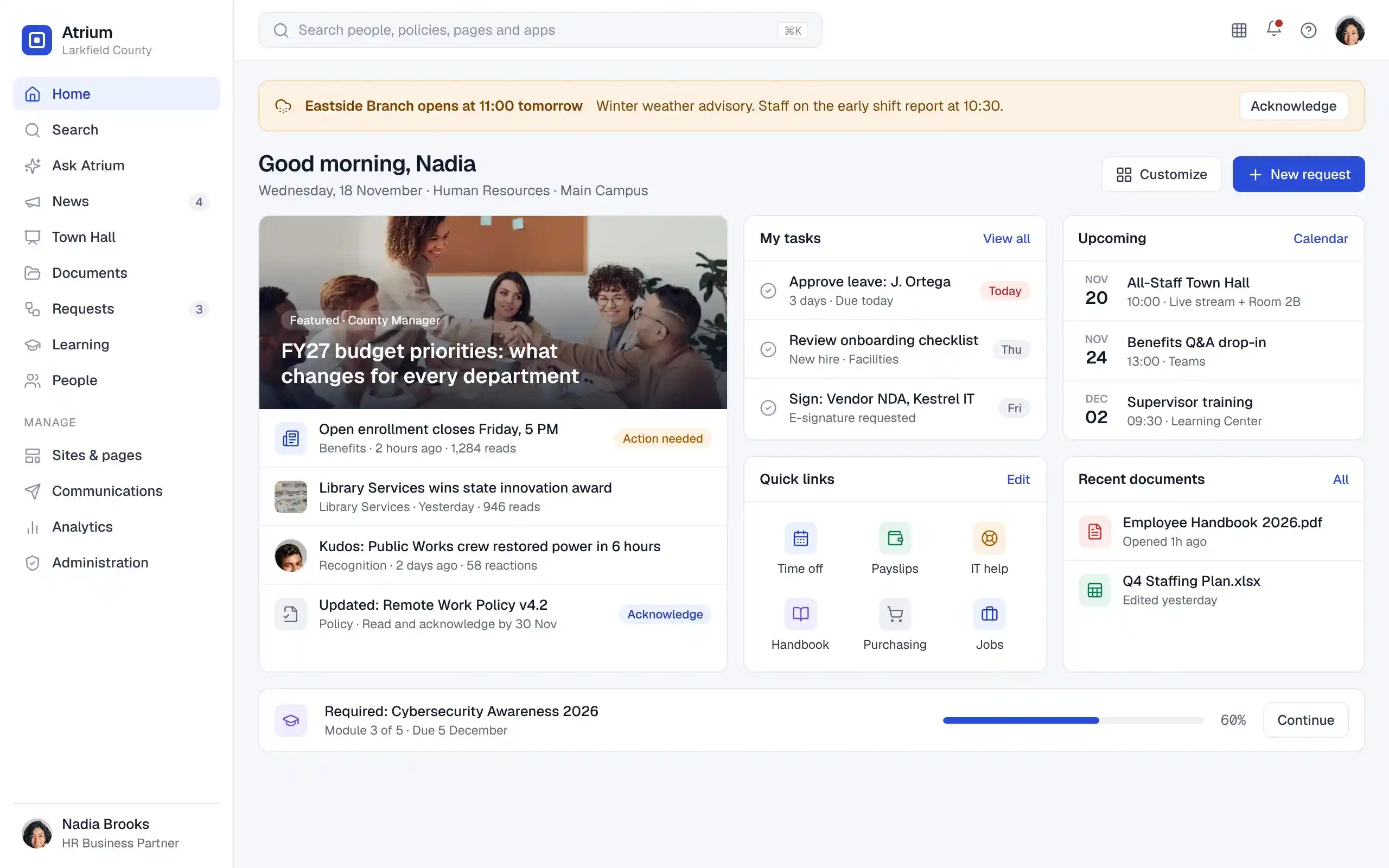
Atrium employee home page with a weather closure banner, featured news, tasks, upcoming events, quick links, recent documents and a required training module

A personalized home for every employee: news, tasks, events, documents and quick links.

Platform

One platform in place of a dozen disconnected tools.

Communications, knowledge, content, documents, workflows and learning share one identity layer, one permission model and one search index. Your existing systems plug in around it.

Find it the first time

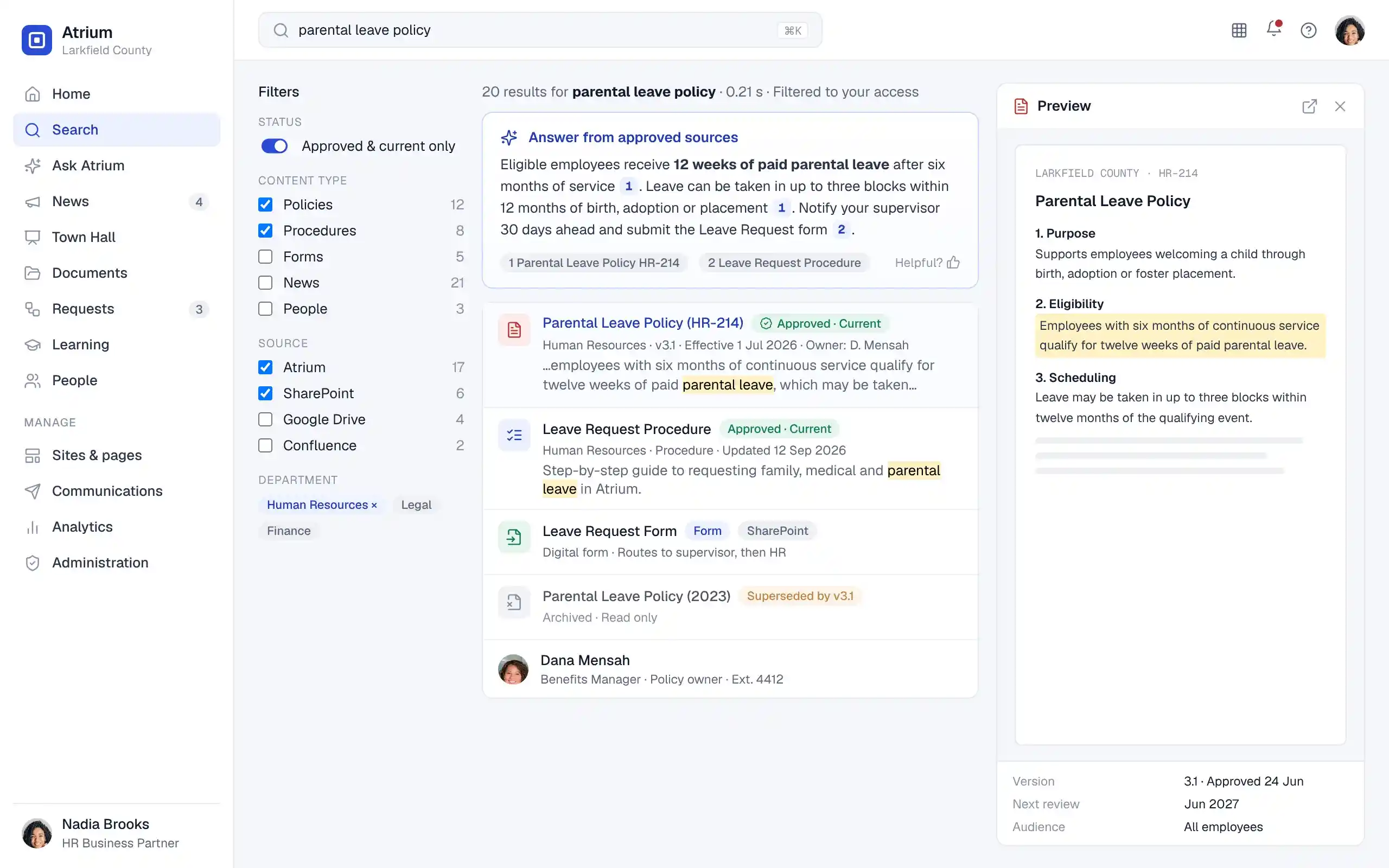
One search across every source, filtered to what each person is allowed to see.

Reach everyone

Target by role, department or location, and confirm the message was read.

Publish without IT

Departments own their pages, with approvals and review dates built in.

Stay in control

Central policies for identity, retention, AI and accessibility across every site.

Core features

Eighteen modules. One login.

Turn on what you need today and add the rest as you grow. Every module shares the same people directory, permissions and analytics.

Employee portal

Personal dashboards by role, department and location.

Enterprise search

Semantic, federated and permission-aware.

Knowledge base

Policies, procedures and FAQs with owners and lifecycles.

Communications

Targeted news, digests, banners and read tracking.

Town Hall

Live streams, moderated Q&A, polls and archives.

Content management

No-code page builder with approval workflows.

Documents and records

Versioning, check-out, retention and legal hold.

Engagement

Surveys, recognition, communities and ideas.

HR self-service

Leave, payroll documents, onboarding and HR requests.

Workflows and forms

Drag-and-drop approvals with routing and escalation.

Emergency alerts

SMS, email and push with safety check-ins.

Learning

Assignments, pathways, certifications and LMS sync.

AI assistant

Grounded answers, summaries and drafting help.

Integrations

Native connectors, REST API and webhooks.

Analytics

Adoption, readership, search and workflow reporting.

Mobile and multilingual

Responsive on any device, in the employee's language.

Security and privacy

SSO, MFA, granular permissions and audit trails.

Multi-tenant admin

Agency portals, delegated admins and data isolation.

Personalized employee experience

Same platform. A different front page for everyone.

Atrium builds each home page from role, department and location, so people see what applies to them and nothing else.


3 policies due for reviewOwner: Human Resources
Nadia, HR business partnerPolicy reviews, leave approvals and benefits deadlines on her home page.
Nurse in scrubs reading a tablet
IC-07 v5 is currentSuperseded version hidden
Joy, charge nurseThe current procedure in two taps, on a shared ward tablet with badge sign-in.
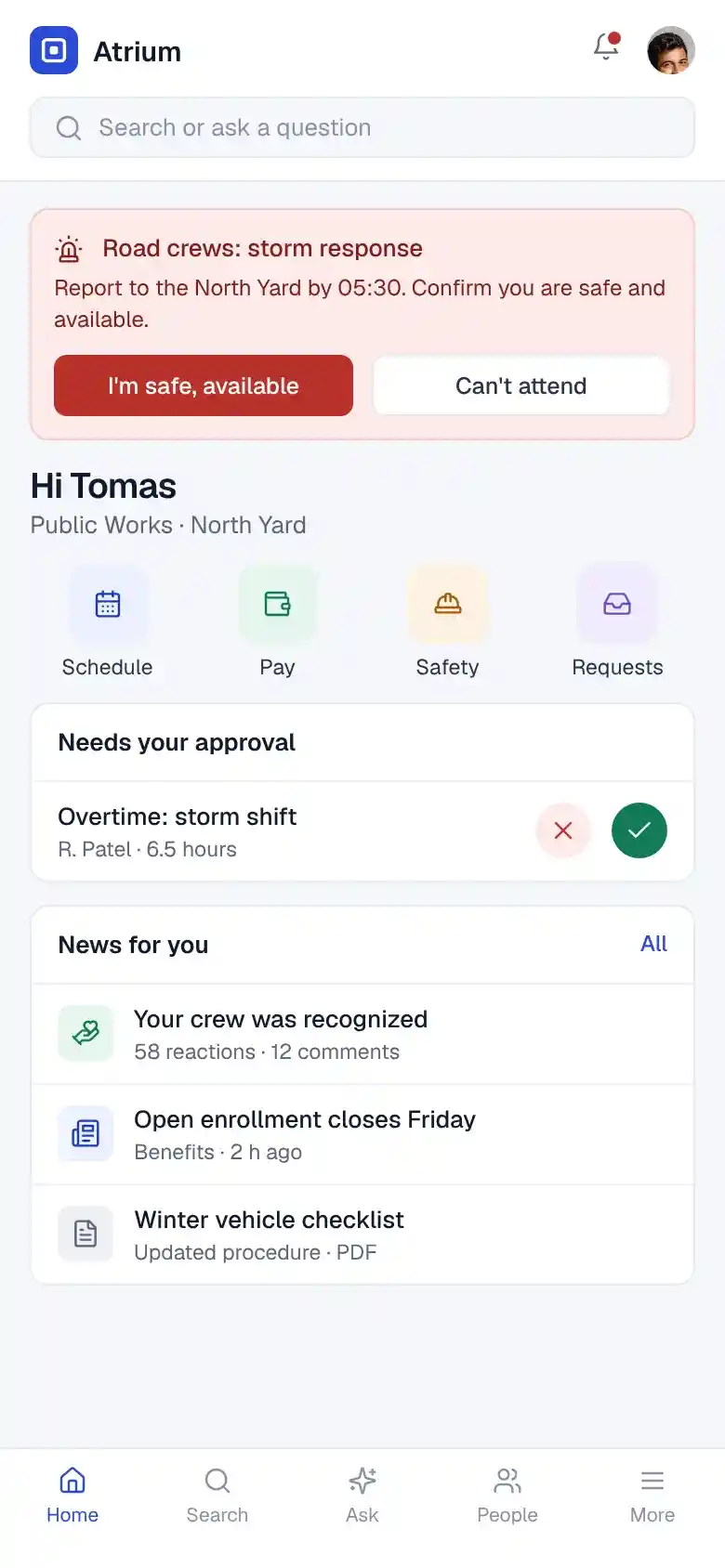
Confirm you're safeStorm response · 05:12
Tomas, road crew leadStorm alerts, overtime approvals and safety check-ins on his phone.

Role-aware by default

Homepages assemble from role, department and location. Employees rearrange widgets and pin links.

One launcher for every app

Payroll, ticketing, scheduling and email behind single sign-on.

Frontline ready

Shared-terminal mode with badge and PIN sign-in. Nothing to install.

In their language

Interface and content in each employee's language, delivered in their time zone.

RoleDepartmentLocationShiftLanguageEmployee group

Communications and engagement

The right message, to the right people, read and confirmed.

Plan from an editorial calendar, target any audience and publish to the intranet, email, Teams, Slack, SMS and push in one step.
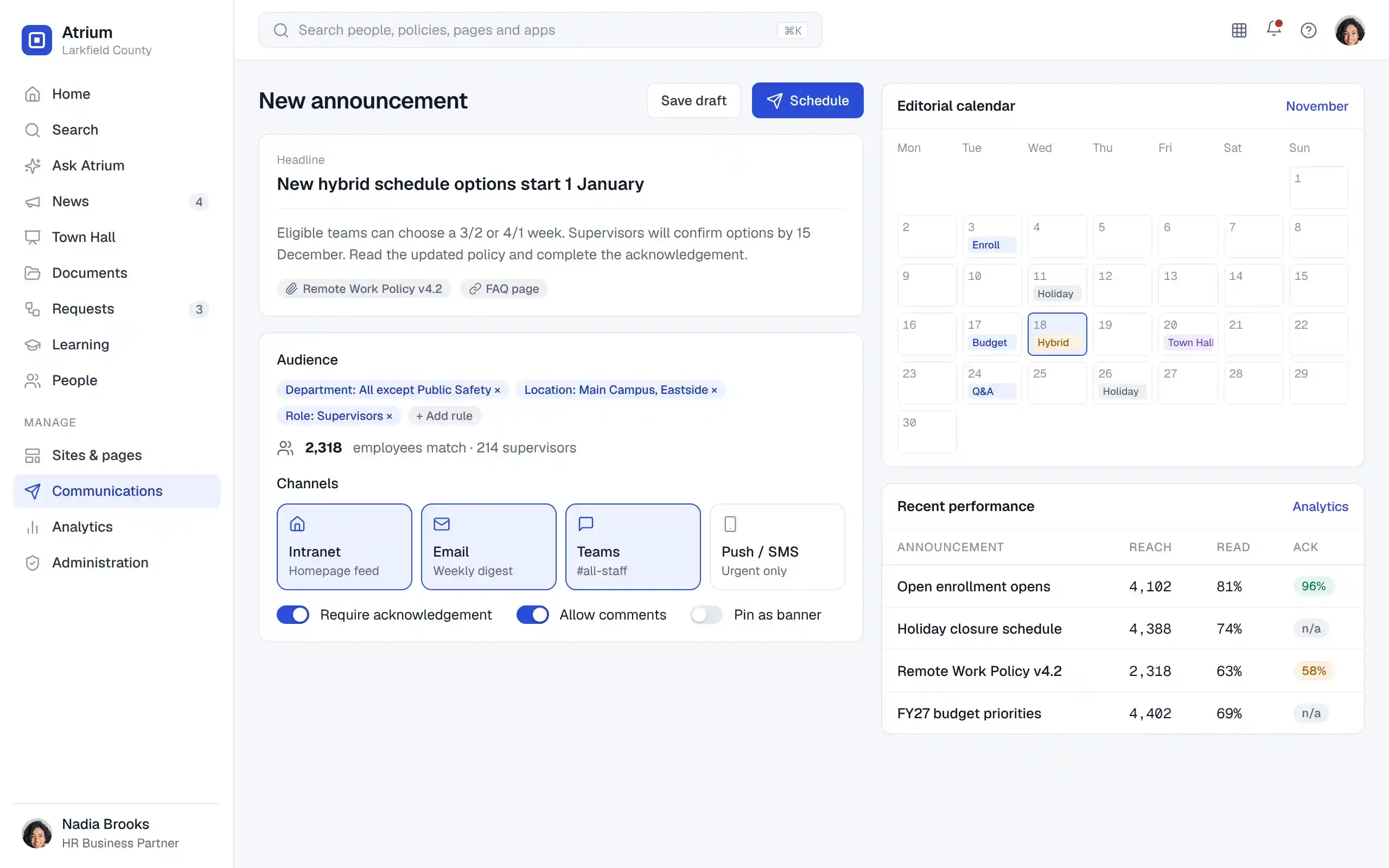
  • Precise targeting. Combine role, department, location and group rules, and see who matches before you send.
  • Acknowledgement tracking. Require sign-off on policy updates and follow up automatically.
  • Town Halls that continue. Live Q&A, polls and captions, then recordings, summaries and written follow-ups.

Surveys and polls

Pulse checks and anonymous feedback with sentiment trends.

Recognition

Peer kudos and programs that show up on the home feed.

Communities

Forums, team spaces and an expertise directory.

Ideas

Collect suggestions, gather votes and report back.

Emergency alerts

From incident to everyone accounted for.

Closures, weather and service interruptions reach the affected locations on every channel, with live acknowledgement.

  1. 01

    Compose

    Start from a crisis template. Escalation rules apply.

  2. 02

    Target

    All staff, or a branch, facility or department.

  3. 03

    Deliver

    Banner, push, SMS and email at the same moment.

  4. 04

    Check in

    Employees confirm they are safe or need help.

  5. 05

    Report

    Live dashboard, follow-ups and a full history.

Content and document management

Every department publishes. Nothing goes stale.

Content owners build pages with drag-and-drop blocks and templates. Reviews, expirations and retention rules keep the whole intranet trustworthy.
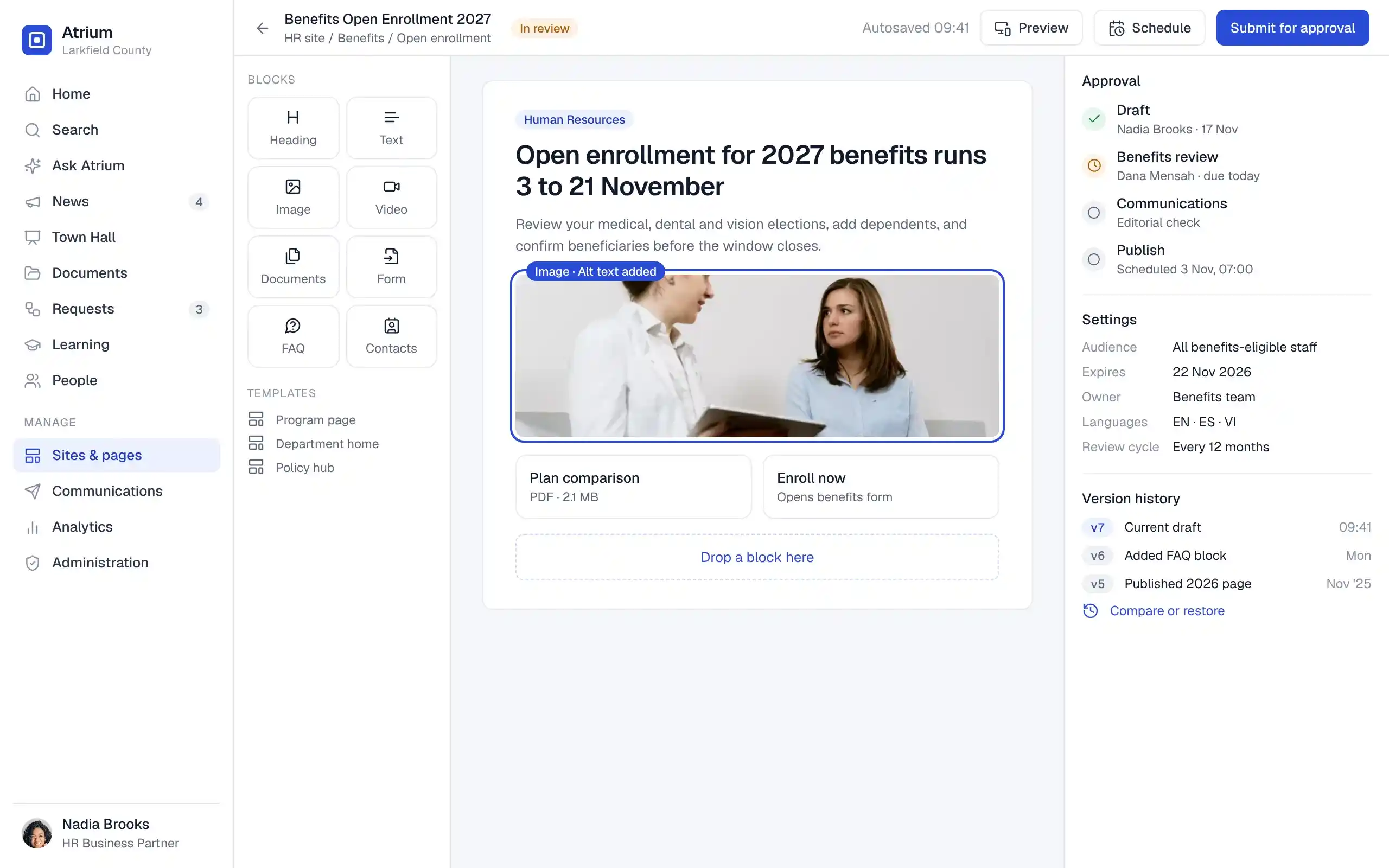
  • Approval workflows. Multi-step review before anything goes live, with scheduled publish and expiry.
  • Version history. Compare, restore and audit every change to pages and documents.
  • Records management. Retention schedules, legal hold, disposition and open-format export.
Atrium page editor for a benefits enrollment page with content blocks, a four-step approval chain, page settings and version history
  1. 01DraftOwner creates
  2. 02ReviewApprovers sign off
  3. 03PublishedScheduled live
  4. 04Review dueOwner reminded
  5. 05SupersededLabeled in search
  6. 06RetainedArchived or disposed

Workflow automation

Paper forms become two-minute requests.

Build forms and approval chains with a visual builder. Conditions route each request, reminders chase it, and every step is logged.

Leave and HR
IT access
Purchasing
Facilities
Onboarding
E-signature
Purchase request workflow: form submitted, supervisor approval, then if the amount is over 5,000 dollars it routes to finance before purchasing, otherwise directly to purchasing; overdue approvals escalate after two days. Request form Employee submits Supervisor Approve or return Over $5,000? Yes Finance Budget check No Purchasing PO created via ERP Escalate After 2 days idle Notify employee Email, Teams, push
Conditional routingDeadline remindersEscalationsAPI triggersAudit log on every step

Integrations

Works with the systems you already run.

Native connectors, APIs and configurable integrations bring identity, files, people data and notifications into Atrium, with source permissions kept in sync.

Microsoft 365Entra ID, Outlook, calendar
SharePointSites, libraries, permissions
OneDriveFiles and sharing
Microsoft TeamsNotifications, meetings
Google WorkspaceIdentity, Gmail, calendar
Google DriveFiles and shared drives
SlackChannels and alerts
JiraProjects and issues
ConfluenceSpaces and pages
WrikeProject work
ADPPeople and payroll data
Absorb LMSCourses and completions
REST API
# Publish a targeted announcement
POST /v1/announcements
{
  "title": "Eastside opens at 11:00",
  "audience": {
    "locations": ["eastside"]
  },
  "channels": ["banner", "push", "sms"],
  "acknowledge": true
}
Webhooks for publish, approval and alert events
Custom connector framework
Sync monitoring and error handling

Also: ServiceNow and other ITSM, ERP, CRM, digital asset management, library systems, performance management and video conferencing.

Analytics

Know what employees read, search and miss.

Dashboards for leaders, communicators and content owners, with role-based access and privacy-aware reporting.
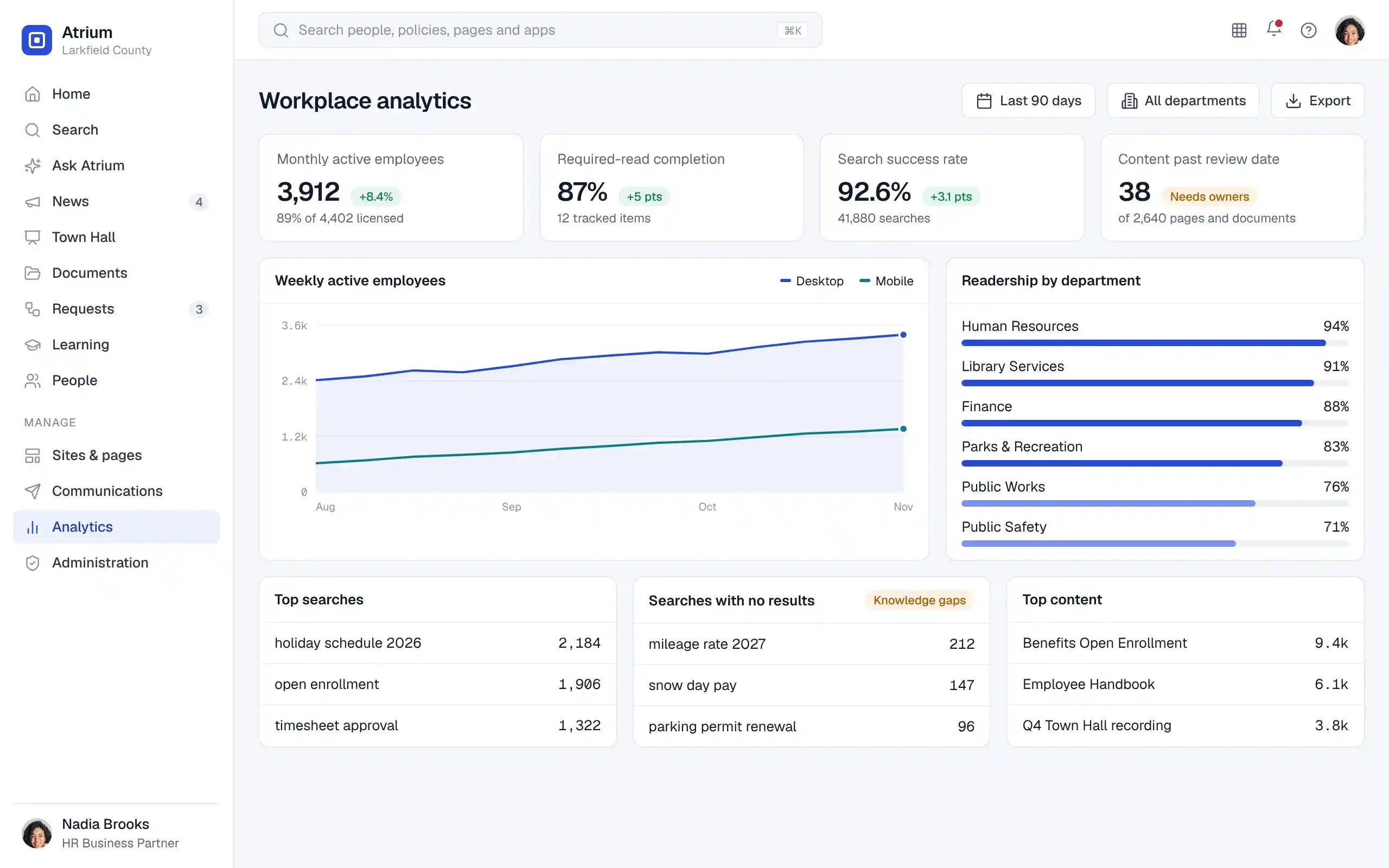
Workplace analytics with monthly active employees, required-read completion, search success rate, content past review date, weekly active trend, readership by department and top and zero-result searches

Adoption

Active employees by department, device and location.

Readership

Reach, reads and acknowledgements for designated content.

Search

Top queries, success rate and searches with no results.

Governance

Pages past review, ownerless content and workflow cycle times.

Security and compliance

Governed from the first login to the last record.

Identity, permissions, retention, accessibility and AI policy are set once and enforced across every site, tenant and device.
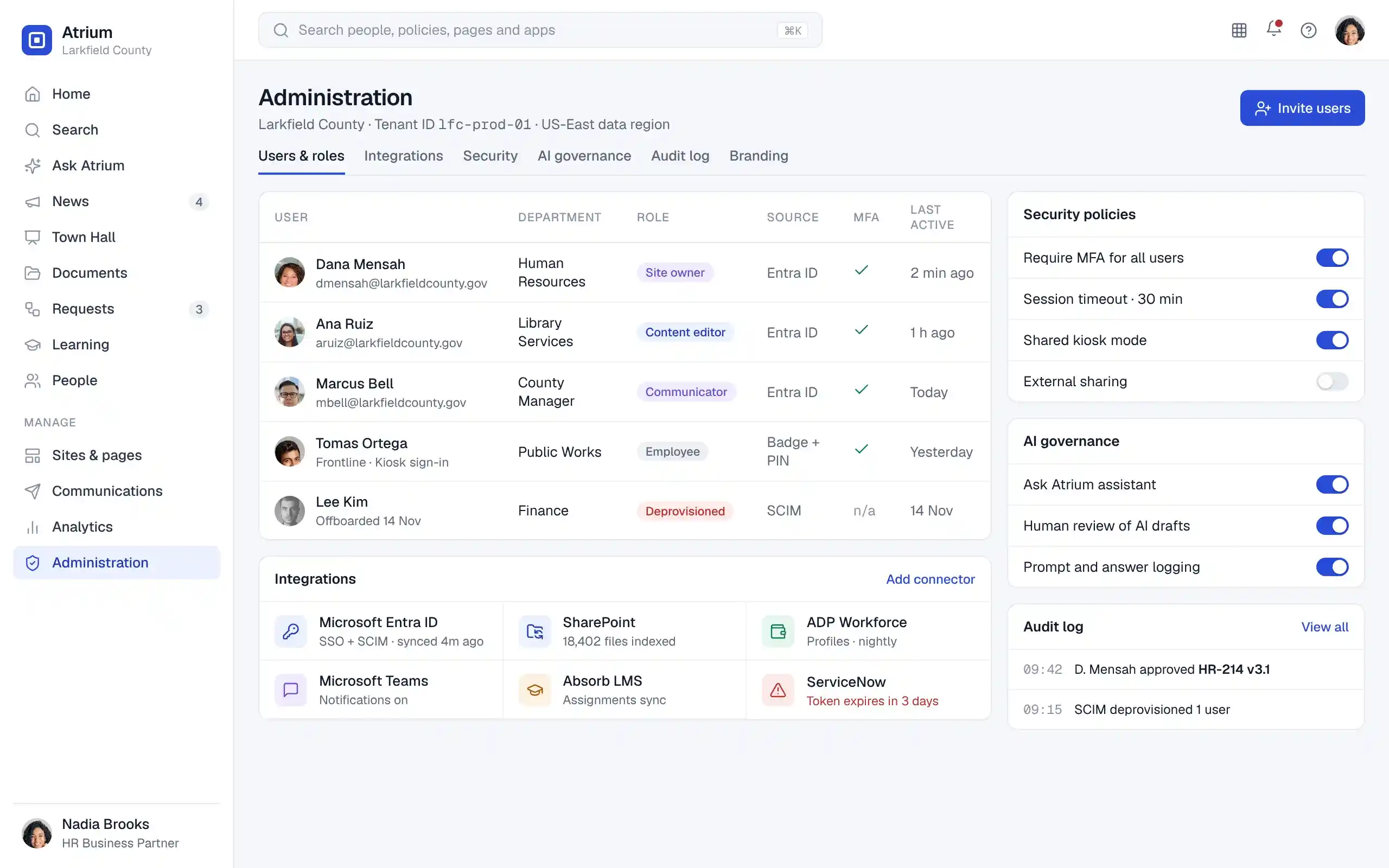
Atrium administration console with users and roles, identity sources, MFA status, connected integrations, security policy toggles, AI governance settings and an audit log

Identity and access

  • SSO with SAML and OIDC
  • Multifactor authentication
  • SCIM provisioning and deprovisioning
  • Role-based and document-level permissions

Data protection

  • Encryption in transit and at rest
  • Configurable data residency
  • Secure session management
  • Data ownership and portability

Governance and records

  • Administrative and user audit logs
  • Retention, legal hold and disposition
  • Secure deletion
  • Privacy-aware analytics

Accessibility

  • Designed to WCAG 2.1 AA and 2.2 AA
  • Accessibility Conformance Report (VPAT)
  • Keyboard and screen reader support
  • Accessible across devices

AI governance

  • Feature-level enablement and opt-out
  • No model training on customer data
  • Usage monitoring and audit logs
  • Human review of AI content

Resilience

  • High-availability architecture
  • Automated backup and recovery
  • Configurable RTO and RPO
  • Availability and security monitoring
SaaSFully managed
Public cloudYour choice of region
Private cloudDedicated environment
HybridSplit by workload
On-premisesYour data center
Controls aligned to SOC 2 and ISO/IEC 27001 Built under an ISO/IEC 27001:2022 certified ISMS Penetration testing and vulnerability management Supports third-party security reviews

Industries

Ready for how your organization works.

organization works in Government

Government

Agency and department portals under one county or state tenant.

  • Records retention and public-records holds
  • Field crews on shared devices
  • Weather and facility closure alerts
organization works in Libraries

Libraries

Every branch on the same page, from the circulation desk to the bookmobile.

  • Branch closure and hours notices
  • Shared workstation sign-in
  • Library system integration
organization works in Education

Education

One place for faculty and staff across campuses and departments.

  • Academic calendar communications
  • Policy acknowledgement each term
  • Compliance training tracking
organization works in Healthcare

Healthcare

Shift-based teams get current procedures wherever care happens.

  • Clinical policy library with versions
  • Unit-level alerts and safety check-ins
  • Certification and license reminders
organization works in Non-Profit

Nonprofits

Staff and volunteers aligned across programs and locations.

  • Program knowledge bases
  • Volunteer onboarding workflows
  • Recognition and engagement
organization works in Enterprises

Enterprises

A global intranet with local content in every region and language.

  • Business-unit tenants and branding
  • HRMS, ERP and CRM integration
  • Leadership and Town Hall channels

Implementation and support

From your old intranet to go-live, with one team.

We assess what you have, move what matters, train your owners and stay on after launch.

  1. 1

    Discover

    Stakeholder workshops and content inventory.

  2. 2

    Design

    Information architecture, branding and portals.

  3. 3

    Configure

    Identity, permissions and integrations.

  4. 4

    Migrate

    Pages, documents, metadata and permissions.

  5. 5

    Test

    Functional, security, accessibility and UAT.

  6. 6

    Launch

    Go-live support and stabilization.

Migration

  • Cleanup and deduplication
  • Metadata and permission mapping
  • Validation and reconciliation reports
  • Legacy archiving and exit assistance

Training and change

  • Administrator and content-owner training
  • Employee onboarding and guides
  • Governance and workflow training
  • Adoption planning and change management

Ongoing support

  • Tiered helpdesk with SLA-based response
  • Critical outage escalation
  • Monitoring, patches and upgrades
  • Availability reporting and optimization

FAQ

Questions buyers ask.

Need something more specific? Our team answers security questionnaires and procurement requirements directly.

Licensing and procurement

How is Atrium licensed?

Atrium is licensed as an annual subscription based on the number of employees, the modules you enable and your deployment model. Pricing is quoted for each organization. Implementation, migration and managed services are scoped separately.

Can we start with a few modules and add more later?

Yes. Most organizations start with the employee portal, communications, search and content management, then add workflows, learning or emergency alerts. New modules use the same users, permissions and content.

Do you support multiple agencies or business units?

Yes. Each agency or unit can have its own tenant or portal with its own branding, administrators and isolated data, under central policies.

Security

Where is our data hosted?

You choose. Atrium runs as SaaS, in public or private cloud, hybrid or on-premises, and you can set the hosting region to meet residency requirements.

Will the AI assistant expose content people should not see?

No. Ask Atrium retrieves only content the person already has permission to open, answers from approved sources and cites each one. Your data is not used to train models, and administrators can turn AI features off entirely.

Is Atrium accessible?

Atrium is designed to WCAG 2.1 AA and WCAG 2.2 AA, and an Accessibility Conformance Report based on the VPAT is available on request.

Implementation

How long does implementation take?

Timelines depend on the number of departments, integrations and the volume of content to migrate. Your plan, with milestones, is agreed during discovery.

Can you migrate from SharePoint or our current intranet?

Yes. We inventory your existing content, map metadata and permissions, migrate pages and documents in bulk and provide reconciliation reports so nothing is lost.

What support is included after launch?

Every subscription includes helpdesk support, monitoring, security updates and product upgrades. Response and escalation times follow the SLA tier you select.

Let’s Talk About Your Product

Get expert guidance on scope, architecture, timelines, and delivery approach so you can move forward with confidence.

What happens next?