Introduction
Salesforce automation should make RevOps faster, but when teams automate every request, routing gets messy, exceptions pile up, and admins spend more time fixing Salesforce than improving revenue so if you’re scaling, start with a stable foundation like this Salesforce development company, then use this guide to tie automation to RevOps KPIs, prioritize with a simple scorecard, and apply lifecycle playbooks plus guardrails to keep everything clean and maintainable.
Why Salesforce automation often increases complexity instead of revenue?
Salesforce automation can improve speed and consistency, but when teams build it one request at a time, it often creates long-term complexity. Over time, Salesforce collects overlapping rules, hidden exceptions, and quick fixes that nobody audits. As a result, RevOps spends more time managing Salesforce than improving revenue outcomes. If you need a structured way to simplify what’s already in place, start with Salesforce consulting to audit what’s running today before you add more.
What usually goes wrong
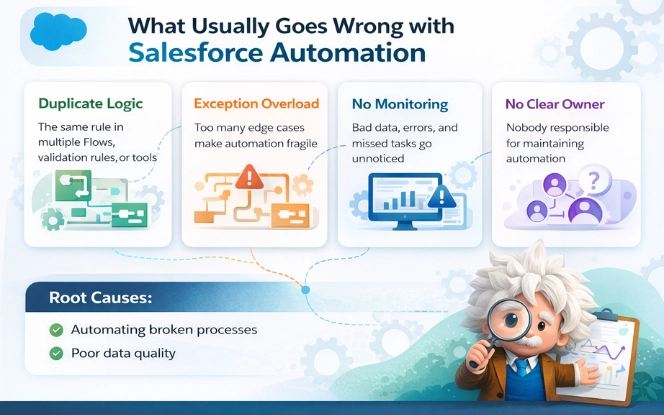
Duplicate logic: the same rule lives in multiple Flows, validation rules, or tools, which creates conflicts during updates.
Exception overload: every edge case adds branches, so automation becomes fragile and hard to test.
No monitoring: failures show up later as bad data, missed tasks, or broken handoffs.
No clear owner: if nobody owns the automation, nobody maintains it.
Two root causes
Teams automate a broken process instead of fixing the workflow first.
Poor data quality breaks triggers and reporting, so automation becomes unreliable.
Read more: Top 10 Salesforce Development Companies
What “RevOps-improving automation” looks like
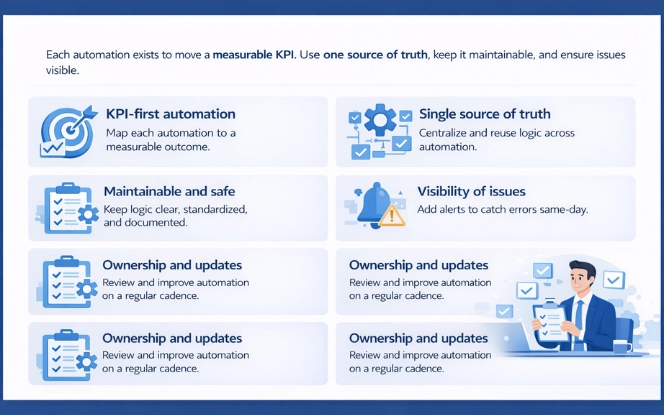
RevOps-improving automation starts with a KPI. In other words, each automation exists to move a measurable outcome. Next, it uses one source of truth, so the rule lives in one place and stays consistent.
KPI-first automation
Each automation should map to one primary KPI, not five “nice-to-have” benefits. Define the metric before you build, capture a baseline, then measure again after release. This keeps automation focused on outcomes like speed-to-lead, stage accuracy, cycle time, or handoff SLA instead of just “more tasks” or “more rules.”
Single source of truth
Routing rules, thresholds, and decision logic should live in one place. Otherwise, teams copy the same rule into multiple Flows or validations and create conflicts over time. A clean setup keeps the rule centralized, then reuses it across flows so behavior stays consistent when segments, territories, or definitions change.
Maintainability and change safety
It also stays maintainable. You keep logic clear, limit branches, and document purpose and ownership. Standardize naming and keep each automation readable enough that another admin can debug it quickly. When exceptions grow, redesign the process instead of stacking more branches.
Visibility when things break
Failures should be visible the same day, not discovered weeks later through bad data or missed handoffs. Add Flow error alerts, a simple exception path (queue or record), and a short weekly health check for the automations that touch routing, stage rules, handoffs, and renewals.
Ownership and lifecycle reviews
Finally, a named owner reviews and updates automation on a cadence, so it stays clean as the business changes. That owner should retire unused rules, merge duplicates, and simplify branches as patterns stabilize.
The RevOps outcomes Salesforce automation should improve
Salesforce automation works when it improves the numbers RevOps is responsible for. Otherwise, teams automate tasks, but revenue performance stays the same. Therefore, start with a small KPI set that leadership already cares about. Then build automation that moves those KPIs in a measurable way. If you need hands-on implementation support, hire developers to build and test flows cleanly.
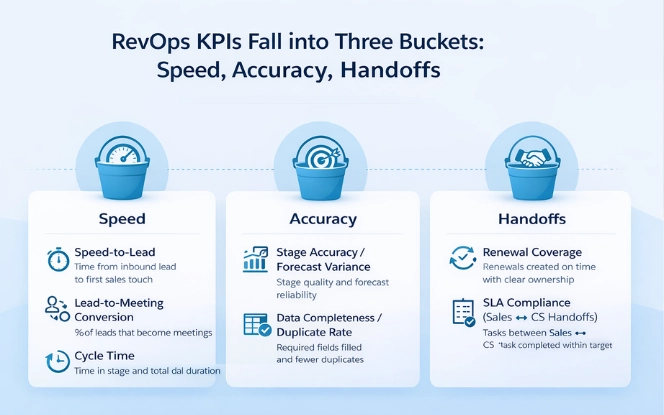
In practice, RevOps KPIs fall into three buckets: speed, accuracy, and handoffs. Because these areas touch the whole revenue lifecycle, they also expose where Salesforce gets messy. If routing rules fight each other, speed-to-lead drops. If stage rules are unclear, forecast variance grows. If data quality is weak, every automation becomes fragile.
KPIs to track
- Speed-to-lead: time from inbound lead to first sales touch
- Lead-to-meeting conversion: % of leads that become meetings
- Cycle time: time in stage and total deal duration
- Stage accuracy / forecast variance: stage quality and forecast reliability
- Data completeness / duplicate rate: required fields filled and fewer duplicates
- Renewal coverage: renewals created on time with clear ownership
- SLA compliance (handoffs): Sales → CS tasks completed within target time
KPI → automation mapping (pipeline KPIs)
| KPI | What to automate | Best approach | How to measure |
|---|---|---|---|
| Speed-to-lead | Assignment + SLA timer + escalation | Flow | Avg time to first touch; % within SLA |
| Lead-to-meeting | Follow-up tasks + reminders | Flow / tool | Meeting rate; time-to-meeting |
| Stage accuracy / forecast variance | Stage rules + minimum required fields | Flow + validation | Stage aging; forecast variance |
| Cycle time | Stage-change tasks + approvals routing | Flow + approvals | Median cycle time; approval duration |
KPI → automation mapping (data + post-sale KPIs)
| KPI | What to automate | Best approach | How to measure |
|---|---|---|---|
| Data completeness / duplicate rate | Dedupe checks + required field prompts | Matching + Flow | Duplicate trend; completeness % |
| Renewal coverage | Renewal creation + owner rules | Scheduled Flow | % renewals created on time |
| SLA compliance (handoffs) | Closed-won handoff checklist | Flow | % handoffs within SLA; time to kickoff |
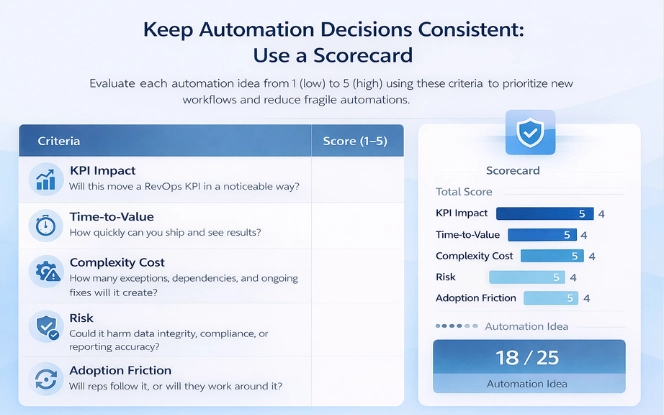
The RevOps Automation Scorecard
Scoring criteria (1–5)
Score each automation idea from 1 (low) to 5 (high).- KPI impact: Will this move a RevOps KPI in a noticeable way?
- Time-to-value: How quickly can you ship and see results?
- Complexity cost: How many exceptions, dependencies, and ongoing fixes will it create?
- Risk: Could it harm data integrity, compliance, or reporting accuracy?
- Adoption friction: Will reps folloSw it, or will they work around it?
The prioritization rule
High impact + high complexity: build only with guardrails and a clear owner
Low impact + high complexity: skip it or redesign the process first
| Automation idea | KPI target | Impact (1–5) | Complexity (1–5) | Risk (1–5) | Time-to-value | Priority | Owner |
|---|---|---|---|---|---|---|---|
| Lead assignment + SLA timer | Speed-to-lead | 5 | 2 | 2 | 1–2 weeks | Now | RevOps |
| Stage exit fields (light) | Forecast variance | 4 | 3 | 3 | 2–3 weeks | Next | Sales Ops |
| Renewal creation (90–120d) | Renewal coverage | 4 | 2 | 2 | 1–2 weeks | Next | CS Ops |
Learn about: Salesforce Approval Process
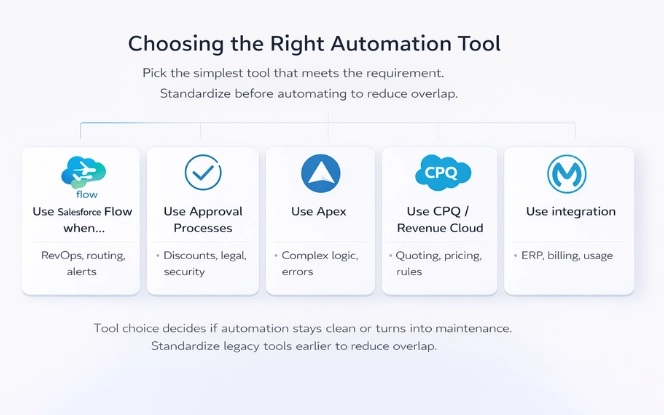
Tool choice guide: Choosing correct tool
Tool choice decides whether automation stays clean or turns into ongoing maintenance. Therefore, pick the lightest option that can meet the requirement. If your org still uses older automation tools, standardize first using legacy tools to reduce overlap.
Use Salesforce Flow when
Flow fits most RevOps automation because it handles routing, task creation, updates, and alerts with less overhead. It works best when logic stays readable and you keep one source of truth.
Use Approval Processes when
Approval Processes work when decisions need structure and audit trails. For discount approvals, legal review, and security sign-offs, approvals keep steps traceable and measurable.
Use Apex when
Apex is the right choice when Flow becomes too complex or too slow. If you need advanced error handling, reusable logic, or heavy data processing, code often stays more stable than a large Flow with many branches.
Use CPQ / Revenue Cloud when
Use CPQ or Revenue Cloud when pricing, quoting, and contracting need standard rules. In that case, the problem is not just “automation.” It is governance across quote-to-cash workflows.
Use integration (MuleSoft/iPaaS) when
Integration tools are best when workflows span multiple systems like ERP, billing, or product usage. For reliability across systems, MuleSoft integration practices help reduce brittle handoffs.
Quick comparison
| Option | Best for | Trade-off |
|---|---|---|
| Flow | Most RevOps automations inside Salesforce | Can sprawl without standards |
| Approvals | Structured decisions + audit trails | Limited for complex branching |
| Apex | Complex logic + performance control | Needs dev effort to change |
| CPQ / Revenue Cloud | Quote-to-cash rules and governance | Higher setup complexity |
| MuleSoft / iPaaS | Cross-system workflows | Adds another platform to manage |
Also Read: Salesforce Flow Loops Best Practices
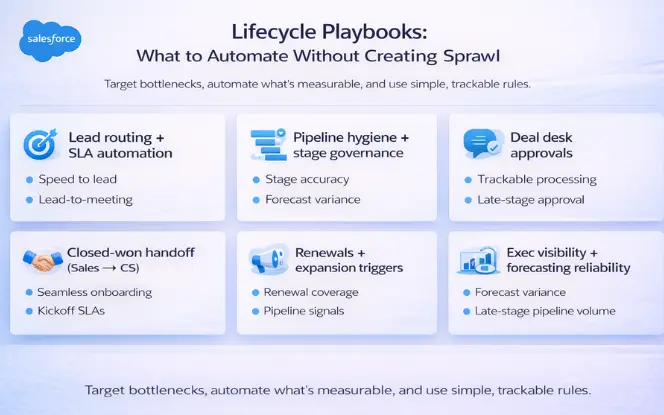
Lifecycle playbooks
You don’t need six big automations to improve RevOps. Instead, pick the one that matches your biggest bottleneck, ship it, and measure the KPI change. Because automation can spread fast, keep logic readable and predictable.
Lead routing + SLA automation
This fixes slow response and inconsistent assignment. It improves speed-to-lead and lead-to-meeting. Use Flow with one routing rule set and a small exception queue. Then add SLA timers with escalation when leads sit too long. Measure average first-touch time and % leads touched within SLA.
Pipeline hygiene + stage governance
This reduces messy stages and forecast confusion. It improves stage accuracy, forecast variance, and cycle time. Use Flow with light validation to enforce stage exit criteria and minimum required fields. Next, flag stalled deals and missing next steps in one manager view. Measure stage aging and forecast variance trend.
Deal desk approvals
This replaces approvals in email or Slack with a trackable process. It improves approval time and reduces late-stage delays. Use Approval Processes with clear thresholds, and use Flow to require fields before submission. Add escalation if requests sit too long. Measure median approval duration and % deals blocked by approvals.
Closed-won handoff that doesn’t break
This removes onboarding confusion after close-won. It improves handoff SLA and time-to-kickoff. Use Flow to create a short handoff checklist and kickoff tasks with owners. Require a small set of fields before close-won so CS gets context. Measure time from close-won to kickoff and SLA completion rate.
Renewals + expansion triggers
This stops renewals from being created late and uncovers expansion signals. It improves renewal coverage and pipeline planning. Use Scheduled Flow to create renewal opportunities 90–120 days out, assign owners, and trigger milestone reminders. Add risk flags only if signals are strong. Measure % renewals created on time and renewal pipeline coverage.
Exec visibility + forecasting reliability
This makes pipeline changes visible and reduces forecast surprises. It improves forecast variance and stage discipline. Track changes to close date, stage, and amount, then flag material changes near close. Keep reporting definitions stable so teams trust dashboards. Measure forecast variance and late-stage change volume.
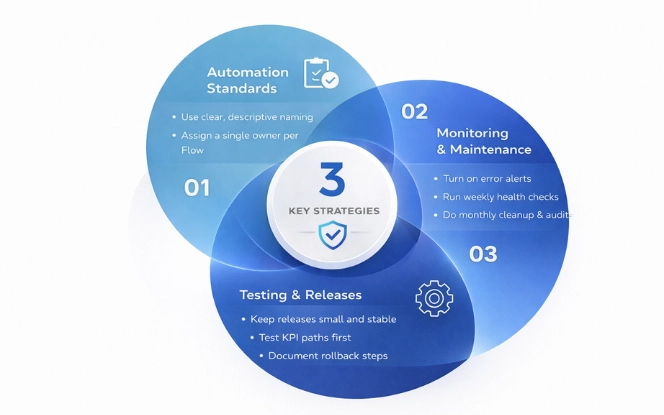
Guardrails & governance that keep automation maintainable
Automation only stays valuable when it stays manageable. Most teams lose control when automation scales faster than standards, so set lightweight guardrails early. Use clear naming so anyone can understand a Flow at a glance, and keep a one-page note with purpose, trigger, key logic, owner, and KPI. Assign a single owner, enable error alerts, and review flows on a simple cadence to prevent stale logic and mystery edits. Do quick weekly checks, plus a short monthly cleanup to remove duplicates, simplify branching, and keep releases predictable.
Automation standards
Start with clear naming so anyone can understand what a Flow does at a glance. Then document each automation in a one-page format: purpose, trigger, key logic, owner, and KPI target. Assign one owner per automation and set a review cadence, so stale logic gets retired instead of piling up. Keep a simple change log as well, because it prevents “mystery edits” and speeds up troubleshooting.
Monitoring and maintenance
Turn on Flow error alerts and route them to the real owner, not a shared inbox. Run quick weekly checks on routing, stage rules, handoffs, and renewals, because these failures hit pipeline movement first. Then do a short monthly audit to remove duplicates, retire unused rules, and simplify branching where exceptions have drifted.
Testing and releases
Keep releases small and predictable, and test the KPI-impacting paths first. Use stable environments so test results match production behavior. For consistent testing and deployments, follow sandbox refresh practices. Finally, document rollback steps for each release, so fixes don’t turn into downtime.
Learn about: Salesforce Flow vs Process Builder vs Workflow
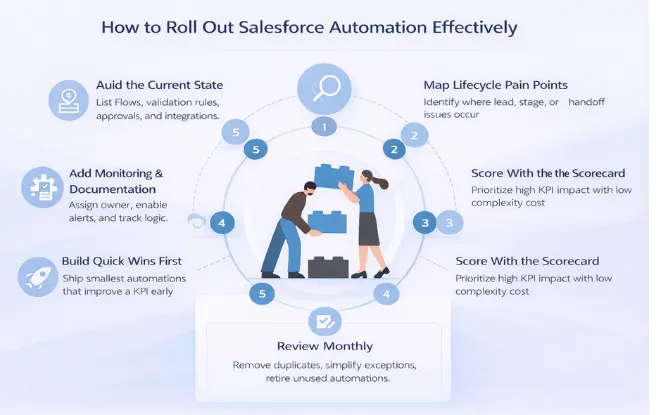
Implementation checklist
A clean rollout keeps Salesforce automation useful and easy to maintain. Therefore, start by getting clarity on what already exists, then prioritize only what moves RevOps KPIs. Next, ship quick wins in small releases so teams can measure impact early.
- Audit the current state: list Flows, validation rules, approvals, and integrations that affect revenue workflows.
- Map lifecycle pain points: pinpoint where leads stall, stages get messy, and handoffs break.
- Score with the scorecard: prioritize high KPI impact with low complexity cost.
- Build quick wins first: ship the smallest automation that improves one KPI.
- Add monitoring + documentation: assign an owner, enable alerts, and document trigger, logic, and KPI.
- Review monthly: remove duplicates, simplify exceptions, and retire unused automations.
Conclusion
Salesforce automation should improve RevOps outcomes and stay easy to maintain. Therefore, start with the KPIs that matter, then use the scorecard to choose high-impact work that won’t create sprawl. Next, apply the lifecycle playbooks to clean up routing, pipeline hygiene, approvals, handoffs, renewals, and forecasting visibility in a structured way. If you want a structured audit and rollout plan, Salesforce consulting is a practical starting point before you scale new automation. When automation stays simple and measurable, it creates revenue ops clarity instead of complexity.
If you already know what you want to build and just need execution, hire developers to implement and test the automations end-to-end.

FAQ'S
What is RevOps automation in Salesforce?
RevOps automation in Salesforce is a set of Flows, approvals, validations, and rules that improve revenue KPIs like speed-to-lead, stage accuracy, cycle time, and handoff SLAs. The goal is measurable outcome improvement, not just “more automation.
Why does Salesforce automation often become complex over time?
It becomes complex when teams build automation one request at a time. Duplicate logic spreads across Flows and validation rules, exceptions keep stacking, and no one audits or owns the system. Over time, this creates conflicts, fragile logic, and inconsistent routing.
What KPIs should Salesforce automation improve for RevOps?
Start with a small KPI set leadership already cares about: speed-to-lead, lead-to-meeting conversion, stage accuracy/forecast variance, cycle time, data completeness/duplicate rate, renewal coverage, and handoff SLA compliance.
How do I stop duplicate logic across Flows and validation rules?
Use a single source of truth for routing and decision rules. Centralize thresholds and logic in one place, then reuse it instead of copying rules into multiple automations. This reduces conflicts when territories, segments, or definitions change.
When should I use Flow vs Apex vs Approval Processes?
Use Flow for most RevOps routing, tasks, updates, and alerts. Use Approval Processes for structured decisions that need an audit trail (discounts, legal, security). Use Apex when Flow becomes too complex, needs heavy processing, or requires advanced error handling and performance control.
What’s the safest way to roll out new Salesforce automation?
Follow a clean rollout checklist: audit what exists, map lifecycle pain points, prioritize with a KPI scorecard, ship small quick wins, add monitoring + documentation, and review monthly to remove duplicates and retire unused rules.