


If you’re weighing build vs buy software, you’re not choosing between “a tool” and “a project.” You’re choosing how your organization will run workflows, manage data, control risk, and handle change over the next few years.
In practice, most custom software vs SaaS decisions are really about integration, governance, and ownership not feature lists.
Build vs Buy Software in 2026
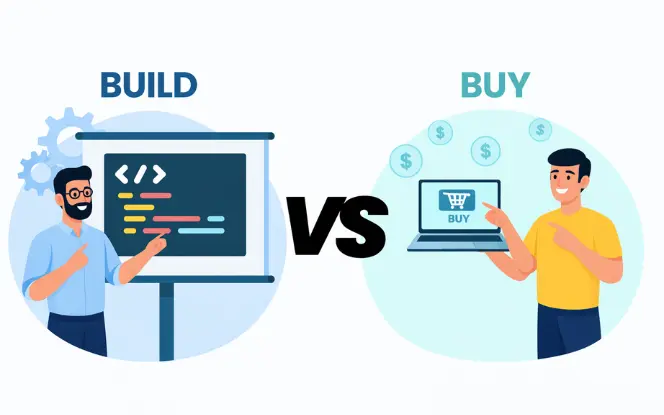
The build-or-buy conversation changed because most organizations don’t run one SaaS product—they run a stack. Over time, stacks create three predictable problems:
- Overlap: multiple tools do similar work
- Integration becomes the product: workflows spread across apps, connectors, and scripts
- Governance load rises: permissions, audits, reporting, and data definitions become hard to keep consistent
That’s why many build vs buy decision matrix outcomes land on hybrid: buy the commodity layer and build the workflow/data layer that keeps the business consistent.
Definitions: Buy (SaaS), Build (Custom), and Hybrid
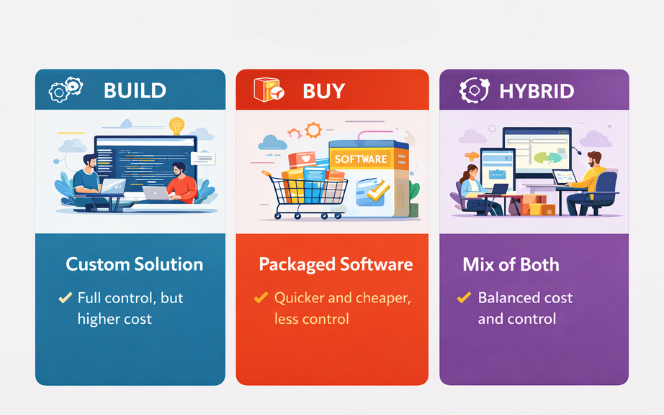
Buy (SaaS)
Buying SaaS means licensing a product that already exists. You configure it, accept its limitations, and depend on the vendor’s roadmap and pricing model.
Build (Custom Software)
Building means creating software around your workflow, data model, and change cadence. You control the roadmap and integration depth, but you also own maintenance, security updates, and operational reliability. This is where custom software development becomes the right choice when the workflow ties directly to revenue, risk, or competitive advantage.
Hybrid (Buy Core, Build Workflow Layer)
Hybrid means you buy systems of record (where standard tools are good enough) and build the parts that are unique, integration-heavy, or cost-inefficient in SaaS. Hybrid is often the lowest-risk approach for complex operations.
Decision Context: SaaS Purchasing Still Requires Building
Even when you buy SaaS, real production use often requires building around it—especially if your workflows cross teams and systems. The effort typically shows up as integrations, governance rules, and reporting layers that sit “between” tools.
- Integration flows and failure handling
- Approval chains and audit trails
- Permission models aligned to real roles
- Reporting consistency across tools
If you’re already building these layers, a targeted custom software development approach (or hybrid) often becomes a practical step rather than a theoretical one.
Build vs Buy Decision Matrix (Scorecard You Can Reuse)
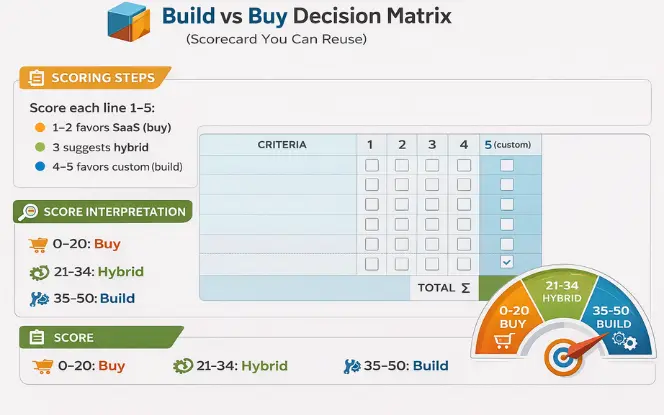
Scoring steps
Score each line 1–5:
- 1–2 favors SaaS (buy)
- 3 suggests hybrid
- 4–5 favors custom (build)
Score interpretation
- 0–20: Buy
- 21–34: Hybrid
- 35–50: Build
| Criteria | 1 (Buy) | 3 (Hybrid) | 5 (Build) |
|---|---|---|---|
| Competitive differentiation | Commodity | Some advantage | Core advantage / IP |
| Workflow uniqueness | Standard | Some exceptions | Highly specific workflows |
| Integration complexity | Few systems | Several key systems | Many systems + deep flows |
| Data sensitivity | Low risk | Moderate controls | Regulated / strict controls |
| Time-to-value | Weeks | 1–2 quarters | Can invest longer-term |
| 3–5 year TCO | SaaS cheaper | Close | Custom cheaper at scale |
| Vendor lock-in risk | Low | Manageable | Unacceptable |
| Reporting needs | Standard dashboards | Some custom metrics | Unified model required |
| Roadmap control | Vendor roadmap OK | Need extensions | Must control roadmap |
| Scale economics | Small team | Growing | Large usage / high fees |
Practical scoring rule:
Score at the capability level, not the category level. Don’t score “CRM.” Score “approval chains,” “audit reporting,” “integration failure handling,” and “data export requirements.”
The Decision Drivers That Flip Most Build vs Buy Choices
Total cost of ownership (TCO)
The most common mistake in build vs buy software evaluations is comparing “license cost” to “build quote.” Both sides hide costs.
SaaS cost drivers people ignore
- Tier jumps and add-ons
- Implementation and migration
- Integrations and middleware (plus upkeep when vendors change APIs)
- Admin overhead: provisioning, permission reviews, audits
- Renewal terms and pricing-change risk
- Cost of workarounds and manual checks
Custom software cost drivers people underestimate
- Discovery: workflow mapping, rules, data definitions, success measures
- Build and testing
- Infrastructure, monitoring, incident readiness
- Maintenance: security patches, upgrades, fixes, small improvements
- Operational readiness: logs, alerts, runbooks
Opportunity cost
Building commodity capabilities wastes engineering time. Buying a poor fit wastes operational time every day through workarounds, manual checks, and inconsistent reporting.
Integration depth and reliability
Many tools claim integrations. The real question is whether your workflow can run end-to-end with failure handling, audit trails, and data consistency. Deep integrations are one of the clearest signals for custom software development or hybrid.
Feature-list trap and requirements template (adds ranking strength)
Feature comparisons fail when they ignore workflows and constraints. A better approach is defining 5 must-haves that reflect production reality.
- Required workflows (3–5) that must succeed end-to-end
- Required integrations (systems, direction, frequency, failure handling)
- Governance baseline (roles, access reviews, audit trails, retention)
- Reliability expectations (availability, recovery needs, incident response)
- Exit requirements (exports, API access, migration support)
Technology Pressures That Make Hybrid More Common
SaaS sprawl and overlap
Stacks grow faster than governance. Overlap creates confusion, inconsistent data definitions, and avoidable spend.
Automation and AI workflows
AI workflows are only as reliable as your data definitions and triggers. If “customer,” “account,” or “order status” means different things across tools, automation quickly becomes manual exception handling. Many teams benefit from building a controlled layer that standardizes data and orchestrates workflows across bought systems.
Pros and Cons Snapshot
| Approach | Strengths | Trade-offs | Best fit |
|---|---|---|---|
| SaaS (Buy) | Fast start, mature baseline features, vendor-managed upgrades | Workflow limits, variable integration depth, lock-in risk, pricing can spike at scale | Commodity capabilities, stable processes, moderate usage |
| Custom (Build) | Precise workflow fit, roadmap control, deeper integrations, stronger domain model | Maintenance ownership, operational responsibility, needs clear product ownership | Differentiating workflows, regulated operations, integration-heavy systems |
| Hybrid | Standardize systems of record while controlling differentiators | Needs integration governance and clear ownership | Most mid-to-large orgs with real complexity |
Hidden Cost Checklist (Use This Before You Decide)
SaaS hidden costs
- Add-ons and premium tiers
- Integration “tax” (connectors, middleware, consultants, ongoing fixes)
- Admin overhead (identity, permissions, audits)
- Overlap (two tools doing similar work)
- Switching cost later (migration + retraining + process redesign)
Custom hidden costs
- Maintenance ownership (patching, monitoring, incident response)
- Scope drift when boundaries aren’t enforced
- Knowledge silos if ownership is unclear
- Under-invested documentation and test coverage
The 3-Year Cost Model (36 Months)
A 36-month model is usually long enough to avoid a bad decision without over-modeling.
SaaS 36-month cost components
- Licenses + add-ons
- Implementation and migration
- Integrations/middleware
- Admin time (internal cost)
- Support and renewal overhead
- Cost of workarounds and manual operations
Custom 36-month cost components
- Discovery + build
- Infrastructure + monitoring
- Maintenance (security + upgrades + fixes)
- Planned enhancements
- Operational readiness (logging, alerts, incident response)
Break-Even Model (Use Ranges, Not False Precision)
Break-even isn’t a single number. Use ranges and identify what assumptions matter most.
Inputs you need
- Current users and projected growth (12–24 months)
- Monthly SaaS spend (licenses + add-ons)
- Annual integration/middleware cost
- Admin hours per month (and cost)
- One-time implementation and migration cost
- Build cost estimate
- Annual maintenance range
- Annual infrastructure/support cost range
Formulas
- SaaS 36-month cost = (Monthly SaaS × 36) + (Annual integration × 3) + (Admin cost × 36) + One-time implementation
- Custom 36-month cost = Build + (Annual maintenance × 3) + (Annual infra/support × 3) + Planned enhancements
Practical interpretation
- If SaaS cost growth is driven by seats and add-ons, break-even often arrives sooner than expected.
- If workflows are standard and SaaS pricing stays stable, break-even may never arrive—and “buy” is correct.
- If workarounds are daily, treat that time as a real cost. It often becomes the hidden break-even driver.
Signals That Favor Custom Software
If several of these are true, custom software vs SaaS usually leans toward build (or hybrid with a strong custom layer).
Workflow drives revenue or risk
Pricing rules, underwriting, routing, approvals, settlement, compliance workflows.
Deep integrations are required
Not “sync contacts.” Real automation across multiple systems with failure handling.
SaaS ceilings block growth
Permission limits, multi-entity complexity, exception paths, audit requirements, API caps.
SaaS pricing is misaligned at scale
Seat growth + add-ons become a major operating cost.
Signals That Favor SaaS
Commodity capability
Email, basic HR, standard ticketing, standard accounting workflows.
Near-term speed matters more than perfect fit
You need working workflows in weeks.
Requirements are unstable
Custom delivery becomes rework-heavy when requirements change constantly.
Long-term ownership is unrealistic
No capacity for maintenance, operations, and security updates.
SaaS Ceiling Indicators (Early Warning Signs)
When multiple signs appear, hybrid or targeted custom software development often becomes the least risky path.
- Workarounds became the standard process
- Spreadsheets became the reporting source of truth
- Extra tools were adopted to fill gaps (duplication)
- Reporting differs across departments because definitions differ
- Integrations require constant manual checks
- Permissions and audit trails don’t match real operations
- “Who owns this data?” has no clear answer
Hybrid Reference Architecture (Buy Core, Build the Workflow Layer)
Hybrid is a clean split, not “half build, half buy.”
Buy
Systems of record (CRM/ERP/HRIS)
Build
Workflow and domain control (rules, orchestration, approvals, unified data model)
Integrate
Reliable APIs and event flows, consistency checks, failure handling
Govern
Audit logging, access controls, change control, ownership
Industry Scenarios (Real Examples)
Logistics and supply chain
- Buy: tracking/telemetry products
- Build: exception workflows, customs/document logic, unified reporting
- Why: region rules + integrations create complexity
Fintech and regulated payments
- Buy: KYC/AML vendors
- Build: underwriting rules, audit trails, decision history
- Why: audits and rule changes require traceability
Healthcare operations
- Buy: commodity scheduling where it fits
- Build: compliant workflows, role-based access, audit-grade logs
- Why: governance is a first-class requirement
Manufacturing and operations
- Buy: ERP backbone
- Build: execution layer matching shop-floor reality
- Why: templates rarely cover real exceptions and integrations
Execution Plan
SaaS path
Capability requirements
- Define 3–5 workflows that must succeed end-to-end
- List required integrations (systems, direction, frequency, failure handling)
- Define governance: roles, access reviews, audit trails, retention
- Define exit requirements: export formats, API access, migration support
Vendor scorecard (rate 1–5)
| Area | Score (1–5) | Notes |
|---|---|---|
| Security + compliance | 3 | SSO/MFA/logs + audits/retention/residency together evaluate |
| API depth + rate limits | 3 | Workflow critical endpoints + webhooks verify |
| Data export + portability | 2 | Full export + audit history portability check |
| Permission model | 3 | Multi-entity + fine-grained access verify |
| SLA + support | 4 | SLA + escalation process confirm |
Pilot discipline
Test one real integration end-to-end, one permission scenario, one reporting requirement, and one export workflow.
Custom path
Discovery essentials
- Map the workflow end-to-end (including exceptions)
- Define rules/decisions that must be explicit and auditable
- Define success measures (cycle time, error rate, compliance outcomes)
- Confirm integration scope and failure handling
Delivery options
Build doesn’t require one staffing model. Teams often combine internal ownership with software development outsourcing (including nearshore software development and offshore software development) to balance speed and control.
Risk Controls (For Both Paths)
SaaS risks
- Vendor lock-in (critical logic trapped in the tool)
- Data export limits and API caps
- Renewal risk (pricing changes, notice windows)
- Compliance gaps (audit trails, retention controls)
- Integration fragility (connector failures, rate limits)
Custom risks
- Scope creep and unclear boundaries
- Underestimated maintenance and security work
- Technical debt from rushed decisions
- Knowledge silos and single points of failure
Key Clarifications
TCO modeling
TCO is an operating model, not a procurement spreadsheet. Include integration upkeep and admin overhead—not only license or build cost.
Break-even timing
Break-even is most sensitive to seat growth, add-ons, integration complexity, and the cost of manual work and errors.
Hybrid vs fully custom
Hybrid often lowers risk: keep proven systems of record while building control where constraints hurt most.
MVP timeline
Timeline is driven less by coding speed and more by workflow clarity, integration scope, and decision ownership.
Reducing vendor lock-in
- Require export paths and formats
- Test APIs early (rate limits and failure handling included)
- Keep critical logic outside vendor-specific workflow builders where possible
- Document data definitions and ownership
Decision Summary and Next Action
Use this as a simple summary of build vs buy software decisions:
- Buy: commodity capability, stable process, fastest rollout matters most
- Build: differentiating workflow, deep integrations, strict governance, or pricing pain at scale
- Hybrid: buy systems of record, build workflow/data control where the business truly differs
Create a one-page brief:
scorecard totals + 36-month assumptions + top workflows + required integrations + governance requirements. Share it with your internal tech lead or an external reviewer. This brief usually exposes the decision risks quickly.
FAQs
What does AI for Sports Tech focus on?
Model 36 months and include licenses/build cost, integrations, admin time, maintenance, and security updates. If you skip admin + integration costs, the comparison is usually wrong.
When does custom software break even vs SaaS?
Break-even depends on seats, add-ons, integrations, and manual work cost. Use a range, not one fixed number.
When is hybrid better than fully custom or fully SaaS?
Hybrid works when you can buy the core system but need control over workflows and data. It reduces risk while fixing SaaS constraints.
What are the clearest signs we’ve outgrown a SaaS tool?
Workarounds become normal, spreadsheets become reporting, and integrations need constant fixes. Permissions, audits, or data definitions also stop matching real operations.
How can SDLC Corp help with a build vs buy decision?
SDLC Corp can assess workflows, integrations, and costs using a decision matrix and 36-month model. You get a clear build/buy/hybrid recommendation plus a plan.
What does SDLC Corp deliver if custom software is the best path?
SDLC Corp builds the custom workflow layer and integrations you need. It’s delivered with clear ownership for maintenance and support.


