sdlc logo (1)
  • Services

    Services

    • Custom Software & Product Engineering
    • Odoo ERP Development
    • Salesforce Development & Consulting
    • Mobile App Development
    • Game & Gaming Platform Development
    • AI & Machine Learning Solutions
    • Blockchain & Web3 Development
    • Websites & CMS Development

    Feature Insight

    SDLC Corp office building with 40 Under 40 award recognition for enterprise AI

    SDLC Corp’s Global Mission: Making AI Practical, Scalable, and Human for the Enterprise World

    Read More »

    Services

    • AI Development
    • Enterprise AI Development
    • Generative AI Development
    • AI as a Service (AIaaS)
    • Machine Learning Development
    • Invoice Processing Automation Platform
    • NLP Development
    • Computer Vision Development

    Feature Insight

    Odoo

    • Odoo Development
    • Odoo Implementation
    • Odoo Customization
    • Odoo Consulting & Support
    • Odoo Licensing Consultancy
    • Salesforce Consulting
    • Certified Salesforce Development
    • Salesforce Integration
    • Salesforce Managed Services / Support

    Feature Insight

    banner image

    Odoo for Agriculture

    Read More »

    Services

    • iGaming Software Development
    • Real-Money Gaming Platforms
    • Casino & Card Games
    • Board & Casual Games
    • Poker Game Development
    • Ludo Game Development
    • Sports & Fantasy Games
    • NFT / Web3 Games

    Feature Insight

    "Board game development cost comparison between physical and digital formats in 2025 with app UI preview."

    How Much Does Board Game Development Cost

    Read More »

    Services

    • Blockchain Development
    • Enterprise Blockchain Development
    • Blockchain Wallet & Exchange Development
    • Web3 Development
    • NFT Marketplace Development
    • DeFi / Token / Smart Contract Development

    Feature Insight

    Casino game development platform illustration

    How to Choose the Right Blockchain for Your Game

    Read More »

    Hire

    • Hire Frontend Developer
    • Hire Game Developer
    • Hire Mobile App Developer
    • Hire AI Genrative Developer
    • Hire AI Developer

    Feature Insight

  • Industry

    All Industries

    • Banking & FinTech
    • Healthcare & Life Sciences
    • Logistics & Transportation
    • Manufacturing & Industrial
    • Aviation & Travel
    • Insurance
    • Education & EdTech Platforms
  • Products

    Data Geometry

    Streamline document workflows with AI that extracts, structures, and processes data instantly, helping teams save time and focus on high-value tasks.

    Learn More

    Praxis AI

    Praxis AI is an all-in-one institute management software that streamlines admissions, student records, attendance, fees, and reporting securely.
    Learn More

    Pulastya AI

    Transform every phone call into an intelligent conversation using AI that understands context, remembers details, and automates customer interactions with precision.

    Learn More
  • Case Study

    All Case Studies

    • Software Development
    • Odoo & ERP
    • Salesforce & Revenue Operations
    • Gaming & iGaming
    • AI & Automation
    • Web3 & Blockchain
    • Ecommerce & Retail
    • Logistics & Supply Chain
  • Blogs
Free Consultation
Home / Blogs & Insights / Custom Metadata Types Salesforce Guide

Custom Metadata Types Salesforce Guide

  • Selavina Brookvale
  • Last Updated : April 1, 2026
A realistic desktop mockup showing the Salesforce Setup home screen. The left sidebar highlights 'Custom Metadata Types' under Setup. The main panel displays a list view of existing CMDTs with columns like Label, API Name, and Visibility. Light background, professional UI style, no branding.

Table of Contents

Introduction

Custom Metadata Types in Salesforce (CMDTs) are one of the most powerful tools for building scalable, configurable applications. Unlike custom settings, CMDTs are deployable, packageable, and version-controlled, making them ideal for enterprise-grade Salesforce projects.

They allow you to define reusable configurations, business rules, feature toggles, and integration endpoints without hardcoding values. This guide explains what Custom Metadata Types are, how they differ from Custom Settings, their key use cases, setup process, and best practices.
stay updated on salesforce features-subscribe to our blog

What Are Custom Metadata Types in Salesforce?
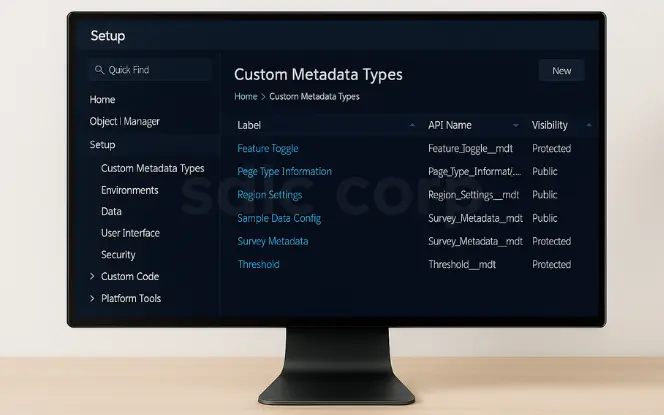
 Alt text: Salesforce Setup showing Custom Metadata Types list in desktop mockup.

Custom Metadata Types (suffix __mdt) let you define application configuration as metadata. Both the type and its records can be deployed across environments.

  • They support fields, validation rules, and relationships.

  • CMDT records are cached at runtime, so retrieving them doesn’t count against SOQL governor limits.

  • They integrate seamlessly with Apex, Flow, and formulas, enabling both declarative and programmatic use.

Related reading: Salesforce Validation Rules Examples You Can Copy

Custom Metadata Types vs Custom Settings

FeatureCustom Metadata Types (CMDTs)Custom Settings
Deployable with recordsYesNo
Packageable for AppExchangeYesNo
Supports validation & formulasYesNo
Cached (no SOQL needed)YesNo
Best forReusable configurationOrg-specific values

For most Salesforce configuration metadata, CMDTs are the better option.

Related reading: Salesforce Record-Level Security

Key Use Cases of Custom Metadata Types

Custom Metadata Types in Salesforce go far beyond simple configuration. They allow admins and developers to store business rules, reference data, and environment-specific settings directly as metadata. This means values are not only reusable but also deployable across sandboxes, staging, and production environments without manual re-entry.

Whether you’re managing feature toggles, lookup tables, integration endpoints, or security rules, CMDTs provide a scalable and version-controlled solution that reduces hardcoding and simplifies maintenance.

1. Configuration & Feature Management
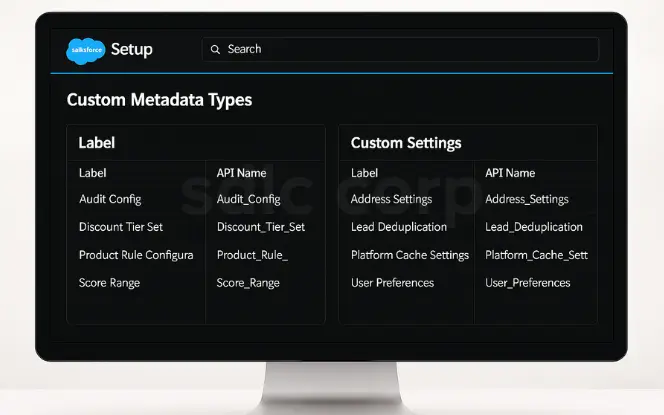
https://sdlccorp-web-prod.blr1.digitaloceanspaces.com/wp-content/uploads/2025/09/01180509/Untitled-design-54.webp.

CMDTs are perfect for feature toggles and environment-specific rules. Instead of editing Apex, you switch features on/off through CMDT records.

Related reading: Salesforce Approval Process: Step-by-Step Guide

2. Data Mappings & Lookup Tables
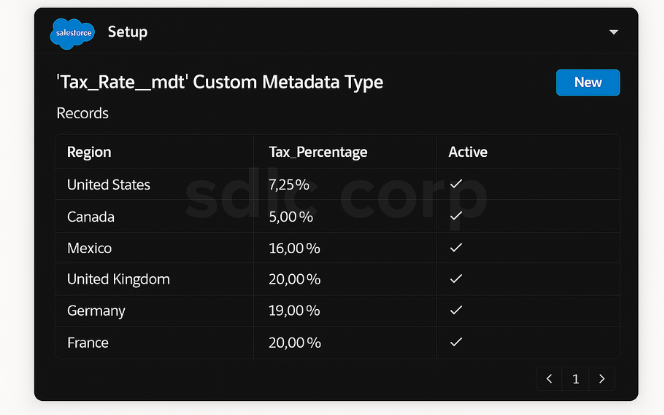
Salesforce CMDT records list for tax rate mapping in desktop mockup.

CMDTs can store reference data such as tax brackets, endpoint URLs, or region codes. This makes them reusable across orgs.

3. Integration with Apex, Flows, and Formulas
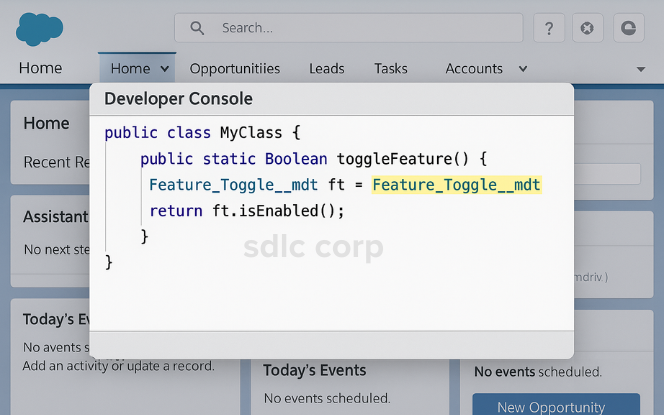
 Salesforce Developer Console showing Apex code using Custom Metadata Types
  • Apex: Access with getAll() and getInstance().

  • Flows: Reference CMDT values in automation.

  • Formulas: Use $CustomMetadata to replace hardcoded values.

Related reading:

  • Salesforce Flow vs Process Builder vs Workflow

  • How to Use Decision Elements in Salesforce Flow Like a Pro

  • How to Create a Salesforce Screen Flow

4. Business Rules & Defaults

Store thresholds, limits, and default values in CMDTs for maintainable logic across orgs.

Related reading: Dynamic Forms vs Page Layouts: What to Use When

Step-by-Step Setup: Creating Custom Metadata Types

The advantages of AI in HR go beyond time savings. They shape strategy and workforce experience.

Step 1 — Create the CMDT
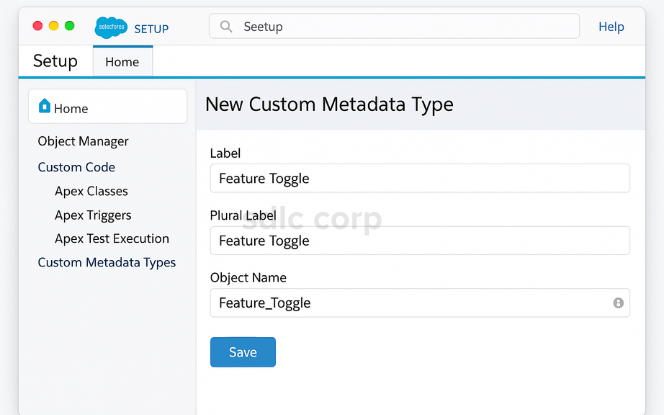
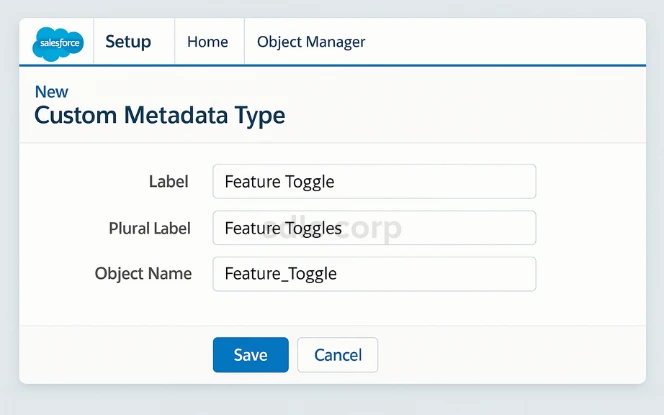
  Salesforce new Custom Metadata Type creation screen in desktop mockup.
  1. Go to Setup → Custom Metadata Types → New.

  2. Enter Label: Feature Toggle.

  3. Object Name: Feature_Toggle.

  4. Save.

Step 2 — Add Fields

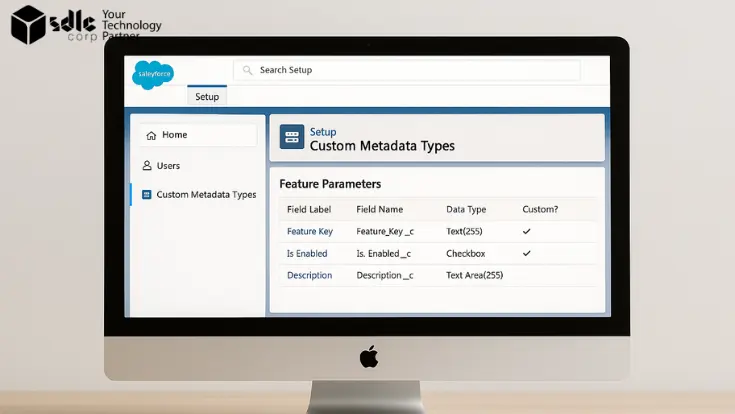
  Salesforce new Custom Metadata Type creation screen in desktop mockup.

Add custom fields such as:

  • Feature_Key__c (Text)

  • Is_Enabled__c (Checkbox)

  • Description__c (Text Area)

Step 3 — Set Visibility

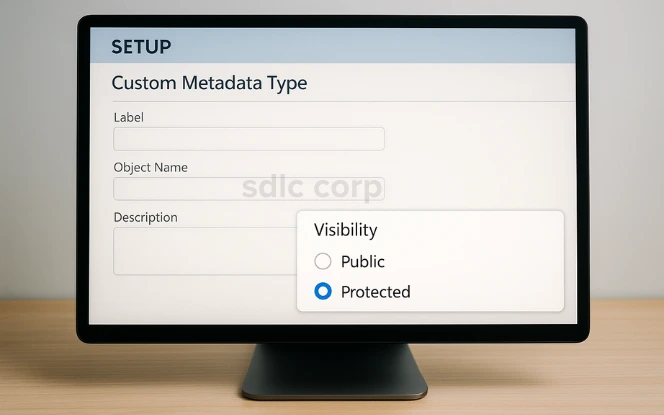
  Salesforce new Custom Metadata Type creation screen in desktop mockup.
  • Public: Usable across subscriber orgs.

  • Protected: Restricted to package namespace.

Step 4 — Create Records
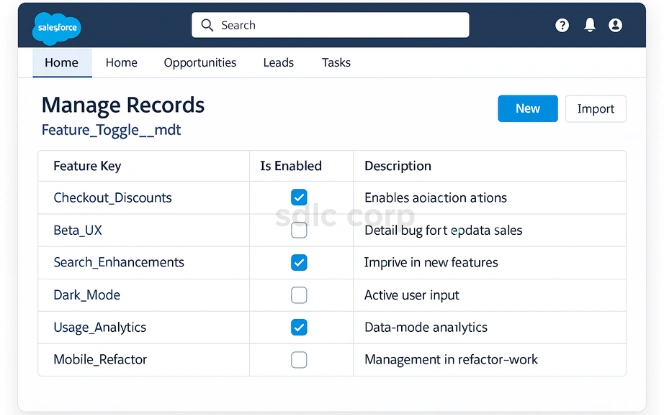
Salesforce CMDT manage records screen for Feature Toggle in desktop mockup.

Click Manage Records and add entries like:

  • Checkout_Discounts → Is_Enabled = TRUE

  • Beta_UX → Is_Enabled = FALSE

Step 5 — Use CMDT in Apex
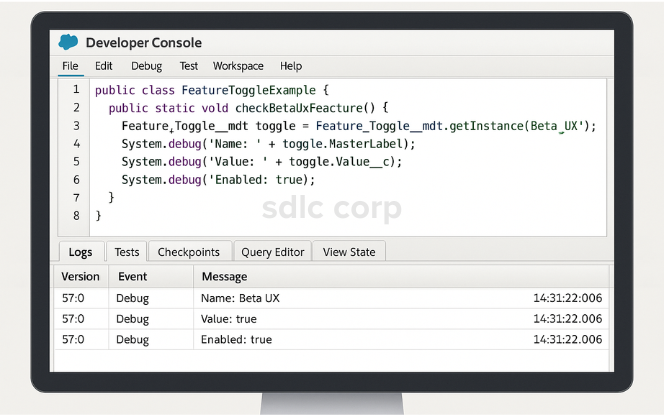
Salesforce Developer Console showing Apex code using CMDT getInstance.

CMDTs can be accessed in Apex without SOQL (faster, doesn’t consume governor limits).

Example 1: Single record

 
Feature_Toggle__mdt betaUX = Feature_Toggle__mdt.getInstance('Beta_UX'); if (betaUX != null && betaUX.Is_Enabled__c) { System.debug('Beta UX feature is enabled!'); } else { System.debug('Beta UX feature is disabled.'); }

Example 2: All records

 
Map<String, Feature_Toggle__mdt> toggles = Feature_Toggle__mdt.getAll(); if (toggles.get('Checkout_Discounts') != null && toggles.get('Checkout_Discounts').Is_Enabled__c) { System.debug('Checkout Discounts are active!'); }

Example 3: SOQL (for long text fields)

 
List<Feature_Toggle__mdt> toggles = [ SELECT DeveloperName, Feature_Key__c, Is_Enabled__c, Description__c FROM Feature_Toggle__mdt ]; for (Feature_Toggle__mdt toggle : toggles) { System.debug('Feature: ' + toggle.DeveloperName + ' Enabled: ' + toggle.Is_Enabled__c); }

Step 6 — Use CMDT in Formulas & Flows
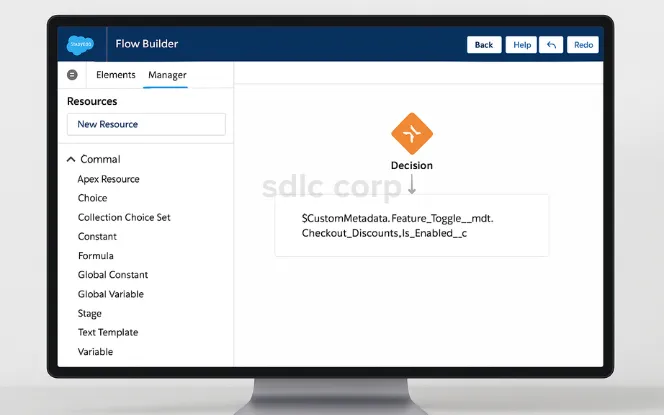
Salesforce Flow Builder referencing Custom Metadata Types in desktop mockup.

Formula Example

 
$CustomMetadata.Feature_Toggle__mdt.Checkout_Discounts.Is_Enabled__c

👉 Useful for validation rules or default values.

Flow Example

  1. Create a Flow.

  2. Add a Decision Element.

  3. Reference $CustomMetadata.Feature_Toggle__mdt.

  4. Choose Is_Enabled__c for decision logic.

 Flows can now change behavior based on metadata.

Step 7 — Test CMDTs in Apex
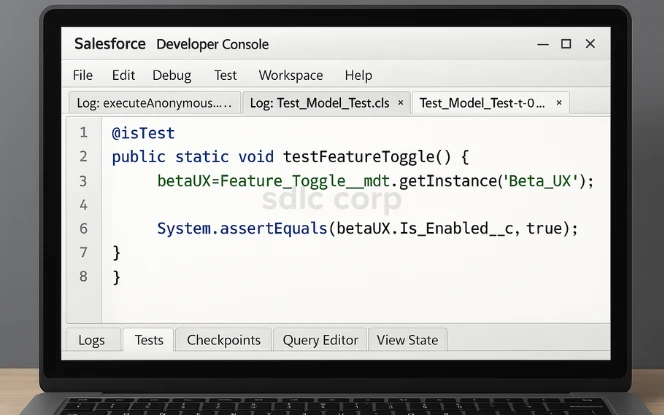
Salesforce Apex test class using CMDT in desktop mockup.

CMDTs are available by default in tests.

 
@isTest private class FeatureToggleTest { @isTest static void testBetaUXToggle() { Feature_Toggle__mdt betaUX = Feature_Toggle__mdt.getInstance('Beta_UX'); System.assertEquals(false, betaUX.Is_Enabled__c, 'Beta UX should be disabled by default'); } }

Step 8 — Deploy CMDTs Across Environments
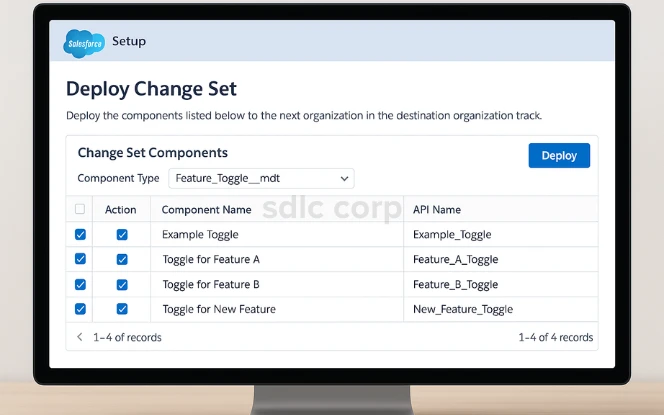
Salesforce Change Set screen showing deployment of CMDT in desktop mockup..
  • Change Sets → point-and-click migration.

  • Salesforce CLI (sfdx) → for CI/CD pipelines.

  • Unlocked Packages → best for large teams.

 Always deploy CMDT + records together.

Related reading: Salesforce Sandbox Refresh Best Practices for 2025

Best Practices for Custom Metadata Types
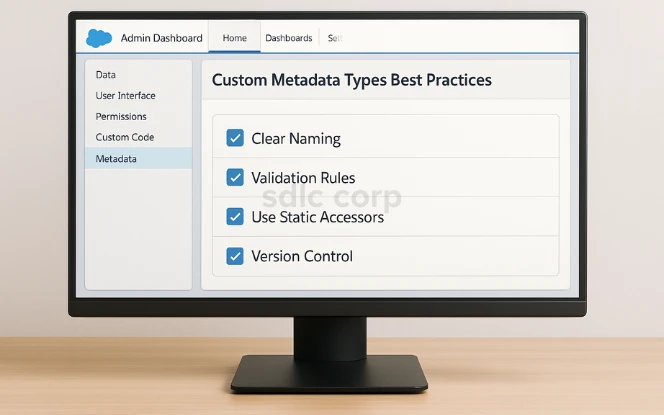
Desktop mockup of Salesforce dashboard showing a checklist of best practices for Custom Metadata Types..
  • Name fields clearly → e.g., Feature_Key__c.

  • Keep CMDTs lightweight → only store values needing deployment.

  • Use static accessors in Apex → avoid unnecessary queries.

  • Add validation rules → prevent incorrect metadata.

  • Version-control metadata → commit CMDTs to Git with other metadata.

Related reading: Salesforce Sandbox Refresh Best Practices for 2025

Benefits of Using Custom Metadata Types
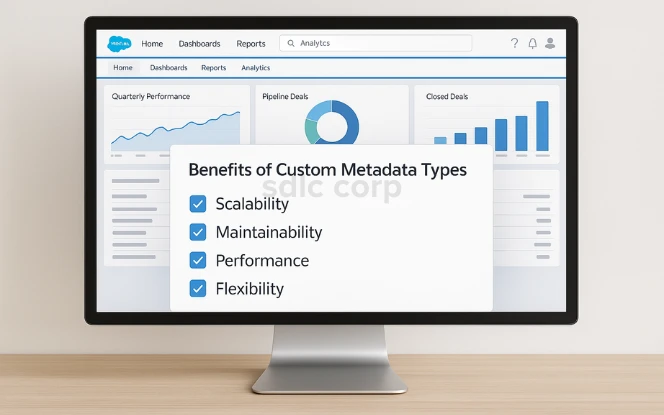
 Salesforce desktop mockup showing dashboard panel listing benefits of Custom Metadata Types such as scalability, maintainability, performance, and flexibility.
  • Scalability → works across orgs and packages.

  • Maintainability → avoids hardcoding.

  • Performance → cached, no SOQL needed.

  • Flexibility → usable in Apex, Flows, Formulas.
struggling with hrdcoded configuration

Conclusion

Salesforce Custom Metadata Types give developers and admins a powerful way to manage configurations declaratively. They reduce code maintenance, improve scalability, and help enforce governance.

For feature toggles, mappings, integration settings, and reusable business rules, CMDTs should be your go-to choice.

Related reading: Understanding Salesforce Page Layouts vs Dynamic Forms

FAQs

Q1: What are Custom Metadata Types in Salesforce?

Custom Metadata Types (CMDTs) are metadata objects (__mdt) used to store configuration as metadata. They help developers and admins manage reusable values, rules, and settings that can be deployed across orgs.

Q2: How do Custom Metadata Types differ from Custom Settings?

CMDTs are deployable with records, packageable, and support validation rules and formulas. Custom Settings are limited to org-specific data, making CMDTs the better choice for scalable configuration.

Q3: What are the main use cases of Custom Metadata Types?

CMDTs are best for feature toggles, lookup tables, integration endpoints, business rules, and environment-specific settings. They remove hardcoding and improve governance.

Q4: Can I use Custom Metadata Types in Apex code?

Yes. CMDTs can be accessed using getAll() or getInstance() methods in Apex without consuming SOQL queries. For long text fields, you can use SOQL queries on __mdt objects.


Q5: How can Custom Metadata Types be used in Flows and Formulas?

CMDTs can be referenced in Flows via Decision Elements and in formulas using $CustomMetadata. This allows admins to configure automation without hardcoding values.


Q6: Are CMDTs available in all Salesforce editions?

Yes. Custom Metadata Types are available in Enterprise, Performance, Unlimited, and Developer editions.


 

Q7: Do CMDTs count against SOQL governor limits?

Yes. Custom Metadata Types are available in Enterprise, Performance, Unlimited, and Developer editions.

ABOUT THE AUTHOR

Selavina Brookvale

Salesforce Consultants

Selavina Brookvale, a Salesforce expert with 12 years’ experience, specializes in Sales, Service, and Marketing Cloud. She helps businesses optimize CRM strategies, delivers impactful solutions, and shares insights to guide the Salesforce community toward innovation and measurable success.
Browse All Posts
PLAN YOUR SOLUTION

More Insights
You Might Find Useful

Explore expert perspectives, practical strategies, and real-world solutions related to this topic.

All Blogs
Bitcoin casino software support evaluation with SLA incident response wallet monitoring and escalation structure
  • Prasad More
  • April 4, 2026

How to Evaluate Technical Support From Bitcoin Casino Software Providers Before You Sign

Technical support is not a secondary service in a bitcoin

Feature image Slot game development
  • Michael Klein
  • April 3, 2026

How to Find Reliable Slot Game Developers in London

London is one of the world’s most competitive and credible

Custom software pricing process and timeline for business software projects
  • Oliver Arkwell
  • March 31, 2026

Software Development Cost Pricing Timeline

Custom software development cost in 2026 usually starts around $50,000

  • Contact Us

Let’s Talk About Your Product

Get expert guidance on scope, architecture, timelines, and delivery approach so you can move forward with confidence.

What happens next?

  • We review your requirements
  • Strategy call with experts
  • Clear roadmap & estimate
  • NDA Protected
  • Enterprise Grade Delivery
  • Global Clients
Sdlccorp logo white
Facebook X-twitter Youtube Linkedin

Ready to Innovate?

Let’s discuss how we can accelerate your
digital transformation journey.
sales@sdlccorp.com
United States Flag

United States:

Transform Digital LLC
44 Montgomery Street, Suite 300
San Francisco, CA 94104

+14155940097
United Kingdom Flag

United Kingdom:

30 Charter Avenue, Coventry
CV4 8GE Post code: CV4 8GF United Kingdom

United Arab Emirates Flag

United Arab Emirates:

Unit No: 729, DMCC Business Centre Level No 1, Jewellery & Gemplex 3 Dubai, United Arab Emirates

India Flag

India:

715, Astralis, Supernova, Sector 94 Noida, Delhi NCR India. 201301

Qatar Flag

Qatar:

B-ring road zone 25, Bin Dirham Plaza building 113, Street 220, 5th floor office 510 Doha, Qatar

Game Development Services
    • Game Development Company
  • Mobile Game Development
  • Unity Game Development
  • 3D Game Development
  • 2D Game Development
  • Console Game Development
  • Metaverse Game Development
  • Blockchain Game Development
Specialized Game Solutions
    • AR Game Development
    • VR Game Development
    • iPhone Game Development
    • Cricket Game Development
  • Adventure Game Development
  • Kids Game Development
  • Sports Game Development
  • Battle Royale Game Development
Hire Developers
  • Hire Unreal Developer
  • Hire Unity Developer
  • Hire Game Developers
Resources
  • Blog
  • Case Studies
  • Portfolio
Sdlccorp logo white

© 2026 SDLC Corp. All Rights Reserved.

  • Privacy Policy
  • Terms & Conditions
  • User guides