
Unreal Engine AAA game development brings gameplay systems, art, animation, lighting, audio, and performance into one production workflow. The goal is a complete playable experience that holds together on the target hardware.
In Hellblade II, watch Senua recover from a blow. In Fortnite, look at light bouncing onto an outfit. Different art styles, but both make characters belong to the scene.
Then the camera catches on a corner, a foot slides, or the image freezes during an attack. The illusion breaks, even if the screenshot still looks expensive.
That is why realism matters to this topic: it shows whether those systems work together during play. A convincing result still depends on production planning, integration, testing, and iteration.
This guide explains how Unreal supports AAA game production, connects its tools to familiar game examples, and shows what a studio should validate before expanding a prototype into a full game.
Key Takeaways
- Unreal Engine AAA game development combines gameplay engineering, art, animation, audio, world building, and testing. Visual realism is one outcome of coordinating those disciplines.
- Nanite helps preserve geometric detail; Lumen handles dynamic indirect light and reflections. Neither automatically creates convincing art or guarantees a smooth frame rate.
- Build a representative vertical slice before scaling production. Test movement, visuals, content streaming, and frame times together on the intended hardware.
What Unreal Engine AAA Game Development Involves
AAA usually describes production scale, resources, and commercial ambition. It does not certify realistic graphics. Unreal provides development systems; the team still has to turn them into a complete game.
That work includes gameplay rules, characters, environments, animation, audio, interface behavior, and platform testing. A detailed world matters when those pieces support the same player experience.
Gameplay systems and production tools
Consider a combat encounter: input starts an attack, animation shows its weight, collision determines contact, audio confirms the hit, and enemy behavior changes the next decision. Rendering is one part of that sequence.
Epic's Blueprint and C++ guidance explains how projects can combine visual scripting with native code. The suitable balance depends on the systems, iteration needs, and team.
For example, engineers can expose gameplay systems to Blueprint so designers can adjust behaviors without rebuilding every underlying system. The production benefit is a clearer route from a design change to a playable review.
A pipeline that keeps disciplines working together
Epic's production pipeline documentation covers asset management, collaboration, version control, and build workflows. These support the repeated integration of content and features across a team.
Agree on asset budgets, ownership, review criteria, and build procedures early. Otherwise, a new character or environment can meet its isolated visual target while causing problems elsewhere in the game.
For players, that coordination shows up as believable movement, coherent environments, and responsive controls. A stylized game can achieve those qualities without trying to resemble a live-action film.
How Unreal Engine Tools Support AAA Game Production
Lumen lighting: connecting the character to the room
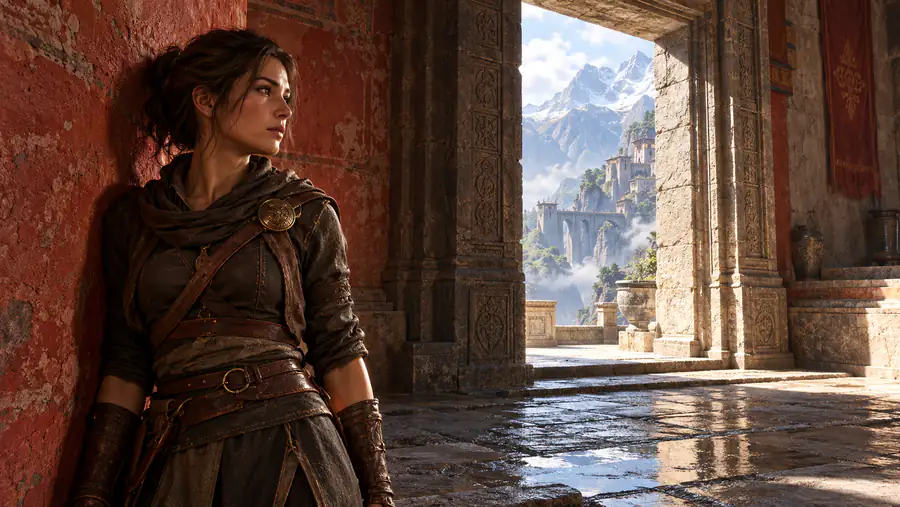
Picture a character standing beside a sunlit red wall. If the surrounding light ignores that wall, the character can look pasted into the scene, however detailed the model is.
Lumen calculates dynamic indirect lighting and reflections. Reflected light can carry the color of a nearby surface, helping characters and objects feel part of the same space.
Watch a doorway between bright daylight and a dim interior. Believable bounce light gives the room depth without making every corner equally bright. Lighting direction matters as much as brightness.
Lumen has a performance cost. The team must choose suitable quality settings and test changing light, reflective surfaces, and fast movement on the actual target hardware.
Nanite geometry: detail that holds up close
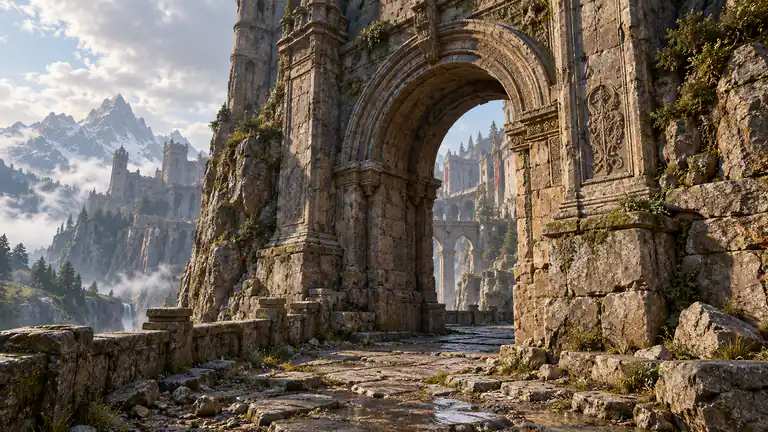
Walk toward a carved wall or a broken rock face. A flat-looking edge becomes obvious as soon as the camera moves sideways, even when the surface texture is sharp.
Nanite uses virtualized geometry, streaming visible detail and handling geometric levels of detail automatically. This makes high-density meshes and scanned assets more practical in real-time environments.
The important distinction is shape versus surface detail. Texture resolution alone cannot give a flat silhouette the depth of modeled stonework. Nanite helps artists retain more of that actual shape.
It does not remove every limit. Material complexity, scene composition, supported features, and hardware still matter. A technically dense environment can remain visually repetitive or expensive to render.
The practical test is the camera path: inspect the same asset from normal playing distance and close up, then measure its cost in a representative scene.
Materials: different responses to the same light
Wet stone, worn leather, and polished metal should not share the same highlight. If everything looks equally glossy, extra geometry can make the mistake more noticeable.
Unreal's physically based materials use properties such as roughness and metallic response to control how surfaces interact with light. Artists still need credible values, textures, and variation.
Animation and audio: supporting the action
A convincing character needs more than detailed skin. Watch the stop after a sprint, the turn before a dodge, and the moment a foot should make contact with the ground.
Epic's Game Animation Sample demonstrates motion-captured traversal driven by Motion Matching. It is a practical example of selecting suitable animation as movement changes, rather than relying on one repeated loop.
That does not mean every Unreal game uses the same animation setup. Animation coverage, transitions, collision, camera behavior, and the response to input remain production decisions.
Sound adds another layer. MetaSounds lets designers build procedural audio behavior, including variations in footsteps and ambient layers. Repetition and badly timed sound can undo convincing visuals.
World Partition: loading large worlds during play
A vista loses its effect when an important building appears late or the game pauses as you approach it. The experience depends on what is ready beyond the current view.
World Partition manages large maps using streaming cells around sources such as the player. Asset sizes, travel speed, storage, and memory still determine whether transitions feel smooth.
Plan streaming around the fastest supported movement, not just walking speed. A route that works on foot may expose late loading when the player drives or travels quickly.
Unreal Engine in AAA Games: Hellblade II, Wukong, and Fortnite
These Unreal Engine games illustrate different production priorities: performance capture, environment interaction, and lighting. Each connects a player-visible result to documented development work and shows why the engine alone does not define the outcome.
Senua’s Saga: Hellblade II: human movement and physical places
In Hellblade II, look at how Senua braces, struggles, and recovers during combat. The useful detail is how a performance carries through movement, rather than how sharp a face looks when paused.
Xbox's account of Ninja Theory’s performance capture describes actors performing almost every in-game movement. That gives the team human reference and captured motion to shape into the final experience.
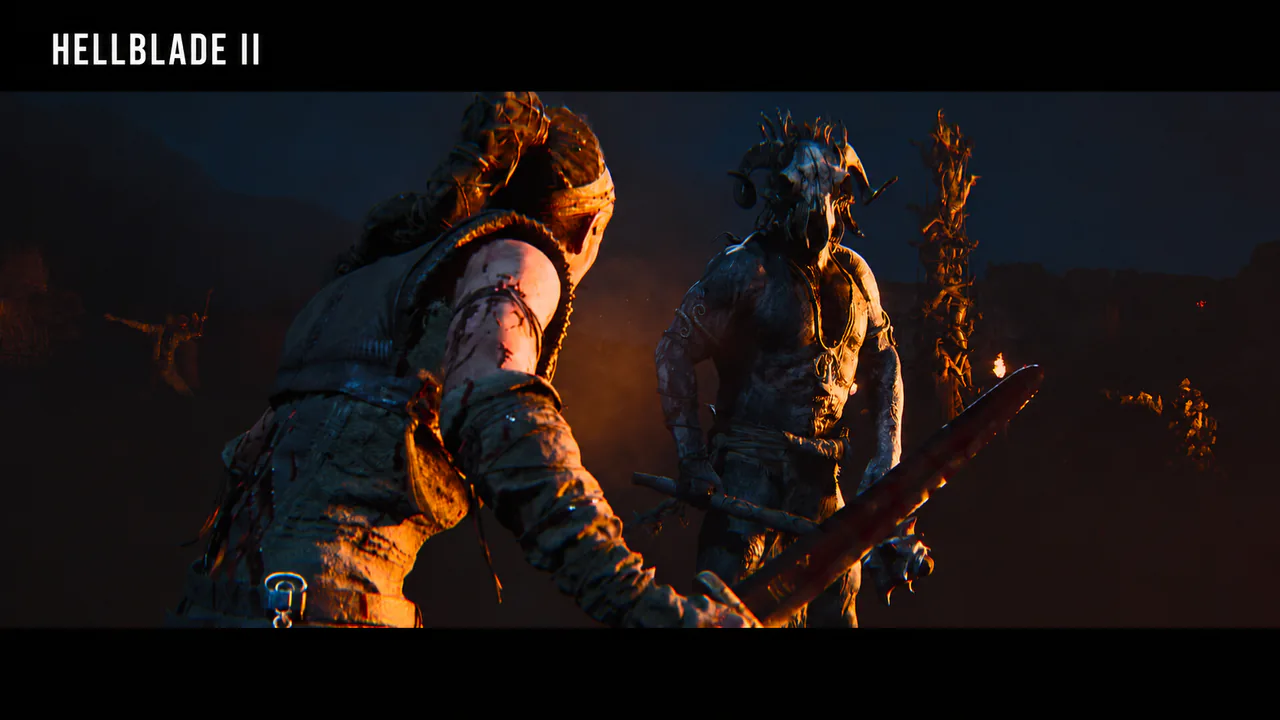
That work also reaches beyond fights. The team captured variations for movement and dialogue, including different delivery while walking or running. A character can react to the situation rather than repeat one performance.
For the landscape, Ninja Theory also discussed combining satellite data, drone photogrammetry, and scanned rocks in its Iceland location breakdown. The terrain starts with specific places and materials.
For AAA production, the lesson is practical: Unreal can display detailed environments and characters, while capture work, animation choices, and scene direction supply much of what makes them convincing.
Black Myth: Wukong: detail that belongs to the setting
In Game Science’s early UE5 showcase for Black Myth: Wukong, snow deforms around the character’s feet. That response makes the ground feel like a material instead of a painted surface.
In Epic's 2021 interview with Game Science, the team explained that this snow used Virtual Heightfield Mesh and artist-made textures. Specific effects require specific implementation.
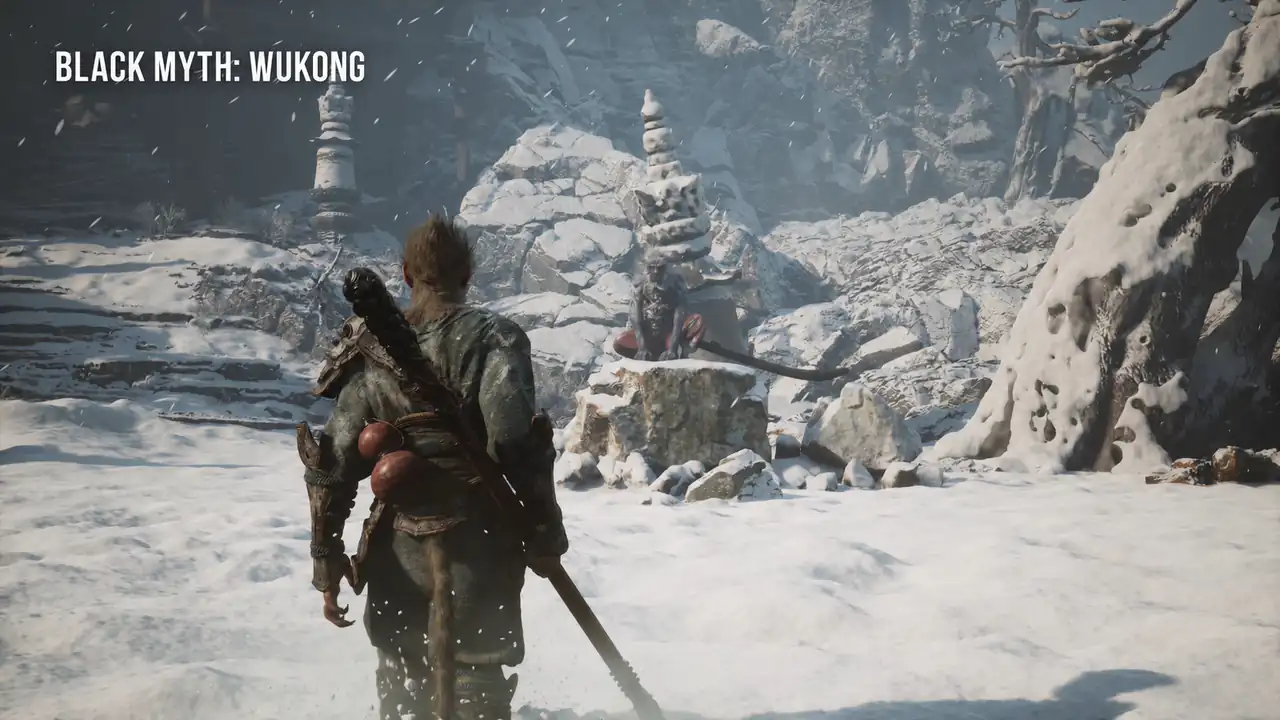
The same interview identified Nanite and Lumen as important to visual quality and art production, including moving away from baked lightmaps and faked indirect lighting.
This was a development showcase, rather than a specification for every shipped setting. The broader lesson is to ask which system creates the effect, instead of crediting every detail to Nanite.
Fortnite: convincing lighting does not require photorealistic art
Fortnite is the useful counterexample to the idea that realism means muted colors and realistic faces. A cartoon outfit can still look naturally connected to the room around it.
In its Chapter 4 technical introduction, Epic showed Lumen bounce lighting, detailed Nanite architecture, and shadows from small modeled features. A red rug could influence the light reaching an outfit.
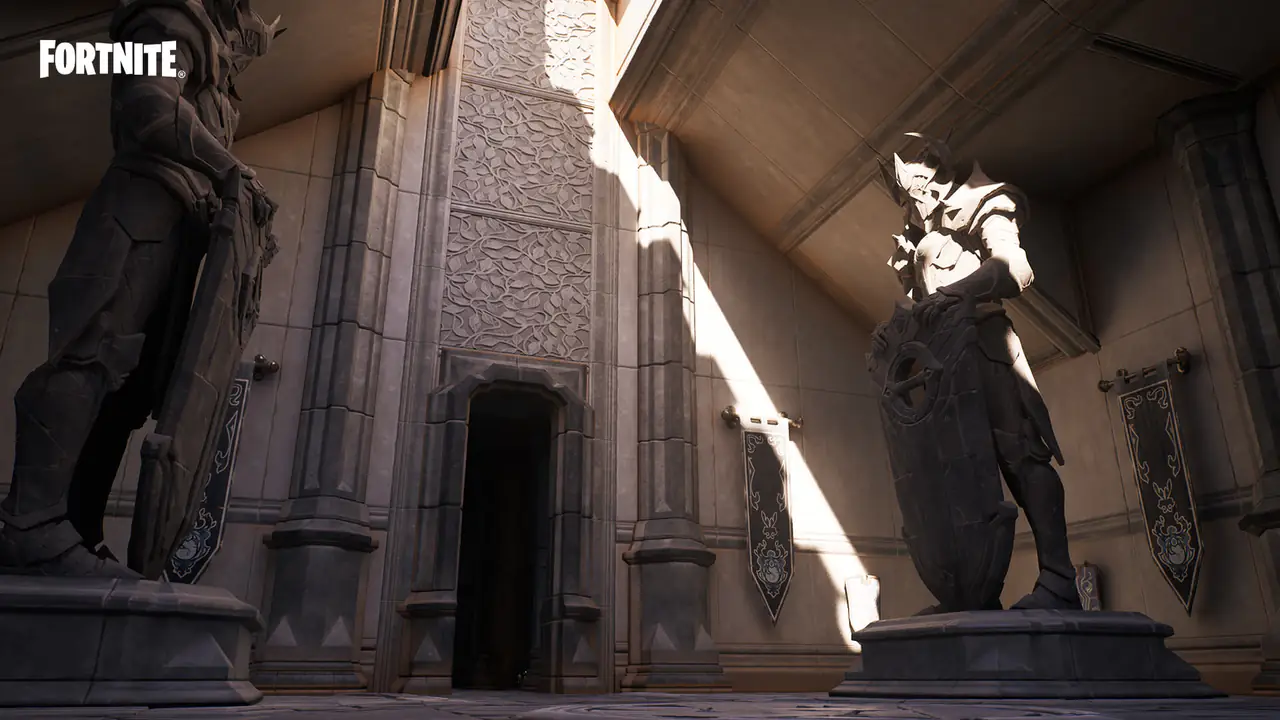
Look at the transition from an outdoor area into a furnished interior. The lesson is the relationship between objects and light, even when the shapes and colors are deliberately stylized.
This is a documented example from that update, rather than a promise about every current platform or graphics mode. Always compare equivalent settings when judging a game’s presentation.
Performance Challenges in Unreal Engine AAA Games
In Unreal Engine AAA production, rendering quality and runtime performance have to be planned together. A slow camera pan can reveal shimmer, trailing outlines, or hitches that a screenshot hides.
Frame rate and frame pacing are part of the illusion
At 60 frames per second, a frame has roughly 16.7 milliseconds to arrive; at 30, roughly 33.3 milliseconds. A missed budget can interrupt motion even when the average looks acceptable.
A consistent presentation matters because players are steering the camera and reacting to events. Judging graphics without judging that response leaves out a large part of the experience.
Upscaling should be judged during movement
Temporal Super Resolution reconstructs a higher-resolution image using lower-resolution rendering and information from earlier frames. It can help make room for expensive effects within a performance budget.
It also makes motion an essential test. Examine thin railings, hair, foliage, and moving effects. A clean still image does not prove those details stay clear while the camera turns.
A hitch needs a diagnosis, rather than an engine stereotype
Epic's explanation of shader stuttering describes how rendering work can stall when a required pipeline state is not ready. PSO precaching aims to prepare that work before it is needed.
Other pauses can involve streaming or CPU work. A hitch alone does not identify its cause. Developers need profiling and first-run testing before deciding what to change.
| What you notice | What it can suggest | A useful check |
|---|---|---|
| Fine detail looks unstable while turning | Temporal reconstruction, motion data, or rendering choices | Compare still and moving views at the intended resolution. |
| A pause when an effect first appears | A pipeline state may not be ready; other causes are possible | Compare first and repeat runs, then inspect a captured performance trace. |
| A building or texture appears late | Streaming, storage, or memory pressure | Test the same route at maximum travel speed on minimum-spec hardware. |
| A character looks detailed but feels floaty | Animation, movement, collision, or input tuning | Test sudden stops, direction changes, slopes, and contact with the ground. |
Treat these as investigation prompts, not automatic diagnoses. Two similar-looking problems can come from different systems, and a settings change can hide a symptom without fixing its cause.
From Vertical Slice to AAA Production
A vertical slice is a small playable section that brings the intended gameplay, content, and technical quality together. It should include difficult interactions, lighting changes, characters, effects, and representative content density.
For AAA game development with Unreal Engine, use that slice to validate the production approach before expanding the game. These checks connect the player experience to practical acceptance criteria.
- Rotate the camera slowly and quickly. Check whether small details stay stable and whether image quality changes sharply in motion.
- Walk from daylight into an interior, then return. Look at faces, contact shadows, reflections, and whether the lighting stays believable through the transition.
- Stop, turn, climb a slope, and move near a wall. Watch foot placement, sliding, camera obstruction, and the delay between input and visible response.
- Trigger the same effect several times. Compare the first appearance with later ones, and listen for obvious repetition in accompanying sounds.
- Travel through the scene at the fastest supported speed. Look for late geometry, delayed textures, and pauses near streaming boundaries.
- Repeat the route in a packaged build on the minimum target hardware. Record frame times and memory use alongside footage of the actual playthrough.
Scale content and testing together
Before scaling content production, define asset budgets, ownership, review criteria, and a repeatable build process. Teams need to test an integrated game as new features and assets arrive.
Choose the visual target and frame-rate target together. Otherwise, expensive art can accumulate before anyone checks whether the intended experience survives on the weakest platform.
Regression checks should revisit movement, combat, interface behavior, streaming, and saved progress as the build changes. A scene passing once does not establish that later content and system changes remain compatible.
Our cross-platform game development services connect engine choice with device targets, controls, and performance budgets. A representative prototype should test whether the chosen approach fits your game.
How SDLC Corp Supports Unreal Engine AAA Game Development
The starting point for our game development services is a playable target, a named platform, and a realistic production scope. Gameplay requirements, visual references, and performance budgets should shape the same brief.
Full Product Team
For a concept or early prototype, the engagement can cover a vertical slice, then art, engineering, and QA through production. The first milestone should demonstrate the hardest part of the experience.
A useful review includes a playable build, agreed visual references, and performance measurements. Creative control, repository access, ownership, and milestone acceptance should be clear from the start.
Specialist Engineers Into Your Pipeline
An established studio may need focused support in engine-level C++, rendering, networking, or performance. The work should fit its existing repository, coding standards, and review process.
Describe the player-visible problem first: a hitch, delayed response, unstable image, or late asset. That gives technical investigation a clear outcome to test rather than a vague request for optimization.
Art and Content Volume
Our game art and consulting services help define the visual direction and asset pipeline. Character, environment, and animation work should follow agreed technical budgets.
Review assets in the game scene, under its lighting and from its normal camera distances. Approving isolated beauty renders can leave material, scale, readability, and performance problems until too late.
For Unreal Engine AAA game development, those decisions need to stay connected. Detailed assets, lighting quality, animation coverage, and build performance cannot be approved as unrelated pieces.
Our Unreal Engine game development services page outlines the services and engagement options. Bring the target platforms, current build status, visual references, and the main production constraint to the first discussion.
Conclusion
Unreal Engine AAA game development brings gameplay, content, engineering, and testing into one playable result. Detailed geometry and lighting help, but animation, audio, streaming, and performance must support the same experience.
When you judge the result, keep moving. Turn toward the light, cross the room, change direction, and trigger something unexpected. Those moments reveal whether the world stays convincing under your control.
For a studio, the practical path starts with a representative vertical slice, then scales content, integration, and testing around agreed platform targets. That is how the production plan supports the experience players see.
Frequently Asked Questions
Why do Unreal Engine 5 games look so realistic?
UE5 combines detailed geometry, dynamic lighting, physically based materials, and animation tools. Nanite and Lumen are important parts, but convincing results also depend on art direction, asset quality, and performance tuning.
What does Unreal Engine AAA game development involve?
It combines gameplay programming, art, animation, audio, world building, optimization, and testing. Unreal provides shared tools, while the team manages production scope, content workflows, integration, and delivery on the target platforms.
What is the difference between Nanite and Lumen?
Nanite handles virtualized geometry and geometric detail. Lumen handles dynamic indirect lighting and reflections. One helps preserve the shapes you see; the other helps those shapes respond to their surroundings.
Why can a visually impressive Unreal Engine game still stutter?
A pause can come from pipeline-state compilation, asset streaming, or other CPU and GPU work. PSO precaching addresses one source of hitching, but developers must profile the build to identify the actual cause.
Can a small team make realistic graphics in Unreal Engine?
Yes, especially with a focused scope, suitable assets, and a carefully built scene. Maintaining that quality across a large game still requires content production, animation, optimization, and extensive testing.
How should a studio judge an Unreal Engine development partner?
Ask for a representative playable build, a clear target platform, performance measurements, and reviewable milestones. Evaluate movement, lighting transitions, first-run behavior, and content quality together rather than judging only a showreel.