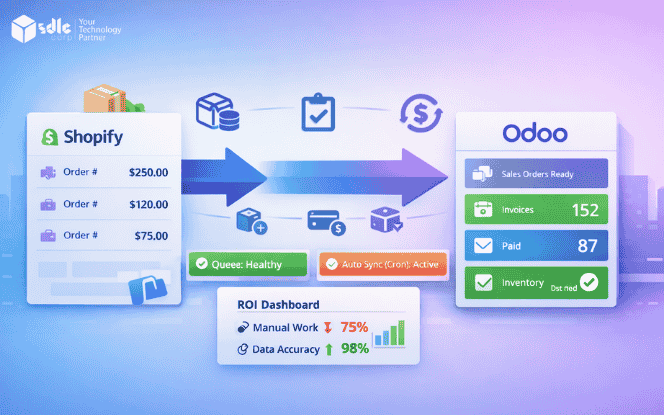
A Shopify–Odoo connector is the bridge between sales and operations. When it’s done right, orders flow cleanly into Odoo, inventory stays accurate, and finance records match reality. When it’s done poorly, teams waste hours fixing mismatches, refunds, and stock errors. If you want reliable Shopify to Odoo integration that scales, start with a clear integration plan through Odoo Integration Services.
Best fit for this setup
This approach works best when you have:
50+ orders per day, or sharp spikes during campaigns
Frequent discounts, promo codes, and refunds
Manual reconciliation between ops and finance
ROI shows fastest in
inventory sync accuracy (less overselling, fewer cancellations)
faster order-to-ship time
tax/payment/refund mapping (less finance rework)
What a Shopify–Odoo connector does in business terms

Shopify runs the storefront. Odoo runs the back office. The connector keeps both aligned with rules.
The goal is simple: one version of truth for:
products and variants
stock and warehouses
orders and fulfillment
invoices, taxes, and payments
This is the practical side of Odoo Shopify integration. It’s not “sync everything.” It’s “sync what matters, with control.”
Data ownership rules (avoid sync conflicts)

Before you sync anything, define who owns what. This prevents overwrites and “mystery changes.”
Recommended ownership for most stores:
Inventory: Odoo → Shopify (Odoo is the stock master)
Orders: Shopify → Odoo (Shopify is the checkout source)
Pricing: decide one owner (Shopify price vs Odoo price lists)
Customers: Shopify → Odoo (only required fields)
Refunds: Shopify → Odoo (keep finance traceable)
If you skip ownership rules, the connector will look fine in testing and fail in production.
Features that actually drive Shopify Odoo connector ROI

1) Product and catalog sync (with control)
A connector must handle products, variants, SKU, images, pricing, and collections/categories.
What matters most:
- clean SKU and variant structure
- selective sync (You can push and pull everything every time)
- conflict rules (what wins when both sides change)
If catalog quality is messy, fix it first. A Shopify Development Company can standardize SKUs, variants, and product structure before you automate sync. That single step prevents months of cleanup later.
2) Inventory sync that prevents overselling
Inventory is usually the quickest ROI lever. It reduces cancellations and support tickets.
Look for:
clear “source of truth” for stock
multi-location
near real-time updates for key events
scheduled sync for stability and bulk corrections
Good inventory sync is not just fast. It is predictable.
3) Order sync built for real operations
Order sync must include:
line items, shipping lines, discounts, and taxes
payment method mapping
order edits and cancellations handling
fulfillment status updates
This is where basic connectors fail. Real stores have partial fulfillments, edited orders, multiple gateways, and exceptions.
Real scenario that breaks weak connectors:
A customer changes an address after payment. One item is swapped. The order is partially shipped. Later, one line item is partially refunded. If your connector only imports an order “once,” finance and ops will spend time repairing the timeline.
4) Refunds, cancellations, and finance correctness
Refund handling must be accurate. This is where teams either trust the connector or abandon it.
Confirm support for:
full and partial refunds
multi-line refunds
refunds that adjust shipping
discount reversals (promo codes, store credits)
cancellation mapping that keeps totals correct
If refunds are wrong, month-end close becomes manual again
5) Taxes, discounts, and payment mapping (hidden ROI engine)
Most ROI comes from removing finance rework.
Look for:
- tax mapping rules (region and product-based)
- discount types and gift cards
- payment gateways to the right Odoo journals
- invoice policy alignment (when to invoice, when to mark paid)
A connector that “syncs orders” but can’t map taxes and payments properly is not production-ready.
6) Webhooks, queues, logs, and safe retries (trust layer)
Operations need visibility, not buttons.
Minimum requirements:
- webhooks for key events (category, products, customers)
- a queue to handle spikes without breaking sync
- Reports that show what failed and why
When you need custom workflows, exception dashboards, or special rules, a Shopify App Development Company is the right option to extend the connector without risking reliability.
7) Performance reality: rate limits and spikes
High volume days expose weak integrations.
Your connector should:
batch requests for bulk updates
throttle safely during spikes
queue jobs when Shopify slows down
recover from failures without losing events
If it can’t handle spikes, it’s not a connector. It’s a risk.
Auto Sync (Cron) for Shopify–Odoo Integration

Webhooks are great for real-time events. But Auto Sync (Cron) is what keeps data consistent over time. Cron runs scheduled jobs in Odoo that sync records automatically in the background based on your selected frequency.
Use cron when you want:
predictable sync cycles (batch updates)
backup syncing if webhooks fail or are delayed
large catalog updates that should run off-peak
stable reporting and reconciliation on a fixed cadence
Best practice: Use webhooks for instant events (orders) and cron for batch stability (products, inventory, refunds, reports).
When to use Cron vs Webhooks
Use Webhooks when:
you need real-time order sync
inventory must update immediately after sales
you want instant customer creation after checkout
Use Cron when:
you want stable batch sync for products, prices, categories
you want scheduled reconciliation for refunds and cancellations
you need predictable reporting snapshots
Cron is not “better than webhooks.” It is a stability layer that prevents data drift.
Hourly Cron Sync (Best for fast-moving stores)
Use hourly cron when:
inventory changes often (fast-selling SKUs)
you have frequent price updates or variant changes
your team needs near real-time reporting
you want quick recovery if a webhook fails
Recommended hourly sync scope:
Inventory sync (Odoo → Shopify)
Order status refresh (Shopify → Odoo)
Refund/cancellation updates (Shopify → Odoo)
Avoid hourly full product sync if you have a large catalog. That should run daily or weekly.
Daily Cron Sync (Best default setting for most teams)
Use daily cron when:
you want stable synchronization without heavy server load
you run daily reporting or finance checks
your catalog changes but not every hour
Recommended daily sync scope:
Products/variants (updates only)
Categories/collections
Customer updates (if needed)
Inventory refresh (full snapshot)
Refund reconciliation
Best timing: Run late night or early morning (off-peak).
Weekly Cron Sync (Best for catalog cleanup + governance)
Use weekly cron when:
you want a controlled catalog audit
you update collections, tags, and metadata in batches
you want weekly consistency checks between systems
Recommended weekly sync scope:
full product catalog validation
attribute + category cleanup sync
inactive product cleanup sync (if applicable)
mapping audit report generation
This helps prevent slow drift in product data over months.
Monthly Cron Sync (Best for finance close + reporting)
Use monthly cron when:
you need month-end checks and reconciliation
you want stable reporting totals
you want a finance-friendly snapshot for audits
Recommended monthly sync scope:
monthly refund summary + cancellation summary
tax/payment mapping validation reports
sales reporting export (Shopify Orders + Odoo invoices)
inventory valuation alignment check
Pro tip: Run this 1–2 days before month-end close to catch issues early.
Safe Cron Rules (avoid duplicate sync + performance issues)
Follow these rules so cron doesn’t create chaos:
Do not run multiple heavy cron jobs at the same time (products + inventory + orders together).
Use delta updates where possible (sync only changed records).
Add retry limits and log every failure.
Keep idempotency for orders and refunds to avoid duplicates.
Run heavy jobs off-peak.
Always keep a Sync Reports screen so ops can see what happened.
If your store has high volume, cron should work together with queues and throttling.
Business benefits you can measure

Lower operating cost
less manual work for orders, inventory, and finance
fewer “fix the mismatch” tasks
fewer support tickets from stock errors
Faster fulfillment
orders hit Odoo quickly
pick/pack/ship starts earlier
fewer delays caused by missing data
Cleaner accounting and faster close
payment mapping reduces reconciliation
refunds and cancellations stay traceable
reporting stays consistent
If you’re building the storefront + operations flow as one system, an Ecommerce Development Company can align both sides so the connector doesn’t become a patchwork later.
ROI model and payback period

Step 1: Calculate annual benefit
Annual benefit =
(hours saved per week × hourly cost × 52)
(errors avoided per month × cost per error × 12)
(cancellations reduced per month × margin impact × 12)
Cost per error should include: support time, refund cost, reshipment cost, and lost repeat purchases.
Step 2: Calculate annual cost
Annual cost =
connector subscription (if any)
implementation (one-time)
support/monitoring (annual)
Step 3: ROI and payback
ROI % = (benefit − cost) ÷ cost × 100
Payback (months) = implementation ÷ monthly net benefit
Typical fast-payback drivers:
inventory accuracy improvements
fewer refund disputes
fewer finance corrections
Setup in 5 Minutes via API

Add Shopify store details: Enter your Shop URL and select the API version.
Generate API access token: Create the token in Shopify and paste it into the connector.
Verify connection: Run a quick test to confirm permissions for products, customers, orders, and inventory.
Pick sync mode:
Real-time sync for orders and stock changes
Scheduled sync for bulk product/catalog updates
Enable core sync first: Turn on Orders + Inventory before anything else.
Run a small test sync: Sync a few records to validate totals, taxes, discounts, and payment mapping.
Expand gradually: After results look correct, enable Products, then Customers, then Refunds/Reporting.
Best practice: Activate only 1–2 areas at a time and validate results before enabling the next.
Common risks and how to prevent them

Overselling due to slow stock sync → make Odoo the stock master + enforce update rules
Duplicate orders during retries → idempotency + queue controls
Wrong totals due to tax/discount mismatch → mapping rules + validation checks
Sync failures during spikes → batching, throttling, and monitoring
Refund confusion → ensure partial refund logic and reversal mapping is tested with real cases
Connector vs custom build: how to choose

Choose a connector when:
your workflows are standard
you want quick time-to-value
you can work within defined mapping constraints
Choose custom integration when:
you need complex rules (allocation, multi-entity accounting, custom approvals)
you need deeper monitoring and governance
you want strict control of validations and rollback behavior
If you’re deciding between connector vs custom, this guide helps you plan scope and risk: How to Integrate Odoo with Your Existing Software Stack.
Custom Shopify–Odoo Integration Features for Enterprise Operations

Custom Workflow & Automation Engine
Tailor sync logic to your business process.
Create custom rules for order approvals, invoicing, refunds, partial fulfillment, and ERP workflows based on your internal policies.
Best for: Businesses with complex operations and internal governance.
Enterprise Reporting & BI Integration
Turn connector data into business intelligence.
Get custom dashboards for sales, inventory turnover, fulfillment performance, and revenue forecasting with advanced Odoo analytics and BI tools.
Best for: Data-driven leadership and performance teams.
Security, Compliance & Access Control Layer
Enterprise-grade governance for integrations.
Enable role-based permissions, audit trails, encryption, IP restrictions, and compliance-ready workflows.
Best for: Security-sensitive and regulated organizations.
Custom Pricing, Tax & Revenue Rules Engine
Support advanced commercial models.
Implement complex tax logic, dynamic pricing rules, B2B/B2C pricing tiers, discount automation, and margin control systems.
Best for: Businesses with customized revenue and billing structures.
Master Data & Product Governance Layer
Maintain consistency across Odoo and Shopify.
Control how products, variants, attributes, categories, SKUs, vendors, and metadata are created, approved, synced, and updated across systems.
Includes validation rules, duplication control, and version management.
Best for: Enterprises managing large catalogs and multiple teams.
How SDLC Corp helps (ROI-first delivery)
The focus stays practical:
lock ownership and mapping rules early
implement only the workflows that drive ROI
validate using real orders, not only test data
add monitoring so ops and finance can trust the numbers
Need hands-on support for connector tuning, custom workflows, or exception dashboards? Hire Shopify Developers to move faster without breaking production stability.
Conclusion
A connector pays off when it makes operations predictable: accurate stock, clean orders, and finance-ready records. Prioritize inventory accuracy, order correctness, refund handling, and tax/payment mapping. Add visibility with logs and retries. Then measure success with a simple ROI and payback model.
FAQs
1) What is a Shopify–Odoo connector, and why do businesses use it?
A Shopify–Odoo connector syncs key data between Shopify (storefront) and Odoo (ERP) so teams don’t re-enter orders, update stock manually, or reconcile mismatched totals. It improves speed, accuracy, and operational control as volume grows.
2) Which sync delivers the fastest ROI?
Orders + Inventory. This reduces overselling, cancellations, fulfillment delays, and support tickets. It also removes a lot of manual work across operations and finance.
3) Real-time sync or scheduled sync—what should we choose?
Use real-time for high-impact events like new orders and stock changes. Use scheduled sync for bulk updates like catalog refreshes. Many businesses run a hybrid setup to balance speed and stability.
4) Can the connector handle partial fulfillment, edited orders, and exceptions?
It should. A production-ready setup supports partial fulfillment, split shipments, edited orders, cancellations, and status updates. If it can’t, teams end up fixing shipment and invoice data manually.
5) How do refunds and cancellations stay accurate in Odoo?
The connector must support full and partial refunds, cancellation reasons, and correct reversal entries so finance totals remain consistent. Always test real refund scenarios early to avoid month-end reconciliation issues.
6) How are taxes, discounts, and payment methods mapped correctly?
Mapping rules are set between Shopify and Odoo for taxes, discount types, and payment methods (journals/accounts). A proper test sync should validate totals, tax lines, discount behavior, and payment posting before full automation.
7) Can we connect multiple Shopify stores to one Odoo instance?
Yes, but success depends on governance. You need clear rules for store-wise pricing, inventory ownership, warehouse routing, tax logic, and reporting. Multi-store works best when these rules are defined before syncing.
8) When should we choose custom integration instead of a standard connector?
Choose custom integration when you need complex approvals, custom pricing/tax logic, multi-entity accounting, or strict security and audit controls. If workflows are standard, a connector is usually faster to deploy and easier to maintain.