Introduction
How to Build an Grocery Delivery App
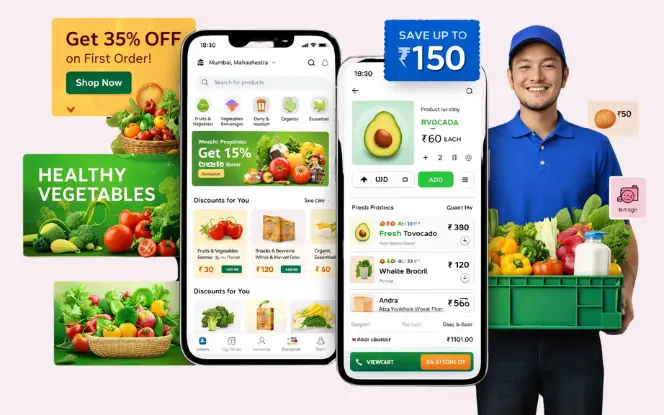
Creating an app like InstaShop requires a combination of modern technology, financial regulation adherence, and user-centric design. Here’s how the development journey typically unfolds:
- Market Research: Understand the target audience, market trends, and competitor analysis.
- Define Features: List out essential and advanced features based on user needs.
- Choose the Right Technology Stack: Select appropriate frameworks and platforms (iOS, Android, Web).
- Design UI/UX: Create intuitive and engaging user interfaces.
- Develop and Integrate: Code the app and integrate necessary APIs and third-party services.
- Testing: Conduct rigorous testing to ensure functionality and security.
- Deployment: Launch the app on the desired platforms.
- Maintenance and Updates: Regularly update the app to fix bugs and add new features.
Explore Our New Blog – How to Develop App like Blinkit
Grocery App Features (Customer, Vendor & Admin Panels)
1. Customer App
User Features
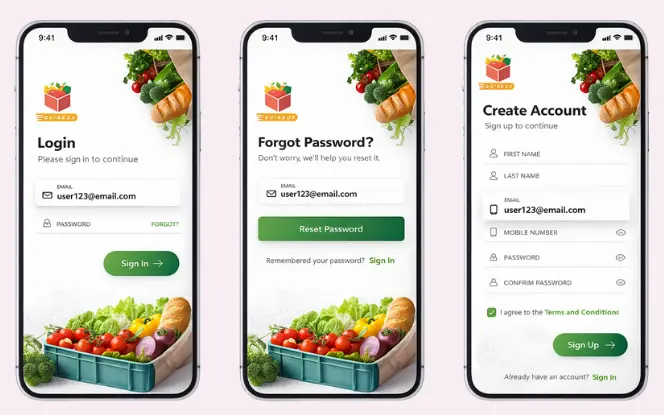
Email, mobile, or social login:
Enables quick and safe user onboarding across devices.OTP verification:
Confirms user identity through secure one-time password authentication.Multiple address management:
Allows users to save and manage multiple delivery addresses easily.
Product Browsing by Category and Filters

Users should easily browse categories including:
- Fruits & vegetables: Displays fresh, seasonal produce sourced from nearby stores, with quality filters and daily availability updates.
- Dairy & bakery: Lists milk products, bread, and baked goods for daily needs, including fresh, branded, and locally sourced options.
- Snacks & beverages: Shows packaged snacks, soft drinks, and beverages, making it easy to discover popular brands and quick-refresh items.
- Household essentials: Includes cleaning supplies and daily household items, enabling users to restock necessities in a single order.
- Organic products: Offers organic and health-focused grocery options for users seeking chemical-free and wellness-oriented products.
- Subcategories: Improve navigation by breaking categories into specific groups (e.g., Fruits → Berries), helping users find items faster and reducing search friction.
Smart Search Bar with Auto-Suggestions

A powerful search bar must offer:
- Auto-suggestions: Displays relevant product suggestions as users type, helping them find items faster with fewer taps.
- Spell correction: Automatically fixes typos and misspellings to improve search accuracy and reduce zero-result queries.
- Trending searches: Highlights popular and frequently searched products to speed up discovery and boost conversions.
- Optional voice search: Lets users search using voice commands for quicker, hands-free ordering especially useful on mobile.
- Internal link line: For fast-commerce UX inspiration, explore our guide on how to develop an app like Zepto.
Cart & Checkout with Multiple Address Options

Users should be able to:
- Coupon application: Enables users to apply discount codes at checkout to reduce order value and increase repeat purchases.
- Delivery scheduling: Allows users to select preferred delivery time slots for greater convenience and order flexibility.
- Itemized billing: Displays a clear, transparent breakdown of product prices, taxes, discounts, and delivery charges.
- Multiple payment options: Supports cards, wallets, UPI, and cash on delivery to ensure a smooth and inclusive checkout experience.
Smart suggestions like “Frequently Bought Together” increase conversions.
Real-Time Order Tracking

Real-Time Order Tracking Includes:
- Live GPS tracking: Allows users to track delivery partners in real time on an interactive map for full order visibility.
- ETA updates: Dynamically displays estimated delivery times based on traffic, distance, and rider location.
- Delivery partner details: Shows the rider’s name, contact information, and current delivery status for transparency.
This significantly improves user trust and retention by keeping customers informed at every stage of the delivery process.
Secure Payment Gateway Integration

Multiple Payment Methods
Support:
- UPI: Enables instant, real-time bank transfers with seamless in-app payment confirmation.
- Cards: Supports secure debit and credit card transactions with global card network compatibility.
- Wallets: Allows fast payments using popular digital wallets for frictionless user experience.
- Cash on Delivery: Provides offline payment flexibility in regions where digital adoption is limited
- Local payment providers :ntegrates region-specific gateways to ensure higher payment success rates and compliance.
All transactions must be encrypted and PCI-compliant.
2. Vendor App
Store Dashboard
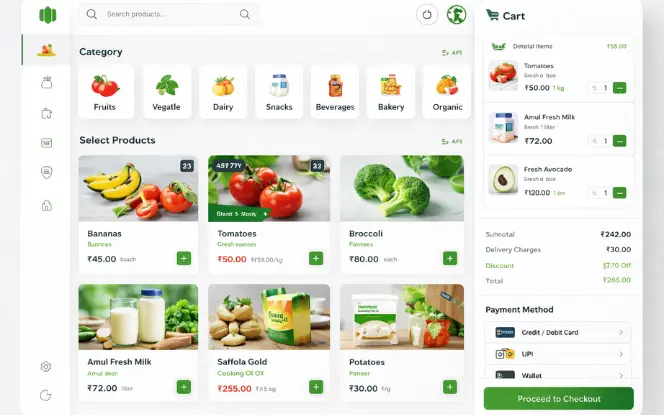
Vendors need tools to:
- Manage inventory & pricing: Allows vendors to update stock availability and product prices in real time to avoid order issues.
- Accept or reject orders: Enables vendors to control order fulfillment based on inventory, capacity, and store availability.
- Track sales & analytics: Provides insights into orders, revenue, customer demand, and overall store performance.
- Run promotions: Allows vendors to create discounts, offers, and special deals to boost visibility and sales.
Order & Delivery Management

Must Include:
- Order requests: Notifies delivery partners instantly about new delivery tasks to ensure quick order acceptance.
- Route optimization: Suggests the fastest and most efficient delivery routes using real-time maps and traffic data.
- Navigation support: Provides turn-by-turn navigation to help delivery partners reach destinations accurately.
- Earnings dashboard: Displays daily, weekly, and monthly earnings for transparent income tracking.
- Proof of delivery: Confirms successful delivery through OTP verification or image upload for added security.
3. Admin Panel
Admin Control
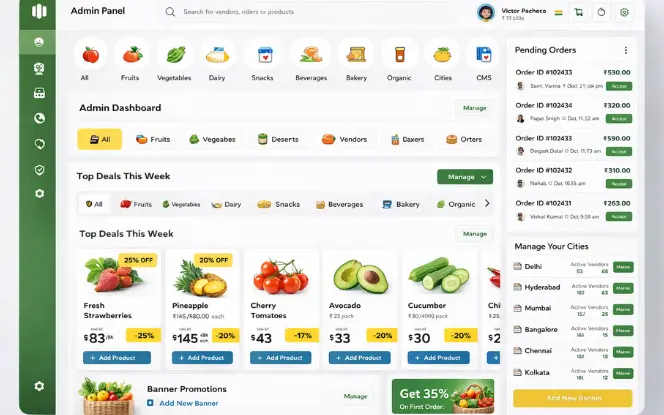
- User, vendor & rider management: Manages all platform users from a centralized dashboard, including access control and account status.
- Order allocation & settlements: Controls order assignments and automates payment settlements between vendors and delivery partners.
- Multi-city operations: Supports seamless platform expansion across multiple cities with location-based management.
- CMS banners & promotions: Manages homepage banners, offers, and promotional content to drive user engagement.
- Analytics & reports: Provides detailed performance insights, revenue reports, and operational analytics for informed decision-making.
Customer Support & Ticketing
Integrate a ticketing system to manage user complaints and queries across all order stages. Support agents can view, assign, and resolve tickets directly from an organized dashboard.
- Order-based issue tracking:
Links customer issues directly to specific orders. - Live chat support:
Enables real-time communication with support agents. - Auto-assignment to agents:
Automatically assigns tickets to available agents. - Ticket status management:
Tracks issue resolution from open to closed.
This improves response time and ensures better customer satisfaction.
InstaShop App Development Cost Breakdown (MVP to Enterprise)
| Tier | Basic MVP | Mid-Level App | Full-Scale App |
|---|---|---|---|
| Cost | $12K–$20K | $25K–$40K | $50K–$80K+ |
| Timeline | 4–6 weeks | 8–10 weeks | 14–18 weeks |
| Includes |
|
|
|
| Security | Encryption | Tokenized payments |
|
| Integrations | 1 payment gateway |
|
|
| AI/Analytics | Basic reports | Sales insights |
|
Explore new blog on – How To Develop Fast and Fresh Food Delivery App Like Grubhub
Monetization Strategies
1. Commission-Based Model

This is the primary revenue stream for most grocery delivery apps. In this model, your platform earns a fixed percentage from each successful transaction between customers and grocery vendors.
How it works:
- Set commission slabs (e.g., 10–25%) based on vendor category, order volume, or exclusivity.
- Charge per item sold or per total invoice amount.
- Offer lower commissions to top-performing partners as an incentive.
Advantages:
- Predictable and recurring revenue
- Aligns platform growth with vendor success
2. In-App Advertising

Monetize using:
- Sponsored listings: Vendors pay to appear at the top of search results or category pages to increase visibility and sales.
- Homepage banners: Brands promote products or offers through high-visibility banners on the app’s home screen.
- Featured product placements: Products are highlighted in curated sections to drive higher engagement and conversions.
3. Featured Listings
- Categories: Vendors pay to feature their products at the top of relevant category pages for higher visibility.
- Search results: Paid placement allows products to appear first when users search for related items.
- Homepage carousels: Vendors showcase products in rotating homepage banners to attract immediate user attention.
4. Delivery Charges
- Time: Delivery fees increase during peak hours, high-demand periods, or late-night orders.
- Distance: Charges are calculated based on the delivery distance between the store and the customer.
- Order value: Fees may vary depending on the total order amount, with discounts for higher-value orders.
Ideal Tech Stack for Grocery Delivery App Development
Choosing the right tech stack is critical for performance, scalability, and maintenance.

1. Frontend Technologies
React Native (Ideal for cross-platform mobile app development)
2. Backend Technologies
Python (Powerful for handling business logic and API integrations)
3. Database Options
MongoDB
PostgreSQL (Support for both structured and flexible data storage)
4. Payment Gateways & APIs
Stripe
Razorpay
Tabby API (Facilitate seamless checkout and split payments)
5. KYC/AML Verification Tools
Onfido
ShuftiPro (Used for automated identity checks and compliance requirements)
Future Trends in Grocery Delivery App Development
To stay competitive in grocery delivery app development, consider integrating the latest tech.
Trends to Adopt
- AI-Powered Recommendations:
Smart product suggestions improve order value. - Voice-Based Ordering:
Integrations with Alexa and Google Assistant enable hands-free shopping. - Dark Stores / Micro-Warehouses:
Mini fulfillment hubs enable rapid 10–30 minute delivery. - Drone Delivery (Pilot Phase):
Helps optimize last-mile logistics and reduce delivery time. - Blockchain for Inventory Audits: Enhances transparency, reduces fraud, and secures supply chain data.
Why Choose SDLC Corp for Grocery App Development?
SDLC Corp is a leading grocery delivery app development company specializing in scalable, secure, and high-performance on-demand solutions. We help startups and enterprises build InstaShop-like platforms with faster go-to-market and optimized development costs.
Key Advantages
End-to-end development: From idea validation and UI/UX to deployment and post-launch support
Scalable architecture: Built to support multi-store, multi-city, and high user traffic
Real-time capabilities: Live order tracking, vendor management, and instant notifications
Secure payments & compliance: PCI-compliant payment gateways and data protection
Experienced team: Proven expertise in grocery, food, and on-demand app development
Conclusion
Building a grocery delivery app like InstaShop requires strong planning, reliable technology, and a deep understanding of hyperlocal logistics. By integrating powerful features, a seamless user experience, and data-driven operations, you can launch a competitive grocery delivery platform in any region.
Also Read Our New Blogs On.
How Much Does it Cost to Develop Delivery App Like InstaMart?
FAQ'S
How long does it take to build an app like InstaShop?
How much does it cost?
Typically $12,000 to $80,000+ based on modules and complexity.