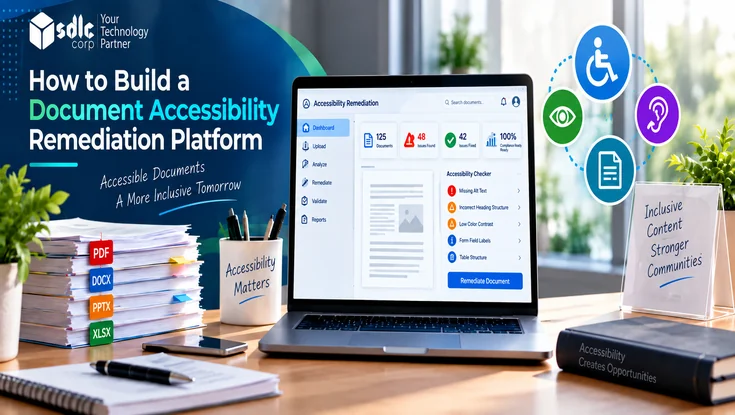
A document accessibility remediation platform identifies and fixes barriers that prevent people with disabilities from reading, navigating, or interacting with digital documents. It is not simply a PDF checker, and it is not simply an automated fixer.
For every issue, the platform has to answer five questions in order. What can be detected automatically, and what can be safely fixed? Where can AI assist, what needs human review, and how is the final document validated?
This guide uses that sequence as its framework. Each section shows how automation, AI assistance, human review, and validation work together to produce documents that are both accessible and faithful to the original.
Understand What the Platform Must Do
For the fundamentals of the remediation process itself, see our guide to making digital content accessible. This article focuses on building the software that runs that process reliably at scale.
An inaccessible document may contain readable text but still lack the structure that assistive technologies need. The platform closes that gap through a controlled pipeline with five stages:
- Detection: find issues and label how certain each finding is.
- Safe automation: apply fixes whose outcome is predictable.
- AI assistance: draft suggestions where judgment is needed but patterns help.
- Human review: resolve meaning, context, and ambiguity.
- Validation: verify accessibility and confirm the original content survived remediation.
Consider a university uploading a scanned, 40-page admission handbook. OCR recovers the text, rules fix the language and metadata, AI proposes headings and alt text, and a reviewer confirms table relationships before validation.
Define Accessibility Standards and Requirements
Technical readers will scrutinize this part of any remediation platform, so precision matters. WCAG 2.2, WCAG2ICT, PDF/UA-1, and PDF/UA-2 answer different questions and should not be treated as interchangeable document standards.
WCAG 2.2 and WCAG2ICT
The Web Content Accessibility Guidelines (WCAG) 2.2 define testable outcomes such as text alternatives, meaningful sequence, sufficient contrast, and labeled form controls. They were written for web content, with conformance levels A, AA, and AAA.
W3C's WCAG2ICT guidance is an informative note explaining how WCAG 2 success criteria can apply to non-web documents and software, including PDFs. It sets no requirements of its own, and non-web accessibility can involve requirements beyond WCAG.
PDF/UA-1 and PDF/UA-2
PDF/UA is the common name for ISO 14289, the PDF-specific accessibility standard. It specifies how tagging, structure, and related PDF features must be used so conforming software and assistive technologies can interpret a file.
PDF/UA-1 is ISO 14289-1:2014, which builds on ISO 32000-1 (PDF 1.7) and remains the current edition. PDF/UA-2 is ISO 14289-2:2024, which applies to PDF 2.0 files.
How the Standards Work Together
PDF/UA addresses how a PDF is technically structured for accessibility, but conformance alone does not guarantee that the content itself is accessible. A file can pass a PDF/UA validator and still carry unhelpful alt text.
WCAG success criteria, interpreted for documents with help from WCAG2ICT, describe the user outcomes many organizations target. Legal, contractual, and policy requirements decide which standards actually apply to a given organization.
The platform should therefore report against each standard separately. Administrators can then choose the targets that apply to each organization, such as PDF/UA-1 together with WCAG 2.2 Level AA.
Build a Standards-Based Rules Engine
Store every check as an individually identifiable rule. Each rule should record its standard, affected PDF element, severity, detection method, and its automation category: deterministic, AI-assisted, human review, or validation.
Versioning the ruleset matters as much as the rules themselves. When requirements change, a new ruleset version lets you re-run documents and explain exactly why a result differs from an earlier report.
Apply an Automation Decision Framework
The most important design decision is not which tools to use. It is deciding, task by task, how much of each fix the platform is allowed to make on its own.
Every remediation task should fall into one of four categories:
- Deterministic automation: predictable, rule-based fixes where the correct result can be derived from the file itself.
- AI-assisted remediation: tasks where a model can make a useful suggestion that a person then confirms.
- Human review: tasks that depend on meaning, context, or author intent that no rule can infer.
- Validation: independent checks that run after remediation and do not trust the engine that made the changes.
| Remediation Task | Recommended Approach |
|---|---|
| Missing document language | Automated |
| Basic structural tagging | Automated + validation |
| Heading detection | AI or rules + review |
| Reading order | AI or rules + human review |
| Simple image description | AI suggestion + review |
| Complex chart description | Human review |
| Complex table relationships | Human review |
| Final conformance checks | Automated + human testing |
Encode this table in the platform rather than in documentation. When the rules engine raises a finding, its category decides what happens next. The fix is applied, queued for an AI suggestion, or routed straight to a reviewer.
What the Matterhorn Protocol Shows About This Split
The PDF Association's Matterhorn Protocol 1.1 puts numbers behind this framework. It translates PDF/UA-1 into 31 checkpoints containing 136 failure conditions and classifies each condition by how it can be tested.
- 136Total failure conditions across 31 checkpoints
- 87Can be determined by software alone
- 47Usually require human judgment
- 2Have no specific test (23-001 and 27-001)
Map these counts directly onto the four categories. The 87 machine-checkable conditions belong in deterministic detection and validation. The 47 judgment-based conditions go to AI-assisted suggestions or human review. The 2 conditions without a defined test should appear in reports as manual checks rather than being silently skipped.
Machine-checkable does not mean automatically fixable. Software can confirm that a figure has alternative text, but only a reviewer can confirm that the text is accurate. The rules engine should therefore store a detection method and a remediation category for each condition separately.
The protocol covers PDF/UA-1 only. If you also target PDF/UA-2, keep those checks in their own ruleset version so reports never mix results from the two standards.
Route Documents by Complexity
Not every document should follow the same workflow. A pre-analysis step can classify each file and send it down the path that matches its complexity, which saves reviewer time on simple files.
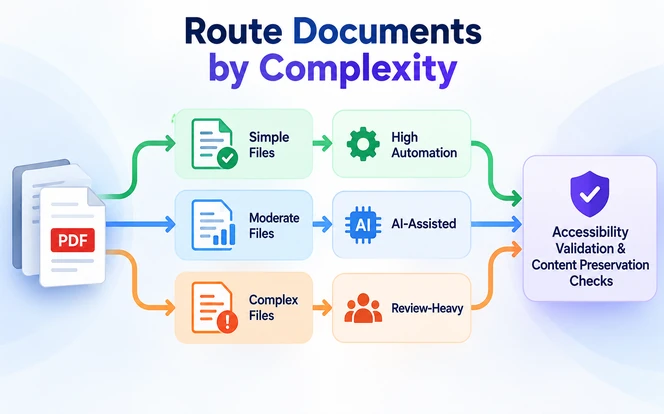
Each lane carries a different mix of automation and review. The table below shows which document types belong in each path, how much work the platform can handle alone, and the OCR accuracy to expect.
| Document Type | Remediation Path | Expected Automation | Indicative OCR Accuracy |
|---|---|---|---|
| Simple text PDF | Automated fixes, automated validation, and spot review | High | Not required, native text layer |
| Multi-column or image-heavy PDF | Automated analysis, AI suggestions, and review of reading order and images | Medium | Not required for body text; 90 to 98 percent on text inside images |
| Scanned PDF | OCR, structure detection, AI suggestions, and full review | Medium to low | 95 to 99 percent on clean 300 DPI scans; 80 to 95 percent on degraded pages |
| Complex tables or forms | Automated detection and intensive human review | Low | 85 to 95 percent on scanned tables and forms; cell text needs review |
OCR figures are indicative character-level ranges for scanned or image-based text. Actual accuracy depends on the OCR engine, scan resolution, fonts, and language, so measure it on your own reference set.
Routing also makes cost predictable. Teams can estimate review hours per batch before processing starts, instead of discovering halfway through that most files need manual work.
For large backlogs, this triage step is what makes bulk PDF remediation workable. Thousands of files can be sorted into lanes before any reviewer time is committed.
Understand the PDF Remediation Problem
Generic document platforms stop at extracting text. A remediation platform has to rebuild the hidden structure that assistive technologies read, and each part of that structure needs its own handling.
Tag Tree and Heading Hierarchy
Tagged PDF stores meaning in a tag tree that sits alongside the visible page content. The engine must create or repair tags for headings, paragraphs, lists, and figures, and link each tag to the right content.
Heading levels should follow the logical outline of the document, not font size alone. A skipped level, or a bold line wrongly tagged as a heading, breaks navigation for screen reader users.
Reading Order and Artifacts
The logical structure tree provides the structure that assistive technologies use to determine reading order. Poorly tagged files often fall back on the raw content stream, which breaks on multi-column layouts, sidebars, and callouts.
Layout analysis should arrange structure elements to match the intended flow. Decorative elements such as page numbers, running headers, background shapes, and rules should be marked as artifacts so they stay out of the reading sequence.
Tables and Header Relationships
Tables need structured rows, header cells, and data cells so each value is announced with its headers. For complex cases such as merged cells and multi-level headers, follow the Tagged PDF Best Practice Guide rather than rules borrowed from HTML.
Alternative Text, Links, and Annotations
Informative images need alternative text, and charts often need longer descriptions. Link tags must connect to their link annotations, and other annotations such as comments must be tagged or handled so they are not silently lost.
Forms, Language, Metadata, and Bookmarks
Form fields need accessible names, tooltips, and a logical tab order. The document also needs a declared language, a title set to display in the window bar, and bookmarks for longer files.
Scanned Content
Scanned pages contain images of text, not text. OCR must run first, and its confidence scores should travel with the content. Low-confidence regions are then flagged for review instead of being tagged as certain.
Design the Platform Architecture
Keep the architecture lean and organized around the decision framework. Processing, rules, AI suggestions, review, and validation should be separate services so each can change without disrupting the others.
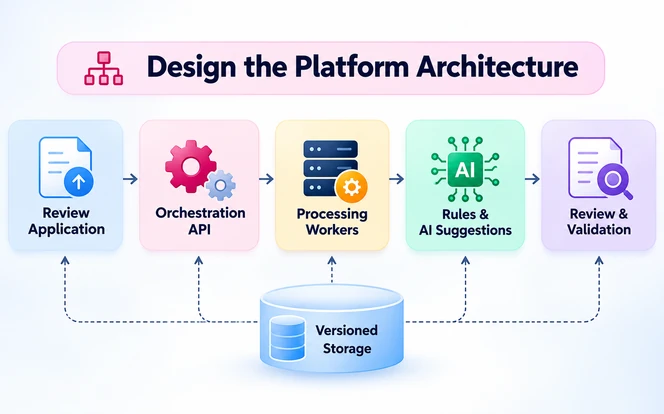
The core components are:
- Review application: the interface where reviewers resolve findings, compare versions, and approve output.
- Orchestration API: manages jobs, routing decisions, permissions, and integrations with document management systems.
- Processing workers: run OCR, tagging, AI suggestions, and export as isolated, retryable tasks.
- Versioned storage: keeps the original file, each remediated version, and every report side by side.
A Real-World Example: ITHAKA's Pipeline on AWS
One production example is the on-demand PDF remediation pipeline ITHAKA built on AWS for JSTOR content. It shows one proven architecture, not a universal template, but its design choices map closely to the framework above.
Each job starts with an event carrying a tracing identifier. The PDF is split into pages, PDFix applies structural tagging, and Amazon Bedrock drafts alt text. The merged file is then validated against PDF/UA using tools such as veraPDF.
Three decisions stand out: tagging tools are modular and swappable, and every stage emits status events for a full audit log. Heuristic pre-analysis also runs first, with human intervention signaled when automated remediation falls short.
For its own corpus and pipeline, ITHAKA reports a 98 percent accessibility check pass rate at roughly $0.026 per page. These are one organization's results, not a general benchmark for remediation platforms.
Remediated files are cached and reprocessed only when the source document or the pipeline itself changes, which keeps repeat requests inexpensive and avoids redundant processing.
Choose Technology by Decision Criteria
A technology list is less useful than knowing what to test. The table below gives common options, but the evaluation criteria matter more, because products behave differently on real remediation work.
| Component | Common Options | What to Evaluate |
|---|---|---|
| PDF SDK | PDFix SDK, Apache PDFBox, or commercial SDKs | Tag-tree editing, PDF/UA support, server-side licensing |
| OCR | Tesseract, Azure AI Document Intelligence, or Amazon Textract | Confidence scores, layout and table output, data residency |
| AI models | Hosted or self-hosted vision-language models | Alt-text quality on your own files, data handling terms, version pinning |
| Validation | Open-source PDF/UA validators plus custom checks | Rule coverage, machine-readable reports, update cadence |
| Orchestration | Celery, RabbitMQ, or cloud workflow services | Retries, idempotency, per-stage queues, tracing |
| Storage | Amazon S3, Azure Blob Storage, or private object storage | Encryption, versioning, retention controls |
Evaluating a PDF SDK
The PDF SDK can be costly to replace later, because remediation logic may become tightly coupled to its document model and APIs. Test each candidate against your own difficult files before committing.
A library that extracts text well may not be able to write a conformant tagged PDF, so evaluate each candidate on these capabilities:
- Tag-tree manipulation and structure creation.
- Reading-order handling and artifact marking.
- Table structure, header cells, and scope.
- Form field and annotation handling.
- PDF/UA-related output and validation hooks.
- Licensing for server-side, high-volume processing.
- Performance and memory use on large scanned files.
Build the Ingestion and Detection Layers
Like the intake step in AI document automation software, the ingestion layer verifies file type, size, and integrity. It also scans for malicious content and stores the untouched original before processing begins.
It then inspects existing tags, fonts, images, annotations, and form fields, runs OCR where needed, and assigns the document to a complexity route.
The detection engine's job is to identify uncertainty, not just issues. Every finding should be labeled as a confirmed failure, a potential issue, or an item needing manual inspection, with the affected element and rule attached.
This labeling stops the platform from presenting guesses as verified violations. It also feeds the decision framework, because the certainty of a finding determines which remediation path it can take.
Build the Remediation Engine
The remediation engine's job is deciding whether to automate. For each finding, it checks the task category, applies deterministic fixes directly, requests AI suggestions for assisted tasks, and routes everything else to review.
Deterministic fixes include setting the document language, displaying the title, marking known artifacts, and repairing tag nesting errors. Because their outcome is predictable, they can run without approval but still pass through validation.
Structural repairs should follow the same rules as manual PDF accessibility tagging. Every tag must carry the correct role and point to the content it describes.
Every change should be reversible and attributed. Reviewers need to see what changed, why, and whether a rule or a model produced it, so they can accept, modify, or reject it.
Use AI for Suggestions, Not Final Decisions
Document AI already extracts structured fields reliably in production, as in AI document processing for Transworld Logistics. Accessibility asks more of a model: proposed heading structure, reading order on complex layouts, and first-draft alt text.
Treat every AI output as a draft with a confidence score, calibrated against an expert-remediated reference set rather than assumed. Low-scoring suggestions go to reviewers first, and suggestions on charts or legal tables always need approval.
Pin model versions and record them with each suggestion. When a model is upgraded, compare its outputs on a reference set before letting the new version touch production documents.
Design Human Review Around Semantic Uncertainty
Human review exists to resolve semantic uncertainty: what an image means, how a complex table relates, or whether reading order reflects the author's intent. The interface should bring reviewers straight to those decisions.
Show the page, the tag tree, and open findings side by side, with AI suggestions pre-filled for editing. Reviewers should be able to reorder content, assign table headers, and rewrite alt text in place.
The review tool must itself be accessible, with keyboard controls, visible focus, and meaningful status messages. For large collections, add task assignment, comments, and approval states so no issue is fixed twice.
Add a Content Preservation Check
Accessibility validation asks whether the document improved. Content preservation asks a different question: did remediation accidentally change the original content or layout? An enterprise platform needs both answers before anyone approves a file.
The full workflow becomes source, remediation, accessibility validation, content-preservation validation, and human approval. Compare the remediated file against the original and flag any of the following:
- Missing or changed text.
- Missing images or figures.
- Broken or altered links.
- Unexpected page additions, deletions, or reordering.
- Damaged table content.
- Visible layout shifts.
- Missing annotations or form fields.
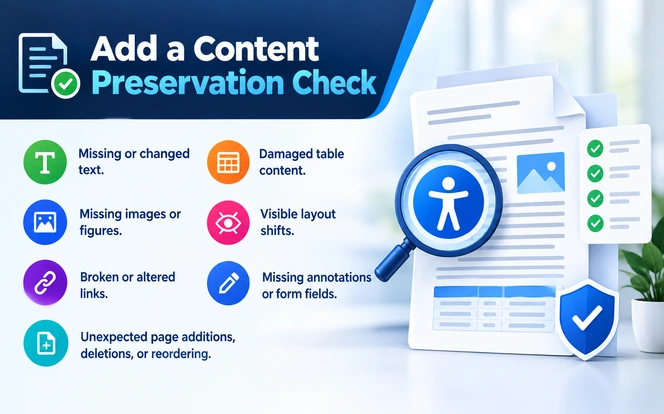
Text and link comparisons can be automated with extraction diffs, and visual changes can be caught by rendering both versions and comparing page images.
Not every difference is a problem. Remediation intentionally changes tags, metadata, bookmarks, artifacts, annotations, and reading structure. The platform should classify each difference as expected or unexpected and hold unexpected changes for review.
Validate Accessibility Independently
Validation must run on the exported file, not the editor view, and it should be independent of the engine that made the changes. It has two distinct layers that answer different questions.
Automated Validation
Validators such as veraPDF check machine-testable conditions, including tag structure and many PDF/UA requirements. They are fast and consistent enough to run on every document, but they can only confirm what a rule can measure.
Human and Assistive Technology Validation
A validator cannot tell whether alt text is meaningful, whether reading order makes sense, or whether a form is usable. Testing representative documents with NVDA, JAWS, or VoiceOver complements automated checks rather than replacing them.
Reports should separate passed checks, failed checks, manual findings, and requirements not evaluated. Teams without in-house QA can use software testing services for repeatable test runs, but should confirm testers have accessibility expertise.
Keep a Remediation Audit Trail
Enterprise, regulated, and high-volume workflows need to prove what happened to every file. For each remediation run, record the following:
- Original document and version.
- Output version.
- Ruleset version.
- Processing engine version.
- AI model and version, where applicable.
- Changes made.
- Which changes were automated and which were AI-generated.
- Reviewer.
- Validation results.
- Approval status.
With this record, any published document can be traced to the exact rules, models, and people that shaped it. That simplifies audits, accessibility complaints, and decisions about which files to reprocess.
Secure and Scale Document Workloads
Remediation queues often hold medical, financial, legal, and HR documents. Encrypt files at rest and in transit, isolate tenants, and set separate retention rules for originals, intermediate files, and outputs.
Check where AI suggestions are processed. Sending page images to an external model may breach data agreements, so consider self-hosted or region-restricted processing where data-processing requirements call for it.
For scale, split large files into pages for parallel processing and give OCR, remediation, and validation their own queues. Make reprocessing idempotent so retries never duplicate outputs or overwrite an approved version.
Decide Whether to Build, Buy, or Take a Hybrid Approach
Before committing engineering effort, decide how much of the platform you actually need to own. Three approaches are common, and each suits a different situation.
Build When
- The organization has specialized document types or requirements.
- Accessibility processing is strategically important to the business.
- Proprietary workflows need deep customization.
Buy When
- Accessibility remediation is a supporting capability rather than a core product.
- The organization wants to reduce engineering effort and time to compliance.
- An existing product already covers the required workflow.
Choose a Hybrid When
- Custom orchestration is required around existing systems.
- Specialized remediation or validation components can be integrated rather than rebuilt.
For the buy or hybrid path, test products against your own documents. Limina, SDLC Corp's ADA and WCAG document accessibility remediation software, discovers, remediates, and validates PDFs at repository scale and maps findings to standards including PDF/UA.
Build an MVP and Measure Its Performance
Start with one route from the complexity table, usually simple text PDFs. The MVP should cover upload, detection, deterministic fixes, review, content-preservation checks, export, and validation reporting before scanned files or forms are added.
Measure the platform with metrics that reflect remediation quality, not just throughput, and give each one a target range:
| Metric | What It Tells You | MVP Target Range |
|---|---|---|
| Automation coverage | Share of findings resolved without human action | 60 to 80 percent on simple text PDFs |
| Human override rate | How often reviewers change automated or AI fixes | Under 15 percent |
| False-positive rate | Findings flagged that were not real issues | Under 10 percent |
| False-negative rate | Real issues the detector missed | Under 2 percent on critical checks |
| Content-preservation rate | Files that passed with no unintended changes | 99 percent or higher |
| Validation failure rate | Exports that fail automated validation | Under 5 percent |
| Reprocessing rate | Files that needed a second run | Under 5 percent |
| Average human-review time | Reviewer minutes spent per document | Under 10 minutes per simple text PDF |
| Cost per document or page | Total processing and review cost per unit | Below your current manual remediation cost per page |
These targets are indicative starting points for a simple-text MVP, not industry benchmarks. Recalibrate them for each route once your reference set produces real numbers.
Benchmark these against the same expert-remediated reference set used to calibrate AI confidence thresholds. Prioritize improvements that lower false negatives and override rates, since they represent barriers users still face, rather than simply raising the count of automated fixes.
Conclusion
A document accessibility remediation platform succeeds when every fix follows a clear path. Detect what you can, automate what is safe, and let AI suggest. Then let people decide on meaning, and validate both accessibility and content.
Start with one document route, a versioned ruleset, and a reference set of real files. Expand automation only when your metrics show it preserves content and produces output that people can actually use.
Frequently Asked Questions
It is a software system that detects accessibility barriers in digital documents and fixes what can be fixed safely. It routes uncertain issues to reviewers and validates the result against standards such as PDF/UA and WCAG.
Not for most real document collections. Language, metadata, and basic tagging can be automated reliably, but complex tables, chart descriptions, and ambiguous reading order still need human judgment.
Sort each task by how predictable its correct result is. Rule-derivable fixes can be automated, pattern-based tasks can use AI suggestions with review, and tasks that depend on meaning or intent go to human reviewers.
Build when remediation is strategic or your workflows are highly specialized. Buy when it is a supporting capability and an existing product fits. A hybrid approach suits teams that need custom orchestration around proven components.
PDF and DOCX are practical starting points. Additional formats can include PPTX, XLSX, HTML, and EPUB, depending on user requirements and the platform's processing capabilities.
Run exported files through automated validators, compare them with the originals for content preservation, and test representative samples with screen readers. Include simple, scanned, multi-column, table-heavy, and form-based documents.
Accessibility checking identifies potential or confirmed barriers. Remediation modifies the document to correct those barriers. A complete platform should support both functions and verify the resulting output.
Development time depends on supported formats, document complexity, automation requirements, and the capabilities of the selected processing SDKs.
A focused prototype covering one document route is substantially smaller in scope than an enterprise platform supporting multiple formats, complex remediation, and large-scale processing.