Bulk PDF accessibility remediation is not a larger version of fixing one file. Instead, it works as a portfolio problem. You decide which documents to keep and prioritize. You automate what can be automated, review what cannot, and govern the library afterwards.
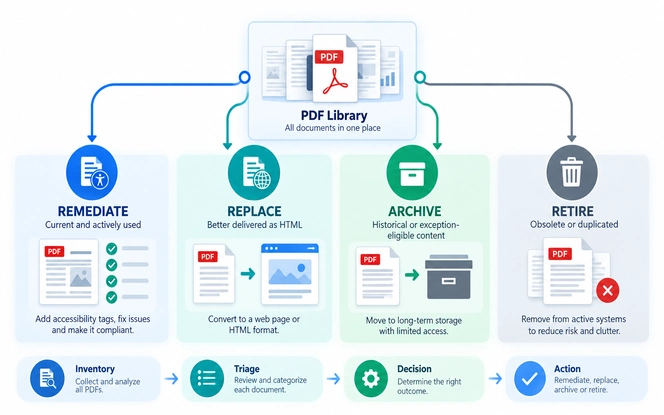
- The first decision: every file gets one of four outcomes, which are remediate, replace, archive, or retire.
- Effort depends on page count, complexity, and whether the source file still exists.
- Automation handles tagging, metadata, and detection at scale.
- People decide alternative text, table logic, form labels, and validation.
- Clear ownership, evidence per file, and checks on new uploads keep it in place.
What Is PDF Remediation?
PDF remediation means adding the structure assistive technology needs, so a document can be read in the intended order. In practice, bulk PDF accessibility remediation starts from the same craft as fixing one file.
Each document needs the structure assistive technology reads. That means tags, reading order, and heading levels. It also means alternative text, table headers, form labels, and properties such as title and language.
In fact, a file can look correct on screen and still be unusable. Screen readers rely on the tag tree rather than the visual layout.
Bulk PDF accessibility remediation uses the same techniques. What changes is that you must first decide which files deserve the work at all.
Why Bulk Remediation Is a Portfolio Problem
Typically, large remediation programmes begin after one of four triggers. These are a compliance deadline, an accessibility complaint, a procurement requirement, or evidence that users cannot complete important documents.
In each case, those triggers set the same constraints: a deadline, a scope, and a budget.
Public entities work to the ADA Title II web and mobile rule,
Meanwhile, federal agencies and their suppliers work to Section 508 laws and policies and the Revised 508 Standards.
Those constraints turn remediation into portfolio management. The real questions become which files to fix first, and which to replace, archive or remove. You also have to prove each decision later.
The Four Outcomes for Every Document
To begin with, use these four outcomes as the first triage decision for every document.
| Outcome | Use When | Effort |
|---|---|---|
| Remediate | The document is current and used | Full remediation cost |
| Replace | A web page serves the content better | Content and build cost |
| Archive | The document meets an applicable exception | Record-keeping only |
| Retire | The document is obsolete or duplicated | Removal only |
As a result, early triage can substantially reduce the number of files needing remediation. It identifies obsolete, duplicate, and archival content, plus content better suited to HTML.
How to Scope the Work
First, crawl your website and document stores. Record the URL, owner, publication date, page count, and download frequency for every file.
Files are often scattered across shared drives, a CMS, and email attachments. Consolidating them first makes the inventory simpler. It also makes later monitoring easier, as this guide to document management software sets out.
Band Files by Complexity
Moreover, effort per page varies widely, so group the library before quoting any of it.
- Simple: text and headings, single column.
- Moderate: multi-column layouts, simple tables, images.
- Complex: data tables, charts, maps, appendices.
- Forms: anything people fill in, needing labels, tab order, and interaction testing.
- Scanned: image-only files needing OCR before tagging.
Inventory, triage, and complexity banding turn an unknown backlog into a scoped programme with a defensible budget.
Scope Your LibraryHow to Prioritize PDFs for Remediation
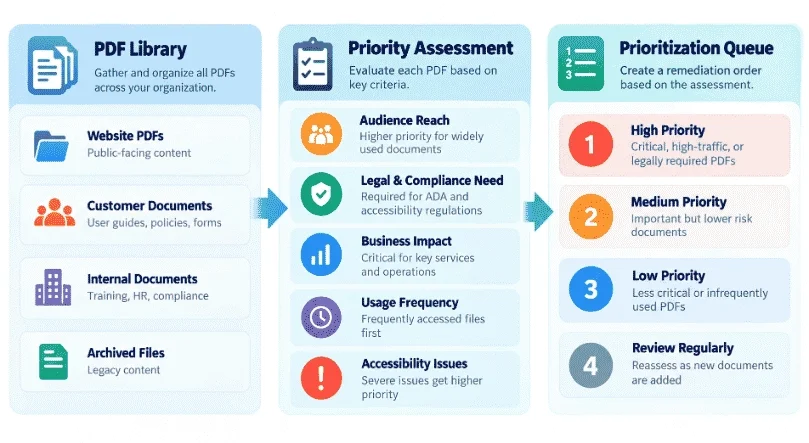
Prioritization is where bulk PDF accessibility remediation differs most from single-file work.
However, download counts are one useful signal, not the only one. A rarely downloaded form that people must complete to receive a service usually matters more than a popular newsletter.
Weigh five signals together:
- Usage: how often people open the document, and who they are.
- Service criticality: whether someone needs it to apply for or complete a service.
- Accessibility risk: an untagged form can block users completely, while a missing document title is an inconvenience.
- Complexity: how much effort remediation will take, which affects sequencing.
- Source availability: an available source file makes the fix faster and more durable.
In short, record a high, medium, or low judgment for each signal. Agree the judgment with the content owner and accessibility team.
Avoid a weighted numeric score unless you have validated the method against real outcomes. False precision is worse than a documented judgment.
Illustrative Example: Triaging a 1,200-PDF Library
For example, the figures below are illustrative, to show the shape of a triage exercise. They are not SDLC Corp performance data.
| Outcome | Files | Why |
|---|---|---|
| Retire | 310 | Superseded versions, expired notices, duplicates |
| Archive | 180 | Historical records not used to access a service |
| Replace with HTML | 90 | Policies and guidance suited to web pages |
| Remediate | 620 | Current forms, applications, reports, notices |
The 620 remaining files would then split by complexity. For example, 240 could be simple, 210 moderate, 110 complex, 40 forms, and 20 scanned.
That split, rather than the file count, is what sets the budget, so quote and schedule those bands separately.
Automated Remediation: Scope and Limits
Essentially, automation removes mechanical work and directs human effort to judgment. The W3C makes the same point in its guidance on accessibility evaluation tools. The guidance states that tools cannot determine conformance on their own.
Treat claims of fully automatic compliance with caution. Several success criteria depend on meaning and context, not structure alone.
If your team needs a repeatable system for high-volume remediation, you can Build a Document Accessibility Platform with automated processing, human review, validation, and audit-ready reporting.
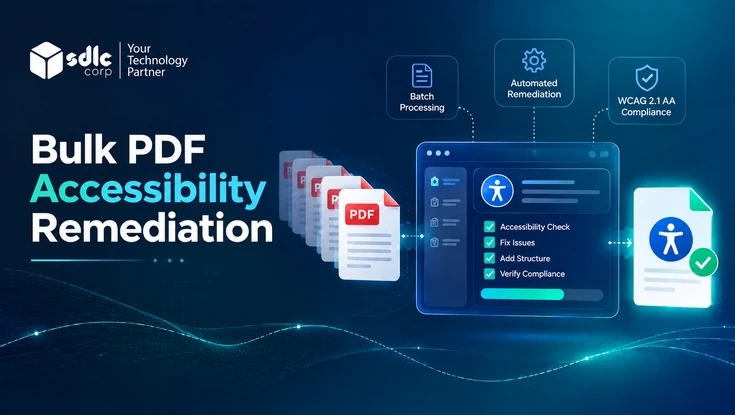
The Bulk PDF Accessibility Remediation Workflow
Overall, a repeatable bulk PDF accessibility remediation pipeline keeps a large library moving. It avoids re-deciding the approach for every file.
How It Works
How a Document Moves Through the Pipeline
- DiscoverInventory every PDF with metadata and usage
- TriageAssign remediate, replace, archive, or retire
- PrioritizeSequence the queue using the five signals
- Batch scanSize the work by defect type
- Fix at the sourceCorrect the Word or InDesign file and re-export a tagged PDF
- Remediate the PDFWhere no source exists, fix tags, order, alternatives, tables, forms
- ValidateAutomated check, manual review, assistive technology pass
- Publish and recordReplace the live file and log the evidence
- MonitorRe-scan on a schedule and check new uploads
Steps 1, 4, 8 and 9 are routine handoffs between systems. Specialists can therefore concentrate on steps 5 to 7.
Those routine handoffs are also the parts most suited to workflow automation.
Governance: Who Owns What
Notably, bulk PDF accessibility remediation stalls when nobody owns the decisions.
| Role | Owns |
|---|---|
| Content owner | Document accuracy, the source file, and whether it is still needed |
| Accessibility team | Remediation and accessibility judgment calls |
| QA reviewer | Independent validation against the acceptance criteria |
| Publishing team | Replacing the production file |
| Governance or compliance | Requirements, evidence standards, exception policy, review cadence |
Decisions to Record
- Whether you remediate a document or replace it with a web page.
- Which exceptions are acceptable, and what evidence each one requires.
- When human review is mandatory rather than optional.
- What must hold true before anyone publishes a document.
- When a document needs a recheck.
A one-page decision matrix covering those five points prevents most of the disputes that slow large programmes down.
Clear roles, acceptance criteria, and a record for each file turn remediation into a programme you can report on.
Talk to Our TeamFixing Recurring and Template PDFs at the Source
By contrast, a one-off report is a single unit of work. A template-generated document can reproduce the same defects every time it is issued. Monthly statements and permit forms are common examples.
Look for three categories in your library:
Word or InDesign files used across a department, where heading styles and alternative text prompts can be set once.
Output can come from an ERP, case management, or reporting tool. In these cases, the defect sits in the generator rather than the file.
Reusable forms, where you define labels, tab order, and instructions once and every file inherits them.
Fixing these removes the defect from every future version. That can cut the backlog further over time than remediating the same number of individual files.
PDF Remediation Software and Accessibility Checkers
Above all, think in capabilities rather than products. A bulk programme needs discovery, assessment, remediation, human review, validation, reporting, and monitoring.
Individual tools cover parts of this. Adobe Acrobat Pro and the free PAC accessibility checker assess files. Dedicated PDF remediation software, such as CommonLook, Equidox or PREP, handles the tagging work itself.
Screen readers such as NVDA or JAWS show how a file actually behaves, particularly on forms.
Platforms spanning several layers also exist, and Limina is one example built around discovery, assessment, remediation, monitoring, and reporting.
Map whichever tools you choose against those seven capabilities, and note which gaps your team will cover manually.
Scanned and Image-Only PDFs
Meanwhile, scanned files usually sit in the highest effort band, because there is no structure to repair.
OCR has to create the text layer first. Its accuracy depends on resolution and skew. It also depends on whether the original was typed or handwritten, as Mastering PDF Text Extraction explains.
OCR alone does not make a PDF accessible. Tags, heading structure, reading order, alternative text, and table fixes still follow.
Security and Data Governance
In many cases, libraries hold personal or legally sensitive material. Remediation may move those files through tools and sometimes third parties. Decide these points before selecting a platform or vendor:
- Sensitivity classification: which documents may leave your environment.
- Processing location: where the vendor processes and stores files, and under which jurisdiction.
- Access controls: whether access is role-based, logged, and time-limited.
- Transfer method: whether the transfer stays encrypted and auditable.
- Retention and deletion: how long files and derived data are kept, and how deletion is confirmed.
- Sub-processors: whether subcontractors are named.
- Source-file ownership: who owns corrected source files at contract end.
- Staff vetting: whether reviewers handling sensitive content are checked.
Ask for these details in writing during procurement. Assess the answers against your own security policy rather than relying on a certification logo.
Quality Assurance at Scale
Quality control in bulk PDF accessibility remediation has to be systematic rather than personal.
First, define acceptance criteria before bulk PDF accessibility remediation starts.
Consider basing them on the ICT Testing Baseline so your tests match what federal reviewers use.
Automated checks should be clean where applicable. Reading order, meaningful alternatives, tables, forms, and assistive technology behaviour should also meet the criteria you set.
Then sample every batch, weighted toward complex files and forms. Track failure reasons rather than pass rates alone. Recurring alternative text problems suggest a briefing gap, while recurring tag problems often point to a template.
Re-test after publishing, because files can be re-saved or replaced in ways that undo the work.
KPIs for a Bulk PDF Accessibility Remediation Programme
| Group | Metrics |
|---|---|
| Portfolio | Percentage inventoried, remediated, replaced, archived, retired |
| Production | Pages per day, documents per batch, first-pass acceptance, rework rate |
| Quality | Automated defects per document, manual QA defects, assistive technology defects, recurring categories |
| Governance | Percentage validated, with evidence on file, with an assigned owner, and of new PDFs checked before publication |
The governance group is the one that shows whether the programme will hold after the backlog is cleared.
Common Mistakes and Their Consequences
| Mistake | What Follows |
|---|---|
| Auto-tagging without human validation | False pass, then rework when a user or auditor finds the defect |
| Alternative text that describes rather than informs | Users get "bar chart" instead of the data |
| Remediating output when a template exists | The same defects return with the next version |
| Tagging layout tables as data tables | Assistive technology output becomes harder to follow |
| Scheduling forms last | The highest-review-effort files land against the deadline |
| No monitoring after launch | New uploads rebuild the backlog |
PDF Remediation Cost and Effort Drivers
Notably, bulk PDF accessibility remediation may be priced by page, document, complexity band, project scope, subscription, or ongoing volume. The pricing model matters less than knowing which characteristics drive effort.
| Driver | Effect | Why |
|---|---|---|
| Data tables, charts, maps | Increases | Each needs human interpretation |
| Forms | Increases | Labels, tab order, instructions, and interaction all need validation |
| Scanned files | Increases | OCR plus full tagging |
| Missing source files | Increases | Structure has to be rebuilt inside the PDF |
| Tight deadlines | Increases | Surge staffing |
| Consistent templates | Decreases | Fixes repeat predictably |
| Available source files | Decreases | Fix once, then re-export |
| Committed volume | Decreases | Usually priced lower per unit |
| Triage before quoting | Decreases | Removes files nobody needs |
Indicative Effort per File
These ranges come from the effort tiers in our guide to making documents accessible. Use them to sanity-check a quote, not as a price.
| Tier | Typical documents | Effort per file |
|---|---|---|
| Simple | Short letters and text-only notices | Often under an hour |
| Moderate | Policies, newsletters, slide decks | A few hours |
| Complex | Annual reports, forms, scanned files | One to several days |
| Enterprise scale | Thousands of mixed files across many sites | A structured programme run over months |
What to Ask Vendors For
Therefore, request a sample of about 10 representative documents, and ask for the following alongside it:
- Complexity classification of the sample, with the reasoning.
- The remediation method, and which steps are automated.
- The validation method, including checker and assistive technology.
- A rework policy covering who pays when a file fails your QA.
- Turnaround assumptions by complexity band.
- The evidence provided for each file.
- Whether corrected source files are returned.
- Pricing by complexity rather than a blended rate.
A sample batch priced by complexity tells you more than any rate card. It also sets the acceptance criteria for everything that follows.
Request a Sample BatchDelivery Models
PDF remediation services suit a fixed backlog with a deadline, while remediation software suits a steady publishing cycle.
| Model | Can Suit | Consider |
|---|---|---|
| In-house | Steady publishing, or content that cannot leave your environment | Training time, turnover, slower start |
| Outsourced | A large backlog with a fixed deadline | Sample first and define acceptance criteria |
| Software | Teams wanting a repeatable pipeline | Still needs skilled reviewers |
| Hybrid | Clearing a backlog while keeping internal ownership of new publishing | Needs explicit ownership of each handoff |
A hybrid model can provide external capacity for the backlog. It also keeps internal control over new documents.
How Regulation, Criteria, Standards and Validation Fit Together
WCAG PDF remediation sits across four layers, and in practice teams often conflate them.
| Layer | Question | Example |
|---|---|---|
| Regulation or contract | What applies to us? | Sector rules, procurement terms, internal policy |
| Accessibility criteria | Which requirements apply? | WCAG success criteria, with WCAG2ICT as informative guidance for non-web documents |
| PDF technical standard | How is it implemented in the file? | PDF/UA (ISO 14289) |
| Validation | How do we confirm it? | Automated checks, manual review, assistive technology testing |
Write requirements at the first two layers, implement at the third, and prove at the fourth.
Which WCAG Version Applies?
Settle this in writing before work starts, because versions and obligations differ.
- What the regulation requires: the DOJ ADA Title II rule specifies WCAG 2.1 Level A and AA. This applies to covered content. Other regimes and contracts may reference different versions.
- What your organization has chosen as its target, which is sometimes a later version than the regulation requires.
- Which WCAG version applies to the work: WCAG 2.2 is the current W3C Recommendation. WCAG2ICT covers WCAG 2.0, 2.1, and 2.2.
- How WCAG applies to non-web documents, where WCAG2ICT is informative guidance rather than a separate legal requirement.
- Whether PDF/UA is part of your technical framework, as a requirement, a benchmark, or not at all.
Document those five answers, because they define what your team and vendors are actually being asked to deliver.
PDF Remediation Checklist
Finally, apply the same checks to every file before publishing. The success criteria numbers below are common to WCAG 2.1 and 2.2.
- The file is tagged, and the tag tree matches the visible structure (1.3.1).
- Headings are tagged in a logical order.
- Reading order follows the intended sequence (1.3.2).
- Informative images have text alternatives, and decorative images are marked as artifacts (1.1.1).
- Data table headers are tagged, with scope on complex tables.
- Form fields have programmatic labels and a logical tab order (4.1.2).
- Link text describes its destination (2.4.4).
- Contrast meets 4.5:1, or 3:1 for large text (1.4.3).
- Title and language are set (2.4.2, 3.1.1).
- The file passes an automated check and an assistive technology review.
Evidence for Every Document
After all, remediation you cannot evidence is difficult to defend in a complaint, an audit, or a procurement review. Keep a record per file, which you can copy as a template. These records can also support Compliance Reporting by keeping validation results, reviewers, and review dates together.
| Field | Example |
|---|---|
| Document name | Permit Application 2026 |
| Owner | Permitting Department |
| Version | v3.2 |
| Remediation date | September 2026 |
| Issues fixed | Tags, reading order, 12 alternatives, 3 tables |
| Validation method | Automated, manual, assistive technology |
| Result | Passed |
| Reviewer | Named reviewer |
| Next review | Scheduled date |
Preventing the Next Backlog
In summary, bulk remediation solves yesterday’s library. Preventing the next one costs less than repeating the exercise.
- Give authors accessible templates, and fix the templates behind recurring documents.
- Train the people who create documents, not only those who fix them.
- Add an accessibility check to the publishing approval step.
- Publish HTML where the content suits a web page, which accessible web development makes straightforward.
- Put accessibility requirements, validation duties, evidence, and source-file ownership into vendor contracts.
How we keep this guide accurate: it follows WCAG 2.1 and 2.2 and WCAG2ICT. It also follows the Revised Section 508 Standards and PDF/UA (ISO 14289).
The 1,200-file example is a worked model for illustrating triage, not client data. We review this guide whenever the standards or governing rules change.
Last reviewed September 24, 2026. This article is general information, not legal advice.
SDLC Corp Capability
Remediating Document Libraries at Scale
SDLC Corp helps organizations inventory, triage, remediate, and validate large PDF libraries. It also provides the evidence trail needed for complaints, audits, and procurement reviews.
Inventory and Triage
Crawl the library, classify complexity, and decide what to remediate, replace, archive, or retire.
Remediate and Validate
Fix tags, reading order, alternatives, tables, and forms, then validate with automated, manual, and assistive technology checks.
Monitor and Report
Track new and changed documents, keep evidence current, and report progress against your target.
Conclusion
Bulk PDF accessibility remediation is a portfolio and governance exercise more than a technical one. The tagging work is the same as for a single file.
Three decisions shape the outcome. Triage before you remediate, fix sources and templates wherever they exist, and keep evidence for every file.
Start with a representative sample. Run about 10 documents through the full pipeline, from discovery to assistive technology validation. Measure throughput by complexity band.
That gives you a defensible budget and tested acceptance criteria. It also gives your team a workflow it has already used before committing a library of thousands.
Frequently Asked Questions
Bringing a whole document library to the accessibility target set by your regulation, contract, or internal policy. It uses triage, prioritization, batch tooling, human review, and sampling, rather than fixing each file in isolation.
Duration depends on page count and complexity more than file count. Run a sample batch, measure pages per day by complexity band, then project from that.
No. Automation can tag, set metadata, and detect defects at scale. Alternative text, table structure, reading order, and form labels still depend on human judgment and validation.
WCAG provides accessibility success criteria, while WCAG2ICT provides informative guidance on applying WCAG 2.x to non-web documents. PDF/UA is an ISO technical standard for accessible PDF files.
The requirements that apply to a particular document depend on the governing regulation, standard, contract, and use case.
Fix the source wherever it exists, particularly for template-generated documents. This prevents the same defects from recurring in every future version.
Section 508 remediation means making applicable federal-agency electronic content conform to the Revised 508 Standards. That includes requirements for electronic documents and for procurement.
Yes. OCR makes text machine-readable, but tags, heading structure, reading order, alternative text, and table or form fixes still follow.
Ownership is usually shared. Content owners hold the source files, while an accessibility team remediates them. A QA reviewer validates independently, and a governance function sets requirements and evidence standards.
Pricing varies by page, document, complexity band, or subscription. Effort rises with data tables, forms, scanned files, and missing source files. Ask a vendor to price a sample batch by complexity rather than quoting a blended rate.
Yes, for checking. The free PAC checker tests against PDF/UA, and Adobe Acrobat Pro includes a checker with the licence. Free tools detect problems. Fixing tags, reading order, and form labels still needs a remediation tool and a person.