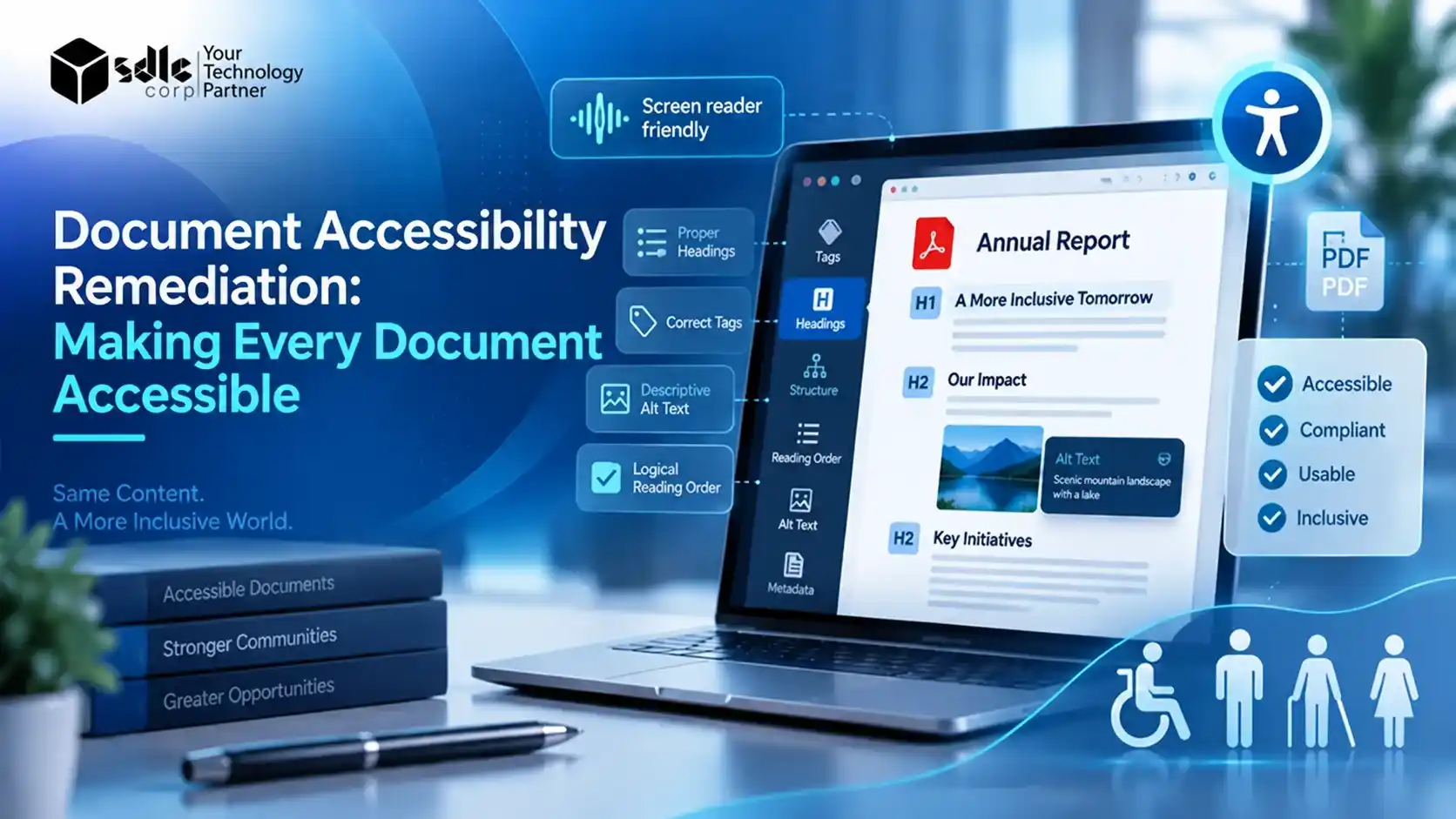
Document accessibility remediation is the process of repairing existing files so that people with disabilities can read, navigate, and use them. It covers PDFs, Word files, slide decks, spreadsheets, and forms published before anyone considered accessibility.
For most organizations, these files are the largest and least visible part of the digital estate. People download annual reports, policy manuals, permit applications, and course materials daily, yet screen readers cannot read many of them reliably.
This guide explains what remediation involves, which standards apply, and how to turn a large library into accessible documents. Along the way, you will find a 7-stage framework, a decision tree, a scoring model, and a QA checklist.
Quick answer
Document remediation corrects a file's hidden structure: tags, reading order, alt text, table headers, and form labels. Assistive technology can then present the content logically, and reviewers confirm the result against WCAG and PDF/UA.
What this guide covers
- Which defects remediation fixes, and how it differs from accessible authoring
- The rules that name documents, with their current conformance dates
- A 7-stage framework, a routing decision tree, and a scoring model
- A QA checklist, effort tiers, and questions to ask a remediation partner
What Document Accessibility Remediation Means
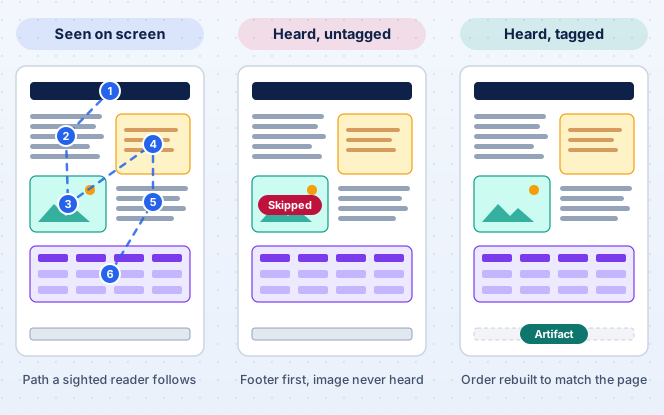
Think of remediation as a retrofit. It leaves the visible content largely as it is and corrects the underlying structure, so assistive technology follows the same logical order a sighted reader does.
Many of the most serious barriers sit in that hidden layer. A PDF can look well organized on screen while its tags are missing, out of order, or wrong. Visible issues such as low contrast still matter too.
When tags are missing or incorrect, a screen reader may announce content out of sequence, skip images entirely, or give the listener no sense of headings and sections. The page looks finished, but the listening experience falls apart.
The Three Benchmarks That Measure Remediation
Teams usually judge remediation work against three benchmarks. Each one answers a different question, and mature programs record results against all three for every file they fix.
- The Web Content Accessibility Guidelines from W3C, in version 2.1 or 2.2, which define what an accessible experience must achieve across all digital content.
- PDF/UA (ISO 14289), which sets the technical rules for building an accessible PDF. PDF/UA-1 applies to PDF 1.7 files, and PDF/UA-2 applies to PDF 2.0 files.
- Legal requirements in the jurisdiction where you publish the document, which decide the target conformance level and the deadline.
Remediation vs Accessible Authoring
Remediation fixes what already exists, whereas accessible authoring prevents new problems from appearing. You need both, because a team that keeps producing inaccessible files will refill the backlog as fast as anyone clears it.
Remediation
- Works on files you have already published
- Reduces the legal and service risk that exists today
- Progress is tracked file by file
Accessible Authoring
- Focuses on templates, tools, and writing habits
- Stops new defects from entering the library
- Progress is tracked team by team
Effective programs therefore pair a one-time cleanup with updated templates, author training, and automated checks at the point of publication. The cleanup lowers risk today, and the process changes keep it low.
Document Accessibility Remediation vs PDF Remediation
People often use the two terms interchangeably, but they describe different scopes. Document accessibility remediation is the umbrella discipline, and PDF remediation is one branch of it, alongside several other file types.
Document accessibility remediation
- PDF remediation
- Word remediation
- PowerPoint remediation
- Excel remediation
- EPUB remediation
Treat any document you offer to the public, customers, students, patients, or employees as in scope. Most teams address the formats below first, because people share them most widely.
| Format | Typical examples | Common barriers | Best place to fix it |
|---|---|---|---|
| Exported reports, scanned letters, fillable forms | Missing tags, wrong reading order, image-only pages | In the source file first, then finished in the PDF | |
| Word and Google Docs | Policies, letters, shared attachments | Manual formatting instead of heading styles, missing alt text | In the document itself, with built-in styles |
| PowerPoint and slide decks | Training material, board presentations | Untitled slides, text boxes read out of order | In the deck, with slide layouts and the reading order pane |
| Excel and data tables | Spreadsheets published with reports | Merged cells, blank header rows, color-only signals | In the workbook, with named tables and clear headers |
| EPUB | Digital textbooks, long-form learning materials | Missing navigation, untagged images | In the source or the publishing workflow |
Why PDFs Receive Special Attention
Organizations most often publish PDFs as the final, fixed version of a file. Few authors ever see their structure, many teams export them without tags, and the original source files often disappear within a few years.
PDFs also carry the highest share of scanned pages and fillable forms, which are the hardest items to repair. Because PDF/UA adds PDF-specific rules on top of WCAG, this work calls for specialist tools and skills.

Why Document Accessibility Remediation Matters in 2026
Accessibility has long been a legal and ethical expectation, but the requirements have become far more specific. Several rules now name documents explicitly, which turns remediation into a dated, budgeted obligation.
The Regulatory Picture
The table summarizes the rules that most often trigger document remediation projects. Dates reflect the one-year extensions that regulators issued in April and May 2026, so seek legal advice on your own obligations.
| Regulation | Who it covers | Technical standard | Key dates | Primary sources |
|---|---|---|---|---|
| ADA Title II web rule | U.S. state and local governments, including public colleges | WCAG 2.1 Level AA | April 26, 2027 (50,000 or more people); April 26, 2028 (smaller entities and special districts) | |
| HHS Section 504 rule | HHS funding recipients, such as hospitals | WCAG 2.1 Level AA | May 11, 2027 (15 or more employees); May 10, 2028 (fewer than 15) | |
| Section 508 | U.S. federal agencies and the technology they buy | WCAG 2.0 Level AA | In force since January 18, 2018 | |
| European Accessibility Act | Many EU products and services, including e-commerce and banking | EN 301 549, aligned with WCAG | Applies since June 28, 2025 |
An extended deadline does not pause the underlying duty. Both U.S. agencies kept WCAG 2.1 Level AA as the standard, and the obligation to provide accessible alternatives on request still applies today.
The Business Risk of Inaccessible Documents
For public bodies, an inaccessible document can lead to complaints, investigations, and costly corrective action. Private businesses face similar exposure, as plaintiffs continue to file lawsuits over digital content that excludes disabled users.
Commercial risk is just as real. Government and enterprise buyers increasingly ask vendors for accessibility conformance reports, so an inaccessible proposal, manual, or product guide can cost a contract before anyone reads a page.
Benefits Beyond Compliance
Accessible documents also help people who fall outside any legal definition of disability. Readers on phones, people using translation tools, and older users with low vision all benefit when text reflows cleanly and headings carry meaning.
There are operational gains too, since properly tagged files are easier to search, index, and reuse. Our guide, Mastering PDF Text Extraction: Tips and Tools, explains why structure matters for machine reading as well.
What Different Sectors Should Focus On
Government Agencies
Start with forms, permits, meeting agendas, and public notices, since residents use these to reach services directly.
Colleges and Universities
Prioritize syllabi, course readings, and slide decks, because inaccessible materials affect grades and enrollment.
Healthcare Providers
Patient forms, consent documents, bills, and discharge instructions come first, as they carry both legal and safety risk.
Banks, Insurers, and EU-Facing Businesses
Review statements, policy documents, and terms, which the European Accessibility Act brings into scope for many services.
What Document Remediation Actually Fixes
Every document is different, yet the same categories of defect appear again and again. The first group sits in the file's structure, which is where most screen reader problems begin.
| Issue | Impact on users | Typical fix |
|---|---|---|
| Missing or incorrect tags | Headings, lists, and paragraphs cannot be identified | Tag content with the correct structure elements |
| Illogical reading order | Sidebars and footers are announced before the main content | Rebuild the reading order to follow the visual flow |
| Images without alternative text | Charts and photos are skipped or announced only as "image" | Add meaningful alt text, and mark decorative images as artifacts |
| Tables without header cells | Readers cannot follow the data cell by cell | Define header cells, scope, and complex associations |
| Unlabeled form fields | Users cannot tell what information a field needs | Set field labels, tooltips, and tab order |
A second group of defects affects how people find, hear, and move through the content. These issues are often quicker to fix, but they still stop readers in their tracks.
| Issue | Impact on users | Typical fix |
|---|---|---|
| Scanned, image-only pages | No text is available to assistive technology at all | Run OCR, then proofread and tag the recognized text |
| Missing title and language | Words are mispronounced, and the file is hard to identify | Declare the title, primary language, and language changes |
| Low color contrast | Text is hard to read for people with low vision | Adjust colors in the source file to meet contrast ratios |
| Vague link text | Link purpose is unclear when heard out of context | Replace phrases such as "click here" with descriptive text |
| No bookmarks in long files | Moving through a long report is slow and tiring | Generate bookmarks from the heading structure |
Most files carry several of these defects at once. Specialists usually correct tags, reading order, and alternative text together, since each fix depends on the structure that the one before it sets up.

A Before-and-After Document Remediation Example
The example below is an illustrative composite based on a typical 24-page annual report exported from a design tool. On screen the file looks polished, but it tells a very different story to assistive technology.
| Element | Before remediation | After remediation |
|---|---|---|
| Tags | None, so the file is untagged | Full tag tree for headings, lists, and figures |
| Document title | File name "AR_final_v7.pdf" | "Annual Report 2025" in the title bar |
| Main heading | Large styled text with no tag | H1, with H2 and H3 below it in order |
| Reading order | Pull quotes and footers read first | Visual flow, with footers marked as artifacts |
| Revenue chart | Announced only as "image" | Alt text states the trend, with a data table below |
| Financial table | No header cells, so values lack context | Headers announced with each value |
| Language | Missing | English declared, with changes marked |
| Bookmarks | None | Generated from the headings |
| Links | Read aloud as long URLs | Descriptive text for every link |
| Validation | Fails most PDF/UA and WCAG checks | Passes PDF/UA and a manual screen reader test |
None of the visible design changed. Every improvement in the after column happened beneath the surface, which is why a visual review alone cannot confirm that a document is accessible.
The 7-Stage Document Remediation Framework
A dependable remediation program follows the same sequence every time: inventory, classify, prioritize, remediate, test, validate, and monitor. Skipping the early stages is one of the most common causes of budget and timeline overruns.
| Stage | Decision criteria | Output |
|---|---|---|
| 1. Inventory | Is the file public, still linked, and owned by someone? | A complete document register |
| 2. Classify | Is it tagged, scanned, a form, or table-heavy, and does a source file exist? | Audit findings and a complexity tier |
| 3. Prioritize | What is the priority score, and which route does the decision tree give? | A ranked, routed work queue |
| 4. Remediate | Will the file change often, and must the final format stay PDF? | Documents ready for testing |
| 5. Test | Has every item on the QA checklist passed? | Test notes and defects |
| 6. Validate | Does the file pass PDF/UA and WCAG validation? | Published file and evidence record |
| 7. Monitor | Has anything new gone live or changed since the last scan? | Regression alerts and trend reports |
Each stage is explained below, along with the practical choices that shape it, so teams can adapt the sequence to their own library and staffing.
-
Inventory Every Document
Start by locating every document on your websites, portals, intranets, and learning platforms. The register records each file with its owner, page count, publication date, and traffic, so effort goes where readers actually are.
-
Classify and Audit Each File
Automated checkers, such as the Acrobat accessibility checker and the free PAC PDF Accessibility Checker, catch machine-detectable failures quickly. They cannot judge whether alt text is accurate or the reading order makes sense.
A trained specialist therefore reviews headings, tables, forms, and images by hand. Each finding is mapped to a WCAG success criterion or PDF/UA requirement, and the file receives a complexity tier.
-
Prioritize and Route the Queue
The prioritization model scores each file, and the decision tree routes it; both appear below. Routing often shrinks the workload considerably, because teams retire outdated duplicates and unused files rather than repair them.
-
Remediate in the Right Place
When the original Word, InDesign, or PowerPoint file is available, make the corrections there. Heading styles, alt text, and table headers set in the source carry into the exported PDF, so the fix survives future edits.
Where no usable source exists, repair the PDF itself. Add or correct tags, rebuild the reading order, mark artifacts, and label form fields. Complex tables and multi-column layouts usually take longest.
-
Test with Assistive Technology
Passing an automated check does not guarantee a usable document. Read each file with a screen reader such as NVDA, JAWS, or VoiceOver, navigate it by keyboard alone, and check it against the full QA checklist.
-
Validate, Publish, and Record
Run a final validation against PDF/UA and WCAG before the file replaces the old version. Log the outcome, so evidence is ready if anyone ever questions the organization's accessibility practices.
-
Monitor for Regressions
Remediated files can break the moment someone exports an old source again, and new files go live every week. Scheduled scans, template controls, and publishing checks keep the library from drifting out of conformance.

Document Remediation Decision Tree: Should You Fix This File?
Not every file deserves the same treatment. Before any tagging begins, run each document through the questions below. The first answer that applies decides the route the file takes.
-
Do readers still need the document?
- No Retire it, or move it to a clearly labeled archive and provide an accessible version on request.
- Yes Go to question 2.
-
Is the editable source file available?
- Yes, and the file changes often Fix the source first, then export a tagged PDF.
- Available, rarely changes, and PDF is a must Remediate the PDF, correcting the source where practical.
- Available, rarely changes, and PDF is optional Consider converting it to accessible HTML.
- No Move on to question 3.
-
Does the PDF contain selectable text?
- No Run OCR, proofread the recognized text, and tag the file manually.
- Yes Continue to question 4.
-
Is it a fillable form?
- Yes Rebuild it as an accessible web form, or label and tag every field in the PDF.
- No, and PDF is a must Remediate the PDF directly.
- No, and PDF is optional Publish the content as accessible HTML instead.
Conversion to HTML is often overlooked. For content that changes regularly or that people read mainly on phones, an accessible web page usually costs less to maintain than a PDF that needs remediation after every update.
How to Prioritize Document Remediation Across a Large Library
When thousands of files are in scope, a simple scoring model helps teams agree on which remediation work comes first. It replaces debate with a repeatable method that content owners and compliance teams can both inspect.
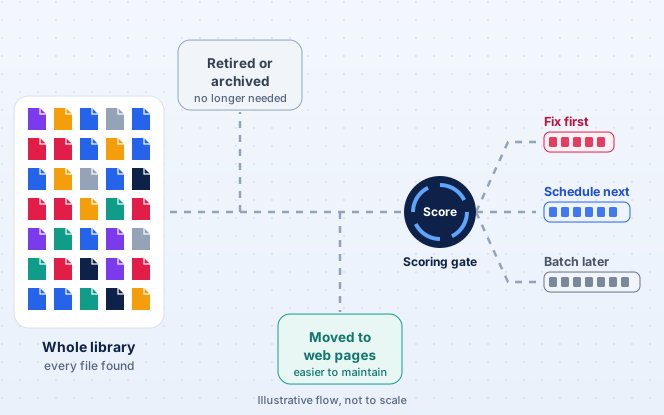
Rate each document from 1 to 3 on six factors, then multiply the six scores together. The table explains what each score means for every factor, so different reviewers apply the scale the same way.
| Factor | Question to ask | Low (score 1) | Medium (score 2) | High (score 3) |
|---|---|---|---|---|
| Risk | What happens if a disabled reader cannot use this file? | Minor inconvenience | Delayed service or complaint | Service denied or legal exposure |
| Audience | Who relies on this document? | Small internal group | Registered users or staff | The general public, patients, or students |
| Traffic | How often do people open or download it? | Rarely | Monthly | Weekly or more |
| Regulatory relevance | Does a specific rule or contract cover it? | Unlikely | Possibly | Clearly in scope |
| Complexity | How much effort will remediation take? | Complex (forms, scans, dense tables) | Moderate | Simple, a quick win |
| Business importance | How closely does it tie to revenue, services, or reputation? | Low | Medium | High |
Scores therefore range from 1 to 729. Complexity is scored in reverse on purpose, so that simple, high-impact files rise to the top and early progress becomes visible quickly.
| Score | Tier | Recommended action |
|---|---|---|
| 200 to 729 | Tier 1 | Remediate now, starting with the highest scores |
| 50 to 199 | Tier 2 | Schedule into the next remediation cycle |
| Below 50 | Tier 3 | Batch with similar files, convert, retire, or provide on request |
One override always applies. Any document that is the subject of a complaint, or that a regulation or contract explicitly requires, moves straight to Tier 1 regardless of its score.
Two Worked Examples
A public permit form scoring 3, 3, 3, 3, 2, and 3 reaches 486. That places it in Tier 1, near the very front of the queue.
By contrast, an old internal newsletter scoring 1, 1, 1, 1, 3, and 1 reaches only 3. It lands in Tier 3, where batching or retirement makes more sense than repair.
Score a Document Yourself
Choose a score for each factor to see where a file would land. The calculator starts with the permit form example, and the result updates as each value changes.
486
Priority score out of 729
Tier 1: remediate now, starting with the highest scores
3 × 3 × 3 × 3 × 2 × 3 = 486
Scoring works best when two people rate the same sample of files and compare results. Agreeing early on what each score means keeps the queue consistent as more owners join the program.
Document Accessibility Remediation QA Checklist
Telling a reviewer to test with a screen reader is not enough on its own. The checklist below turns testing into a repeatable process that any reviewer can follow and any auditor can verify.
Structure and Content Checks
| Check | What to verify | Pass when |
|---|---|---|
| Tags | Every content element sits in the tag tree | No untagged content remains |
| Heading hierarchy | Headings use H1 to H6 tags in logical order | One H1 exists, and no level is missing |
| Reading order | Content is read in the same order people see it | Order matches the visual flow on every page |
| Alt text | Informative images have descriptions, and decorative ones are artifacts | Each description conveys the image's purpose |
| Table structure | Header cells, scope, and spans are defined | Each data cell is announced with its headers |
| Forms | Fields have labels, tooltips, and a logical tab order | Users can identify and complete every field |
| Language and title | The primary language, language changes, and a meaningful title are set | Pronunciation is correct, and the title replaces the file name |
Structure alone does not prove that a file is usable. The second set of checks confirms that people can move through the document and that the spoken result makes sense from start to finish.
Navigation and Validation Checks
| Check | What to verify | Pass when |
|---|---|---|
| Keyboard navigation | Links, fields, and buttons work without a mouse | No keyboard traps exist |
| Links | Link text describes the destination | Every link makes sense out of context |
| Contrast | Text and background colors meet WCAG ratios | At least 4.5:1 for normal text and 3:1 for large text |
| Bookmarks | Long files include bookmarks that match the headings | Bookmarks work in every long document |
| Screen reader output | A tester reads the file end to end with NVDA, JAWS, or VoiceOver | The spoken output is complete and understandable |
| Automated validation | The reviewer runs PAC and the Acrobat checker | No PDF/UA or WCAG failures remain unexplained |
Save each completed checklist with the file's record. Over time, those records become the evidence trail that compliance teams and auditors will ask to see.
Manual, Automated, and Hybrid Document Remediation Compared
Choosing a remediation approach is largely a question of volume, complexity, and risk. Each option has a clear place, and most mature programs combine all three across different parts of the library.
| Criteria | Manual | Automated | Hybrid |
|---|---|---|---|
| Accuracy | Highest, guided by expert judgment | Variable, with frequent structural errors | High, because experts review automated output |
| Speed | Slow for large libraries | Very fast | Moderate to fast |
| Cost per document | Highest | Lowest | Moderate |
| Complex tables and forms | Handled well | Often mishandled | Handled with human correction |
| Best suited to | High-risk, high-traffic, or complex files | Simple, text-heavy files with low risk | Large libraries of mixed complexity |
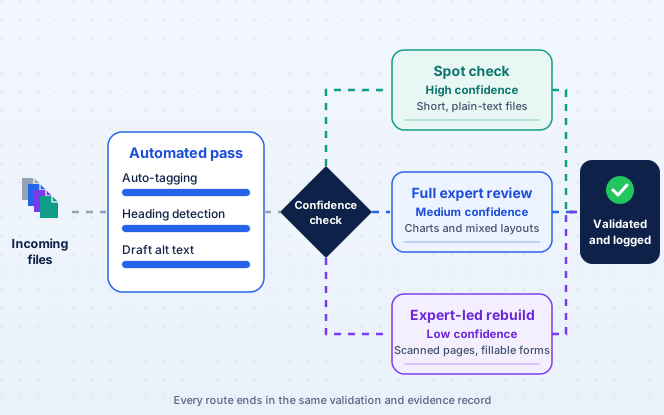
In practice, the hybrid route sends every file through automation first and then decides how much human attention it needs. The diagram below shows how that split typically works.
Where AI Helps and Where It Falls Short
Teams now use AI to suggest tags, draft alt text, and detect headings in untagged files. These suggestions can remove a large share of repetitive effort, especially across thousands of similar documents.
The output still needs review. In its April 2026 interim final rule, the DOJ pointed to slower-than-expected progress in remediation technology, including the limits of generative AI.
That caution matters in daily work. A confident but wrong chart description can mislead a listener more than a missing one, so a person should approve every AI draft before it goes live.
Accessibility overlays and widgets cannot fix downloaded documents. They do not change the internal structure of a PDF, so you cannot rely on them to make files conform to WCAG or PDF/UA.
How Much Effort Does Document Remediation Take?
Exact pricing depends on the provider and the library, but remediation effort follows a predictable pattern. The four tiers below help teams estimate work and budget before they request quotes.
| Tier | Typical documents | What makes it this tier | QA depth | Indicative effort |
|---|---|---|---|---|
| Simple | Short letters, text-only notices | Few pages, no tables or forms, source available | Automated checks plus a quick screen reader pass | Often under an hour per file |
| Moderate | Policies, newsletters, slide decks | Some images, simple tables, basic layout | Full checklist review | A few hours per file |
| Complex | Annual reports, forms, scanned files | Dense tables, charts, forms, OCR, multi-column layouts | Full checklist plus detailed table and form testing | One to several days per file |
| Enterprise scale | Thousands of mixed files across many sites | Volume, ownership gaps, ongoing publishing | Sampled QA, audit trail, and monitoring | A structured program run over months |
What Drives Document Remediation Effort
Eight factors account for most of the difference between a quick fix and a multi-day job. Knowing them helps you read a quote critically and spot which sample files will take longest.
- Page count, since every page needs tags and a check.
- Tables, especially nested or multi-level headers that need manual associations.
- Forms, because each field needs a label, a tooltip, and a place in the tab order.
- OCR, since someone must recognize and then proofread scanned pages line by line.
- Visual fidelity, when the design must remain identical to the original.
- Source availability, because fixing a source file is usually faster than repairing a PDF.
- Layout complexity, such as multiple columns, sidebars, and floating graphics.
- Required QA, since manual screen reader testing and formal reports add time.
How Document Remediation Pricing Usually Works
Most providers price per page, per document, or per program. Pages with complex tables, forms, or charts cost far more than simple text pages, so an inventory and a sample audit give the most accurate estimate.
Who Owns Document Accessibility Inside an Organization
Remediation fails most often when no one owns it. Clear responsibilities keep the work moving and stop uninvolved teams from overwriting files that have already been fixed.
| Role | Main responsibility | What they hand to the program |
|---|---|---|
| Compliance or legal | Interprets obligations, sets the target standard, and handles complaints | The conformance target and complaint log |
| Accessibility lead | Runs the framework, owns the QA checklist, and reports progress | The work queue and progress reports |
| Content owners and authors | Create accessible source files and approve alt text | Corrected source files and approvals |
| Web and IT teams | Manage publishing, scanning, and document storage systems | Scan results and publishing controls |
| Procurement | Writes accessibility requirements into vendor contracts | Contract clauses and delivery checks |
| Quality assurance | Tests documents alongside the applications that produce them | Test notes and defect reports |
A simple responsibility chart that names one accountable person for each document collection is often enough to keep these roles aligned as the program grows.
How to Evaluate a Document Remediation Partner or Tool
Whether you outsource remediation or support it with software, the same questions reveal quality. Ask each one below before you sign any contract, and compare the answers with what a strong response should include.
How do you validate conformance, and will you provide PDF/UA and WCAG reports for each file?
A per-file report naming the checker, its version, and any exceptions.
Is manual screen reader testing included, or only automated checks?
Named screen readers and a sample of real test notes.
How are complex tables, charts, and forms handled?
A tested example with header associations and labeled fields.
Do you fix source files where they exist, or only the PDFs?
A source-first workflow that stops the same defects returning.
What turnaround can you commit to for each complexity tier?
Separate commitments per tier rather than one flat figure.
How do you secure confidential documents during the work?
Access controls, retention terms, and the location where processing happens.
Can you provide an audit trail we can share with regulators or customers?
Redacted sample records showing dates, checks, and reviewer sign-off.
Is training offered so that internal teams can keep documents accessible?
Template fixes and author training, not only a one-off cleanup.
Treat a quote without a sample validation report, or a promise of fully automated compliance, as a warning sign. Strong answers are specific, and a good provider can show them rather than only describe them.
A provider that can share a sample report, a redacted audit trail, and a tested complex table is usually more dependable than one that only quotes a turnaround time.
Common Document Remediation Challenges and Solutions
Even well-planned projects run into obstacles. The challenges below come up most often in document accessibility work, and each comes with the approach teams typically use to resolve it.
| Challenge | How teams solve it |
|---|---|
| Large libraries | Retire unused files first, then fix similar documents in batches, such as monthly reports built from one template. |
| Scanned documents | Run OCR and proofread the output, since screen readers repeat recognition errors exactly as they appear. |
| Complex data tables | Simplify or split tables in the source file, because deeply nested headers are hard to navigate even when tagged. |
| Fillable forms | Rebuild forms as accessible web forms, which are easier to maintain and work more reliably across devices. |
| Regression | Fix the templates, since exporting an untouched source file again overwrites a remediated PDF. |
| Vendor documents | Write accessibility requirements into contracts and check them on delivery. |
| Limited in-house skills | Train authors, and let specialist partners handle the backlog and the most complex files. |
Best Practices for Keeping Documents Accessible
Remediation delivers the most value when you protect its fixes. The following practices help prevent new barriers from appearing once you clear the existing backlog.
- Use built-in heading, list, and table styles in every template, rather than manual formatting.
- Add alternative text as you insert images, not at the end of a project.
- Export PDFs with tagging enabled, and check the result before publishing.
- Publish key content as accessible HTML where possible, and offer PDFs as a secondary format.
- Assign an owner to every document, so nobody misses updates and reviews.
- Schedule periodic scans, so they catch newly uploaded files quickly.
- Maintain an accessibility statement that explains how people can request alternative formats.
Document checks also belong inside quality assurance rather than in a separate exercise. Teams that already invest in Software Testing and QA Services for their applications can extend that discipline to the documents those applications produce.
How SDLC Corp Puts the Framework into Practice
At SDLC Corp, we treat document accessibility as an engineering problem as much as a content one. Our work on document-heavy systems, shown in our AI Intelligent Document Processing Case Studies, shapes how we handle large libraries.
Day to day, the framework becomes an operational pipeline. We inventory the library, risk-score and route each file, fix simple items automatically, send complex items to human review, and record every step in an audit trail.
That pipeline is exactly what Limina ADA and WCAG document accessibility remediation software runs. It discovers documents alongside web pages, classifies them by risk and complexity, and queues each file for automated, template-based, or human remediation.
Limina maps findings to WCAG, PDF/UA, Section 508, and EN 301 549, and reports progress from a single record. Whichever route a file takes, automation speeds up the work, and people confirm the result.
Some organizations need a pipeline built around their own content systems, such as a records platform or a customer portal. For that kind of project, our Custom Software Development Services team can design and build it.
Connecting Remediation to Where Documents Live
Storage matters too, because the way you store files affects how easily they stay accessible. Our roundup of Top 10 Document Management Software Options is a useful starting point if you are reviewing your system.
Many teams create and store documents inside Microsoft tools such as SharePoint and Dynamics 365. If that is your setup, our Microsoft Dynamics Implementation and Support team can advise on where document checks fit into your existing workflows.
Making Document Accessibility Last
Document accessibility remediation turns files that merely look finished into files that everyone can use. It covers tagging, reading order, alternative text, table structure, and form labeling, all verified against WCAG and PDF/UA.
With U.S. deadlines set for 2027 and 2028, and the European Accessibility Act already in force, waiting only shortens the runway. A clear framework, a decision tree, and a scoring model make even a large backlog manageable.
Those gains then need protecting. Accessible templates, trained authors, a consistent QA checklist, and regular monitoring keep remediated documents accessible long after the initial project has closed.
Key takeaways
- Structure, not appearance, decides whether a document is accessible.
- Fix the source file whenever one exists, and repair the PDF only when it does not.
- Score and route files before tagging begins, so that effort follows risk.
- Protect finished work with templates, training, and scheduled scans.
Frequently Asked Questions
It is the process of fixing existing documents, such as PDFs and Office files, so people using screen readers and other assistive technology can read and navigate them. The work typically covers tags, reading order, alt text, tables, and forms.
PDF remediation is the most common type, but document accessibility remediation is broader. It also includes Word files, slide decks, spreadsheets, and ebooks, which teams often fix in their source format before exporting PDFs.
Most organizations aim for WCAG 2.1 Level AA, which the ADA Title II and HHS Section 504 rules reference. PDF/UA (ISO 14289) sets PDF-specific requirements, and Section 508 applies WCAG 2.0 Level AA to federal documents.
WCAG defines what an accessible experience must achieve across all digital content. PDF/UA defines how to build a PDF file technically to deliver that experience, so most organizations validate PDFs against both.
Not reliably. Automation handles simple, repetitive fixes well, but reading order, complex tables, and meaningful alt text still need human judgment. A hybrid approach, with automated tagging followed by expert review, is generally the safest choice.
Score each file on risk, audience, traffic, regulatory relevance, complexity, and business importance. Remediate high-scoring files first, along with any file a complaint names or a regulation explicitly requires.
It depends on length and complexity. A specialist can often finish a short, text-only PDF in under an hour, whereas a long report with complex tables, charts, and forms can take several days.
A tagged PDF contains a hidden structure that identifies headings, paragraphs, lists, tables, and images. Assistive technology relies on these tags to present content in a logical order, so an untagged PDF is rarely accessible.
Under the ADA Title II rule, archived content and older documents no longer in active use may qualify for narrow exceptions. An accessible version should still be provided promptly whenever a person requests one.
Providers usually price per page or per document, and rates vary with complexity. Simple text pages cost far less than pages with complex tables, forms, or charts, so an inventory is the best starting point for an estimate.