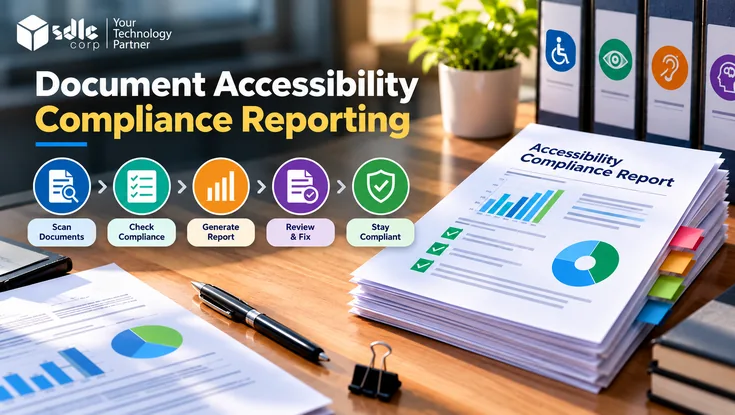
Document accessibility compliance reporting turns accessibility testing and remediation into documented, traceable, and verifiable evidence. It records which documents were assessed, which requirements applied, what barriers were found, how each one was corrected, and how the correction was confirmed.
That record is what separates a compliance report from a list of errors. A findings list tells a team what is wrong today.
A compliance report shows what was tested, against which standard, on which version of a document, by whom, and with what result, so the conclusions can be checked and defended later.
For organizations managing hundreds or thousands of PDFs, Word files, spreadsheets, and presentations, this traceability is what makes accessibility claims credible at scale.
This guide explains the different types of accessibility reports, the structure of a complete compliance report, what counts as evidence, how findings should move through a defined lifecycle, how sampling affects what a report can claim, how to interpret portfolio-level metrics, and how to publish verified results in a Trust Center.
What Is Document Accessibility Compliance Reporting?
Document accessibility compliance reporting is the process of recording and communicating how well digital documents meet defined accessibility requirements, supported by evidence that links every conclusion back to the testing and verification that produced it.
A compliance report should answer six questions:
- Which documents, and which versions, were evaluated?
- Which accessibility requirements apply?
- What issues did testing identify, and how were they confirmed?
- Who is responsible for correcting those issues?
- How was each correction verified, and by whom?
- What conclusions does the assessment support, and where are its limits?
The core of the report is an evidence chain that connects each finding to its final status:
Finding → affected document and version → requirement → test method → remediation → retest → verification result → reviewer → final status
If any link in that chain is missing, the report can describe problems but cannot reliably demonstrate compliance.
A note on terminology: this guide treats accessibility compliance reporting as an evaluation and governance process that produces evidence-backed reports. Some jurisdictions also use "accessibility compliance report" for a specific statutory filing.
For example, organizations in Ontario file an Accessibility Compliance Report under the Accessibility for Ontarians with Disabilities Act (AODA).
If you have a statutory filing obligation, follow the regulator's requirements for that filing; the reporting practices in this guide can support it but do not replace it.
Types of Accessibility Reports and How They Differ
"Accessibility report" is used to describe several different outputs. Each has a different purpose and audience, and confusing them leads to reports that answer the wrong question.
| Report type | Purpose | Primary audience | What it claims |
|---|---|---|---|
| Accessibility audit or evaluation report | Records the results of a structured evaluation against a defined standard | Accessibility specialists, remediation teams | What barriers exist in the evaluated content at the time of testing |
| Compliance or conformance report | Documents whether content meets defined requirements, with supporting evidence | Compliance, legal, procurement, leadership | Whether specific documents or collections meet stated requirements, and on what basis |
| Remediation report | Tracks corrections made after an audit | Project managers, content owners | Which findings were corrected and verified, and which remain open |
| Accessibility statement | Publicly describes an organization's accessibility commitment and known limitations | Website visitors and document users | The organization's conformance position and how to request accessible alternatives |
| Accessibility Conformance Report (ACR) | Discloses how an ICT product, such as software or a platform, conforms to accessibility standards. The VPAT is the template; the completed document is the ACR. | Buyers and procurement teams | How a product conforms, criterion by criterion. It is a product disclosure, not a report on a document collection. |
| Portfolio or management report | Summarizes status across a document collection | Executives, governance committees | Coverage, remediation progress, and risk across the portfolio |
This guide focuses on the compliance report: the evidence-backed record that connects audit findings, remediation, and verification. It also covers the portfolio reporting that aggregates compliance results across many documents.
Audit reports feed into it, remediation reports track part of it, and accessibility statements often draw on its results. ACRs are a separate, product-level disclosure.
Why Document Accessibility Compliance Reporting Matters
Reporting only delivers these benefits when it captures specific data.
Progress Becomes Measurable
A report that records assessment coverage and verified corrections shows how much of the document collection has actually been evaluated and fixed, rather than how many documents passed an automated scan.
Recorded in the report:- Assessment coverage
- Verified corrections
Prioritization Becomes Defensible
An inaccessible application form can prevent someone from completing an essential task, while a missing document title mainly affects identification and navigation. Recording severity, user impact, and the document's business role lets teams justify why some corrections come first.
Recorded in the report:- Severity
- User impact
- Business importance
Accountability Becomes Visible
Document accessibility involves content authors, designers, compliance teams, and remediation specialists. A report that assigns each finding an owner, a target date, and a lifecycle status shows where work has stalled within the recorded workflow.
Recorded in the report:- Owners
- Due dates
- Lifecycle status
Quality Improves
When reports use consistent issue categories, repeated findings become visible. If table header problems appear across many reports, the likely cause is a template or authoring practice, and fixing that source prevents the issue from recurring.
Recorded in the report:- Consistent issue categories
- Recurring defects
Which Accessibility Standards Should Reports Cover?
Requirements depend on document format, audience, applicable law, contractual obligations, and organizational policy. A report should name the exact standard, version, and target level used during testing rather than simply stating that a document is accessible.
| Standard or framework | Primary purpose | Reporting considerations |
|---|---|---|
| WCAG 2.2 | Defines testable success criteria for web content. Many policies and contracts also apply these criteria to documents, either directly for web-delivered documents or through interpretive guidance for non-web documents. | Record applicable success criteria, target conformance level, and results. For non-web documents, W3C's WCAG2ICT guidance explains how WCAG criteria can apply. |
| PDF/UA (ISO 14289) | Defines technical accessibility requirements for PDF documents | Record the PDF/UA part (PDF/UA-1 or PDF/UA-2), validator used, and results for tagging, structure, and content relationships. |
| Section 508 | Establishes accessibility requirements for covered U.S. federal information and communication technology | Identify applicable provisions and record outcomes for covered electronic content. See Section508.gov guidance on accessibility testing and accessible documents. |
| EN 301 549 | Specifies accessibility requirements for ICT in European procurement and regulatory contexts | Identify the edition, the relevant document requirements (Clause 10 for non-web documents), and required conformance evidence. |
A single document may need assessment against more than one framework. A PDF can pass technical PDF/UA checks and still present usability barriers under WCAG.
To understand how the two overlap and differ, see our comparison of PDF/UA vs WCAG.
The report should also separate technical conformance findings from legal compliance determinations. Meeting a technical standard does not automatically establish compliance with every law or contract, and the report should not imply otherwise.
Likewise, WCAG is not the governing legal standard for every document format or jurisdiction; the report should state why each standard was selected.
The Anatomy of a Complete Compliance Report
The structure below builds on the W3C Template for Accessibility Evaluation Reports, extended for document collections and compliance evidence.
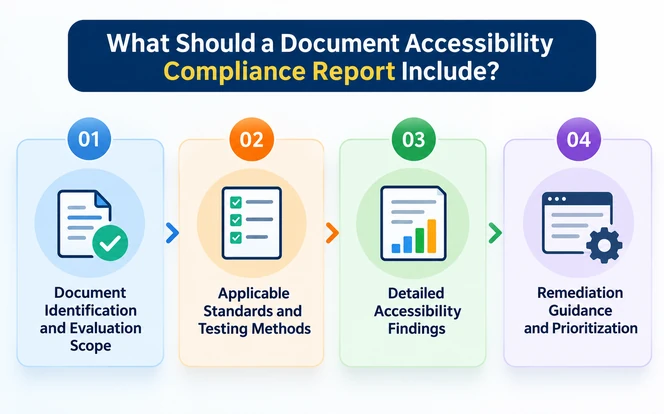
| Report section | What to record |
|---|---|
| Executive summary | Overall result, scope in one or two sentences, number of documents assessed, open high-priority findings, and key limitations |
| Scope and exclusions | Documents, pages, or collections included; what was deliberately excluded and why |
| Document population and sample | Total population, how the sample was selected, and which document types it represents |
| Standards and versions | Each standard, version, and target conformance level applied |
| Evaluation methodology | Automated tools and versions, manual review procedures, assistive technologies and versions, and the criteria for pass, fail, and resolved |
| Findings register | Each finding with a unique ID, location, requirement, user impact, severity, detection method, owner, and status |
| Remediation status | Current lifecycle status of every finding, with dates and responsible parties |
| Verification evidence | Retest method, retest result, document version retested, and reviewer for each closed finding |
| Limitations | Content that could not be tested, sampling limits, and conclusions that should not be generalized |
| Reviewer and approval | Who performed the assessment, who verified corrections, and who approved the final result |
| Document version history | File identifiers, version numbers, and dates linking each finding to the exact file tested |
| Supporting attachments | Validator output, screenshots, test logs, and assistive-technology observation notes |
The findings register is only one component of this structure. The other sections supply the scope, method, and approval context that allow someone outside the testing team to understand and trust the result.
What Counts as Evidence in an Accessibility Report
Evidence is any record that helps a reviewer confirm how a finding was identified and how its resolution was verified, without repeating the entire assessment.
No single item, such as a screenshot or a validator result, establishes conformance on its own. Evidence supports the conclusions of a qualified review; it does not replace that review.
The PDF Association's Matterhorn Protocol 1.1, the conformance testing model for PDF/UA-1, shows why. It breaks the standard into 31 checkpoints containing 136 failure conditions, which divide by how they can be tested:
- 87Machine-checkableSoftware can determine these conditions on its own.
- 47Human judgmentThese usually need a reviewer, such as logical reading order or OCR text accuracy.
- 2No defined testThe protocol specifies no test for these conditions.
A validator report can therefore cover at most 87 of the 136 conditions, roughly 64%. The remaining 49 need manual review records or a documented judgment before a PDF/UA-1 conformance claim is supportable.
These figures apply to PDF/UA-1, but the same principle holds for WCAG testing of any format. Criteria such as meaningful alternative text always need a human reviewer.
| Evidence type | What it demonstrates | Example |
|---|---|---|
| Validator or checker output | Which technical checks were run and their results | An exported PDF/UA validation report with tool name, version, and date |
| Manual review records | Which criteria a reviewer examined and what they concluded | A checklist entry confirming heading hierarchy was reviewed on pages 1 to 40 |
| Assistive-technology observations | How the document behaved with real assistive technology | Notes recording that a screen reader announced form fields in the wrong order on page 32 |
| Screenshots or tag-tree captures | The state of the document before and after correction | A capture of the tag structure showing table header cells before and after remediation |
| Document version records | Which file each finding and retest refers to | File identifier, version number, and modification date |
| Retest results | That the correction worked and introduced no new issues | A retest entry linked to the original finding ID, with result and reviewer |
| Approval records | Who accepted the final assessment and when | A sign-off entry naming the approver, date, and approved version |
Evidence does not need to be elaborate for every finding. It needs to be sufficient to reconstruct the evidence chain: what was found, on which version, against which requirement, how it was fixed, and how the fix was confirmed.
The Finding Lifecycle: From Detection to Closure
Statuses such as "open" and "resolved" are too coarse for compliance reporting.
A finding marked resolved may have been fixed but never retested, or retested on a different version. A defined lifecycle makes the difference visible.
- DetectedFlagged by an automated tool or initial review.Required before moving on: Tool output or reviewer note
- ConfirmedVerified as a genuine failure against a named requirement.Required before moving on: Manual confirmation and requirement mapping
- AssignedOwner and target date set.Required before moving on: Named owner, priority, and due date
- In remediationCorrection in progress.Required before moving on: Reference to the working file or source document
- Retest pendingCorrection complete, awaiting verification.Required before moving on: New document version identifier
- VerifiedRetest confirms the fix and no new issues.Required before moving on: Retest result, method, reviewer, and version tested
- ClosedAccepted and recorded in the final report.Required before moving on: Approval record
Two rules keep this lifecycle reliable. First, only confirmed findings should count as failures, because automated detections may be false positives or warnings that need judgment.
Second, a finding should not reach Verified without a retest on the specific corrected version.
Many organizations also require that verification be performed by someone other than the person who made the correction. That is an organizational control rather than a universal requirement, but where it applies, the report should record both names.
Organizations can rename these stages to fit their workflow, but the distinction between "fixed" and "verified" should remain.
Scope and Sampling: What a Report Can Claim
Organizations with large document collections rarely test every file in full. Sampling is legitimate, but it limits what the report can conclude, and the report must say so.
A credible sampled report records:
- Population: the total set of documents the assessment is meant to represent, such as all public-facing PDFs published since a given date
- Sampling approach: how documents were chosen, whether random, risk-based, or structured around document types
- Selection criteria: factors such as traffic, business importance, complexity, and presence of forms or data tables
- Document types represented: reports, forms, brochures, scanned files, spreadsheets, and so on
- Exclusions: documents or content types outside the assessment, with reasons
- Limitations: what the sample does not cover
The key reporting rule is that sampled results describe the sample, not the whole population. A sample can support conclusions about patterns, such as common defect types in a given template, but it cannot certify that untested documents are accessible.
In a bulk PDF remediation program, the same scope record should travel with every batch, so each processed file traces back to a defined population.
W3C's WCAG Evaluation Methodology (WCAG-EM) 2.0, published as a Group Note in July 2026, offers a useful model for defining scope and selecting representative samples.
Unlike version 1.0, which was written for websites, WCAG-EM 2.0 also applies to apps and other digital products. It is supporting guidance: it does not add requirements to WCAG itself.
How to Create a Document Accessibility Compliance Report
Testing is an input to reporting, not the report itself. For detailed testing methods, see our guide to document accessibility testing.
The steps below focus on what to record at each stage.
Step 1: Build a Document Inventory
Record each in-scope document's identifier, format, version, owner, location, and business purpose. This inventory becomes the denominator for every portfolio metric, so documents left out of it are effectively invisible to reporting.
Step 2: Define and Record the Assessment Criteria
Document the standards, versions, target levels, scope, sampling approach, and the criteria for pass, fail, and verified. Recording these before testing prevents criteria from shifting between reviewers or reports.
Step 3: Run and Log Automated Checks
Automated tools efficiently detect technical issues such as missing tags, language settings, and structural errors, but they cannot judge whether alt text is meaningful, reading order is logical, or a document is usable.
This is why automated results should enter the lifecycle as Detected, not as confirmed failures.
For how automated and manual work divide in practice, see automated vs manual PDF accessibility remediation. Record the tool name, version, settings, and date.
Scanned, image-only PDFs need text recognition before meaningful testing; see OCR for PDF Accessibility: How It Works.
Step 4: Record Manual and Assistive-Technology Review
Log which criteria were reviewed, on which pages, with which assistive technologies and versions, and what was observed. These records are what move findings from Detected to Confirmed.
Step 5: Classify Findings in the Register
Give each confirmed finding a unique ID, location, requirement, user impact, severity, detection method, owner, and status. Keep warnings that need further judgment separate from confirmed failures.
Step 6: Remediate, Verify, and Retain Evidence
Link each document remediation correction to a new document version, retest it, and record the result against the original finding ID.
Once all findings are Verified or formally accepted as limitations, record the approval and retain the evidence with the published version.
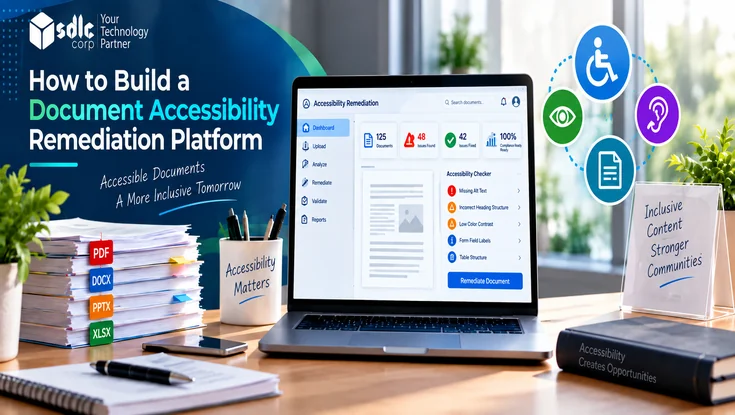
Teams handling large volumes can learn how to build a document accessibility remediation platform that connects these steps in one workflow.
Practical Example: A Findings Register With Evidence
Consider an organization reviewing a 40-page employee benefits PDF (version 2.1) containing headings, images, comparison tables, and an enrollment form.
In this fictional register, the organization has selected WCAG 2.2 Level AA as its reporting standard for the PDF, so each finding is mapped to a WCAG success criterion. Each finding carries its requirement, lifecycle status, and supporting records.
| ID | Finding | Requirement | User impact | Status | Evidence |
|---|---|---|---|---|---|
| F-001 | Incorrect reading order on page 4 | WCAG 1.3.2 Meaningful Sequence | Screen readers may present instructions in the wrong sequence | In remediation | Screen reader observation notes, tag-order capture |
| F-002 | Missing alternative text for diagram on page 8 | WCAG 1.1.1 Non-text Content | Users may miss information conveyed by the diagram | Assigned | Validator output, manual review record |
| F-003 | Table header cells not associated with data cells on page 15 | WCAG 1.3.1 Info and Relationships | Users may struggle to connect benefit values with categories | Confirmed | Tag-tree capture, screen reader observation notes |
| F-004 | Unlabeled form field on page 32 | WCAG 1.3.1, 4.1.2 Name, Role, Value | Screen-reader users may not understand the requested input | Verified | Retest on version 2.2, reviewer sign-off, screen reader observation |
Table header problems like F-003 are worth checking carefully in any data-heavy document; our guide to accessible PDF tables explains how to structure headers and data cells correctly.
Note that F-004 is Verified rather than simply "Resolved": the fix was retested on version 2.2 and signed off. The overall report would also state the document versions, standards applied, methodology, reviewer, and approval status.
Key Metrics for Tracking Document Accessibility Compliance
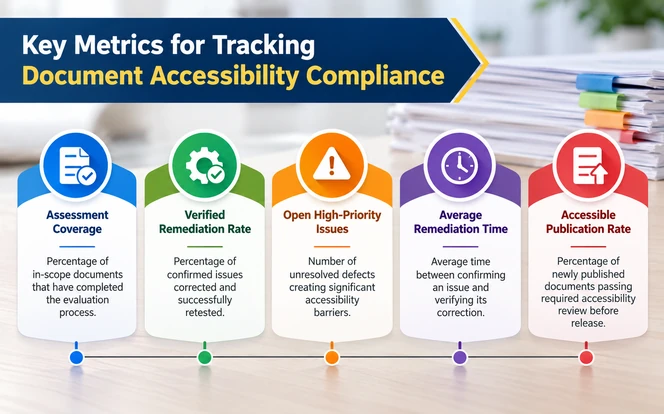
Individual reports explain specific findings. Portfolio metrics show progress across the whole collection.
Useful metrics, with indicative target ranges, include:
| Metric | What it measures | Indicative target range |
|---|---|---|
| Assessment coverage | Percentage of in-scope documents that completed the defined evaluation process | 100% of priority documents (forms, high-traffic, public-facing) per cycle; 80% to 100% of the full inventory |
| Verified remediation rate | Percentage of confirmed findings corrected and successfully retested | 85% to 95% per reporting period; 100% for blocking findings |
| Open high-priority findings | Number of unresolved findings creating significant barriers | None past their due date; count trending down each period |
| Average time to verification | Average time between confirming a finding and verifying its correction | 5 to 10 business days for high-priority findings; 30 days or less for others |
| Accessible publication rate | Percentage of newly published documents passing required review before release | 95% to 100% |
Target ranges are indicative starting points for internal governance, not regulatory thresholds. Set yours from your own baseline, document mix, and legal or contractual obligations, and record the chosen targets in the report.
How to Interpret These Metrics
Read together, these metrics follow documents through a sequence:
Coverage → findings → remediation → verification → publication readiness
Each stage depends on the one before it, and a strong number at one stage does not imply a strong number at the next. For example:
- 90% assessment coverage means 90% of in-scope documents were evaluated. It does not mean 90% are accessible; many of those documents may still have open findings.
- A high verified remediation rate on a small, low-coverage sample says little about the wider portfolio.
- A low count of open findings can reflect genuine progress or simply limited testing. Read it alongside coverage.
Always state the denominator. "90% complete" is meaningless without defining which documents are in scope and what "complete" requires.
A single percentage or a scanner-generated score should never be presented as a compliance verdict.
Common Document Accessibility Reporting Mistakes
Mixing Findings From Different Document Versions
When findings from version 1.0 and retests from version 1.3 appear in the same register without version labels, no one can tell which file the report actually describes.
Reporting Sampled Results as if They Cover the Whole Population
Stating that "the document library is accessible" based on a 5% sample overstates what was tested. Report sample conclusions as sample conclusions.
Closing Findings Without Verification Evidence
A status change from "in progress" to "resolved" with no retest record leaves the evidence chain broken.
Using Inconsistent Severity Definitions Between Reports
If "high" means blocking in one report and inconvenient in another, portfolio metrics become unreliable. Define severity levels once and apply them everywhere.
Combining Automated Warnings With Confirmed Failures
Counting unreviewed tool warnings as failures inflates defect counts, while ignoring them can hide real barriers. Keep them in separate categories.
Losing Evidence When Documents Are Replaced or Republished
When a file is overwritten on a website or document system, the evidence tied to the previous version can disappear. Retain reports, versions, and evidence together.
Leaving Accessibility Out of the Trust Center
Many organizations publish security and privacy evidence in a Trust Center but say nothing about accessibility, even when approved reports exist. Buyers then have to ask for evidence that should already be public.
Best Practices for Ongoing Accessibility Compliance Reporting
Make Reporting Part of Publishing
Accessibility review should be a publishing gate, not an activity triggered only by complaints or scheduled audits.
Standardize the Reporting Model
Use consistent report templates, finding IDs, severity definitions, lifecycle statuses, and evidence requirements across teams and reporting periods.
Assign Clear Ownership and Authority
Content authors should know their responsibilities, and reviewers should have the authority to hold back documents with unresolved barriers.
Retain an Audit Trail
Keep a central record of document versions, testing evidence, remediation decisions, verification results, and approvals, and retain it after documents are updated or withdrawn. For public entities covered by ADA Title II, this record is how they show which documents were reviewed, fixed, and verified, and when.
Use Platforms to Connect, Not Replace, Review
A reporting platform, including AI-assisted document accessibility remediation tools, can assign findings, enforce lifecycle stages, and produce management summaries, but it should preserve human confirmation and keep automated detections distinct from verified findings.
Fix Defects at the Source
As an operational practice, correcting a recurring defect in the source template means the fix carries into every future document built from it, instead of being repeated file by file.
Publishing Accessibility Evidence in Your Trust Center
A Trust Center is where an organization publishes its security, privacy, and compliance posture for customers, buyers, and procurement teams. Accessibility often has no section there, even when approved compliance reports already exist internally.
That gap matters. People evaluating a vendor, and people deciding whether they can rely on its documents, look for accessibility evidence in the same place they check security certifications. When it is missing, they have to request it or assume there is none.
The compliance report is the right source for a Trust Center accessibility section. Every public element should trace back to a specific, approved part of the report:
| Trust Center element | What to publish | Source in the compliance report |
|---|---|---|
| Accessibility statement | Commitment, target standard and level (for example WCAG 2.2 Level AA), and current conformance position | Executive summary; standards and versions |
| Scope of coverage | Which products, websites, and document collections the statement covers, and what is excluded | Scope and exclusions; document population and sample |
| Conformance reports | Current ACRs for each product, with the VPAT edition used and publication date | Separate product-level evaluation |
| Document accessibility status | Assessment coverage, verified remediation rate, and date of the last assessment, each with its denominator | Portfolio metrics |
| Known limitations | Open barriers, the content they affect, and planned remediation dates | Limitations; open findings in the findings register |
| Methodology summary | Standards applied, the mix of automated and manual testing, and assistive technologies used | Evaluation methodology |
| Feedback and accessible alternatives | How to report a barrier or request an accessible format, and the expected response time | Organizational accessibility policy |
| Review date | Date of the most recent approved report and the next scheduled review | Reviewer and approval; document version history |
Rules for Publishing Accessibility Claims
- Publish only approved results: update public claims after a report is approved, not while findings are still in remediation.
- Keep sampled claims scoped: "42 of 50 sampled public forms verified against WCAG 2.2 AA" is supportable; "our documents are accessible" is not.
- Date every claim: state the assessment date and the standard version next to each figure.
- Never publish a scanner score as a verdict: automated pass rates describe tool output, not conformance.
- Keep history: when a new report replaces the old one, retain the previous public version in the audit trail.
Why this closes the loop: internal reporting proves compliance to your own team. A Trust Center accessibility section extends the same evidence chain to customers and users, because every public statement points back to an approved report that can be produced on request.
Conclusion
A reliable document accessibility compliance report is built on evidence and traceability. It identifies which documents and versions were assessed, against which requirements, with which methods.
It moves every finding through a defined lifecycle from detection to verified closure, keeps a record of each step, and states honestly what the assessment can and cannot claim.
Start with a document inventory, a standard report structure, and a defined finding lifecycle. Then require supporting records at each stage, retain them with the published version, and publish what the approved report supports in your Trust Center.
The result is a report that does more than describe problems: it demonstrates, in a way others can verify, how accessible your documents actually are.
Frequently Asked Questions
It is an evidence-backed record of an accessibility assessment: the documents and versions tested, applicable standards, methods, confirmed barriers, remediation actions, verification results, and final approval status.
An audit report records the evaluation and the barriers it found. A compliance report goes further, tracking remediation and verification and documenting the evidence that supports the final conclusion.
No. Automated tools can supply technical findings and support report creation, but confirmed failures, meaningful alt text, reading order, and usability require human review.
Typical evidence includes validator output, manual review records, assistive-technology observations, before-and-after captures, document version records, retest results, and approval records.
No. A sample supports conclusions about the documents tested and patterns within them. The report should state the population, sampling method, and limits of any generalization.
Assess documents before publication and after changes that could affect accessibility. Review existing collections periodically based on importance, usage, risk, and applicable requirements.
No. PDF/UA validation covers the technical requirements checked by the validation process. Manual review is still needed for content quality, usability, and other applicable requirements.
Not necessarily. Some jurisdictions, such as Ontario under the AODA, require a specific filing called an accessibility compliance report.
This guide covers the evaluation and evidence practices behind accessibility reporting, which can support a statutory filing but do not replace the regulator's own requirements.
A VPAT (Voluntary Product Accessibility Template) is the template. Once it is completed for a specific product, the resulting document is an Accessibility Conformance Report (ACR), which discloses how that product conforms to accessibility standards.
An accessibility statement with the target standard and conformance position, the scope it covers, current ACRs, dated document accessibility metrics with their denominators, known limitations, a methodology summary, a way to report barriers or request accessible formats, and the date of the last approved review.