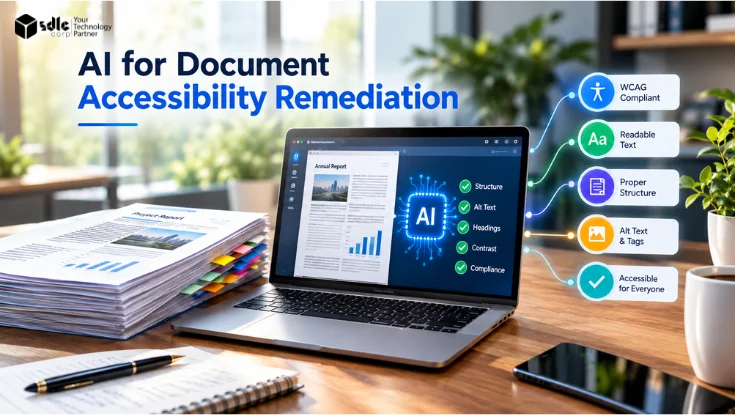
AI for document accessibility remediation can process large PDF libraries far faster than manual work alone. It can detect headings, lists, tables, reading order, and scanned text, then propose or apply structural repairs.
But the useful question is not whether AI can remediate a PDF.
The real question is which remediation tasks can be automated reliably, which require human judgment, and how the final document can be validated before publication.
- Detect, recommend and fix are different Finding an issue, proposing a correction and writing it into the file are three separate capabilities, and none of them proves the result is correct.
- Review follows risk AI handles repeatable structural tasks well, while anything that depends on meaning, intent or subject knowledge needs human judgment.
- Done means passing criteria A document is ready when it meets defined acceptance criteria, not when an AI tool finishes processing it.
This guide answers that question with a clear decision matrix, a document-complexity framework, the most common failure modes, and acceptance criteria that define when a remediated PDF is ready to publish.
What Is AI for Document Accessibility Remediation?
AI for document accessibility remediation uses machine learning, computer vision, natural language processing, OCR, and layout analysis to find accessibility barriers in documents and propose or apply corrections.

For PDFs, AI examines both the visual layout and the underlying content. It looks for headings, paragraphs, lists, tables, figures, links, form fields, decorative elements, scanned text, reading order, and document metadata.
The goal is to turn a visually formatted document into one with meaningful structure that assistive technology can interpret.
A PDF can look correct on screen and still be unusable with a screen reader. Section 508 guidance on creating accessible PDFs describes tags as the structural foundation of an accessible PDF, because tags tell assistive technology what each element is.
Detect, Recommend, and Fix Are Not the Same Thing
Most confusion about AI remediation comes from treating three different capabilities as one.
A system that identifies a missing tag has not repaired it. A system that repairs it has not proven the repair is correct.
| Level | What the AI does | Example | What it does not prove |
|---|---|---|---|
| Detect | Finds a potential issue | Flags an image with no alternative text | That the flag is correct or complete |
| Recommend | Proposes a correction for review | Suggests an H2 tag, drafts alt text | That the suggestion is semantically right |
| Fix | Writes the change into the file | Adds the tag to the structure tree | That the document now communicates correctly |
Vendors are explicit about this gap. Adobe’s PDF Accessibility Auto-Tag API documentation states that an automatically tagged PDF is not guaranteed to meet WCAG or PDF/UA and may need further remediation.
The operating principle for the rest of this guide follows from that distinction. AI detects and proposes at scale, people decide anything that depends on meaning, and validation confirms the result before publication.
How AI-Assisted Remediation Works
Analyze and Classify the Document
The system first determines what kind of document it is: born-digital, scanned, partially scanned, already tagged, poorly tagged, form-based, table-heavy, image-heavy, or multi-column.
Classification matters because each type needs a different strategy. A scanned contract needs OCR before any meaningful tagging can happen, a step covered in OCR for PDF Accessibility.
Detect Structure and Reading Order
AI analyzes page regions to identify headings, paragraphs, lists, tables, and figures from position, size, formatting, and relationships between elements.
It then proposes a logical sequence such as Document → H1 → H2 → Paragraph → List → Table → Figure.
Current tools such as cloud-based auto-tagging in Acrobat can identify heading levels, tables, nested lists, and reading order in multi-column layouts.
Generate or Repair Tags
Once elements are identified, AI creates or repairs the tags that describe them.
| Document element | Typical PDF structure | What should be checked |
|---|---|---|
| Main title | H1 | Correct title and hierarchy |
| Section heading | H2/H3 | Logical heading sequence |
| Paragraph | P | Text belongs to the correct section |
| List | L, LI, LBody | Items are grouped correctly |
| Table | Table, TR, TH, TD | Headers and relationships are correct |
| Image | Figure | Appropriate alternative text |
| Decorative element | Artifact | Excluded from the reading order |
W3C’s WCAG 2.2 PDF techniques define how headings, tables, lists, reading order, alternative text, form controls, links, and language should be represented.
Flag Content-Level Issues
Beyond structure, AI can flag missing alt text, decorative graphics tagged as content, missing document language, untagged content, unlabelled form fields, vague link text, and likely OCR errors.
These flags are detections, not decisions. The decision matrix below shows which ones AI can resolve reliably.
AI vs Human Decision Matrix
This matrix sets the right automation level for each remediation task. AI suitability runs from High to Low. Human review runs from Spot check to Sample, Required, and Expert.
| Task | AI suitability | Human review | Validation | Risk if wrong |
|---|---|---|---|---|
| OCR on clean scans | High | Sample | Compare text against page image | Medium |
| OCR on numbers, stamps, poor scans | Medium | Required | Line-by-line check of figures | High |
| Heading detection | High | Sample | Tag-tree and outline review | Low |
| Heading hierarchy | Medium | Required | Read heading outline as a sequence | Medium |
| List detection | High | Spot check | Tag-tree review | Low |
| Reading order, single column | High | Spot check | Reading-order review | Low |
| Reading order, multi-column or sidebars | Medium | Required | Screen reader pass | High |
| Tables with one clear header row or column | Medium | Sample | Header cells and their relationships | Medium |
| Tables with spanning or multi-level headers | Low | Expert | Header association and screen reader test | High |
| Locating interactive form fields | Medium-High | Sample | Field inventory against the visual form | Medium |
| Form labels, grouping, tab order, instructions, required status, errors | Low | Required | Keyboard and screen reader test | High |
| Decorative vs meaningful images | Medium | Required | Artifact and Figure review | Medium |
| Alt text for simple images | Medium | Required | Alt text checked against purpose | Medium |
| Alt text for charts and diagrams | Low | Expert | Subject-matter review | High |
| Language, title, metadata | High | Spot check | Automated checker | Low |
| Link text quality | Medium | Sample | Link list review | Low |
AI is generally better suited to repeatable structural and pattern-based tasks. Tasks that depend heavily on context, meaning, intent, or subject knowledge require greater human oversight.
Performance also varies by document. Automated systems can do well on specific tagging and reading-order tasks, yet still struggle with some languages, figures, captions, and semantic classification.
Tables deserve a specific caution. Visual simplicity is not the test. A table that looks simple can still have ambiguous header relationships, so every table is judged by whether each data cell is correctly associated with its headers.
Document Complexity Framework
Not every document deserves the same workflow. Classifying documents by complexity and risk lets teams automate where it is safe and focus specialists where it matters.
For scanned documents, each tier also carries an indicative OCR accuracy range and a matching level of text review, drawn from our OCR for PDF Accessibility guide. Use them to plan reviewer time, not as guarantees.
| Level | Typical documents | Automation level | Indicative OCR accuracy | Text review for scans | Review level | Validation |
|---|---|---|---|---|---|---|
| Low | Single-column reports, letters, policies with simple lists | AI tags and fixes | 98 to 99%+ on clean printed text | Spot-check critical values | Spot check | Automated check plus reading-order check |
| Moderate | Newsletters, reports with simple tables and images | AI proposes, reviewer corrects exceptions | 95 to 98%, lower inside tables and captions | Full text review | Full tag-tree review | Automated check, reading order, alt text |
| Complex | Annual reports, research papers, data tables, charts, fillable forms | AI as first pass only | 90 to 95%, with table cells and small-print labels dropping further | Line-by-line review | Specialist remediation | Full acceptance criteria plus screen reader test |
| High-risk | Legal notices, benefit applications, financial disclosures, public forms | AI assists, specialist owns outcome | Often below 90% on faded or skewed pages; handwriting can fall below 70% | Double review of all critical data | Specialist plus subject-matter sign-off | Full criteria, assistive technology testing, documented approval |
Accuracy figures are character-level estimates for scans of at least 300 dpi. Word-level accuracy is lower, because one wrong character corrupts the whole word. Born-digital PDFs skip OCR, so these two columns apply only to scanned pages.
Classify by consequence as well as layout. A simple-looking one-page form that determines eligibility for a public service belongs in the high-risk tier.
Failure Modes: What Goes Wrong and How to Catch It
AI remediation rarely fails loudly. It usually produces a file that passes a quick glance but misleads a screen reader user. Knowing the common failure modes makes them far easier to catch.
| Failure mode | Why it happens | How to detect it | Who reviews | How to validate |
|---|---|---|---|---|
| OCR misreads figures | Low scan quality, unusual fonts, stamps | Compare numbers to the page image | Content owner | Check every figure line by line |
| Reading order jumps between columns | Sidebars, pull quotes, floating images | Reading-order review, listen to the page | Remediation specialist | Screen reader pass |
| Table headers misassigned or flattened | Merged cells, borderless tables, multi-row headers | Inspect TH cells and header scope | Remediation specialist | Screen reader cell navigation |
| Heading levels skipped or inflated | Visual size used as a proxy for level | Review the heading outline | Remediation specialist | Outline reads as a logical hierarchy |
| Meaningful image marked as artifact, or the reverse | Model judges appearance, not purpose | Review every Figure and Artifact | Content owner | Every image has the correct role |
| Generic or inaccurate alt text | Model describes pixels, not meaning | Read alt text against surrounding content | Subject-matter expert | Alt text conveys the image’s purpose |
| Form fields without labels or logical tab order | Visual labels not bound to fields | Tooltip and tab order check | Remediation specialist | Complete the form by keyboard only |
| Regression after re-export | Source edited and exported without structure | Version comparison | Document owner | Re-run the acceptance criteria |
The last row is easy to overlook. Fixing an exported PDF does not fix its source, so the next export can quietly undo the remediation.
Real-World Document Scenarios
Annual Report
Annual reports combine multi-column layouts, pull quotes, infographics, and financial tables. AI handles body text, headings, and lists well.
Reading order around pull quotes, infographic descriptions, and table headers need specialist attention. Treat most annual reports as complex documents.
Scanned Archive
Archives start with OCR, then move to structure detection and tagging. The differences explained in OCR vs AI OCR for Smarter Invoice Processing apply here, especially for degraded pages and mixed layouts.
Names, dates, and numbers need verification. Large archives can be prioritized using factors such as usage, audience, regulatory exposure, business importance, and document risk.
Financial Statement
Financial statements rely on dense tables with multi-level headers, subtotals, and footnotes. A single misassigned header can change what a number means.
W3C’s guidance on using table elements for table markup in PDF documents is the reference point. Treat these as high-risk documents.
Complex Government Form
Government forms depend on labels, grouping, instructions, tab order, required-field cues, and error handling. AI can often locate the fields themselves, but it cannot confirm that a person can complete the form.
Keyboard-only completion and screen reader testing are essential before these forms are published.
Research Report
Research reports contain deep heading hierarchies, footnotes, citations, equations, and figures. AI tags the body text efficiently.
Heading levels, footnote linking, and equation alternatives need expert review so the document’s argument stays navigable.
Chart-Heavy Document
Charts carry information that pixels alone do not explain. Depending on the chart’s purpose, the alternative may need to convey values, relationships, trends, comparisons, outliers, or relevant context.
W3C’s guidance on applying text alternatives to images in PDF documents covers this. For data-dense charts, an accompanying data table is often clearer than a long description.
An Enterprise Remediation Operating Model
At scale, remediation is an operational process rather than a file-by-file task. A dependable model includes nine stages.
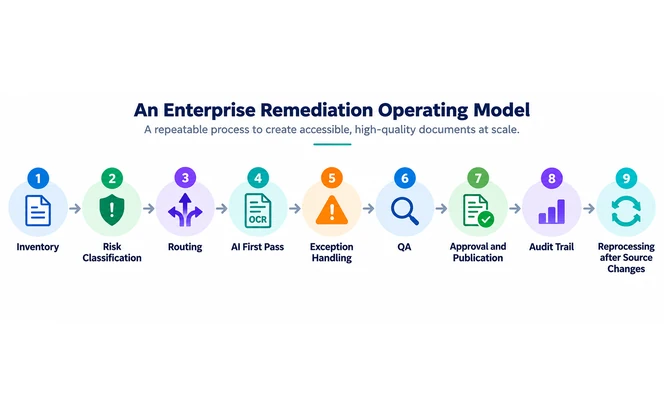
- InventoryRecord every document, its owner, format, volume, audience, and publication location.
- Risk classificationAssign each document a complexity and risk tier using the framework above.
- RoutingSend each tier to the right workflow, from automated processing to specialist queues.
- AI first passApply OCR, tagging, reading order, and repeatable fixes.
- Exception handlingRoute low-confidence results and failed checks to the right reviewer.
- QATest every document against the acceptance criteria for its tier.
- Approval and publicationRelease only the approved accessible version.
- Audit trailRecord what was changed, by whom, when, and which checks passed.
- Reprocessing after source changesTrigger remediation and validation whenever the source is edited.
Connecting these stages without manual handoffs is where workflow automation services help, especially for routing, exception queues, and reprocessing triggers.
For the audit trail, mapping each check to a named control makes evidence easier to produce. A reference such as the Global Compliance Controls Matrix shows how controls and evidence can be organized.
Where the original Word, PowerPoint, or InDesign file exists, fixing the source is usually more sustainable than repeatedly repairing exported PDFs.
Acceptance Criteria: What “Done” Means
A remediated document is done when it meets defined criteria, not when an AI tool finishes processing it.
PDF/UA-1, published as ISO 14289-1 (PDF/UA), defines the technical requirements for accessible PDF files based on PDF 1.7. PDF/UA-2 (ISO 14289-2) extends those requirements to PDF 2.0.
The Matterhorn Protocol is not the standard itself. It lists the ways a file can fail PDF/UA-1, organized into 31 checkpoints and 136 failure conditions.
Of those 136 conditions, 87 can be determined by software alone and 47 usually require human judgment. The remaining 2 (23-001 and 27-001) have no specific test defined.
That split is why automated checks cannot close a remediation project on their own, a trade-off explored in Automated vs Manual PDF Remediation.
| Check | Pass condition | Method |
|---|---|---|
| Tag tree | Meaningful content correctly represented in the structure tree, decorative content intentionally marked as artifacts | Tag-tree inspection |
| Reading order | Content reads in a logical sequence | Reading-order review |
| Headings | Hierarchy reflects the document with no skipped levels | Heading outline review |
| Lists | Items grouped and nested correctly | Tag-tree review |
| Tables | Header cells defined and correctly associated with data cells | Table review |
| Forms | Every field labelled and grouped, logical tab order, clear instructions and errors | Keyboard test |
| Images | Meaningful images described by purpose, decorative ones marked as artifacts | Alt text review |
| Language and metadata | Title and document language set | Automated check |
| Automated validation | No unresolved machine-detectable failures reported by the selected validator | PAC or veraPDF |
| Manual checks | Checks that software cannot judge completed and recorded | Manual review |
| Assistive technology | Representative documents navigable with a screen reader | Manual screen reader test |
| Approval | Named reviewer signs off and the record is stored | Audit trail |
Validators such as the PDF Accessibility Checker (PAC) and veraPDF test the machine-checkable conditions of the standard, such as missing tags, missing language, or structural errors.
They cannot establish whether alt text is accurate, whether the reading order makes sense, whether headings reflect the real hierarchy, or whether a form is usable. A clean validator report is necessary evidence, not a final verdict.
Section 508’s guidance on testing electronic documents explains how to examine the tag structure, distinguish artifacts correctly, and combine automated checks with manual review.
How to Choose an AI Document Remediation Solution
Evaluate platforms on what they can prove, not only on their AI claims.
Check capability first: native and scanned PDF support, OCR, reading-order detection, table handling, form support, and alt-text workflows.
Then check transparency. A strong platform shows whether each change was detected, recommended, or fixed, and lets reviewers compare before and after.
Check validation and operations next: WCAG and PDF/UA checks, review queues, batch processing, API integration, audit reports, and reprocessing when sources change.
Limina, for example, combines accessibility testing, remediation, monitoring, and reporting in one workflow. Organizations with unusual document types or systems may instead need document remediation software development.
Security deserves equal weight when documents contain contracts, financial records, personal information, or government data. Enterprise buyers should confirm:
- Data residency and where processing takes place
- Encryption in transit and at rest
- Retention periods and verified deletion
- Access controls and administrator permissions
- Subprocessors involved in handling files
- Tenant isolation between customers
- Which AI models or providers documents are routed to
- Whether uploaded content is used for model training or improvement
Public agencies can use a government AI governance framework to structure these vendor questions.
Common Mistakes to Avoid
Treating an automated score as proof of accessibility is the most common mistake. A passing score covers machine-checkable conditions only.
Running one workflow for every document is the second. A letter and a financial disclosure should not follow the same path.
Remediating exports while ignoring the source guarantees repeat work, and skipping the audit trail leaves no evidence that remediation happened.
When AI Remediation Makes Sense
AI-assisted remediation pays off with large PDF backlogs, repetitive templates, frequent publishing, scanned archives, and tight deadlines.
For a handful of simple PDFs, manual remediation may be enough. For thousands of mixed documents, AI provides a scalable first pass, as long as routing and validation are built around it.
Conclusion
AI can make document accessibility remediation faster and more consistent. It detects structure, performs OCR, reconstructs reading order, generates tags, and flags common problems across large collections.
The advantage comes from deciding precisely where automation ends. Classify documents by complexity and risk, match each task to the right level of review, watch for known failure modes, and publish only against clear acceptance criteria.
The question is not whether AI can remediate a PDF. It is which tasks AI handles reliably, which need human judgment, and how you prove the result works before it goes live.
Frequently Asked Questions
AI can automate OCR, tagging, structure detection, and reading-order analysis. Automated tagging does not guarantee WCAG or PDF/UA conformance, so the final document still needs validation against defined acceptance criteria.
Detection finds a potential issue, such as a missing tag. Remediation writes a fix into the file. A fix still needs checking, because a tag can be present and still describe the content incorrectly.
Low-complexity documents such as single-column reports, letters, and policies with simple lists are the best candidates. Complex tables, forms, charts, and high-risk documents need specialist remediation.
Yes. AI workflows apply OCR to convert scanned pages into machine-readable text before adding structure. Names, dates, and numbers should be verified, because OCR errors change the meaning of the content.
It is a useful starting point. Alt text must convey the purpose of the image in context, and decorative images should be marked as artifacts rather than described.
It is ready when it passes the acceptance criteria for its tier: tag structure, reading order, headings, tables, forms, images, metadata, automated validation, completed manual checks, representative screen reader testing, and a recorded approval.