
Offline field operations let NGO staff record approved activities when a reliable connection is unavailable. The difficult part is what happens afterwards: delayed submissions, duplicate records, conflicting updates and lost devices must be handled without losing evidence or exposing participants' information.
Offline capability is therefore a workflow requirement, not simply a mobile screen. Specify which actions work without connectivity, what data is stored locally and how a record becomes accepted in the central system. Test those behaviours using the devices and interruptions field teams actually experience.
What should still work when connectivity disappears?
Separate essential capture from actions that require current central information. A visit record may be collected locally, while approval of a new payment may require an up-to-date balance and an authorised online process. Avoid treating every desktop function as equally suitable for disconnected use.
List the forms, reference data, languages and attachments needed for each activity. Define how staff receive updates before leaving a connected location and what happens if their form version becomes outdated. Large reference lists or media files can affect device performance and storage.
ODK Collect is an example of a specialist tool designed for offline form collection. Its availability does not establish a ready-made ERP connection. A proposed architecture still needs an agreed integration and reconciliation design between field capture and central records.
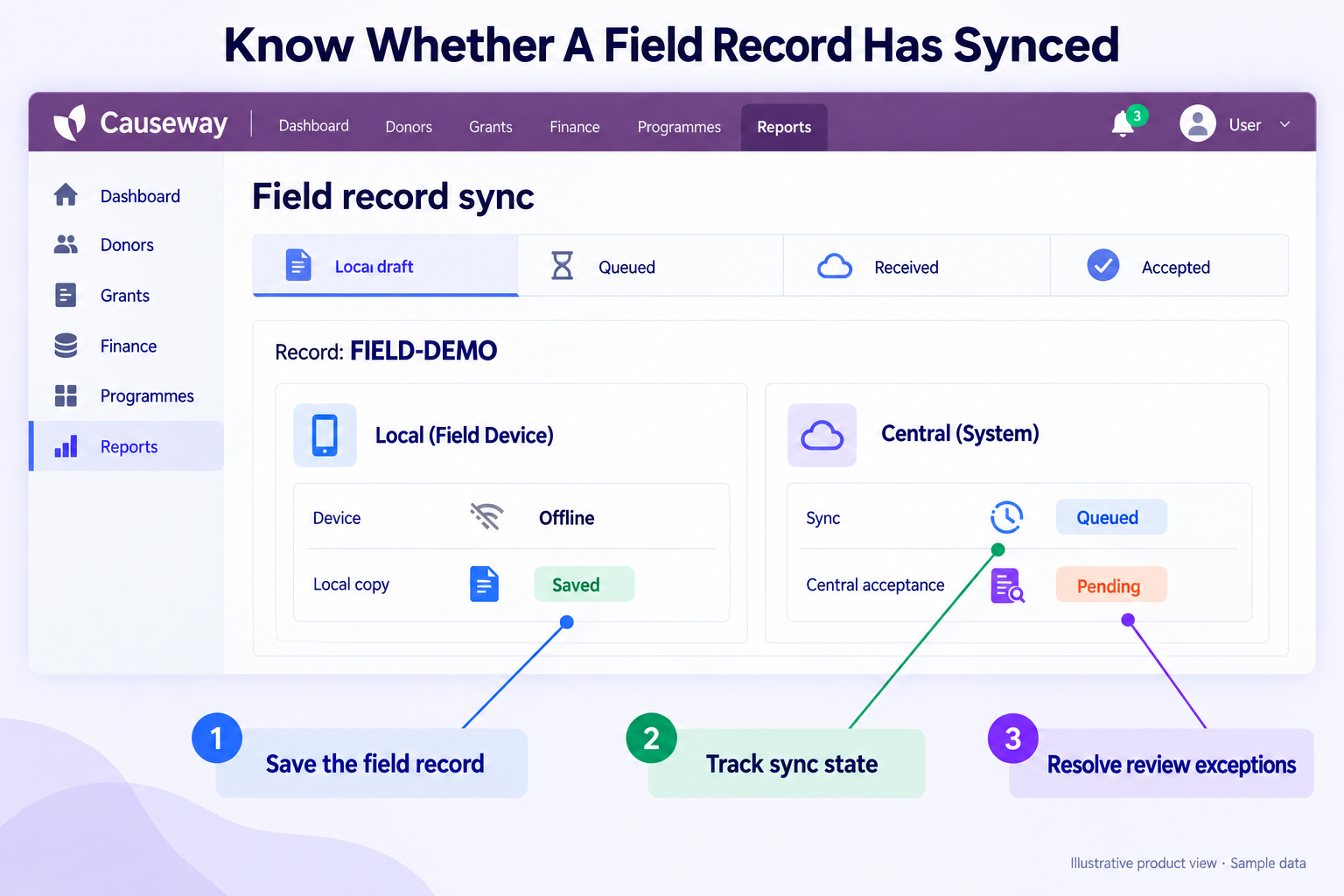
Saved, received and accepted are different states
| State | Meaning | Required User Feedback |
|---|---|---|
| Draft on device | Work has been saved locally | What remains incomplete and who can edit |
| Ready to send | Capture is complete under the local workflow | Record is still awaiting transmission |
| Received centrally | The server has acknowledged receipt | Stable reference and validation status |
| Accepted or returned | Central review has made a decision | Acceptance evidence or correction request |
A synchronisation icon should not imply that a record has passed review. Keep device capture time, transmission time and activity date distinct. The programme reporting process needs the activity period, while support staff may need the transmission history to investigate a delay.
Use stable record identities across retries. If the device loses a response after sending, it should be possible to check whether the original record arrived rather than create another observation. Preserve the original submission alongside any approved correction.
Resolve conflicts without silently losing work
Two devices may record the same household visit, or a central reviewer may change a record while a field copy remains offline. Decide which fields can be merged automatically and which need human review. A simple last-write-wins rule can erase important evidence.
Show the reviewer the conflicting values, their sources and timestamps. Record the resolution and reason. For beneficiary identity matches, follow the duplicate-resolution and privacy process rather than merging people solely because names resemble each other.
A reconnect must preserve both versions
Example: a field worker changes a visit date while the country office corrects the same record. On reconnect, the submission should carry its record ID, the version last seen by the device and a unique submission reference. If the central version has changed, hold the conflicting update for review instead of silently overwriting it.
The reviewer compares both values and their timestamps, chooses the accepted value and records a reason. A retry of the same submission must return its existing outcome, not create a second visit. Before clearing the local queue, the device needs confirmation that the central record was accepted. Test a lost connection between receipt and acknowledgement: the worker should be able to retry without losing work or doubling programme totals. These are acceptance requirements for the proposed offline design.
Offline copies need their own protection
Limit downloaded data to the worker's assigned purpose. Specify device access protection, local storage safeguards, session behaviour and the process for a lost or reassigned device. Remote revocation may not take effect until a device reconnects, so the offline risk needs its own controls.
Decide how long submitted records remain on a device and what evidence confirms central receipt before local removal. Include backups, exported files and photographs in the review. A secure server does not protect an uncontrolled copy stored elsewhere.
Collect location or detailed audit data only where justified and explained. ODK's form-audit documentation describes configurable audit capabilities and limitations. Review the actual tool configuration; the existence of an audit feature does not mean every field action is captured automatically or that additional tracking is appropriate.
Rehearse a difficult field day
Build an acceptance exercise around realistic interruptions. Start a record, lose connectivity, close the application, resume work, submit twice after an uncertain response and send a correction after central review. Check both the worker's screen and the central record.
Include a device with low storage, an outdated reference list and the largest expected attachment. Test the supported languages and accessibility needs with actual users. Record how long synchronisation takes under representative conditions rather than relying on an office demonstration.
Establish a support and recovery route
Field staff need a simple way to identify a stuck record and obtain help without sending sensitive data through an uncontrolled channel. Provide a record reference, status explanation and escalation contact. The support team needs access to appropriate logs and a documented recovery process.
If temporary paper or file capture is necessary, assign responsibility for later entry and duplicate checks. Mark which temporary records have been accepted centrally. Include that reconciliation in the rollout and cutover plan so the fallback does not become an invisible parallel database.
Conclusion
Offline operation succeeds when saved work can be transmitted, reviewed and reconciled without losing its history. Specify record states, conflict handling, device protection and support responsibilities before choosing the tool. A realistic field rehearsal is stronger evidence than a mobile interface shown on a reliable office connection.
Test your field workflow with Causeway
Assess field-data and ERP requirements for a possible Causeway. Share representative forms, device constraints, connectivity gaps and the central approvals that follow submission.
Request a clear distinction between native capability, specialist field tools and integration work. Confirm offline behaviour through a supervised test rather than a general mobility claim. The proposed scope should identify device responsibilities, duplicate handling, recovery ownership and the evidence needed before field teams depend on the workflow.
Frequently asked questions
Should every offline record be accepted automatically?
No. Transmission and acceptance are separate decisions. Apply the validation and review required for the record type, preserve the original submission and make returned records understandable to the person responsible for correcting them.
What happens if a device is lost before synchronisation?
Follow the agreed incident and recovery process. Assess the data exposure and whether an approved local backup or other evidence can recover the work. Design for this possibility before deployment, because remote controls may be ineffective until the device reconnects.