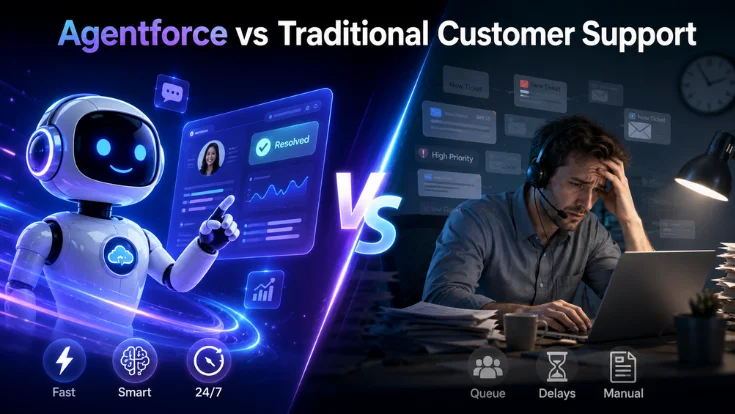
Traditional customer support runs on human agents, queues, scripts, and manual case handling. Agentforce uses AI agents that pull customer data from CRM, choose the right action, complete approved tasks, and hand off complex cases to humans.
Neither model is universally better. The right choice depends on your ticket types, data quality, and risk tolerance.
Short answer: Agentforce is better for high-volume, repeatable, data-driven workflows. Traditional support is better for complex, emotional, regulated, or high-value cases. Most teams benefit from a hybrid model where Agentforce handles Tier 1 requests and human agents handle exceptions.
Quick Comparison: Agentforce vs Traditional Customer Support
| Dimension | Traditional support | Agentforce |
|---|---|---|
| Availability | Limited by business hours and staffing | 24/7 on digital channels within configured scope |
| Response time | Queue-dependent — minutes to hours | Near-instant for supported topics |
| How cases get solved | Human reads, decides, manually updates systems | Agent reasons, executes approved actions, escalates |
| Scalability | Requires hiring, onboarding, and scheduling | Scales digitally within licensing and configuration limits |
| Data access | Manual switching across CRM, KB, billing, ERP | Unified — CRM, Data 360, and connected systems |
| Consistency | Varies by agent experience and workload | More consistent within approved limits |
| Best for | Complex, emotional, sensitive, high-risk cases | High-volume, repeatable, well-documented workflows |
| Main risk | Slow response, inconsistency, cost at scale | Bad data, weak handoff rules, over-automation |
Outcomes depend on data quality, workflow complexity, and how well handoff rules are configured before go-live.
What Is Traditional Customer Support?
Traditional support teams handle queries across phone, email, live chat, and ticket systems. Agents triage cases manually, switch between systems, and escalate to supervisors. Handled well, it delivers empathy, judgment, and relationship management that are hard to replace.
Where it works well
- Angry or distressed customers who need empathy
- Legal, compliance, or regulated cases
- Complex negotiation and policy exceptions
- High-value account and relationship management
- Ambiguous situations requiring judgment
- Cases outside any documented workflow
- New product issues without a playbook
- Processes not clean enough to automate yet
Where it struggles
- Queue delays during peak periods or outside hours
- Inconsistent answers across different agents
- Manual switching between CRM, KB, billing, ERP
- High cost of hiring, training, and retaining agents
- Knowledge gaps and slow escalation routing
- Repetitive, high-volume queries that drain capacity
- Slow case updates across disconnected systems
- Limited 24/7 coverage without high headcount
What Is Agentforce in Customer Support?
Agentforce support centres on the Service Agent — an AI agent that handles inbound queries, pulls CRM data, runs approved actions, and transfers cases to humans with full context when needed. These are the components relevant to a support deployment.
Service Agent
Salesforce's pre-built support agent. Handles messaging, case creation, resolution, and handoff across web, chat, and voice channels.
Atlas Reasoning Engine
The LLM layer. Processes context, chooses the right action sequence, and selects from the agent's configured topic and action set.
Agent Builder
Low-code interface for defining agent role, topics, allowed actions, handoff conditions, and approved limits without code for most cases.
Data 360 + CRM
Provides unified customer context — account history, cases, orders, and interactions — available to the agent at query time.
Salesforce Flow + Apex
Powers agent actions: updating records, triggering workflows, and executing resolution logic. See: Salesforce Flow automation.
MuleSoft + REST API
Connects to external systems — ERP, billing, order management — for data retrieval and cross-system actions. See: Salesforce REST API integration.
Approved limits + handoff rules
Configured boundaries on what the agent can and cannot do. Out-of-scope or risky cases escalate to humans with full context attached.
Agentforce vs Traditional Support: Detailed Comparison
Seven operational dimensions where the two models diverge most — with examples, trade-offs, and practical guidance.
1. Response Time
Traditional support response time depends on queue length, staff availability, and business hours. During peak periods, customers wait minutes to hours.
Agentforce responds near-instantly to supported topics, on all hours across digital channels. Cases it cannot resolve are routed to a human with full context attached.
2. How Cases Get Solved
Traditional support relies on human judgment and manual execution. Every action — updating a field, issuing a credit, scheduling a callback — requires an agent to act in the correct system.
Agentforce resolves cases where the workflow is fully defined: password resets, address updates, refund status checks, appointment rescheduling, case creation and routing. Everything outside that scope is escalated.
3. Data Access and Context
Human agents often switch between CRM, order systems, KB, billing, and ERP to gather context for one case. Each switch adds time and creates the risk of missing information.
Agentforce pulls from CRM, Data 360, and connected systems in one unified view. Context is assembled at the start of each interaction — provided the data integrations are configured and the data itself is clean.
4. Scalability
Traditional support scales by hiring, training, and scheduling more agents — a process measured in weeks and months, with cost at every step.
Agentforce scales digitally by adding topics and actions rather than headcount. It still depends on licensing, channel setup, clean data, and the human escalation team that handles what Agentforce cannot.
5. Cost
Traditional costs include salaries, hiring, onboarding, training, QA, management, overtime, and attrition. Cost per case reflects the fully-loaded cost of an agent hour.
Agentforce costs include platform licences, Agentforce usage, Data 360 setup, implementation, integration work, prompt maintenance, and the human escalation team. Agentforce can lower cost per case for high-volume repeatable workflows — but total ROI depends on volume, clean data, integration complexity, and escalation rates.
6. Customer Experience
Traditional support delivers empathy and nuanced conversation, but wait times and repeated explanations hurt the experience at peak periods. Agentforce gives fast, consistent, personalised replies when data quality is high — but lacks the human warmth needed for emotionally sensitive interactions.
| CX factor | Traditional support | Agentforce |
|---|---|---|
| Empathy | Stronger for sensitive cases | Limited unless handed off |
| Speed at peak | Slower — queue-dependent | Consistent response time |
| Consistency | Varies by agent | More consistent within approved limits |
| Personalisation | Agent-dependent | Data-driven if CRM/Data 360 is clean |
| Context on escalation | Customer often repeats details | Full context transferred to human |
7. Controls and Risk
Traditional risks include inconsistent answers, policy misapplication, and slow QA feedback. Monitoring requires manual review of calls and tickets.
Agentforce risks include wrong answers from poor data, actions on incorrect intent, and edge cases outside approved limits. Controls require configuring allowed topics, prohibited actions, credit limits, escalation triggers, and ongoing conversation monitoring.
Support flow — traditional vs Agentforce
Where Each Model Works Best
Traditional support still wins
- Angry or distressed customers who need empathy
- Legal, compliance, or regulated cases
- High-value account escalations and relationship management
- Complex negotiation — discounts, refund exceptions, overrides
- Ambiguous situations needing human judgment
- Cases outside any documented or tested workflow
- New issues without a configured agent response
Agentforce works best for
- High-volume FAQs and product support questions
- Order status, tracking, and shipping updates
- Refund and credit status checks (within approved limits)
- Appointment scheduling and rescheduling
- Password resets and access requests
- Case creation, routing, and status updates
- Knowledge retrieval and guided troubleshooting
- After-hours and weekend coverage on digital channels
- Handling volume spikes without adding headcount
Best Model: Agentforce and Human Support Together
The most effective deployment is not Agentforce replacing human agents. It is Agentforce handling Tier 1 repeatable volume while human agents focus on exceptions, emotional cases, high-value customers, and complex decisions. This protects service quality while reducing operational strain.
| Tier | Owner | Best for | Escalates when |
|---|---|---|---|
| Tier 0 | Self-service / Knowledge base | Static FAQs and help articles | Customer requests agent |
| Tier 1 | Agentforce Service Agent | High-volume repeatable cases with defined paths | Out-of-scope or low-confidence response |
| Tier 2 | Human support agent | Complex or emotional cases — full context from Tier 1 | High risk, high value, or approval required |
| Tier 3 | Specialist or supervisor | Sensitive, regulated, high-value, or policy exceptions | Final resolution authority |
A feedback loop from resolved Tier 1 cases should update knowledge articles and agent topics — improving Agentforce over time without requiring manual prompt rewrites.
Migration Roadmap: Traditional Support to Agentforce
A structured approach reduces failed pilots and protects service quality during transition. Each step builds on the one before it.
Audit current support volume
Break down tickets by channel, issue type, handle time, escalation rate, and repeatability. Identify which types are high-volume, well-documented, and low-risk.
- Channel breakdown
- Issue categories
- Average handle time
- Escalation rate
- Repeatability score
Choose one pilot workflow
The best starting points have high volume, consistent logic, clean data, and low business risk. Avoid anything involving financial approval or emotionally sensitive handling.
- Order tracking
- Password reset
- Appointment rescheduling
- Refund status check
- Knowledge Q&A
Clean the data foundation
Agent output quality is directly tied to CRM and Data 360 completeness. Audit knowledge articles, case categories, and customer profiles before configuration begins.
- CRM field completeness
- Knowledge article accuracy
- Data 360 readiness
- Order and entitlement data
Define topics, actions, and handoff rules
For each topic: what can the agent answer, what can it do, which systems it accesses, what needs human approval, and when it must escalate. These rules must be documented before Agent Builder configuration begins.
- Allowed topics
- Prohibited actions
- Credit and refund limits
- Escalation triggers
Test against real historical cases
Run the agent against historical support cases in a sandbox — testing resolution, escalation, wrong intent, missing data, and compliance-sensitive edge cases before any live traffic.
- Resolution path
- Escalation path
- Wrong-intent handling
- Compliance edge cases
Launch with monitoring
Deploy to limited live volume first. Track the metrics below weekly for the first 4–6 weeks. Use results to tune topics, prompts, and handoff rules before expanding scope.
- Deflection rate
- Escalation rate
- Wrong-answer rate
- CSAT change
- Human override rate
KPI Comparison: Traditional Support vs Agentforce
| KPI | Traditional support baseline | Agentforce — what to evaluate |
|---|---|---|
| First response time | Queue-dependent | Should reduce for supported topics |
| Average handle time | Human workload and system-switching dependent | Should reduce for repeatable workflows |
| Case deflection rate | Limited to self-service only | Should increase if Tier 1 cases are resolved |
| Escalation rate | Manual routing | Should decrease for clear workflows; monitor edge cases |
| Cost per case | Labor-heavy | Should reduce at scale if volume and data quality are sufficient |
| CSAT | Agent-dependent | Should improve if speed and resolution accuracy improve |
| QA effort | Manual call and ticket review | Requires conversation monitoring and audit tooling |
| Agent productivity | Limited by total workload | Human agents focus on higher-value exceptions |
Track deflection rate, resolution quality, and CSAT — not just conversation count. Agree on baselines before launch.
Decision Matrix: Which Support Model Should You Choose?
Match your scenario to the right model, then use the quick selector below for a personalised recommendation.
| Scenario | Recommended model |
|---|---|
| Low ticket volume, high-touch customers | Traditional |
| High-volume repetitive tickets with clean data | Agentforce |
| Regulated support with high-risk decisions | Hybrid |
| Poor CRM or knowledge data quality | Traditional first — clean data before Agentforce |
| 24/7 global support with off-hours volume | Agentforce Tier 1 + escalation team |
| Complex enterprise account relationships | Hybrid with human account specialists |
| Cost-reduction pressure on support operations | Agentforce pilot on Tier 1 cases |
| Complaints requiring empathy and discretion | Human-led support |
Quick Support Model Selector
Answer two questions for a personalised recommendation.
Step 1 — What best describes your support volume?
Step 2 — How complete is your CRM and knowledge data?
- Start with one high-volume, low-risk workflow — order tracking or case creation
- Configure topics, allowed actions, and handoff rules before go-live
- Agree on deflection rate and CSAT targets before launch
- Run for 4–6 weeks then evaluate before expanding scope
- Audit CRM completeness and knowledge article accuracy before configuring Agentforce
- Run a limited pilot on your cleanest workflow only
- Human agents continue handling volume while data is improved
- Traditional support handles all cases while CRM data is built
- Set up Salesforce CRM and populate the knowledge base
- Plan Data 360 streams and integration architecture in parallel
- Revisit Agentforce when data readiness criteria are met
- Agentforce handles Tier 1 repeatable queries autonomously
- Human agents receive complex cases with full context
- Configure handoff rules for every scenario Agentforce cannot resolve
- Monitor deflection rate and wrong-answer rate weekly for first 6 weeks
- Pick the one workflow with the highest volume and cleanest data
- Configure topics, actions, and handoff rules for that workflow only
- Test against 4–6 weeks of historical cases in sandbox first
- Use pilot results to prioritise data cleanup for the next workflow
- Continue with traditional support while Salesforce is implemented
- Invest in CRM data quality, case categories, and knowledge base content
- Plan Agentforce as part of the Salesforce rollout, not after it
- Human agents handle complex and sensitive cases as the primary model
- Agentforce limited to non-sensitive query types only — FAQ, status checks
- Strict handoff rules required for any case with regulatory or emotional risk
- Traditional support remains primary for all case types
- Improve CRM data completeness as first priority
- Consider a limited knowledge-base-only pilot once data quality improves
- Traditional support fits your current case mix and risk profile
- Focus on building the Salesforce data foundation in parallel
- Revisit Agentforce when data quality and readiness criteria are met
Common Mistakes When Moving to Agentforce
These apply whether you are running a first pilot or expanding from one workflow to many.
Automating every support case
Broad scope from day one leads to poor agent performance and makes it hard to identify what caused failures.
Launching before data is clean
Agent output quality is tied directly to CRM and Data 360 completeness. Incomplete records produce unreliable responses at scale.
No handoff rules configured
Handoff rules must be set before go-live. Without them, edge cases go unresolved and customers are left without support.
High-risk actions too early
Financial approvals, high-value refunds, and compliance-sensitive decisions need human review until the agent has a validated track record.
Ignoring human agent experience
Escalated cases land with humans. If context or framing is poor, CSAT suffers even when the AI agent performed correctly.
Designing it like a chatbot
Agentforce takes real actions in connected systems. Applying scripted chatbot logic misses the platform entirely.
Missing integration requirements
Many support use cases need MuleSoft, REST API, or Apex. Discovering this after scoping begins significantly extends timelines.
Measuring conversations, not outcomes
Conversations handled does not mean resolution quality, deflection success, or business impact. Define outcome KPIs before launch.
- Deflection rate — not conversations handled
- First contact resolution rate
- CSAT delta vs baseline
- Human override rate
How SDLC Corp Helps Modernize Customer Support with Agentforce
SDLC Corp supports the full journey from support audit to Agentforce deployment — covering readiness assessment, Service Cloud and Data 360 setup, Agent Builder configuration, integration work, approved limit design, pilot deployment, and post-launch monitoring.
Frequently Asked Questions: Agentforce vs Traditional Support
It is better suited for high-volume, repeatable, data-driven workflows — order tracking, case routing, password resets, appointment scheduling, and knowledge Q&A. Traditional support is still better for complex, emotional, high-risk, or relationship-heavy cases. Most effective deployments combine both.
It can reduce the volume of work human agents handle. The most effective model is hybrid — Agentforce resolves Tier 1 repeatable cases and escalates exceptions to humans, who focus on complex decisions, emotional interactions, and high-value account management.
Traditional chatbots follow scripts or fixed decision trees. Agentforce reasons through the right next step, retrieves live CRM and Data 360 context, triggers real actions — updating records, rescheduling appointments, routing cases — and escalates with full context. It is an action-taking agent, not a conversation router.
Order status and tracking, case creation and routing, password resets, address updates, appointment scheduling and rescheduling, refund status checks within approved limits, product support Q&A, knowledge retrieval, and basic troubleshooting.
Sensitive complaints, legal and compliance cases, high-value account decisions, complex policy exceptions, emotionally distressed customers, cases not covered by a configured workflow, and any situation where human judgment is the only appropriate response.
Reliable CRM records — account history, contact data, case history — at minimum. Richer deployments benefit from Data 360 unified profiles, clean knowledge articles, order and entitlement data, and connected external systems via MuleSoft or REST API for cross-system actions.
Start with one high-volume, low-risk workflow that has consistent logic and clean CRM data. Define topics, allowed actions, and handoff rules before Agent Builder configuration. Test against historical cases in a sandbox. Track deflection rate, escalation rate, and CSAT for the first 4–6 weeks before expanding scope.
Ready to modernize customer support with Agentforce?
Start with one high-volume workflow, define success metrics, and build a safe hybrid support model with human escalation. SDLC Corp can guide the process from audit to go-live.
Talk to an Agentforce expert