Home / Blogs & Insights / How to Switch iGaming CRM: Operator’s Migration Playbook

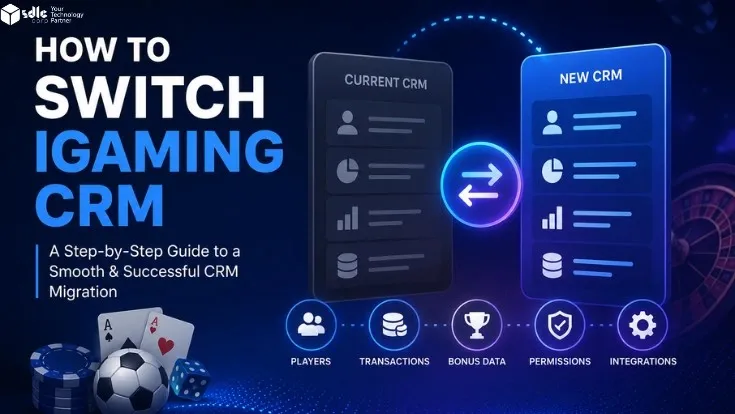
How to Switch iGaming CRM: Operator’s Migration Playbook

How to switch iGaming CRM systems for seamless player data and platform migration.

Table of Contents

Switching your iGaming CRM is one of the highest-stakes decisions an operator can make. The wrong move risks player data, active campaigns, and revenue during peak windows. The right move unlocks faster FTD conversion, real-time triggers, and a unified player view your team can actually use.

How to switch iGaming CRM platforms successfully comes down to five disciplines: a clean pre-switch audit, the right framework, careful data handling, sequenced integration cutovers, and a structured 90-day validation. Skip any of these and you risk broken integrations, lost player data, or paused revenue mid-campaign. Ultimately, a proven iGaming CRM migration follows the same pattern every time.

Key Takeaways

  • Audit before action: Contract, data inventory, and RACI ownership come before vendor demos.
  • Switch-Safe Framework: Six phases over 6 to 10 weeks for most mid-tier operators.
  • Not all data migrates: KYC records, consent timestamps, and journey logic need extra care.
  • Sequence live integrations: Upstream first, then downstream, by channel category.
  • True cost is 1.5 to 2x license: Dual-running, retraining, and compliance re-validation drive year-one cost.
  • 90-day validation matters: KPIs should return to baseline by day 60 and beat it by day 90.

9 Signs It's Time to Switch Your iGaming CRM

If three or more of these apply, your CRM is no longer fit for purpose.

Player data updates overnight, not in real time.
Your CRM and CDP are different vendors.
Campaign builds need engineering support.
Same-session interventions are not possible.
Compliance and consent live outside the CRM.
VIP teams have no real-time tier visibility.
Reporting consumes more time than execution.
The vendor has stopped shipping iGaming-relevant features.
Renewal cost no longer reflects value delivered.

Switching is often triggered by failing player retention best practices and rising vendor lock-in. Industry research consistently shows CRM projects fall short because of weak planning, not weak platforms, which is why operators benefit from a structured migration framework rather than a vendor-led rebuild.

Pre-Migration Audit: Contract, Data, and Team Readiness
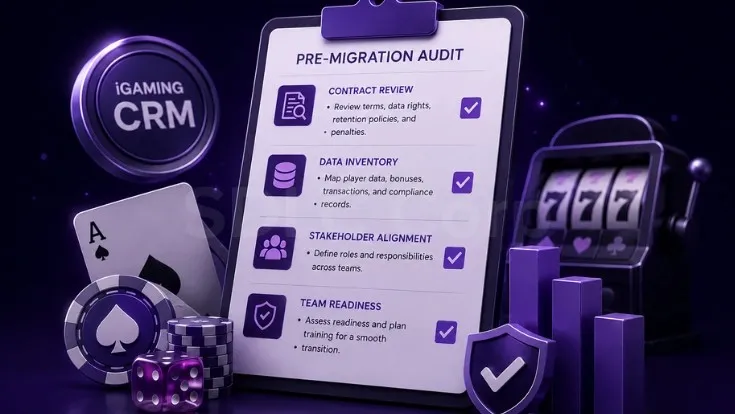
RACI matrix for iGaming CRM migration showing responsibility across CRM, CTO, compliance, marketing ops, support, finance, and legal teams

Before evaluating a new platform, audit what you already have. In fact, a weak audit is the most common cause of failed migrations.

First, audit your existing contract

Review notice periods, data export rights, post-termination data retention, and penalty fees. Operators often discover lock-in clauses only after signing with a new vendor.

Next, map your full data inventory

Player profiles, deposit and bet history, KYC records, responsible gaming flags, consent timestamps, segments, journeys, suppression lists, and affiliate attributions. A complete inventory connects directly to your iGaming compliance checklist for the markets you operate in.

Finally, build a stakeholder RACI matrix

Define responsibility across CRM, CTO, Compliance, Marketing Ops, Customer Support, Finance, and Legal. Without clear ownership, the migration becomes a series of escalations.

The Switch-Safe Framework: 6 Phases to Zero-Downtime Migration

Switch-Safe Framework timeline showing six iGaming CRM migration phases across 10 weeks

The Switch-Safe Framework runs over 6 to 10 weeks across six phases. Importantly, each phase has a clear exit condition before the next begins. For best results, operators planning a structured switch should align this framework with a purpose-built iGaming CRM software solution from day one.

01Weeks 1–2

Discovery and Vendor Scoping

Define migration goals, success KPIs, and platform requirements. Run vendor demos against your own data.

02Weeks 2–3

Data Mapping and Field Inventory

Map every field in the old CRM to its equivalent in the new platform.

03Weeks 3–5

Journey and Segment Rebuilding

Recreate active journeys, suppression rules, and high-value segments.

04Weeks 4–6

Compliance, Consent, and RG Migration

Transfer consent records, self-exclusion lists, and responsible gaming flags with full audit trails.

05Weeks 5–8

Parallel Running and Validation

Run both platforms in parallel. Compare deliverability, segment counts, and attribution daily.

06Weeks 8–10

Cutover and Post-Migration Optimization

Switch traffic to the new platform. Decommission the old system only after 30 days of stable operation.

Plan Your iGaming CRM Switch

Audit, plan, and execute the migration with zero downtime

If your current CRM is missing FTD windows or creating data reconciliation work, the migration cannot wait. SDLC Corp helps operators audit, plan, and execute CRM switches without breaking campaigns or compliance.

Audit My CRM Switch Plan

What Data Actually Migrates When You Switch iGaming CRM

The biggest surprise in CRM migrations is what does not transfer. In reality, most vendors describe data export in broad terms, but the details are more granular.

Migrates CleanlyMigrates With EffortRarely MigratesAlmost Never Migrates
Player profilesBonus historyJourney automation logicHistorical attribution
Transaction historyLoyalty pointsA/B test historyReal-time event archives
Basic segmentsKYC recordsCampaign creativeVendor-locked dashboards
Suppression listsRG flags and consentPredictive model scoresVendor-specific reports

Notably, KYC records carry the highest compliance weight, and any gap creates regulatory exposure. Therefore, operators should treat KYC migration as a regulated workflow tied to their KYC compliance in gambling apps policies. According to Sumsub's 2024 iGaming Fraud Report, iGaming fraud rose 64% year over year between 2022 and 2024, making clean KYC portability a revenue-protection issue, not only a compliance task.

Switching CRM With Live Integrations: Keeping Everything Connected
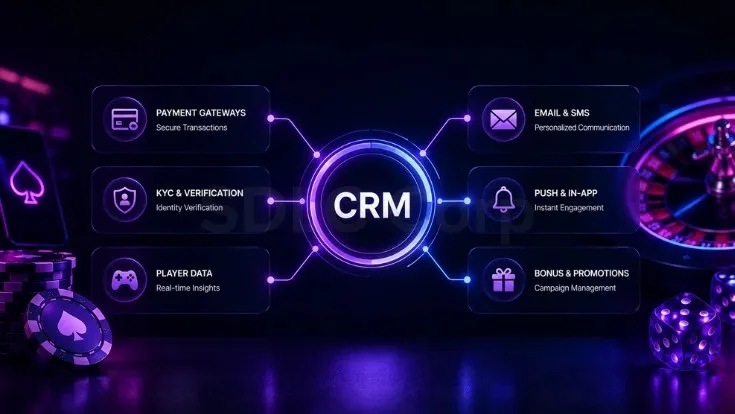
iGaming CRM live integration map showing upstream and downstream connections

An iGaming CRM connects to dozens of upstream and downstream systems. Without proper sequencing, the cutover creates campaign gaps, attribution loss, and compliance exposure.

Upstream Integrations to Map

PAM, payment gateways, KYC providers, game providers, sportsbook feeds, and live odds or settlement systems. For operators running multiple games, the connection logic mirrors online casino games API integration patterns.

Downstream Integrations to Map

Email, SMS, push, in-app messaging, BI tools, attribution platforms, and affiliate trackers. For operators tracking revenue across channels, attribution accuracy depends on how these systems receive events from the new CRM.

Sequence the Cutover

First, migrate upstream integrations so the new CRM receives accurate data before campaigns start. Then run downstream channels in parallel during validation. Next, cut over by channel category, not all at once. Finally, validate webhooks, API response times, event payloads, and error handling before the new platform handles real traffic.

The Real Cost of Switching iGaming CRMs
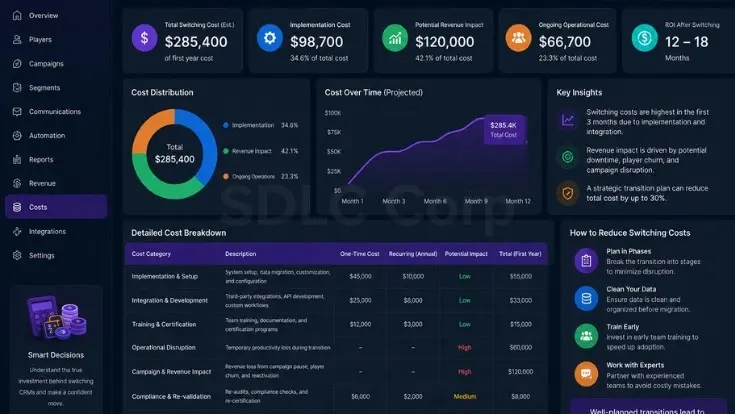
iGaming CRM migration cost breakdown across small, mid-tier, and enterprise operators

License fees are the most visible cost but rarely the largest. However, operators often miss the cost of dual running, retraining, and revenue blackouts.

In total, switching cost typically runs 1.5 to 2x the new platform's annual license fee in year one. Additionally, operators planning broader investments should align this with their casino software development cost projections.

Cost CategorySmall OperatorMid-TierEnterprise
New license + implementation$15K to $40K$50K to $150K$200K to $500K+
Dual-running (60 days)$5K to $15K$20K to $60K$80K to $250K
Integration consultancy$10K to $25K$40K to $100K$150K to $400K
Retraining and certification$3K to $8K$10K to $25K$30K to $80K
Compliance re-validation$5K to $15K$20K to $60K$75K to $200K
Campaign blackout revenue loss$10K to $30K$50K to $200K$200K to $1M+

Figures are indicative ranges based on common project scopes. Final cost depends on integration depth, market coverage, licensing jurisdictions, and the data volume being migrated.

Switchover Day: The Hour-by-Hour Cutover Runbook
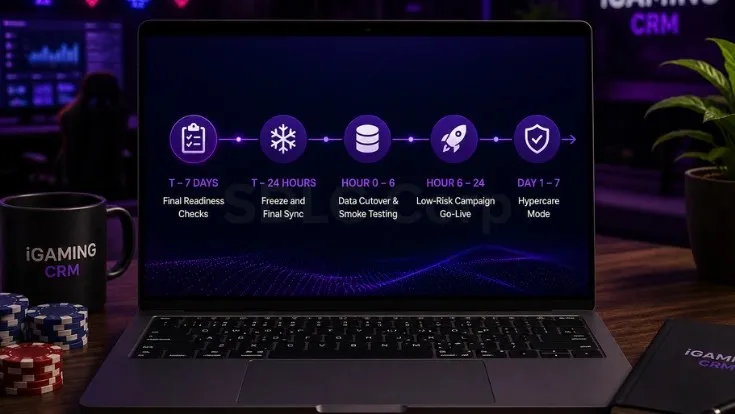
iGaming CRM cutover day runbook showing hour-by-hour checkpoints

Cutover should follow a written plan, not be rushed. A clean runbook keeps every stakeholder aligned and self-exclusion plus responsible gaming checks active throughout.

T − 7 Days: Final Readiness Checks

Seven days before cutover, complete all integration tests, gather stakeholder sign-off, and confirm rollback triggers. After this point, no new feature requests should enter the migration scope.

T − 24 Hours: Freeze and Final Sync

Twenty-four hours before cutover, freeze communications on the old platform. Then run the final data sync overnight so the new CRM starts with the most current player records.

Hour 0 – 6: Data Cutover and Smoke Testing

In the first six hours, complete the data cutover and run smoke testing. Verify that segment counts, journey triggers, and webhooks match expected values before any campaign goes live.

Hour 6 – 24: Low-Risk Campaign Go-Live

Next, go live with low-risk campaigns while the full team stays on standby. Use this window to catch issues at small scale rather than across all player segments.

Day 1 – 7: Hypercare Mode

For the first seven days, run hypercare with daily health checks across deliverability, attribution, and player events. Self-exclusion and responsible gaming checks must remain active throughout, which is why a compliance-by-design iGaming platform approach matters during cutover.

30 / 60 / 90 Day Post-Migration Validation

The migration is not complete on go-live day. Indeed, the first 90 days determine whether the switch delivered value.

Day 1 – 30 Stabilize

Track campaign send volumes, deliverability, and journey completion. Compare against pre-migration baselines and address regressions immediately.

Day 31 – 60 Validate

Validate FTD rate, deposit frequency, click-through rate, and churn against historical performance. Investigate any KPI still below baseline.

Day 61 – 90 Activate

Turn on features the old platform could not support: real-time triggers, behavioral segmentation, and dynamic personalization tied to loyalty programs in online casino gaming.

iGaming CRM Migration Glossary

Key terms used throughout this playbook, defined in plain language.

CDPTerm 01

Customer Data Platform that unifies player data into a single profile.

PAMTerm 02

Player Account Management system handling balances, KYC, and core records.

CutoverTerm 03

The moment traffic switches from the old CRM to the new platform.

Parallel RunningTerm 04

Operating both CRMs simultaneously during validation.

Journey ConfigurationTerm 05

The automated rules that trigger campaigns based on player behavior.

Consent Re-PermissioningTerm 06

Re-validating player communication consent after a platform change.

RG FlagTerm 07

Responsible gaming marker on player accounts.

HypercareTerm 08

The intense monitoring period immediately after cutover.

Conclusion

Switching your iGaming CRM is a structured project, not a risk gamble.

With a clean pre-migration audit, the Switch-Safe Framework, sequenced integration cutover, and a tested 90-day validation plan, operators can move platforms without losing player data, breaking campaigns, or weakening compliance.

Ultimately, the right CRM switch protects revenue today and unlocks the personalization and real-time triggers that drive growth tomorrow..

Map Your Migration Risks

Switch your iGaming CRM without losing data, campaigns, or compliance

SDLC Corp helps operators plan and execute iGaming CRM migrations across data mapping, live integrations, compliance, and post-launch validation. Talk to our team about your current platform and switching goals.

Map My Migration Risks

Frequently Asked Questions

1

How long does iGaming CRM migration take?

Most iGaming CRM migrations take 6 to 10 weeks for mid-tier operators. Small single-brand operators can complete a switch in 4 to 6 weeks. Enterprise multi-brand operators usually need 12 to 24 weeks because of integration depth and compliance scope.

2

Can I migrate player data between CRM platforms?

Yes. Player profiles, transaction history, and basic segments usually migrate cleanly via API or CSV export. Bonus history, KYC records, and consent timestamps need careful field mapping. Journey logic and campaign creative often need to be rebuilt.

3

How much does it cost to switch iGaming CRM?

Total switching cost typically runs 1.5 to 2x the new platform's annual license fee in year one. The largest hidden costs are dual-running fees, retraining, compliance re-validation, and revenue loss during campaign blackout windows.

4

Should we switch CRM before or after a major tournament?

Switch after, not before. Major tournaments are peak revenue windows where any campaign disruption costs more than the entire migration project. Plan cutover for low-traffic periods between major events.

5

How do I avoid downtime during CRM migration?

Use a parallel-running strategy where both platforms operate simultaneously during validation. Cut over channels in sequence rather than all at once. Maintain a documented rollback plan for the first 30 days post-launch.

6

Who should own CRM migration, marketing or IT?

CRM migration should be owned by the CRM or marketing operations team with IT as a critical partner. When IT owns the project, the platform decision often optimizes for integration ease rather than marketing capability.

7

How do I validate a successful CRM migration?

Compare 30, 60, and 90 day KPIs against pre-migration baselines. FTD rate, deposit frequency, click-through rate, and churn should return to baseline within 60 days and improve beyond baseline by day 90 if the platform delivers on its promise.

ABOUT THE AUTHOR

Michael Klein

iGaming Expert

Michael Klein is an iGaming expert with 18 years of experience in the gaming industry. He helps businesses innovate and scale by applying cutting-edge strategies and technologies that drive growth, enhance player experiences, and optimize operations in the ever-evolving iGaming landscape.
PLAN YOUR SOLUTION

More Insights
You Might Find Useful

Explore expert perspectives, practical strategies, and real-world solutions related to this topic.

AI in iGaming operator guide featured image with AI dashboard, player insights, personalization, risk management, and campaign performance visuals

AI in iGaming: Operator Guide

Learn how AI helps iGaming operators improve fraud control, CRM,
Futuristic iGaming CRM banner showing a VIP player profile, predictive analytics dashboards, segmentation charts, and risk-check panels.

VIP Player Identification for iGaming CRM

VIP identification for iGaming CRM should detect emerging high-value players

Player churn detection in iGaming showing player behavior analysis, churn risk identification, and retention-focused gaming insights with casino elements in a realistic dark environment.

Player Churn Detection in iGaming: 8 Early Warning Signals

Winning a single iGaming player now costs somewhere between $250

Let’s Talk About Your Product

Get expert guidance on scope, architecture, timelines, and delivery approach so you can move forward with confidence.

What happens next?