Your accessibility policy says every PDF must meet WCAG 2.1 AA. Then a procurement form asks about PDF/UA, and the team starts to wonder whether PDF/UA vs WCAG is a real distinction or just two names for one rule.
It is a real distinction. One standard sets outcomes for people and the other sets rules for the file, so each one catches problems the other misses. As a result, you usually need both to publish a PDF with confidence.
This guide explains what each standard measures and where the two overlap. It also covers which laws name which standard, and how to test a document against both without doubling the work.
WCAG 2.1 AA defines what people with disabilities must be able to do with content in any format. PDF/UA, published as ISO 14289, defines how a PDF must be built so assistive technology can deliver that content.
Laws usually cite WCAG. PDF/UA supplies the file-level rules that make WCAG achievable inside a PDF, so the strongest documents meet both.
What PDF/UA and WCAG 2.1 AA Actually Measure
The two standards come from different organizations and answer different questions. Therefore, a fair comparison starts with what each one was built to judge, not with a checklist.
WCAG 2.1 AA Judges the Experience
The W3C published the Web Content Accessibility Guidelines 2.1 in June 2018. Level AA bundles 50 success criteria, 30 at Level A and 20 at Level AA, under four principles: perceivable, operable, understandable and robust.
Every criterion describes an outcome. For example, text needs enough contrast, images need a text alternative, and headings must describe their topic. WCAG rarely says how to build these outcomes, so it fits web pages, apps and documents alike.
For files such as PDFs, the W3C guidance on applying WCAG to non-web documents and software explains how each criterion translates when there is no web page involved.
PDF/UA Judges the File
PDF/UA, published by ISO as ISO 14289, covers only PDF. It spells out how the file must be built: real content tagged, decoration marked as artifacts, fonts embedded and the document title stored in metadata.
Two parts exist today. PDF/UA-1 builds on PDF 1.7, while PDF/UA-2 applies the same approach to PDF 2.0 files and adds stricter rules for structure attributes and annotations.
Because PDF/UA speaks to software as well as authors, it also sets expectations for PDF readers and assistive technology. In contrast, WCAG leaves most of that behavior to the browser or reader.
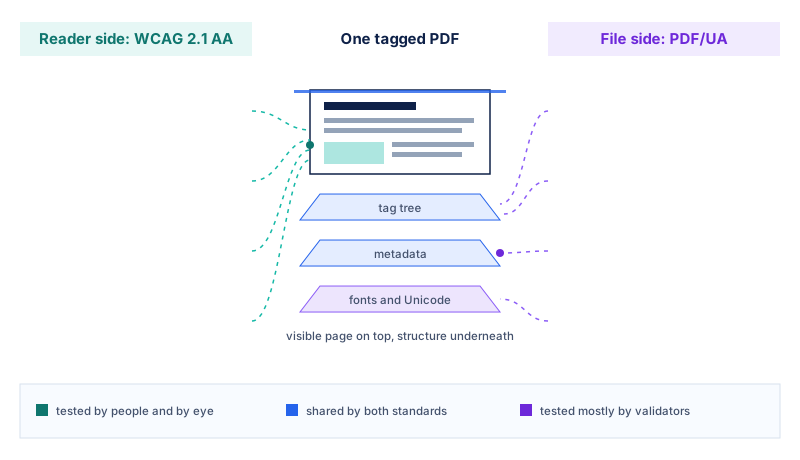
Put simply, WCAG asks whether a person can use the document. PDF/UA asks whether the file gives software everything it needs to make that possible in the first place.
PDF/UA vs WCAG 2.1 AA at a Glance
The table below compares the two standards on the points that usually decide how a team plans testing, reporting and vendor contracts.
| Attribute | WCAG 2.1 AA | PDF/UA |
|---|---|---|
| Published by | W3C, June 2018 | ISO; PDF/UA-1 in 2012 (revised 2014), PDF/UA-2 in 2024 |
| Scope | Any digital content, applied to documents through WCAG2ICT | PDF files, PDF readers and assistive technology only |
| Style of rules | Outcome-based success criteria | Prescriptive file-format requirements |
| Size | 50 success criteria at Levels A and AA | 31 checkpoints and 136 failure conditions in the Matterhorn Protocol for PDF/UA-1 |
| Visual design | Contrast, use of color and resizing are all covered | No numeric contrast or color rules |
| Media and timing | Captions, audio description and time limits are covered | Only minimal requirements |
| How it is checked | Automated scans, manual review and assistive technology testing | Validators for machine checks, plus human review |
| Cost of the text | Free | Paid ISO standard; the matching WTPDF specification for PDF 2.0 is free |
| Named in law | ADA Title II, HHS Section 504, EN 301 549, Section 508 (as WCAG 2.0) | Section 508 names it only for PDF export in authoring tools |
Across this PDF/UA vs WCAG comparison, the pattern is clear. WCAG covers more human needs, while PDF/UA covers more technical ground inside the file, so neither column is simply a subset of the other.
Where the Two Standards Overlap and Split
Most structural criteria in WCAG line up with a PDF/UA checkpoint. When a heading is tagged as a heading, for instance, it satisfies both standards in a single move.
Shared Ground
Alternative text for figures, a logical reading order, tagged tables with header cells, a declared document language and a meaningful title all appear in both standards. Fixing these once moves a document forward on both scorecards.
Tables and form fields cause the most shared failures. Our guide to accessible PDF tables and forms covers header scope, field tooltips and tab order in detail.
What Only WCAG Catches
WCAG sets a 4.5:1 contrast ratio for normal text and 3:1 for large text and meaningful graphics. It also rules out conveying meaning through color alone and asks for captions on embedded video.
PDF/UA has no numeric contrast test. Its color checkpoint only asks that meaning carried by color or layout also appear in the tags, so a grey-on-grey report can still pass a validator cleanly.
What Only PDF/UA Catches
PDF/UA demands embedded fonts with reliable Unicode mapping, a PDF/UA identifier in the XMP metadata, and a role map that ties every custom tag to a standard type.
Unicode mapping decides whether a screen reader, a search index or a copy action gets real characters. Readers of our guide on mastering PDF text extraction: tips and tools will recognize the same problem from the data side.
WCAG 2.1 stays silent on most of these points, because a web page never needs them. That gap explains why a PDF can look perfect in a user test and still fail a formal audit.
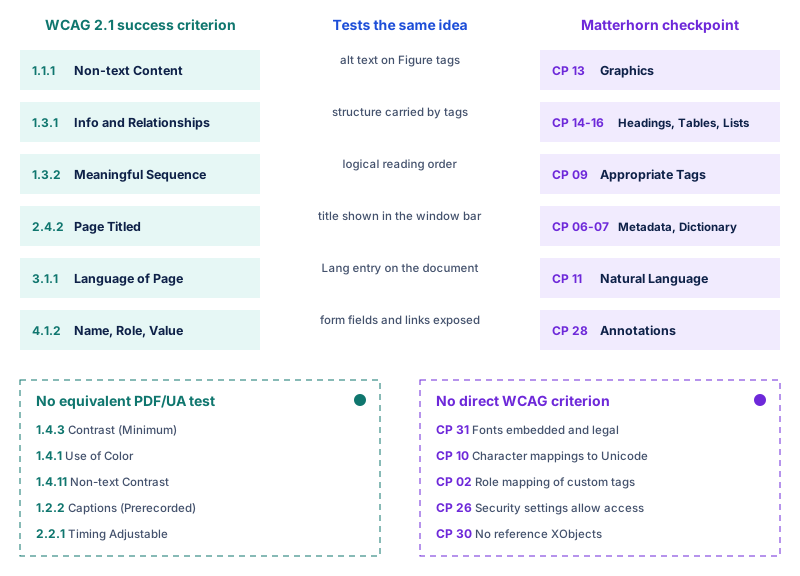
Read the map from left to right. Each line joins a WCAG criterion to the Matterhorn checkpoint that tests the same idea inside the file, while the lower boxes show what each standard tests alone.
Why a PDF Can Pass One Standard and Fail the Other
The PDF/UA vs WCAG gap becomes real the moment an audit report lands. The two cases below come up again and again in public-sector and healthcare document reviews.
Case One: PDF/UA Pass, WCAG Fail
A county budget report comes from a well-built template. Every element is tagged, the fonts are embedded and the validator reports zero errors, so the team marks the file as compliant.
A manual review then finds light grey table text at 2.8:1 contrast and a pie chart whose slices differ only by color. Both break WCAG 2.1 AA, yet neither appears in the PDF/UA report.
Case Two: WCAG Pass, PDF/UA Fail
A hospital consent form reads smoothly in a screen reader. The headings announce correctly, every field has a label and the contrast is strong, so a usability tester signs it off.
The validator disagrees. Two fonts are not embedded, decorative lines sit in the tag tree instead of being marked as artifacts, and the PDF/UA identifier is missing from the metadata.
Neither result is wrong. Each audit simply answered its own question, which is why reviewers who rely on a single report tend to miss half of the picture.
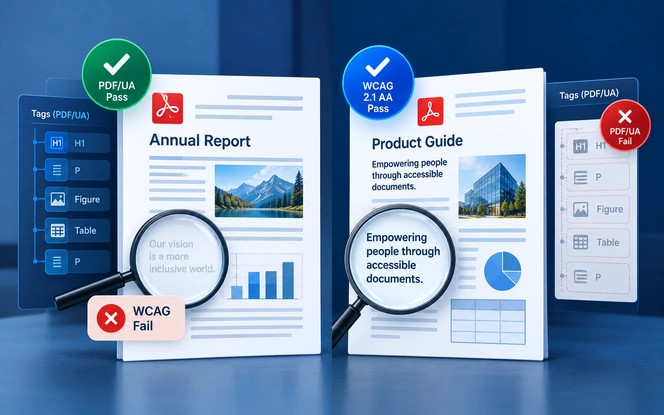
The practical lesson is simple. Treat a clean validator report as a floor rather than a finish line, and treat a good screen reader session as evidence rather than proof.
Which Laws Name WCAG and Which Name PDF/UA
Regulators almost always write WCAG into their rules, because it covers every channel an organization publishes through. PDF/UA usually appears as the technical route to meeting that WCAG requirement inside a PDF.
| Rule | Standard named | Who it covers | Where PDF/UA fits |
|---|---|---|---|
| ADA Title II web rule | WCAG 2.1 AA | State and local governments, including their PDFs | Not named; the most reliable route to WCAG in a PDF |
| HHS Section 504 rule | WCAG 2.1 AA | Organizations that receive HHS funding | Not named; same practical role |
| Revised Section 508 | WCAG 2.0 AA, with four criteria waived for non-web documents | Federal agencies and the ICT they buy | Required as an export option in PDF authoring tools |
| EN 301 549 and the European Accessibility Act | WCAG 2.1 AA, applied to documents in clause 10 | EU public bodies and many private products and services | Not required; widely used as evidence for documents |
In the United States, the Justice Department's 2026 interim final rule extending the ADA Title II compliance dates moved the deadlines but kept WCAG 2.1 AA. HHS then applied the same one-year shift to Section 504.
Section 508 takes a narrower route. Federal teams follow the Section 508 guidance on testing documents, and the Access Board declined PDF/UA as an alternative because it does not cover scripting and video in the same depth.
Contracts are the other place PDF/UA shows up. Many public-sector RFPs for document remediation ask vendors to deliver files that pass a WCAG 2.1 AA review and a PDF/UA validator, so the pair becomes a contract term.
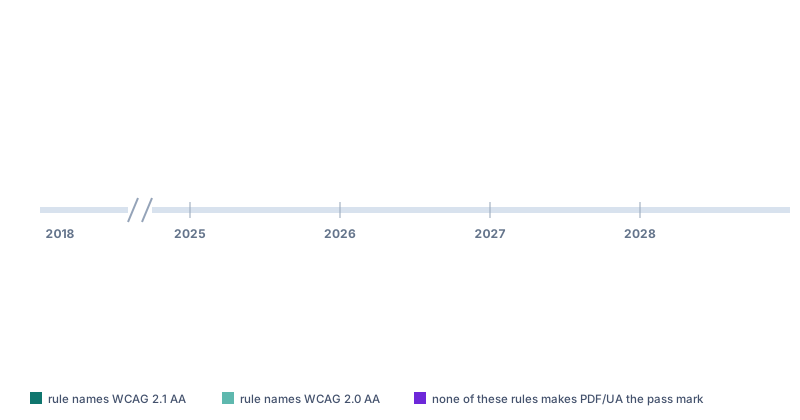
Treat these dates as the current position. Both US agencies issued interim rules that stayed open to public comment, so it is worth checking for further changes before you lock a project plan.
How to Test a PDF Against Both Standards
Testing for both standards does not mean running two separate projects. In fact, a single pass can collect both sets of evidence if you order the checks well.
Five Checks in the Right Order
Run a PDF/UA Validator First
Tools such as veraPDF and the free PDF Accessibility Checker (PAC) catch missing tags, fonts and metadata in seconds.
Review the Tag Tree by Hand
Confirm that headings nest logically, the reading order matches the visual order, and each alternative text describes its image. Our guide to PDF accessibility tagging shows how to repair the tree.
Check the Visual Layer for WCAG
Measure contrast, look for color-only meaning, zoom to 200 percent, and confirm that form fields show visible labels and clear error messages.
Listen With a Screen Reader
Read the whole file in NVDA or JAWS, tab through links and fields, and note anything confusing even when it passes every rule.
Record Results Against Both Standards
Log each issue with its WCAG criterion and its Matterhorn checkpoint, so one fix closes both entries in your report.
The Matterhorn Protocol splits PDF/UA-1 failures into checks a machine can run and checks that need a person. That split is exactly why no automated tool can certify a PDF on its own.
What a Validator Checks and What a Person Checks
Knowing which side owns each check keeps the two lanes from repeating work. The first four items suit a validator, while the last three need human judgment.
- Validator: every piece of real content sits inside a tag, and decoration is marked as an artifact.
- Validator: all fonts are embedded and each character maps to Unicode.
- Validator: the PDF/UA identifier, document title and language are present in the metadata.
- Validator: every custom tag maps to a standard type through the role map.
- Person: alternative text describes each image in a way that makes sense in context.
- Person: the reading order follows the logic of the page, not just the tag sequence.
- Person: headings describe their topic, and table headers match the data they label.
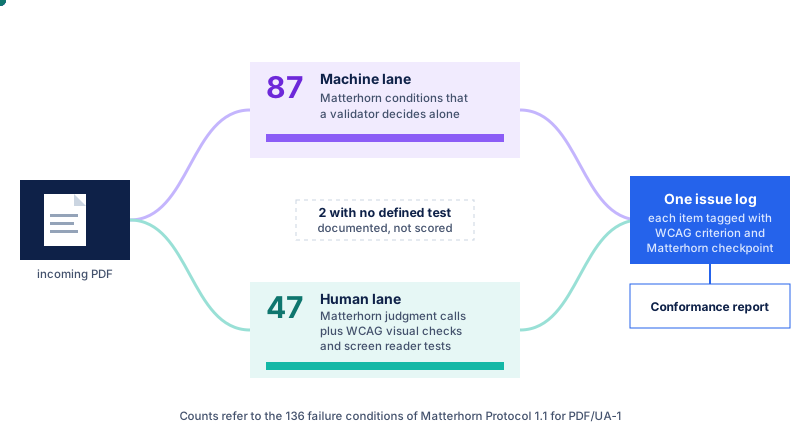
For teams that publish hundreds of files a month, an independent review layer pays off quickly. Our software testing and QA services apply the same two-lane approach to documents, apps and portals.
Need a second opinion on your PDF audits?
Our accessibility engineers review documents against WCAG 2.1 AA and PDF/UA, then hand back one report your team can act on.
Book a document reviewChoosing the Right Target for Your Documents
The PDF/UA vs WCAG decision depends on who you serve and which rule applies to you. The routes below cover the situations that come up most often.
- State or local government: meet WCAG 2.1 AA for every public PDF, and use PDF/UA validation as the fastest way to prove the structural half.
- HHS-funded healthcare provider: follow the same WCAG 2.1 AA target, and fix patient forms, notices and billing documents first.
- Federal agency or contractor: test documents against WCAG 2.0 AA for Section 508, and confirm your authoring tools can export PDF/UA-1.
- Business selling into the EU: meet WCAG 2.1 AA through EN 301 549, and use PDF/UA results as evidence for downloadable files.
- Archive or library publisher: favor PDF/UA, since the US Library of Congress lists it among its preferred formats for page-based content.
When in doubt, aim for both. Meeting PDF/UA rarely costs much extra once a team already fixes structure for WCAG, and the dual result holds up better under close scrutiny.
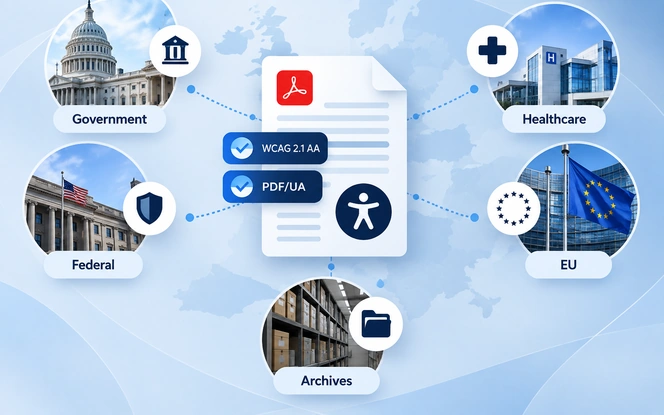
Organizations that also run public portals and citizen services can extend the same thinking beyond documents, as our piece on AI for government explores.
PDF/UA-2, WCAG 2.2 and What Comes Next
- WCAG 2.0 (2008)
- WCAG 2.1 (2018)
- WCAG 2.2 (2023)
- PDF/UA-1 (2012, revised 2014)
- PDF/UA-2 (2024)
Both standards have moved on since the current laws were written. WCAG 2.2 arrived in October 2023 with nine new success criteria, and ISO 14289-2, known as PDF/UA-2, followed in 2024.
US rules still cite WCAG 2.1 AA, but aiming at 2.2 costs little extra for documents. Most new criteria cover focus visibility, target size and repeated entry, which mainly affect interactive forms.
PDF/UA-2 matters most for teams that generate PDFs from code. It expects PDF 2.0 output, so first check that your pipeline, validator and reader all support it, and only then switch templates.
The PDF Association also describes PDF/UA-2 as a way to build PDF 2.0 files that conform to WCAG. Over time, that brings the two standards closer together than they have ever been.
Bringing Both Standards Into One Workflow
Most organizations do not fail accessibility audits because they chose the wrong standard. Instead, they fail because documents pile up faster than anyone can check them against either one.
A single workflow keeps both standards in view from the moment a file arrives to the moment it goes live:
- Triage the backlog: sort documents by traffic, legal risk and deadline, so the files people rely on most get fixed first.
- Remediate once for both: fix tags, reading order, contrast and metadata in one pass, and log each fix against WCAG and Matterhorn.
- Validate, then review: run the validator first, then finish with a manual check and a screen reader session before release.
- Report and monitor: keep one report per document, so audits and procurement reviews draw on the same evidence.
That backlog is the problem Limina ADA & WCAG document accessibility remediation software was built to solve. It tests content against WCAG 2.1 and 2.2, flags structural PDF issues, and tracks every fix through to a report.
When your needs go beyond an off-the-shelf platform, our team builds custom pipelines through our document accessibility remediation software development services.
We have also delivered related document intelligence projects, which you can explore in our AI intelligent document processing case studies.
Get your PDF library ready for 2027
Tell us how many documents you publish and which rules apply to you. We will map a path to WCAG 2.1 AA and PDF/UA that fits your deadline.
Talk to our accessibility teamFrequently Asked Questions About PDF/UA vs WCAG
Is PDF/UA the Same as WCAG 2.1 AA?
No. WCAG 2.1 AA is a W3C set of outcome-based criteria for any digital content, while PDF/UA is an ISO standard for how a PDF file must be built. They overlap heavily, but each covers ground the other does not.
Does a PDF/UA Compliant File Meet WCAG 2.1 AA?
Not automatically. PDF/UA does not test color contrast, color-only meaning or media captions, so a file can pass a PDF/UA validator and still fail WCAG 2.1 AA. A manual WCAG review is still needed.
Which Standard Does ADA Title II Require for PDFs?
The Justice Department rule names WCAG 2.1 Level AA for web content, including PDFs that state and local governments publish. PDF/UA is not named, but following it is the most reliable way to reach WCAG conformance in a PDF.
What Is the Difference Between PDF/UA-1 and PDF/UA-2?
PDF/UA-1 (ISO 14289-1) applies to PDF 1.7 files. PDF/UA-2 (ISO 14289-2:2024) applies to PDF 2.0 files and adds stronger requirements for structure attributes and annotations. Both remain valid today.
Can Automated Tools Prove a PDF Is Accessible?
No. Validators handle the machine-checkable PDF/UA conditions, but alternative text quality, reading order logic and many WCAG criteria need human judgment and screen reader testing.
Should We Target WCAG 2.1 or WCAG 2.2 for Documents?
Meet WCAG 2.1 AA because current US rules cite it, and adopt WCAG 2.2 AA where practical. The extra criteria mostly affect interactive forms, so the added effort for static documents is small.