Large capital projects run about 80% over budget and about 50% behind schedule on average, and only about 31% of IT projects are delivered as fully successful.
Those two numbers come from very different research bodies, yet they point at the same thing: when a project management information system disappoints, the software is almost never the reason. The rollout is.
Most guidance on this topic stops at advice. Engage stakeholders, train your team, phase the rollout.
All true, all useless on a Tuesday morning when you need to know who signs off on the requirements matrix and whether you are behind.
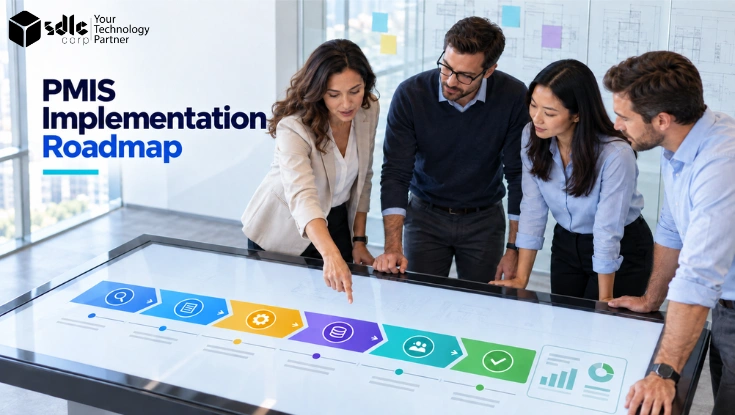
This PMIS implementation roadmap is written for the other job: six phases, week-by-week durations, named owners, deliverables per stage, a cost model, and the metrics that tell you whether adoption is real.
Definition What Is a PMIS Implementation Roadmap?
A PMIS implementation roadmap is a sequenced plan for deploying a project management information system across an organization.
It divides the rollout into phases, assigns a duration, an owner and a set of deliverables to each one, and defines the exit criteria that must be met before the next phase begins.
It covers readiness assessment, requirements, vendor selection, configuration, data migration, pilot testing, go-live and post-launch optimization.
The difference between a roadmap and a best-practices list matters more than it sounds. A list tells you what to care about.
A roadmap tells you what happens in which order, who is accountable, and how you know a stage is finished.
Teams that work from the second kind reach real adoption months earlier, because nobody is guessing whether they are allowed to move on.
Phases may overlap. Gates may not. Configuration can begin while requirements are being finalized, but no gate is passed on the strength of a calendar date alone.
Why Most PMIS Implementations Stall
It is worth being blunt about the failure pattern before laying out the plan, because every phase below exists to defuse one of these.
McKinsey's review of more than 300 billion-dollar megaprojects found average overruns of about 80% on cost and about 50% on schedule, with the overwhelming majority hitting at least one of the two.
Meanwhile the Standish Group's CHAOS research on IT projects broadly attributes failure not to technology but to unclear requirements, absent user involvement and weak change management.
Put those together and the diagnosis is consistent. The tool works. The data does not arrive, the field does not use it, or the process cannot keep up with the system.
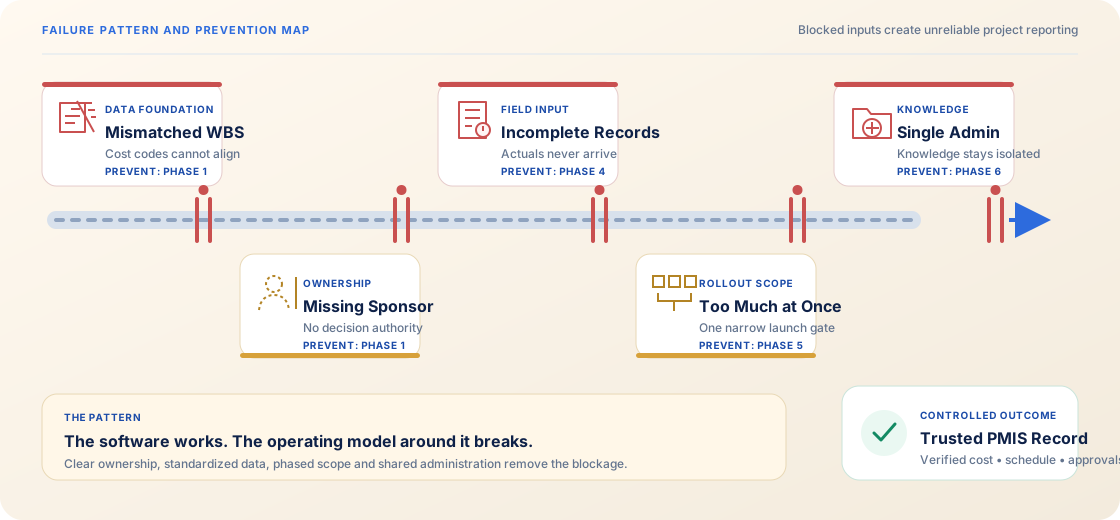
| Failure cause | What it looks like in practice | Where the roadmap prevents it |
|---|---|---|
| No data standard before configuration | Work breakdown structures and cost codes differ by project, so nothing rolls up and every report needs manual reconciliation | Phase 3 blocks configuration until the WBS and cost code standard is signed off |
| No field uptake | Actuals are never submitted, so earned value metrics and dashboards report fiction | Phase 5 pilots with real site users and measures submission rate before expanding |
| Big-bang scope | Every module launched at once, users overwhelmed, fallback to spreadsheets within a quarter | Phases 5 and 6 gate expansion on pilot exit criteria, not on the calendar |
| Tool handed over, capability not transferred | One administrator holds all the knowledge and leaves, configuration freezes | Phase 5 trains super users by role; Phase 6 defines admin succession |
| No named executive sponsor | Cross-department disputes stall for weeks with nobody empowered to decide | Phase 1 will not exit without a sponsor named in the charter |
The consistent signal across all five is the same: the system becomes a reporting veneer over spreadsheets rather than the record itself.
Assess Your PMIS Maturity Before You Pick a Tool
The most common opening question is which product to buy. It is the wrong first question.
An organization running schedules in spreadsheets and one already running a scheduling tool with cost tracked separately need completely different next steps, even though both would describe their goal as "implement a PMIS."
Score yourself honestly against the four levels below. Your current level sets your realistic scope, and attempting to skip a level is the single most reliable way to end up with an expensive system full of empty fields.
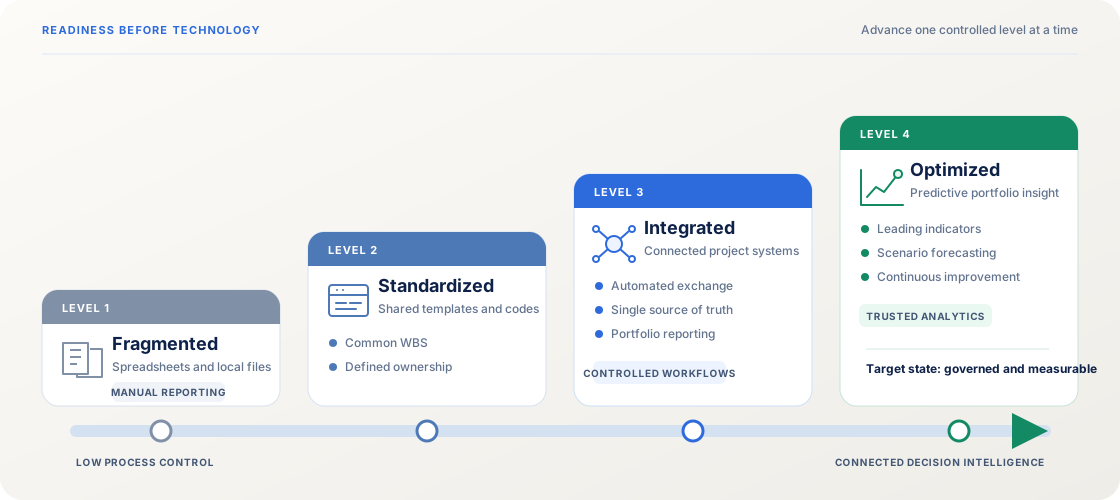
| Level | Where you are today | What to fix next | Realistic horizon |
|---|---|---|---|
| L1 Fragmented | Spreadsheets, email threads, documents on individual drives, no shared definitions | Standardize scheduling and document control first; do not attempt cost integration yet | 3 to 6 months |
| L2 Scheduling standardized | One scheduling tool used consistently, but cost, contracts and documents live elsewhere | Integrate cost and contract management against a shared WBS | 6 to 12 months |
| L3 Integrated | Schedule and cost in one model; documents and collaboration still scattered | Add document control, collaboration and earned value management | 6 to 9 months |
| L4 Analytical | Integrated data accumulating reliably across projects | Automate reporting, add forecasting and predictive analysis | Ongoing |
Two practical rules fall out of this. Smaller organizations fail by adopting too much at once. Larger ones fail by adopting plenty but connecting none of it. Your maturity level decides which mistake you are closer to making.
The PMIS Implementation Roadmap at a Glance
A mid-size PMIS implementation typically runs 16 to 24 weeks from kickoff to go-live. An enterprise or multi-program rollout runs 9 to 18 months. Anyone promising six weeks is selling a login screen, not a system.
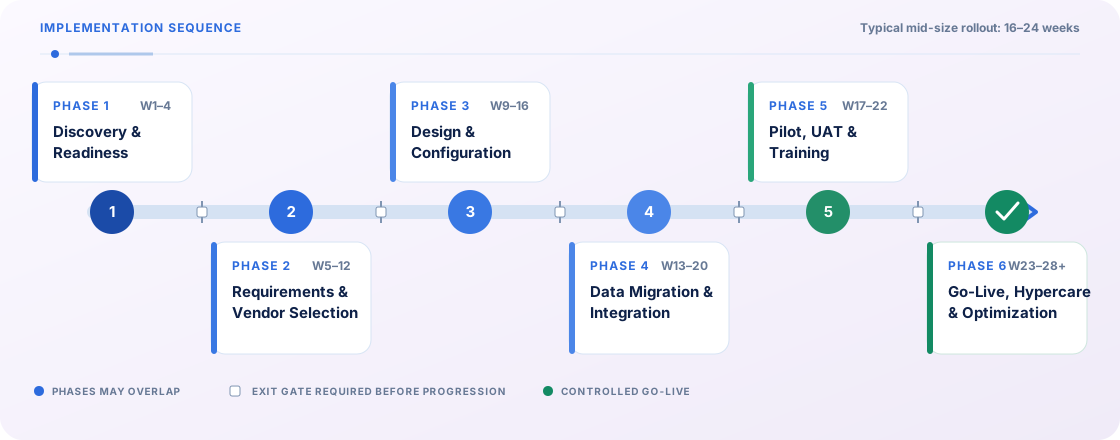
The phases below overlap deliberately. Configuration begins while requirements are being finalized, and integration work starts before configuration closes. What must not overlap is the exit criteria: each gate is a real stop.
| Phase | Duration | Owner | Key deliverables | Exit criteria |
|---|---|---|---|---|
| 1. Discovery and readiness | Weeks 1 to 4 | PMO lead | Charter, current-state process map, stakeholder register, readiness score | Sponsor named, budget approved, processes documented |
| 2. Requirements and vendor selection | Weeks 5 to 12 | System owner | Requirements traceability matrix, vendor scorecard, contract | Requirements signed off, vendor selected, demo validated against real scenarios |
| 3. Design and configuration | Weeks 9 to 16 | PMIS administrator | WBS and cost code standard, workflow designs, role and permission matrix | Data standard approved, workflows tested in sandbox |
| 4. Data migration and integration | Weeks 13 to 20 | IT and integration lead | Migration plan, cleansed data set, integration specifications, reconciliation report | Migrated data reconciles to source, integrations pass end-to-end tests |
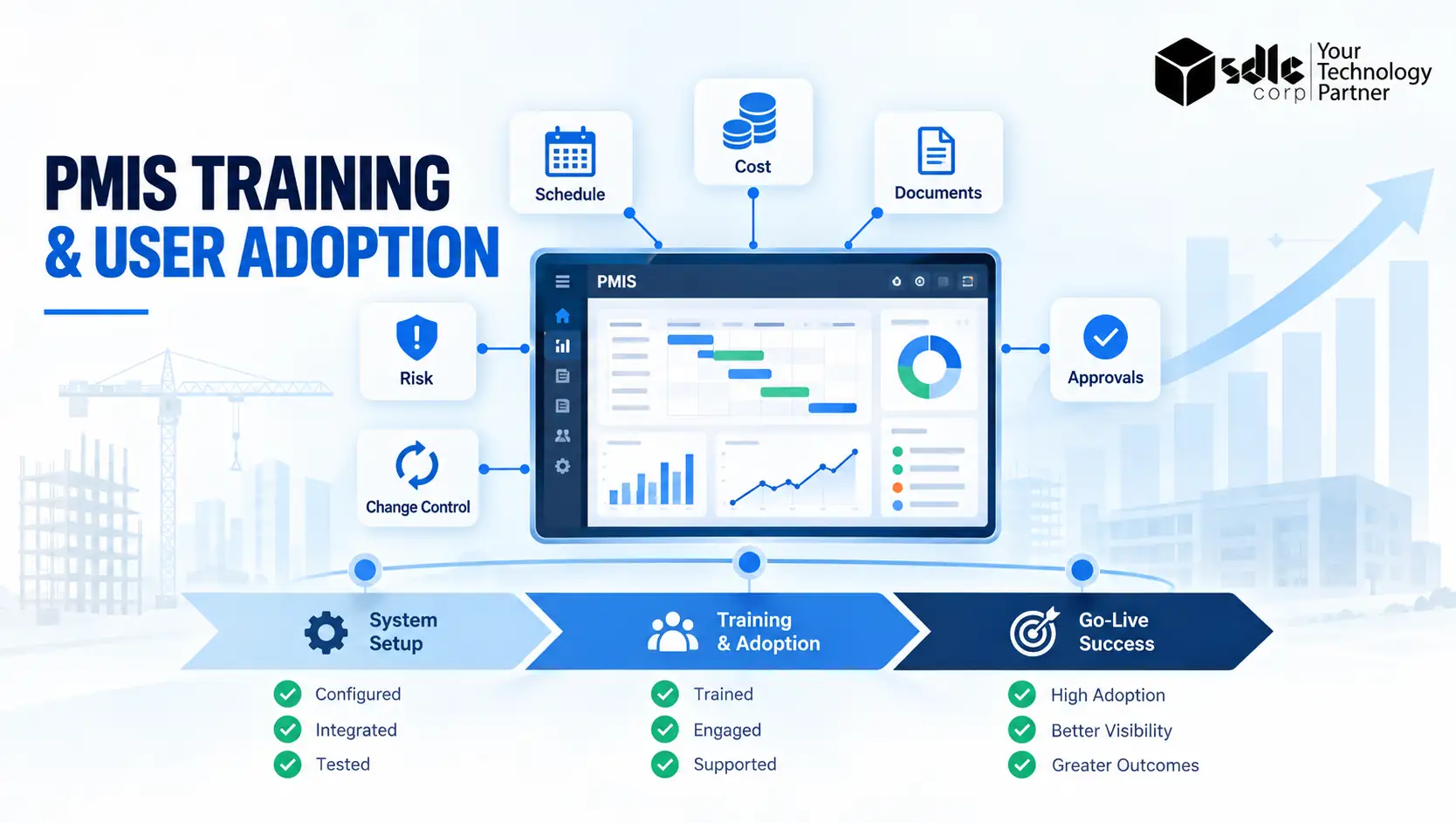
| 5. Pilot, UAT and training | Weeks 17 to 22 | PMO lead and change champion | Pilot scope, UAT scripts and sign-off, role-based training, super user roster | UAT passed, pilot adoption targets met for two consecutive weeks |
| 6. Go-live, hypercare and optimization | Weeks 23 to 28+ | System owner | Cutover runbook, hypercare plan, 90-day review, optimization backlog | Hypercare closed, KPIs on target, governance cadence running |
Need a Roadmap Sized to Your Organization?
Share your current systems, project volume and data maturity with our team. We can size the phases, name the owners and build the implementation plan around your constraints rather than a vendor timeline.
Discovery and Readiness (Weeks 1 to 4)
This phase answers one question: are we actually ready to do this? Skipping it is how organizations end up configuring a new system around processes that were already broken.
What you do
Map how project information moves today, end to end, including the workarounds. Interview the people who will use the system daily, not only the managers who will read its reports.
Establish the problems you are solving in measurable terms, for example reporting cycles that take eleven days or change orders that lose four days in approval routing.
Deliverables
- Project charter with a named executive sponsor and approved budget
- Current-state process map covering schedule, cost, documents and approvals
- Stakeholder register with roles and level of influence
- Readiness score against the maturity table above
Common mistake
Treating discovery as a formality and moving straight to demos. A vendor demo shown against your real workflows tells you something. A demo shown against the vendor's sample data tells you nothing.
Requirements and Vendor Selection (Weeks 5 to 12)
This is the longest phase for most organizations, and rightly so. Every hour saved here reappears as three hours of rework during configuration.
Building the requirements traceability matrix
Write each requirement as an observable behaviour tied back to a problem from Phase 1, then mark it must-have, should-have or nice-to-have. A requirement that cannot be traced to a stated problem does not belong on the list.
This document becomes your acceptance criteria in Phase 5, so it is worth the discipline now.
Evaluating vendors
Score candidates against weighted criteria rather than feature checklists. Feature lists favour whoever ships the most modules; weighted scoring favours whoever fits your maturity level. Insist that shortlisted vendors demonstrate two or three of your real scenarios using your terminology.
| Criterion | Suggested weight | What to test |
|---|---|---|
| Fit to must-have requirements | 20% | Scripted walkthrough of your own scenarios |
| Integration capability | 15% | Documented API, existing connectors to your ERP and accounting stack |
| Usability for field and site users | 15% | Time for an untrained user to submit a real update |
| Reporting and analytics | 10% | Build one of your existing reports live during evaluation |
| Configurability without code | 10% | Who can change a workflow after go-live, and how long it takes |
| Implementation and support model | 10% | Named team, methodology, escalation path, regional coverage |
| Security and compliance | 8% | Access control granularity, audit trail, relevant certifications |
| Total cost of ownership | 7% | Five-year cost, not year-one licence pricing |
| Scalability | 3% | Behaviour at your projected project and user volume |
| Vendor stability and roadmap | 2% | Release history, customer base in your sector |
Design and Configuration (Weeks 9 to 16)
Standardize the WBS and cost codes first
Nothing else in this phase should start until your work breakdown structure and cost coding standard is approved in writing. If two projects code the same expense differently, no amount of configuration will produce a portfolio view you can trust.
This is the most-skipped step in the entire roadmap and the most expensive one to fix later, because retrofitting a coding standard means re-tagging historical data.
Workflow and approval design
Design approval routing around decisions, not job titles. Map each workflow with its trigger, its steps, its escalation path and its service-level expectation. Build them in a sandbox and walk real users through them before anything reaches production.
Roles, permissions and access control
Define a role matrix covering what each role can view, create, approve and export. Over-restricting is as damaging as over-permitting, since users locked out of the data they need simply go back to email.
Confirm single sign-on and audit logging at this stage rather than after go-live.
Data Migration and Integration (Weeks 13 to 20)
This phase gets the least coverage in most published guidance and causes the most delays in practice. Budget for it properly.
What to migrate and what to archive
Resist migrating everything. Bring across active projects, open commitments, the current document set and enough historical cost data to support estimating, usually two to three years. Archive the rest in read-only storage.
Cleanse before you migrate, never after, and reconcile record counts and financial totals against the source system before signing the phase off.
Integration map
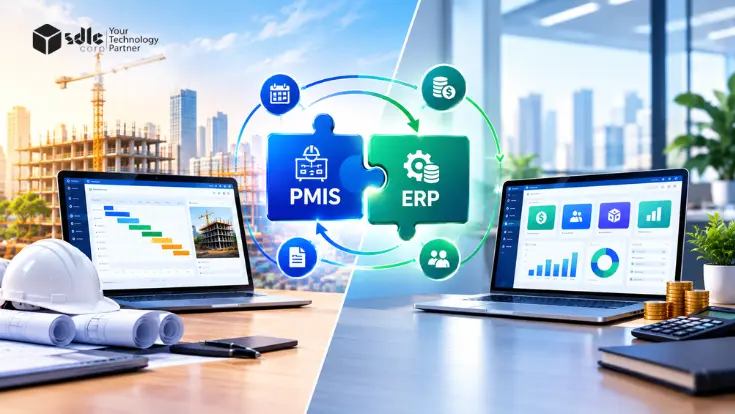
Document every connection, its direction, its frequency and its system of record. The usual set includes ERP or accounting for commitments and actuals, scheduling tools, document control, HR systems for resource data, and in construction environments, design and BIM platforms.
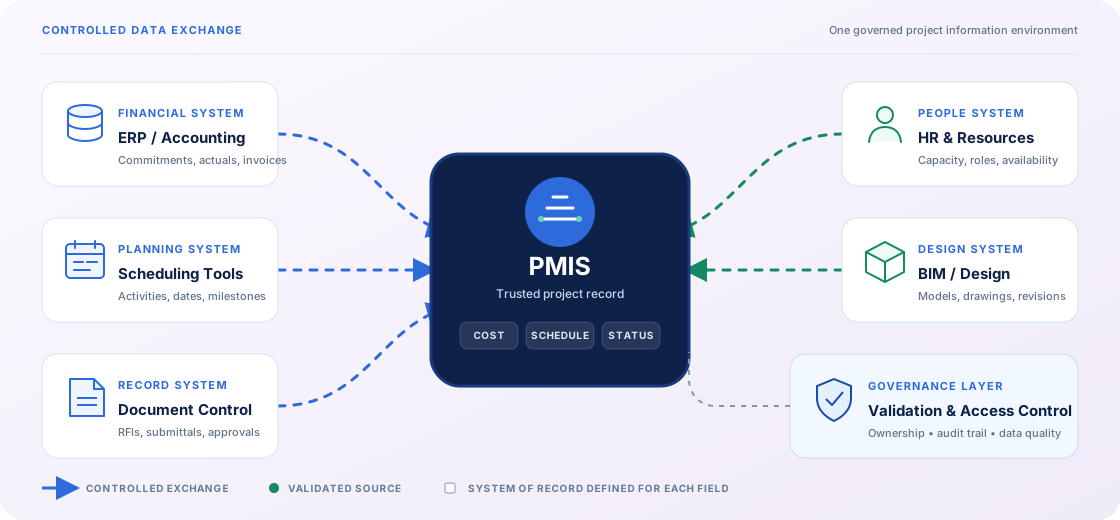
- ERP or accounting for commitments and actuals
- Scheduling and planning tools
- Document control and drawing management
- HR systems for resource and rate data
- Design and BIM platforms in construction
- Reporting and analytics layer
Agree explicitly which system owns each data element. Two systems both believing they own the budget is a reconciliation problem that never resolves itself.
Legacy decommissioning
Set a firm date for read-only mode on the legacy system and a later date for retirement. Without it, users keep both systems half-alive and your PMIS data stays permanently incomplete.
Worried About the Data Migration Step?
Migration and integration cause more delays than any other phase. We profile source data, define the reconciliation approach and map every interface before a single record moves.
Pilot, UAT and Training (Weeks 17 to 22)
Choosing the pilot project
Pick a project that is representative rather than easy. It should be mid-complexity, actively running, staffed by people willing to give blunt feedback, and far enough from a critical milestone that a bad week will not cause real damage.
A pilot on your simplest project proves nothing about your hardest one.
UAT and sign-off
Write test scripts directly from the requirements traceability matrix so acceptance is objective. Log defects by severity and agree in advance which severities block go-live. Sign-off belongs to the business, not the vendor and not IT.
Training by role, not by feature
A site engineer submitting daily progress and a portfolio director reading dashboards need entirely different sessions. Train each role on the tasks they actually perform, using your own data and terminology.
Identify two or three super users per department during training; they will absorb most of the day-to-day questions after launch and are the difference between a support queue and a functioning system.
Go-Live, Hypercare and Optimization (Weeks 23 to 28 and Beyond)
Cutover
Write a runbook covering the sequence, timing, owner and rollback trigger for every cutover task. Schedule the freeze window when it does least damage, usually a month-end that is not a quarter-end.
Communicate the date at least three weeks ahead and again the day before.
Hypercare
Run an intensive support window of four to six weeks after launch, with daily check-ins in week one tapering to weekly. Staff it with the implementation team, not the standard help desk, and track questions by theme.
Recurring questions signal a configuration or training gap, not a user problem.
The 90-day review
Reassess against your Phase 1 baseline. Close hypercare only when adoption metrics hold for two consecutive weeks, then move to a standing optimization backlog reviewed monthly.
A PMIS that is never adjusted after launch drifts out of usefulness within a year.
Who You Need on the PMIS Implementation Team
Ambiguous accountability delays decisions more than technical complexity does. Assign these roles by name in Phase 1, not by department.
| Role | P1 | P2 | P3 | P4 | P5 | P6 |
|---|---|---|---|---|---|---|
| Executive sponsor | A | A | I | I | I | A |
| System owner (business) | R | A | A | C | A | R |
| PMO lead | A | R | C | C | R | C |
| PMIS administrator | C | C | R | C | C | R |
| IT and integration lead | C | C | C | A | C | C |
| Data owner or cost controller | C | R | R | R | C | C |
| Super users | I | C | C | I | R | R |
| Change champion | C | I | I | I | A | R |
Exactly one A per phase per role column keeps decisions unblocked. Two accountable parties is the same as none.
How Much Does a PMIS Implementation Cost?
Licence pricing is the number vendors lead with and the smallest part of the total.
Budget as a proportion of the full five-year cost rather than as a year-one figure, and expect the ranges below to shift with your maturity level and integration count.
| Cost line | Share of 5-year total | What drives it up |
|---|---|---|
| Software licences or subscription | 30% to 45% | User count, module count, premium analytics tiers |
| Implementation services | 15% to 25% | Process complexity, number of business units |
| Integrations | 8% to 15% | Legacy systems without modern APIs |
| Data migration | 5% to 12% | Data quality, volume of history retained |
| Training and change management | 5% to 10% | Number of roles, geographic spread, language needs |
| Internal staff time | 10% to 20% | Frequently omitted from business cases, rarely small |
| Ongoing administration and support | 5% to 10% | Configuration change volume after go-live |
The return case is best made on avoided loss rather than efficiency.
Against an industry backdrop of about 80% average cost overrun on large capital projects, trimming even two or three percentage points off the overrun on a single major programme typically dwarfs the entire system cost.
The savings come from earlier warning on cost and schedule variance, faster impact assessment when changes land, fewer disputed claims and less rework.
Payback on integrated systems is commonly reported in the 12 to 24 month range, though it varies widely with scale and, above all, with adoption.
How to Measure a Successful PMIS Rollout
Adoption is not a feeling. Instrument it from day one of the pilot so you can see drift before it becomes abandonment.
| Metric | Target by end of hypercare | Target at 90 days |
|---|---|---|
| Weekly active users against licensed users | 70% | 85% or higher |
| Actuals submitted on time | 75% | 90% or higher |
| Mandatory field completeness | 85% | 95% or higher |
| Approval cycle time for changes and RFIs | 20% faster than baseline | 35% to 50% faster |
| Hours spent preparing monthly reports | 40% reduction | 60% to 70% reduction |
| Projects reporting from the system alone | 60% | 100% |
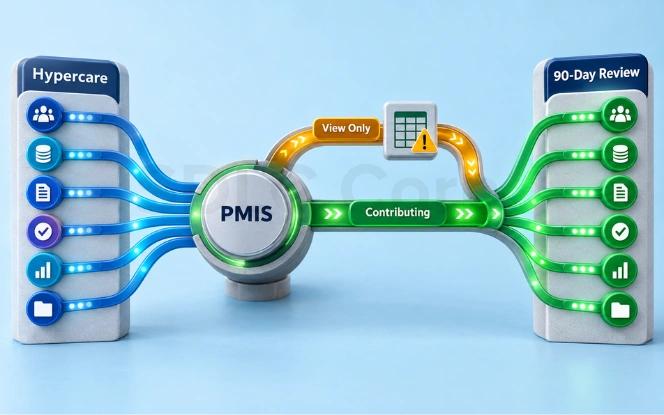
If active users look healthy but data completeness does not, people are logging in to read rather than to contribute. That is the earliest reliable signal that the system is becoming a reporting veneer over spreadsheets.
How the Roadmap Changes by Industry
The six phases hold across sectors, but scope, sequencing and the length of Phase 2 shift considerably. Use these as adjustments to the roadmap rather than as separate roadmaps.
Construction and Capital Projects
Contract administration, change orders, requests for information and submittals carry the most value here, and earned value management usually follows once cost and schedule are integrated. Write PMIS obligations into contractor agreements, otherwise supply chain data never arrives.
Pilot on a single site or package before extending to a programme.
Government and Public Sector
Procurement rules extend Phase 2 substantially, often by months. Records retention, auditability and public reporting requirements should be treated as must-have requirements rather than configuration details. Build the audit trail specification into requirements, not into a later change request.
Healthcare
Facility upgrades and equipment programmes run alongside strict regulatory checkpoints, so approvals and evidence capture matter more than scheduling sophistication. Procurement and clinical readiness tracking usually justify the system on their own.
IT and Software Organizations
Resource capacity, portfolio prioritization and dependency tracking dominate. Timelines compress because integration surfaces are cleaner, and rollouts at the shorter end of the 16 to 24 week range are realistic.
PMIS Implementation Risk Register
Every risk needs a trigger, which is the observable event that tells you to act. The concept comes from classic implementation planning practice documented by PMI and it works well here.
| Risk | Trigger | Mitigation | Owner |
|---|---|---|---|
| Sponsor disengagement | Sponsor misses two of three steering meetings | Escalate to the executive committee; reconfirm or replace the sponsor | PMO lead |
| Requirements creep | More than 15% new must-haves added after sign-off | Route additions to a phase-two backlog under change control | System owner |
| Poor source data quality | Migration profiling shows over 10% incomplete records | Pause migration, run a cleansing sprint, reduce history scope | Data owner |
| Integration slippage | Any interface misses its test date by more than two weeks | Launch with scheduled batch transfer, move to real-time after go-live | IT and integration lead |
| Low pilot adoption | Weekly active users below 50% in pilot week three | Hold go-live, run role-based refresher training, simplify workflows | Change champion |
| Key person dependency | Only one person can configure the system | Train a backup administrator and document configuration before go-live | PMIS administrator |
When You Should Not Implement a PMIS Yet
Not every organization needs one right now, and starting at the wrong moment wastes both budget and credibility. Hold off if any of the following is true today.
- You run fewer than a handful of concurrent projects and a disciplined shared workspace still covers you.
- Your work breakdown structure and cost codes are not standardized, so you would be automating inconsistency.
- A major ERP or finance migration is already in flight and would compete for the same people.
- No one will own the system by name after launch, because an unowned PMIS decays faster than the spreadsheets it replaced.
None of these are permanent blockers. Each one is a Phase 0 task that shortens the real implementation once it is cleared.
Ready to Start Your PMIS Implementation?
SDLC Corp runs the full sequence: readiness assessment, requirements, configuration, integration with your ERP and finance stack, data migration, role-based training and post-launch optimization.
Conclusion
Three things decide whether this works. Maturity before product, because your current data discipline sets your realistic scope. Sequence before scope, because a gated rollout embeds and a big-bang rollout does not.
Adoption before return, because the value comes from losses avoided, and losses are only avoided when the data actually arrives.
SDLC Corp builds and deploys project management information systems in that order, from readiness assessment and requirements through configuration, integration with your existing ERP and finance stack, data migration, role-based training and post-launch optimization.
If you want a roadmap sized to your organization's maturity rather than a vendor's product catalogue, we can put one together with you.
Frequently Asked Questions
How long does a PMIS implementation take?
A mid-size implementation typically runs 16 to 24 weeks from kickoff to go-live, followed by four to six weeks of hypercare. Enterprise or multi-programme rollouts run 9 to 18 months.
The largest variables are the number of integrations, the quality of source data and how standardized your cost coding already is.
How much does a PMIS implementation cost?
Licences usually account for only 30% to 45% of the five-year total. Implementation services, integrations, data migration, training, internal staff time and ongoing administration make up the rest.
Business cases that budget for licences alone typically understate the real cost by roughly half.
What are the phases of a PMIS implementation?
Six: discovery and readiness, requirements and vendor selection, design and configuration, data migration and integration, pilot with user acceptance testing and training, then go-live with hypercare and optimization.
Each has its own owner, deliverables and exit criteria, and phases may overlap while the gates do not.
Who should own a PMIS implementation?
A business-side system owner should hold day-to-day accountability, supported by an executive sponsor with authority to settle cross-department disputes.
IT owns integration and infrastructure but should not own the system itself, since IT-owned implementations tend to optimize for architecture rather than for the people entering data.
What is the difference between a PMIS and project management software?
Project management software organizes tasks and schedules for a team. A PMIS is the wider environment that governs how project data is collected, stored, connected and reported across the organization.
Project management software can be one component within a PMIS, but a PMIS also covers records, cost data, documents and reporting standards.
Is Microsoft Project a PMIS?
Not on its own. Microsoft Project is a scheduling and planning tool.
It can operate as one component of a PMIS when combined with document management, cost control and reporting layers, but it does not provide the full information environment by itself.
What is the biggest reason PMIS implementations fail?
Adoption, not technology. The consistent pattern across research is unclear requirements, absent user involvement and weak change management. In practice the visible symptom is that actuals never arrive from the field, which turns every downstream metric into fiction.
Should we run a pilot or go live everywhere at once?
Pilot first, in almost all cases. A representative mid-complexity project surfaces configuration and training gaps at a scale you can still fix. Big-bang rollouts concentrate every problem into the same week and usually end with users reverting to spreadsheets.
How do we migrate data from our existing system?
Profile and cleanse at source before migrating anything. Bring across active projects, open commitments, current documents and two to three years of historical cost data, then archive the rest as read-only.
Reconcile record counts and financial totals against the source before signing off, and set a firm retirement date for the legacy system.
Does every organization need a PMIS?
No. Below a certain project volume and complexity, a disciplined shared workspace is enough. The case strengthens once you are running concurrent projects across multiple teams, need portfolio-level reporting, or face audit and compliance requirements that demand a defensible record.