Organizations managing complex projects often rely on multiple systems for project execution, finance, procurement, resources, and reporting.
Moreover, ERP platforms now add project-management capabilities, and PMIS platforms expand into budgeting and operational data. As a result, the boundary between the two can become difficult to define.
However, the key difference is not simply which system has more features. Instead, it is about which layer of information each system is designed to control.
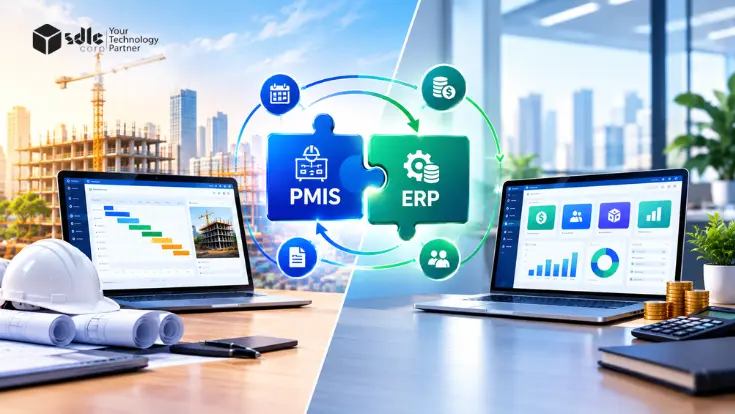
A PMIS focuses on detailed project execution, while an ERP manages broader enterprise financial and operational processes. When connected properly, the two can create a continuous flow between project delivery and business operations.
PMIS vs ERP: Key Takeaways
- PMIS is primarily focused on project execution and control.
- ERP manages broader enterprise financial and operational processes.
- Both systems can overlap in areas such as costing, procurement, resources, and reporting.
- Integration allows approved project events to flow into enterprise processes and financial results to return to project reporting.
- Data ownership should be defined by business domain, rather than assuming one system owns everything.
- Complex project environments may benefit from using both systems together.
What Are PMIS and ERP Systems?
PMIS and ERP can support the same project or organization, but they serve different information needs. A PMIS focuses on the project execution layer, while an ERP manages the enterprise operations layer.
As a result, understanding this distinction makes it easier to see where the two systems differ, where they overlap, and where integration connects them.
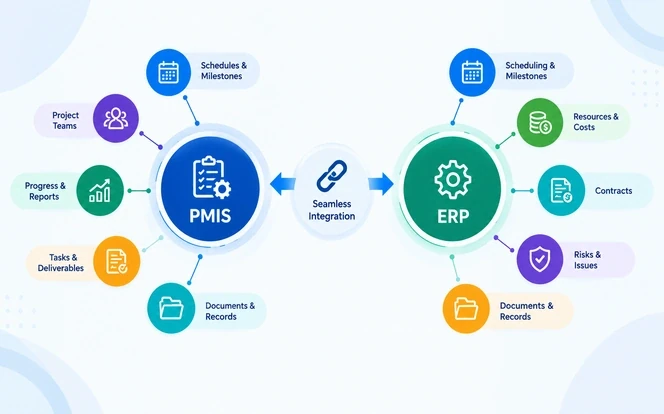
PMIS: The Project Execution Layer
The Project Management Institute (PMI) defines a Project Management Information System (PMIS) in its PMBOK® Guide. It is an information system consisting of the tools and techniques used to gather, integrate, and disseminate the outputs of project management processes.
In addition, it supports all aspects of the project from initiating through closing, and it can include both manual and automated systems.
For example, on complex projects this can include schedules and milestones, resource assignments, cost forecasts, contracts, changes, and project documents. It can also cover requirements, issues, risks, reviews, approvals, and progress records.
Depending on the industry, these records may also include construction RFIs and submittals, engineering deliverables, implementation tasks, or other project-specific workflows.
Public agencies add further requirements around funding, compliance, and multi-year planning. We cover these in our guide to PMIS for public infrastructure capital improvement programs.
Above all, the central purpose of a PMIS is project control and delivery. In other words, it connects project records to the work being performed. This helps teams understand what is happening, what has changed, and what could affect delivery.
ERP: The Enterprise Operations Layer
In contrast, an Enterprise Resource Planning (ERP) system operates across the organization's wider business processes. Consequently, it manages transactions and resources that may span multiple projects, departments, and business units.
Additionally, an ERP typically supports the general ledger, accounts payable and receivable, procurement, purchasing, inventory, assets, HR and payroll, budgeting, invoices, and payments.
It also maintains enterprise-level information such as supplier records and accounting structures.
Therefore, this creates a different operational perspective. A PMIS asks "How is the project progressing?", while an ERP addresses "How are the organization's financial and operational resources being managed?"
PMIS vs ERP: Key Differences Explained
In short, the comparison below sets out how each system approaches the same areas of work.
| Area | PMIS Approach | ERP Approach |
|---|---|---|
| Primary Focus | Manages projects, schedules, milestones, risks, and project-specific workflows. | Manages organization-wide financial, operational, and administrative processes. |
| Project Scheduling | Provides detailed project schedules, task dependencies, milestones, and progress tracking. | Usually provides basic project scheduling or relies on integrated project tools. |
| Cost Management | Tracks project budgets, forecasts, commitments, and project-level costs. | Handles broader accounting, financial controls, invoicing, and enterprise budgeting. |
| Resource Management | Focuses on assigning people, equipment, materials, and other resources to projects. | Manages enterprise-wide resources, procurement, payroll, inventory, and related operations. |
| Reporting | Provides project-level dashboards, progress reports, forecasts, and performance insights. | Provides financial, operational, compliance, and organization-wide reporting. |
| Integrations | Connects project data with ERP, document management, scheduling, and other project systems. | Connects financial and operational data across departments and business systems. |
Overall, the important distinction is context. Both systems can contain budgets, resources, procurement records, approvals, and reports, but they use that information differently.
A PMIS connects information to project activities, work packages, milestones, and delivery, while an ERP connects it to company-wide financial and operational processes.
Where Do PMIS and ERP Capabilities Overlap?
However, the boundary is not absolute. For instance, modern ERP systems can include project accounting, job costing, resource management, procurement, timesheets, and project reporting. PMIS platforms can also provide budgeting and financial tracking.
Our guide to PMIS budget, financial, and contract management for capital projects shows how far these PMIS cost controls can go.
The same business event may therefore appear in both systems without the systems performing the same function.
A PMIS might connect a cost to a work package, milestone, change event, or forecast. The ERP then records the resulting financial transaction within the organization's accounting structure.
This distinction matters when deciding whether another system is necessary. If an ERP already provides a sufficient project controls system, a separate PMIS may create unnecessary duplication.
On the other hand, some projects require deeper project controls, document management, collaboration, field visibility, or project-specific workflows. In those cases, a dedicated PMIS may provide additional value.
Our PMIS consulting and selection services help teams make that call before committing to a platform.
PMIS or ERP: Which System Does Your Organization Need?
Generally, the deciding factor is the capability gap between the existing ERP and the project's execution requirements.
| Business situation | Likely approach |
|---|---|
| Strong ERP project functionality and straightforward projects | ERP may be sufficient |
| Detailed scheduling, project controls, and field coordination required | PMIS may be appropriate |
| Complex projects with centralized finance and procurement | PMIS and ERP |
| Fragmented project information and document workflows | PMIS may add value |
| Multiple projects or entities requiring consolidated financial control and detailed project controls | PMIS and ERP |
The decision is therefore not simply whether to choose a PMIS or ERP.
Organizations should instead determine which system should control each business process and where integration is needed to connect project execution with broader enterprise operations.
For this reason, a structured PMIS fit-gap analysis is a practical way to measure that capability gap against your real requirements.
Not sure whether your ERP already covers your project controls needs?
Get a fit-gap reviewHow PMIS and ERP Work Together in Practice
The most practical approach is often to use PMIS for project execution and ERP for enterprise transactions. Both systems are then connected through defined business events.
For example, a project may require a new subcontractor or supplier. The project team can identify the requirement and move it through the appropriate approval process in the PMIS.
Once approved, the relevant information can then be passed to the ERP, where procurement can create the required purchasing transaction.
The ERP can then manage purchase orders, receipts, invoices, payments, and accounting. Relevant financial results can be made available to the PMIS so project teams can monitor costs, update forecasts, and prepare project reports.
Thus, the exact workflow depends on how responsibilities and data ownership are defined.
The goal is not to make both systems contain every record. Rather, it is to ensure that the right information reaches the right system at the right point in the workflow.
Common Data Exchanges
Integration should focus on business-critical information rather than synchronizing every record. Similarly, the direction of data flow depends on the organization's workflows, system capabilities, and data-ownership model.
The examples below represent common integration patterns rather than fixed rules.
- Project IDs and cost codes
- Approved budgets
- Purchase requisitions and commitments
- Contract line items
- Approved change orders
- Payment certificates and progress billing
- Vendor and supplier records
- Purchase orders and contracts
- Receipt information
- Actual costs
- Invoice and payment status
- Resource and payroll cost information
Data Ownership: Source of Truth
To begin with, a practical approach is to define ownership by data domain.
In many implementations, for example, the ERP remains authoritative for financial and enterprise master data.
The PMIS remains authoritative for project execution information such as schedules, RFIs, submittals, risks, changes, progress, and project documents.
Before integration, teams should answer three questions:
- Who creates the data?
- Which system owns the approved version?
- What event triggers synchronization?
This is more important than simply connecting APIs. Otherwise, without clear ownership, organizations can end up with duplicate records, stale information, and reconciliation problems.
Furthermore, our guide to ERP integration strategy covers how APIs, middleware, and data ownership fit together.
How PMIS and ERP Integration Works: Architecture and Sync Frequency
In general, a PMIS–ERP integration architecture connects project execution with enterprise transactions through an integration layer. As a result, key information moves between the systems only when a defined business event occurs.
Similarly, this approach keeps project context separate from enterprise transactions while allowing both systems to share relevant information.
The integration layer also needs to map project identifiers, cost codes, vendors, contracts, and accounting structures, supported by validation and reconciliation processes.
For a platform-specific example, see our guide to PMIS integration with Microsoft Dynamics and SharePoint.
PMIS–ERP Sync Frequencies
Not every record needs to move in real time. Instead, sync frequency should match how time-sensitive each type of data is, as the suggested intervals below show.
| Priority | Data Type | Suggested Sync Frequency | Examples |
|---|---|---|---|
| 1 | Critical Transactions | Real-time (event-driven) | Approved costs, invoices, and payment status |
| 2 | Project Progress | Every 15 to 30 minutes | Project status and milestone updates |
| 3 | Budget & Commitments | Every 30 to 60 minutes | Budget changes and purchase commitments |
| 4 | Resource Data | Hourly | Employee and resource assignments |
| 5 | Master Data | Daily | Vendors, cost codes, and departments |
| 6 | Historical & Reporting Data | Daily or weekly | Consolidated reports and archives |
5-Step PMIS and ERP Integration Process and Timeline
Integration should begin with the business process, not the API. Accordingly, the five steps below set the order of work.
- Define the workflowsIdentify where project execution connects with procurement, contracts, costs, invoices, payments, and reporting.
- Map data and ownershipDecide which system creates, approves, updates, and owns each major data object.
- Define synchronization triggersSpecify what event causes information to move, for example an approved requisition, change order, payment certificate, invoice, or financial posting.
- Test and reconcileValidate that records transferred between systems retain the correct identifiers, values, relationships, and status.
- Establish governanceDefine permissions, exception handling, reconciliation responsibilities, and procedures for resolving conflicting or failed records.
PMIS–ERP Integration Timeline
A typical PMIS–ERP integration runs for around 12 to 14 weeks. Some phases overlap to shorten the overall timeline, as shown below.
| Stage | Integration Phase | Timeline | Key Activities |
|---|---|---|---|
| 1 | Discovery & Data Mapping | Weeks 1 to 2 | Identify systems, data owners, fields, and dependencies |
| 2 | API & Integration Design | Weeks 2 to 4 | Define APIs, data flows, field mappings, and validation rules |
| 3 | Development & Configuration | Weeks 4 to 8 | Build connectors and configure automated workflows |
| 4 | Data Migration & Testing | Weeks 7 to 10 | Migrate data and perform reconciliation checks |
| 5 | UAT & Security Testing | Weeks 10 to 12 | Test workflows, permissions, failure handling, and reporting |
| 6 | Go-Live & Hypercare | Weeks 12 to 14 | Deploy the integration and monitor data syncs |
These steps usually run as one phase of a wider rollout. Meanwhile, our PMIS implementation roadmap shows where integration fits alongside configuration, data migration, and go-live.
Moving historical records also deserves its own plan. Our PMIS data migration strategy for project, financial, and document records explains how to sequence it.
Thus, this approach treats integration as a business-process and information-governance initiative, not simply a technical connection.
Planning a PMIS–ERP integration and need data ownership mapped first?
Talk to our integration teamCommon PMIS and ERP Integration Challenges
An API can move data between systems, but it cannot determine data ownership, decide when an update becomes authoritative, or resolve conflicting records.
In particular, common challenges include:
- Different data models and identifiers
- Project codes that do not align with accounting structures
- API or integration limitations
- Duplicate or stale records
- Synchronization failures
- Security and permissions
- Unclear data ownership
- User adoption and process changes
The integration therefore needs clear data mappings, ownership rules, synchronization triggers, validation procedures, and exception-handling workflows.
Moreover, where standard connectors fall short, custom API development and integration services can close the gap between the two data models.
How SDLC Corp Supports PMIS and ERP Integration
PMIS–ERP integration requires more than connecting two applications.
Specifically, organizations need to determine how project and enterprise workflows should interact and which system owns each data object. They also need to decide how information should be validated and reconciled between systems.
For this purpose, SDLC Corp can support organizations with integration initiatives by helping assess existing systems and workflows. We can also help define integration requirements and design how business applications should exchange information.
Depending on the project requirements, this can include:
- Integration architecture
- Data mapping
- System responsibility definitions
- Workflow design
- Integration-point identification
- Testing, validation, and reconciliation processes
Overall, the objective is to develop an integration approach that aligns with the organization's existing applications, data structures, and operational processes.
Equally, the appropriate implementation depends on the systems already in place and the data to be exchanged. It also depends on the technical requirements and the level of project control required.
For the project side, see our PMIS implementation solutions. Similarly, for the enterprise side, see our custom ERP development services.
Conclusion: Connecting PMIS and ERP for Better Project Control
In summary, PMIS and ERP address different layers of organizational information. A PMIS provides detailed visibility into project execution, while an ERP manages enterprise financial and operational processes.
When integrated effectively, they can create a continuous workflow from project planning and progress to procurement, costs, accounting, and reporting.
Still, the right architecture depends on project complexity, existing technology, data ownership, and the level of project control required.
Finally, some organizations need to connect project workflows with broader business applications. For them, SDLC Corp can help assess integration requirements and develop solutions that align PMIS, ERP, and other enterprise systems with their operational processes.
Ready to connect project execution with enterprise operations?
Talk to SDLC CorpFAQs About PMIS and ERP Integration
Is PMIS The Same As ERP?
No. A PMIS primarily focuses on project execution and project information, while an ERP manages broader enterprise financial and operational processes.
Can An ERP Replace A PMIS?
Sometimes. If an ERP provides sufficiently detailed project controls and the organization's workflows are straightforward, a separate PMIS may not be necessary. However, complex projects may require specialized PMIS capabilities.
What Data Is Exchanged Between PMIS And ERP?
For example, common exchanges include project IDs, cost codes, budgets, purchase requirements, commitments, change orders, and progress billing from PMIS to ERP. Meanwhile, vendor information, purchase orders, actual costs, invoices, and payment status may flow back to the PMIS.
Why Integrate PMIS With ERP?
Above all, integration can connect project execution with procurement and accounting and improve project cost visibility. It can also reduce duplicate data handling and make financial information available for project forecasting and reporting.
Which System Is The Source Of Truth For Project Costs?
The ERP usually owns actual costs, invoices, and payments, while the PMIS owns budgets, forecasts, and commitments tied to work packages. Ownership should be defined for each data domain before integration begins.
Do Small Organizations Need Both PMIS And ERP?
Not always. For instance, organizations with straightforward projects and strong ERP project features can often manage with the ERP alone. However, a dedicated PMIS becomes more valuable as project volume, complexity, and document workflows grow.
What Are The Common Risks Of PMIS And ERP Integration?
Overall, the main risks are mismatched identifiers, unclear data ownership, duplicate or stale records, and failed synchronizations. Therefore, clear data mapping, defined synchronization triggers, and regular reconciliation help reduce these risks.
How Long Does A PMIS And ERP Integration Take?
A typical PMIS and ERP integration takes around 12 to 14 weeks, from discovery and data mapping through go-live and hypercare. However, timelines vary with the systems involved, available APIs, data quality, and the number of connected workflows. For this reason, mapping workflows and data ownership first gives a more reliable estimate before development starts.