
A module of Data AI NinjaAP module

AI Invoice Processing Automation Software

Our invoice processing automation software reads every invoice, scores each field from 0 to 100 and sends only the doubtful values to a person. Then it exports clean, checked records to your finance systems. It runs on Data AI Ninja, the SDLC Corp document AI platform.

  • SOC 2 Type II
  • ISO 27001 Certified
  • ISO 9001 Certified
Document types out of the box
18+
Confidence score on every field
0-100
Stages: capture, extract, verify, export
4
Deployment options, incl. on premises
3

Platform facts from the Data AI Ninja product page.

The problem

Why Manual Invoice Processing Breaks at Volume

Most AP teams already scan their invoices. The trouble is what comes next: someone still has to read the image and key the numbers. Basic OCR returns loose text, so the cleanup work stays with your team. That gap is exactly what invoice processing automation software closes.

  • Manual data entry

    Staff retype vendor names, totals and terms from PDFs and scans. It is slow work, and every keystroke is a chance for a typo.

  • Slow processing

    Invoices wait in inboxes and shared folders until someone has time. As a result, approvals slip and month-end gets tight.

  • Errors found too late

    A swapped digit in a total often surfaces at audit or reconciliation. By then, it costs far more to fix.

  • Duplicate invoices

    The same invoice can arrive by email and by post. Without a check, it can slip through, and you pay it twice.

  • Review bottlenecks

    When reviewers must check every field on every invoice, the queue grows with volume. So clean invoices wait behind hard ones.

How it works

How Our Invoice Processing Automation Software Works

Every invoice takes the same five steps, and each step writes to the audit log. Nothing reaches your system of record without passing validation first.

  1. 01

    Intake

    Invoices arrive from mailboxes, shared drives, scanners, phone photos or the REST API. Then the platform classifies and logs each one on arrival.

  2. 02

    Extraction

    AI OCR reads the invoice against your schema. It returns named fields and every line item, each with its place on the page.

  3. 03

    Field validation

    Next, rules check that totals add up, the vendor matches, dates make sense and the invoice number is not a duplicate.

  4. 04

    Human review

    Fields under your threshold, or rules that fail, open beside the source page. A named reviewer confirms or corrects them.

  5. 05

    Export and sync

    Finally, checked records leave as JSON, CSV or Excel, through the REST API or on a signed webhook.

Core capabilities

Invoice Processing Automation Software Capabilities

Plain OCR gives you text. This module gives you named, scored and checked invoice data that your AP team can defend. For a deeper look at the extraction step, read our guide to AI OCR invoice data extraction.

  • Invoice OCR and AI extraction

    Header fields, tax lines and full line-item tables, even when rows span pages. A value is either read from the page or left empty and flagged, never guessed.

  • Confidence scoring

    Each field gets a score from 0 to 100. You set the pass threshold per schema, and you can raise it at any time.

  • Review workflows

    Reviewers see the value next to the source page, edit in place and sign off. In addition, reviewer and approver roles can stay separate.

  • Batch processing

    Upload a batch, drop files in a watched folder or post them through the API. Also, long PDFs stay one document, not a pile of pages.

  • Validation and duplicate checks

    Arithmetic checks, vendor matching, date logic and duplicate detection run before export. If a rule fails, the record waits.

  • Auditability

    An append-only log records every upload, extraction, edit, approval and export, with the actor, time and prior value.

Supported invoice formats

These are the formats the Data AI Ninja product page lists. It reads handwriting too, but handwriting scores lower than clean print, so those fields go to a reviewer. The platform also detects language per invoice, and output always lands in your own field names.

  • PDF
  • Multi-page PDF
  • Scanned PDF
  • PNG
  • JPG
  • WEBP
  • Handwritten entries
  • Multilingual invoices

ERP and accounting integrations

ERP and Accounting Integrations: What Connects and How

For this invoice processing automation software, we split integrations into three types: built in, API-based and project work. That way, you know exactly what to expect before a pilot starts.

Native

Built in

These intake sources and export formats are part of Data AI Ninja. Even so, we confirm which connectors apply to your deployment during scoping.

  • Email intakeGmail and Google Workspace, Outlook and Microsoft 365, shared AP mailboxes or a forwarding address. The platform pulls and queues the attachments.
  • Cloud storageGoogle Drive, SharePoint and OneDrive, network or watched folders and object storage buckets. It processes what is there, then watches for new files.
  • Paper invoicesScanners and multifunction printers, mobile photo capture and bulk backfile scanning, including skewed or low-quality scans.
  • File exportsChecked records export as JSON, CSV or Excel, using your downstream field names.

Source: Data AI Ninja product page, intake and export sections.

API-based

Via API

Verified records reach ERP, finance and data platforms through the REST API, a signed webhook or a scheduled file export. So a system that is not listed is an integration question, not a blocker.

  • REST APIPost an invoice and get structured JSON fields with confidence values back. It also includes batch upload, async status and retry and replay controls.
  • Signed webhooksA signed event fires when an invoice clears review, so downstream systems act only on approved data.
  • Scheduled file exportTimed exports for systems that prefer files over live calls.
  • Destinations named on the DAN pageSAP, Oracle, NetSuite, Microsoft Dynamics, Workday, Infor, Salesforce, ServiceNow, Snowflake and Databricks, each reached through the API, a webhook or a file export.
  • Security for integrationsScoped API keys, token authentication, signed events and IP allow listing.

These are API-based connections, not prebuilt native connectors. We confirm connector scope during rollout.

Custom implementation

Implementation work

Some AP needs go beyond the standard API. Our engineers deliver these through implementation work, scoped with your team during rollout.

  • Direct ERP postingField mapping and posting into your ERP AP objects, scoped and built during program rollout. See our software integration services.
  • Program-specific matching rulesCross-document checks, such as matching an invoice to its PO and receiving note in your ERP, set up per program during onboarding.
  • Legacy screens with no APIWhere an older finance app has no API, an RPA bot can key the checked data into its screens.
  • Approval routingMulti-step approval flows after review, built with our workflow automation services.

We agree scope, effort and timeline per project, so this work sits outside the standard module.

Benefits and outcomes

What Invoice Processing Automation Software Changes for Finance

We do not quote a headline accuracy rate. Instead, a document assessment measures field coverage and review rate on your own invoices. The figures below come from published case studies only.

  • Accuracy you can check

    Errors surface at entry, not at audit. Low scores and failed rules stop a record before it reaches your ledger, and no value is ever made up to fill a gap.

    Per the Data AI Ninja case study: 80% fewer manual entry errors for a finance team.
  • Faster processing

    Fields above your threshold post without a human touch. So reviewers spend their time on the flagged few, not on clean invoices.

    Per the case study: 60% faster document processing. On a separate invoice project, Transworld Logistics went from 48 hours to 4 hours.
  • Full traceability

    First, click any value to see where it came from on the page. Every edit and approval carries a name, a time and the prior value.

    Audit answers are already written, instead of rebuilt from email and spreadsheets.
  • Scale without adding headcount

    Volume grows on the platform, while only the flagged share needs people. Also, reviewer corrections stay in your tenant, so the same field stops getting flagged.

    Corrections are never pooled into a shared model.

Want numbers from your own invoices?

Send us a sample set. A document assessment reports the field coverage and review rate you can expect.

Use cases

Use Cases for Invoice Processing Automation Software

Our invoice processing automation software fits any team that receives invoices at volume and must also prove where each number came from.

  • Accounts payable

    Capture vendor invoices, match them to the PO and receiving note, and flag totals that do not reconcile before payment.

    RPA for accounting
  • Finance shared services

    Run one schema and one review queue for invoices from many entities, languages and mailboxes, with roles kept separate.

  • Procurement

    Read PO numbers, vendor details and line items, so buyers can compare each bill with its order.

  • Enterprise document operations

    Apply the same flow to receipts, statements and delivery notes, and turn scanned backfiles into indexed records.

    Other Data AI Ninja document types

Product relationship

Powered by Data AI Ninja: Module and Platform

Invoice Processing Automation is a module of Data AI Ninja, not a separate product. The platform does the reading, scoring, review and logging for every document type. The module applies it to invoices, with the schema and rules an AP team needs.

So you get one platform, one audit trail and one security review. Later, you can add receipts, statements or contracts on the same platform. It is part of our wider AI services work.

Data AI Ninja platform

  • Extraction engine and AI OCR
  • Confidence scoring and review workspace
  • Append-only audit log
  • REST API, webhooks and exports
  • Government cloud, private VPC or on premises

Invoice module

  • Invoice schema: header, tax, terms and line items
  • AP rules: totals, vendor match, duplicates
  • Invoice, PO and receiving note matching
  • AP review queue with your threshold
  • Exports mapped to your finance fields
Explore the Data AI Ninja platform
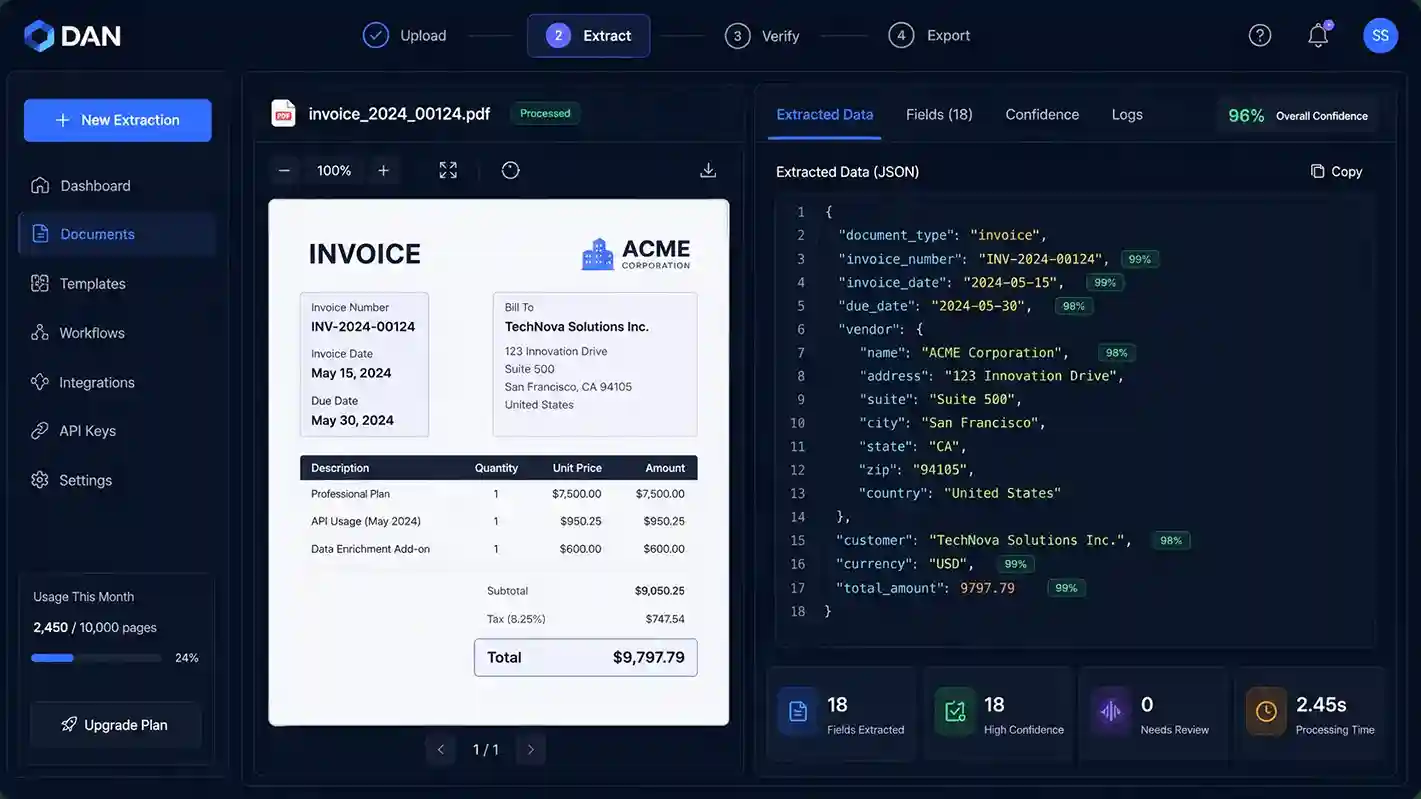
Invoice processing automation software screen in Data AI Ninja showing an invoice beside extracted JSON fields with confidence scores
Invoice extraction screen from the Data AI Ninja case study: the source invoice on the left, scored fields on the right.

Verified case study

Invoice Automation Case Studies

One finance team ran this workflow on Data AI Ninja. Two more invoice projects used the same approach as custom builds. All figures appear as stated on each case study page.

All document processing cases
Finance | Data AI Ninja

A finance team moved from manual entry to AI review

Twelve finance staff across three departments keyed vendor names, invoice numbers, totals, taxes and due dates by hand. Basic OCR had not helped, because it returned raw text that still needed cleanup.

With Data AI Ninja, the team uploads invoices, receipts and POs in one place. Then confidence scores and validation checks flag missing values, duplicate files and total mismatches before export.

  • AI OCR
  • Confidence scoring
  • Human review
  • JSON, CSV, Excel, API, webhooks
Read the Data AI Ninja case study
Faster document processing
60%
Fewer manual entry errors
80%
Setup time for the extraction workflow
2 weeks
Export options for business workflows
5+

Figures as stated in the Data AI Ninja case study.

  • Project build, same workflow

    Transworld Logistics invoice extraction

    More than 2,000 invoices a day arrived with no standard layout. We built a custom platform with OCR, confidence checks, a review queue and JSON into the ERP. Per the case study, processing time fell from 48 hours to 4 hours, and the error rate from 4-5% to 0.1%.

    • OCR
    • Confidence checks
    • ERP via API
    Read the case study
  • Project build, email intake

    Automated email invoice processing

    A custom system scans an AP inbox every 15 minutes, reads the SKU on each invoice and routes it to the right team. Per the case study, it handles 500+ invoices a month and saved 90% of manual effort.

    • Inbox scan
    • SKU routing
    • Retry queue
    Read the case study

Client feedback

What Clients Say About Working With SDLC Corp

These reviews cover AI, ERP and automation projects with our team, rather than this module itself.

They've quickly understood our business context, moved fast, and brought recommendations rather than questions.

Brandy KuentzelCo-Founder & CEO, Ease Pet Vet

Verified review on Clutch

Overall, we were very satisfied with the engagement.

Rajesh U GaikwadFounder, Quantus-Technik

Verified review on Clutch

The team understood my requirement, agreed to multiple change requests, and delivered a very likable product.

Aarti DohareyCEO, Algo Harmonic

Verified review on Clutch

FAQs

Invoice Processing Automation Software FAQs

Straight answers for AP, finance and IT leaders on formats, accuracy, review, integrations, security and cost.

Ask Your Own Question
What is invoice processing automation software, and how is it different from plain OCR?

Invoice processing automation software turns invoices into checked, structured data. Plain OCR only returns text. This module returns named fields against your schema, each with a confidence score and its place on the page. It also adds validation rules, a review workflow and an audit trail. For more detail, see our post on OCR vs AI OCR for invoices.

Which invoice formats are supported?

The module accepts PDF, including multi-page and scanned files, plus PNG, JPG and WEBP images. It also reads handwriting on printed forms, though those fields score lower and go to a reviewer. The platform also detects language per invoice, and output always uses your own field names.

How accurate is the extraction, and how do confidence thresholds work?

Every field gets a score from 0 to 100, and you set the threshold per schema. Values above it pass, while values below it go to a named reviewer beside the source page. We do not quote a headline accuracy rate. Instead, a document assessment measures field coverage and review rate on a sample of your own invoices.

Can it detect duplicate invoices?

Yes. Duplicate detection is one of the validation rules that run before export, alongside arithmetic checks, vendor matching and date logic. If an invoice number repeats, the rule fails, and the platform holds the record for review instead of exporting it.

Which ERP and accounting systems does it integrate with?

Our invoice processing automation software sends records to your systems through the REST API, signed webhooks or scheduled file exports. The Data AI Ninja page names SAP, Oracle, NetSuite, Microsoft Dynamics, Workday and Infor among the destinations. However, we scope and build direct ERP posting as implementation work during rollout.

Where is invoice data hosted, and how is it secured?

You choose: government cloud in your tenancy, a single-tenant private cloud or VPC, or on premises, including disconnected sites. The platform encrypts data in transit and at rest, and it supports role-based access and SSO through SAML or OIDC. SDLC Corp holds SOC 2 Type II, ISO 27001 and ISO 9001 certifications. Visit our Trust Center for more.

How long does implementation take?

It depends on your invoice mix, the number of schemas and the integrations you need. Most teams start with a document assessment, then a scoped pilot on one document type, then a wider rollout. For reference, the Data AI Ninja case study reports a 2-week setup for its extraction workflow.

How is pricing structured?

There is no public price list. Instead, the price of our invoice processing automation software depends on invoice volume, schema count, deployment model and support level. Most teams start with a paid pilot on one document type, so we can scope the rest against real results.

Do people still review invoices?

Yes, but only where it matters. Reviewers see flagged fields beside the source page, then confirm or correct them. Each approval records a named person and a time, and reviewer and approver duties can stay separate.

How does this module relate to Data AI Ninja?

Invoice Processing Automation is a module of Data AI Ninja, not a standalone product. It uses the same extraction engine, review workspace, audit log and deployment options. The module adds the invoice schema, AP rules and review queue.

Start with your own invoices

See Invoice Processing Automation Software on Your Invoices

Bring a few real invoices to a short demo. We will show the extracted fields, the scores and the review step, then outline a pilot.

  • Demo on your samples
  • NDA on request
  • Clear pilot plan

Contact Us

Share a few details about your project, and we’ll get back to you soon.

Let's Talk About Your Project