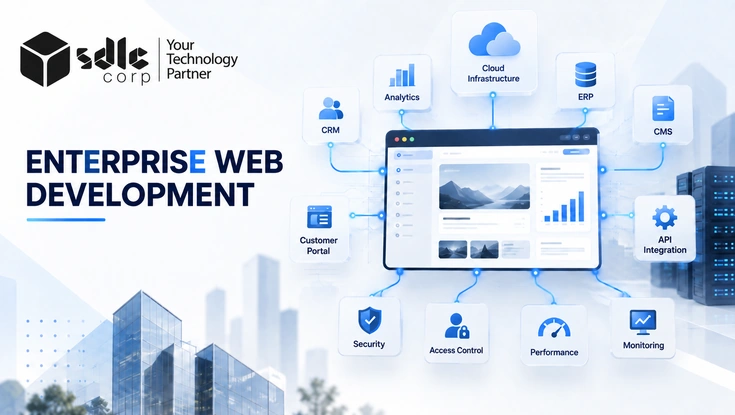
Enterprise web portals give customers, employees, vendors, and partners authenticated access to sensitive business data, APIs, documents, payments, and internal workflows. That makes portal security a broader responsibility than standard website protection.
A secure portal needs strong identity controls, server-side authorization, API protection, encryption, monitoring, secure development practices, and the right compliance controls from the start.
In short: protect who can sign in, control what each user can access, secure every API and data flow, monitor sensitive activity, test continuously, and retain evidence that proves the controls work.
Key Takeaways
Enterprise Web Portal Security Checklist at a Glance
Use this quick view to prioritize the controls that matter most before moving into detailed testing.
| Security Area | Key Controls | Priority |
|---|---|---|
| Identity | SSO, MFA, SCIM, secure user lifecycle | Critical |
| Access Control | RBAC, least privilege, tenant isolation | Critical |
| API Security | Authentication, authorization, rate limiting | Critical |
| Data Protection | TLS, encryption at rest, key management | Critical |
| Application Security | OWASP Top 10, OWASP ASVS, SAST, DAST, dependency scanning | High |
| Monitoring | Audit logs, SIEM, alerts, defined retention | High |
| Compliance | SOC 2, ISO/IEC 27001, GDPR, HIPAA, PCI DSS | Depends on portal |
Secure Identity and Authentication
Identity is the first security boundary. Centralize authentication where appropriate, reduce local credentials, and make privileged accounts harder to compromise. The NIST SP 800-63-4 Digital Identity Guidelines provide a useful reference for identity proofing, authentication, and federation.
Single Sign-On
Use SAML or OpenID Connect with the enterprise identity provider. Validate every SSO response and apply separate authorization checks.
Multi-Factor Authentication
Require MFA for privileged and high-impact roles. Use step-up authentication before sensitive actions.
User Lifecycle
Automate account provisioning and removal. Disable former users promptly and assign owners to service accounts.
Set a Measurable Identity Review Cadence
Review privileged accounts quarterly and review all user accounts and related access at least every six months. The six-month interval also aligns with PCI DSS access-review requirements for in-scope environments. Recheck access immediately after role changes, mergers, vendor offboarding, or major application changes.
Implement Strong Access Control and API Security
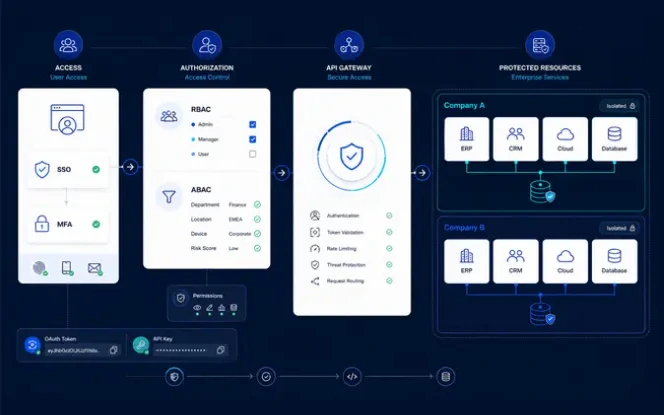
Authentication confirms who the user is. Authorization determines what that user can see or change. Enterprise portals must enforce both on trusted server-side systems because browser controls, hidden buttons, and client-side role checks can be bypassed.
RBAC and Least Privilege
Start with a documented role-permission matrix. Grant only the actions and data each role needs. Add attributes such as department, organization, ownership, region, or data sensitivity when role-based access alone cannot express the rule safely.
Tenant Isolation
Verify tenant ownership for APIs, records, files, exports, search, caches, queues, and background jobs. Use server-derived tenant context where possible instead of trusting a tenant identifier submitted by the browser.
API Authorization
Authenticate protected APIs and enforce object-level and function-level authorization on every sensitive request. Apply the same checks to REST, GraphQL, webhooks, mobile endpoints, file downloads, and internal APIs exposed through the portal.
Abuse Protection
Rate-limit login, password reset, OTP, search, export, invitation, and expensive API operations. Add tighter per-user or per-tenant controls where one account could otherwise consume shared capacity or enumerate large amounts of data.
Test Authorization as a Matrix
For each sensitive function, test the same request as an unauthenticated user, a normal user, a privileged user, and a user from another tenant. Then test direct object references and parameter changes. Include bulk actions, exports, archived records, file identifiers, and administrative endpoints because these paths often bypass normal interface restrictions.
Simple test: changing a customer ID, invoice ID, tenant ID, file ID, or resource ID in a request must never expose or modify data that the current user is not authorized to access.
Protect Sensitive Portal Data
Enterprise portals often process personal, financial, healthcare, and confidential business information. Protect this data throughout its lifecycle with encryption, access controls, retention rules, and secure session handling.
Classify and Minimize the Data
Classify data by sensitivity and collect only what each workflow needs. Keep sensitive values out of logs, test systems, analytics, and notifications unless properly protected.
Protect Encryption Keys and Secrets
Store keys and API secrets in a managed key or secrets system. Restrict access, record key operations, and rotate credentials after suspected exposure.
Use Explicit Session and Token Lifetimes
As a starting baseline, set standard idle sessions to 15–30 minutes and privileged sessions to 5–15 minutes. Keep the absolute browser session near 8 hours or shorter based on risk. OWASP Session Management guidance and NIST SP 800-63B-4 provide risk-based timeout and reauthentication guidance.
Set API access tokens to about 10–15 minutes. Rotate refresh tokens, revoke them after logout or risk events, and limit every token to the minimum required scope.
Control Retention, Deletion, and File Handling
Assign each data category an owner, retention period, and deletion method. Validate and scan uploads before storage, then confirm the user has permission before releasing any file.
Build Security Into Development and DevSecOps
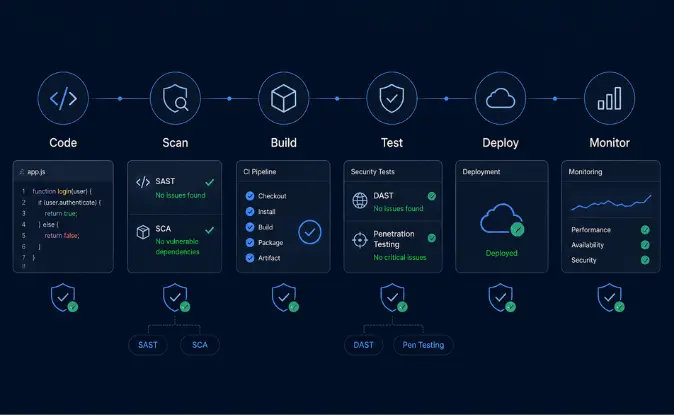
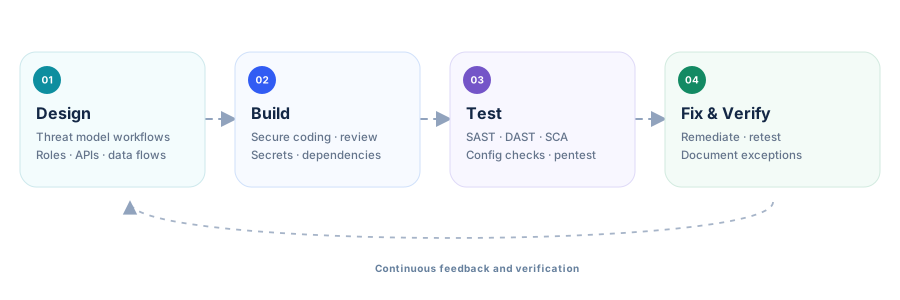
Security should be part of delivery rather than a one-time check before launch. Use the OWASP Top 10 to keep major web risks visible, but use the OWASP Application Security Verification Standard (ASVS) when the team needs detailed requirements that can be designed, tested, and verified.
Use Security Gates That Block Risky Releases
Run secret scanning and dependency checks on every change. Run SAST during build and DAST against a deployed test environment. Require manual security review for authentication, authorization, cryptography, payment, tenant-isolation, and other high-risk changes. A finding should have an owner, severity, due date, and retest result.
| Severity | Portal Patch SLA | Escalation Rule |
|---|---|---|
| Critical | 72 hours | 24 hours when actively exploited or internet-exposed |
| High | 14 days | Prioritize authentication, RCE, and data-exposure paths |
| Medium | 30 days | Track to the owning team and release |
| Low | 90 days | Fix through normal maintenance |
These are practical internal targets and can be tightened by risk. For payment-card environments, PCI DSS requires applicable critical or high-security patches to be installed within one month of release, so the portal SLA should never weaken an applicable regulatory or contractual requirement.
Software Supply Chain Controls
Dependency Visibility
Track direct and transitive libraries, remove unsupported packages, and know which services contain a vulnerable component before an incident forces the search.
SCA and SBOM
Use software-composition analysis for known issues and maintain an SBOM for important releases so remediation can be scoped quickly.
Pipeline Security
Protect CI/CD credentials, repositories, runners, build systems, deployment approvals, package registries, and release artifacts from unauthorized change.

Secure Infrastructure, Monitoring, and Incident Response
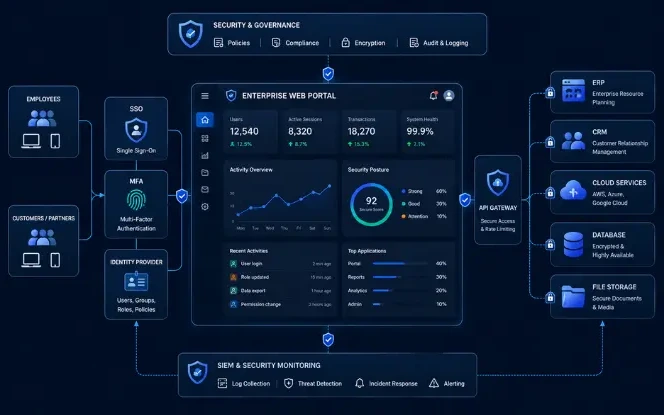
Application security cannot compensate for exposed infrastructure, weak cloud permissions, missing monitoring, or an untested recovery plan. Treat the portal runtime, network paths, cloud identities, secrets, backups, and observability stack as part of the same security boundary.
Cloud & Hosting
Separate production from lower environments. Restrict administrative access, remove public exposure that is not required, harden images and services, and use WAF or DDoS controls where the threat model supports them. Monitor drift from approved configurations.
Backups & Recovery
Protect backups with separate credentials and restricted deletion rights. Define RPO and RTO targets for critical portal services. Test restoration at least twice a year, and more often for systems where recovery time is business-critical.
Incident Response
Document who detects, contains, investigates, communicates, recovers, and approves return to service. Run a tabletop exercise at least annually and after material architecture changes. Include identity compromise, cross-tenant exposure, ransomware, and credential leakage scenarios.
Log the Events That Matter
Security logs should support investigation without becoming a new store of passwords, tokens, secrets, or unnecessary personal data. Capture identity events, authorization failures, privileged changes, sensitive exports, configuration changes, and security-control failures with synchronized timestamps.
Define Log Retention Before an Incident
Use 12 months of security-log retention as a strong enterprise baseline, with the most recent 90 days immediately searchable. This also matches the audit-log retention pattern in PCI DSS for applicable environments. Keep longer only when law, contracts, investigations, or business risk justify it, and apply privacy and deletion controls to the log store itself.
Map Portal Security to the Right Frameworks and Regulations
Not every framework applies to every portal. Scope depends on the organization, users, industry, jurisdiction, contracts, and the data being processed. Start with applicability, then map each requirement to a portal control, owner, test method, and evidence source.
| Framework or Rule | When It May Be Relevant | Portal Security Focus |
|---|---|---|
| SOC 2 via AICPA | SaaS and service organizations | Controls relevant to security, availability, processing integrity, confidentiality, and privacy |
| ISO/IEC 27001:2022 | Organizations operating or certifying an ISMS | Risk-based information-security management, governance, and continual improvement |
| NIST SP 800-63-4 | Identity programs and environments using formal digital-identity assurance guidance | Identity proofing, authentication, authenticator management, and federation |
| NIST Cybersecurity Framework (CSF) 2.0 | Organizations structuring a broader cybersecurity program | Govern, Identify, Protect, Detect, Respond, and Recover outcomes |
| PCI DSS | Systems storing, processing, transmitting, or affecting payment-account data | Payment-data protection, access control, vulnerability management, logging, and testing |
| GDPR | Personal data within applicable EU/EEA scope | Lawful processing, minimization, security, retention, rights, and breach obligations |
| HIPAA Security Rule | Applicable U.S. regulated entities and business associates handling ePHI | Administrative, physical, and technical safeguards for ePHI |
| WCAG 2.2 | Accessibility requirements, policies, and procurement standards | Accessible navigation, forms, authentication, focus, target size, and interaction |
Separate Security Standards From Legal Applicability
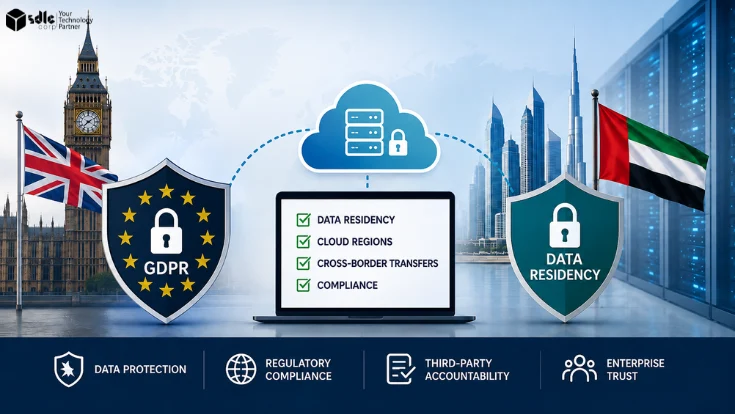
OWASP Top 10, NIST CSF 2.0, and ISO/IEC 27001 can guide security design, but they do not automatically become legal obligations for every portal. GDPR, HIPAA, and PCI DSS applicability depends on specific processing and organizational facts. SOC 2 is an attestation framework rather than a product certification. Keep legal interpretation with qualified counsel or compliance owners, while engineering maps the resulting obligations to technical controls.
Create a Control-to-Evidence Map
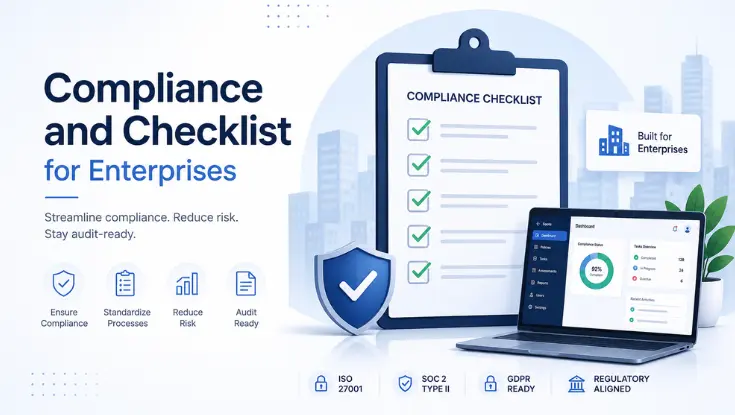
For every applicable requirement, record the control owner, system scope, implementation, test procedure, frequency, evidence location, and remediation path. This prevents the same control from being re-explained separately for customer questionnaires, audits, procurement reviews, and internal risk assessments.
Important: treat compliance as an applicability and evidence exercise, not a badge list. The strongest portal program can show which requirements apply, why they apply, how the control works, and when it was last tested.
Keep Security Evidence That Proves Controls Work
Enterprise teams should be able to show not only that a control exists, but also how it is configured, tested, reviewed, and maintained. Evidence should be recent enough to reflect the current portal, not a screenshot from a configuration that no longer exists.
| Control | Useful Evidence | Suggested Refresh |
|---|---|---|
| MFA / SSO | Identity-provider policy, federation configuration, test result | After change + quarterly review |
| RBAC | Role-permission matrix, approvals, access-review records | Quarterly privileged / 6-month all users |
| Encryption | TLS settings, key-management configuration, rotation records | After change + annual review |
| Security Testing | SAST, DAST, SCA, pentest, remediation and retest records | Each release cycle / risk-based |
| Logging | SIEM configuration, alert rules, retained audit events | Continuous + periodic validation |
| Backups | Backup policy, protected-storage configuration, restore result | At least twice yearly |
| Incident Response | Response plan, contact tree, tabletop and incident records | At least annually |
Make Evidence Reproducible
Prefer exported configuration, automated reports, tickets, signed approvals, and test outputs over isolated screenshots. Each evidence item should identify the system, date, environment, control owner, and result. When a test finds an exception, preserve the remediation ticket and retest evidence instead of replacing the original record.
Useful audit model: Control → Implementation → Testing → Evidence → Remediation. This keeps security practical for engineering teams and easier to verify during customer, procurement, and compliance reviews.
Use a Security Gate Before Enterprise Portal Launch
Before production launch, verify the controls that can create the greatest security impact if missed. A checklist is useful only when each item has an owner, pass/fail result, evidence, and an explicit exception process.
Use One Executable Baseline
| Control | Starting Target | When to Tighten It |
|---|---|---|
| Privileged session inactivity | 15 minutes or less | Financial, administrative, or highly sensitive workflows |
| API access token | 10–15 minutes | High-impact scopes or elevated privileges |
| Privileged access review | Every 90 days | Immediately after role or organization changes |
| All-user access review | At least every 6 months | More often for regulated or high-turnover environments |
| Security log retention | 12 months; 90 days immediately searchable | Longer when law, contracts, or investigations require it |
| Critical / High patches | 72 hours / 14 days | Critical actively exploited issues: 24 hours |
Require Security Sign-Off, Not Silent Exceptions
Block launch for unresolved critical authorization flaws, cross-tenant exposure, exposed secrets, or unpatched actively exploited vulnerabilities. If a lower-severity risk is accepted, record the business owner, compensating control, due date, and expiry. Re-run the launch gate after major identity, payment, data, or architecture changes.
Common Enterprise Portal Security Mistakes
Most serious gaps come from inconsistent implementation rather than the complete absence of security tools.
Planning a Secure Enterprise Web Portal?
SDLC Corp can help design and develop customer, employee, vendor, and partner portals with identity, API security, access control, integration, and compliance requirements built into the architecture.
Talk to an Enterprise Portal ExpertFAQs About Enterprise Web Portal Security
What Security Controls Should An Enterprise Web Portal Have?
Most enterprise portals need strong authentication, MFA, access control, API authorization, encryption, audit logging, vulnerability testing, secure infrastructure, backups, and incident-response controls. The exact set should reflect the portal's risk profile.
What Is The Difference Between SSO And MFA?
SSO centralizes authentication across connected applications. MFA strengthens authentication by requiring additional verification. Enterprise portals commonly use both together.
How Do You Secure A Multi-Tenant Portal?
Verify tenant ownership on the server for every API request, record, file, export, search result, and sensitive action. Cross-tenant testing should be part of security testing and penetration testing.
Which OWASP Standard Should Enterprise Portals Follow?
Use the OWASP Top 10 for awareness of major web application risks and the OWASP ASVS when you need more detailed, testable security requirements.
How Often Should Enterprise Portal Security Be Reviewed?
Monitoring should be continuous. Access reviews, vulnerability scans, security testing, and broader assessments should run regularly and after significant architectural or security-sensitive changes.
Final Thoughts
Enterprise portal security works best when identity, authorization, APIs, data protection, infrastructure, secure development, monitoring, recovery, and compliance are designed together.
The practical goal is simple: know what control exists, how it is implemented, how it is tested, and what evidence proves it works. That approach improves security while making enterprise procurement, customer reviews, and audits easier to manage.