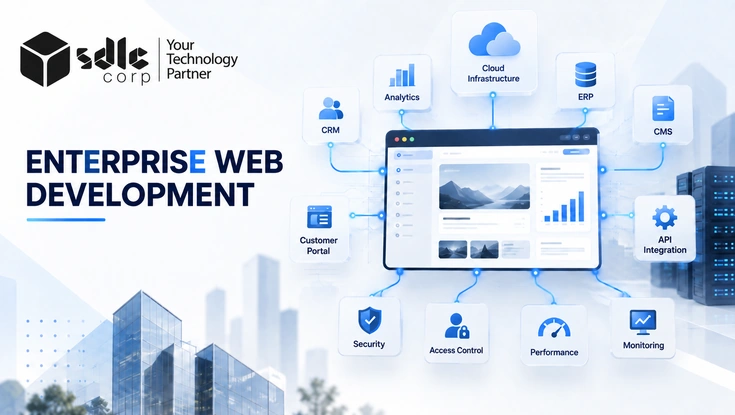
Enterprise web development is the process of building websites and web applications for organizations with complex workflows, multiple systems, different user groups, demanding security requirements, and long-term growth needs. It is not simply regular web development at a larger scale it's a different discipline, built around dependency and risk.
- It's about dependency, not size. A growing company with tangled workflows may need an enterprise approach before a much larger company with a simple site does.
- No single stack makes it "enterprise." React, WordPress, Java, .NET, headless CMS what matters is whether the whole system meets the bar for reliability, security, and integration.
- Data ownership is the real architecture question. Which system owns each type of data, and how does it move between systems that decision shapes everything downstream.
- Most failures trace back to early decisions features defined before outcomes, integrations validated too late, migration underestimated.
What Enterprise Web Development Actually Is
Understand what makes enterprise web development different and how it supports complex digital operations. This section explains the scope, responsibilities, and business requirements behind enterprise-grade platforms.
It covers the planning, design, engineering, integration, testing, deployment, and maintenance of web platforms built for complex organizational requirements. In practice, that spans:
Corporate & multi-brand websites
Multi-country websites
Customer self-service portals
Partner & vendor portals
Employee applications
B2B ecommerce platforms
Internal dashboards
SaaS platforms
ERP-connected applications
A particular technology doesn't make a platform enterprise-grade. What matters is whether the complete system meets the required level of reliability, security, scalability, integration, and maintainability not which framework logo is on the stack.
Enterprise Website Vs. Enterprise Web Application
Enterprise websites and web applications serve different business purposes even when they share the same technology foundation. See how content-focused experiences differ from platforms built around transactions, accounts, and operational workflows.
An enterprise website mainly supports content, marketing, product discovery, lead generation, customer education, or ecommerce. An enterprise web application supports business transactions and workflows customer accounts, order processing, procurement, inventory operations, employee workflows, subscription management, partner onboarding.
Many organizations run both side by side. A manufacturer might operate a public product website while registered customers use a secure portal to view contract pricing, place orders, download invoices, and track deliveries.
Enterprise Vs. Standard Web Development
Standard websites and enterprise platforms differ most in complexity, dependency, and operational impact. This comparison highlights the areas where enterprise projects require stronger architecture, governance, testing, and integration planning.
| Area | Standard | Enterprise |
|---|---|---|
| Users | Small or moderate audience | Large or varied user groups |
| Integrations | Limited | Multiple business systems |
| Architecture | Relatively simple | Built around complex requirements |
| Permissions | Basic | Detailed roles and access |
| Content | Simple publishing | Multi-team workflows |
| Infrastructure | Standard hosting | Greater resilience often required |
| Testing | Mainly functional | Broader risk-based testing |
| Business impact | Usually contained | Often business-critical |
When Does A Business Need It
Enterprise development becomes valuable when a web platform starts affecting day-to-day operations, customer experience, or growth. These signs help determine when a conventional website approach is no longer enough.
An enterprise approach becomes necessary once the current platform starts limiting operations, customer experience, or growth. Common signals:
- Important business processes depend on the platform.
- Several systems need to exchange data reliably.
- Peak traffic creates performance issues.
- Different users require different permission levels.
- Sensitive information moves through the application.
- Multiple teams manage content or workflows in parallel.
- Launching new products, brands, or regions is difficult.
- Technical debt slows even routine changes.
- Employees manually re-enter data between disconnected systems.
Business Problems It Actually Solves
The strongest enterprise platforms solve operational problems rather than simply adding more features. Explore how they reduce disconnected systems, manual work, scalability limits, and legacy technology constraints.
Disconnected systems
Sales runs on a CRM, finance on an ERP, marketing on a CMS, operations on something else entirely. When these don't exchange information properly, customers and employees see inconsistent data. A well-planned platform brings the right information together while letting each system keep ownership of the data it's responsible for.
Manual work
Enterprise web applications can automate record creation, validation, notifications, approval routing, and status updates most useful when it removes repetitive work while preserving human review for decisions that actually require judgment.
Growth constraints
A platform that works well at one scale may struggle at another. Enterprise architecture plans for expected growth before capacity limits become urgent, unplanned problems.
Legacy-system limitations
Old software often still holds important business logic. A full replacement isn't always necessary organizations can modernize selected interfaces, APIs, infrastructure, or modules while keeping the stable parts of the existing system in place.
Core Features Of An Enterprise Platform
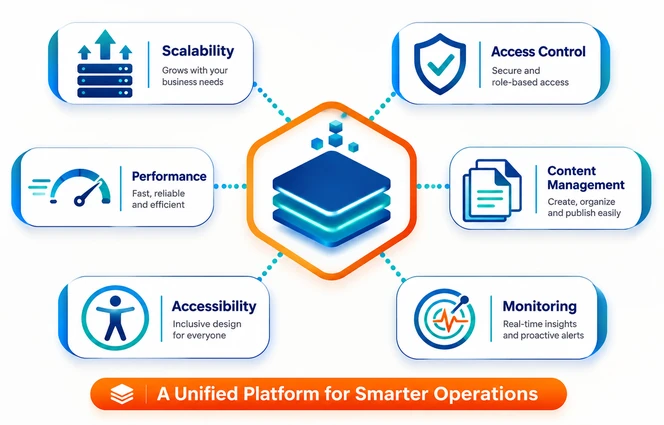
Enterprise platforms need capabilities that keep critical digital services reliable as users, data, and business requirements grow. These core features support scalability, access control, performance, content governance, accessibility, and monitoring.
- SCALE
Scalability & availability
Caching, load balancing, CDNs, database optimization, cloud scaling, and redundant services provide enough capacity and resilience for realistic demand without overbuilding infrastructure.
- ACCESS
Access control
Permissions can be assigned by role, department, region, customer account, or partner organization. Users should only reach what their responsibilities require.
- PERF
Performance
Performance should be evaluated across real user journeys. Checkout, search, account, and ERP-connected workflows all need testing under realistic conditions.
- CMS
Enterprise content management
Approval workflows, version history, localization, scheduled publishing, and multi-site management should match how teams actually publish instead of forcing workarounds.
- A11Y
Accessibility
Keyboard navigation, semantic structure, labels, focus states, contrast, error feedback, and screen-reader support should be addressed during design. Review the W3C's Introduction to Web Accessibility and the Web Content Accessibility Guidelines (WCAG) for recognized implementation guidance.
- MON
Monitoring
Teams need visibility into application errors, outages, slow responses, authentication failures, and integration failures before users find them first.
How It Connects With Business Systems
Enterprise websites rarely operate as isolated systems and often exchange information with several business applications. This section explains how CRM, ERP, CMS, product, payment, and ecommerce systems can work together reliably.
Enterprise websites often act as the user-facing layer for several internal systems. The question that matters most is: which system owns each type of data, and how should that data move between systems? For event-driven integrations, streaming pipelines, and low-latency synchronization, review this guide to real-time data architecture.
CRM integration
Connects web activity with customer and sales workflows creating leads, updating account information, associating activity with existing customers, and passing context to support teams, while helping prevent duplicate records.
ERP integration
ERP typically holds product information, pricing, inventory, orders, procurement, and financial records. A customer portal can expose selected ERP data without giving external users direct access to the ERP itself often through caching, middleware, or synchronization rather than live backend calls on every page load.
CMS and product systems
Each important type of information should have one clear system of record. If product data belongs to a product management system, it shouldn't also be manually maintained in three other places.
Payments and ecommerce
Enterprise ecommerce may need contract pricing, purchase orders, credit accounts, subscriptions, invoices, and refunds architecture should support the business model while limiting unnecessary exposure of sensitive financial data.
Build, Modernize, Or Replatform?
A complete rebuild is not always the smartest or most cost-effective option for an existing platform. Compare when businesses should build something new, modernize selected areas, or move to a different platform.
Not every outdated platform needs a full rebuild. The right call depends on where the real limitation actually lives.
| Situation | Likely direction |
|---|---|
| Core system can't meet essential requirements | Build |
| Existing system has isolated weaknesses | Modernize |
| CMS or commerce platform is the main constraint | Replatform |
| Technical debt affects selected areas | Modernize |
| New business model needs new workflows | Build |
Not sure which path fits your platform?
A short technical audit tells you whether you need a rebuild, a modernization pass, or a replatform before you commit budget to any of them.
Choosing An Enterprise Web Architecture
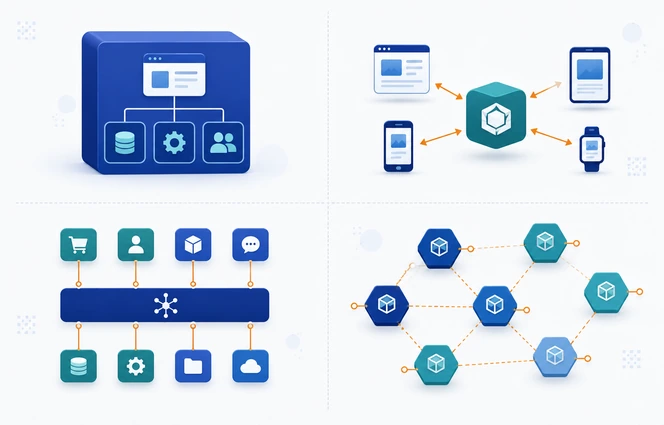
Architecture decisions influence scalability, maintainability, integration complexity, and long-term operating cost. Review the strengths and trade-offs of monolithic, headless, composable, and microservices approaches before choosing.
There's no single architecture that fits every enterprise. The right choice depends on requirements, technical capability, integrations, expected growth, and operational maturity.
Monolithic
Most functionality in one main system. Works well with stable workflows, single-team ownership, and a premium on operational simplicity.
Headless
Separates content management from the frontend. Useful when content needs to reach several sites, apps, or channels at the cost of more frontend and integration work.
Composable
Specialized services for content, search, ecommerce, payments, and identity, combined through APIs. Flexible, but adds integration and vendor-management overhead.
Microservices
Independent services per business function. Useful when separate teams own separate capabilities but demands real DevOps, monitoring, and API governance. Microsoft's microservices architecture guidance provides a useful technical reference for the model and its trade-offs.
Which business functions change frequently?
Which systems must connect to this platform?
What needs to scale independently from everything else?
How many teams will actually maintain it?
What is the expected total cost of ownership?
Technology Stack
Technology choices should follow business requirements and the operating model rather than short-term trends. The right stack should fit the workload, team skills, integration needs, and expected lifetime of the platform.
The stack should support the chosen architecture and long-term operating model. Typical enterprise options include the following technologies:
- FRONTEND
Web interfaces
React, Angular, Vue.js, Next.js, TypeScript, HTML5, and CSS for responsive websites, portals, dashboards, and transactional applications.
- BACKEND
Application services
Java with Spring Boot, C# with ASP.NET Core, Node.js with NestJS or Express, Python with Django or FastAPI, and PHP with Laravel.
- DATA
Databases
PostgreSQL, Microsoft SQL Server, MySQL, Oracle Database, MongoDB, Redis, and Amazon DynamoDB, selected around transaction, consistency, and scale requirements.
- CONTENT
CMS & commerce
WordPress, Drupal, Contentful, Adobe Experience Manager, Sitecore, Shopify Plus, and Adobe Commerce for governed content and commerce operations.
- SEARCH
Search & messaging
Elasticsearch, OpenSearch, Apache Kafka, RabbitMQ, and cloud queues support search, asynchronous processing, and event-driven integration.
- INTEGRATION
APIs & integration
REST, GraphQL, gRPC, webhooks, MuleSoft, Boomi, and Azure Logic Apps can connect CRM, ERP, payment, content, and partner systems.
- CLOUD
Cloud & delivery
AWS, Microsoft Azure, Google Cloud, Docker, Kubernetes, Terraform, GitHub Actions, GitLab CI/CD, and Azure DevOps support repeatable delivery and scaling.
- OBSERVE
Monitoring & performance
Datadog, New Relic, Grafana, Prometheus, OpenTelemetry, and Sentry provide operational visibility, while CDNs and HTTP caching strategies improve response times.
The named products are examples, not a default shopping list. Evaluate each option with four practical questions:
- Does the technology fit the workload?
- Does the team have the skills to maintain it?
- Is it supported for the platform's expected lifetime?
- Can it integrate reliably with what already exists?
The Development Process
A structured delivery process reduces expensive surprises and gives technical and business teams clear decision points. Follow the enterprise development journey from discovery and architecture through testing, migration, deployment, and handover.
- 01
Business discovery
Define objectives, users, workflows, stakeholders, constraints, and success measures tied to a business outcome, not just a feature list.
- 02
Technical audit
Review existing code, infrastructure, databases, integrations, technical debt, and content systems to see what to keep, improve, or replace.
- 03
Solution architecture
Define system responsibilities, data ownership, communication patterns, authentication, infrastructure, and failure handling.
- 04
UX/UI design
Design the important user journeys, forms, navigation, responsive behavior, accessibility, and reusable components.
- 05
Development
Build with clear engineering standards, source control, code review, and documentation throughout.
- 06
Integration testing
Test external systems under realistic conditions, including timeouts, invalid data, API limits, and third-party outages instead of testing only the happy path.
- 07
Quality assurance
Run functional, regression, performance, accessibility, security, and user acceptance testing based on the platform's actual risk.
- 08
Migration
Plan data and content migration before launch. For large sites, URL changes, redirects, metadata, and search visibility need attention too.
- 09
Deployment & handover
Define launch validation, rollback, and ownership. After launch, responsibility for incidents, updates, and improvements should be clear from day one.
Cost & Timeline
Enterprise web development cost and delivery time depend on much more than the visible interface. Scope, integrations, security, migration, approvals, infrastructure, and long-term ownership all influence the real investment.
There's no fixed price. Budget depends on the complexity behind the platform rather than how similar it looks to another website. Two sites with nearly identical interfaces can require very different levels of engineering.
| Planning band | Typical scope | Indicative build cost | Typical timeline |
|---|---|---|---|
| Focused enterprise build | One portal or application, limited roles, one to three integrations, modest migration | $50,000–$150,000 | 3–5 months |
| Integrated enterprise platform | Several workflows, role-based access, CRM/ERP integration, governed content, reporting | $150,000–$500,000 | 5–9 months |
| Complex transformation | Multiple products or regions, legacy modernization, complex migration, high availability, advanced compliance | $500,000–$1.5M+ | 9–18+ months |
The better cost question is not only “what does the build cost?” It is also what the platform will cost to operate, secure, support, and change over time. Plan annual run costs for cloud services, software licenses, monitoring, maintenance, support, accessibility reviews, security testing, and ongoing improvements.
On timeline: a common planning mistake is estimating only development time. Stakeholder approvals, data preparation, content readiness, and third-party access can all affect delivery just as much as engineering. For large projects, phased releases are usually safer than one launch carrying every requested feature at once.
Security & Compliance
Security should be designed around the users, data, integrations, and business risks of the platform. Strong enterprise security combines identity controls, API protection, secure engineering practices, and responsible data management. The same control-by-design principle is explained in SDLC Corp's guide to data security and privacy in enterprise AI.
Identity and access management
Multi-factor authentication, single sign-on, role-based access, session management, account recovery, and privileged access controls with access removed promptly when someone no longer needs it.
API security
Authentication, authorization, input validation, rate limiting, encryption, and secure secrets management all matter. The OWASP API Security Top 10 is a strong reference for common API risks. Restricted functions must be protected on the server because hiding them in the interface is not sufficient.
Secure development
Code review, dependency management, vulnerability scanning, penetration testing, and patch management. No single automated scan proves an application is secure; testing should reflect the platform's actual risks.
Data protection
Know what sensitive information you collect, why, where it's stored, who can access it, and how long it's retained. Specific requirements depend on industry, data type, and jurisdiction.
Why These Projects Fail
Large digital projects usually fail through several early decisions rather than one isolated technical mistake. Understanding the most common causes helps teams identify risks sooner and build stronger delivery plans.
Large projects rarely fail from one isolated technical choice problems build through poor decisions made early.
Measuring ROI
Enterprise web development should create measurable business and operational improvement. Use clear baselines and relevant KPIs across revenue, operations, customer experience, and technology to evaluate long-term ROI.
Success should be measured against the platform's actual purpose. Record a reliable baseline before development begins, choose one primary outcome for each KPI category, and compare equivalent periods after adoption stabilizes.
| KPI category | Measures to track | Practical first-year target range |
|---|---|---|
| Revenue | Conversion rate, qualified opportunities, digital revenue, subscription growth | 5–15% conversion improvement; 10–25% more qualified opportunities; 5–20% digital revenue growth |
| Operations | Processing time, manual effort, error rate, workflow automation | 20–40% shorter cycle time; 25–50% less manual effort; 20–60% fewer processing errors |
| Customer experience | Task completion, self-service adoption, abandonment, repeat usage | 10–25% higher task completion; 15–35% greater self-service adoption; 10–25% lower abandonment |
| Technology | Availability, response time, incident frequency, mean time to recovery | 99.9–99.99% availability; 20–50% faster key journeys; 20–40% fewer incidents; 25–50% faster recovery |
Choosing A Development Partner
The right development partner should understand business workflows as clearly as the technology used to support them. Evaluate experience, architecture thinking, integration expertise, quality engineering, ownership, documentation, and post-launch support.
A good partner understands the business problem as well as the technology. Look for:
- Relevant experience comparable complexity in workflows, integrations, content, migration, or multi-region platforms, not necessarily the same industry.
- Architecture capability they can explain why an architecture fits your requirements and what trade-offs it carries. Be cautious if every client gets the same recommendation.
- Integration expertise how they handle failed APIs, synchronization, retries, data conflicts, and data ownership. Reliable integration is mostly about controlling failure conditions.
- Quality engineering their approach to testing, acceptance criteria, automation, and defect management.
- Documentation & ownership source code, repository access, infrastructure ownership, and documentation should all end up in your hands.
- Post-launch support who manages incidents, maintenance, updates, and future improvements once the platform is live.
How will you understand our business workflows?
Which technical risks will you validate first?
How will integrations be tested including failure cases?
Who owns the source code and infrastructure?
What happens after launch?
FAQ
These frequently asked questions cover the key decisions business leaders usually face when planning an enterprise web platform. Use them as a quick reference for architecture, cost, integrations, and development strategy.
Building web platforms that support complex business workflows, system integrations, security requirements, and large or varied user groups.
A website mainly supports content, marketing, and discovery. An application supports transactions and workflows accounts, orders, procurement, reporting.
It depends on scope, architecture, integrations, security, migration, infrastructure, testing, and ongoing support not on how the interface compares to another site.
It helps when content needs to reach several digital channels. The added complexity isn't necessary for every enterprise website.
Through APIs, middleware, caching, or synchronization with the architecture clearly defining which system owns each type of data.