A cutover is the only part of an ERP programme where months of work collapse into a few dozen hours.
Everything before it can be rescheduled, but the cutover cannot. Once the legacy system freezes and the final extract runs, the project stops being a plan and starts being a live business.
Most late-stage ERP failures are not software failures. Instead, they are coordination failures: an unowned reconciliation step, a rollback nobody rehearsed, a go/no-go call settled by the loudest voice at 2 a.m.
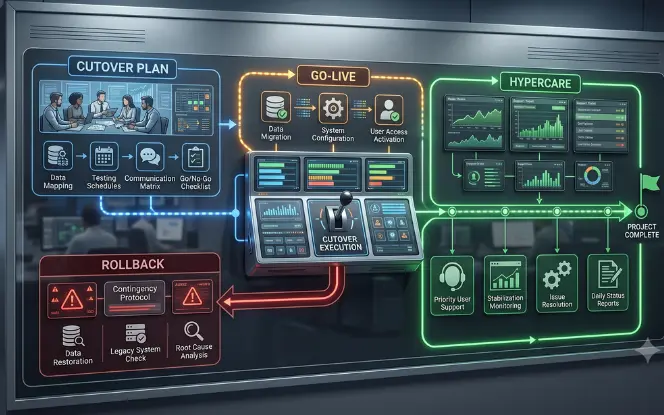
So this guide sets out the full ERP cutover plan end to end: the pre-cutover checklist from T-30 to T-1, the hour-by-hour go-live runbook, the go/no-go gates, a rollback plan that can actually be executed, and a hypercare model that carries the business to its first month-end close.
- A checklist and a cutover plan are different documents
- The checklist answers are we ready, whereas the runbook answers who does what, in what order, by when.
- Gate decisions on evidence, not consensus
- Because evidence outranks opinion, a reconciliation report, a closed Sev-1 log and a verified restore beat any status call.
- Write the rollback before you need it
- So define the triggers, the decision-maker, the time box and the point of no return well in advance.
- Hypercare runs 30 to 90 days
- Still, stabilisation is proven by a clean month-end close rather than by a successful login.
What an ERP Cutover Plan Actually Covers
Teams use "cutover plan", "go-live checklist" and "hypercare plan" interchangeably, and the confusion creates real gaps. In fact, three separate documents do three separate jobs.
Ideally all three belong in one place. So our SAP implementation and support engagements keep them under version control from T-60 onwards.
Three Documents, Three Jobs
Go-live checklist
A yes/no readiness pack across data, integrations, security, testing, training and infrastructure. Moreover, each line carries an owner and a piece of evidence.
Cutover runbook
A time-based execution script for the window itself, scheduled to the hour. Specifically: tasks, sequence, dependencies, validation steps, gates and rollback triggers.
Hypercare plan
The support model for stabilisation. In particular, severity definitions, response targets, staffing waves, escalation paths and the exit criteria that end hypercare.
How to Structure the Runbook Board
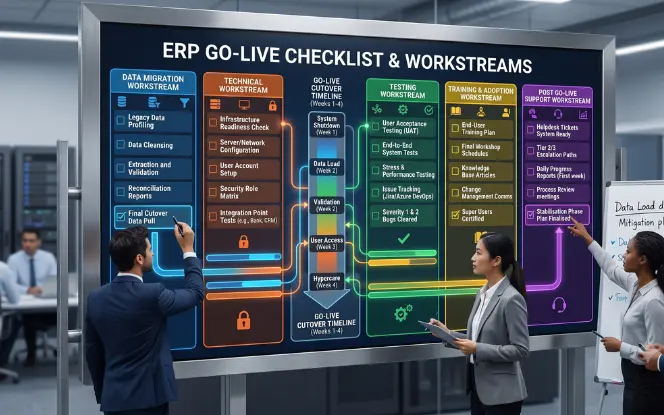
The runbook is what gets you through the weekend. So build it as a board where every row carries five fields.
- A start time and an expected duration, both taken from a timed rehearsal.
- One named owner, because a person can be phoned at 03:00 and a department cannot.
- The predecessor task, so that the critical path stays visible all weekend.
- Some "done" test that a second person can verify independently.
- Finally, a status field that only the cutover manager is allowed to update.
Usually, vendor methodologies converge on the same shape. Microsoft's Success by Design guidance and SAP's cutover guidance both treat a signed-off, rehearsed runbook as a precondition for go-live rather than a nice-to-have.
ERP Go-Live Checklist: The Pre-Cutover Evidence Pack
Thirty days out, the useful question stops being "how is the project going" and instead becomes "what proof do we have".
Below, the checklist is structured the way it gets used on the day: grouped by workstream, with the artefact that closes each row. Therefore attach a name to every line before T-30 begins.
T-30: The Readiness Baseline
External partners often sit inside several rows without owning any of them, and that is exactly where handoffs get lost. So give every row one accountable name.
| Stream | What must be true | Closing evidence |
|---|---|---|
| DATA | Final mock load completed. Master data loaded into a production-like environment at full volume, with variance inside agreed tolerance on GL, AR, AP and inventory. | Reconciliation report signed by Finance |
| DATA | Open transaction rules approved. Conversion logic for open POs, sales orders, WIP, part-shipped lines and unapplied cash agreed with process owners. | Approved mapping document |
| INTEGRATION | Every interface tested end to end. Bank files, EDI, tax, payroll, warehouse and eCommerce feeds run in both directions with real payloads, including error and retry paths. | Interface log, two clean cycles each |
| TESTING | UAT signed by named business owners. Zero open Severity-1 defects. Severity-2 items either closed or carrying a documented, trained workaround. | Defect log plus UAT sign-off sheet |
| TESTING | Performance tested at peak volume. Month-end batch, reporting and concurrent-user load simulated at the busiest realistic profile, not an average day. | Load test results measured against SLA |
| ACCESS | Roles mapped to real jobs. Segregation-of-duties conflicts resolved, licences provisioned, SSO and MFA verified for every day-one role. | Role matrix plus SoD exception log |
| INFRA | Backups verified by restore. A restore has actually been performed and timed, not merely scheduled. Furthermore, monitoring and alerting are live in production. | Restore test record with elapsed time |
| PEOPLE | Role-based training completed. Above 95% completion for day-one roles, super-user network named per site, quick-reference guides published. | LMS completion report by role |
T-14: The Mock Cutover
First, run the entire runbook as a rehearsal, timed, with the people who will do it for real. A mock cutover is certainly not a data load.
Rather, it is a dress rehearsal of the sequence, the handoffs, the validation queries and the communication cadence. One rehearsal is therefore not enough.
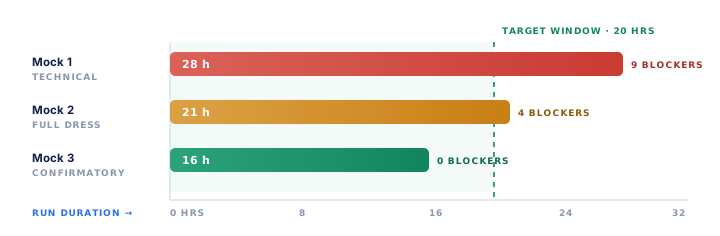
So plan three, each with a different job. Overall, the shrinking gap between rehearsal duration and available window is your single best readiness signal.
| Rehearsal | Purpose | Scope | Exit test |
|---|---|---|---|
| First rehearsal | Prove the technical path works at all | Extract, transform and load only. IT team alone. | Data lands with row counts matching the extract |
| Second rehearsal | Prove the sequence and the handoffs | Full runbook, business validators, comms cadence, war room | Every task has a measured duration and a named owner |
| Third rehearsal | Confirm the window holds | Full runbook at production volume, plus a rollback drill | Total run fits the window with 25% headroom, zero blockers |
What Each Rehearsal Must Produce
A timing baseline
Actual start and finish stamps for every task, rather than estimates. Consequently, this is what turns the runbook from a wish list into a schedule, and the only honest input to your contingency buffer.
A single-point-of-failure list
Every step only one person knows how to run. So pair each with a second trained operator, because that person will be asleep, ill or unreachable at exactly the wrong hour.
A reusable validation pack
The reconciliation queries, control totals and comparison reports, saved and version-controlled. Then, on the night, you run them instead of writing them.
A rehearsed comms rhythm
Who posts a status update, where, and how often. Otherwise, teams that improvise spend the window answering "any news?" instead of doing the work.
The restore is the step nobody tests, because a successful mock cutover feels like proof that you will not need it. Run it once at the end of Mock 3: bring legacy back from the verified backup, time it, then confirm the business can transact.
That number becomes your recovery time objective. Without it, "we can roll back" is an assumption rather than a capability. If environments and backups sit with a separate team, book their time for the rehearsal at T-21, not T-8. Our cloud transformation services cover that environment and restore work.
T-7: Freeze and Final Sign-Offs
The freeze is where scope stops moving so that the plan can stop changing. Therefore draw the line explicitly and publish it.
An undeclared freeze is just a preference that the first urgent request will override. The distinction that matters is not "no changes", but which changes still get through and who approves them.
- Configuration changes and new custom development
- Scope additions, however small they look
- Data model or field mapping changes
- Integration endpoint or payload changes
- Role and permission redesign
- Infrastructure patching outside the change window
- Severity-1 defect fixes, with sponsor sign-off
- Master data cleansing in the legacy source
- Training completion and refresher sessions
- Runbook refinements from Mock 3 findings
- Communications and workaround documentation
- User provisioning and licence assignment
A freeze with no exception process gets bypassed quietly. Publish one instead: a written request, an impact assessment from the technical lead, a regression test, and the sponsor's approval in writing.
This is ordinary change control, and the ITIL change enablement practice describes the same authority model. Two exception forms a week is healthy friction. Ten means the programme was not ready to freeze.
T-7: The Communications Matrix
Meanwhile, the governance scaffolding goes up. The go/no-go meeting is scheduled with its criteria circulated in advance, the war room is stood up, and on-call rosters are confirmed with named substitutes.
Downtime notices go out on a matrix rather than a single all-staff email, because different audiences need different messages at different times.
| Audience | Message | Channel | Sent |
|---|---|---|---|
| All staff | Freeze time, downtime window, where to get help on Monday | Email and intranet | T-7 and T-1 |
| Customers | Order and portal availability, expected response delays | Account managers | T-7 |
| Suppliers | PO and invoice submission pause, catch-up plan | Procurement | T-7 |
| Banks and EDI partners | File formats, test transmissions, first live cycle date | Named contacts | T-14 and T-1 |
| Executives | Gate schedule, decision points, escalation numbers | Direct brief | T-3 |
| Cutover team | Shift roster, contact tree, war room location and links | Dedicated channel | T-3 |
T-1: The Legacy Freeze Sequence
The final day is a sequence rather than a moment. Above all, everything on it exists to make sure that when the legacy system goes read-only, nothing you still need has been left behind.
Three Things Teams Discover Too Late
A report that nobody realised only exists in legacy. A spreadsheet feed pulling from a legacy table that was never in scope. And a user group, usually field staff or a small subsidiary, that was never on the training list.
Ask those three questions explicitly at 15:00, while you can still do something about the answers.
The Cutover Runbook, Hour by Hour
Typically, mid-market cutovers run across a 48 to 72-hour weekend timed to a period boundary.
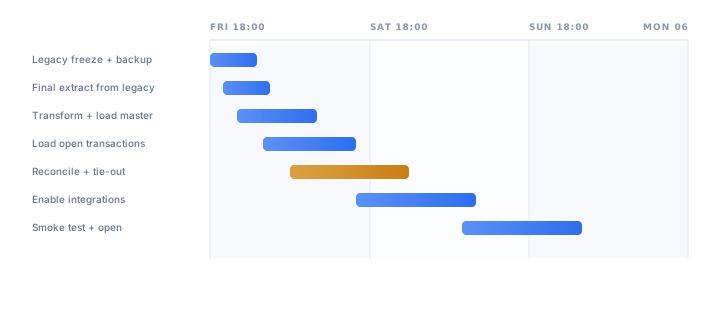
The sequence below is a working template for a Friday-evening freeze and a Monday-morning open. So take your durations from the mock cutover results, never from optimism.
Friday to Saturday: Freeze, Load and Reconcile
- FRI 18:00Legacy freezeFinal transaction posted, users logged out, environment set to read-only.OwnerCutover manager
- FRI 19:00Final backup and restore checkFull backup taken and verified. This is the rollback restore point.OwnerInfrastructure lead
- FRI 20:00Final data extractMaster data and open transactions pulled from legacy, row counts logged.OwnerData lead
- FRI 22:00Transform and load master dataCustomers, suppliers, items, BOMs, chart of accounts, price lists.OwnerData lead
- SAT 02:00Load open transactionsOpen POs and SOs, AR and AP ageing, inventory balances, WIP, fixed assets.OwnerData lead
- SAT 06:00ReconciliationTrial balance tie-out, subledger-to-GL agreement, inventory quantity and value, control totals.OwnerFinance and Supply Chain
- SAT 10:00Gate 1: data validationFinance and Supply Chain sign the reconciliation. Variances outside tolerance escalate now, not later.OwnerProcess owners
- SAT 12:00Enable integrationsInterfaces switched on in sequence, first cycles monitored, outbound files held for manual release.OwnerIntegration lead
- SAT 16:00Gate 2: integration validationTwo clean cycles per critical interface. Errors triaged and closed before proceeding.OwnerIntegration lead
Sunday to Monday: Security, Smoke Test and Open
- SAT 18:00Activate security and rolesUsers provisioned, permissions spot-checked against the role matrix, admin access restricted.OwnerSecurity lead
- SUN 08:00Business smoke testSuper-users run 15 to 25 end-to-end scenarios: quote to cash, purchase to pay, receive and ship, close a period, print a document.OwnerSuper-user network
- SUN 14:00Gate 3: go / no-goSponsor decides against published criteria. Rollback is still available at this point.OwnerBusiness sponsor
- SUN 16:00Open to wave 1Finance and one operational team begin live processing. Legacy stays read-only, not deleted.OwnerCutover manager
- SUN 20:00Go-live communicationAll-staff notice sent, support desk opens, floor-walkers confirmed for Monday.OwnerChange lead
- MON 06:00Full open: hypercare day 1All users on the new ERP. War room active, first stand-up at 08:00.OwnerHypercare lead
What This Looks Like on a Real Cutover
Naturally, the template above is easier to trust with a worked example attached. The cutover below comes from our manufacturing software development practice, anonymised at the client's request, with figures rounded.
Window and buffer. Freeze at 18:00 Friday, full open at 06:00 Monday: 60 hours available, 43 consumed. Because Mock 3 had measured 41 hours, the buffer held.
Gate decisions. Gate 1 passed with a GL variance of zero and an inventory value variance of 0.4%, inside the published 1% tolerance. However, Gate 2 failed on the first pass, since the EDI despatch advice feed produced malformed lines for one customer.
Recovery inside the window. So the team held outbound files, fixed the mapping, then re-ran two clean cycles by 21:00 Saturday, four hours behind plan.
Why no rollback. At Gate 3 the sponsor had one open Severity-2 defect, a warehouse label format. Because a trained workaround existed and the triggers named no matching condition, the call was a documented go with a deferred fix rather than a debate.
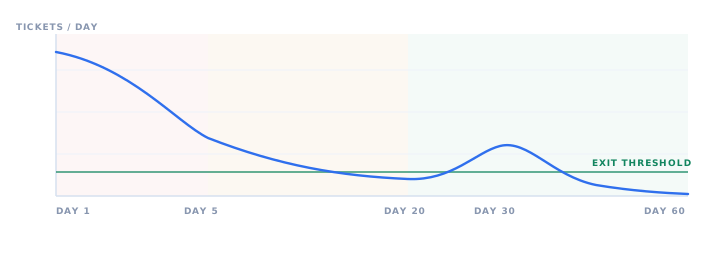
Hypercare exit. Ticket inflow fell 74% from the day-1 peak by day 21, spiked at the first close, then cleared. Overall, hypercare ran 38 days and the close finished one day outside the normal window.
Go/No-Go Criteria That Hold Up Under Pressure
Generally, the go/no-go call fails when it is a conversation instead of a measurement.
Therefore publish the criteria before the window opens, define each tolerance numerically, and give one named executive the authority to decide. Anything softer turns into a vote, and votes at 2 a.m. favour whoever is least tired.

The Tolerance Table
| Criterion | Objective threshold | Verdict if missed |
|---|---|---|
| GL reconciliation | Trial balance variance = 0.00 | No-go |
| Subledger tie-out | AR and AP variance under 0.5% and fully explained | No-go |
| Inventory valuation | Quantity variance = 0, value variance under 1% | Conditional |
| Severity-1 defects | Zero open | No-go |
| Severity-2 defects | Three or fewer open, each with a trained workaround | Conditional |
| Critical integrations | Two consecutive clean cycles each | No-go |
| User access | All day-one roles can log in and transact | No-go |
| Rollback readiness | Restore rehearsed and timed inside the RTO | No-go |
| Training coverage | 95% or higher completion for day-one roles | Conditional |
| Support model | War room staffed, on-call named, channels live | Conditional |
Why the Conditional Rows Matter
A mature gate distinguishes between defects that stop the business and defects that merely irritate it.
Refuse to launch over every imperfection and you will never go live. Conversely, waving everything through means you go live badly. So the tolerance table is where that judgement gets made in daylight, weeks before anyone is under pressure.
Platform vendors run the same pattern. For Dynamics 365 finance and operations apps, a formal go-live readiness review sits between the project and production provisioning, and the review is scheduled weeks ahead rather than called on the night.
The ERP Rollback Plan: Triggers, Authority and the Point of No Return
A rollback plan exists so that a bad cutover costs a weekend instead of a quarter.
Well-rehearsed launches rarely invoke it, and that is precisely the point, since the plan buys the confidence to proceed. Above all, three things make it real: written triggers, a single decision-maker, and a rehearsed restore.

Rollback Triggers, Written in Advance
| Trigger | Test | Response |
|---|---|---|
| Unexplained variance | Reconciliation gap outside tolerance, unresolved after the agreed time box | Full rollback |
| Blocking Severity-1 | Order-to-cash or procure-to-pay cannot run and no workaround exists | Full rollback |
| External corruption | Bad payloads sent to banks, customers or tax authorities | Contain, notify, then decide |
| Schedule breach | Runbook far enough behind that the window will not close before business opens | Full rollback |
| Isolated module defect | One module or site is broken, everything else reconciles cleanly | Partial deferral |
| Reporting defect | Business can transact, the issue affects presentation or a non-critical report | Fix forward |
The Mechanics Nobody Documents Until It Is Too Late
- Restore point. The verified backup taken immediately before the legacy freeze. If legacy was genuinely frozen and untouched, your recovery point objective is effectively zero.
- Recovery time objective. Measure it during the mock cutover. "A few hours" is not an RTO. "Three hours forty minutes, tested twice" is.
- Re-keying exposure. Anything already transacted in the new ERP has to be reversed or re-entered in legacy. So cap that exposure by opening the new system to a small wave first.
- External comms. Outbound files, EDI messages and portal updates already sent cannot be recalled. Therefore hold them for manual release until Gate 2 clears.
Authority, Time Box and the Replan Cost
One named executive decides, advised by the cutover manager, inside a fixed window of roughly 60 to 90 minutes. Otherwise, escalation without a deadline becomes paralysis.
The point of no return is not a clock time. Instead, it is the first irreversible external event: a bank file transmitted, an EDI message accepted, a tax submission filed.
The next viable window is usually the following period boundary. So budget for it before you need it, and be honest about team fatigue when you set the new date.
Not sure your date holds?
First we walk your programme against the same gate criteria used on this page, covering data, integrations, access, rollback and hypercare. Then we tell you plainly what needs fixing before the window opens.
Book a readiness review- Data & reconciliationPassed
- Rollback rehearsalAt risk
- Hypercare staffingNot ready
Hypercare: From Go-Live to a Clean Month-End Close
Go-live is when the system starts running the business, whereas hypercare is when the business learns to run on it.
Therefore plan 30 to 90 days with the project team still engaged, and treat the first month-end close as a scripted event with its own checklist and owners. Indeed, that first close surfaces more real issues than any test cycle.
The Three Hypercare Waves
Wave 1: war room
Two stand-ups a day, floor-walkers on site, Severity-1 response inside 30 minutes. Importantly, business process experts sit alongside IT, because an IT-only desk cannot tell a system defect from a process misunderstanding.
Still, log every issue, including the ones resolved in five minutes, because the pattern itself is the finding.
Wave 2: triage and tune
One daily stand-up, formal severity triage, configuration tuning under change control. Subsequently, recurring tickets get routed to targeted retraining rather than another patch.
Meanwhile, reporting and dashboards get reconciled against the numbers the business already trusts.
Wave 3: first close and handover
Now run the month-end close as a scripted event, with a checklist, named owners and the implementation partner on call.
Finally, transfer knowledge to internal support, groom the leftover backlog into a phase-2 roadmap, and hold the exit review.
Severity Model and Response Targets
| Severity | Definition | Response | Resolution |
|---|---|---|---|
| Sev-1 | Business stopped: cannot ship, invoice, pay or close | 30 minutes | Same day |
| Sev-2 | Major function impaired, workaround exists | 2 hours | 2 business days |
| Sev-3 | Minor defect or usability issue | 1 business day | Next release |
| Sev-4 | Enhancement or nice-to-have request | 3 business days | Phase-2 backlog |
Hypercare Exit Criteria
Hypercare ends on evidence rather than on a calendar date. So define the exit before it starts, so the decision becomes a measurement rather than a negotiation.
- Zero Severity-1 tickets for ten consecutive business days
- Ticket inflow down roughly 70% from the day-1 peak and still falling
- One month-end close completed in the new ERP inside the normal close window
- Transaction volumes in the ERP matching expected business volumes, not routed around it in spreadsheets
- Knowledge transfer to internal support signed off, with runbooks and known-issue notes handed over
- Remaining backlog triaged into a funded phase-2 roadmap with named owners
When to Decommission Legacy
Meanwhile, keep legacy in read-only until after the first clean close, and retain audit access for as long as your retention policy requires.
Decommissioning early to save licence cost is a false economy, because it removes your ability to answer questions about historical transactions.
Big Bang, Phased or Parallel Run
Notably, the cutover strategy is chosen long before the runbook is written, since it sets the risk profile for everything that follows.
There is no universally correct answer. Rather, the right one depends on organisational complexity, tolerance for disruption, and how much duplicate effort the team can absorb.
Comparing the Four Approaches
| Approach | How it works | Main risk | Best fit |
|---|---|---|---|
| Big bang | All modules and sites switch in one window | Concentrated exposure: one bad gate affects everything | Single-entity, moderate complexity, disciplined governance |
| Phased by module | Finance first, then supply chain, then manufacturing | Temporary interfaces between old and new must be built and maintained | Complex process landscapes with low disruption tolerance |
| Phased by site | One pilot location, then a rollout wave plan | Longer timeline, two operating models coexist | Multi-site groups where a pilot de-risks the pattern |
| Parallel run | Both systems process the same transactions for two to four weeks | Double data entry and real team fatigue | Regulated environments needing proof of equivalence |
Why Data Migration Sets the Calendar
Whichever route you take, data migration sequencing remains the constraint that shapes the calendar. Legacy extraction and modernisation sit inside our enterprise software development practice.
Master data can be loaded and validated days ahead. However, open transactions and balances can only be taken after the legacy freeze, which is why the reconciliation window is always the tightest part of the runbook.
Platform Guidance to Read Before You Lock the Date
Each major ERP vendor publishes its own cutover and go-live model. Consequently, the target platform changes which gates are externally scheduled rather than internal.
- SAP S/4HANA. Cutover is a formal Activate deliverable covering technical, functional, security and data tracks, with cutover simulation ahead of the production run.
- Oracle NetSuite. Deployments usually follow the SuiteSuccess lifecycle methodology, which front-loads industry-standard configuration and shortens the build, not the cutover discipline.
- Microsoft Dynamics 365. Finance and operations projects need a go-live readiness review before the production environment is provisioned, so T-30 is an external deadline, not an internal one.
- Sage Intacct. Typically a shorter finance-first cutover, where the binding constraint is subledger tie-out rather than manufacturing data volume.
- QuickBooks. Usually the source system rather than the target. Expect open AR and AP detail, not summary balances, to be the migration sticking point.
Still deciding between big bang and a phased rollout?
First we map your sites, modules and interface count against window length and team capacity. Then we recommend the sequence that carries the least risk for your calendar.
Talk through your optionsEight Mistakes That Sink Otherwise Healthy Programmes
These recur across industries and platforms. Generally, each one is cheap to avoid at T-30 yet expensive to fix at T-0.
Treating the checklist as the plan
A completed checklist proves readiness. Even so, it does not tell anyone what to do at 03:40 on Saturday when the inventory load fails.
Never rehearsing the rollback
The restore step is the one nobody tests. Rehearse it once and you learn the real RTO, whereas skipping it means learning the number during a crisis.
Deciding the gate on opinion
Without published numeric tolerances, the go/no-go becomes a debate about optimism. So publish the thresholds weeks earlier.
Choosing a date that collides
Peak season, quarter-end, an audit, a plant shutdown, a payroll run. Therefore map the business calendar before the project calendar.
Migrating history nobody needs
Ten years of closed transactions inflate the load window and the reconciliation effort. So migrate open items plus agreed history, then archive the rest.
Staffing hypercare with IT only
Most day-1 tickets are process questions wearing a technical costume. Consequently, business experts resolve them several times faster.
Switching off legacy too soon
Read-only legacy is your safety net and your audit trail. Therefore keep it until well after the first clean close, per your retention policy.
Ending the project at go-live
Declaring victory on launch day leaves the stabilisation work unfunded and unowned, precisely when the business needs it most.
Metrics That Prove the Cutover Actually Worked
Overall, first-month metrics are the strongest available predictor of long-term adoption.
Track them daily during Wave 1 and weekly through Wave 2. Also report them to the steering group in the same format every time, so trends stay visible without interpretation.
How SDLC Corp Runs ERP Cutovers
So far we have delivered more than 150 ERP rollouts across manufacturing, logistics, retail, finance, healthcare and professional services.
Similarly, every engagement runs the discipline described above: a gated runbook, a rehearsed rollback, and a 30-day hypercare period with a four-hour critical response target. The anonymised cutover earlier on this page is one of them.
Need a second pair of hands for the window?
We staff cutover weekends and hypercare with functional and technical consultants who have run the sequence before, so that your team is not learning the runbook on the night.
Request cutover supportFrequently Asked Questions
How long should an ERP cutover window be?
Most mid-market cutovers run 24 to 72 hours, scheduled across a weekend at a period boundary to minimise open transactions. However, large multi-site programmes sometimes extend to five days by using a public holiday. So derive your own number from the mock cutover: add the measured task durations, then add a contingency buffer of at least 25% for reconciliation and validation, which are the steps that consistently overrun.
What is the difference between an ERP cutover plan and a go-live checklist?
The go-live checklist confirms readiness. In short, it answers a yes/no question across data, integrations, security, testing and training, while each line is closed by an artefact. The cutover plan, by contrast, is a time-based execution runbook covering task sequence, named owners, dependencies, validation gates and rollback triggers, usually scheduled to the hour. You need both documents: one feeds the go/no-go decision, the other gets you through the window.
Who makes the ERP go/no-go decision?
One named executive, normally the business sponsor, advised by the cutover manager and the process owners who signed the reconciliation. Moreover, the criteria and their numeric tolerances should be published before the window opens, and the decision should be time-boxed. Otherwise, committees and open-ended escalations are how cutovers lose hours they cannot recover.
How often is an ERP rollback actually used?
Rarely, and that is the intended outcome. Programmes that rehearse the restore and gate on evidence almost never invoke it. Nevertheless, the plan earns its keep, because it defines the point of no return, sets the tolerance for proceeding, and lets the team make a calm decision instead of an improvised one. Teams with a tested rollback also recover substantially faster in the cases where it is needed.
How long should ERP hypercare last?
Plan 30 to 90 days, and keep the project team engaged through at least one full month-end close. Two to four weeks is enough for straightforward single-site deployments, whereas complex or multi-entity rollouts need longer. Finally, exit on criteria rather than a date: no Severity-1 tickets for ten consecutive business days, ticket inflow down around 70% from the day-1 peak, and one close completed inside the normal window.
When can we decommission the legacy ERP system?
Not at go-live. Instead, keep legacy in read-only mode through hypercare and past the first clean close, then retain audit access for as long as your data retention and statutory requirements demand. Read-only legacy costs very little and still answers historical questions the new ERP cannot. Consequently, shutting it down early to save licence fees usually costs more than it saves.
Should we go live on a Monday or over a weekend?
Freeze on a Friday evening and open on a Monday morning. Because the weekend gives you a low-transaction window for the load and reconciliation, you also gain a buffer before business volumes return. Additionally, avoid opening on the last or first working day of a period, avoid peak season, and check the calendar for payroll runs, statutory filings and audit fieldwork before you commit to a date.
What causes most ERP go-live failures?
Coordination rather than code. Specifically, the recurring causes are unclear ownership of individual runbook steps, missing sign-off evidence, decisions delayed past the moment they mattered, data quality problems discovered too late to fix inside the window, and hypercare that was never properly resourced. Almost all of these are nevertheless addressed by a rehearsed runbook with named owners and objective gates.
- SAP Community, SAP project manager's guide to SAP project cutover. community.sap.com
- Microsoft Learn, Prepare your production environment to go live (Dynamics 365 Success by Design). learn.microsoft.com
- Microsoft Learn, Prepare for go-live, finance and operations apps. learn.microsoft.com
- Oracle NetSuite, SuiteSuccess methodology. netsuite.com
- Oracle NetSuite Applications Suite documentation, SuiteSuccess. docs.oracle.com
- Axelos, ITIL 4 change enablement practice. axelos.com