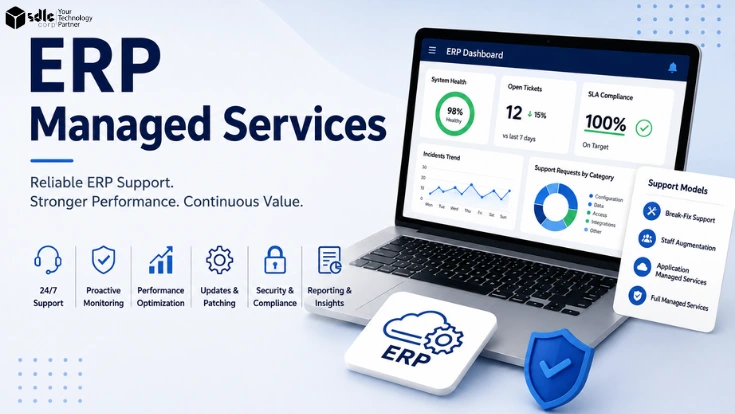
ERP managed services are an ongoing, SLA-governed engagement in which a provider takes continuing responsibility for operating, supporting, and improving an ERP system, instead of being called only when something breaks.
The support model is rarely the hardest part to choose. Problems usually come from vague SLAs, pricing nobody can predict, an enhancement backlog that never gets touched, and a support relationship that never actually improves anything.
This guide covers the full decision: which support model fits your ERP, what belongs in the SLA, what actually drives cost, how transition works, and how to make continuous improvement a contractual line item instead of a slide in the sales deck.
Key Takeaways
Pick the support model that matches your change velocity, not your comfort level.
Response time and resolution time are different commitments. Get both in writing.
Managed services cost depends on workload, coverage, integrations, customization, and delivery model.
Ring-fence a fixed share of monthly capacity for proactive improvement work.
A useful health signal is declining recurring ticket volume while adoption and service quality remain stable.
Get exit and portability terms agreed at signature, not at termination.
DefinitionWhat Are ERP Managed Services?
ERP managed services are an ongoing, SLA-governed engagement where a provider operates, supports, and improves an ERP system on a continuing basis, rather than being engaged only when something breaks.
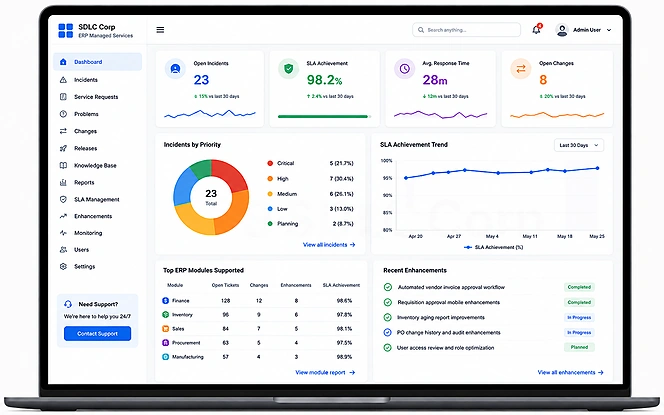
Exact scope varies by contract, but most ERP managed services agreements bundle incident resolution with proactive monitoring, patching, minor enhancements, and reporting. Organizations already running on Odoo often pair this with a dedicated Odoo support services engagement so the same team that built the system also keeps it running.
What Is Typically In Scope
| Area | What it covers |
|---|---|
| Incident resolution | Fixing issues against defined severity levels |
| Proactive monitoring | Watching system health before users report problems |
| Patch and release management | Applying vendor updates and testing against your configuration |
| Minor enhancements | Small configuration and workflow changes within capacity |
| Integration support | Keeping connected systems and APIs functioning correctly |
| Reporting and continuous improvement | Tracking trends and reducing recurring issues over time |
If you are evaluating whether to build this internally or bring in a partner, an Odoo consulting scoping session can map your current ticket volume and support gaps before you commit to a model.
Managed Services vs Traditional Break-Fix Support
Break-fix support is reactive and priced per incident. Managed services is proactive, SLA-governed, and priced for predictability. Neither is universally right. It depends on how much change your ERP environment is absorbing.
| Area | Break-fix | Managed services |
|---|---|---|
| Pricing | Billed per incident, unpredictable | Fixed or tiered, predictable |
| Monitoring | None | Continuous |
| Enhancements | Separately quoted | Often bundled capacity |
| Governance | Ad hoc | Scheduled service reviews |
| Improvement | Rare | Contractual, ring-fenced capacity |
The Four ERP Support Models
Vendors describe dozens of models. In practice there are four, and most contracts are a blend of them. The right choice depends on ERP criticality, integration complexity, and how often the system changes.
| Factor | Break-fix | Staff augmentation | Application managed services | Full managed services |
|---|---|---|---|---|
| Best fit | Stable ERP, low change | Specific skill gap | Most mid-market and enterprise ERP | Lean IT teams, cloud-first |
| Cost predictability | Low | Medium | High | High |
| Management overhead | Low until an incident hits | High, you still manage delivery | Low to medium | Low |
| Proactive work | None | Whatever you direct | Contractual | Contractual, app and infra |
Break-fix
- Best fit
- Stable ERP, low change
- Cost predictability
- Low
- Management overhead
- Low until an incident hits
- Proactive work
- None
Staff augmentation
- Best fit
- Specific skill gap
- Cost predictability
- Medium
- Management overhead
- High, you still manage delivery
- Proactive work
- Whatever you direct
Application managed services
- Best fit
- Most mid-market and enterprise ERP
- Cost predictability
- High
- Management overhead
- Low to medium
- Proactive work
- Contractual
Full managed services
- Best fit
- Lean IT teams, cloud-first
- Cost predictability
- High
- Management overhead
- Low
- Proactive work
- Contractual, app and infrastructure
Teams already running on Odoo often start this evaluation with an Odoo implementation partner who can also carry support once the system goes live, which avoids a second handover.
SLA Design: Severity, Response, and Resolution
Response time is not resolution time. Response measures acknowledgement, often satisfied by an automated email. Resolution measures when the business impact actually ends.
An SLA is the mechanism that converts a promise into something enforceable. Every severity level needs a documented classification, a named escalation path, and a clear rule for what pauses the clock.
For incident handling and service-management governance, use the ITIL 4 Incident Management practice and ISO/IEC 20000-1:2018 as reference points. When defining ERP severity levels, compare your contract language with published vendor guidance from SAP incident priorities, Oracle support severity levels, and Microsoft Unified severity levels. These references help normalize terminology; the contractual severity matrix should still reflect your own business impact and coverage requirements.
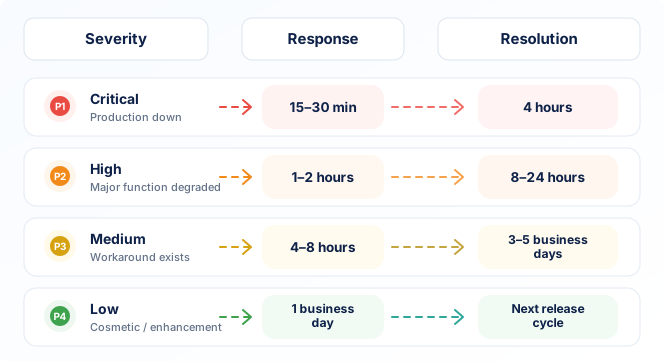
| Priority | Business impact | Response target | Resolution target |
|---|---|---|---|
| P1 Critical | Production down, no workaround | 15 to 30 min | 4 hours |
| P2 High | Major function degraded | 1 to 2 hours | 8 to 24 hours |
| P3 Medium | Isolated, workaround exists | 4 to 8 hours | 3 to 5 business days |
| P4 Low | Cosmetic or enhancement | 1 business day | Next release cycle |
Illustrative example only, not a universal standard. Actual targets should reflect ERP criticality, geography, and module.
What Drives ERP Managed Services Cost
Pricing is one of the least transparent parts of the ERP managed services market because most providers need to scope the environment before quoting. In practice, cost is driven by the factors below, roughly ordered by the weight they typically carry.
Ticket volume and severity mix
ImpactMore tickets, and more high-severity tickets, require more capacity to cover.
Coverage window
ImpactExtended hours and 24/7 follow-the-sun coverage carry a real premium over business-hours only.
Number of integrations
ImpactEach connected system adds a dependency that has to be monitored and supported.
Customization level
ImpactHeavily customized ERP takes longer to diagnose and carries more upgrade risk.
Delivery location mix
ImpactOnshore, blended, and offshore delivery carry meaningfully different hourly rates.
Common Pricing Models
| Model | How it works | Best fit |
|---|---|---|
| Fixed monthly fee | Flat rate for a defined scope and SLA tier | Predictable, stable environments |
| Ticket or consumption | Billed per ticket or hour consumed | Low, irregular support volume |
| Capacity or FTE | Dedicated headcount billed monthly | Large, complex, high-touch estates |
| Tiered packages | Bronze, Silver, Gold hour bundles | Most mid-market engagements |
| Outcome-based | Fees tied to uptime or performance | Mature, metrics-driven relationships |
There is no reliable universal percentage benchmark for ERP managed services. Some organizations use annual ERP licence or subscription spend as a budgeting reference, but actual cost varies significantly with ticket volume, coverage hours, integrations, customization, delivery location, and SLA requirements.
ERP Managed Services Cost Estimator
A directional estimate built from the cost drivers above. Adjust the inputs to see how coverage, users, and ticket volume move the range. This is a planning tool, not a quote.
Estimate your indicative monthly range
Directional planning estimate based on simplified workload, coverage, and delivery assumptions. It is not a market benchmark or a quote; request a scoped assessment for an exact number.
Transition and Onboarding: Step by Step
A realistic transition takes weeks, not days. Rushing it is the most common cause of a rocky first quarter with a new provider.
Discovery and Scope Confirmation
Document the current ERP environment, integrations, ticket history, and the exact scope the new provider will own from day one.
Knowledge Transfer and Documentation
Capture configuration decisions, known issues, and tribal knowledge before the incumbent team steps back. This is the stage most commonly rushed.
Tool Setup and Shadow Support
Provision access and tooling, then have the new team shadow live tickets alongside the outgoing team or internal staff.
Reverse Shadowing
The new team leads on tickets while the previous owner observes and corrects, closing knowledge gaps before go live.
Go Live and Hypercare
The new team takes full ownership under close monitoring for the first weeks, then moves into steady state governance.
Continuous Improvement: The Operating Loop
One useful signal of a healthy engagement is declining recurring ticket volume in mature functional areas, provided user adoption and service satisfaction remain stable. If repeat incidents stay unchanged year after year, root causes are probably not being removed. A closed-loop process makes improvement repeatable instead of accidental.
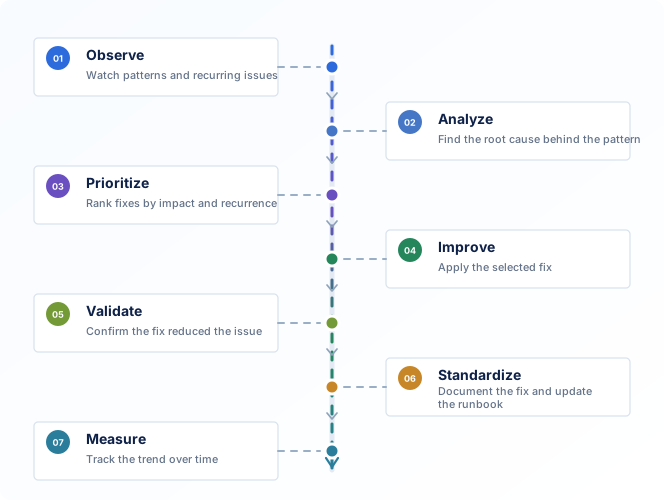
Observe
Monitor ticket patterns, performance, and recurring symptoms across the ERP estate.
Analyze
Group incidents by root cause instead of treating every ticket as an isolated event.
Prioritize
Weigh fixes by recurrence and business impact, not by whichever ticket arrived last.
Improve
Apply the fix using the proactive capacity ring-fenced in the contract, not spare hours.
Validate
Check that the fix actually reduced recurrence before calling it resolved.
Standardize
Document the fix and the runbook so it does not have to be rediscovered later.
Measure
Track ticket volume in that area over the following quarter to confirm the trend actually declined.
Security, Compliance, and Access
A managed services provider does not own every security responsibility. Some controls sit with the ERP vendor, cloud host, or customer. Confirm the responsibility split, evidence requirements, and escalation process before signature.
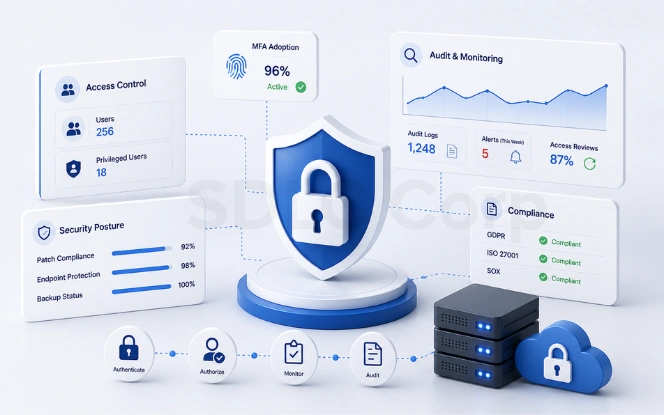
- Least privilege and role-based access
- Multi-factor authentication for privileged and support accounts
- Segregation of duties on finance-critical roles
- Privileged access and audit logging
- Joiner, mover, and leaver access removal
- Secure remote support channels
- Patch and vulnerability management ownership
- Backup, recovery, and restore-testing responsibilities
- Data residency and approved subprocessors
- Documented change approval workflow
- Breach notification and escalation timelines
- Written incident handling process
Common ERP Support Mistakes
Most support relationships fail for a small, repeatable set of reasons. Catching each one at contract stage is far cheaper than fixing it mid-engagement.
Vague Enhancement Definitions
Nobody agrees where incident work ends and enhancement work begins.
No Named Escalation Path
Critical issues stall because nobody knows who to call.
Coverage Gaps at Month End
Support hours end before the close process does.
No Root Cause Obligation
The same incident recurs every quarter with no explanation.
Zero Proactive Capacity
All hours go to incidents, so nothing ever actually improves.
No Exit Plan
Leaving the provider becomes expensive and slow when it eventually happens.
Governance Cadence and KPIs to Track
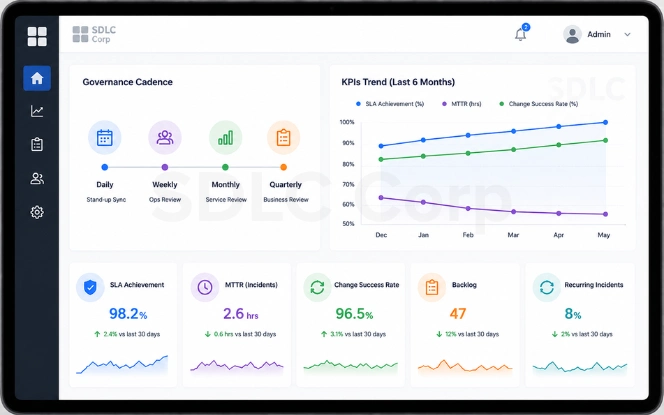
Governance is what keeps a managed services relationship from decaying into ticket processing with no accountability. Response time is the easiest metric to hit and the least useful to trust alone.
| Cadence | Forum | Purpose |
|---|---|---|
| Weekly | Operational review | Open tickets, escalations, blockers |
| Monthly | Service review | SLA performance, trend analysis |
| Quarterly | Business review | Root cause themes, improvement roadmap |
KPIs Worth Tracking
Track each severity separately, not as one blended number.
Measure how often issues are resolved without reassignment.
Watch how long tickets stay open, not only total volume.
Identify tickets that return after an apparent resolution.
Measure whether root-cause work is reducing repeat issues.
Report performance separately from paused-ticket time.
In-House Support vs Managed Services
Managed services are not automatically cheaper. The comparison depends on scale, coverage needs, and how specialized the required ERP skills are.
| Factor | In-house team | Managed services |
|---|---|---|
| Cost structure | Salaries, recruitment, training | Predictable monthly fee |
| Coverage | Limited by headcount, attrition | Contractual coverage window |
| Specialized skills | Hard to source and retain | Provider maintains bench depth |
| Scalability | Slow, hiring cycles | Fast, contractual flex |
Retain enough internal capability to hold the provider accountable, typically a business-facing ERP owner who understands your configuration decisions. Outsourcing execution is sound. Outsourcing understanding is not.
Choosing a Provider: Evaluation Criteria
Score providers on ERP-specific expertise first. General IT managed services experience does not transfer cleanly to ERP. If your stack runs on Odoo, look for a partner that can support the full lifecycle from implementation and configuration through ongoing optimization, so the support team understands why the system was built the way it was.
| Category | What to look for |
|---|---|
| Red flag | Vague enhancement versus incident definitions |
| Red flag | No named escalation contacts |
| Red flag | Pricing that varies without a defined framework |
| Non-negotiable | Data residency confirmed in writing |
| Non-negotiable | Security certifications current and verifiable |
| Non-negotiable | Documented root-cause analysis obligation |
ERP Managed Services Evaluation Checklist
Final Thoughts
ERP managed services is a growing category because the operating complexity of modern ERP has outrun what most internal teams can carry alone. The contract structure matters more than the provider logo.
Pick the model that matches your change velocity, not your comfort level. Write an SLA that measures resolution, not acknowledgement. Make continuous improvement a line item with hours attached. If it is not in the contract, it is not happening.
The objective is not simply to keep the lights on. It is to enter every quarter with fewer recurring incidents than the one before, and a clear record of why.
Frequently Asked Questions
What Are ERP Managed Services?
An ongoing, SLA-governed engagement where a provider operates, supports, and improves an ERP system, rather than being called only when something breaks.
What Is Included in the Scope?
Commonly L1 to L3 support, monitoring, patch and release management, integration support, minor enhancements, security support, and continuous improvement.
How Much Do ERP Managed Services Cost?
There is no universal percentage benchmark. Cost depends on platform, users, ticket volume, coverage hours, integrations, customization, delivery model, and SLA requirements. Use the calculator above only as a directional planning estimate.
Support vs. Managed Services: What Is the Difference?
Support is usually reactive, billed per hour. Managed services is governed, ongoing, and includes proactive maintenance and enhancement capacity.
Can Coverage Run 24/7?
Yes, typically through a follow-the-sun or dedicated after-hours model, usually priced at a premium.
How Is Continuous Improvement Measured?
Track recurring ticket volume, recurrence rate, SLA performance, automation coverage, change success, and user satisfaction. Improvement is stronger when repeat incidents fall without reducing adoption or service quality.