Home / Blogs & Insights / ERP Testing Guide: From Strategy and UAT to Go-Live Readiness

ERP Testing Guide: From Strategy and UAT to Go-Live Readiness

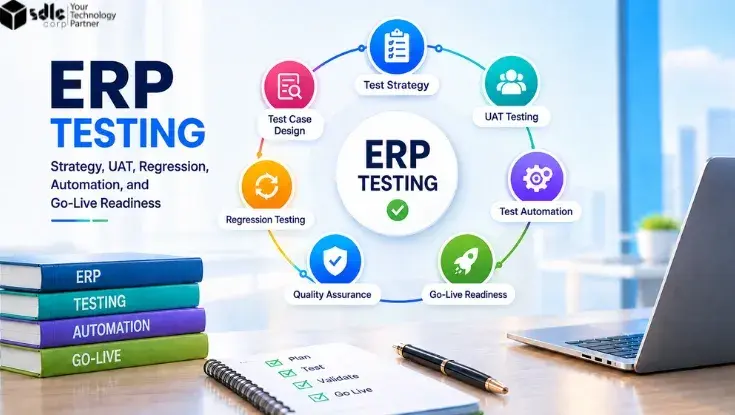
ERP testing lifecycle showing test strategy, UAT, regression testing, automation, quality assurance, and go-live readiness.

Table of Contents

ERP testing checks whether your ERP can support real business operations before go-live. Because ERP connects sales, finance, inventory, procurement, warehouse operations, and other teams, one defect can affect several processes at once.

A complete ERP testing process checks workflows, integrations, migrated data, user roles, performance, UAT, regression, and cutover readiness. The goal is simple: prove that the business can operate safely and reliably on the system.
7 stages Business + technical validation Evidence-based go-live
The ERP testing journeyFull lifecycle
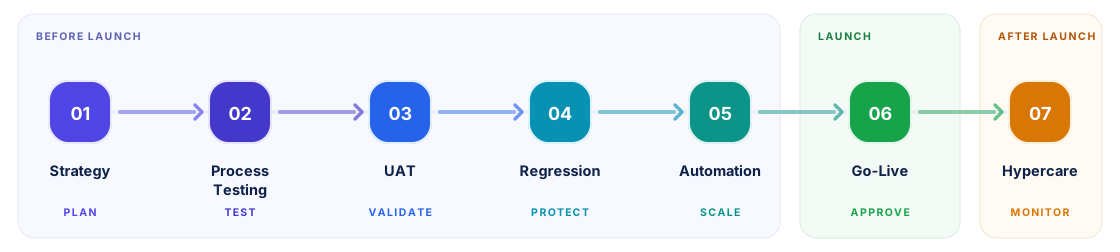
The ERP testing journey in seven stages: 01 Strategy to plan, 02 Process Testing to test, 03 UAT to validate, 04 Regression to protect, 05 Automation to scale, 06 Go-Live to approve, and 07 Hypercare to monitor.
Each stage answers a different question. Skipping a stage usually moves the risk forward instead of removing it.

This guide follows that journey stage by stage. It covers what to test, who validates it, what to automate, and how to decide that the business is ready.

Key Takeaways

The points that decide whether your ERP testing effort actually protects go-live.

  • Test complete business processes, not only individual ERP screens or modules.
  • Build the ERP testing strategy around business risk and critical workflows.
  • Use UAT to confirm that real users can complete real work correctly.
  • Use regression and automation to protect stable processes after changes.
  • Approve go-live only when testing, data, integrations, users, and cutover are ready.

What Is ERP Testing and Why Does It Matter?

ERP testing validates whether an enterprise resource planning system works correctly across business processes, data, integrations, user access, and performance. It checks both individual functions and the connections between them.

For example, an Order-to-Cash process moves through six owners in sequence. Sales raises the order and stock checks inventory. The warehouse handles fulfillment, billing issues the invoice, accounting posts the entry, and finance allocates the payment. A sales order may work correctly while the accounting entry or warehouse update fails later.

Because of these dependencies, ERP teams should test more than isolated screens. They need to confirm that each important transaction reaches the correct business outcome.
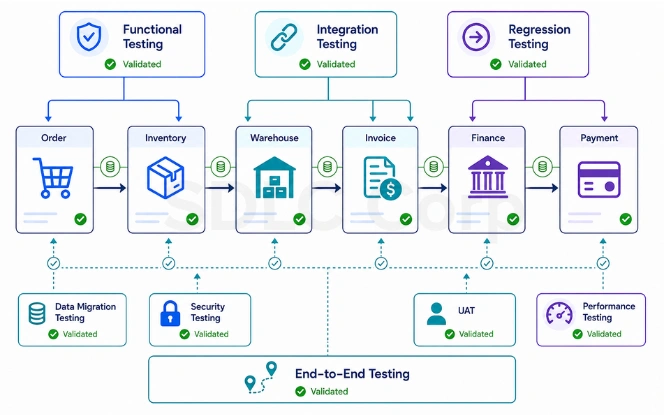
ERP testing coverage across functional, integration, end-to-end, UAT, regression, migration, security and performance testing

ERP implementation testing normally includes functional, integration, end-to-end, UAT, regression, migration, security, and performance testing. However, the purpose is not to run every possible test. The goal is to find important risks before the business depends on the new system.

Organizations planning a rollout can align testing with their broader ERP implementation services strategy. Validation then starts early instead of just before launch.

How to Build an ERP Testing Strategy

A strong ERP testing strategy starts with business risk. Before writing test cases, identify the processes that must work for the company to operate. That usually means collecting revenue, paying employees, serving customers, and meeting reporting requirements.

An ERP test plan should define the scope, people, systems, environments, data, and decision criteria for each testing phase.

What the ERP test plan must cover Strategy map
ERP TEST STRATEGY
ScopeModules, customizations, integrations
RiskWhich failures hurt operations most?
ProcessesCritical business workflows first
DataRealistic customers, products, taxes
EnvironmentStable, comparable test systems
PeopleRoles, owners, responsibilities
DefectsSeverity and retesting rules
Exit CriteriaSign-off before moving forward
The plan should also cover test cycles and schedules, automation scope, and business sign-off requirements.

Prioritize Testing by Business Risk

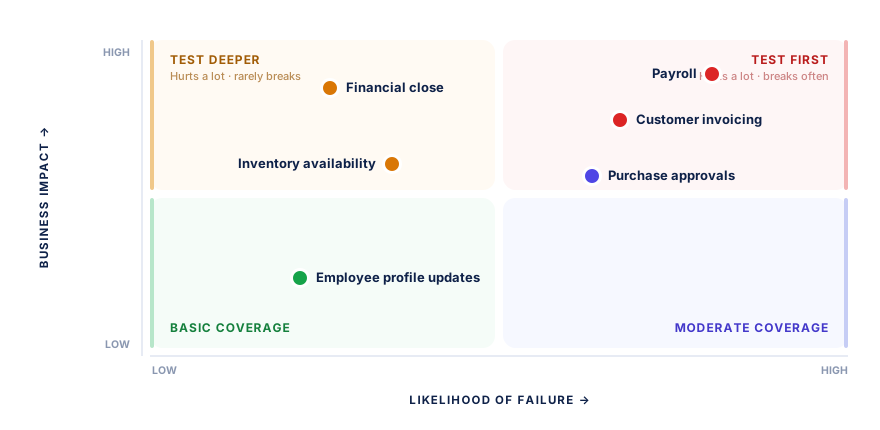
Not every ERP workflow needs the same level of testing. Therefore, prioritize scenarios based on business impact, failure risk, and change impact.

Business ProcessPriorityMain Risk
PayrollCriticalIncorrect or delayed employee payments
Customer invoicingCriticalRevenue and accounting errors
Financial closeCriticalIncorrect financial reporting
Inventory availabilityHighFulfillment disruption
Purchase approvalsHighUnauthorized spending
Employee profile updatesMediumLimited operational impact
The same six processes, plotted Risk matrix
ERP testing risk matrix plotting payroll, customer invoicing, financial close, inventory availability, purchase approvals and employee profile updates by business impact and likelihood of failure

Teams should also define entry and exit criteria in simple terms. Decide what must be ready before testing begins and what must pass before the project moves forward.

Where independent validation is useful, software testing services can support functional, integration, regression, security, and performance testing within the ERP program.

Microsoft describes a comparable structure in its Dynamics 365 guidance. A testing strategy there sets scope, test cycles, and entry and exit criteria. See Test your solution before deployment.

Not sure which ERP processes to test first?

Get a risk-based test plan

Test Complete ERP Business Processes

ERP modules rarely work alone, so ERP end-to-end testing should follow complete business workflows instead of stopping at a single function. Functional testing may confirm that a user can create an invoice. End-to-end testing checks whether that invoice still holds the correct values after sales, inventory, fulfillment, and accounting steps have finished.

Consider an Order-to-Cash scenario, mapped to the department that owns each step:
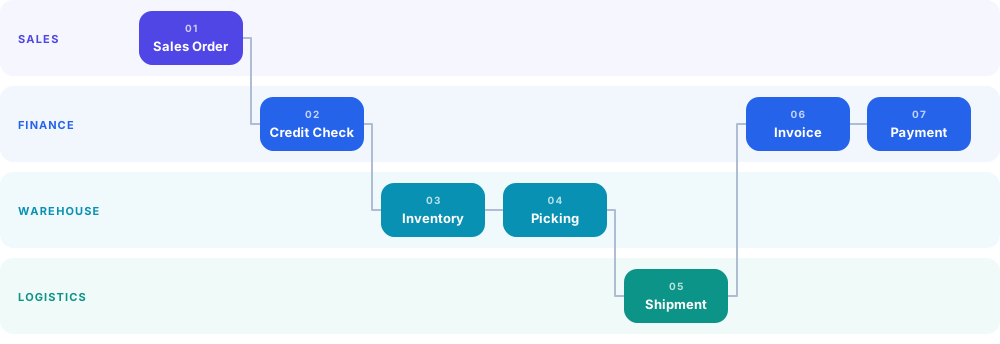
Order-to-Cash by departmentOwnership map
Order-to-Cash swimlane showing sales order in sales, credit check in finance, inventory and picking in warehouse, shipment in logistics, and invoice and payment back in finance
7Steps
4Departments
5Handoffs
1Business outcome

Every time the line changes lane, ownership and data change hands. Those five handoffs are where end-to-end testing finds what screen-level testing misses. Each department signs off on its own step while the defect travels downstream unnoticed.

During this flow, testers should verify:

  • Customer and pricing rules
  • Credit limits
  • Inventory availability
  • Tax calculations
  • Warehouse updates
  • Shipment status
  • Invoice values
  • Accounting postings
  • Payment allocation

The same principle applies to Procure-to-Pay and Record-to-Report processes. ERP integration testing should also include connected systems. Typical examples are CRM, e-commerce platforms, warehouse systems, banks, payment providers, reporting tools, and third-party APIs. Interface-heavy landscapes are usually validated alongside dedicated ERP integration services.

Successful transactions are only part of the picture. Teams should also test what happens when an API times out, a message arrives twice, or an external system becomes unavailable.

  • API timeout
  • Duplicate message
  • External system down

Performance and user roles should be tested in the same business context. A process that works for one administrator may still fail under real user permissions or peak transaction volumes.

ERP User Acceptance Testing (UAT)

ERP user acceptance testing confirms whether the configured system works for the people who will use it every day. Business users should test realistic scenarios, expected results, approvals, and exceptions.

For example, a Procure-to-Pay UAT scenario may follow this process:

Procure-to-Pay · who validates what
Employee Raises the purchase request
Manager Approves within limits
Buyer Issues the purchase order
Warehouse Records the goods receipt
Accounts Payable Three-way match, then payment

Several users take part across that workflow, so UAT also validates handoffs, user roles, approvals, and business rules. A practical ERP UAT process should include:

  • Business-critical scenarios
  • Normal transactions
  • Important exceptions
  • Correct user roles
  • Realistic or migrated test data
  • Expected business outcomes
  • Defect ownership
  • Retesting after fixes
  • Formal business sign-off

Where possible, avoid giving all UAT testers administrator access. Real permissions can expose workflow and access problems that elevated accounts may hide. Pairing UAT with structured ERP user training also cuts the number of false defects raised by unfamiliar testers.

How Long ERP UAT Usually Takes

Duration depends on scope rather than headcount. The ranges below reflect a single UAT cycle, excluding defect fixes and retesting, which typically add 30 to 50 percent more time.

ScopeTypical UAT durationBusiness testers
Single module1 to 2 weeks3 to 6
2 to 3 modules2 to 4 weeks6 to 15
Full ERP, one site4 to 6 weeks15 to 30
Full ERP, multi-site or multi-country6 to 10 weeks30 or more

SIT vs UAT in ERP Testing

System integration testing and UAT answer different questions. SIT checks that the systems talk to each other, following a chain such as application to ERP to warehouse API to bank. UAT checks that the business can actually run on them, following the people instead: buyer, approver, warehouse, finance.

AreaSITUAT
Main questionDo connected systems work together?Can the business operate correctly?
Typical usersQA, developers, integration teamsBusiness users and SMEs
Main focusInterfaces and data exchangeProcesses and business outcomes
Common issuesMapping, API, message failuresWorkflow and business-rule gaps
CompletionTechnical acceptanceBusiness sign-off

UAT should not become a final checkbox. If critical business scenarios still fail, the ERP is not ready for approval.

Oracle makes the same point about environments, noting that user acceptance testing should run in an isolated test account. See User Acceptance Testing, NetSuite Applications Suite.

ERP Regression Testing and Change Impact

ERP systems continue to change during implementation and after launch. Configuration updates, fixes, integrations, tax changes, and upgrades can all affect processes that already worked. ERP regression testing checks whether those changes have damaged existing functionality.

Consider a single tax configuration update. That one change may affect tax calculation, invoices, credit notes, accounting postings, tax reports, and financial close. Six areas need attention, and none of them were edited. That is the whole argument for regression testing: the risk sits in what was not touched.

The regression process should follow this logic:

01 ERP change Config, fix or upgrade
02 Impact analysis What could this touch?
03 Affected processes Scope the blast radius
04 Regression tests Run only what matters
05 Release decision Ship or hold

Typical triggers include:

  • Configuration changes
  • Custom development
  • Integration updates
  • Defect fixes
  • ERP upgrades
  • Tax changes
  • Pricing updates
  • Workflow changes
  • Security-role changes

As a working baseline, most ERP programs keep full regression coverage on critical processes such as payroll, invoicing and financial close. High-impact processes usually sit at roughly 60 to 80 percent coverage, and low-impact areas at 30 to 40 percent.

Timings follow the same pattern. A regression cycle after a configuration change runs 2 to 5 working days. A full pre-upgrade cycle usually needs 2 to 3 weeks.

Teams do not need to rerun every test after every small update. Instead, use change impact and business risk to select the right regression coverage.

A pricing rule change may require retesting orders, discounts, invoices, returns, and financial postings. An unrelated employee-profile workflow may not need the same attention. The same discipline applies to every round of ERP customization, because each new build reopens part of the regression scope.

This approach makes ERP regression testing faster and more useful because each test has a clear reason.

Microsoft defines regression testing the same way for enterprise solutions. It is the check applied after changes or updates such as bug fixes and feature enhancements. See Types of tests that implementation projects use.

What Should You Automate in ERP Testing?

ERP test automation works best for stable and repeatable workflows. It can reduce repeated manual effort, especially during regression cycles and frequent releases.

Three questions decide it. A test earns automation only when it is repeated often and runs on a workflow that has stopped changing. It should also cause real business damage if it failed unnoticed. Invoice regression clears all three; a brand-new approval workflow clears none.

Should this ERP test be automated? Decision tree
Decision tree for ERP test automation: a test scenario passes three checks: repeated often, stable workflow, and business risk on failure. Any no sends it to the keep-manual group; all yes sends it to the automate group.

Applying those questions across a typical ERP program produces two clear groups:

Automate
  • Regression and smoke tests
  • Repetitive transactions
  • Stable end-to-end workflows
  • API and integration checks
  • Repeated calculations
  • High-volume scenarios
Keep manual
  • Exploratory testing
  • New or changing workflows
  • Early UAT cycles
  • Usability checks
  • Rare business exceptions
  • Anything needing business judgment

For example, an automated test may create an order, reserve inventory, process shipment, generate an invoice, and verify the accounting result. However, automation should not replace human judgment.

The best ERP test automation strategy does not ask, “How much can we automate?” It asks, “Which repeated tests reduce meaningful business risk when automated?”

Automation Fit at a Glance

Where a scenario sits between these two columns is usually a better guide than any target automation percentage.

Better for automationBetter for manual testing
Stable regression pathsExploratory testing
Smoke checksNew workflows
Repetitive transactionsEarly UAT
API and interface checksUsability checks
High-volume scenariosRare business exceptions
Repeated calculationsBusiness judgment

That distinction also controls maintenance effort. Automating a workflow that changes every week may create more work than it saves. Stable, high-volume paths return the most value first, and they are the same ones targeted by workflow automation services.

Want to know which ERP tests are worth automating?

Scope your automation coverage

Test ERP Data, Integrations, and Security

ERP quality depends on more than application logic. Even a stable ERP can fail operationally if migrated data is wrong, integrations break, or users receive incorrect permissions. These three areas sit outside the application screens, which is exactly why they are the ones most often missed:

Data Did everything arrive from the old system, and is it still worth the same?
Integrations What happens when a connected system is slow, silent, or sends bad data?
Access Can every user do their job, and nothing at all beyond it?

Validate ERP Data Migration

ERP data migration testing should compare both technical records and business values. Testers should check record counts, field mappings, opening balances, master data, transaction history, missing or duplicate records, and currencies and taxes.

Record counts alone are not enough. The source and target may hold the same number of invoices while the total invoice value does not match. Reconciliation should therefore compare both volume and financial values. Large cutovers usually run this reconciliation as part of planned ERP data migration services.

Test Integration Failures

ERP integration testing should include negative scenarios as well as successful transactions. Test what happens during API timeouts, invalid data, duplicate messages, connection failures, partial processing, retry attempts, and external system downtime.

When a connected system fails, the ERP should follow a predictable path rather than an undefined one. The timeout is caught, the message is retried, and the failure is logged. Someone is then alerted, and the transaction recovers. For more complex environments, ERP consulting services can help assess migration risks, integration dependencies, and cross-system workflows.

Validate Roles and Security

Security testing should confirm that users can perform their jobs without receiving unnecessary access.

Sales users should not change payroll records. Warehouse users should not post unrestricted financial journals, and employees should not approve transactions beyond their authority. Role testing should cover permissions, approval limits, sensitive data, privileged actions, segregation of duties, and role-based workflows.

RoleSalesInventoryPayrollFinance
Sales userFullViewNoneNone
Warehouse userNoneFullNoneNone
Finance userViewViewNoneFull

Testing with real user roles is important because administrator accounts can hide permission problems. Access reviews should also continue after launch, not only during the test phase.

ERP Go-Live Readiness and Cutover Testing

Passing many test cases does not automatically mean the ERP is ready for production. Go-live readiness depends on testing, data, users, integrations, performance, support, and cutover planning together.

Before launch, confirm that critical business processes pass and that UAT has business sign-off. Regression testing should be complete, and critical defects closed or formally accepted.

Check the technical side in the same way. Migrated data should reconcile, integrations should work correctly, security roles should be validated, and performance should meet agreed criteria.

Finally, confirm the people and the plan. Users should be trained, support ownership should be clear, cutover steps should be documented, and rollback criteria should exist.

Run a Mock ERP Cutover

A mock cutover rehearses the real launch before production, so the team learns the true timing before it matters. A typical rehearsal window looks like this:

Mock cutover timeline 36-hour window
Fri 8 PMLegacy freeze
Fri 9 PMData extraction
Sat 12 AMData migration
Sat 6 AMReconciliation
Sat 9 AMERP activation
Sat 11 AMSmoke tests
Sat 1 PMBusiness approval
Mon 8 AMGo live

Measure migration time, task dependencies, downtime, validation effort, integration startup, and rollback timing during the rehearsal. A migration may be perfectly accurate and still take longer than the available downtime window. That is the kind of problem only a rehearsal exposes.

Make an Evidence-Based Go/No-Go Decision

The final go/no-go decision should rely on agreed evidence, not deadline pressure. A simple readiness gate is:

UAT Regression Data Integrations Defects closed Cutover GO LIVE

Severity thresholds keep that decision objective. A common rule is zero open critical defects and zero open high defects on critical processes.

Below that line, allow no more than 5 open medium defects with agreed workarounds, and log low defects for the first post-launch sprint. Most programs also expect a pass rate of 95 percent or higher on critical scripts before approval.

A high overall pass rate should not drive the decision alone. If payroll, invoicing, financial posting, or another critical process still fails, the business may not be ready.

Microsoft groups go-live readiness in a similar way, covering solution acceptance, data migration readiness, change readiness, and support readiness. See Use the go-live checklist.

Teams that need extra support before deployment can use ERP implementation services. That covers workflows, migration readiness, integrations, cutover tasks, and remaining launch risks.

Approaching go-live and unsure the evidence stacks up?

Book a go-live readiness review

What Happens After ERP Go-Live?

Testing continues after deployment because production introduces real users, real transaction volumes, and live integrations. The early support cycle moves through four phases, each with a different focus:

0 TO 4 HOURS Production smoke tests Confirm the most important workflows still run
4 TO 24 HOURS Active monitoring Watch critical transactions and interfaces
DAYS 1 TO 3 Hypercare Fix, retest and close issues quickly
AFTER DAY 3 Stabilization Continue as needed through month-end

The first 24 to 72 hours are usually the most intensive monitoring period, but they are not the full hypercare duration. Many ERP programs keep heightened support running for several weeks, especially through the first month-end or payroll cycle.

During those first hours, teams should watch critical business transactions, failed integrations, financial postings, and inventory updates. User access, response times, batch jobs, and scheduled processes need the same attention.

Production smoke tests should confirm that the most important workflows still work. Monitoring should quickly identify failed interfaces, incorrect postings, access problems, or slow processes.
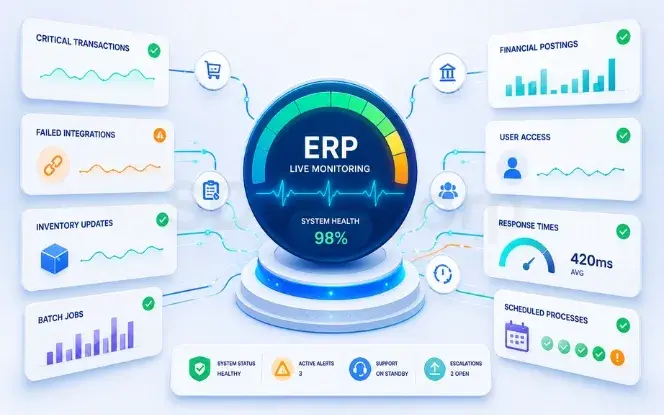
ERP hypercare monitoring after go-live covering transactions, integrations and financial postings

Hypercare also needs clear ownership. Users should know where to report issues, and support teams need agreed priorities and escalation paths.

After a production fix, rerun the affected regression tests before closing the issue. Keep the same discipline after later configuration changes and ERP upgrades. Many teams fold this into their ongoing support model, so monitoring and release validation continue without a gap.

This lifecycle also connects with broader enterprise software development practices. Testing, integration, maintenance, and release validation all continue after the first production launch.


ERP Testing Checklist

Use this checklist as a final review before launch. Tick each item to track your own readiness. Nothing is saved or sent anywhere.

complete
Plan
Test
Verify
Launch
Anything left unticked is worth resolving before the go/no-go decision. All readiness checks are complete. The ERP is ready for the go/no-go decision.

Conclusion

Effective ERP testing connects technical quality with business readiness. A strong strategy starts with critical processes, tests complete workflows, involves real users through UAT, and protects stable operations through targeted regression.

Automation can reduce repetitive work, but it cannot replace business validation. A successful test cycle does not prove go-live readiness on its own. Data, integrations, security, cutover, support, and unresolved risks all need review as well.

Can the business operate safely on this ERP from day one?

When the evidence supports that answer, stakeholders can approve launch with a clearer view of both readiness and remaining risk.

Need an independent check before you launch on your ERP?

Talk to an ERP testing expert

Frequently Asked Questions About ERP Testing

How is ERP testing different from regular software testing?

Regular software testing usually validates one application. ERP testing validates a chain of departments. A single transaction can move through sales, inventory, warehouse, billing, and finance before it is complete. Each screen may pass its own test while the business outcome is still wrong, so ERP testing has to follow the whole process.

What is UAT in an ERP implementation?

UAT allows business users to test realistic scenarios before launch. It confirms whether the ERP supports expected processes, roles, approvals, data, and business outcomes.

How long does ERP user acceptance testing take?

A single UAT cycle runs about 1 to 2 weeks for one module and 2 to 4 weeks for two or three modules. A full single-site ERP takes 4 to 6 weeks, and a multi-site or multi-country rollout takes 6 to 10 weeks. Defect fixes and retesting usually add another 30 to 50 percent.

What is ERP regression testing?

ERP regression testing checks whether a change has affected existing functionality. Teams use change impact and business risk to decide which test cases should run again.

How much regression coverage is enough after an ERP change?

Most programs keep full regression coverage on critical processes such as payroll, invoicing and financial close. High-impact processes sit at around 60 to 80 percent, and low-impact areas at 30 to 40 percent. A regression cycle after a configuration change usually takes 2 to 5 working days, and a full pre-upgrade cycle needs 2 to 3 weeks.

Which ERP tests should be automated?

Stable regression tests, smoke checks, API validation, repetitive transactions, integrations, repeated calculations, and high-volume scenarios are strong automation candidates. New workflows, exploratory testing, usability checks, and business-focused UAT often need manual validation.

What defect severity levels should block an ERP go-live?

A common threshold is zero open critical defects and zero open high defects on critical processes. Below that, allow no more than 5 open medium defects with agreed workarounds, and defer low defects to the first post-launch sprint. Critical test scripts are usually expected to pass at 95 percent or higher.

How do you know an ERP system is ready for go-live?

An ERP is ready when agreed business and technical exit criteria are met. Critical workflows should pass and UAT should have sign-off. Migrated data should reconcile, integrations should work, critical defects should be addressed, and the cutover plan should be rehearsed.

Still deciding whether your ERP is ready to launch? ERP testing services.

ABOUT THE AUTHOR

Scott edwards

Scott Edwards is an ERP expert with 11 years of experience helping organizations improve how they work. At SDLC Corp, he designs and implements ERP systems that streamline operations, reduce costs, and support better decision-making. With deep knowledge across industries, Scott focuses on making complex systems simple and effective, ensuring each solution fits the business’s real needs.
PLAN YOUR SOLUTION

More Insights
You Might Find Useful

Explore expert perspectives, practical strategies, and real-world solutions related to this topic.

Event management workflow showing attendee registration, secure payment processing, digital ticket confirmation, settlement, and event notifications

Event Registration and Payment Processing Features

Event registration payment processing looks simple from the attendee side:

HCM migration checklist showing legacy HCM moving to a new system through data migration, payroll validation, integrations, testing, and user adoption.

HCM Migration Checklist: A Complete Guide

Human Capital Management (HCM) migration moves critical HR, payroll, and

Big Bang vs phased ERP implementation comparison to determine which rollout strategy is better for your business.

Big Bang vs Phased ERP Implementation: Which Is Best?

ERP Migration StrategyChoosing an ERP rollout model affects risk, cost,

Let’s Talk About Your Product

Get expert guidance on scope, architecture, timelines, and delivery approach so you can move forward with confidence.

What happens next?