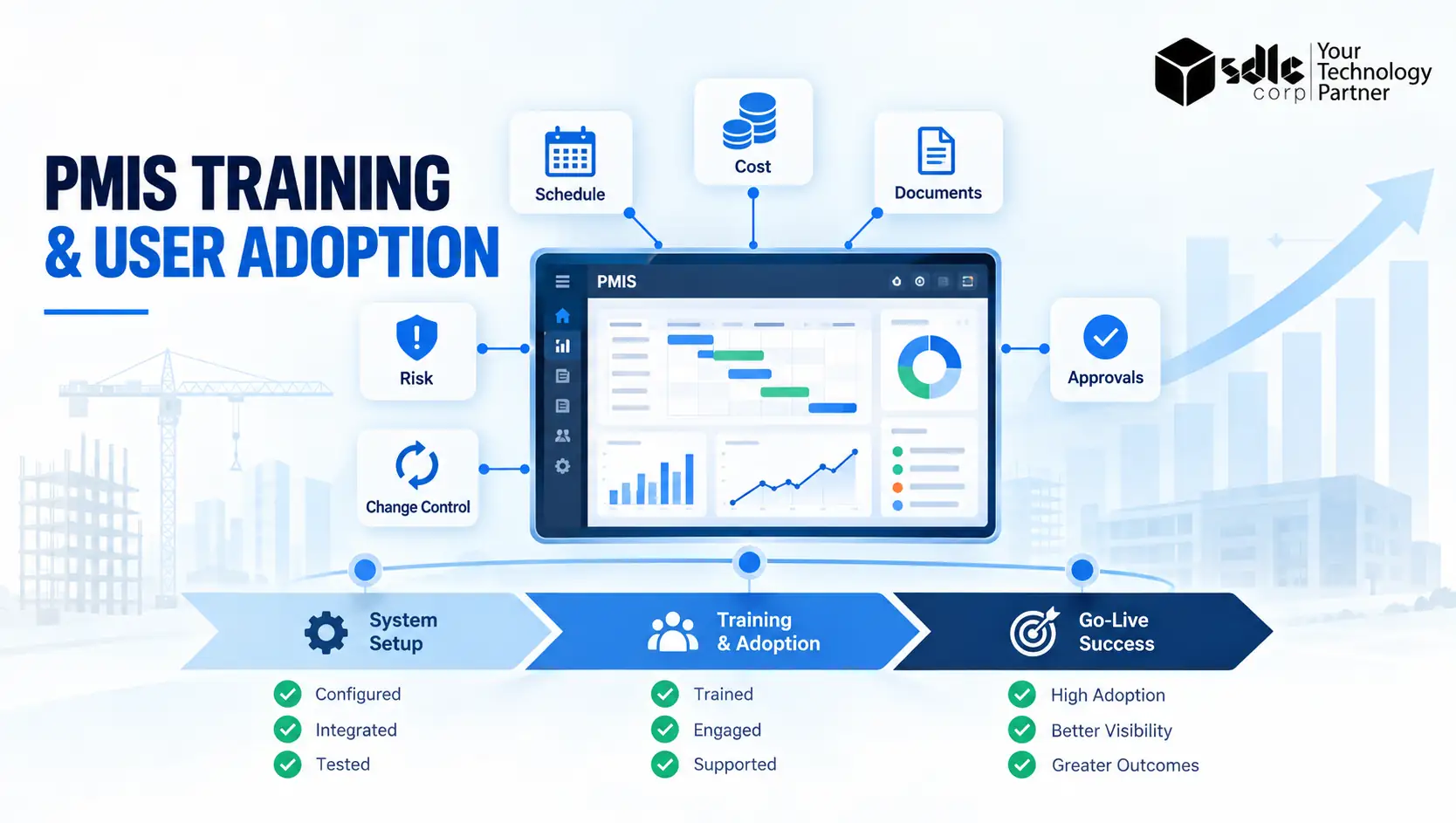
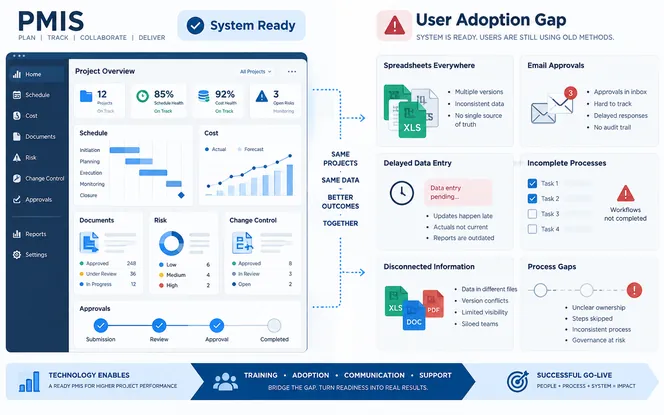
A PMIS can be technically ready and still fail at launch. The configuration may work, integrations may pass testing and data may be migrated correctly. Yet project teams can still avoid the system, enter incomplete information or continue using spreadsheets outside the approved process. That gap is an adoption problem, not a software problem.
Effective PMIS training prepares each person to complete the work required by their role. A strong user adoption plan also explains why processes are changing, gives teams time to practice and provides support when live project pressure begins. This guide explains how to plan both sides of the rollout, measure go-live readiness and support users through the first 90 days.
Why PMIS User Adoption Determines Go-Live Success
A Project Management Information System connects scheduling, cost control, documents, risk, changes, reporting and approvals. Each workflow depends on people entering reliable information at the right time. If one group does not use the agreed process, the quality of downstream reports falls.
For example, a dashboard cannot show a dependable cost forecast if commitments are updated late. A change register will not support decisions if site teams log changes after work has started. A document workflow cannot provide a clear audit trail when approvals continue through email.
This is why system access should not be treated as proof of adoption. Logging in is only the first step. Users must be able to complete critical tasks correctly, consistently and within the expected time. The people side of implementation deserves the same discipline as configuration and testing.
Prosci’s change-management research describes a structured way to prepare, equip and support people through change. It also reports that projects with effective change management are more likely to achieve their objectives.
The practical lesson for a PMIS rollout is simple: training, communication, sponsorship and reinforcement need an owned plan. They should not be added as a few last-minute activities before launch.
What PMIS Readiness Looks Like
A team is ready for go-live when users can complete essential workflows with limited help. Readiness includes knowledge, practical ability, access, process clarity and available support. Before approving the launch, confirm that:
- Every user has the correct role and permissions.
- Role-based training has been completed.
- Users have practiced realistic scenarios in a safe environment.
- Critical tasks have been assessed, not only demonstrated.
- Process owners have approved the new ways of working.
- Known issues have owners, priorities and documented workarounds.
- Help channels, office hours and escalation routes are published.
- Managers understand how adoption will be monitored.
- Legacy spreadsheets and duplicate reporting routes have a clear retirement plan.
Readiness should be assessed by role and business unit. An overall training completion rate can hide a serious gap. A project may report 95% completion while half of its cost controllers have not demonstrated the month-end forecasting process.
Start With a PMIS Training Needs Assessment
Do not begin by building a generic course. First identify who will use the PMIS, what they must do and what could go wrong if they cannot do it. Create a role-to-process map. List each user group, the workflows it owns, the decisions supported by those workflows and the required level of proficiency.
Include permanent employees, contractors, joint-venture partners and external reviewers where relevant. Interview process owners and representative users. Observe how work is completed today. These conversations often expose hidden steps, local spreadsheets and approval paths that are missing from official process documents.
Rate each task by frequency, complexity and operational risk. A task performed once a quarter may need a searchable guide rather than a long classroom session. A daily task that feeds executive reporting needs hands-on practice and a clear assessment. The output should be a training matrix, not a list of software features.
Build an Eight-Week PMIS Go-Live Training Plan
The exact schedule depends on project size, system scope and workforce distribution. The following eight-week model gives most organizations enough time to train, assess and correct gaps without teaching so early that users forget the process.
Training dates must align with configuration stability. If workflows change after users practice them, confidence falls and support demand rises. Freeze critical process designs before formal training where possible. When a late change is unavoidable, explain exactly what changed and update every affected guide.
Design Training Around Real Work, Not Software Menus
Feature tours create familiarity, but they rarely prepare someone for a live reporting deadline. Organize learning around complete work scenarios. A scheduler should practice importing or updating progress, validating dates, reviewing exceptions and publishing the approved schedule.
A cost controller should work through commitments, actuals, accruals, forecast changes and reconciliation. A document controller should complete a submission, review, revision and approval cycle. Use realistic data with sensitive details removed.
Give each exercise a clear starting point, expected output and pass condition. Include common errors so users learn how to recover rather than assuming every transaction will follow the ideal path. A useful learning sequence is:
- Explain the business outcome and the user’s new responsibility.
- Demonstrate the complete workflow once.
- Let the user complete it with guidance.
- Ask the user to repeat it without guidance.
- Assess the result against defined criteria.
- Provide a short guide for use during live work.
Keep reference materials task-based. Titles such as “Submit a change request” are easier to search than “Change Module Overview.” Short videos can help with simple and repeatable actions. More complex workflows need a written guide that explains business rules, decision points and escalation routes.
Prepare PMIS Champions and People Managers
PMIS champions provide local context that a central training team cannot always supply. Select respected users from the teams most affected by the change. Do not choose people only because they are available or technically confident. A champion should understand the business process, communicate clearly and have enough time to support colleagues.
Give champions early access to the system, deeper scenario training and a direct route to the implementation team. Clearly define what champions can resolve and what must be escalated. They should support adoption without becoming an unofficial help desk or approving ungoverned workarounds.
Managers have a separate role. They set expectations, reinforce new behaviors and prevent teams from returning to old methods when deadlines tighten. Provide managers with a short briefing that covers:
- The reason for the PMIS change
- The workflows affected in their team
- The behaviors expected after launch
- Known concerns and approved responses
- Adoption measures they will review
- The support route for unresolved issues
Visible sponsorship matters because users watch what leaders request. If an executive continues asking for a manually prepared spreadsheet after launch, teams receive a clear signal that the PMIS is optional.
Communicate the Change Without Creating Noise
Communication should answer practical questions:
- What is changing?
- Why is it changing?
- When does it affect me?
- What must I do?
- Where can I get help?
Segment messages by audience. Executives need to understand decision quality, governance and accountability. Project controls teams need details about reporting cut-offs and data ownership. Field users need clear instructions about devices, connectivity and required entries.
Use several communication channels, but maintain one source of truth for dates, training materials and support information. Repeated messages are useful when they add timely detail. Repeating the same broad announcement does not build readiness.
Resistance should be diagnosed rather than labeled. A user may avoid the system because permissions are wrong or the workflow adds duplicate work. The training example may also differ from reality, or a manager may still reward the old behavior.
Each cause needs a different response. More training will not fix an access problem or a poorly designed workflow.
Connect User Acceptance Testing With Training
User acceptance testing and training serve different purposes, but they should share scenarios. UAT confirms that the configured system supports agreed business requirements. Training confirms that users can operate the approved process.
Use process owners and future champions in UAT. Their experience helps improve the training material before it reaches a wider audience. Record recurring confusion even when the software behaves as designed. Confusion may point to unclear labels, weak instructions or an unnecessarily complex process.
Do not use formal training as a substitute for UAT. Users should not discover major defects while they are expected to learn. Likewise, do not assume that UAT participants can train the whole organization without guidance. Subject knowledge and teaching ability are different skills.
Use a Go-Live Readiness Scorecard
A scorecard gives sponsors a clearer basis for a launch decision. It should combine training completion, demonstrated ability, access, support and process readiness.
| Readiness area | Example measure | Suggested launch condition |
|---|---|---|
| Training coverage | Required users who completed assigned learning | At or above the agreed threshold for each critical role |
| Proficiency | Users who passed critical task assessments | No high-risk role below its minimum standard |
| Access | Users with tested accounts, roles and devices | All critical users ready; exceptions have owners |
| Process approval | Workflows signed off by accountable owners | All launch-critical workflows approved |
| Support readiness | Trained support staff, knowledge articles and escalation paths | Coverage confirmed for launch hours and locations |
| Data readiness | Required reference and migrated data validated | No open defect that prevents a critical process |
| Change readiness | Managers briefed and champions active | Coverage confirmed across affected teams |
Avoid averaging away a critical failure. A high overall score should not compensate for missing access in the commercial team or an untested schedule-update process. Define non-negotiable conditions separately from weighted measures. The steering group should review every open gap, its business impact, workaround risk and accountable owner before making the go-live decision.
Plan Hypercare Before the System Launches
Hypercare is a short period of increased support after go-live. Its purpose is to protect critical work while users apply new skills under real conditions. Set up one intake route for support requests. Classify issues as:
- System defects
- Access problems
- Data problems
- Process questions
- Training gaps
This classification prevents every question from being sent to developers. It also makes recurring adoption problems easier to identify. Create a command-center schedule covering important reporting dates, time zones and work locations. Publish response targets for critical issues.
Hold a short daily review during the first days of launch, then reduce the frequency as the system stabilizes. Support should be easy to reach without encouraging permanent dependency. When a user asks how to complete a task, solve the immediate problem and point them to the relevant guide.
Update the guidance when the same question appears repeatedly. Exit hypercare based on evidence, not a fixed date alone. Useful exit conditions include stable priority workflows, lower support demand, acceptable data quality and confirmed ownership by the normal support team.
Measure PMIS Adoption During the First 90 Days
Training completion is a readiness measure. It does not prove adoption. After launch, combine system usage data with process quality and business feedback. Useful PMIS adoption metrics include:
- Active-user rate: The percentage of assigned users who complete meaningful work during the measurement period.
- Critical-workflow completion: The percentage of required workflows completed in the PMIS by the deadline.
- Data-quality rate: The percentage of required records that are complete, valid and entered on time.
- Proficiency rate: The percentage of users who can complete critical tasks without direct assistance.
- Support demand: The number and type of tickets by role, process and location.
- Workaround rate: The frequency of unapproved spreadsheets, email approvals or duplicate reports.
- Cycle time: The time required to complete processes such as change approval or monthly reporting.
Interpret these metrics together. A high login rate with poor data quality may mean users enter the system but do not understand the process. A temporary rise in support tickets may be healthy if users are engaging with the new workflow rather than avoiding it.
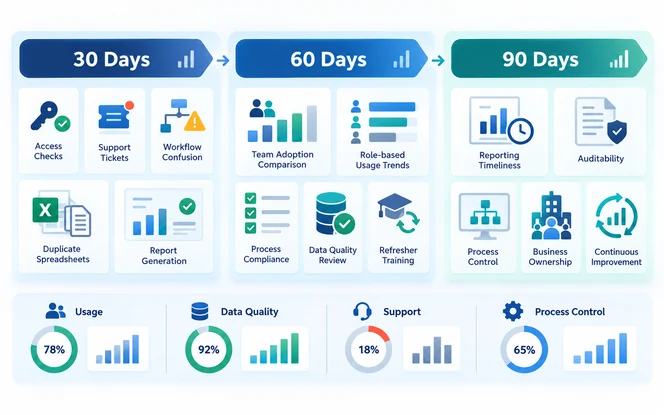
The 30-Day Review
Focus on stability. Identify access failures, confusing workflows, missing guidance and teams relying on workarounds. Provide targeted coaching for high-volume problems. Review whether critical reports are being produced from the PMIS. Check whether teams are still maintaining duplicate trackers or requesting approvals through email.
The 60-Day Review
Focus on consistency. Compare adoption across roles, projects and locations. Investigate why similar teams produce different results. Refresh complex or infrequent workflows before the next reporting cycle. Update training materials using real questions collected during the first month.
The 90-Day Review
Focus on value and ownership. Confirm whether the PMIS is improving reporting timeliness, auditability and process control. Transfer remaining adoption actions to business owners and the permanent support team. Agree on future system reviews, refresher training and process improvements.
Prosci reports that 81% of research participants who planned reinforcement or sustainment activities met or exceeded objectives. For a PMIS program, reinforcement can include manager reviews, visible performance measures, refresher training and recognition of teams that use the process well.
A Hypothetical PMIS Adoption Scenario
Consider a hypothetical capital-project organization replacing separate schedule, cost and document trackers with one PMIS. Its first training plan consists of two general demonstrations for all users. Attendance is high, but users do not practice role-specific work.
During readiness testing, the program team finds that project managers can view dashboards but cannot trace late information to its source. Cost controllers interpret forecast fields differently across projects. Site teams have not tested mobile access in low-connectivity areas.
The organization changes the plan before launch. It creates separate learning paths for managers, project controls, document management and field teams. Each group completes a realistic reporting cycle. Champions run local practice sessions, while process owners define pass criteria for critical tasks.
Mobile users test offline procedures at actual work locations. The steering group delays one non-critical module but keeps the main launch date. During hypercare, support tickets are tagged by process and role.
The team uses recurring ticket themes to issue short refreshers and update guides. The lesson is to test practical ability, expose role-level gaps and adjust scope or support before live operations are affected.
Common PMIS Training and Adoption Mistakes
Training Everyone With the Same Material
Generic training wastes time and leaves important tasks uncovered. Build learning paths around responsibilities, workflow complexity and business risk.
Scheduling Training Too Early
Users forget steps when there is a long delay between training and use. Place practical sessions close enough to launch for users to retain knowledge and confidence.
Measuring Attendance Instead of Ability
Attendance proves that someone joined a session. It does not show that the person can complete a forecast, approval or document workflow. Assess users through practical tasks that reflect their live responsibilities.
Ignoring Contractors and External Users
External participants may create or approve important project data. Include their access, training and support requirements in the same readiness plan. Confirm who owns their onboarding and what will happen when external team members change.
Allowing Old Processes to Continue Without Control
If spreadsheets and email approvals remain accepted indefinitely, the PMIS becomes another reporting layer. Define which legacy tools will stop, when they will stop and who can approve a temporary exception. Document any approved workaround and set an expiry date.
Closing Support as Soon as Technical Issues Fall
Adoption problems may appear during month-end, a major change cycle or a new project phase. Keep targeted support available until critical business cycles have been completed successfully.
Treating Every Adoption Problem as a Training Problem
Some problems are caused by weak configuration, unclear ownership, poor data or duplicate processes. Diagnose the cause before assigning more training.
Failing to Update Learning Materials
Training guides become unreliable when system fields or workflows change. Assign an owner to every important guide and define how updates will be approved and published.
When to Use an External PMIS Implementation Partner
An external partner can help when the rollout spans several business units or a large contractor network. Extra support may also be useful for complex integrations. The partner should connect system design, process ownership, data, testing, training and post-launch support.
Training should not be treated as a separate task added at the end of implementation. Organizations planning a broader technology change can review SDLC Corp’s digital transformation services for support across assessment, implementation and optimization.
Where the PMIS requires tailored workflows or integrations, custom software development services may also be relevant. Buyers can review SDLC Corp case studies to examine delivery experience before starting a conversation. Ask a potential partner how it will:
- Measure user proficiency
- Manage role-based learning
- Prepare contractors and external users
- Support teams after go-live
- Monitor adoption and data quality
- Transfer knowledge to the internal support team
Request examples with defined context and measurable outcomes. Treat broad adoption claims without evidence with caution.
Prepare People as Carefully as the Platform
A successful PMIS training and user adoption plan depends on more than a stable platform. Users need to understand why work is changing, practice the workflows that matter and receive support when real project pressure begins.
Start with role and process analysis. Train through realistic scenarios. Assess ability instead of attendance. Use a readiness scorecard to protect the launch decision, then measure user behavior and process quality during the first 90 days.
When people, processes and technology are prepared together, the PMIS has a better chance of becoming the organization’s trusted system of record instead of another tool that teams work around.
Conclusion
Successful PMIS adoption depends on preparing people as carefully as the platform. Role-based training, realistic practice, clear communication and measurable readiness help users complete critical workflows confidently from go-live.
Support should continue after launch through hypercare, targeted coaching and adoption reviews. When organizations reinforce the approved processes, monitor data quality and remove unnecessary workarounds, the PMIS can become a trusted system of record that improves project control and decision-making.
Frequently Asked Questions
What Is PMIS Training?
PMIS training teaches users how to complete their assigned project-management workflows in a Project Management Information System. Effective training is role-based and includes practice, assessment and task-level support materials.
When Should PMIS Training Begin Before Go-Live?
Training planning should start several weeks before launch. Awareness and champion preparation can begin early. Hands-on user training is usually more effective closer to go-live, after critical workflows are stable.
How Do You Improve PMIS User Adoption?
Explain the reason for the change, involve process owners, use role-based scenarios, develop local champions, remove duplicate processes and monitor meaningful usage. Reinforce the new process through managers and post-launch coaching.
How Can PMIS Go-Live Readiness Be Measured?
Measure training coverage, practical proficiency, access, workflow approval, support readiness and data readiness. Review critical roles separately so a strong overall average does not hide a high-risk gap.
What Are the Best KPIs for PMIS Adoption?
Useful KPIs include active-user rate, critical-workflow completion, data quality, task proficiency, support demand, workaround use and process cycle time. Choose measures linked to the outcomes expected from the PMIS.
What Is PMIS Hypercare?
PMIS hypercare is a period of increased support immediately after launch. It combines rapid issue triage, accessible user assistance, daily reviews and targeted coaching until critical workflows are stable.
How Long Should PMIS Hypercare Last?
The duration depends on the rollout size and the timing of important business cycles. End hypercare when priority workflows are stable, support demand is manageable, data quality is acceptable and the permanent support team is ready to take ownership.
What Should a PMIS Champion Do?
A PMIS champion helps colleagues understand new workflows, supports local practice, identifies recurring issues and connects users with the central implementation team. Champions should not replace formal support or approve ungoverned workarounds.
What Is the Difference Between PMIS Training and User Adoption?
Training helps users gain the knowledge and ability to complete specific tasks. User adoption is the broader result of people consistently using the PMIS as part of their normal work. Adoption also depends on leadership, communication, process design, support and reinforcement.
How Do You Know Whether PMIS Training Was Successful?
Successful training produces demonstrated ability, not only attendance. Users should be able to complete their critical workflows accurately, resolve common errors and explain when an issue must be escalated.