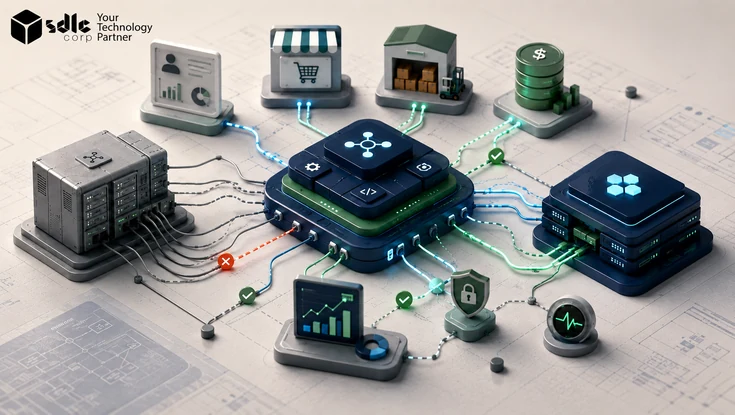
Replacing a core ERP system affects far more than the ERP itself. For foundational context, see What Is ERP? CRM platforms, warehouse systems, ecommerce applications, banking interfaces, reporting tools, APIs, scheduled jobs, middleware flows, and custom applications may all depend on it.
The biggest integration problems usually appear when those dependencies are discovered after the replacement program is already underway. A small interface can support order fulfillment, inventory allocation, invoicing, payroll, financial reporting, or another business-critical process.
What Is ERP Integration Architecture?
ERP integration architecture defines how an ERP exchanges data, transactions, and business events with other enterprise systems. It provides the technical and operational structure for how connected applications communicate during an ERP replacement.
Scope: This article focuses on the technical architecture and transition design for ERP integrations during core-system replacement; the sibling ERP integration strategy guide covers the broader planning, governance, prioritization, and operating approach.
A clear integration strategy should establish these decisions before detailed implementation. A complete architecture defines which systems connect to the ERP, what data moves between them, which platform owns each business domain, and which integration methods are used.
It should also define where transformation and validation occur, how interfaces are secured and monitored, how failures are handled, and who owns each integration. Typical connected systems include CRM, WMS, TMS, ecommerce, procurement, HR, payroll, manufacturing, banking, tax platforms, supplier systems, data warehouses, BI tools, and custom applications.
A useful architecture does more than show arrows between systems. It explains why each connection exists, which business process depends on it, and what happens if the connection fails.
Map the Current ERP Integration Landscape
The first step is understanding the environment that exists today. Before designing the replacement architecture, teams need a reliable view of every system, service, database, partner, and manual process that exchanges information with the current ERP.
Business Applications
Start with core business systems such as CRM, WMS, TMS, HRIS, ecommerce, procurement, manufacturing, point-of-sale, planning, and customer-service applications. Document whether each application sends information to the ERP, receives information from it, or operates bidirectionally.
External Systems
External dependencies can be just as important as internal applications. Banks, payment processors, suppliers, logistics providers, marketplaces, government systems, tax platforms, and EDI networks may all rely on ERP-generated transactions or master data.
Data Platforms
Data warehouses, BI platforms, ETL pipelines, master-data systems, and reporting tools should also be reviewed. Some may use approved APIs, while others may read directly from legacy ERP databases or scheduled exports.
Custom and Manual Interfaces
Do not overlook scripts, custom databases, scheduled jobs, CSV exports, SFTP folders, spreadsheets, manual uploads, and user-run reports. These are often missing from formal architecture diagrams even though business teams rely on them. Do not assume the existing architecture documentation is complete. Interview application teams, process owners, and operational users. Useful questions include:
Build an ERP Integration Inventory
Once the integration landscape is understood, convert it into a structured inventory. The architecture diagram shows how systems relate to one another, while the inventory captures the information required to decide what each interface should become in the replacement environment. For every interface, record:
| Field | What to Capture |
|---|---|
| Integration ID | Unique interface identifier |
| Business process | Order-to-cash, procure-to-pay, payroll, etc. |
| Source system | Application sending the data |
| Target system | Application receiving the data |
| Data entities | Customer, order, invoice, inventory, supplier |
| Direction | Inbound, outbound, or bidirectional |
| Integration method | API, EDI, file, database, middleware, queue |
| Frequency | Real-time, event-based, hourly, daily, scheduled |
| Transaction volume | Normal and peak volume |
| Criticality | Business impact if unavailable |
| Owner | Business and technical responsibility |
| Failure handling | Retry, queue, alert, manual recovery |
| Future status | Retain, redesign, replace, or retire |
Scroll table →
| ERP Environment | Planning Range | Typical Complexity |
|---|---|---|
| Small / single-entity | 10–30 integrations | Core finance, CRM, payroll, ecommerce, banking, and a few operational systems |
| Mid-size / multi-entity | 30–100 integrations | More SaaS platforms, warehouses, data feeds, EDI, tax, and regional systems |
| Large / global enterprise | 100–300+ integrations | Multiple ERPs, countries, plants, legacy applications, partner networks, and high-volume interfaces |
Scroll table →
Planning note: These are illustrative discovery ranges, not vendor limits. Actual counts vary by industry, operating model, acquisitions, custom applications, and how interfaces are grouped.
Decide What to Retain, Redesign, Replace, or Retire
The current integration landscape should be treated as evidence of existing business requirements, not as the blueprint for the future architecture. Every interface should be reviewed to determine whether it still provides value and whether its current technical pattern remains appropriate.
Retain
Retain an integration when the business requirement still exists and the connection is already stable, maintainable, secure, and appropriate for future needs.
Redesign
Redesign an interface when the business process is still required but the current technical implementation creates unnecessary coupling or operational risk.
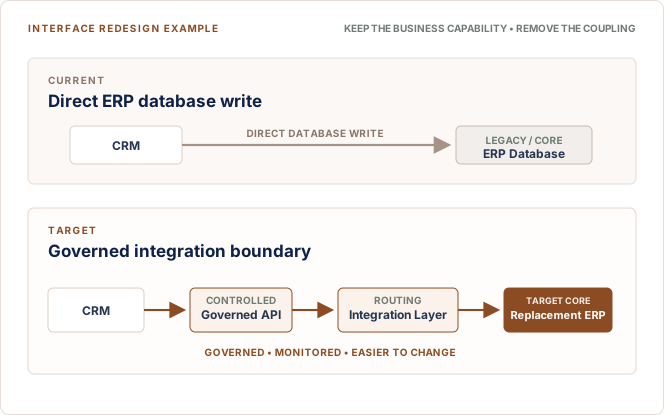
The business capability remains, but the dependency becomes easier to control and maintain.
Replace
Replace an interface when the new ERP or another enterprise platform provides the same capability through a more suitable native API, connector, event, or service.
Retire
Retire integrations tied to applications, reports, workflows, or data exchanges that are no longer required.
| Decision | Requirement Exists? | Current Architecture Suitable? | Action |
|---|---|---|---|
| Retain | Yes | Yes | Keep |
| Redesign | Yes | No | Rebuild |
| Replace | Yes | Superseded | Use new capability |
| Retire | No | No | Remove |
Scroll table →
Define Systems of Record and Data Ownership
A replacement project cannot create reliable data flows until ownership is clear. Before defining future integrations, decide which system is authoritative for each major business entity and which systems are allowed to create, update, or consume that information. A possible ownership model might look like this:
| Data Domain | Possible System of Record |
|---|---|
| Customer | CRM |
| Supplier | ERP |
| Product | PIM or ERP |
| Pricing | ERP or pricing platform |
| Inventory | ERP or WMS |
| Employee | HRIS |
| Sales order | ERP or order-management platform |
| Shipment | WMS or TMS |
| Financial ledger | ERP |
Scroll table →
These are examples rather than universal rules. The correct ownership model depends on how each organization operates. For every domain, define who creates and updates the record, which applications can read it, and which identifier is authoritative.
Also define how identifiers are mapped across systems, how conflicting updates are resolved, which attributes are replicated, and whether synchronization is real-time, event-driven, or scheduled.
Define Non-Functional Requirements Before Choosing Technology
Integration technology should be selected only after operational requirements are understood. Choosing an API gateway, middleware platform, iPaaS product, or event technology too early can result in an architecture built around tools rather than business needs.
Transaction Volume
Estimate normal and peak volumes so integrations can handle expected demand without delays.
Latency
Define required data speed, separating real-time flows from those that can tolerate delays.
Availability
Set acceptable downtime for each integration, with stronger resilience for critical business flows.
Recovery
Set recovery targets and decide whether failed transactions replay automatically or need manual review.
Data-Loss Tolerance
Identify which records can be recreated and which require guaranteed preservation and recovery.
Security and Retention
Identify sensitive data, define access controls, and set secure retention periods for logs and records.
| Integration Type | Illustrative Target | Use Case |
|---|---|---|
| Synchronous user-facing API | 0.5–2 seconds at p95 | Pricing, availability, credit checks, transaction confirmation |
| Internal synchronous service | 1–5 seconds at p95 | ERP-to-application lookups and transactional service calls |
| Asynchronous event | 5–60 seconds end-to-end | Order, shipment, inventory, or status events that do not block the user |
| Near-real-time queue | 1–5 minutes | Resilient updates where short delays are acceptable |
| Batch / reporting feed | 15 minutes–24 hours | Analytics, historical extracts, bulk synchronization, and scheduled reporting |
Scroll table →
Latency benchmark note: Treat these as starting targets for architecture workshops, not universal SLAs. Final thresholds should be based on business impact, user expectations, transaction volume, ERP capacity, network conditions, and vendor platform guidance.
Choose the Right ERP Integration Pattern
Most ERP environments use a mix of APIs, messaging, events, batch processing, middleware, and direct connections based on business needs. Microsoft's Get Started with Integration Architecture Design also emphasizes choosing integration methods according to workload requirements.
Vendor documentation provides useful platform-specific guidance as well. See the SAP Integration Architecture Guide, Oracle Fusion Cloud Financials Integration Documentation, and Microsoft Dynamics 365 Finance Documentation when validating APIs, events, middleware, security, and integration options for a specific ERP platform.
Synchronous API
Use synchronous APIs when an application needs an immediate response, such as availability, pricing, credit checks, or transaction creation. The trade-off is higher dependency on ERP or API availability.
Asynchronous Messaging
Use AWS Asynchronous Communication Guidance when transactions can be accepted now and processed later. Queues improve resilience during outages but require reliable monitoring and reconciliation.
Event-Driven Integration
Use event-driven integration when multiple systems must react to the same business event, such as a shipment triggering ERP, notification, analytics, loyalty, and invoicing updates.
Batch Integration
Use batch integration when real-time sync is unnecessary, such as reporting feeds, bulk data loads, historical extracts, or nightly processing.
Middleware or ESB
Use middleware or ESB for routing, transformation, orchestration, protocol conversion, and legacy-system integration.
iPaaS
Use iPaaS in cloud-heavy environments that need managed SaaS connectors, workflows, transformations, and monitoring.
Point-to-Point Integration
Use point-to-point integration for small, stable, low-risk connections with limited transformation or reuse needs. Avoid using it everywhere.
ERP Integration Pattern Decision Table
| Requirement | Pattern to Consider |
|---|---|
| Immediate response | Synchronous API |
| Outages must not lose transactions | Queue / asynchronous |
| Several systems react to one event | Event-driven |
| Large scheduled transfer | Batch |
| Legacy protocol conversion | Middleware / ESB |
| Many SaaS platforms | iPaaS |
| Reusable business capabilities | API-led architecture |
| Small, stable connection | Point-to-point |
Scroll table →
Choose the final pattern based on transaction volume, latency, security, team skills, cost, platform standards, and operational complexity.
Design the Target ERP Integration Architecture
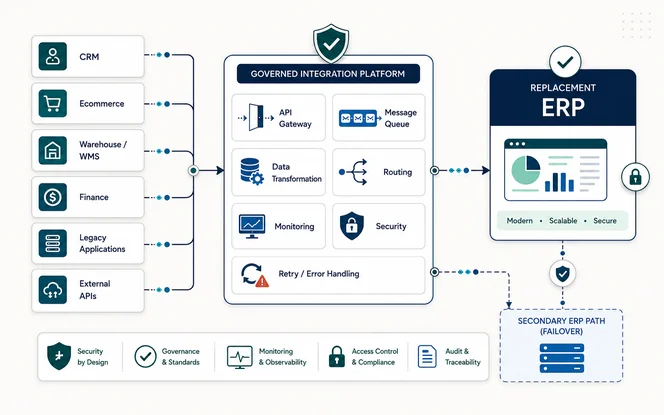
With current dependencies, data ownership, and operating requirements understood, the team can define the target architecture. The target state should separate responsibilities so applications do not become unnecessarily dependent on ERP-specific structures.
- Application Layer
The application layer contains systems that create or consume business information, including CRM, ecommerce, WMS, HR, procurement, customer portals, and mobile applications.
- Integration Layer
The integration layer handles communication and may provide APIs, events, queues, routing, transformation, orchestration, managed file transfer, and connectors.
- Business or Data Services
Business or data services can expose reusable capabilities around domains such as customer, product, order, inventory, supplier, and finance.
- Replacement ERP
The ERP remains the transactional core for the processes and data domains assigned to it, while monitoring, logging, security, auditing, and governance operate across the complete architecture.
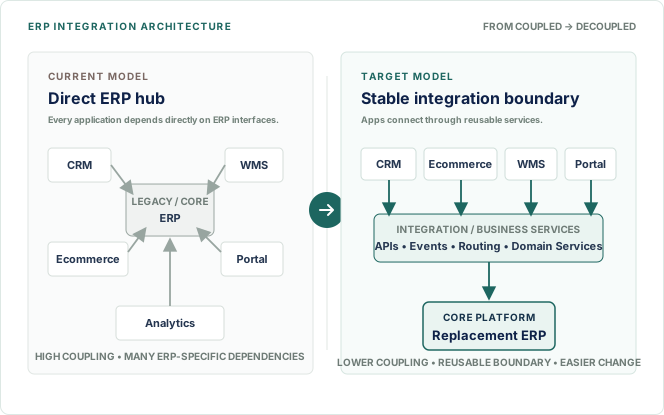
Avoid Making the ERP the Direct Hub for Everything
A tightly coupled model connects CRM, ecommerce, WMS, portals, and analytics directly to the ERP. A more flexible model introduces an integration or business services layer before the replacement ERP.
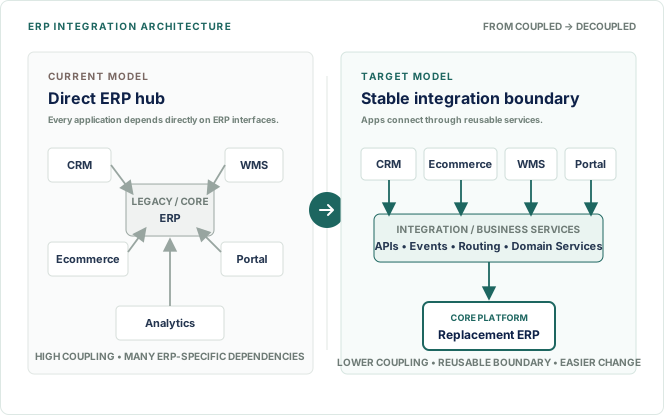
The objective is not to add middleware for its own sake. It is to prevent every connected application from depending directly on ERP-specific interfaces when a stable integration boundary would make future changes easier.
Plan for Legacy and Replacement ERP Coexistence
ERP replacement is often phased rather than completed in a single cutover. Organizations may migrate by country, legal entity, business unit, process, or data domain, which means the legacy and replacement ERP can operate at the same time.
| Rollout Model | Illustrative Coexistence Duration | Planning Implication |
|---|---|---|
| Single entity / concentrated cutover | 2–6 weeks | Short transition with focused synchronization and rollback controls |
| Phased business-unit rollout | 1–6 months | Temporary routing, shared master data, and reporting consistency become more important |
| Multi-country / global rollout | 6–18+ months | Long-lived coexistence requires formal ownership, reconciliation, support, and retirement dates |
Scroll table →
Coexistence benchmark note: These are planning ranges rather than fixed standards. Actual duration depends on rollout waves, regulatory requirements, data migration readiness, business blackout periods, and the number of dependent integrations.
Processes and interfaces that have not yet moved remain connected here during the transition.
Newly migrated processes and data domains are routed to the replacement environment.
Define which ERP owns each transaction and which integrations still route to the legacy system.
Track migrated flows, temporary synchronization, and controls that prevent duplicate or conflicting records.
Keep master data aligned and reporting consistent while both ERP environments remain active.
Give each temporary integration an owner, purpose, and clear retirement condition.
Build Reliability, Monitoring, and Security Into the Design
Production integration architecture should be designed for failures, timeouts, duplicate transactions, invalid records, and unavailable systems.
Reliability Controls
Use retries, queues, dead-letter handling, idempotency, replay, and reconciliation to protect transactions and keep source and target data consistent.
Monitoring
Monitor infrastructure availability, interface health, and business outcomes. Track key measures such as failures, latency, queue depth, retries, transaction volume, and reconciliation differences.
Security
Build security in from the start with TLS, OAuth 2.0, role-based access, least privilege, secrets management, audit logging, and credential rotation. For broader access-control principles, reference the NIST Zero Trust Architecture.
Establish Integration Governance and Ownership
A technically strong target architecture can deteriorate quickly if teams create new interfaces without governance. Ownership and change control therefore need to continue after implementation.
Define who approves new integrations, owns API contracts and schemas, manages versions, communicates breaking changes, approves production deployments, maintains documentation, and responds when an integration fails. For critical integrations, ownership should include:
| Responsibility | Owner |
|---|---|
| Business process | Business owner |
| Source system | Source-system owner |
| Target system | Target-system owner |
| Integration platform | Platform owner |
| Security | Security owner |
| Production support | Support owner |
Scroll table →
Major architecture decisions should also document the pattern selected, alternatives considered, rationale, trade-offs, and decision owner. This makes the architecture easier to maintain and gives future teams the context behind important technical choices.
Coordinate ERP Data Migration With Integration Design
ERP data migration and ERP integration are separate workstreams, but decisions in one can directly affect the other. Migration moves existing customers, suppliers, products, inventory, balances, assets, and open transactions into the replacement ERP. Integration manages the continuing flows after go-live.
If migration changes customer IDs, product codes, account structures, or the system of record, connected applications need the correct mappings. Migration and integration teams should align on identifiers, ownership, mapping rules, cutover timing, and reconciliation before production migration begins. Organizations planning both workstreams can use ERP Consulting & System Integration Services to assess dependencies, API requirements, target architecture, and migration impacts.
Validate the Architecture Before Cutover
Integration testing should confirm that complete business processes work correctly. A successful API connection or file transfer alone does not prove that the business transaction is complete.
Interface and Contract Testing
Confirm that interfaces exchange the expected payloads and follow the agreed request, response, and schema definitions.
Transformation Testing
Validate mappings, status codes, units, currencies, calculations, and other transformations between source and target systems.
End-to-End Testing
Test the complete business flow rather than validating isolated interfaces one by one.
Negative and Recovery Testing
Test invalid data, duplicates, missing fields, timeouts, failed credentials, and unavailable downstream systems. Confirm queues, retries, alerts, and replay work correctly.
Performance and Security Testing
Validate normal and peak transaction volumes together with authentication, authorization, and sensitive-data controls.
Reconciliation Testing
Compare record counts, financial totals, quantities, identifiers, statuses, and rejected transactions so business values reconcile correctly.
Define Go/No-Go, Rollback, and Cutover Criteria
Before production cutover begins, teams need measurable criteria for deciding whether the replacement environment is ready. This reduces subjective decisions during a high-pressure go-live window.
Go-live criteria may include successful testing of critical integrations, no unresolved critical defects, confirmed production endpoints, verified authentication, operational monitoring, approved reconciliation procedures, available support teams, and a validated rollback approach.
Rollback conditions should be equally clear. Teams need to know whether traffic can return to the legacy ERP, whether transactions can remain safely queued, how post-cutover records will be handled, and who can approve a rollback. The point where rollback becomes riskier than continuing should also be understood in advance.
Plan Integration Cutover and Legacy Decommissioning
Use cutover as an execution checklist: stabilize the legacy environment, switch integrations, verify production, and retire obsolete connections only after the replacement ERP is stable.
| Environment | Illustrative Cutover Window | What Usually Fits |
|---|---|---|
| Small / low-complexity | 4–12 hours | Final sync, endpoint switch, smoke tests, and basic reconciliation |
| Mid-size / moderate complexity | 12–36 hours | Multiple interface groups, broader reconciliation, business validation, and controlled restart |
| Large / global or highly integrated | 24–72+ hours | Large data volumes, many dependencies, regional teams, staged activation, and extended validation |
Scroll table →
Cutover benchmark note: Use these figures only as early planning references. The approved window should come from dress rehearsals, data-volume tests, business blackout constraints, rollback timing, and production validation requirements.
Freeze applicable transactions and finish outstanding processing.
Secure queues and capture reconciliation baselines.
Complete final synchronization and stop legacy interfaces.
Redirect endpoints and update credentials or certificates.
Activate replacement ERP integrations and run smoke checks.
Confirm critical transactions and reconciliation results.
Obtain business approval.
Monitor production stability.
After the replacement environment is stable, remove obsolete APIs, jobs, accounts, connections, credentials, and monitoring that are no longer required.
Keep anything still needed for rollback, audit, retention, or reconciliation until those obligations are complete.
Illustrative ERP Integration Architecture Example
A simple example helps show how these decisions come together. Consider a company replacing its legacy ERP while keeping Salesforce, an ecommerce platform, a warehouse management system, and a data warehouse. In the current state, those systems may connect directly to ERP-specific APIs, database tables, files, and scheduled jobs. That tight coupling means a change to the ERP can affect several downstream processes at once, and ownership of customer, order, inventory, and financial data may be unclear.
In the target state, the company first assigns clear systems of record. Salesforce may remain authoritative for selected customer and opportunity data, the WMS may own warehouse execution and shipment status, while the replacement ERP becomes authoritative for financial postings, suppliers, purchasing, and other agreed core domains. Instead of recreating every direct legacy connection, reusable APIs, events, queues, transformations, or managed integration services provide a controlled boundary between business applications and the replacement ERP.
During phased migration, the integration layer can temporarily route transactions to the legacy ERP, the replacement ERP, or both according to rollout wave and process ownership. Synchronization rules prevent conflicting updates, queues protect critical transactions during outages, and reconciliation confirms that orders, invoices, inventory movements, and financial totals remain consistent. As each business process moves to the replacement platform, its temporary legacy interface is retired. The diagram below illustrates this progression from a tightly coupled current state to a more governed and decoupled target architecture; it is a visual companion to the decisions described above rather than a substitute for them.
Common ERP Integration Architecture Mistakes
Even well-planned replacement programs can create new technical debt if a few common architecture mistakes are not addressed early. Several of these issues also help explain why ERP implementations fail.
Rebuilding Every Legacy Interface
An existing integration proves that a business requirement existed. It does not prove that the same technical solution should continue.
Choosing Technology Before Requirements
Do not begin with “everything must use APIs” or “we need iPaaS.” First define how the business process needs to operate.
Failing to Define Data Ownership
Shared master data without a clear system of record can create synchronization conflicts and inconsistent reporting.
Using Real-Time Integration Everywhere
Some processes need immediate responses. Others are more reliable and economical through queues, events, or batch processing.
Designing Only for Success
Duplicates, outages, partial failures, reconciliation, replay, and recovery need to be designed from the beginning.
Treating Connectivity as Integration Testing
A successful API response does not prove that the complete order, invoice, shipment, or payment process finished correctly.
Forgetting Temporary Interfaces
Transition integrations should have clear owners and retirement conditions so they do not remain in the environment indefinitely.
ERP Integration Architecture Planning Checklist
A final architecture review should confirm that the important discovery, design, reliability, and cutover decisions have been completed.
Current State
Discovery Complete- All connected systems are documented.
- Manual and scheduled integrations are included.
- Business processes and owners are known.
Data and Architecture
Design Confirmed- Systems of record are defined.
- Interfaces are classified as retain, redesign, replace, or retire.
- Transaction volume, latency, and criticality are documented.
- Integration patterns are selected.
- Target and transition architectures are documented.
Reliability and Security
Controls Ready- Failure handling and duplicate prevention are designed.
- Monitoring and reconciliation requirements are defined.
If these decisions remain unresolved when ERP development is already underway, integration risk has been postponed rather than removed.
When Should ERP Integration Architecture Planning Begin?
Integration architecture planning should begin during ERP discovery and solution planning, early in the ERP implementation process, not after configuration and development are already well advanced.
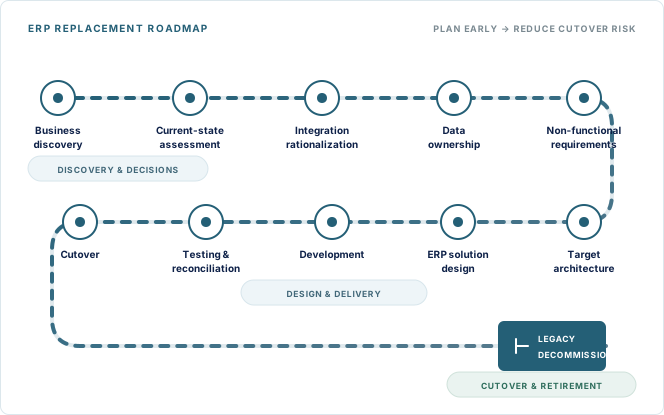
Starting early can also influence how to choose the right ERP system because discovery may reveal requirements for APIs, events, EDI, hybrid integration, multi-entity connectivity, legacy protocols, or near-real-time processing.
Final Takeaway
ERP integration architecture should be planned before a core system replacement moves into detailed implementation. Start by identifying which systems and business processes depend on the current ERP, defining data ownership, and deciding which legacy integrations should survive.
Then select future integration patterns based on business and operational requirements, and design for coexistence, reliability, monitoring, security, testing, cutover, and legacy retirement. A successful ERP replacement creates an integration landscape that is less tightly coupled, easier to monitor, safer to change, and better prepared for future modernization.
Frequently Asked Questions
The following questions address the practical issues teams commonly need to resolve before approving an ERP integration architecture.
How should ERP integrations be tested before cutover?
ERP integrations should be tested across complete business transactions, not only individual interfaces. Teams should validate payloads and transformations, end-to-end process handoffs, failure and retry behavior, performance, security controls, and reconciliation of record counts, financial totals, quantities, statuses, and rejected transactions before production cutover.
Why should ERP integration architecture be planned before ERP replacement?
Legacy systems may depend on ERP through APIs, files, database connections, middleware, scheduled jobs, or custom scripts. Mapping those dependencies early helps teams decide what to retain, redesign, replace, or retire before implementation decisions become difficult to change.
How do you map ERP integrations before replacement?
Create an inventory of every inbound and outbound interface. Record its source, target, business process, data entities, technology, frequency, volume, criticality, ownership, failure handling, and future-state decision.
Should ERP integrations use APIs, middleware, or events?
The right choice depends on the requirement. APIs fit immediate request-response interactions, middleware supports transformation and orchestration, events work well for decoupled business notifications, and queues help preserve transactions during temporary outages.
How can legacy and replacement ERP systems coexist?
An integration layer can route processes to either ERP during phased migration. The transition architecture should define transaction ownership, synchronization, duplicate prevention, reconciliation, and retirement conditions for temporary interfaces.
What should an ERP integration architecture diagram include?
It should show connected applications, interface direction, integration layers, APIs or messaging components, major data domains, external systems, security boundaries, monitoring, and the transition path from the legacy ERP to the replacement environment.