ERP implementation connects departments, tools, and records in one system. It is more than software setup. A good rollout helps teams trust data, manage daily work, and make faster decisions. This guide explains the main steps, timeline, cost factors, team roles, rollout methods, industry needs, and launch checklist in a clear order.
Key Takeaways
- Use one roadmap: Keep ERP scope, owners, timeline, and expected outcomes clear from the beginning.
- Separate overview from execution: Use the table for quick understanding and the detailed section for actual project work.
- Control changes early: Late change requests often create more risk than the ERP software itself.
- Measure after launch: Track adoption, process speed, report quality, and daily control.
What Is ERP Implementation?
ERP implementation means moving a company from separate tools or old systems to one ERP platform. It shows how users, modules, approvals, records, reports, and controls will work in the new system.
For a broader overview of how ERP works, Oracle explains what ERP is and how it supports business operations. A strong implementation gives the ERP a clear operating model before it becomes the daily system of record.
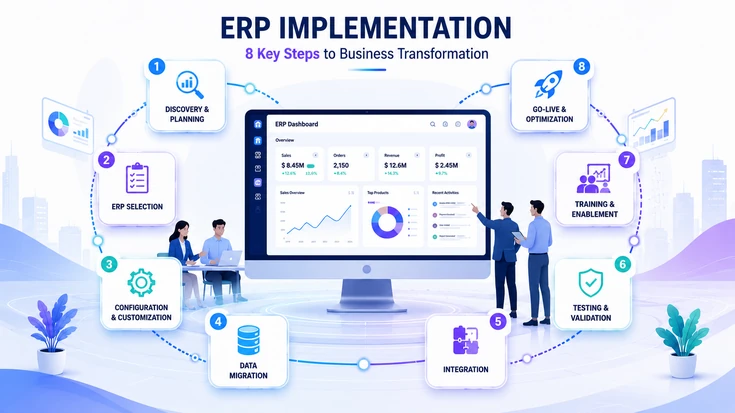
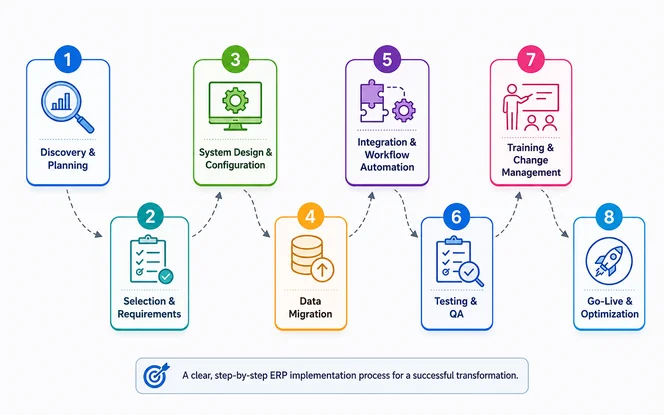
The 8 Steps of the ERP Implementation Process
ERP vendors may group the work in different ways, but most projects follow the same core path. These steps help teams move from business goals to a live system without missing key work.
You can review SDLC Corp’s guide on the ERP rollout process for deeper planning context. A clear order keeps scope, timelines, budget, and owners easier to manage during the project.
Planning & Team Setup
The first step defines why the ERP is needed, what success looks like, and who will deliver it. This becomes the base for the whole project.
- Define clear, measurable business objectives.
- Set a realistic budget with a clear risk buffer.
- Record current processes and pain points.
- Assemble the project team.
- Agree on scope and prevent scope creep.
ERP Selection & Needs List
This step turns business needs into clear system needs. It helps you choose the ERP system and hosting model that fit best.
- Split needs into must-have and nice-to-have items.
- Choose cloud, on-premise, or hybrid hosting.
- Run demos against real business cases.
- Review the full cost of ownership.
- Select your implementation partner.
System Design & Setup
After selection, the chosen ERP is shaped around your work. This includes mapping workflows, setting up modules, defining user roles, and deciding what needs custom work.
- Map future workflows like order-to-cash and procure-to-pay.
- Set up modules, chart of accounts, approvals, and permissions.
- Design reports and dashboards around KPIs.
- Avoid custom work that is not needed.
Data Migration
During data migration, old records and master data move into the new ERP. Before that happens, teams clean, map, and check the data.
- Audit data quality.
- Decide what data to migrate.
- Remove duplicates and align formats.
- Map old fields to the ERP format.
- Move, check, and match the final data.
System Links & Workflow Automation
ERP connects with CRM, e-commerce, EDI, payroll, BI, and other systems at this stage. Workflow automation supports faster approvals, cleaner records, and better handoffs. If CRM is part of your rollout, see how ERP with CRM integration improves customer and daily work data.
- Map required system links.
- Choose native connectors, middleware, or APIs.
- Test data flowing both directions.
- Automate approvals, invoice checks, and stock triggers.
- Record each system link for support.
Testing & Quality Checks
Before launch, testing checks that every process, system link, and report works correctly. Users can depend on the system with fewer surprises.
- Unit testing
- System-link testing
- Full workflow testing
- User approval testing
- Speed and load testing
Training & Change Support
Training helps people use the ERP with confidence. Change support helps teams adjust to the new way of working.
- Give hands-on training by role.
- Use a train-the-trainer model.
- Explain the reason for change early.
- Create quick user guides.
- Check user readiness before go-live.
Go-Live, Support & Improvement
Go-live is when ERP becomes the main system of record. It starts value tracking instead of ending the project.
- First 30 days: close urgent issues fast.
- Days 30–60: fix repeat issues and support users.
- Days 60–90+: measure KPIs and improve workflows.
- Plan more modules, automation, and reports.
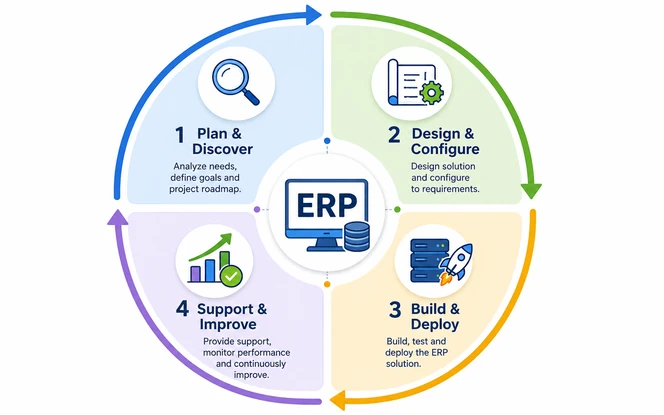
ERP Implementation Life Cycle
The ERP life cycle shows how an early idea becomes a stable way to run work. Three control gates matter most: leadership direction, system readiness, and after-launch results. These gates help project leaders confirm that the ERP is approved, ready, and improving daily work.
ERP Rollout Methods: Big Bang vs Phased vs Parallel
The rollout method defines how you switch from the old system to the new one. This choice affects risk, cost, users, testing, and support. Decide it early.
Microsoft’s guide to enterprise resource planning systems shows how connected ERP platforms support core work. The right approach should match downtime limits, system size, and user readiness.
Big Bang
All users switch to the new ERP on one go-live date. Fast, but highest risk.
Phased Rollout
ERP goes live by module, team, or location. Lower risk, but takes longer.
Parallel Adoption
Old and new systems run together briefly. Safer fallback, but needs more effort.
Need the Right ERP Rollout Strategy?
Compare big bang, phased, and parallel rollout options with an ERP expert. Choose the go-live approach that fits your risk level.
Choose Your ERP Rollout PlanERP Implementation Timeline
A typical ERP project can take several months. Smaller rollouts may finish sooner, while large programs can run for more than a year.
The schedule depends on modules, users, reports, locations, system links, and custom work. A realistic timeline should leave space for reviews, cutover planning, and early support.
| Organization Size | Typical Timeline | Notes |
|---|---|---|
| Small business / SMB | 3–6 months | Usually cloud ERP with limited custom work |
| Mid-market | 6–12 months | Multiple modules and selected system links |
| Large enterprise | 12–24+ months | Multi-company operations, heavy system links, and complex data |
The fastest projects usually have available team leads, clear sign-off rules, clean data, and few late changes. For expert planning support, you can explore SDLC Corp’s ERP consulting services.
ERP Implementation Cost Factors
ERP implementation cost changes with company size, scope, data depth, system links, training, and custom needs. As a planning range, small ERP projects may start around $15K–$30K, mid-size ERP rollouts may fall around $35K–$45K, and large ERP programs can move beyond $50K.
These ranges are estimates, not fixed pricing. The final budget should include software, services, data move, support, change support, integrations, and risk reserves.
Estimated ERP Implementation Cost Range
Use these ranges for early budgeting before a detailed ERP scope review.
| Cost Driver | What to Review |
|---|---|
| Software license or subscription | Users, modules, billing model, and contract length |
| Implementation services | Planning, setup, testing, project control, and support |
| Data migration | Data quality, volume, mapping, checks, and final matching |
| System links | Number of systems, API access, and data-flow complexity |
| Custom work | Needed changes beyond standard ERP setup |
| Training & change support | Training by role, user guides, and go-live support |
| Contingency | Reserve for risks, extra testing, and change requests |
Cost control works best when teams challenge custom requests and launch modules by need. Every paid service hour should have a clear output.
Need Help Planning Your ERP Budget?
Get expert help estimating ERP scope, cost, timeline, system links, and rollout risks before you start. A clearer budget is easier to defend.
Discuss Your ERP ProjectERP Implementation Team Roles
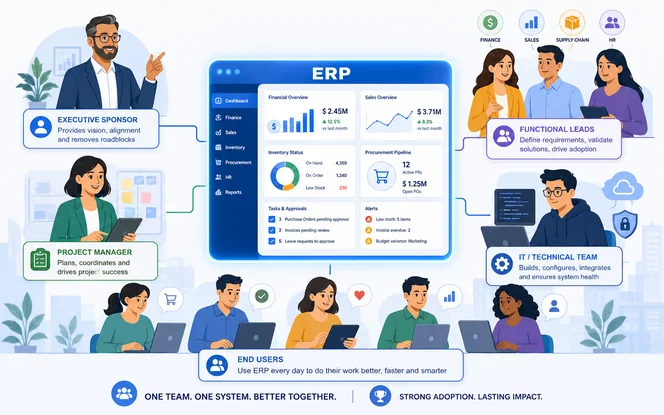
A successful ERP project needs a team that can review work, answer process questions, and remove blockers quickly. Each role should have clear authority, time, and ownership.
Gartner’s resource on enterprise resource planning strategy helps explain ERP as both a technology and business priority. With the right team setup, the project is less likely to become slow, political, or dependent on one person.
| Role | Responsibility |
|---|---|
| Executive Sponsor | Owns the business case, secures budget, removes blockers, and champions the project. |
| Project Manager | Runs the plan, timeline, budget, and updates. |
| Functional Leads | Define needs, check setup, and drive adoption. |
| IT Lead | Owns hosting, security, system links, and data. |
| Implementation Partner | Provides ERP expertise, best practices, setup, and rollout support. |
| End Users | Test real workflows and provide UAT sign-off. |
AI in ERP Implementation: What’s Changing in 2026
AI can support ERP implementation work by speeding up reviews, finding patterns, and helping users. It should not replace team leads or consultants. Used well, it cuts manual review work and helps teams find issues earlier.
IBM’s overview of enterprise resource planning explains how ERP connects core functions and data. The best use of AI is guided help with human review and business context.
ERP Implementation Best Practices
These best practices focus on simple habits that keep the ERP implementation controlled. They help teams avoid confusion, reduce delays, and keep important work visible.
- Keep one decision log for approvals, open questions, and owners.
- Freeze design changes before build work becomes costly.
- Review permissions carefully so users see only what they need.
- Use weekly project updates to remove blockers quickly.
- Document exceptions instead of hiding them inside custom work.
- Protect key users from too many side requests.
- Keep one place for project files and sign-offs.
- Track value metrics after launch, not only task completion.
Common ERP Implementation Challenges
Most ERP problems come from hidden workarounds, weak data quality, access conflicts, and unclear cutover planning. Finding these risks early helps the project team fix issues before they affect go-live.
ERP Implementation Checklist
Use this final checklist before major approvals and launch decisions. It focuses on proof that scope, access, reports, cutover, support, and success metrics are ready.
If you need rollout support from planning to launch, explore SDLC Corp’s ERP implementation services.
- Business case approved by leadership
- Project owner and escalation path confirmed
- Module launch order agreed
- Data migration checked and verified
- User access rules reviewed
- Reports accepted by team leads
- Open risks assigned to named owners
- Cutover and fallback plan reviewed
- Support contacts shared with users
- Success metrics ready for tracking
Ready to Build Your ERP Implementation Roadmap?
Plan your ERP implementation with the right scope, team, timeline, system links, and rollout approach. Move toward launch with fewer surprises.
Get ERP Implementation HelpFor nonprofits operating across countries, local records and donor obligations shape rollout readiness. See NGO ERP implementation.
Conclusion
A successful ERP implementation process depends on clear planning, clean data, strong ownership, realistic timelines, and practical user support. The software matters, but the real value comes from how well the ERP fits daily workflows, reporting needs, approval paths, and long-term business control.
Companies that define scope early, test real workflows, train users properly, and measure results after launch are more likely to get lasting value from ERP. Whether the project uses big bang, phased, or parallel rollout, the goal should stay the same: launch a trusted system that helps teams work faster, reduce manual effort, and make better decisions.
Frequently Asked Questions
These FAQs answer common buyer and team questions in a short, direct format.
ERP implementation usually takes 3 to 6 months for small businesses, 6 to 12 months for mid-size companies, and 12 to 24+ months for large enterprises. The timeline depends on modules, users, locations, integrations, data migration, customization, and approval speed.
ERP implementation cost depends on project size, ERP type, users, modules, data migration, integrations, training, and custom workflows. As a general estimate, small ERP projects may cost around $15K–$30K, mid-size rollouts may cost around $35K–$45K, and large ERP programs can cost $50K or more.
Choose an ERP system by first listing your business needs, must-have modules, budget, user count, reporting needs, and integration requirements. Then compare ERP options based on scalability, ease of use, industry fit, support, security, total cost, and how well the system matches your daily workflows.
The biggest ERP implementation risks include unclear scope, poor data quality, weak user training, late change requests, budget overruns, integration issues, and low team adoption. These risks can be reduced with clear planning, strong ownership, proper testing, and regular communication.
An ERP implementation checklist should include business goals, project owners, budget, module scope, data migration plan, integration needs, user roles, testing steps, training plan, go-live checklist, fallback plan, support contacts, and success metrics. This helps teams stay organized before, during, and after launch.
ERP implementations usually fail because of poor planning, unclear requirements, weak leadership support, messy data, too much customization, limited training, and resistance from users. A project is more likely to succeed when goals are clear, teams are involved early, and workflows are tested before go-live.
ERP implementation can cause temporary disruption because teams need to learn new workflows, review data, test processes, and adjust daily habits. The disruption is lower when the rollout is phased, training is practical, support is available, and users know what will change before go-live.
You may need an ERP system if your teams depend on spreadsheets, disconnected tools, duplicate data, slow approvals, manual reporting, or poor visibility across departments. ERP helps connect finance, inventory, sales, HR, procurement, operations, and reporting in one place.
ERP is worth switching to when your current system slows growth, creates manual work, causes reporting errors, or cannot support multiple teams and locations. The value comes from better data visibility, faster workflows, stronger controls, and fewer disconnected processes.
Prepare your team by explaining why the ERP is being implemented, involving key users early, assigning clear process owners, sharing timelines, giving role-based training, and creating simple user guides. Teams adopt ERP faster when they understand the benefits and get hands-on practice before launch.