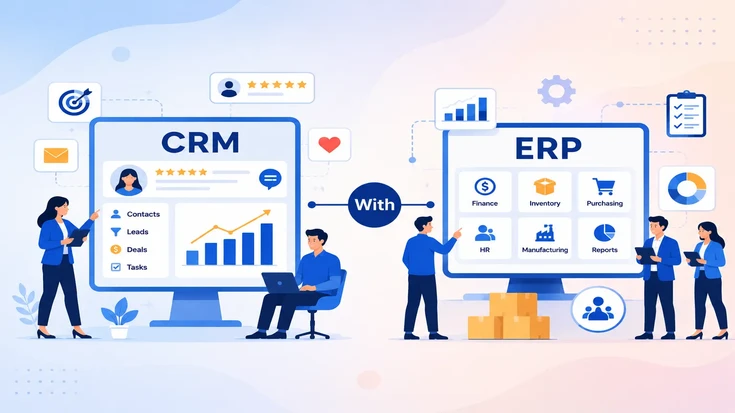
ERP with CRM connects your Enterprise Resource Planning system with your Customer Relationship Management platform. Both systems can then share customer, sales, finance, inventory, and order data in real time.
This setup removes the gap between front-office and back-office teams. Sales can work with accurate stock and pricing data, while finance and operations can see customer context before acting on orders or invoices.
As a result, teams stop relying on manual exports, duplicate entry, and delayed updates. Everyone works from one connected view of customers, orders, invoices, support history, and business performance.
ERP with CRM integration connects sales, finance, inventory, operations, and customer data into one shared workflow. It reduces manual entry, improves reporting, speeds up quote-to-cash, and helps teams work with accurate real-time information.
Key Takeaways
What Is ERP with CRM?
ERP with CRM means linking two core business systems so they do not operate as separate data silos. ERP manages operational records, while CRM manages customer-facing records. For a broader foundation, read what ERP is and how it works across finance, inventory, sales, purchasing, and operations.
In most companies, ERP owns finance, inventory, procurement, manufacturing, and supply chain data. Platforms such as Oracle ERP support these back-office workflows at scale.
CRM handles leads, deals, contacts, customer interactions, and support tickets. Tools like Salesforce CRM help teams manage sales activity and customer relationships.
Why the Connection Matters
A single sales order can touch inventory, invoicing, shipping, and support. Without integration, those updates often sit in different tools and move between teams manually.
With integration, a sales rep can see live inventory and invoice history without leaving the CRM. Finance and support teams can also view customer context without opening multiple systems.
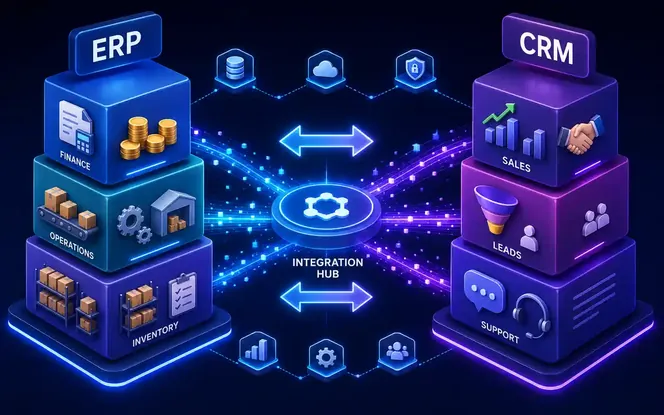
ERP and CRM: What Each System Owns Before Integration
ERP
CRM
Why Businesses Need ERP and CRM Together
Data silos rarely happen on purpose. A sales team chooses a CRM because it fits the sales process. Finance and operations choose an ERP because it supports daily business control.
Both decisions can make sense at first. The problem appears later, when growth makes spreadsheets, email updates, and manual checks too slow to manage.
Common Problems Caused by Disconnected Systems
- Repeated data entry Teams enter the same customer, order, and account details twice, which slows work and creates avoidable errors.
- Inventory guesswork Sales teams quote products without live stock visibility, so delivery promises depend on delayed updates.
- Disconnected finance context Finance sees invoice records but misses sales conversations, customer concerns, and support history.
- Conflicting reports Leaders compare different dashboards because sales, finance, inventory, and service data do not match.
These issues are not always dramatic. They are small daily frictions that slow teams, weaken reporting, and reduce customer confidence.
How ERP with CRM Integration Works
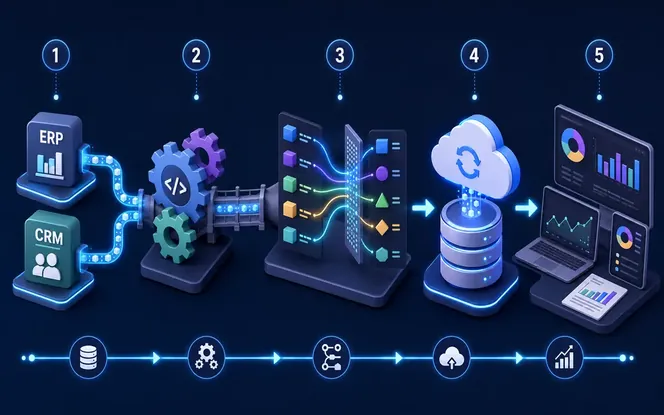
ERP CRM integration moves data between both platforms automatically. It replaces manual exports, spreadsheet uploads, and repeated record updates.
Common ERP CRM Integration Methods
- Native connectors Pre-built connectors are quick to launch, but field mapping and workflow coverage depend on vendor limits.
- Middleware or iPaaS platforms Middleware tools sit between systems and move records through configured rules.
- Custom API integration API builds give more control over sync timing, field logic, exceptions, and business workflows.
- Data validation rules Validation checks required fields, duplicate records, permissions, and data formats before sync.
Key Sync Decisions
Every integration needs clear mapping rules. Teams must decide which CRM fields connect to ERP fields, how often data should sync, and whether updates move one way or both ways.
Conflict handling is just as important. If incoming data is incomplete or duplicated, the system needs rules before it writes anything into production records.
Key Features of ERP and CRM Integration
Not every integration performs well under daily business use. Strong ERP CRM integration needs clear sync logic, error handling, access control, and reporting visibility.
Features That Keep Data Reliable
- Real-time sync Updates move across systems within minutes, so teams work from current customer and order data.
- Single customer record Shared profiles show orders, invoices, account notes, and service history in one view.
- Automated handoffs Closed deals can create orders, shipments can trigger invoices, and approved updates can move automatically.
- Unified reporting Dashboards combine CRM pipeline data with ERP finance, inventory, and fulfillment data.
- Role-based permissions Access rules protect sensitive records while still giving teams the data they need.
- Scalable architecture The integration supports more users, business units, orders, and records as volume grows.
- Sync logging Every sync event is tracked with status, time, record details, and error notes.
- Error alerts Failed records, missing fields, API issues, and duplicate conflicts trigger alerts quickly.
Benefits of Combining ERP with CRM
Combining ERP and CRM gives every department a clearer view of customers, orders, pricing, inventory, and revenue. Teams can make faster decisions because they no longer depend on delayed updates or separate spreadsheets.
First-party experience: In one anonymized B2B distribution integration, SDLC Corp connected CRM quote data with ERP inventory, pricing, and invoice records. The sales team stopped checking spreadsheets before every quote, while operations received cleaner order handoffs with fewer manual corrections.
Faster Sales Workflows
Sales reps spend less time entering data manually. Product pricing, customer history, payment status, and stock availability can appear inside the CRM before a quote is shared.
More Accurate Forecasting
Forecasting becomes more reliable when pipeline data is connected with real financial and inventory records. Leaders can compare expected demand with stock, cash flow, and fulfillment capacity.
Smoother Operations
Orders move from quote to cash faster because fewer manual handoffs are needed. Operations teams can review approved deals, delivery timelines, and fulfillment needs from connected records.
Better Customer Support
Support teams get stronger context when tickets, order history, invoices, and account notes sit in one connected view. This helps them answer questions faster and spot customer risks earlier.
Stronger Team Alignment
When sales, finance, and operations use the same numbers, disputes about orders, invoices, and customer status become easier to resolve.
ERP with CRM Implementation Roadmap
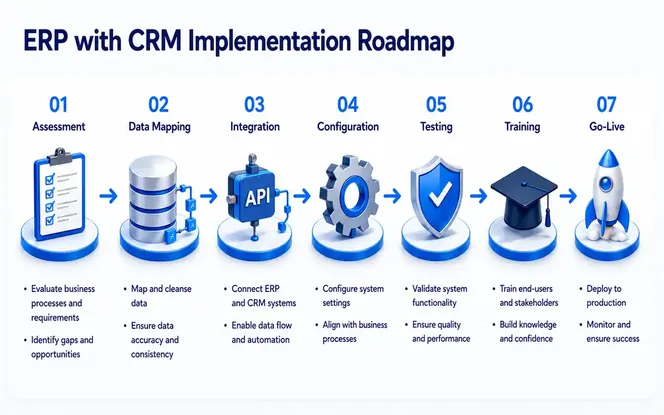
A successful ERP CRM integration needs a clear rollout plan. Following a structured ERP implementation process helps teams define goals, map data, test with real records, train users, and monitor performance after launch.
ERP CRM Integration Steps
| Step | What happens | Why it matters |
|---|---|---|
| 1. Assess systems and goals | Document current systems and the problem integration must solve. | This keeps the project focused. |
| 2. Define data mapping | Decide which fields sync and how conflicts are resolved. | It prevents silent data errors. |
| 3. Pick an approach | Choose native connector, middleware, or custom build. | The wrong approach is costly to unwind. |
| 4. Build and configure | Start with the highest-impact workflow first. | Core flows matter more than edge cases. |
| 5. Test with real data | Use actual records instead of sample data. | Duplicates and mapping issues appear here. |
| 6. Train users | Explain what changed in daily workflow. | Adoption depends on clear training. |
| 7. Roll out in phases | Launch by team, process, or business unit. | This reduces operational risk. |
| 8. Monitor after launch | Track sync issues and edge cases. | Go-live is the start of optimization. |
Why Testing Matters
Many integration projects slip because of technical issues, scope changes, or poor data quality. Real-data testing helps teams find mapping errors before they affect daily work.
Post-launch monitoring is also important. Some sync issues only appear after real users, live records, and daily volume enter the system.
ERP with CRM Use Cases for Modern Businesses
Most ERP CRM integrations support a few common business workflows. These use cases appear across manufacturing, distribution, services, retail, SaaS, and B2B commerce.
Common ERP CRM Use Cases
- Quote-to-cash Approved CRM quotes become ERP sales orders and invoices without duplicate entry.
- Live inventory in sales Sales reps see stock levels, delivery windows, and product availability before promising timelines.
- Support with full context Support agents view order status, billing history, and account details while helping customers.
- Credit checks before close Sales teams review payment history, open balances, and account risk before finalizing deals.
- Demand planning CRM pipeline data feeds ERP forecasting for inventory, purchasing, staffing, and production.
- Field service history Technicians see warranty details, parts availability, assets, and customer history before visits.
- Renewal timing ERP contract dates trigger CRM renewal tasks, reminders, and outreach.
- Customer onboarding Closed deals start ERP setup, billing, fulfillment, or service workflows with clean data.
Best Industries for ERP with CRM Solutions
ERP with CRM can help any business with customer-facing and operational complexity. It usually delivers faster value when many teams touch the same customer record.
Industries That Benefit Most
- Manufacturing ERP software Sales orders connect with production schedules, procurement, inventory, and supply chain updates.
- Wholesale and distribution Sales teams get warehouse visibility, account pricing, delivery timelines, and order history.
- Professional services Client records connect with project delivery, billing milestones, utilization, and account activity.
- ERP for retail and e-commerce Online and offline orders sync with purchase history, inventory, returns, and customer profiles.
- Healthcare and medical supply Account, billing, order, compliance, and service data stay aligned.
- Construction and field services Project records connect with job costing, equipment, invoices, schedules, and communication.
- SaaS and subscription businesses Billing, renewals, usage data, customer health, and support activity work together.
- B2B e-commerce Customer portals connect with bulk orders, pricing rules, invoices, approvals, and account history.
The common thread is complexity. When supply chains, long customer lifecycles, or multi-team workflows are involved, disconnected systems create bigger problems.
For large operational environments, SAP ERP is a useful reference point for finance, supply chain, procurement, and business operations.
ERP with CRM Implementation Cost and ROI
Cost depends on the systems being connected, the integration approach, and the complexity of your workflows. Simple connectors usually cost less than custom API builds. Use the complete ERP cost guide to compare licensing, implementation, migration, integration, training, support, and total cost of ownership.
Cost by Integration Approach
| Approach | Typical cost range* | Typical timeline | Best fit |
|---|---|---|---|
| Native connector | $15,000–$30,000 | 2–6 weeks | Standard workflows and supported platform pairs |
| Middleware / iPaaS | $35,000–$45,000 | 1–3 months | Multiple systems and moderate customization |
| Custom API build | $50,000+ | 3–6+ months | Unusual workflows, high transaction volume, or strict business rules |
*These USD ranges are planning bands. Final cost depends on the ERP, CRM, workflow depth, record volume, data cleanup, security rules, and reporting needs.
Evidence and ROI Benchmarks
Integration ROI depends on scope, but industry data shows why connected systems matter. MuleSoft's 2026 Connectivity Benchmark Report says 95% of organizations face integration challenges, while a 2025 Forrester Total Economic Impact study of MuleSoft reported 426% ROI over three years for a composite organization. Salesforce also shares Forrester TEI research to help teams evaluate potential financial impact before investing in CRM and connected customer workflows.
Useful references: MuleSoft Connectivity Benchmark Report, Forrester TEI of MuleSoft, and Forrester TEI of Salesforce for Consumer Goods.
Common Cost Factors
The main cost items include integration development, data migration, data cleanup, testing, training, and ongoing maintenance. Data cleanup is often underestimated, especially when older records contain duplicates or missing fields.
ROI Expectations
Returns usually come from faster quote-to-cash cycles, fewer manual handoffs, better reporting, and cleaner customer data. Businesses that clean data before go-live often see value sooner.
Well-scoped integrations also reduce rework. When teams trust shared records, they spend less time checking, correcting, and reconciling data across systems.
How to Choose the Right ERP with CRM Solution
The best solution is not always the most feature-heavy platform. It is the setup that fits your systems, workflows, data quality, security needs, and rollout budget. Before selecting an integration approach, compare the main types of ERP systems and review how to choose the right ERP system for your business.
Questions to Ask Before Choosing
- Native connector fit Check fields, workflows, permissions, sync rules, and platform support.
- Future volume Make sure the integration can handle more records, users, orders, catalogues, and business units.
- Workflow flexibility Choose a setup that supports approvals, pricing logic, quote rules, handoffs, and exceptions.
- Security and compliance Review access controls, audit trails, compliance needs, and sensitive record protection.
- Partner experience Select a team that understands your ERP, CRM, industry workflows, and data risks.
- Post-launch support Confirm support for sync errors, API changes, field updates, user issues, and performance.
Suites such as Microsoft Dynamics 365 can help teams evaluate how CRM, ERP, finance, sales, and service capabilities work in a connected environment.
How SDLC Corp Delivers ERP and CRM Integration Services
SDLC Corp builds ERP CRM integrations around the way your teams already work. The goal is to connect systems without forcing users into a generic process.
Discovery and Integration Design
Our team starts with ERP consulting services, discovery, and process mapping. We review your ERP, CRM, data flow, business rules, and the exact problem the integration needs to solve before designing the right integration approach.
After that, we design the right approach. Depending on your needs, this may be a native connector, middleware setup, or custom API integration.
Testing, Rollout, and Support
Data migration and cleanup happen before go-live, so the integration starts with reliable records. Implementation then rolls out in phases with real-data testing at each step.
After launch, we monitor sync issues and adjust the integration as your systems, users, and business needs change. Integration work does not end at go-live.
Practical delivery note: A strong ERP CRM integration should include clean field mapping, real-data testing, sync monitoring, role-based access, and a phased rollout plan.
If you are starting fresh or fixing a fragile setup, SDLC Corp can help design an ERP CRM integration built around your operations.
Need ERP and CRM integration built around your workflow?
Share your ERP, CRM, data flow, and business process. SDLC Corp can help you scope a practical integration plan with clean mapping and phased rollout.
Talk to an ERP CRM Integration ExpertFAQ
Common ERP CRM Integration Questions
These answers cover the main questions businesses ask before connecting ERP and CRM systems.
No. Smaller businesses can also benefit because manual reconciliation takes a larger share of a small team's time.
Timeline depends on scope. A native connector can take weeks. A custom integration across several departments may take months.
Usually not. Native connectors, middleware, and custom APIs can connect existing systems without replacing either platform.
The biggest risk is syncing poor-quality data. Duplicate records, outdated fields, and missing values should be cleaned before go-live.
ROI depends on data quality, scope, adoption, and workflow impact. Most value comes from less manual work, faster handoffs, cleaner reporting, and better customer visibility.