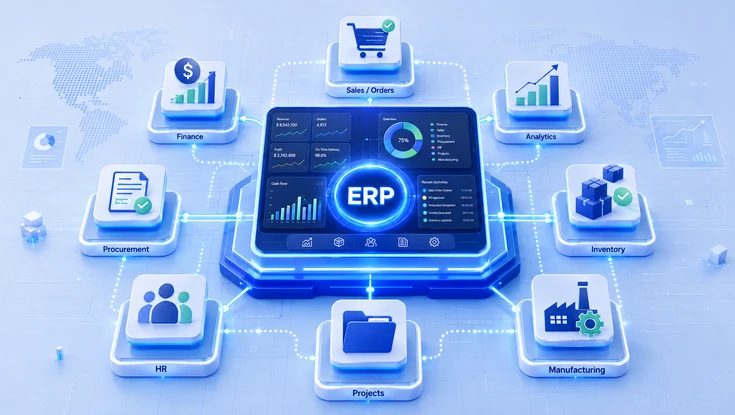
ERP modules create real business value when finance, procurement, inventory, sales, manufacturing, workforce, and project management operate through shared data, standardized controls, and coordinated workflows.
This guide explains how the main ERP modules work together and helps organizations define the right scope, reduce implementation complexity, and choose the modules that support long-term business growth.
Executive perspective
Understanding how ERP modules interact helps organizations define the right ERP scope, reduce unnecessary implementation complexity, and make better software selection, pricing, and implementation decisions before choosing an ERP platform.
What Are ERP Modules?
At their core, ERP system modules are connected business capabilities within an ERP (Enterprise Resource Planning) platform, designed to support end-to-end business processes rather than individual departments. For a broader foundation, read our complete guide to what ERP is. Common modules include finance, procurement, inventory, order management, manufacturing, human resources, projects, and analytics.
However, depending on the platform and licensing model, many ERP vendors allow selected modules to be licensed or implemented separately while remaining part of an ERP integration environment. Their greatest value comes from sharing governed master data, transaction data, approval workflows, business rules, security roles and access controls, and reporting structures through a common platform, data model, or integration architecture.
Therefore, selecting modules based on business processes and dependencies helps organizations reduce overlapping functionality, unnecessary licensing, integration complexity, and avoidable implementation costs.
How ERP terminology connects
ERP Modules vs. Features, Functions and Components
Understanding these terms helps buyers compare ERP platforms more effectively.
- Module A broad business capability, such as Finance.
- Function A specific business activity within a module, such as Accounts Payable.
- Feature A capability that supports a function, such as three-way invoice matching.
- Component A technical building block such as a workflow engine, reporting service, or integration tool.
- Architecture The framework connecting modules, data, users, components, and external systems.
Because ERP vendors use these terms differently, buyers should evaluate process coverage, data requirements, integration needs, reporting capabilities, and business controls rather than product terminology alone.
Main ERP Modules and Their Functions
Although ERP vendors package and name modules differently, the business processes they support remain broadly consistent. You can also compare the main types of ERP systems and deployment models.
Nine commonly implemented modules
Each panel connects a business problem with capabilities, an example, and measurable impact.
Finance / Financial Management
For example, delayed reporting and manual reconciliation reduce visibility into cash flow and business performance.
In addition, the module covers general ledger, accounts payable and receivable, fixed assets, multi-currency accounting, tax management, and financial reporting.
After a supplier invoice is validated against the purchase order and goods receipt, Accounts Payable updates the General Ledger automatically.
As a result, businesses achieve a faster financial close, stronger controls, and more reliable reporting.
Procurement
Meanwhile, decentralized purchasing and inconsistent supplier management increase costs and compliance risks.
Consequently, the module supports purchase requisitions, purchase orders, supplier management, sourcing, approvals, and three-way matching.
A purchase request triggers supplier evaluation, and payment is released only after matching the order, receipt, and invoice.
Therefore, businesses gain better spend visibility, purchasing control, and supplier governance.
Inventory Management
Similarly, poor inventory visibility leads to shortages, excess stock, and inaccurate planning.
To address this, the module provides real-time tracking, replenishment rules, lot and serial traceability, valuation, and multi-location inventory.
A confirmed sales order allocates available inventory and can trigger replenishment planning where required.
As a result, businesses gain better inventory accuracy, lower carrying costs, and improved product availability.
Order Management
By contrast, disconnected sales, fulfillment, and billing processes create delays and operational errors.
Therefore, the module supports order capture, pricing, fulfillment tracking, returns, billing, and order-to-cash visibility.
Customer orders progress through fulfillment and billing using workflows shared across sales, inventory, logistics, and finance.
Ultimately, this creates a more consistent customer experience and improved order accuracy.
Manufacturing and Production Planning
For instance, inaccurate production planning creates material shortages, idle resources, and delayed deliveries.
In response, the module supports bills of materials, MRP, production scheduling, capacity planning, quality management, and shop-floor execution.
A manufacturing order checks material availability and capacity before scheduling purchasing or production activities.
Consequently, businesses achieve better production coordination and improved resource utilization.
Human Capital Management (HCM)
Likewise, workforce information spread across multiple systems slows reporting and administration.
Therefore, the module brings together employee records, recruitment, attendance, leave, performance, workforce analytics, and payroll integration.
Workforce metrics update automatically as employee, attendance, and payroll information changes.
As a result, organizations gain more consistent workforce records, compliance, and operational reporting.
Project Management
In comparison, managing projects outside ERP reduces visibility into cost, utilization, billing, and profitability.
Accordingly, the module includes resource planning, project costing, time and expense management, billing, and profitability analysis.
Approved timesheets update project costs and client billing while supporting revenue recognition activities.
Therefore, teams gain better financial oversight and improved project performance.
Analytics and Reporting
Furthermore, decisions based on disconnected spreadsheets often rely on outdated information.
To improve visibility, the module provides dashboards, KPI monitoring, operational reporting, drill-down analysis, and cross-functional reporting.
Executive dashboards update as finance, inventory, procurement, or sales transactions are processed.
As a result, leaders make faster and more consistent decisions using current operational data.
Customer Relationship Management (CRM)
Finally, separating customer records across sales, marketing, and service creates inconsistent experiences.
For this reason, the module combines lead management, opportunities, service, segmentation, marketing, and customer history.
Whether native or integrated, customer interactions remain connected to orders, invoices, and service history.
Consequently, teams gain a unified customer view across commercial and service functions.
Core ERP Modules Working Together
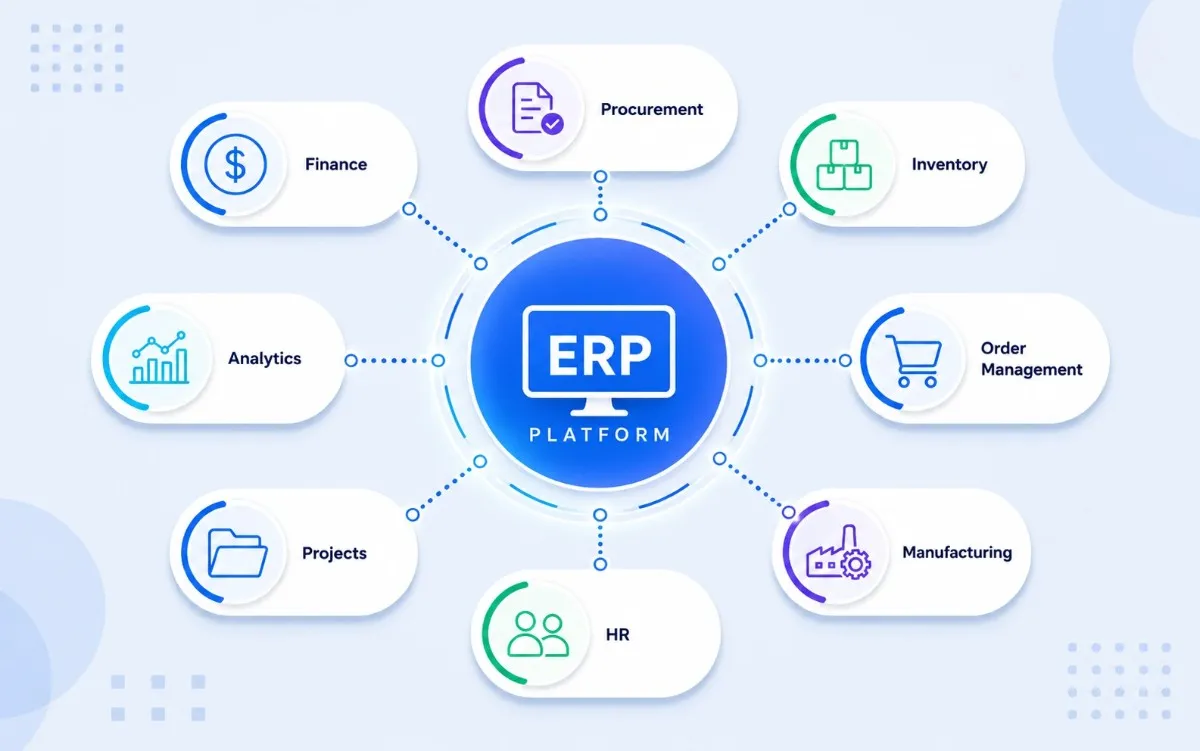
Use this image to show finance, procurement, inventory, sales, manufacturing, HR, projects, and analytics connected through one ERP platform.
Define the right ERP module scope before implementation
Map your critical processes, data dependencies, integration requirements, and rollout priorities with an experienced ERP consulting team.
Optional and Industry-Specific ERP Modules
Importantly, not every ERP system module should be implemented. Prioritize capabilities based on industry requirements, regulatory obligations, operational complexity, reporting needs, and growth objectives. SAP provides a useful overview of modern ERP capabilities for further reference.
Retail
POS integration, merchandising, omnichannel inventory, store operations, and unified order visibility.
Construction
Project costing, subcontractor management, site procurement, progress billing, and project controls.
Food Manufacturing
Lot traceability, quality management, expiry control, production compliance, and product recall management.
Energy & Utilities
Asset management, preventive maintenance, field service, regulatory reporting, and workforce management.
In addition, industry-specific capabilities may be delivered as native ERP software modules, separately licensed add-ons, marketplace extensions, or third-party integrations. Before selection, confirm that each capability supports a defined operational or compliance requirement rather than adding unnecessary implementation cost and complexity.
How ERP Modules Work Together
In practice, integrated ERP modules connect business processes through shared data, common rules, and standardized workflows, eliminating duplicate entry and creating a single source of truth. IBM also explains how enterprise resource planning connects core operations.
Customer Order
A sales opportunity or customer order is created.
Validation
Pricing, credit, and stock availability are checked.
Inventory
Available stock is allocated across all locations.
Supply Planning
Procurement or production starts if supply is short.
Fulfillment
Warehouse and logistics teams process the shipment.
Finance
Receivables and accounting entries are then posted.
Recognition
Revenue recognition rules are applied where needed.
Analytics
Revenue, margin, and fulfillment KPIs are updated.
The same principle applies to procure-to-pay, record-to-report, hire-to-retire, and plan-to-produce workflows. These relationships should be mapped before configuration to prevent downstream issues with master data, approvals, integrations, reporting, testing, and internal controls.
Integrated ERP Workflow
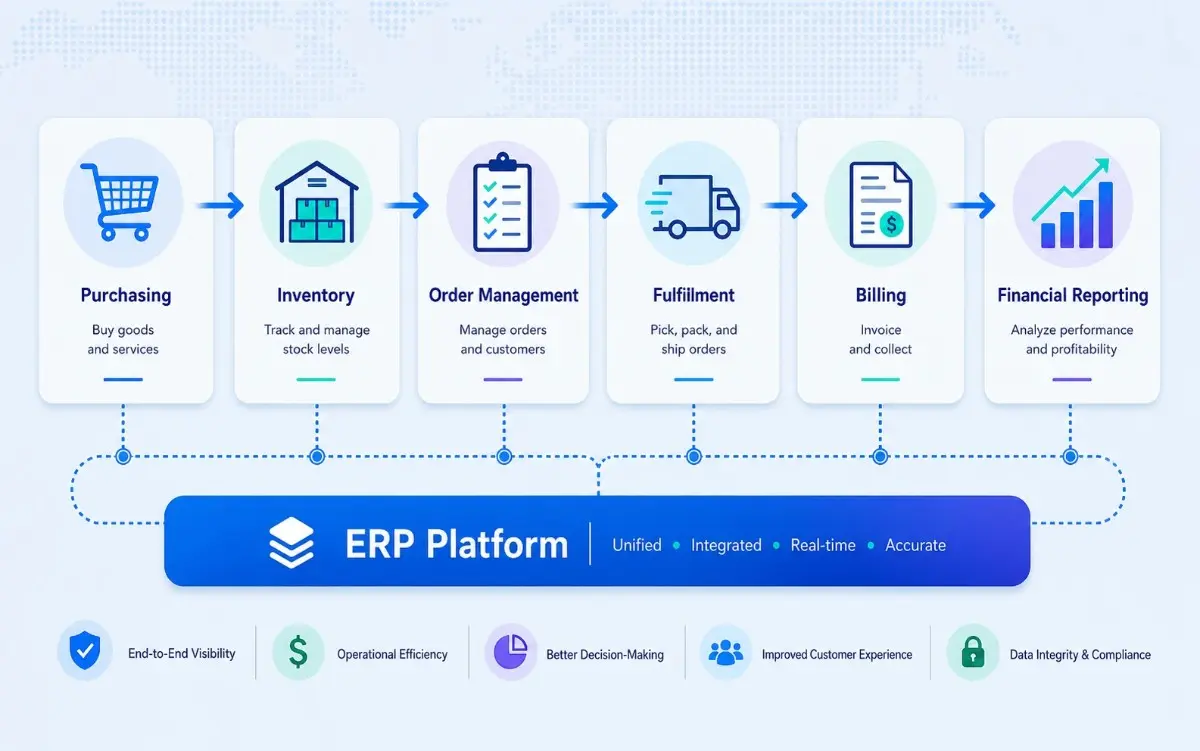
Use this image to explain how business data moves across purchasing, inventory, order management, fulfillment, billing, and financial reporting.
Benefits of Integrated ERP Modules
As a result, when ERP modules share a common data model, they improve coordination, governance, and decision-making across the enterprise.
Data Quality
Cleaner master data, fewer duplicate records, and more consistent information across teams.
Process Control
Standardized approvals, clear process traceability, and stronger compliance across teams.
Operational Visibility
Earlier insight into stock shortages, committed spend, and operational bottlenecks.
Decision Support
Shared KPIs, cross-functional reporting, and more reliable forecasting across teams.
Ultimately, the greatest advantage comes from treating ERP as an integrated business platform rather than a collection of disconnected applications. Outcomes still depend on implementation quality, data governance, and user adoption.
How to Choose the Right ERP Modules
Therefore, ERP module selection should begin with business processes and operational priorities rather than a long list of software features. Oracle’s ERP fundamentals and business benefits guide offers additional context for evaluating platform scope.
Assess Processes and Pain Points
Identify critical workflows, manual tasks, process bottlenecks, and existing system limitations.
Define Functional Requirements
Document essential functions, reporting needs, approvals, compliance requirements, and user roles.
Map Business Relationships
Understand master data, integrations, reporting flows, and cross-functional dependencies.
Validate Readiness
Evaluate data quality, organizational readiness, implementation risk, and expected business value.
Prioritize Rollout
Plan a phased implementation based on business priorities, process maturity, and adoption capacity.
ERP Module Selection Framework
However, implementation priorities vary by industry. Manufacturing organizations often prioritize finance, procurement, inventory, planning, and production. Professional services usually focus on finance, projects, resources, and billing. Retail organizations typically emphasize inventory, order management, procurement, POS integration, and finance. The optimal rollout should be validated through a structured ERP assessment and ERP implementation process.
Build a phased ERP roadmap around measurable business priorities
Consequently, a structured assessment helps identify the modules to implement now, the capabilities to phase later, and the dependencies that must be resolved first.
ERP Module Pricing Factors
Importantly, ERP implementation cost is influenced by more than software licensing. Integrations, data readiness, implementation effort, and long-term operations can have a greater impact on total investment. Microsoft also shows how cloud ERP capabilities can be structured across business functions.
| Pricing Factor | What Influences Cost |
|---|---|
| Licensing | Modules, editions, user roles, and user counts. |
| Scale & Usage | Transaction volume, legal entities, locations, and cloud consumption. |
| Implementation | Configuration, customization, integrations, data migration, and testing. |
| Organizational Readiness | Training, change management, process ownership, and user adoption. |
| Ongoing Operations | Support, maintenance, third-party applications, environments, and continuous improvement. |
A lower license price does not always mean a lower ERP implementation cost
For example, vendors may use module-based, suite-based, user-based, consumption-based, or enterprise pricing. Customization, integrations, process redesign, and data migration can materially change total cost.
How SDLC Corp Helps Implement ERP Modules
Above all, successful ERP implementation depends on aligning technology with business processes, data readiness, and user adoption, not simply deploying software. Review our detailed ERP implementation process and rollout stages to understand the complete delivery lifecycle.
Assess
Analyze business processes, define module requirements, map dependencies, and validate solution architecture before implementation.
Implement
Configure modules, migrate data, integrate systems, test workflows, train users, and deliver phased rollouts with minimal disruption.
Optimize
Monitor performance, improve adoption, refine processes, and expand ERP capabilities as organizational needs evolve.
In addition, SDLC Corp’s experienced ERP consultants and implementation specialists deliver secure cloud, on-premises, and hybrid ERP solutions across finance, healthcare, manufacturing, retail, logistics, government, and education. Explore our ERP consulting services for strategy, selection, and implementation support. Delivery is aligned with enterprise security and compliance requirements.
Turn ERP modules into connected business outcomes
Work with SDLC Corp to assess your requirements, select the right modules, and implement a scalable ERP platform with lower risk.
NGOs and nonprofits need fund, donor, grant and programme capabilities alongside common ERP modules. See NGO ERP features.
Conclusion
Ultimately, successful ERP implementations are built on business strategy, not the number of modules deployed. Long-term value comes from selecting the right capabilities, aligning them with critical business processes, and connecting them through reliable data, standardized workflows, and effective governance.
Therefore, before comparing vendors or configuring software, organizations should define process requirements, data dependencies, integration priorities, and implementation objectives. A structured, business-first approach helps reduce implementation risk, improve user adoption, and build an ERP platform that can adapt and scale as business needs evolve.
FAQs
Generally, the most commonly implemented ERP modules include finance, procurement, inventory management, manufacturing, order management, and analytics. The right combination depends on your business processes, industry requirements, and operational goals.
First, evaluate your business processes, functional requirements, data dependencies, and implementation priorities. Choose modules that address critical operational challenges rather than purchasing every available capability.
In simple terms, ERP modules are major business areas such as finance or inventory. Functions are specific business activities within a module, while features are tools or capabilities that support those functions.
Typically, ERP implementation costs vary based on the number of modules, customization, integrations, data migration, user training, and deployment complexity. Implementation services often represent a significant portion of the overall investment.
Yes. In fact, many organizations implement ERP modules in phases, starting with core modules such as finance and procurement before expanding to inventory, manufacturing, CRM, or analytics as business needs evolve.