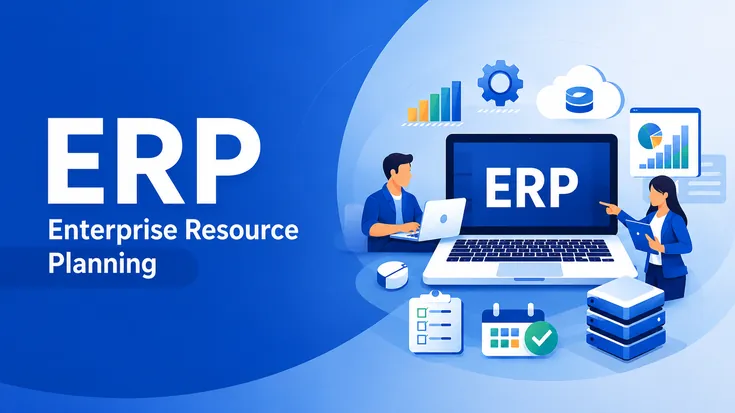
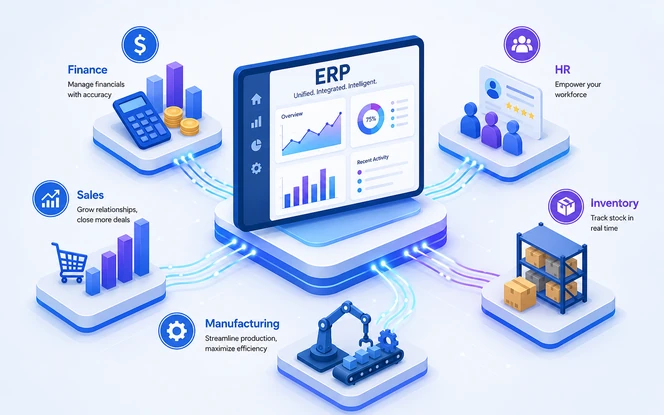
What is ERP? ERP stands for Enterprise Resource Planning. In simple terms, ERP software connects finance, inventory, HR, sales, purchasing, production, and reporting in one shared system.
As a result, teams work from the same data. Therefore, they spend less time checking spreadsheets and more time making clear decisions.
Key Takeaways
What Is ERP?
ERP stands for Enterprise Resource Planning. In practice, this software connects finance, inventory, HR, sales, purchasing, production, and reporting into one shared system instead of disconnected tools.
For example, a manufacturer can use ERP to match production plans with stock. In the same way, a distributor can keep warehouse counts accurate across locations. Meanwhile, a growing retailer can stop checking several sales reports by hand every week.
At SDLC Corp, we work as an ERP consulting services provider and system integration firm.
In addition, our team implements Odoo and custom-built ERP systems for manufacturing, distribution, and public-sector clients. We also advise on platforms we do not sell, including SAP, Oracle, NetSuite, and Microsoft Dynamics.
Therefore, this guide focuses on what happens during and after setup, not on a product pitch.
ERP Meaning in Simple Words
ERP meaning becomes easier to understand when you break Enterprise Resource Planning into three simple parts. However, it is not only a software term. Instead, the idea explains how ERP manages people, money, stock, time, workflows, and data from one connected system.
A simple way to picture it is to think of a company as a body. For example, sales is the mouth, finance is the bloodstream, inventory is the muscle, and HR keeps the whole thing staffed and moving.
Without ERP, each part works from its own separate set of information. With ERP, they all read from the same nervous system, which means one shared source of data everyone acts on in real time.
Why Is ERP Software Used?
Most organizations do not buy ERP on day one. At first, spreadsheets, small accounting tools, inventory apps, and manual reports may feel easy. However, as the company grows, each team starts keeping its own data. This creates confusion.
For example, finance may close books with numbers copied from many tools. Meanwhile, inventory teams may see stock that does not match the system. At the same time, sales may promise delivery dates without real stock data. As a result, these gaps can lead to late orders, weak forecasts, repeated entry, and missed chances.
ERP helps by bringing those disconnected activities into one shared system. For example, a sales order can update stock. Then, purchasing can plan the next order. After that, finance gets cleaner data for reports.
Because of this, teams spend less time checking numbers by hand and more time making decisions.
In short, ERP removes the gap between real work and system data. That gap often causes errors, missed orders, slow reports, and poor choices. Therefore, a good ERP gives growing teams better control, clearer views, and a stronger base for growth.
How ERP Works in an ERP System
An ERP system works by keeping ERP data in one shared place and then connecting each function through modules. Instead of finance, inventory, HR, sales, and purchasing using separate records, every team works from the same updated information. Microsoft also explains how ERP connects operational workflows across teams.
When one action happens in the system, the next related action can happen automatically. For example, a sales order can reduce available stock, create a delivery task, update revenue records, and help purchasing decide when to reorder. Because of that, ERP removes repeated manual entry and keeps daily operations connected.
Simple ERP workflow diagram
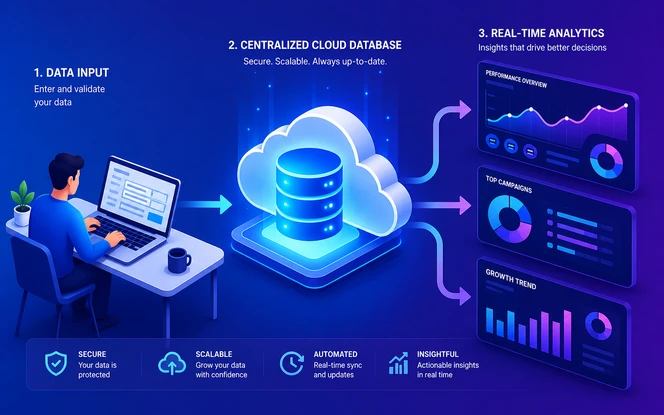
As a result, a manager can pull a real-time view of cash position, open orders, inventory value, and pending tasks without waiting for someone to compile reports from four different sources.
Common ERP Modules and What They Do
Most ERP platforms are built from core modules. Each module handles one important operational area. However, the real value comes when all modules share the same data. Oracle's guide to ERP software modules also shows how finance, purchasing, project management, risk management, and supply chain functions can work together.
Not every organization needs every ERP module on day one. For example, a growing company can start with finance, inventory, and purchasing. Later, it can add CRM, HR, manufacturing, or reporting as the process becomes more mature.
Key Features of ERP Software
The main features help teams work faster, reduce manual tasks, and keep system data accurate. However, a good ERP system should not only store information. It should also connect workflows, protect access, and give managers a clear view of daily operations.
In addition, these features are useful across finance, inventory, HR, sales, purchasing, and reporting. As a result, ERP can move scattered records into one connected operating system.
ERP Benefits of ERP Software
In practice, ERP gives teams a cleaner way to manage daily work. Instead of using separate tools and manual reports, teams work from one connected system with current data.
Also, these benefits become clearer as ERP scope adds users, locations, products, vendors, and teams. Therefore, ERP helps reduce mistakes, improve planning, and grow without losing control.
A single source of truth
As a result, departments use the same ERP data, so finance, sales, inventory, and operations stop using different numbers.
Fewer manual errors
For example, data is entered once and used across the system, which reduces mistakes from copying and retyping.
Faster, more accurate reporting
Therefore, managers can review live finance, inventory, sales, and performance reports without waiting for manual data collection.
Better inventory and production view
Also, teams can see available stock, reserved stock, warehouse movement, and production needs in one connected view.
Scalability without re-platforming
In addition, new users, branches, warehouses, product lines, and modules can be added without rebuilding the full system.
Audit and rules readiness
Finally, shared records, approval logs, and role-based access make audits easier than chasing data across separate systems.
Bottom line: ERP helps growing companies replace scattered data with clear processes, cleaner reporting, and stronger control over everyday ERP operations.
Types of ERP Systems
ERP systems can be set up in different ways based on budget, security needs, custom work, and control. However, the right choice is not only about software cost. It also affects speed, rules, updates, ownership, and long-term support.
Cloud ERP
For example, cloud ERP runs on the vendor's servers and opens in a browser. Usually, it is billed as a subscription. Because of this, it is popular for faster setup, easier updates, and lower upfront IT cost.
On-premise ERP
Meanwhile, on-premise ERP runs on servers owned and managed internally. It costs more at the start. However, it gives stronger control over custom work, data location, security rules, and internal IT setup.
Hybrid ERP
In contrast, hybrid ERP keeps some work on local servers and moves other work to the cloud. This model works well when a company has old systems, rules to follow, or a step-by-step upgrade plan.
Open-source ERP
Additionally, open-source ERP, such as Odoo, gives access to the code. Because of this, teams can self-host and change more features. It can cut license cost, but it still needs a skilled partner for setup, updates, security, and support.
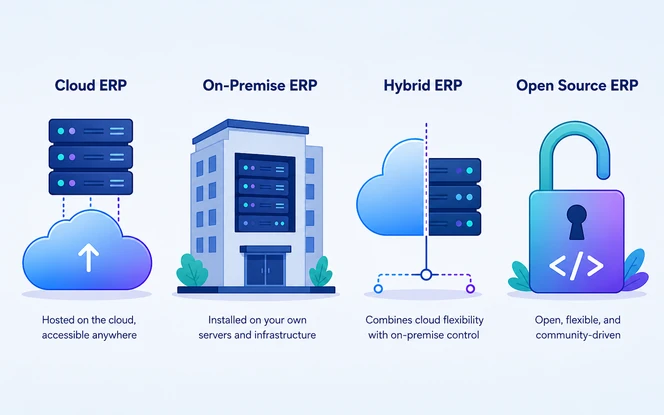
Quick tip: Use cloud ERP when speed and simple setup matter most. However, use on-premise ERP when control and rules are the main concern. For a step-by-step move, hybrid ERP can work well. Finally, open-source ERP fits teams that need more freedom and less vendor lock-in.
ERP Examples by Industry
In every industry, ERP works differently because each sector has its own workflows, controls, and reporting needs. The examples below show how ERP supports real operations without forcing every company into the same process.
Manufacturing
In manufacturing, ERP connects production scheduling, bills of materials, shop-floor tracking, quality checks, and finished goods movement. As a result, teams can plan work with better accuracy.
Retail & E-commerce
For retail and e-commerce, ERP keeps online orders, POS sales, warehouse stock, returns, and fulfillment updates connected across digital and physical sales channels.
Wholesale & Distribution
Meanwhile, distribution teams use ERP to manage multi-location inventory, vendor purchasing, warehouse movement, pricing, order picking, and delivery coordination from one system.
Logistics & Supply Chain
In logistics, ERP supports shipment planning, freight view, route coordination, partner data, and daily reporting across a connected supply network.
Healthcare & Life Sciences
For healthcare and life sciences, ERP supports regulated inventory, asset tracking, purchasing controls, rules records, and better visibility across equipment, supplies, and departments.
Construction
Finally, construction teams use ERP for project costing, subcontractor records, material planning, equipment tracking, approvals, and job-site expenses in one controlled workflow.
Across SAP, Oracle, NetSuite, Microsoft Dynamics, Odoo, and Zoho, the platform matters less than whether the ERP is configured around your industry's actual workflow.
ERP vs CRM vs MRP: What Is the Difference?
ERP, CRM, and MRP are connected software systems. However, each one solves a different problem. ERP manages the main operational system, CRM manages customer work, and MRP helps with production planning.
When these systems need to work together, our ERP with CRM system link guide explains how sales, finance, inventory, and customer data can stay aligned.
As a result, many growing companies use all three together so sales promises, production plans, stock levels, and finance records stay aligned.
| Comparison Point | ERP | CRM | MRP |
|---|---|---|---|
| Main purpose |
|
|
|
| Primary users |
|
|
|
| Key data handled |
|
|
|
| Best for |
|
|
|
| System outcome |
|
|
|
| How it connects |
|
|
|
Simple rule: Use CRM when the main issue is customer management. Use MRP when the issue is manufacturing material planning. Use ERP when finance, operations, inventory, purchasing, HR, sales, and production need one connected system.
When Is ERP Needed?
Usually, ERP is needed when two or more of these signs are true. Each sign points to the same problem: your teams need one connected system instead of scattered tools and manual checks.
At this point, the cost of errors, missed orders, and slow choices can be higher than the ERP project itself.
ERP Implementation Process
The ERP implementation process explains how an ERP solution moves from planning to launch. Usually, a standard setup follows five phases:
| Phase | What Happens | Typical Focus |
|---|---|---|
| 1. Discovery & process mapping | Documenting current workflows, data sources, approvals, and informal workarounds | Requirements, current-state mapping |
| 2. System design & setup | Mapping those processes to the ERP's modules and workflows | Setup, not custom code, where possible |
| 3. Data migration | Moving historical records from legacy systems into a clean, structured format | Data cleansing and validation |
| 4. Testing & training | Validating workflows end-to-end and training the people who'll use it daily | User acceptance testing |
| 5. Go-live & support | Launching, then stabilizing through the first few close cycles | Hypercare and issue triage |
In most cases, a standard cloud ERP launch takes 3–6 months. However, a large custom project can take a year or more. For more detail, see ERP Implementation Process: Steps & Timeline and ERP Implementation Services.
How Much Does ERP Cost?
In most projects, ERP cost changes by company size, module scope, data migration, system links, custom work, training, and support needs.
| Company Size | Total Cost Range | Main Cost Driver |
|---|---|---|
| Small deployment | $15,000 – $30,000 | Licensing, setup, and basic custom work. |
| Mid-market | $35,000 – $45,000 | Module count, system links, data migration, and workflow complexity. |
| Enterprise deployment | $50,000+ | Setup, change management, security, rules, and multi-team rollout. |
Cost note: Licensing is rarely the biggest line item. In most cases, setup, data migration, custom work, training, and post-launch support cost more than the software itself. For an itemized breakdown and calculator, see ERP Setup Cost or the broader ERP Cost Guide.
Common ERP Challenges and Mistakes
- Underestimating process change. ERP forces standardization. As a result, departments running on informal workarounds often resist the new workflow more than the software itself.
- Poor data migration planning. In many projects, moving inconsistent legacy data into a structured new system becomes the most underestimated task.
- Scope creep during custom work. Every extra custom field adds cost and extends the timeline. Therefore, projects that stay on budget lock scope before development starts.
- Insufficient training. Even a well-configured ERP can fail if users return to spreadsheets because the new workflow was not explained clearly.
For more detail, read Why ERP Setups Fail before signing any vendor statement of work.
How to Choose the Right ERP System and ERP Solution
Choose ERP by matching the system to your industry, budget, setup model, process needs, and setup support. Ideally, the right ERP should fit current workflows and still support future scale. For a wider market view, Forrester's ERP solutions landscape can help compare how ERP platforms are positioned in 2026.
Start with your industry workflow
For instance, manufacturing needs production depth, retail needs connected stock and sales, and service firms need project and resource control. Therefore, shortlist ERP platforms that already support your daily operations.
Decide the setup model early
Next, choose cloud, on-premise, or hybrid based on control, security, update needs, budget, and long-term maintenance. This decision shapes cost, speed, access, and future flexibility.
Plan the full project budget
Also, do not judge ERP by license cost only. Include setup, data migration, system links, training, testing, support, and change management before comparing vendors.
Limit custom work to real needs
Therefore, standard workflows usually reduce risk and launch faster. Custom work should be used only when it protects a critical process, rules requirement, or operational advantage.
Check the setup partner
Finally, the partner affects adoption, timeline, support quality, and long-term success. Before choosing one, review their track record with similar ERP scope, industry workflows, and system complexity.
Quick rule: The best ERP is not always the biggest platform. It is the system your team can adopt, your budget can support, and your operations can scale without adding more manual work.
Future of ERP: AI, Automation, and Cloud ERP
ERP is moving toward smarter workflows, faster reporting, and more flexible cloud delivery. Gartner's enterprise resource planning research also highlights why ERP remains central to modern technology planning. Even so, the goal is still simple: keep every team working from one connected source of ERP data.
Embedded AI inside ERP
For example, forecasting, anomaly detection, and automated data entry are moving into core ERP platforms across SAP, Oracle, Microsoft, and Odoo.
Continued cloud ERP migration
Meanwhile, more teams are choosing cloud ERP because it lowers upfront setup, simplifies updates, and helps growing teams scale without heavy IT setup.
AI agents for routine workflows
In addition, invoice matching, purchase approvals, and basic reporting are increasingly handled by AI agents, so teams can focus on exceptions and decisions.
Still, the main idea does not change. ERP remains one connected system instead of many separate tools. In addition, AI and cloud make it faster to act on live ERP data. For more detail, see AI in ERP: 2026 Trends.
How SDLC Corp Helps With ERP Consulting and Setup
SDLC Corp helps with ERP selection, implementation, migration, integration, and support without forcing one vendor-first answer. First, we focus on the process, data, system links, and long-term fit before recommending a platform.
In addition, we implement Odoo and custom-built ERP systems for manufacturing, distribution, and public-sector clients. We also advise on platforms we do not sell. That split matters because our recommendation is not tied to only one software product.
Compare SAP, Oracle, NetSuite, Microsoft Dynamics, Odoo, and custom ERP options based on workflow fit, cost, control, and future scale.
Plan, configure, customize, test, and launch Odoo modules for finance, inventory, sales, purchasing, manufacturing, and reporting teams.
Build ERP workflows when packaged software cannot match your approvals, data rules, system links, user roles, or industry-specific process.
Move clean data from legacy tools, connect ERP with existing apps, stabilize go-live, and support users after launch with clear ownership.
If you are evaluating whether ERP fits your workflows, have that conversation before signing with any vendor. It helps avoid the wrong platform, weak data planning, and expensive rework after launch.
Talk to our ERP consulting team
Get help with ERP selection, setup planning, migration, system link, and long-term support.
Talk to an ERP Consultant →NGOs extend core ERP records with fund restrictions, donor conditions and programme outcomes. See what is NGO ERP.
Conclusion
Overall, ERP is not a single product. Instead, it is a software category built around one simple idea: every team should work from the same data. The right platform, modules, and setup depend on your industry, size, and growth plan.
Because of this, the vendor selling the software is not always the best source for an unbiased answer.
Start by finding which ERP problems apply today. Then, compare ERP options against those problems. As a result, this becomes a better starting point than any long feature list.
FAQs About ERP
Enterprise Resource Planning software connects core functions into one shared ERP system.
No. Accounting software handles finance only. ERP includes finance plus inventory, HR, manufacturing, and purchasing, all sharing one database.
SAP is a specific ERP vendor one brand within the ERP software category, alongside Oracle, NetSuite, Microsoft Dynamics, and Odoo.
A standard cloud ERP launch often takes 3–6 months. However, a large custom ERP project can take a year or more.
Yes. Cloud ERP has made ERP accessible to smaller teams that previously could not justify the cost of on-premise systems.
Most ERP projects benefit from one. ERP setup includes process mapping, data move, system setup, testing, and training. Without experience, mistakes can be costly to fix later.