Odoo 18 Ready 500+ Active Installs Odoo Official Partner

Odoo Accounting
Custom Reports

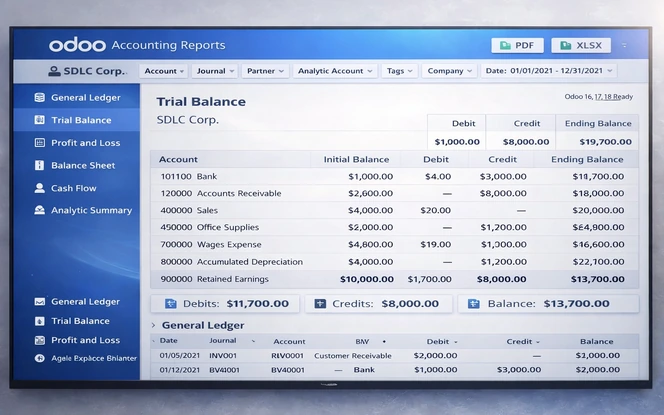
Standard Odoo reports stay basic. SDLC Odoo Accounting Custom Reports adds advanced filters, drill-down and PDF or XLSX export for faster finance reporting.

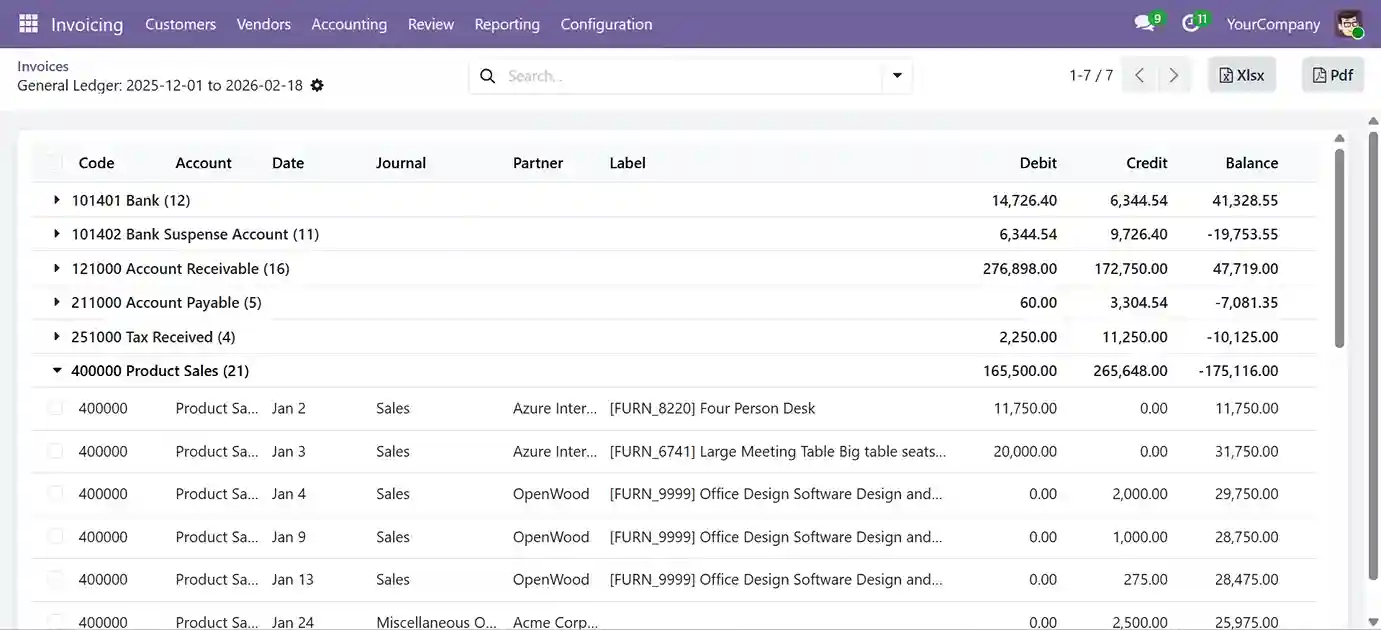
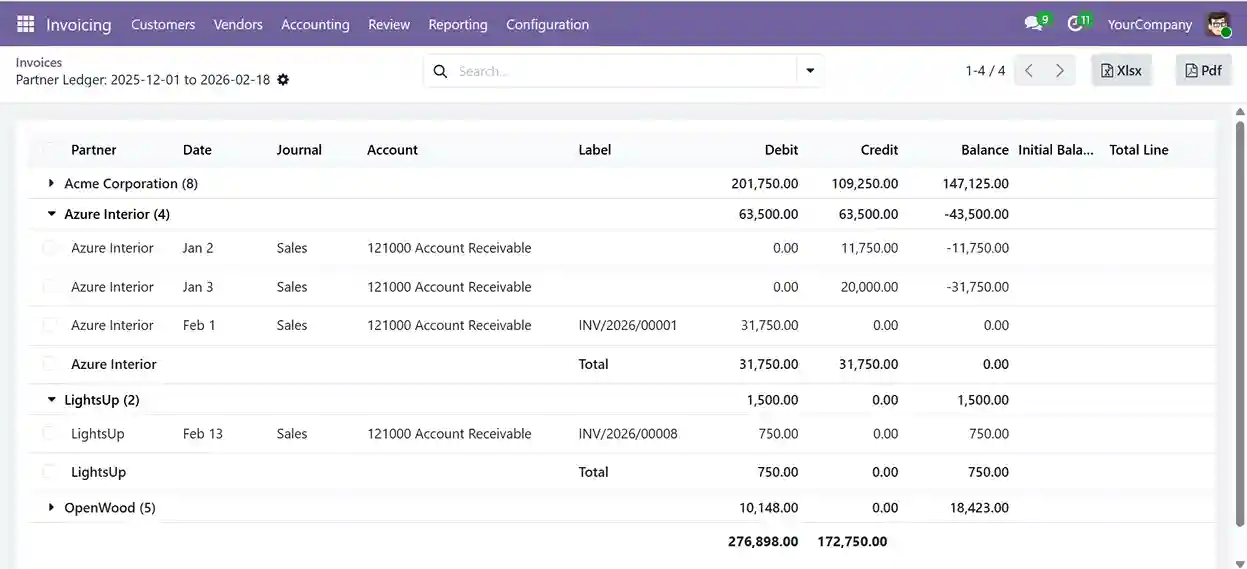
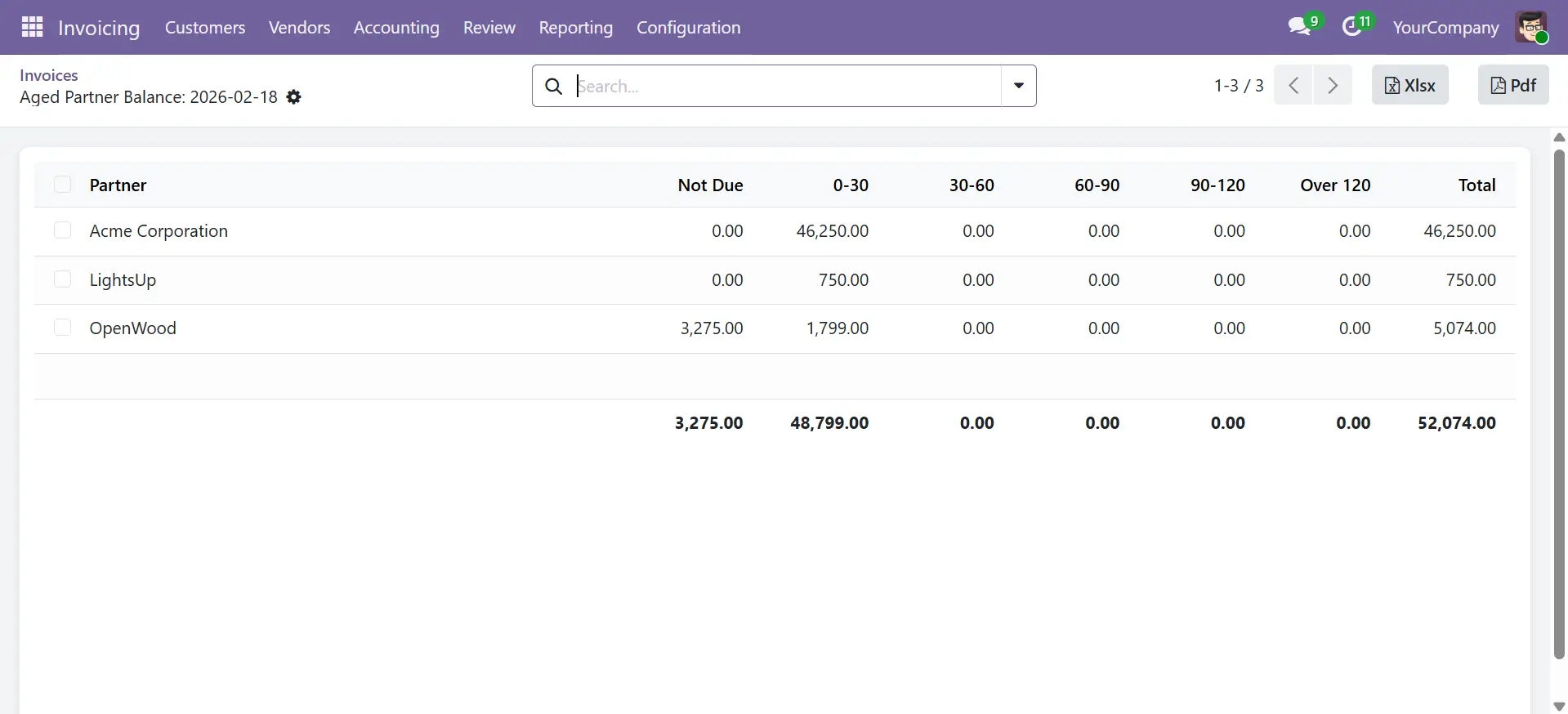
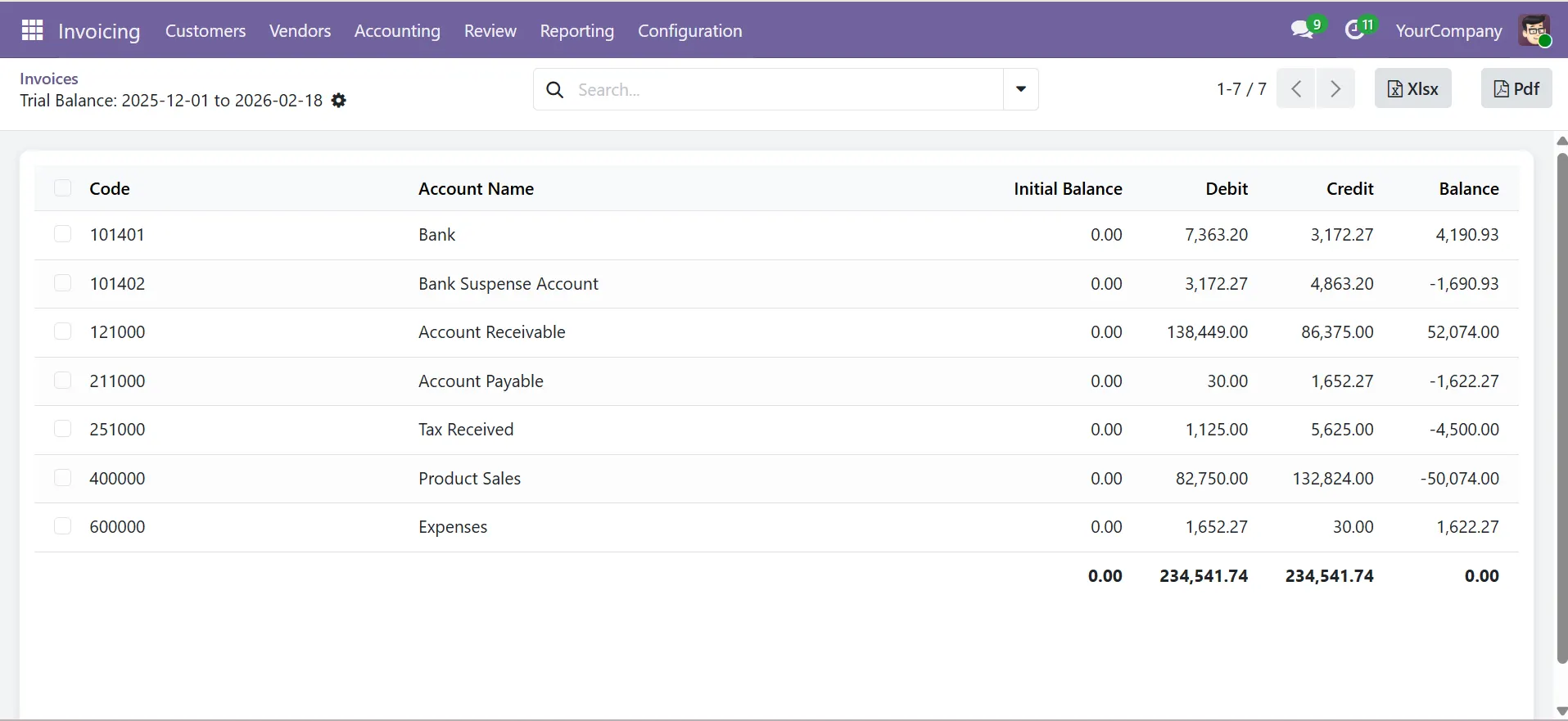
  • Filter by account, partner, journal, analytics, tags and date range.
  • Export PDF or XLSX reports with balances, totals and closing figures.
  • Works with Odoo 16, 17, 18 and 19 for Community and Enterprise.
Clutch
5/5 ★★★★★
F GoodFirms
4.9/5.0 ★★★★★
AppFutura
4.9/5.0 ★★★★★
Advanced Odoo accounting custom reports with analytics and financial summaries
3 downloads
Active Installations
v02
Supported Versions
$
$10.00
Price
LGPL-3
License Type
Comparison

Standard Odoo Accounting Reports vs SDLC Odoo Accounting Custom Reports

A direct comparison of reporting capabilities so you know exactly what you gain before installing.

Reporting FeatureStandard Odoo Accounting ReportsSDLC Odoo Accounting Custom Reports
Multi-parameter simultaneous filteringNot AvailableFull Support
Drill-down to journal entry levelNot AvailableOne Click
Structured XLSX export with headers & groupingBasic OnlyFormatted & Grouped
Running balance column in all reportsNot AvailableIncluded
Opening and closing balance totalsNot AvailableAll Reports
Analytic account & tag filteringNot AvailableFull Support
Multi-company consolidated viewManual Merge RequiredBuilt-In
Currency-level filteringNot AvailableFull Support
Audit-ready PDF export formatLimited FormatAudit-Ready
Odoo 16 / 17 / 18 / 19 compatibilityVaries by VersionOdoo 16 / 17 / 18 / 19
Features

Eight Features Built for Finance Teams

These features help finance teams create faster financial reporting, cleaner ERP reports, and more accurate accounting analysis in Odoo.

Advanced Report Filtering

Filter Odoo accounting reports by account, partner, journal, analytics, tags, and date range in one view.

Drill Down to Journal Entry Level

Open journal-level details directly from summary figures for faster financial reporting and account review.

PDF and XLSX Report Export

Export ERP reports in clean PDF or XLSX format with balances, totals, and structured accounting data.

Opening, Closing, and Running Balances

Track opening balance, running balance, and closing figures in one report for clearer accounting visibility.

Multi-Company Accounting Reports

Generate custom accounting reports for multiple companies from one interface without manual file merging.

Real-Time Odoo Reporting Data

View reports using current Odoo accounting data for faster checks, reviews, and finance decisions.

Built for High-Volume Accounting Data

Handle large Odoo accounting datasets with stable report performance and faster data processing.

Read-Only Reporting Security

Run reports in a secure read-only mode to reduce the risk of accidental accounting data changes.

Outcomes

What Finance Teams Actually Gain

Finance teams spend less time on exports, manual checks and spreadsheet cleanup. As a result, reporting becomes faster, clearer and easier to trust.

Faster Month End Close

Generate structured reports directly in Odoo instead of exporting raw data and reworking it in Excel.

Audit Ready Reports

Trace report balances back to source journal entries without digging through spreadsheets or manual files.

Faster CFO Reporting

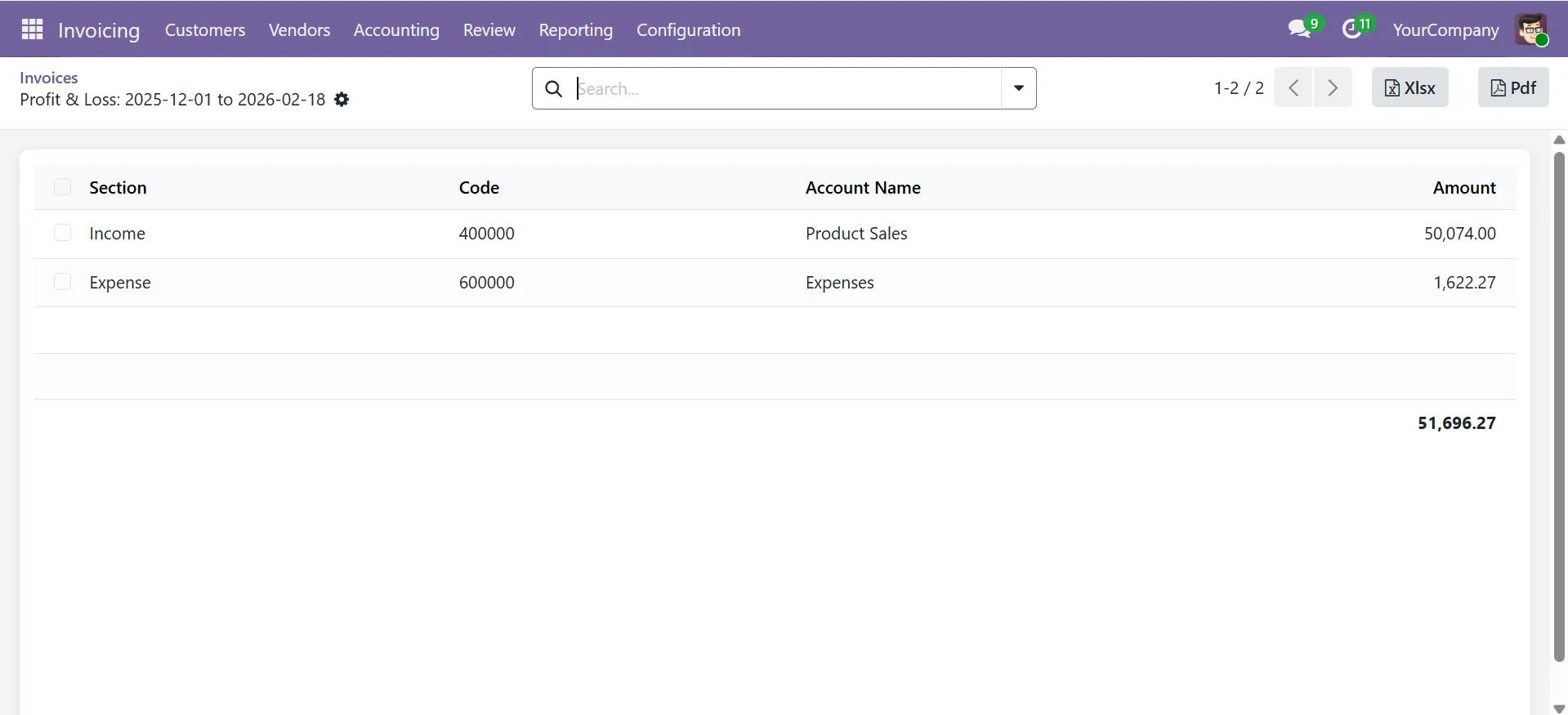
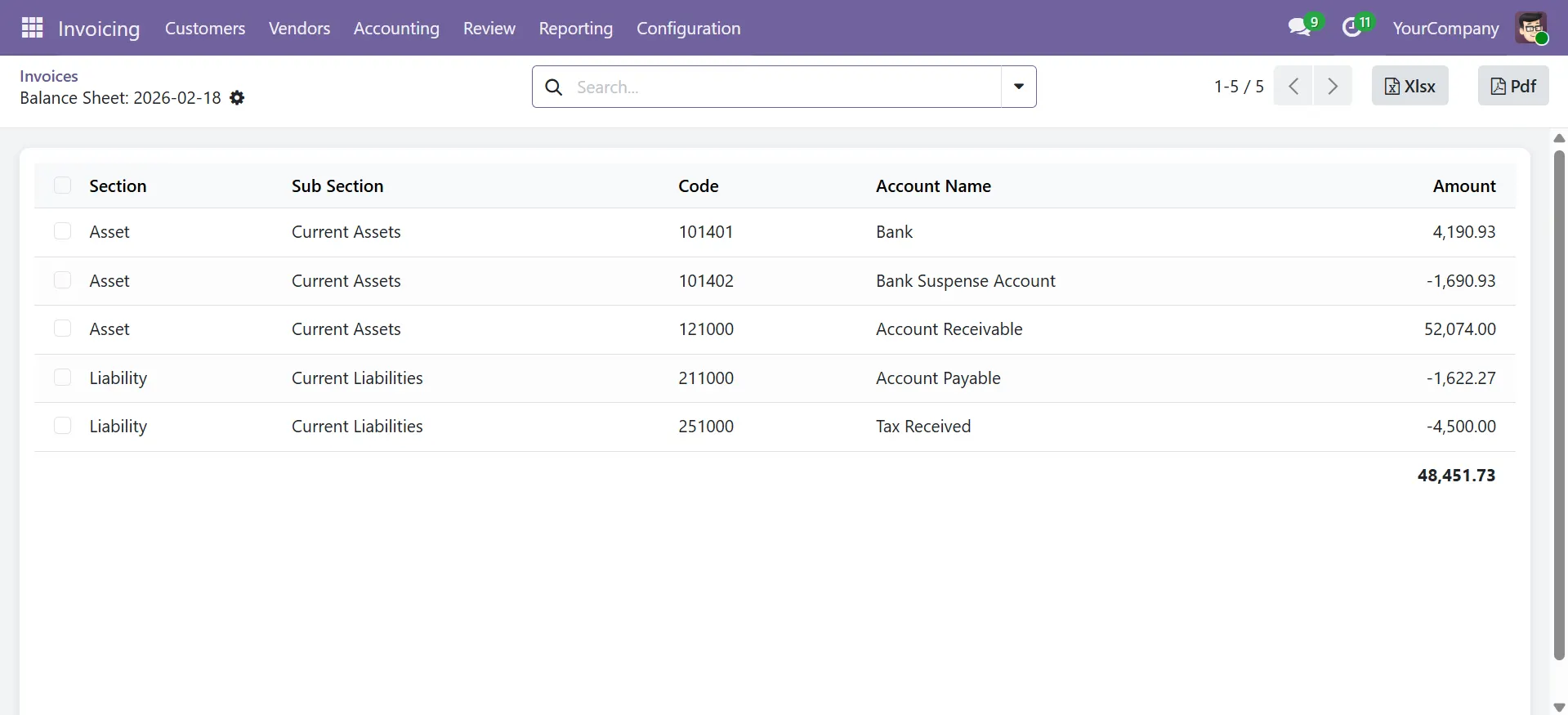
Run P&L, balance sheet and cost center reports in Odoo without waiting for manual report preparation.

Less Excel Dependency

Replace offline Excel-based reporting with structured financial reports generated from live Odoo accounting data.

Process

Get Started in Four Simple Steps

From installation to clean export in minutes, a simple, proven four-step workflow for fast, accurate, and audit-ready Odoo financial reports.

1

Install from Odoo App Store

Install on Odoo 16, 17, 18, or 19 in minutes with no extra setup.

2

Open Accounting Reports

Go to Accounting → Reporting to access all 8 custom reports instantly.

3

Apply Your Filters

Select accounts, partners, journals, analytics, currencies, and date ranges from one filter panel.

4

Export or Drill Down

Click any balance line to view source entries or export a clean PDF or XLSX report.

Support

Free Lifetime Support Reliable Help When You Need It

Every installation includes free lifetime bug fix support, version compatibility updates as Odoo evolves and direct access to our certified Odoo technical team.

Free Bug Fixes

We fix module bugs for the life of your installation.

Free Version Updates

Get compatibility updates as Odoo changes.

Technical Support

Contact our Odoo team by email, phone or WhatsApp.

Official Odoo Partner

SDLC Corp is a certified Odoo partner with strong product expertise.

Compatibility

Compatible with All Major Odoo Versions

Fully tested and supported across Odoo 16, 17, 18 and 19 for both Community and Enterprise editions, including multi-company and multi-currency environments.

Odoo 16 — Community & Enterprise
Odoo 17 — Community & Enterprise
Odoo 18 — Community & Enterprise
Multi-Company Support
Multi-Currency Support
Odoo VersionCommunity EditionEnterprise EditionMulti-CompanyMulti-Currency
Odoo 16SupportedSupportedYesYes
Odoo 17SupportedSupportedYesYes
Odoo 18SupportedSupportedYesYes
Odoo 19SupportedSupportedYesYes
FAQ

Frequently Asked Questions

Common questions about Odoo Accounting Custom Reports, implementation, filtering, export and multi company reporting.

Standard Odoo reports offer basic filters and no drill-down, with exports that need manual cleanup. This module adds multi-parameter filtering, one-click drill-down to journal entries, structured PDF/XLSX exports and multi-company reporting, eliminating Excel-based workarounds.

Compatible with Odoo 16, 17, 18, and 19 for both Community and Enterprise editions. Regular updates ensure smooth upgrades without reconfiguration.

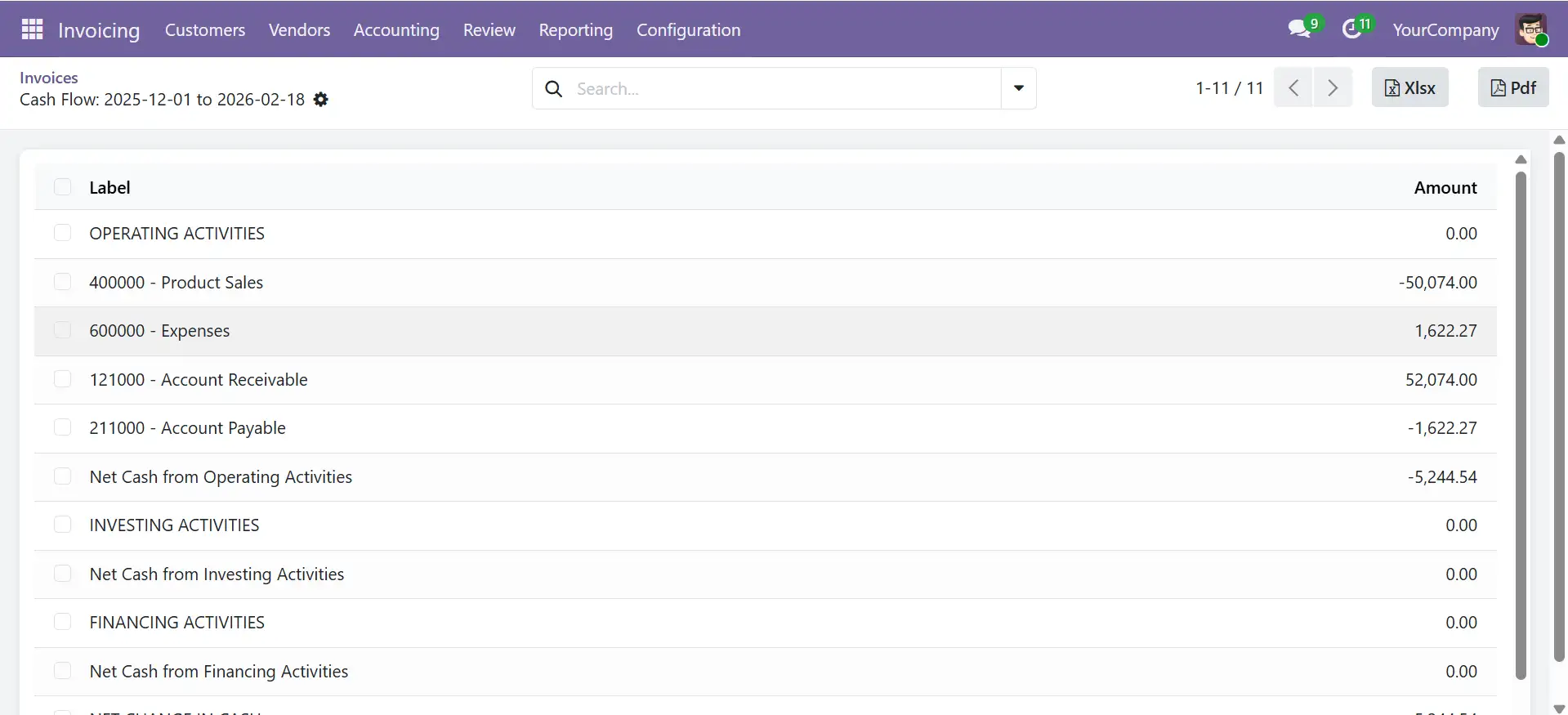
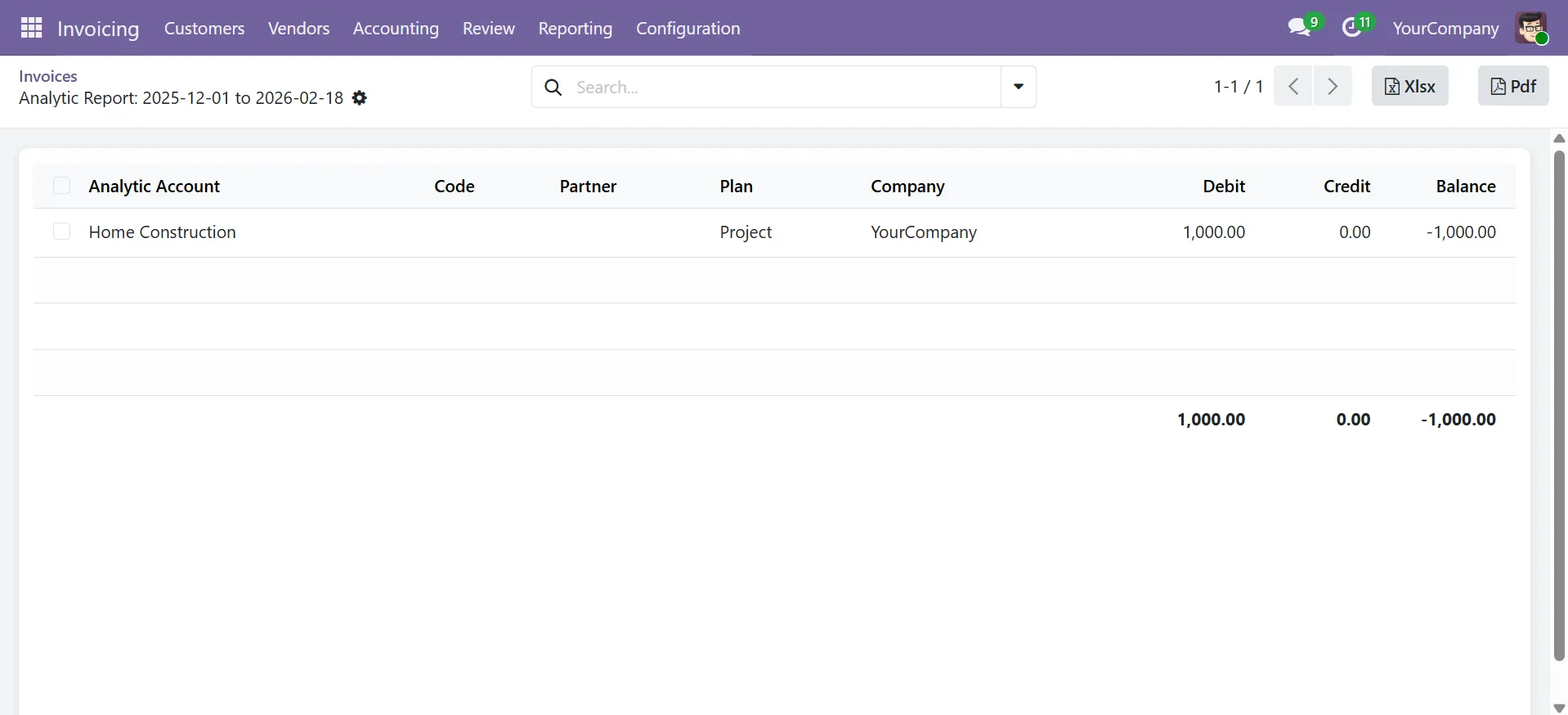
Includes 8 core reports: General Ledger, Partner Ledger, Trial Balance, Aged Partner Balance, Profit & Loss, Balance Sheet, Cash Flow Statement and Analytic Summary, all with advanced filtering and export options.

Yes. Reports support analytic account and plan filters, allowing project, department or cost centre-level reporting without creating separate companies.

Standard setup takes 1–2 business days. Custom configurations and enterprise setups are typically completed within 5 business days.

Yes. Generate consolidated or company-specific reports from a single interface across all report types.

Yes. The module is read-only and does not modify any accounting records. It follows Odoo’s access control rules.

Exports include structured headers, running balances, and grouped totals. Files are fully editable and ready for analysis or reporting.

Yes. Custom reports such as budget vs actuals, intercompany reports and industry-specific formats are available on request.

Let’s Talk About Your Product

Discuss your enterprise mobile app requirements, integration needs, platform strategy, and delivery scope with our team.

What happens next?