
- ODOO 19 COMPATIBLE
Odoo Project Cost Management
Odoo Project Cost Management helps teams track budgets, labor costs, extra expenses, client payments, and margins in one dashboard. Built for Odoo 19, it gives project teams faster visibility into budget variance, timesheet-based labor costs, and over-budget projects from a single view.
- Supports fixed cost and variable cost projects
- Tracks extra costs and client payments per project
- Shows KPIs, cost charts, and budget variance in one dashboard
- Benefits and Project Cost
Benefits of Better Project Cost Control
Manage budgets, labor costs, extra expenses, client payments, and margins in one clear workflow.
Budget Tracking
Set project budgets and compare them with actual project cost. Therefore, teams can spot budget gaps earlier.
Timesheet Costing
Calculate labor cost from employee hourly rates and logged hours. As a result, project costing stays more accurate.
Extra Cost Control
Track extra project expenses in one place. Also, teams can review non-labor costs without missing details.
Client Payment Tracking
Record client payments against each project. So, teams can compare incoming revenue with project cost faster.
Margin Visibility
Review project revenue, cost, profit, and margin together. This helps teams check project performance with less manual work.
Flexible Project Setup
Support both fixed-cost and variable-cost projects in one process. Therefore, teams can manage different costing models with better control.
- How It Works
How Project Cost Tracking Works
A clear workflow to set budgets, track costs, record payments, and review margins.
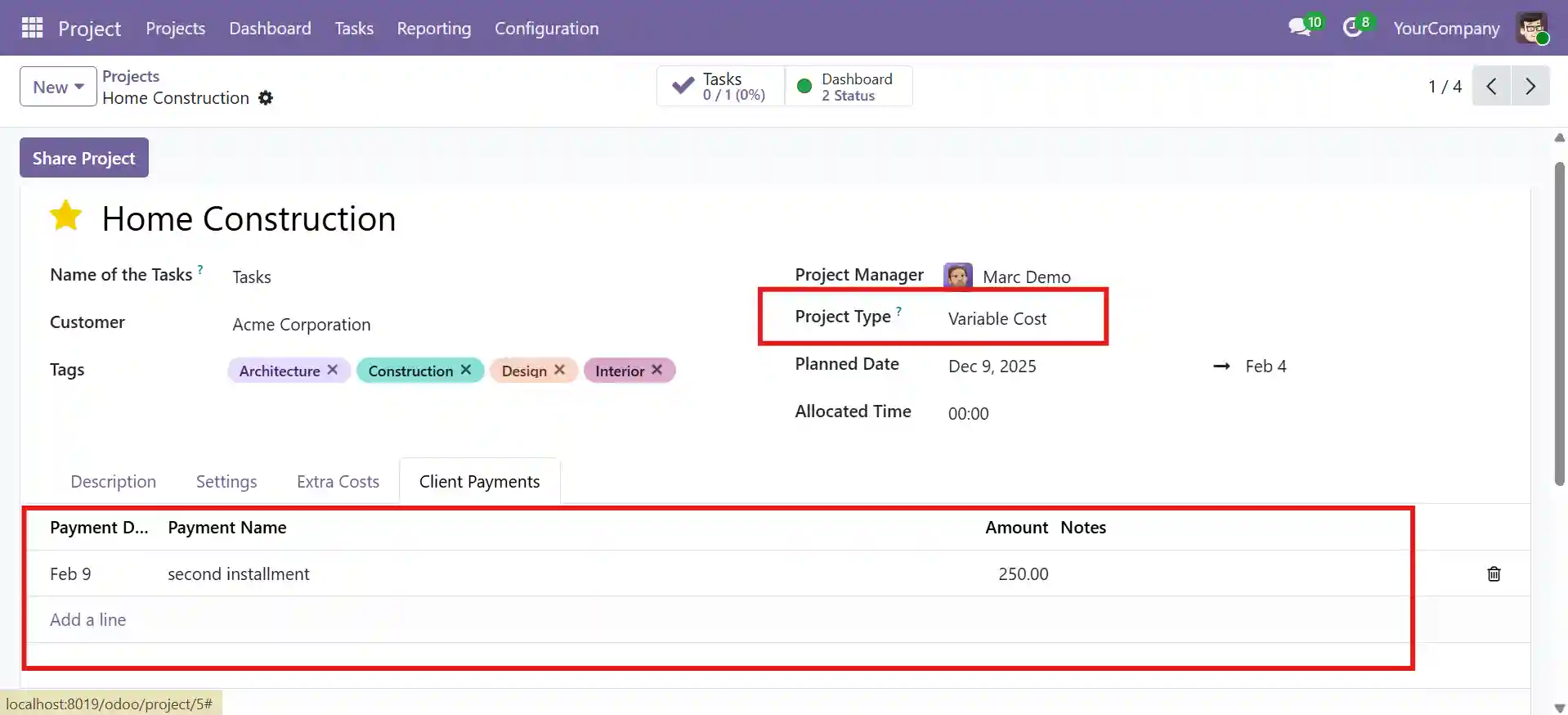
Set Project Type
Choose the right costing model based on how the project will be managed.
- Fixed cost
- Variable cost
- Billing match
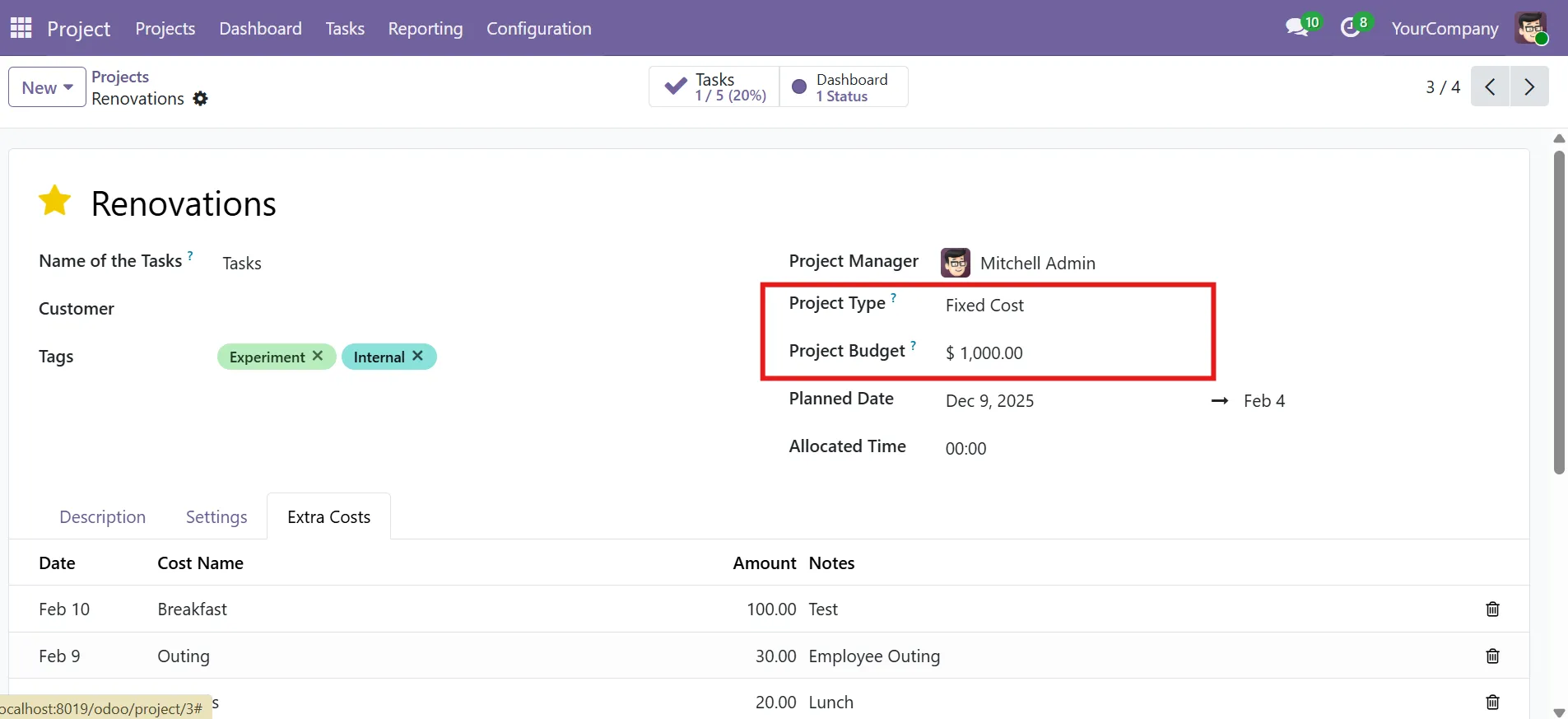
Add Project Budget
Add the approved budget early. This helps teams track planned vs actual cost clearly.
- Approved budget
- Cost limit
- Budget baseline
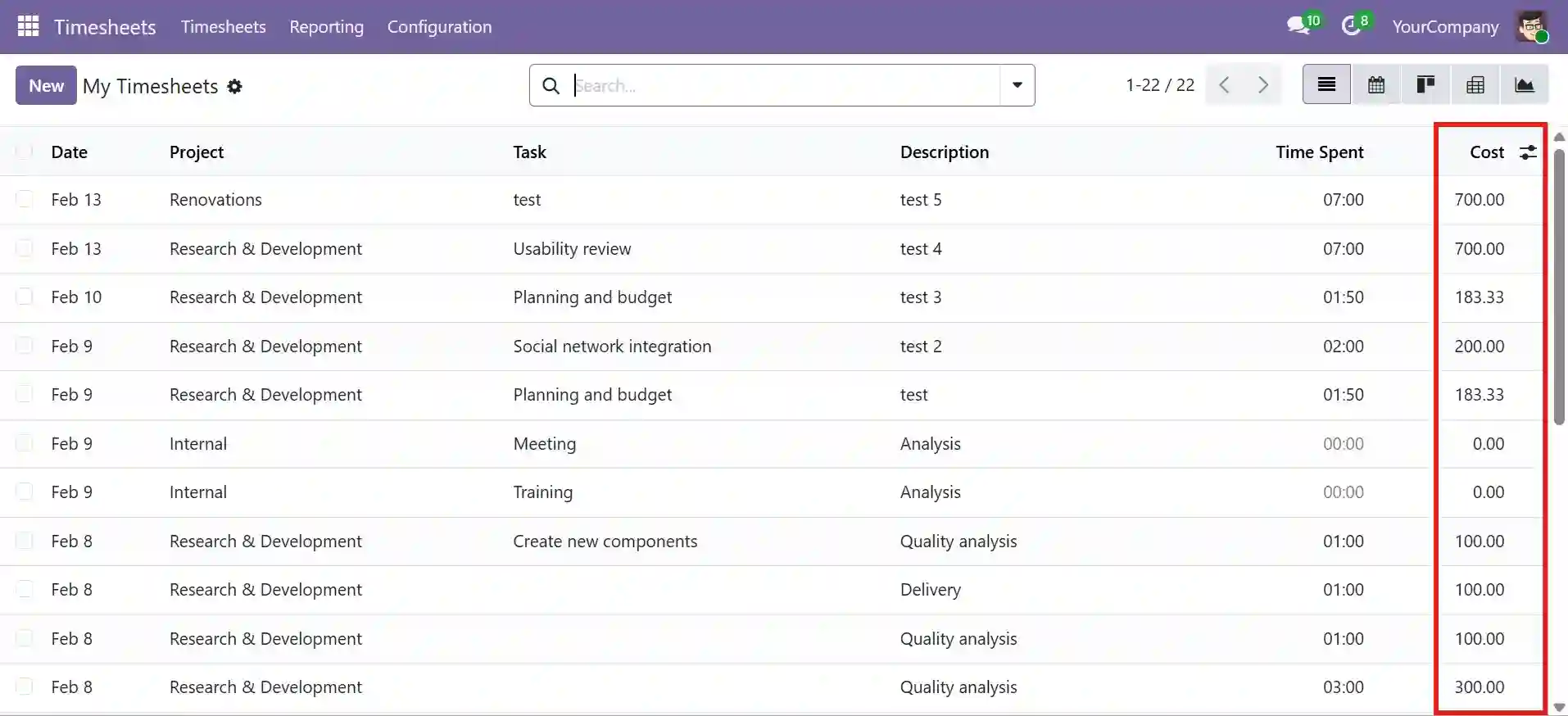
Timesheet Costing
Calculate labor cost from logged hours and employee hourly rates. As a result, project costing stays accurate.
- Hourly rates
- Timesheet entries
- Auto costing
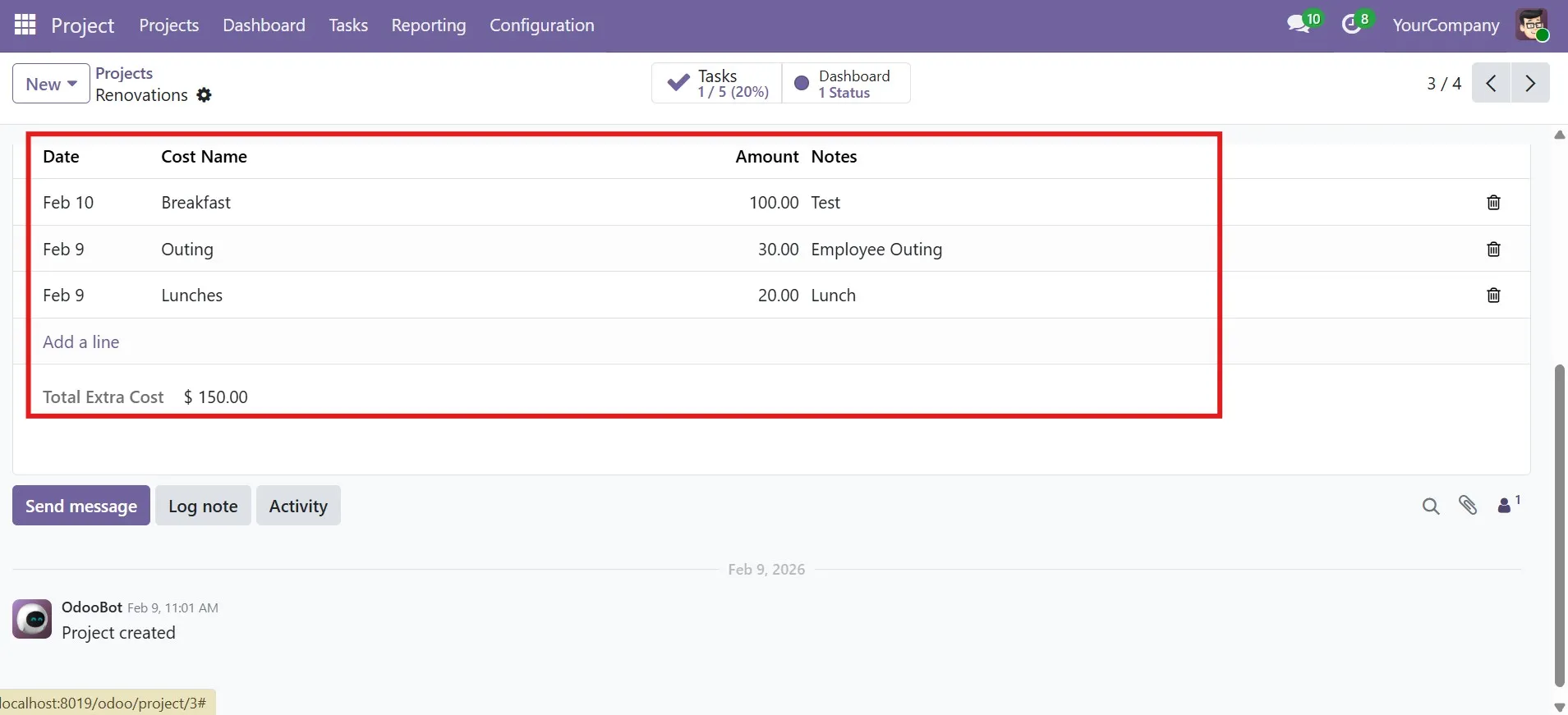
Costs & Payments
Record extra expenses and client payments in the same project flow. Also, this keeps cost and revenue tracking cleaner.
- Extra expenses
- Client payments
- Linked records
Dashboard Review
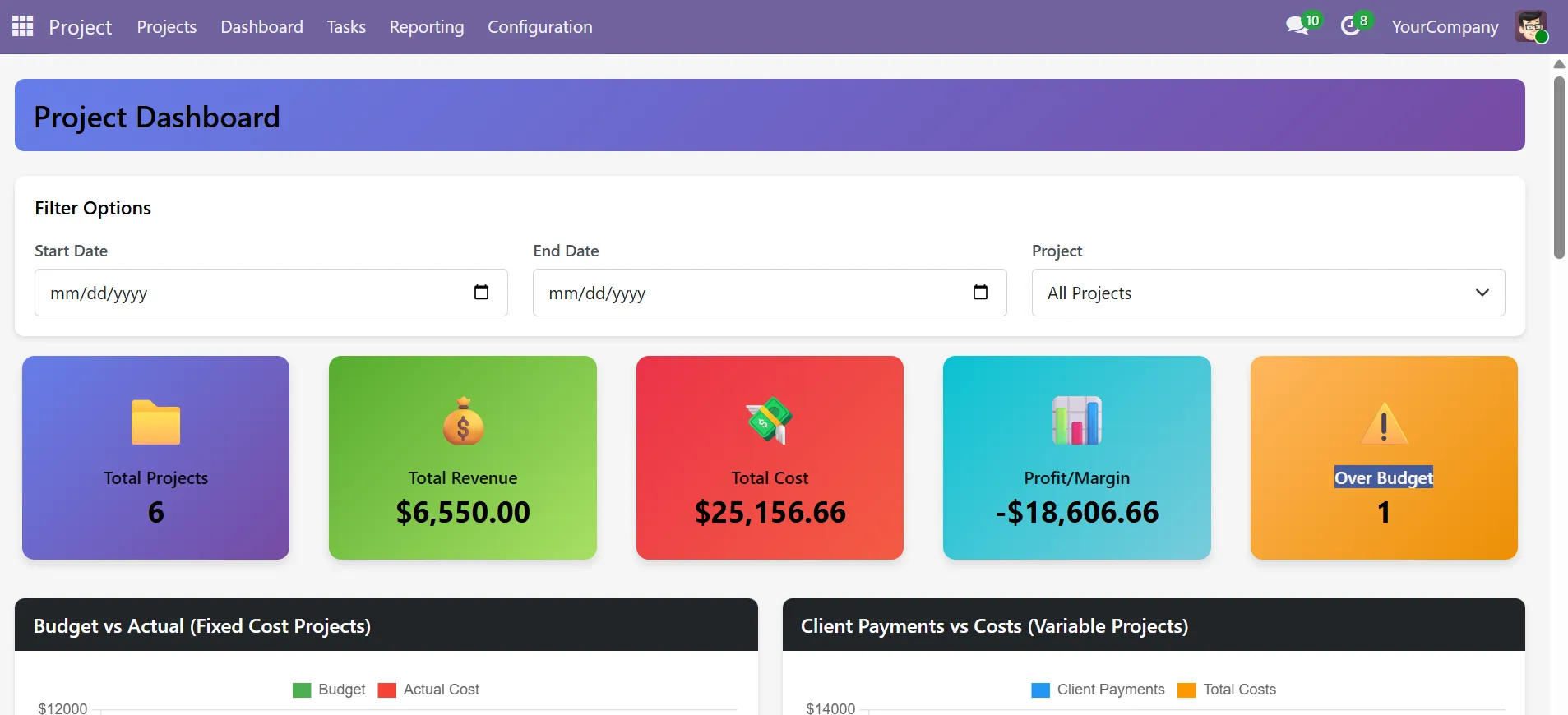
Review cost, revenue, margin, and variance in one dashboard. Therefore, teams can act faster.
- KPI cards
- Variance alerts
- Cost charts
- Pricing
Project Cost Setup and Pricing
Start with the core module, or add setup, customization, and support when needed.
Project Cost Management
- Fixed-cost and variable-cost project support
- Project budget setup and cost tracking
- Extra cost and client payment tracking
- Timesheet-based labor cost visibility
Implementation & Customization
- Project workflow and field customization
- Module setup and configuration
- Dashboard and report adjustments
- Deployment and post-go-live support
- Project Dashboard
Project Cost Management Compatibility, Setup, and Access
A clear dashboard to review project cost, revenue, margin, and variance.
KPI Dashboard
Project KPIs
Get a fast financial view of each project from one place. Also, teams can check project performance without opening each record.
Budget & Revenue Charts
Planned vs actual
Compare budget vs actual and payments vs costs. So, gaps become easier to spot.
Cost Breakdown
Spending sources
Review workforce cost and extra expenses by project. Therefore, cost analysis stays clearer.
Margin & Variance Review
Alerts + filters
Use over-budget alerts, variance details, and filters. Then, act before margins drop
- Setup & Compatibility
Project Cost Management Compatibility, Setup, and Access
A simple setup to start budget tracking, cost control, and margin review.
Compatibility
Fits current project workflows and supports flexible deployment needs. Also, teams can use it without changing the full process.
Setup Requirements
Basic project data and cost inputs are needed before tracking starts. Therefore, teams should set the key values early.
Basic Configuration
Set the project type, add the budget, and start tracking project costs. As a result, teams get clearer cost and margin visibility.
Dashboard Access
The dashboard becomes available under Project > Dashboard after installation. As a result, teams can review budgets, costs, and margins from one place.
- We are your technology partner
Need Better Project Cost Control?
Track budgets, extra costs, client payments, labor cost, and margins in one system. Also, get clearer project visibility with Project Cost Management.
- Frequently Asked Questions
Common Questions
About Project Cost Management
Clear answers to common questions about budgets, costs, payments, margins, and dashboard visibility.
How does project cost management help teams?
It helps teams track budgets, labor costs, extra expenses, client payments, and margins in one place. As a result, cost control becomes easier and faster.
Does it support fixed-cost and variable-cost projects?
Yes. It supports both fixed-cost and variable-cost projects. Therefore, teams can manage different project models with better control.
Can teams track labor cost from timesheets?
Yes. Labor cost is calculated from logged hours and employee hourly cost. So, project costing stays more accurate.
Can extra expenses and client payments be tracked by project?
Yes. Teams can record extra expenses and client payments inside the same project flow. Also, this gives a clearer view of cost and revenue.
What can users review in the dashboard?
Users can review KPIs, cost charts, project variance, and margin visibility in one dashboard. As a result, teams can spot issues earlier.
Can this solution show over-budget projects?
Yes. It helps teams identify over-budget projects faster through dashboard visibility and variance review. Then, they can act before costs rise further.
- Get Started
Let’s Talk About Project Cost Management
Get expert support for project cost management setup, budget tracking, and margin control. Also, we help teams plan the right workflow.
What happens after you submit?
- We review your project cost tracking needs
- Then, we understand your workflow and cost model
- Next, we share the right setup and next steps
- Secure Integration
- Cost Tracking Ready
- Global Clients


