Shopify runs your online storefront, while Odoo ERP manages inventory, orders, CRM, and accounting. However, when both systems work separately, data gets inconsistent and teams rely on manual updates. Therefore, a Shopify Odoo connector automates API-based data synchronization across products, inventory, customers, and orders. Below: the connector overview, system architecture, integration workflow, and step-by-step configuration.
What is Shopify Odoo Connector

A Shopify Odoo connector is an Odoo Shopify integration module that enables automated data synchronization between Shopify storefronts and Odoo ERP. Using API-based communication and mapping rules, it transfers key business data across both systems. Shopify manages storefront tasks like product listings, checkout, and order capture, while Odoo handles backend operations such as inventory control, sales automation, and accounting. As a result, Shopify Odoo integration helps maintain consistent data and automate order and inventory workflows.
SDLC Corp Shopify Odoo Connector Overview

The SDLC Corp Shopify Odoo connector supports enterprise-level synchronization workflows and multi-store integration environments. Moreover, it enables real-time Shopify Odoo sync while maintaining data accuracy across systems.
Core Capabilities
- Bi-directional data synchronization between Shopify and Odoo
- Multi-store Shopify Odoo integration using instance based setup
- Real-time inventory tracking and reconciliation
- Automated order lifecycle processing
- Instance-level monitoring and synchronization tracking
Shopify Odoo Connector System Architecture

Data Source Layer
- Shopify storefront database
- Odoo ERP database
However, both platforms keep independent data structures, so sync workflows ensure consistency.
Integration Layer
- Shopify Admin API integration
- Token-based authentication
- Middleware mapping engine
- Synchronization scheduler
Processing Layer
- Payload transformation engine
- Validation and audit logic
- Event-trigger synchronization
Presentation Layer
The connector provides monitoring and reporting features through:
- Unified Shopify dashboard inside Odoo
- Instance-wise synchronization tracking
- Sync performance reporting
Shopify to Odoo Integration Workflow

Product Synchronization Workflow
- Product creation synchronization
- Variant and SKU mapping
- Product media synchronization
As a result, the product catalog stays consistent across Shopify and Odoo.
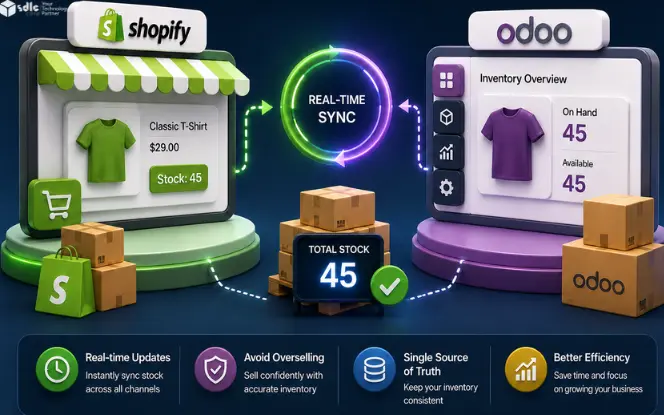
Inventory Synchronization Workflow
Map the eligible warehouse and sellable quantity before enabling updates. Order confirmation, reservation, and completed delivery are separate events; avoid deducting the same order twice. Sync can reduce overselling risk, but delays, stock errors, and out-of-stock selling settings still require controls.
- Reducing stock quantity after order confirmation
- Preventing overselling through real-time updates
Therefore, inventory levels remain reliable across both systems.
Order Synchronization Workflow
- Automatic order import from Shopify
- Sales order creation in Odoo
- Fulfillment and tracking synchronization
Finally, order status and shipment updates stay aligned end-to-end.
Supported Synchronization Modules
Confirm each direction against the installed connector release. Order import is not the same operation as fulfillment or status updates back to Shopify.
| Module | Shopify → Odoo | Odoo → Shopify |
|---|---|---|
| Products | Confirm support and mapping | Confirm support and mapping |
| Inventory | Confirm support and mapping | Confirm support and mapping |
| Orders | Confirm support and mapping | Confirm support and mapping |
| Customers | Confirm support and mapping | Confirm support and mapping |
| Categories | Confirm support and mapping | Confirm support and mapping |
| Gift Cards | Confirm support and mapping | Confirm supported operations |
| Tracking | Confirm support and mapping | Confirm support and mapping |
Prerequisites Before Configuring Shopify Odoo Connector
Before starting the Shopify ERP connector setup tutorial, organizations must prepare both platforms. First, confirm the Shopify and Odoo access requirements. Then, validate infrastructure readiness to avoid sync failures.
Shopify Requirements
- Shopify admin account access
- Shopify API permission configuration
- Access token generation
Odoo Requirements
- Active Odoo ERP installation
- Odoo Shopify integration module installation
- Administrative configuration privileges
Infrastructure Requirements
- Stable server connectivity
- Secure API authentication setup
- Data mapping preparation
Step-by-Step Configuration Guide
Step 1 – Generate Shopify Admin API Access Token
Choose the authentication flow supported by your connector and app type. New Dev Dashboard apps use app credentials and the applicable token exchange; do not assume you can copy a permanent token from Shopify Admin. Client credentials grant applies to stores in the same Shopify organization. Confirm token renewal, required scopes, and secure credential storage with your connector supplier. Follow Shopify’s app credential guidance.
- Log in to Shopify Admin Panel
- Configure API access permissions
- Generate authentication token
- Permanent API credentials
Step 2 – Register Shopify Store Instance

- Configure Shopify store URL
- Add authentication token
- API Version
- Activate all credentials
Step 3 – Configure Mapping Engine

- Product field mapping
- SKU synchronization
- Variant price mapping
- Customer data mapping
Step 4 – Configure Synchronization Scheduler

The synchronization scheduler controls Shopify Odoo automation workflows, including inventory and order timing. Therefore, configure schedules based on order volume and update frequency.
- Configure Shopify inventory
- Configure Shopify order sync
- Configure category mapping
Product Synchronization Module

Shopify to Odoo Product Sync
The connector synchronizes product data and supports easy auto sync schedules like hourly, daily, weekly, and monthly. For example, it can handle:
- Product creation
- Variant mapping
- SKU synchronization
- Product image synchronization
Odoo to Shopify Product Sync
- Product update push and pull
- Pricing updates
- Variant configuration synchronization
Inventory Synchronization Engine
Inventory Automation Capabilities
The connector supports:
- Real-time stock updates
- Reserved stock tracking
- Batch inventory refresh
Inventory Synchronization Logic
Test what happens at order import, sales confirmation, reservation, fulfillment, cancellation, and return. Record which event changes on-hand versus available quantity. Confirm that retries and repeated webhook deliveries do not create duplicate orders or duplicate stock deductions.
Order Management Synchronization

Order Data Synced Between Systems
- Customer details
- Product line items
- Payment and tax calculations
- Shipping and tracking details We can update multiple fields in order
Moreover, you can update multiple fields in an order based on mapping rules and sync settings.
Best Practices for Shopify Odoo Integration
Organizations should follow best practices to maintain synchronization accuracy. First, plan mapping carefully, and then validate sync behavior under real load.
- Plan mapping configuration before deployment
- Configure synchronization frequency based on order volume
- Test integration in staging environments
- Monitor synchronization logs regularly
- Implement automated validation checks

Conclusion
Shopify Odoo integration connects storefront and ERP workflows, enabling automated synchronization of products, inventory, orders, customers, and fulfillment processes for improved operational accuracy. SDLC Corp helps businesses implement the Shopify Odoo connector through expert configuration, API setup, and workflow optimization for reliable data synchronization.
FAQs
What is Shopify Odoo connector?
How does Shopify integrate with Odoo?
Integration is achieved through middleware connectors that synchronize products, orders, customers, and inventory data between both systems.