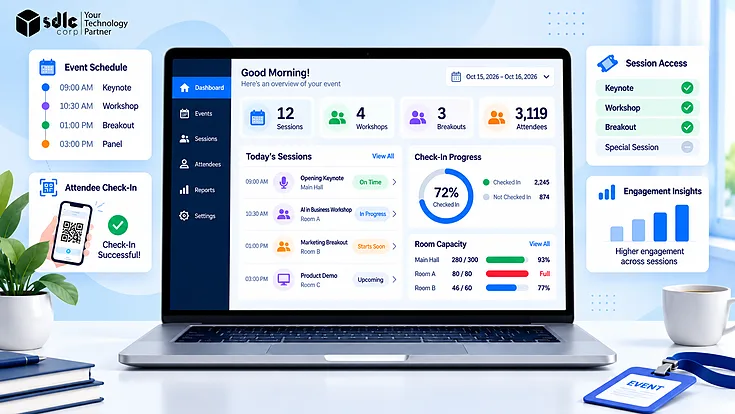
A conference with several tracks, workshops, breakout groups, speakers, rooms, and hundreds of attendees creates a different operational problem from a single-session event. Rooms can fill unevenly, speakers can be scheduled twice, workshops may need specific resources, and one room change can affect attendee schedules, access rules, signage, and staff coordination.
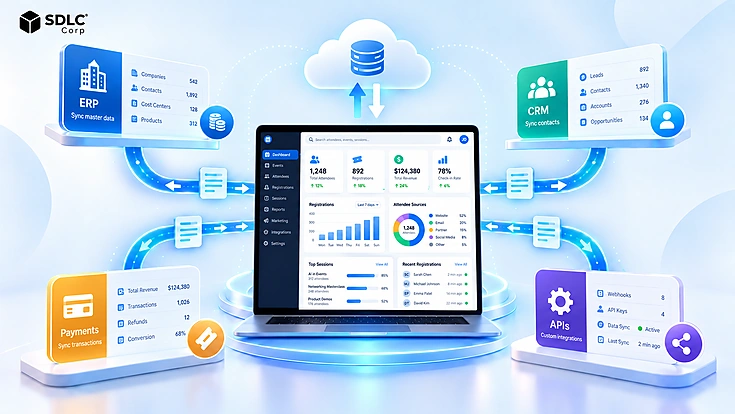
Effective multi-session event management connects those dependencies instead of treating the agenda as a collection of independent time slots. Event session management software can support that workflow by bringing scheduling, capacity, registration, attendee agendas, check-in, and session data into one operating model.
Why Multi-Session Events Break Down
Multi-session events become difficult when schedules, rooms, speakers, registrations, and attendee choices are managed separately. A timetable may look correct while still hiding audience conflicts, uneven demand, room collisions, or speaker double booking. Two sessions may use different rooms and speakers but still compete for the same audience, while a popular workshop can reach capacity as another session remains underused.
Live changes add another layer. Moving one session may require updates to personal agendas, mobile notifications, access controls, digital signage, and staff instructions. Good multi-session event management therefore has to manage both the original schedule and the dependencies that change with it.
The Session Hierarchy: Events, Tracks, Sessions and Sub-Sessions
A clear hierarchy gives the event system a reliable structure before scheduling begins.
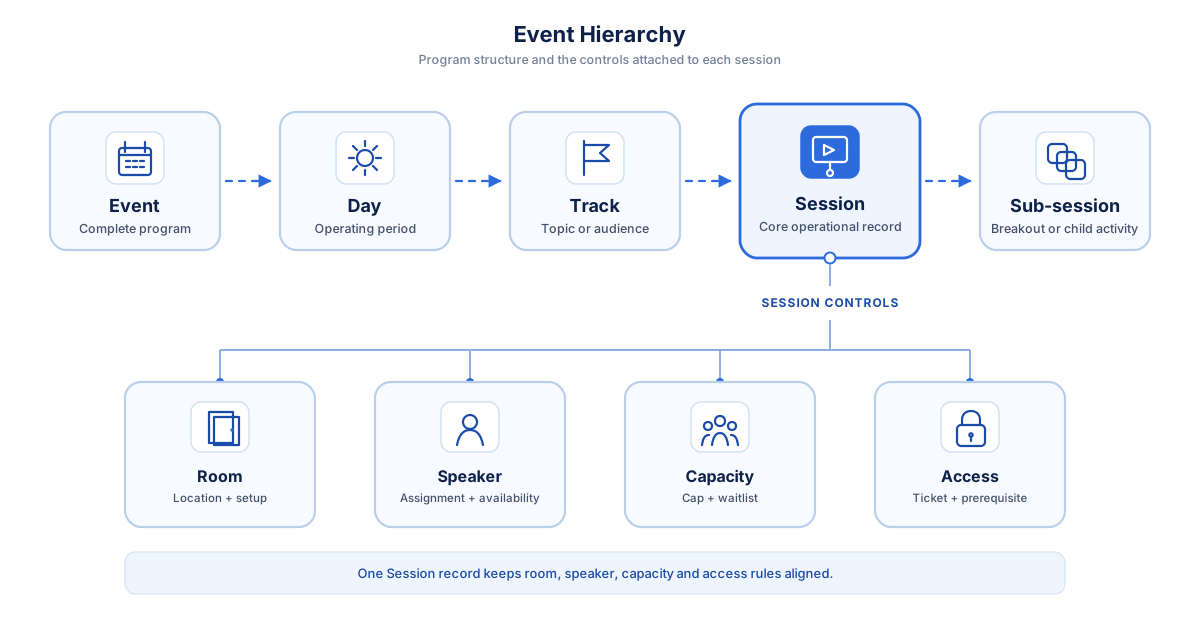
The event represents the complete program, while days divide longer conferences into operating periods. In multi-track event management, tracks group related content by topic, role, audience, department, or learning path without becoming separate scheduling systems. Each session then carries its own room, speakers, timing, capacity, access rules, equipment requirements, and registration status.
Sub-sessions are useful when one activity divides into smaller groups. A workshop with 120 attendees, for example, may split into six breakout groups. Treating those groups as children of the parent session keeps the workshop connected while allowing every breakout to have its own facilitator, room, capacity, and attendee list. This structure also improves reporting because organizers can review one breakout individually or combine all sub-session results under the parent activity.
Detecting and Preventing Scheduling Conflicts
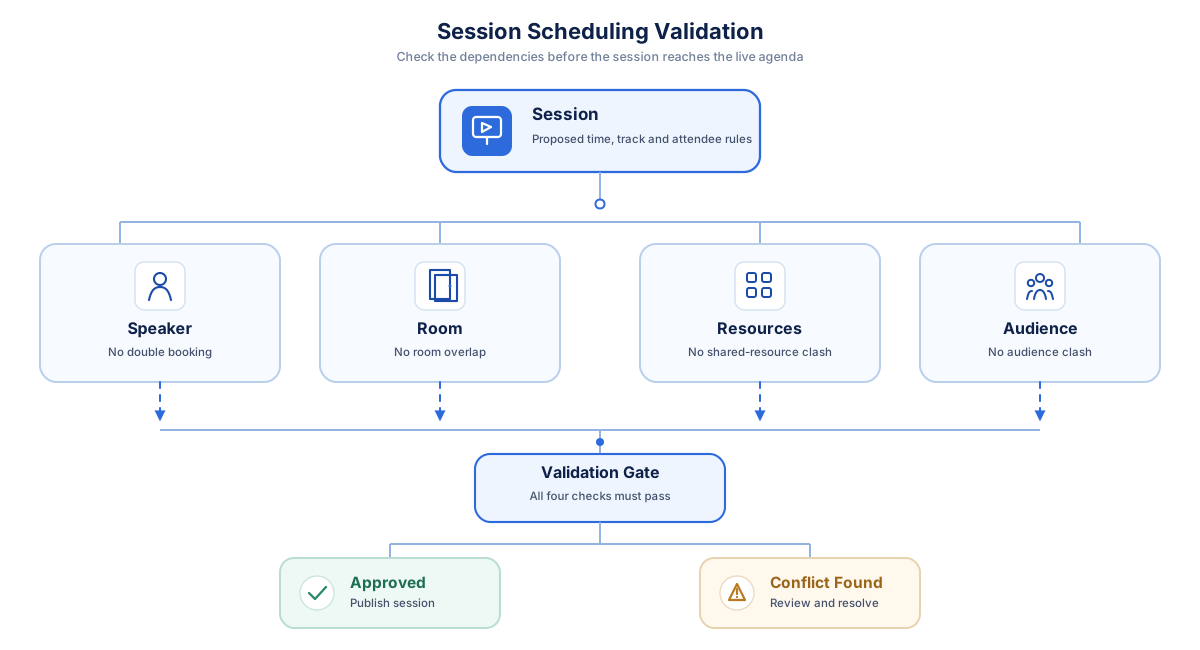
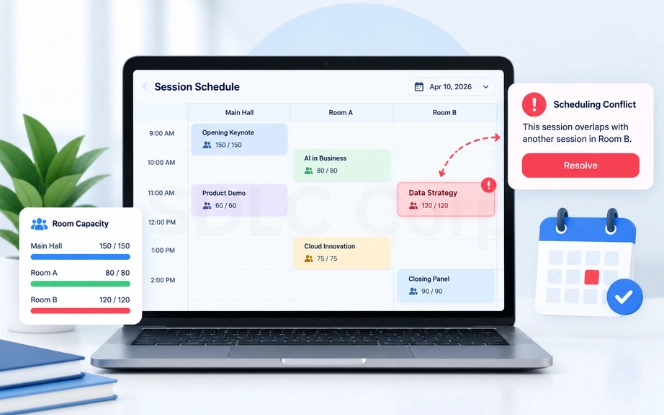
A calendar can display a clash, but a stronger session-management workflow identifies incompatible assignments before the agenda is published.
The Five Conflict Types
- Speaker or facilitator double booking
- Room and setup-time overlap
- AV, equipment, or specialist conflicts
- Prerequisite and sequencing problems
- Sessions competing for the same audience
How to Avoid Session Scheduling Conflicts
Validation should happen when a session is created or edited. If a speaker is already assigned elsewhere, the system should flag the issue immediately. The same rules can compare rooms, resources, setup buffers, session dependencies, and audience groups.
Managing Session Capacity, Waitlists and Overflow
Session capacity management connects attendee demand with the limits of each room or activity. Event-level capacity cannot provide enough detail when a conference has 1,000 attendees but one specialist workshop can only accommodate 80.
How to Manage Workshop Capacity with a Session Cap
A session cap sets the maximum number of attendees who can reserve an activity. It may match the physical room limit or remain slightly lower to create space for staff, speakers, accessibility needs, or operational adjustments.
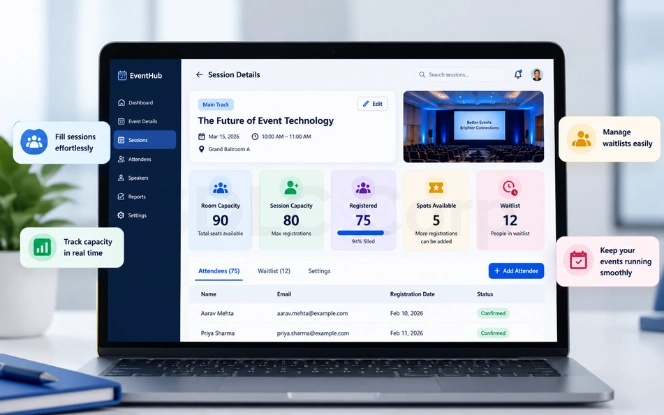
Once the final five seats are reserved, later registrations move to the session waitlist. EventMobi's official session management documentation provides one implementation reference for session capacities, access settings, tracks, and attendee schedule controls.
How a Session Waitlist Works
If a confirmed attendee cancels, the first eligible person can receive the open place. A confirmation window prevents that seat from staying blocked indefinitely, while ticket type, prerequisites, approval status, and event-day cutoffs can also affect promotion rules.
Demand should be reviewed before event day. A session approaching capacity may need a larger room, repeat delivery, or overflow space. An underbooked session may need promotion, consolidation, or a smaller room.
Controlling Session Access by Ticket Type
Event registration determines whether someone can attend the event. Session-level registration determines which individual sessions they can reserve or access.
Ticket session mapping connects ticket categories with the program.
| Ticket Type | Example Session Access |
|---|---|
| Standard | Keynotes and general sessions |
| Workshop Pass | General sessions and eligible workshops |
| VIP | General, premium, and VIP-only activities |
| Speaker | Assigned sessions and speaker areas |
| Staff | Operational areas based on role |
These rules are useful when workshops have additional fees, certifications require approval, or premium sessions are available only to selected attendees. Prerequisites can also be checked before a session becomes selectable.
Organizations using Odoo for event workflows can compare this approach with Effortless Event Management with Odoo's Powerful Event Module, which provides a platform-specific implementation perspective.
Running Workshops: Facilitators, Materials and Prerequisites
A standard presentation may need little more than a speaker, room, and time slot. Workshops usually have more dependencies, which is why workshop management software needs to support additional operational information.
People and Capacity
Participant limits, facilitators, support staff, and attendance requirements should be defined before registration opens.
Materials and Equipment
Printed kits, devices, software access, AV requirements, and specialist resources should be connected to the workshop record.
Prerequisites
Some workshops may require earlier sessions, certifications, experience levels, organizer approval, or particular participant roles.
Room Turnover
Seating changes, AV resets, material placement, setup, and teardown need protected time between different room formats.
A space configured for a theater-style panel at 10:00 may need to become a round-table workshop at 11:00. If the agenda stores only the visible start and finish times, the operations team may have no protected window for furniture changes, AV resets, or material distribution. Setup and teardown buffers turn those physical requirements into real scheduling constraints.
Assigning Attendees to Breakout Groups
Effective breakout session management depends on matching the assignment method to the purpose of the activity.
How to Assign Attendees to Breakout Groups
Automatic Assignment
Distribute attendees randomly or use role, department, experience, interests, or registration responses.
Manual Assignment
Give organizers more control when groups need balanced expertise, specific combinations, or defined outputs.
Self-Selection
Allow attendees to choose the breakout topic or group that best matches their interests.
Hybrid Breakouts
Keep physical and virtual groups as sub-sessions of the same parent activity while they operate in different locations.
Zoom's official breakout-room guidance demonstrates automatic, manual, and participant-selected assignment models in a virtual environment.
The breakout group assignment method should reflect the desired outcome. Self-selection works well for networking, attribute-based allocation supports focused problem-solving, and manual assignment is useful when every group requires certain roles or expertise.
Building Personalized Attendee Agendas
A personalized event agenda turns a large conference program into an individual schedule. Attendees should be able to browse sessions, filter by track, reserve activities, save sessions, and remove choices they no longer plan to attend.
The platform should also warn users about overlapping reservations so they do not create impossible schedules. Not every agenda needs to be self-selected, though. Preset schedules work well for employee training, hosted groups, VIP programs, and certification pathways where some sessions are mandatory.
Once established, the personal agenda becomes an important communication channel. Room changes, cancellations, reminders, and speaker updates can be delivered against the sessions that matter to each attendee.
Handling Live Schedule Changes on Event Day
Last-minute changes are unavoidable. The operational challenge is ensuring that one update reaches every dependent workflow.
How to Handle Last-Minute Session Changes
Suppose a speaker becomes unavailable and a workshop moves from Room B to Room D. The new room may have a different capacity, reservations may need to be rechecked, personal agendas must show the new location, and attendees may need a push notification. Digital signage and onsite staff should receive the same update.
If badge access or room-level check-in depends on the session location, those rules may also need to change. The most reliable approach is to maintain one authoritative session record so connected channels receive the revised information from the same source.
Notification thresholds are also important. A corrected description does not need the same treatment as a cancellation or room move. Teams should define which changes update silently and which require immediate communication.
Session Check-In Versus Event Check-In
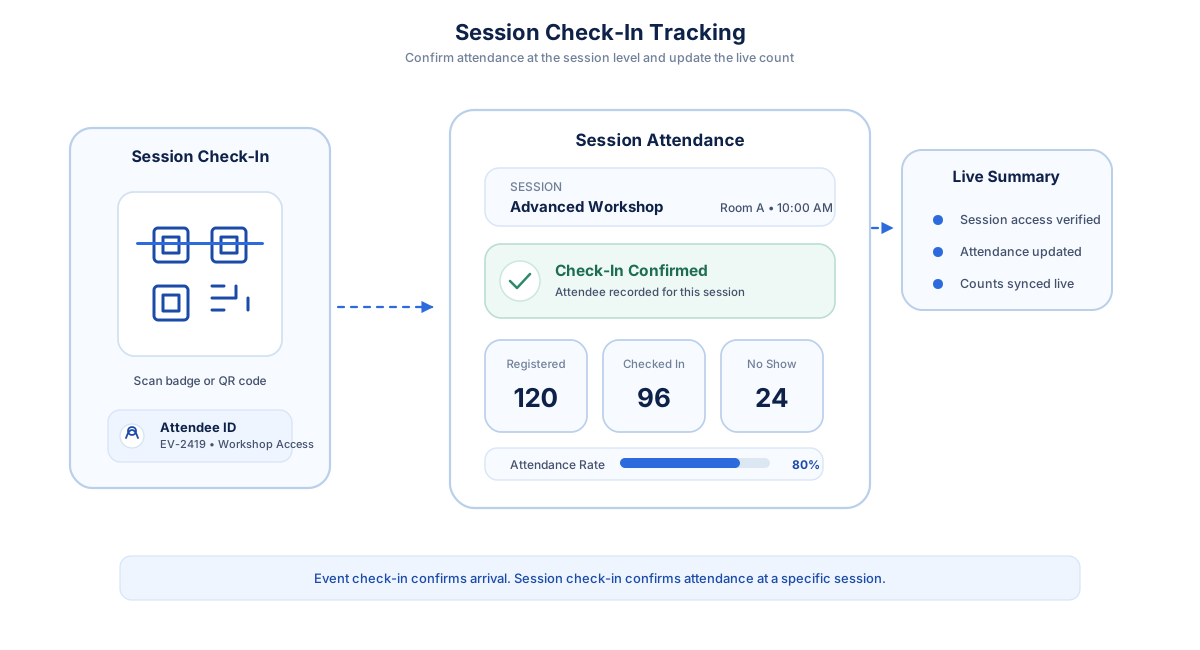
Event check-in confirms that an attendee arrived at the event. Session check-in confirms that they attended a specific workshop, breakout, panel, or presentation.
That distinction matters because someone can enter the venue in the morning and still skip every session they reserved. Session attendance tracking can use QR codes, badges, mobile devices, RFID or NFC, or staffed scanning points.
SDLC Corp's Rostra provides a first-party example of onsite event operations. Its onsite workflow supports camera scanning from laptops, tablets, and phones, along with queued badge printing designed to help check-in continue when venue connectivity becomes unreliable.
How to Track Breakout Session Attendance
Attendance should be recorded against the specific session rather than relying only on the overall event entry record.
These figures help organizers compare registrations with actual participation, measure room use, identify high no-show rates, and evaluate demand. For continuing education or professional training, session records may also support CEU or CPD workflows where appropriate.
Where Session Data Should Flow After the Event
Session data becomes more valuable when it moves into the systems responsible for customer relationships, learning records, credentials, and reporting.
A CRM may receive information about the sessions an attendee registered for or attended, while an LMS can receive attendance or completion data when sessions form part of a training program. CEU and CPD processes may require stronger evidence than a simple room scan, such as minimum attendance time, assessment results, or organizer approval.
For organizations issuing portable digital credentials, the 1EdTech Open Badges standard provides a neutral framework for interoperable credentials.
Post-event analytics should compare registrations, actual attendance, no-shows, capacity utilization, waitlist demand, and feedback. Organizations using Odoo in the wider event workflow can also review Event Management Planning Flawlessly with Odoo for a platform-specific example.
When Off-the-Shelf Session Management Stops Working
Standard platforms are usually sufficient when ticket rules, session structures, capacity controls, and integrations follow common patterns. Limitations appear when the platform cannot represent the organization's actual operating rules.
- Complex participant allocation
- Proprietary badge systems
- Unusual session pricing
- Multi-brand event portfolios
- Specialized compliance requirements
- Complex business-system integrations
A limitation does not automatically justify replacing the platform. First, determine whether configuration can solve it, then check whether an API or integration can close the gap. Deeper engineering is more reasonable when the requirement is repeatable, business-critical, and difficult to manage through manual workarounds.
Where those conditions apply, Custom Software Development Services can support workflows or integrations that standard platforms cannot express cleanly.
Build the Right Multi-Session Event Workflow
Review your session structure, capacity rules, attendee access, breakout logic, check-in requirements, and system integrations before committing to another platform.
Final Thoughts
Managing multi-session events works best when schedules, rooms, speakers, capacity, attendee access, check-in, and live updates are managed in one connected workflow. The right event session management software reduces manual work, prevents conflicts, and keeps event operations organized from planning through post-event reporting.
Frequently Asked Questions
What Is Multi-Track Event Management?
Multi-track event management organizes several parallel session streams within one event. It connects tracks, rooms, speakers, times, capacity rules, and attendee schedules so concurrent sessions can operate without unnecessary conflicts.
How Do Session Waitlists Work?
When a session reaches capacity, additional attendees join a queue. If a confirmed attendee cancels, an eligible person on the waitlist can be offered the place based on promotion rules and cutoffs.
Can Attendees Build Their Own Agenda?
Yes. Attendees can browse sessions, filter by track, reserve activities, and create a personalized schedule. Event session management software can also warn them when selected sessions overlap.
How Do You Prevent Speaker Double-Booking?
Speaker availability should be checked whenever a session is created or changed. The validation can also include preparation and travel buffers between locations.
Can Different Ticket Types Access Different Sessions?
Yes. Session-level registration can map ticket categories to standard, workshop, premium, VIP, or restricted activities. Additional rules can require approval, prerequisites, or paid add-ons.
What Is the Difference Between Session Check-In and Event Check-In?
Event check-in records that an attendee entered the overall event. Session check-in records attendance at a particular workshop, breakout, panel, or presentation.
How Do You Assign Attendees to Breakout Groups?
Breakout groups can use automatic, manual, or self-selected assignment. The right model depends on whether organizers prioritize attendee choice, balanced groups, or specific team structures.
How Is Session Management Different From a Spreadsheet?
A spreadsheet stores session information but generally does not understand dependencies between speakers, rooms, capacities, access rules, attendee reservations, and live changes. Event session management software can validate those relationships and keep connected workflows synchronized.