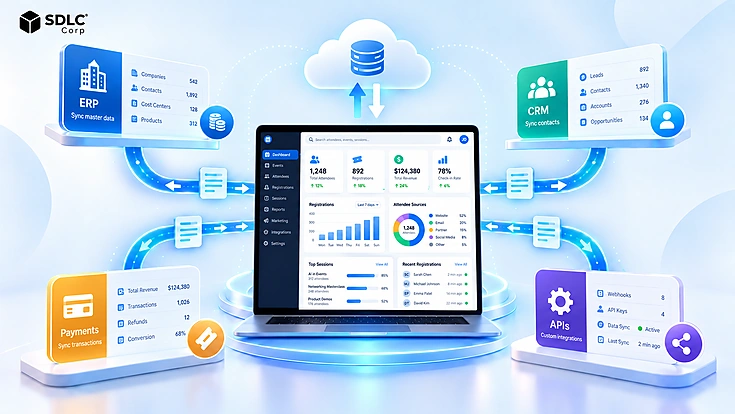
An event platform rarely operates alone. Registration details may need to reach a CRM within seconds. Ticket revenue may need to reach an ERP with the right tax and accounting references. Payment confirmations can arrive from a separate gateway. Attendance and session activity may then flow back into sales, marketing, and reporting systems.
Without reliable event management system integration, the same registration can be entered into several applications. Customer records can diverge. Sales teams may follow up using stale attendance data. Finance teams can spend days matching processor settlements to event orders.
The goal is not to connect every application to every other application. A reliable architecture determines which data moves, which system owns it, when it moves, how it is validated, and what happens when a connection fails. Those decisions determine whether an integration remains dependable after registration volume, financial complexity, and the number of connected systems increase.
What Event Management System Integration Means
Event management system integration connects an event platform with the enterprise applications that already manage customers, finance, payments, reporting, and operational workflows.
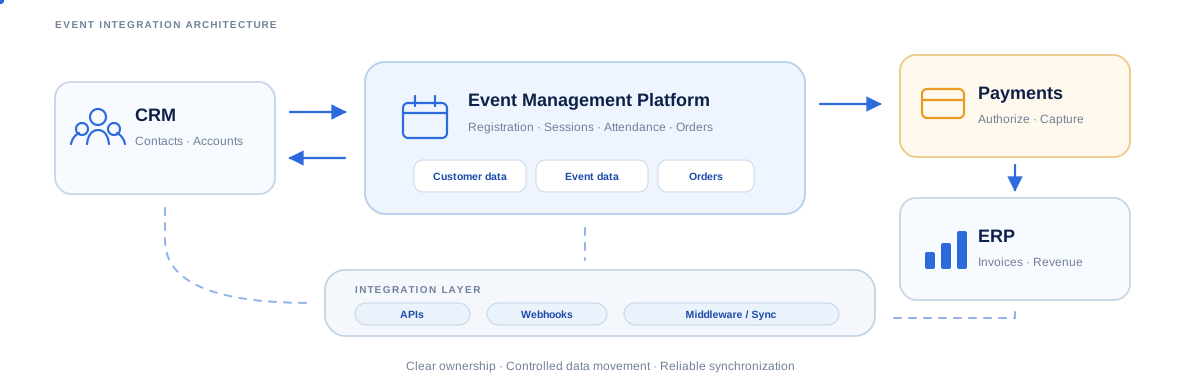
A typical event management software integration has four business layers:
- Event platform: registrations, tickets, sessions, attendance, and check-ins.
- CRM: contacts, accounts, campaigns, leads, and opportunities.
- ERP: invoices, revenue, taxes, credits, settlements, and accounting dimensions.
- Payment provider: authorization, capture, refunds, chargebacks, and settlement.
APIs, webhooks, native connectors, middleware, or scheduled transfers join those layers.
The important question is therefore not simply whether Salesforce, NetSuite, Stripe, or another platform can connect. The architecture has to preserve record ownership, prevent duplicate transactions, manage API limits, and keep operational and financial records consistent.
For a product example that combines registration, payments, finance connectivity, APIs, webhooks, and scheduled exports, see Rostra event management platform.
For broader enterprise integration patterns, see Software Integration Services That Connect Every Business System .
Why Event Data Has to Reach Your Enterprise Systems
Disconnected event data creates work at every handoff. A registration that begins in the event platform may be copied into the CRM for follow-up. Finance may receive another export, which then has to be matched manually to a payment settlement.
- Create the registration once and synchronize only the fields other systems require.
- Attach attendance to an existing customer rather than creating another CRM contact.
- Trigger follow-up when a person actually registers, attends, or misses the event.
- Give finance transaction and settlement references it can reconcile.
- Connect event revenue with normal ERP and management reporting.
- Keep check-in, session, and capacity data current during live operations.
For complex programs with concurrent workshops and capacity rules, the same integration principles also support multi-session operations. See How to Manage Multi-Session Events, Workshops and Breakout Sessions .
System of Record and Who Owns Each Record
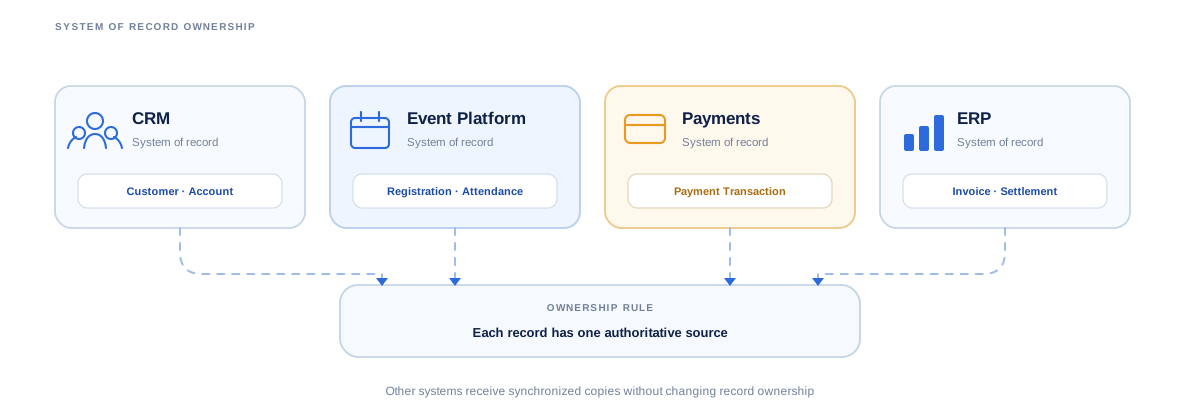
A reliable integration starts by deciding which application is authoritative for each business object.
System of Record vs. System of Engagement
A system of record owns the authoritative version of a record. A system of engagement may display, enrich, or act on that information without becoming its primary owner.
For example, Salesforce may own the customer account while the event platform owns the registration and check-in status. The payment provider can remain authoritative for the underlying transaction, while the ERP owns the final invoice and accounting entry.
Copying the same field into several applications does not make all of them authoritative.
Record Ownership Across Event, CRM, ERP and Payment Systems
| Record | Typical System of Record | Other Systems Use It For |
|---|---|---|
| Customer or account | CRM | Registration and financial mapping |
| Event registration | Event platform | CRM engagement and reporting |
| Attendance and check-in | Event platform | CRM and analytics |
| Payment transaction | Payment provider | Event confirmation and reconciliation |
| Invoice or credit note | ERP | Finance and customer service |
| Settlement or accounting entry | ERP | Financial reporting |
| Opportunity | CRM | Revenue attribution |
Ownership rules should be decided before bidirectional synchronization begins. Otherwise, two applications can independently change the same value and create a conflict.
For example, an attendee updating their email during registration should not automatically overwrite a governed CRM identity unless the business has explicitly approved that rule. Likewise, an event platform should not invent a final settlement status independently from the processor and ERP.
That distinction becomes increasingly important as the number of connected applications grows.
Connect Your Event Platform to the Systems That Already Run Your Business
Build CRM, ERP, payment and API integrations around clear ownership, reliable synchronization and controlled recovery.
ERP and Accounting Integration
Event management ERP integration is a core part of enterprise event architecture. Operational event objects do not automatically correspond to financial objects.
The integration has to decide how registrations, tickets, sponsors, taxes, refunds, and settlements should appear inside the organization's accounting model.
For broader ERP connectivity planning, see ERP Consulting & System Integration Services .
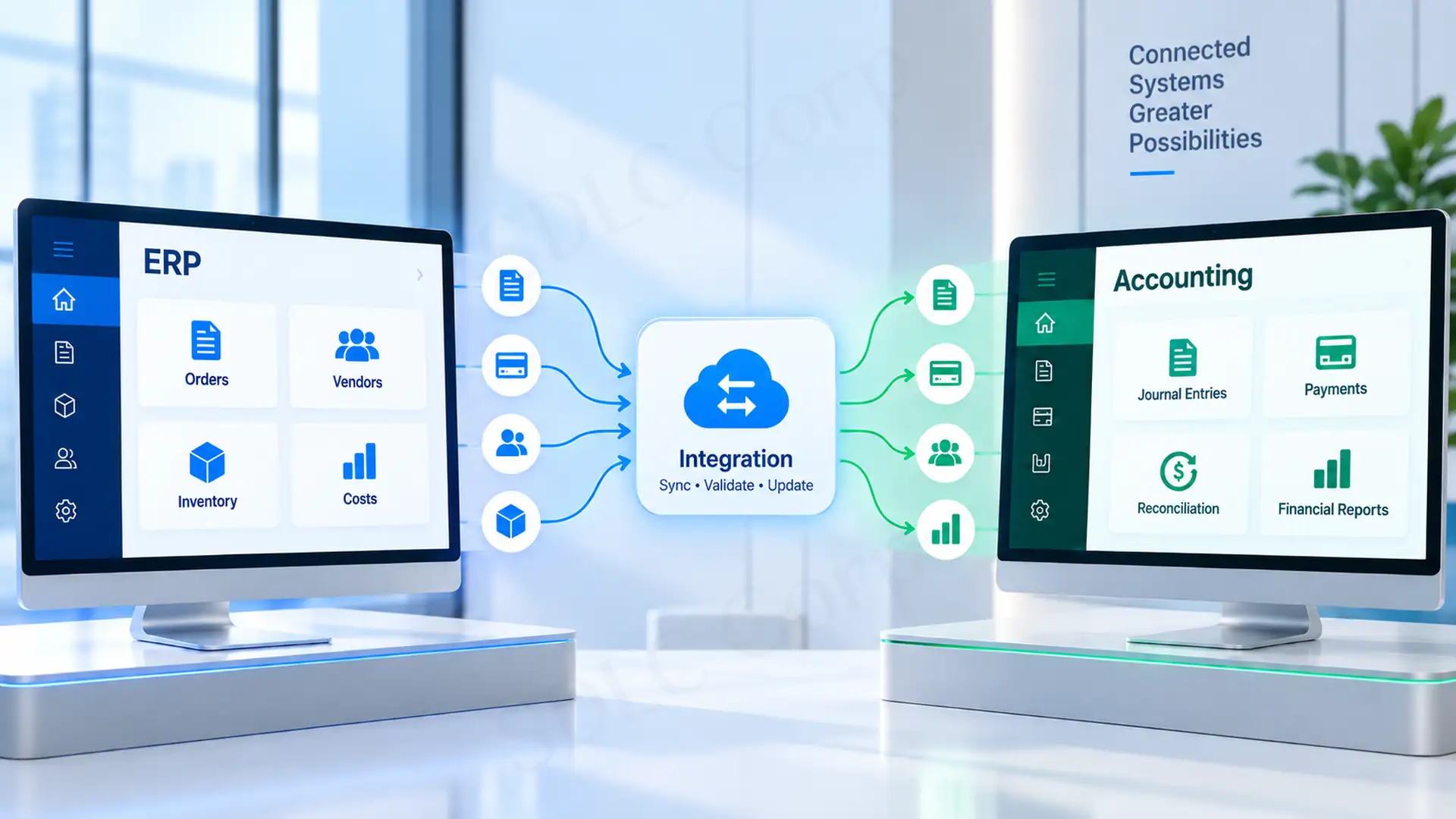
Mapping Events Onto Financial Objects
| Event Object | Possible ERP Representation |
|---|---|
| Event | Project, cost centre, or business unit |
| Ticket order | Sales order or receivable transaction |
| Buyer or attendee | Customer or related contact |
| Sponsor | Customer or account |
| Invoice | Accounts receivable document |
| Refund | Credit note |
| Settlement | Cash or reconciliation entry |
The exact design varies by ERP and accounting policy. SAP, Oracle NetSuite, Microsoft Dynamics 365, Business Central, and Odoo can represent similar commercial activity through different objects and workflows.
Organizations using Odoo, for example, may also need field mapping, bidirectional synchronization, idempotency, and reconciliation between ERP and connected platforms. Those patterns are covered in Odoo Integration Services Built for Production .
What Financial Data Moves to ERP?
- Event and order IDs
- Customer references
- Ticket or sponsorship revenue
- Discounts and processor fees
- GST, VAT, or other taxes
- Refund values
- Payment transaction IDs
- Settlement references
- Currency
- Cost centre and GL dimensions
The ERP does not necessarily need each operational update the moment it occurs. Registration confirmation may need to happen in seconds, while settlement or accounting data can move after transactions have been validated.
Revenue Recognition and Deferred Ticket Revenue
Ticket sales can create a timing difference between collecting cash and recognizing revenue.
A conference may sell tickets months before the event takes place. Depending on the organization's accounting policy, receiving the payment does not necessarily mean the full amount should immediately become recognized revenue.
Oracle's NetSuite documentation explicitly separates billing and payment from revenue recognition and supports deferring revenue into future periods. NetSuite Revenue and Expense Recognition Overview .
An event-to-ERP integration therefore needs enough information to distinguish collected cash, deferred amounts, recognized revenue, refunds, and final settlement.
Multi-currency events add another layer. A customer may purchase in one currency while the ERP reports in another. Tax treatment can also differ by jurisdiction, customer type, and product.
Keep the original identifiers intact so finance can trace each ERP entry. The trace should connect the invoice, order, payment, registration, refund, and processor settlement.
CRM Integration for Event Management Systems
Event CRM integration connects registration and attendance with customer and sales records. Common target platforms include Salesforce, HubSpot, Microsoft Dynamics 365, and Zoho CRM.
The objective is not to copy every CRM contact into the event platform. It is to preserve identity while exchanging the information each system needs.
Organizations with Salesforce-heavy workflows can also review Salesforce Integration Services for Seamless Workflows .
What Should Flow From CRM to the Event Platform?
- Persistent CRM contact or account ID
- Company and account information
- Membership status
- Customer segment or tier
- Invitation eligibility
- Campaign or sales-owner information
This allows the registration experience to apply eligibility, pricing, invitations, and personalization without creating an independent customer database.
What Event Data Should Flow Back?
- Registration status
- Ticket or pass type
- Attendance
- Session participation
- Lead-capture activity
- Survey responses
- Cancellation or no-show status
The CRM can then use those signals for customer history, segmentation, lead scoring, campaign reporting, or sales follow-up.
Registration to Opportunity Attribution
Identity matching is the critical part.
A persistent CRM ID is safer than relying only on an email address. Attendees can register using aliases, personal addresses, or a new company domain.
Email can still be a useful secondary matching field. Bidirectional integration should define field mappings, matching precedence, deduplication rules, and conflict handling.
Payment Gateway Integration
An event payment gateway integration connects registration with a payment provider such as Stripe, PayPal, Razorpay, or Adyen.
Authorization, Capture and Settlement Are Different Events
A payment being approved during checkout does not mean the funds have already reached the organization's bank account.
The event system needs fast payment confirmation because it affects the attendee experience. Finance usually needs a different view that includes fees, refunds, settlement batches, and final accounting treatment.
Refunds and Chargebacks Writing Back to the Ledger
Refunds, partial refunds, and chargebacks should retain the original payment and order identifiers so they can be matched to the corresponding ERP records.
Payment architecture should also avoid handling raw card data unnecessarily. Stripe's integration security guidance supports lower-risk patterns that collect payment information directly through Stripe. This avoids passing sensitive card data through the merchant's servers and can reduce PCI obligations. Stripe Integration Security Guide .
For the complete registration-to-settlement workflow, see Event Registration and Payment Processing Features .
Reduce Manual Payment and ERP Reconciliation
Connect registration, payment confirmation, settlements, refunds and ERP postings around stable transaction references.
APIs, Webhooks and Integration Methods
Most enterprise implementations combine more than one method rather than choosing a single approach for the entire architecture.
Native Connector
Provides a prebuilt relationship between supported products and is usually fastest for standard workflows.
REST API
Lets one application request, create, or update a specific resource in another system.
Webhook
Notifies another application when an event occurs, such as a registration, payment, cancellation, or check-in.
Scheduled Sync
Exchanges records at defined intervals when immediate updates are unnecessary.
iPaaS or Middleware
MuleSoft, Boomi, Workato, or Zapier can map, transform, route, and monitor information across several systems.
File-Based Integration
SFTP, CSV, or another structured format can still make sense for legacy platforms with limited APIs.
Choosing a Method
| Method | Best Use | Main Limitation |
|---|---|---|
| Native connector | Standard SaaS workflows | Limited customization |
| REST API | Custom reads and writes | Engineering and maintenance |
| Webhook | Real-time notifications | Delivery and retry handling |
| Scheduled sync | Non-urgent data exchange | Information can become stale |
| iPaaS | Multi-system orchestration | Platform cost and dependency |
| File transfer | Legacy or batch workflows | Limited real-time behavior |
A common hybrid design uses a webhook to signal that something changed and an API to retrieve or update the authoritative record.
If you are still comparing platforms, use the Event Registration and Management Software Buyer’s Guide . Its scoring framework includes an “Integrations and data” row, while this article explains how to implement that requirement.
For custom REST, GraphQL, SOAP, and webhook connectivity, see Custom API Development & Integration Services .
Real-Time or Batch Synchronization
Real-time synchronization is useful when delay changes the attendee or operational outcome. Batch processing is often better when several records can be validated and transferred together without affecting immediate operations.
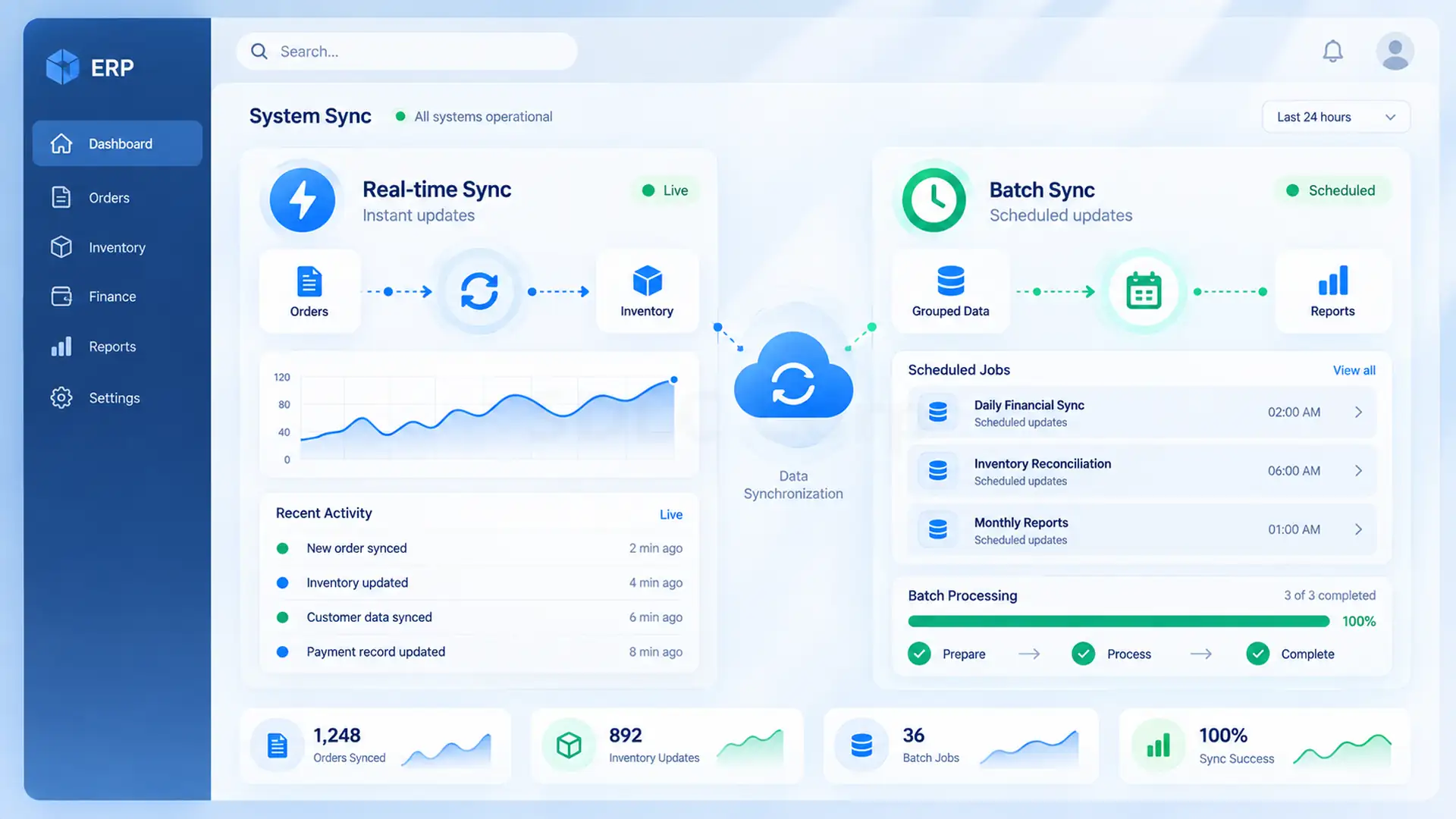
| Data | Typical Synchronization |
|---|---|
| Registration | Real-time |
| Payment confirmation | Real-time |
| Check-in | Real-time |
| Session or capacity update | Real-time |
| CRM engagement | Real-time or near-real-time |
| ERP settlement | Near-real-time or batch |
| Financial reconciliation | Scheduled |
| Analytics warehouse | Batch or streaming |
The event-specific challenge is traffic shape.
Registration does not always arrive at a steady rate. Opening registration for a major conference can produce a sharp burst of requests within a short period, followed by much quieter traffic.
That affects queue capacity and downstream APIs. A design that works for 20 registrations per hour may fail when hundreds arrive close together. Real-time architecture therefore needs to account for destination-system limits, processing throughput, and how long queued records can safely wait.
Designing Integrations That Survive Failure
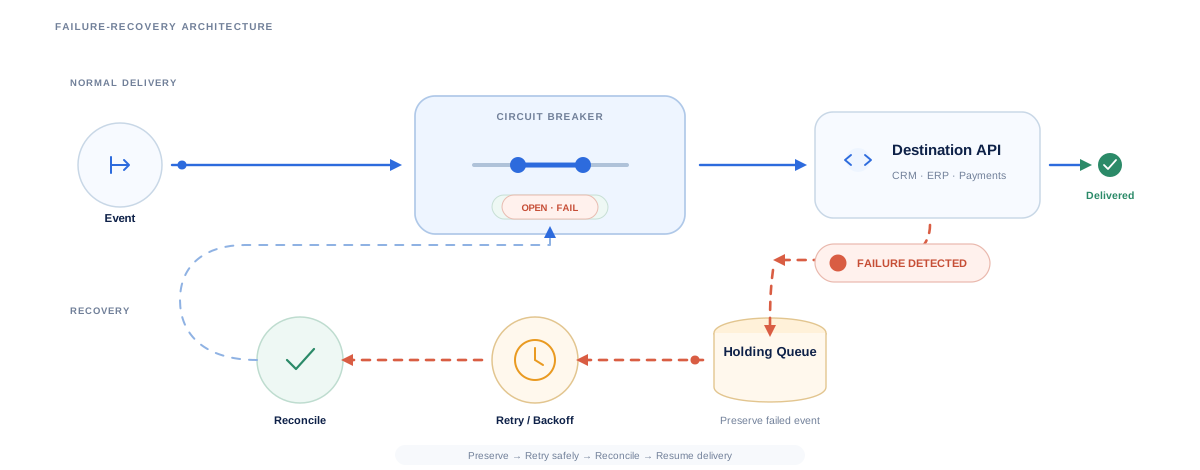
Production integrations should assume that APIs, networks, and downstream applications will sometimes be unavailable.
The Delivery Path
The queue separates the user-facing event workflow from the CRM or ERP. If the destination is temporarily unavailable, registration can continue while the integration retains work for later processing.
Idempotency, Retries and Rate Limits
Duplicate delivery is normal enough that integrations should explicitly defend against it.
Idempotency allows the integration to identify an operation and safely avoid performing it twice. Stripe supports idempotency keys so a request can be retried without creating the same operation again. Stripe Idempotent Requests .
Stripe also documents concrete webhook retry windows. In live mode, failed event deliveries are retried for up to three days with exponential backoff. Sandbox deliveries are retried three times over a few hours. Manual resend remains available for up to 15 days in the Dashboard and up to 30 days through the Stripe CLI. Stripe Webhook Retry Behavior .
That same principle matters when an event registration triggers a CRM record, invoice, refund, or other business operation.
Retries also need limits. Repeating a failed request immediately can intensify an outage or consume the destination platform's API allocation. Most Salesforce Connect REST API requests count against a per-org allocation measured over 24 hours. Chatter REST resources use a per-user, per-application, per-hour limit. Salesforce also advises polling no more than once per minute, or 60 times per hour. Salesforce Connect REST API Limits .
Exponential backoff, bounded retries, queues, and replay controls allow the integration to recover without creating a retry storm.
What Should Happen When an Integration Fails?
| Failure | Required Behavior |
|---|---|
| CRM unavailable | Queue the update and retry |
| Webhook delivered twice | Detect the duplicate and avoid a second operation |
| ERP API unavailable | Retry without creating a duplicate posting |
| Payment succeeds but callback fails | Verify against provider records |
| Mapping validation fails | Quarantine the record and alert support |
| API limit reached | Back off and continue from the queue |
| Onsite network unavailable | Preserve operational data until connectivity returns where supported |
Retries alone cannot prove that two systems agree. A separate reconciliation process should identify missing registrations, failed CRM updates, unmatched payments, and duplicate financial entries.
Payment Succeeds but the Callback Is Lost
Consider an illustrative conference with 4,000 paid registrations.
During a registration burst, one attendee completes payment successfully. The payment provider records the transaction, but the callback to the event platform times out before the registration receives its final paid status.
A weak implementation can leave three conflicting views. The attendee sees no confirmation, the payment processor shows a successful charge, and the ERP has nothing to post.
A resilient workflow does not simply charge the card again. The registration keeps its order ID and payment reference. A reconciliation process queries or compares provider records, identifies the successful transaction without a matching completed registration, and safely replays the missing downstream steps. Idempotency prevents that replay from producing a second invoice or CRM activity.
The exact volume and timing in this example are illustrative, not a claim from a client implementation. The point is the recovery path: identifiers plus reconciliation resolve uncertainty without turning an integration failure into a duplicate financial transaction.
Preventing Duplicate and Inconsistent Records
Duplicate prevention begins before synchronization.
Every important object should have a stable identifier: CRM contact ID, registration ID, order ID, payment transaction ID, ERP document ID, and settlement reference.
The mapping should then define:
- Which system owns each field
- Whether synchronization is one-way or bidirectional
- What qualifies as the same person or transaction
- What happens when both systems change a record
- Whether the newest timestamp automatically wins
- When a record is merged, rejected, or sent for review
Email-only matching is convenient but fragile. A persistent enterprise identifier provides a stronger primary key, while email, name, company, and other attributes can support secondary matching.
Data quality also needs monitoring. A synchronization job that completes technically but maps an attendee into the wrong account is still an integration failure.
Security and Compliance Across Connected Systems
Security controls need to cover the entire integration path, not only the event application.
API credentials should be kept outside application code, access should follow least-privilege principles, and sensitive connections should use appropriate authentication such as OAuth 2.0. Webhook consumers should verify the sender before trusting the payload.
Stripe, for example, recommends verifying webhook signatures using the endpoint secret and the signature sent with each event.
Attendee data also becomes harder to govern when copies exist in the event platform, CRM, analytics environment, and other connected systems.
The European Commission's GDPR guidance emphasizes principles including purpose limitation, data minimization, and storage limitation. European Commission GDPR Data Processing Principles .
For India, the current framework includes the Digital Personal Data Protection Act and the Digital Personal Data Protection Rules, 2025. Ministry of Electronics and Information Technology .
Retention, correction, deletion, access control, and audit processes should cover every application that receives attendee information. Do not treat the event platform as the only copy.
PCI DSS considerations apply separately to payment data. Minimizing unnecessary card-data handling can reduce exposure, but the precise compliance scope depends on the payment architecture.
When Custom Integration Is the Right Choice
A native integration is usually enough when the systems are common, the fields are standard, and the workflow fits what the connector already supports.
iPaaS is a better fit when several applications need reusable mappings, routing, transformations, monitoring, and centralized orchestration.
Custom integration becomes more appropriate when:
- Transactions are business-critical
- Workflows include complex business rules
- Proprietary or legacy applications are involved
- Event traffic is highly bursty
- Low latency is important
- Financial operations require strict traceability
- Recovery and reconciliation logic is specialized
- Packaged connectors cannot represent the required data model
The decision should consider not only implementation speed but also long-term maintenance, observability, vendor API changes, security, and who will own the connection after launch.
For larger environments where event workflows are part of a broader custom platform, see Enterprise Software Development Company .
Final Thoughts
Reliable event management system integration is not measured by how many application logos appear on an integrations page.
Reliable integration starts with clear record ownership and correct mapping into CRM and ERP objects. It also requires the right synchronization pattern, plus retries and reconciliation designed before failures happen.
When these decisions are made together, the event platform becomes part of the enterprise architecture. Teams no longer have to reconcile another isolated application manually.
Connect ERP, CRM, Payments and APIs Without Creating Another Isolated System
Design an integration architecture that keeps customer, operational and financial records synchronized as your event environment scales.
Frequently Asked Questions
What Is Event Management System Integration?
Event management system integration connects an event platform with CRM, ERP, payment gateways, analytics, and other enterprise applications. It allows registration, customer, attendance, payment, and financial information to move between systems using controlled APIs, webhooks, connectors, middleware, or scheduled synchronization.
How Does Event Management Software Integrate With a CRM?
Event software can integrate with a CRM through a native connector, API, webhook, or middleware. Customer and account data can flow into the event platform, while registration, attendance, session activity, and other engagement signals flow back to the CRM.
Can an Event Management System Integrate With ERP Software?
Yes. Event platforms can integrate with ERP systems such as SAP, NetSuite, Microsoft Dynamics 365, Business Central, and Odoo. Typical workflows transfer customer references, invoices, ticket revenue, taxes, refunds, settlements, and accounting dimensions.
What Is the Difference Between Native Integrations, APIs and iPaaS?
A native integration is a prebuilt connection between supported platforms. APIs provide more control over custom data exchange and business logic. iPaaS adds an orchestration layer for multi-system integration. It can transform, route, and monitor information without building every connection from the beginning.
Should Event Data Sync in Real Time or in Batches?
Registration, check-in, and payment confirmation usually benefit from real-time synchronization because delays affect operations or the attendee experience. Settlement, reconciliation, and many analytics workloads can run in batches when immediate updates are unnecessary.
How Do You Prevent Duplicate Records When Syncing Event and CRM Data?
Use persistent record identifiers, clear system-of-record rules, defined field mappings, deduplication logic, and conflict-resolution rules. Email can help with identity matching, but a stable CRM or enterprise identifier is usually a stronger primary key.
What Happens if the Same Webhook Is Delivered Twice?
The receiving integration should use idempotency or another duplicate-detection mechanism to determine whether the business event has already been processed. A duplicate delivery should not create another contact, invoice, payment action, or ERP posting.