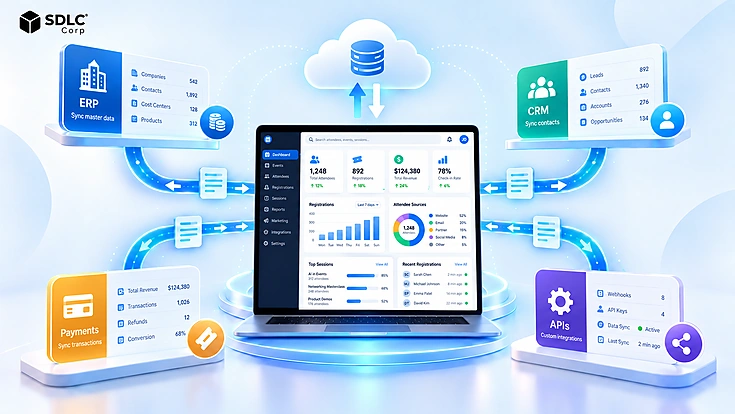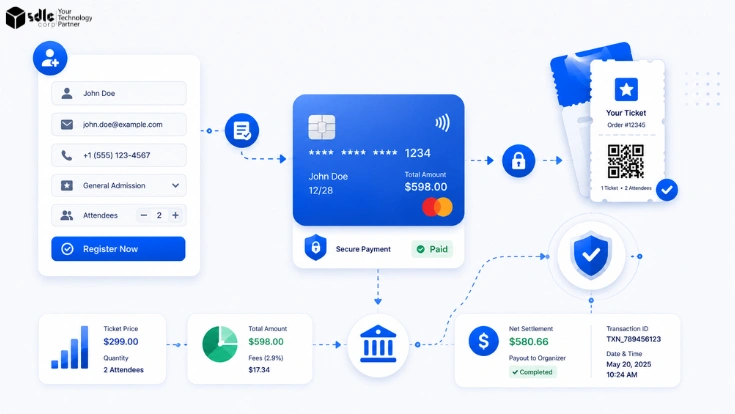
Event registration payment processing looks simple from the attendee side: choose a ticket, enter details, pay, and receive confirmation. Behind that flow sit several connected records, including the attendee profile, order, transaction, fees, taxes, refunds, payout, and accounting entry. When those records drift apart, teams face duplicate registrations, payment mismatches, delayed refunds, and difficult reconciliation.
Organizations get better results by evaluating more than the front-end form. The right event registration software connects the full journey from registration to settlement and gives operations, finance, marketing, and IT teams reliable data.
Why Registration and Payments Have to Work as One System
A registration creates more than an attendee record. It also creates an order matched to a payment transaction, payment status, ticket entitlement, tax amount, and later settlement record. Refunds and chargebacks remain connected to that same chain.
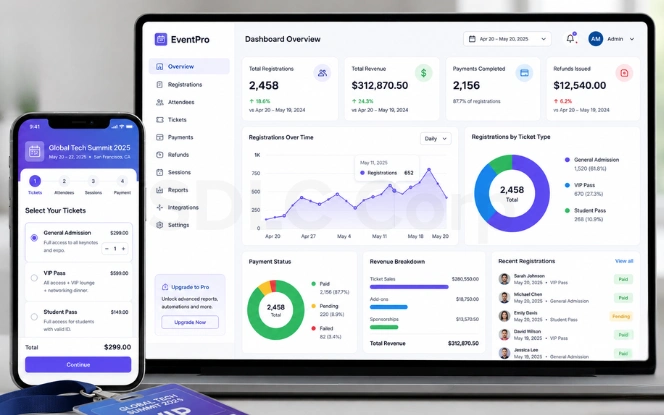
Problems appear when the registration platform and payment processor behave like unrelated systems. An attendee may receive a confirmation while payment is still pending. Finance may see a processor payout without knowing which registrations produced it. Customer support may process a refund in one system while the registration remains active in another.
A strong setup lets teams trace one registration from the initial form submission through payment, ticket issuance, refund activity, processor fees, payout, and accounting. That shared data model reduces manual matching and gives each team a clearer source of truth.
Registration Features Every Organization Needs
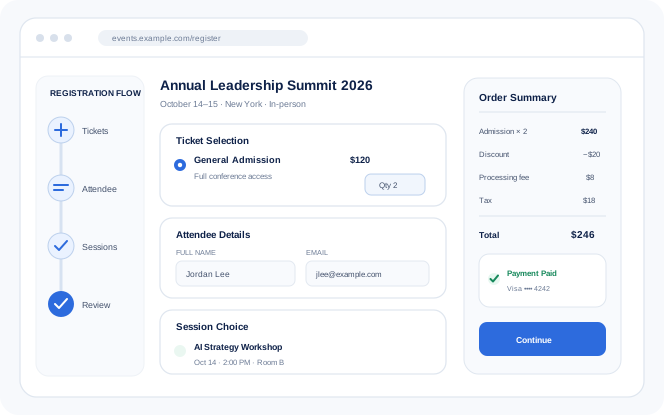
Event registration software needs to manage more than attendee names. The registration layer controls what information is collected, how pricing and capacity rules are applied, and how attendees move from sign-up to confirmation and check-in.
Custom Forms and Conditional Logic
Registration forms collect the right information without forcing every attendee through the same questions.
- Show fields by ticket type, membership, or earlier answers
- Validate required information before submission
- Keep forms branded and mobile-friendly
Multiple Ticket Types and Pricing Rules
One event can support several pricing structures without creating separate registration flows.
- Standard, VIP, member, student, and sponsor tickets
- Automatic early-bird pricing windows
- Eligibility-based or member-specific pricing
Group and Multi-Attendee Registration
One purchaser can manage several attendees while individual attendee profiles remain separate.
- One order with multiple attendee profiles
- Individual session choices and details
- Shared invoices, payments, and group discounts
Sessions, Capacity, and Waitlists
Capacity controls prevent overbooking and give teams a reliable view of session availability.
- Set limits for sessions and ticket categories
- Prevent conflicting session selections
- Promote attendees when waitlist space opens
Mobile, Accessible Registration, and QR Check-In
The registration experience remains usable before the event and at the point of entry.
- Responsive forms for phones, tablets, and desktops
- Accessible controls and keyboard navigation
- QR tickets with real-time check-in controls
Automated Confirmations and Attendee Communications
Messages stay connected to registration and payment status across the attendee journey.
- Registration confirmations and payment receipts
- Event reminders and schedule updates
- Refund, cancellation, and failed-payment notices
Event Registration Payment Processing Features to Evaluate
Event payment processing affects checkout completion, transaction costs, international sales, refunds, and finance operations. Evaluate the entire payment lifecycle rather than checking only whether the platform can accept an online payment.
Multiple Payment Methods
Give attendees practical payment choices without creating separate registration flows or additional manual finance work.
- Credit and debit cards
- Digital wallets where supported
- Bank transfer or invoice options when required
Payment Gateway Flexibility
Gateway choice affects transaction costs, geographic coverage, settlement, fraud controls, and integration architecture.
- Preferred processor support
- Region-specific gateway options
- Clear transaction and settlement ownership
Multi-Currency and Cross-Border Payments
International events require visibility into attendee currency, conversion costs, cross-border charges, and final settlement.
- Supported attendee currencies
- Foreign-exchange and cross-border fees
- Transaction and settlement currency tracking
Discounts, Coupons, and Promotional Pricing
Promotional pricing works best when discount rules are automated, controlled, and traceable instead of manually adjusted.
- Fixed or percentage discounts
- Expiration dates and usage limits
- Ticket, attendee, or campaign eligibility
Deposits, Installments, and Partial Payments
High-value registrations may require deposits or scheduled payments rather than collecting the full balance at checkout.
- Initial deposit collection
- Defined installment schedules
- Outstanding balance tracking
Full and Partial Refunds
Refund activity should remain linked to the attendee, order, original payment, and resulting financial adjustment.
- Full and partial refund support
- Reason and authorization tracking
- Pending and completed refund status
Security and Compliance Requirements
Event registration systems handle attendee information, transaction records, and payment-related data. Security controls therefore need to protect the checkout process, stored information, user access, integrations, and payment activity.
PCI DSS and Tokenization
Payment architecture should minimize exposure to raw card data. The PCI Data Security Standard (PCI DSS) provides baseline technical and operational requirements for protecting payment account data. Tokenization replaces sensitive payment information with non-sensitive references while the payment processor retains the underlying credentials.
Privacy and Access Controls
Registration data can include contact details, accessibility requirements, membership information, attendee preferences, and transaction history. Access should match each user's operational responsibility.
Security Documentation
Security claims need supporting evidence. Review how the platform protects information, responds to incidents, manages vulnerabilities, and recovers from operational failures.
Fraud Prevention and Payment Authentication
Fraud controls help identify stolen-card activity, automated abuse, suspicious transaction patterns, and other payment behavior that can increase chargebacks. Processor risk scoring, velocity controls, transaction monitoring, and EMV 3-D Secure can be applied where appropriate.
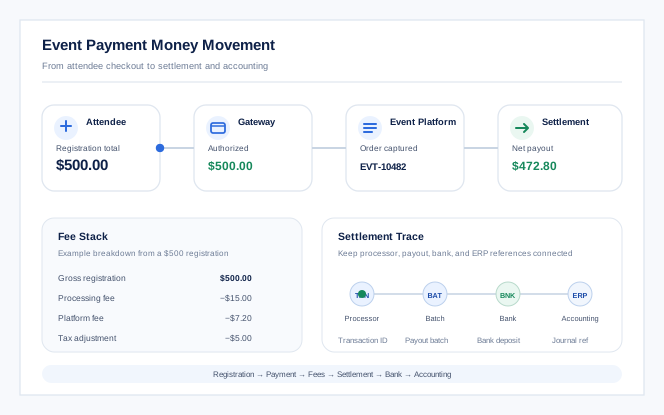
How Event Money Actually Moves
A successful registration does not mean the financial process is complete. Organizations also need visibility into payment ownership, fees, settlement, and possible reversals.
-
Merchant of Record
Confirm who legally accepts attendee payments and whose merchant account receives the funds. This determines settlement ownership, refunds, statement details, and chargeback handling.
-
Full Fee Stack
Review processing, gateway, platform, transaction, and currency charges together. A complete fee view gives finance a clearer picture of expected net revenue.
-
Payout and Settlement
Check payout frequency, settlement delays, reserves, and holds. Finance also needs references that connect bank deposits with the related registration transactions.
-
Chargebacks and Disputes
Define who receives dispute notices, submits evidence, tracks outcomes, and records reversals. Clear ownership keeps registration and accounting records aligned.
Payment Processing Benchmarks to Model
Use provider-specific pricing and settlement terms in the final business case. The figures below are current public benchmarks, not universal contract rates.
| Planning Item | Current Public Benchmark | What It Means for Events |
|---|---|---|
| Online card processing | Stripe lists standard online card processing at 2.9% + $0.30 per successful domestic card transaction. Stripe pricing. | Use the published rate as a planning baseline, then account for platform, international-card, currency, and ticketing fees that may apply to the event. |
| Payout timing | PayPal states that a standard transfer to a linked bank typically takes 1–3 business days. PayPal transfer timing. | Model event cash flow using the selected gateway's actual payout schedule, weekends, bank holidays, reserves, and any post-event holds. |
| Chargeback rate | Event-ticketing chargeback rates vary, but one published merchant-services benchmark places the category near 0.9%. Event ticketing benchmark. | Track dispute rate by event and payment method because cancellations, postponements, unclear descriptors, and refund delays can create short-term spikes. |
Planning for Failed and Incomplete Payments
Payment problems need clear recovery rules so attendees can complete registration without creating incorrect payment records or duplicate charges.
| Payment Situation | How the Platform Should Handle It |
|---|---|
Abandoned Checkout Recovery | Preserve registration progress so attendees can return directly to an unfinished checkout instead of starting again. |
Failed and Pending Payments | Keep failed or delayed transactions separate from confirmed registrations until the processor provides a final payment status. |
Duplicate Payment Prevention and Idempotency | Use safe retry logic so repeated clicks, network failures, or gateway timeouts do not create a second payment charge. |
SCA, PSD2, and 3-D Secure Authentication | For applicable European card payments, handle PSD2 Strong Customer Authentication (SCA) and EMV 3-D Secure as explicit checkout states. If authentication is challenged, abandoned, or fails, keep the registration pending and let the attendee retry authentication or choose another payment method without creating a duplicate order. |
Integration Requirements for CRM, ERP, and Accounting
Registration data should move reliably into the systems used by customer, membership, finance, and reporting teams. Evaluate what data moves, which system owns it, and how integration failures are recovered. For complex application landscapes, SDLC Corp's software integration services can help define and implement those data flows.
| Integration Area | What to Evaluate |
|---|---|
CRM and Membership Integration | Sync attendee identity, contact details, ticket type, registration status, and relevant engagement data without creating duplicate customer or member records. |
ERP and Accounting Integration | Transfer orders, taxes, fees, refunds, payout references, and settlement data in a structure that finance can reconcile with the ledger and bank deposits. Wider finance architecture can also be planned through ERP consulting and system integration services. |
APIs, Webhooks, and Retry Logic | Look for reliable APIs and webhooks with error logging, retries, and replay support so temporary outages do not create permanent gaps between connected systems. Review API exposure against the OWASP API Security Top 10. When packaged connectors are not enough, custom API development and integration services can support controlled system-to-system flows. |
System-of-Record Ownership | Define which application owns attendee identity, payment status, invoices, refunds, and financial postings so updates remain consistent across registration, CRM, and finance systems. |
Connect registration, payments, CRM, ERP, and finance without duplicate records.
Define ownership, APIs, webhooks, retries, and reconciliation rules before building the integration.
Plan the IntegrationMaking Event Registration Payment Processing Reconcilable
A finance-ready event workflow creates a traceable chain from the attendee's registration to the final accounting entry.
Each stage needs identifiers that let finance move forward or backward through the trail. If the bank receives a $47,280 payout, the team can identify which transactions produced that deposit and which fees, taxes, refunds, or disputes explain the difference from gross registration revenue.
Reconciliation becomes harder when processors batch many registrations into one payout. The system preserves the relationship between each transaction and its settlement batch. That lets finance compare processor reports, bank deposits, and ERP entries without building a manual matching file for every event.
First-party integration work shows the value of this traceability. Organizations planning connected CRM, quoting, billing, and finance workflows can use our Salesforce CPQ implementation guide to understand how CPQ configuration, approvals, pricing, quoting, and downstream system integration fit together. The event-registration use case is different, but the same principle applies: financial handoffs are easier to control when transaction states and system ownership remain connected.
| Record | Key Identifier | Why Finance Needs It |
|---|---|---|
| Registration and order | Registration ID, order ID | Links attendee activity to the commercial transaction. |
| Payment | Gateway transaction ID | Connects the order to the processor record. |
| Adjustments | Refund or dispute reference | Explains changes after the original sale. |
| Settlement | Payout or settlement batch | Matches processor activity to bank cash. |
| Accounting | Journal or ERP reference | Closes the trace into the finance system. |
Reporting covers revenue by ticket type, discount usage, payment method, refunds, taxes, processing fees, outstanding balances, settlement status, sales channel, and attendance versus registration.
Off-the-Shelf Versus Custom Development
The decision is not simply whether custom or SaaS software is better. Organizations first need to determine whether an established event registration and payment processing platform can support their registration rules, payment flows, integrations, settlement requirements, and finance processes without excessive workarounds.
When Standard Event Registration Software Is Enough
Standard event software works well when registration, payment, integration, and reporting requirements fit established platform capabilities. Organizations comparing packaged options should score established event registration platforms against the same workflow, integration, settlement, reporting, and ownership requirements before deciding whether custom development is necessary.
- Registration rules and attendee eligibility requirements are straightforward.
- Standard payment methods and refund workflows meet operational requirements.
- A limited number of external system integrations are required.
- Finance reporting and reconciliation requirements remain relatively straightforward.
- One legal entity and merchant account receive event revenue.
- Standard forms, ticketing, emails, payments, and reports meet requirements.
When Custom Event Registration Development Makes Sense
Custom development works better when registration, payment, integration, and reporting requirements exceed established platform capabilities. It is useful when critical workflows cannot be supported without technical compromises or manual workarounds.
- Registration rules or attendee eligibility requirements are highly complex.
- Specialized payment methods or refund workflows need custom control.
- Multiple external systems require deep or bidirectional integrations.
- Finance reconciliation and settlement requirements are highly specialized.
- Multiple legal entities or merchant accounts receive event revenue.
- Registration must operate inside an existing customer or member portal.
For a structured decision, SDLC Corp's Build vs Buy: Custom Software vs SaaS guide compares SaaS, custom, and hybrid approaches around workflow fit, ownership, integration depth, and long-term cost.
Event Registration and Payment Processing Evaluation Checklist
Registration
Payments
Finance
Integrations
Security
Final Thoughts
The best event registration payment processing setup is not simply the one with the most attractive form builder. Evaluate the entire chain from attendee registration through payment, settlement, reconciliation, reporting, and integration. Confirm who owns the money, how failure states are handled, where each record lives, and how finance can trace every payout. Once those answers are clear, it becomes much easier to decide whether an off-the-shelf platform is enough or custom development is justified.
Turn your event requirements into a clear registration and payment architecture.
Share your registration rules, payment model, integrations, and reconciliation needs with our team.
Talk to SDLC CorpFrequently Asked Questions
What Is Event Registration and Payment Processing?
It is the workflow used to collect attendee information, create an order, accept payment, issue access, manage refunds, and track settlement. A strong setup connects these records so event, support, and finance teams work from consistent data.
Who Is the Merchant of Record for Event Ticket Sales?
It depends on the payment model. The event organizer may use its own merchant account, or the platform or payment provider may play a larger role. Confirm this early because it can affect payouts, disputes, refunds, statement descriptors, and tax responsibilities.
Should We Absorb Payment Processing Fees or Pass Them to Attendees?
The right approach depends on pricing strategy, applicable rules, attendee expectations, and platform capability. Absorbing fees reduces net revenue but keeps pricing simpler. Passing them through can protect margin but may raise the final checkout total.
What Happens When an Attendee Disputes a Registration Charge?
The cardholder can raise a dispute through the issuer. The responsible merchant can accept it or submit evidence such as the registration, accepted terms, communications, attendance records, and refund policy. Response deadlines and settlement impact belong in the operating procedure before tickets go on sale.
Can Event Registration Software Integrate With CRM and Accounting Systems?
Yes. Many platforms provide APIs, webhooks, connectors, or export tools. Integration quality depends on field mapping, synchronization rules, duplicate handling, error recovery, and clear system-of-record ownership, not simply whether a connector exists.
When Should an Organization Consider Custom Event Registration Software?
Custom development is worth evaluating when standard platforms cannot support critical pricing, eligibility, payment, settlement, integration, reconciliation, or data-ownership requirements. For straightforward events, an established platform is usually faster and more economical.