Sponsors and exhibitors both support events, but they do different jobs. Typically, sponsors pay for or contribute to an event to gain visibility, reach an audience, share content, or receive other agreed benefits.
Exhibitors use a booth, virtual space, or product area to meet attendees, show products, book meetings, and capture leads.
However, one company can also do both. In that case, the registration flow should collect shared company details once and then show only the sponsor and exhibitor tasks that match the package.
This guide explains the key differences, when to combine the workflows, what to collect, and how to track results after registration opens.
Sponsor vs Exhibitor Registration At A Glance
Overall, the main difference is why the company joins the event. Sponsors focus on visibility, content, audience reach, and the benefits included in their package, while exhibitors focus on booth activity, product demos, meetings, and lead generation.
Each group therefore needs its own tasks, deadlines, and reporting.
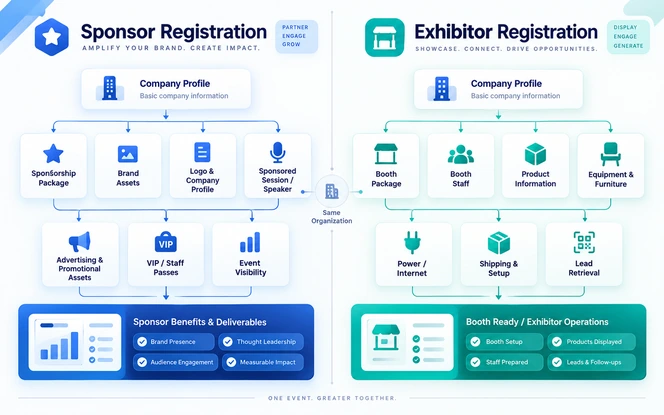
Sponsor Registration
Brand visibility, positioning, audience engagement, and the benefits written into the sponsorship package.
A sponsorship package or negotiated agreement, usually managed by a sponsor or marketing contact.
Executives, speakers, marketing staff, guests, and activation teams who represent the brand at the event.
Brand assets, sponsored content, activation requirements, and other details tied to the purchased benefits.
Logos, signage, sessions, and app placement, with logistics usually linked to the sponsored activities.
Sponsorship exposure and engagement, with lead capture depending on what the package includes.
Exhibitor Registration
Product showcasing, buyer meetings, live demonstrations, and lead generation from booth visitors and passers-by.
A booth or exhibition package with allocated space, usually managed by an exhibitor or booth coordinator.
The team can include booth staff, sales teams, product specialists, and representatives who meet attendees at the stand.
Key information includes booth requirements, product details, shipping plans, equipment needs, and orders for venue services.
Visibility comes from the booth listing, directory profile, and product listings, with detailed booth and venue logistics to manage.
Reporting covers booth activity, meetings, scans, and leads, since lead capture is a common exhibitor requirement.
Therefore, connect the workflows when one company buys both sponsorship benefits and exhibition space.
Do not force every sponsor through booth tasks or every exhibitor through sponsor tasks, because unused questions slow people down and create incomplete records that the event team must chase later.
What Is Sponsor Registration?
Sponsor registration helps an event team onboard companies that have bought or received sponsorship benefits. First, start with what the sponsor bought, then collect only the details needed to deliver those benefits.
To review ticket, payment, and registration rules, see event registration and payment processing features. For example, sponsor registration may collect the following details.
- Company name
- Primary sponsor contact
- Sponsorship package or tier
- Brand logo
- Company description
- Website
- Social links
- Staff information
- Guest details
- Sponsored-session information
- Speaker details
- Promotional assets
- Activation requirements
- Advertising creative
- Lead-capture requirements
Depending on the package, benefits may include logo placement, app visibility, sponsored content, speaking slots, signage, VIP passes, networking access, branded activities, or exhibition space.
Then, link each purchased benefit to a clear task so the sponsor always knows what the event team expects and by when.
For instance, a sponsor with a sponsored session should submit the session and speaker details, while one with digital branding only should not see booth or shipping questions.
Overall, good sponsor registration tracks people, assets, deadlines, and benefits in one flow instead of relying on one large form.
What Is Exhibitor Registration?
Exhibitor registration helps a company prepare its booth, virtual space, marketplace profile, demo area, staff, and event-day needs.
Therefore, the flow should collect the details the organizer needs to set up the exhibitor and support its team during the event. For example, typical exhibitor information can include the following items.
- Company name
- Booth coordinator
- Booth size or package
- Staff registrations
- Company description
- Product categories
- Booth images
- Equipment requirements
- Shipping information
- Furniture requirements
- Power requirements
- Internet requirements
- Setup and dismantling details
- Insurance documents
- Safety documents
- Lead-retrieval requirements
- Meeting availability
Exhibitor onboarding often continues after the first booking. Eventbrite's trade show and expo registration guidance also separates exhibitor paths from standard attendee ticket types, which shows why a plain ticket form rarely covers what an exhibitor needs.
As a result, planning that path early avoids rework once booth sales open.
After booking, an exhibitor may still need to add staff, complete its profile, upload products, order venue services, submit documents, and prepare for setup.
As a result, exhibitor registration becomes both a sign-up flow and an operating checklist that stays open until the event begins, which also helps the organizer plan support before setup day.
Key Differences Between Sponsor And Exhibitor Registration
Sponsors and exhibitors can belong to the same company, but the event team should ask them for different information.
In practice, the six areas below show where the two roles diverge and how to design the flow for each one, so partners only see the work that applies to them.
Then, read each area as a pair and apply the design advice to your own flow.
Participation Goal
Sponsors join to build visibility, reach the audience, support thought leadership, and receive package benefits.
Exhibitor objectives may include:
- Demonstrating products
- Meeting potential buyers
- Generating leads
- Booking meetings
- Collecting contact information
- Introducing new solutions
- Building partnerships
Ask each company what it needs to achieve and show only the tasks that support that goal.
Package And Entitlements
Sponsor packages may define:
- Logo placement
- Number of passes
- Sponsored sessions
- Event-app visibility
- Advertising placements
- VIP access
- Networking benefits
- Lead-retrieval access
- Exhibition space
- Content opportunities
Exhibitor packages are more likely to define:
- Booth size
- Booth location
- Included furniture
- Staff passes
- Lead-capture access
- Directory listings
- Product listings
- Meeting features
- Venue services
Store the package once and use rules to show only the benefits and tasks the company bought.
Details Collected
Sponsor registration may require:
- Logos
- Brand descriptions
- Website links
- Advertising assets
- Sponsored-session content
- Speaker information
- Promotional copy
Exhibitor registration often requires more operational information, including:
- Booth staff
- Equipment
- Shipping
- Setup requirements
- Product demonstrations
- Service orders
- Safety documentation
- Meeting schedules
Avoid one oversized form. Split the work into short, relevant tasks for each role.
Team Registration
Sponsor teams can include:
- Executives
- Speakers
- Marketing teams
- VIP guests
- Activation teams
- Customer representatives
Exhibitor teams usually include booth staff, sales teams, and product specialists.
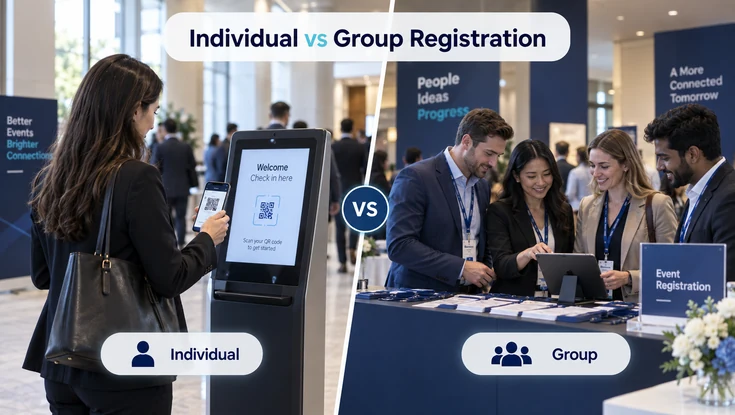
Every person should have an individual attendee record. The individual vs group event registration explains when each model fits.
Deadlines And Deliverables
Sponsor deadlines may cover:
- Logos
- Advertising creative
- Session details
- Speaker information
- Videos
- Promotional content
Exhibitor deadlines may cover:
- Booth plans
- Staff registration
- Shipping orders
- Electricity requirements
- Venue forms
- Insurance documents
- Setup schedules
Give each task an owner and a due date so teams can see what is still missing.
Reporting
Finally, sponsor reports measure visibility, sponsored-session activity, content use, and activation engagement, while exhibitor reports measure booth activity, meetings, scans, product interest, and qualified leads.
In addition, connect activity to the package and company record, and see event engagement tools for a wider view.
Swapcard's exhibitor and sponsor management overview is one external example of partner profiles, team coordination, lead capture, and ROI reporting.
In addition, reviewing how other platforms group these tasks can help you decide which parts of your own workflow should be shared and which should stay role specific.
Benefits And Limitations Of Sponsor And Exhibitor Registration
A clear workflow helps partners finish their work faster and gives the event team a cleaner record of what is complete.
However, each model has its own strengths and limits, so the cards below show what each one improves, where it can struggle, and how to design around those weak points.
Therefore, use them to decide where to simplify your own flow first.
Sponsor Registration
Structured sponsor registration can provide:
- Clear sponsorship entitlements
- Centralized brand-asset collection
- Better deadline management
- Easier team registration
- Consistent sponsor information
- Improved activation coordination
- Better reporting
- Less manual email follow-up
Organizers may need to manage:
- Custom deliverables
- Different staff allocations
- Multiple contacts
- Sponsored sessions
- Advertising deadlines
- Activation logistics
- VIP benefits
- Reporting requirements
These variations can push teams back to spreadsheets when tasks are not linked to entitlements.
Therefore, tie every benefit to a task, owner, due date, and status, and show only the work included in that sponsor's package so nothing is asked twice.
Exhibitor Registration
Structured exhibitor registration can provide:
- Centralized booth information
- Staff registration
- Clear setup instructions
- Lead-retrieval access
- Product and company listings
- Better logistics planning
- Self-service profile management
- Fewer repetitive support requests
However, booth, shipping, staff, services, and compliance create many tasks, and one long form can overwhelm exhibitors. As a result, late documents can block setup, and different booth packages may need different questions to stay accurate.
Therefore, break onboarding into short tasks and reveal each task only when the booth package requires it, so exhibitors never scan through irrelevant questions.
When Should Sponsor And Exhibitor Registration Be Combined?
Combine the workflows when one company receives both sponsor benefits and exhibition space.
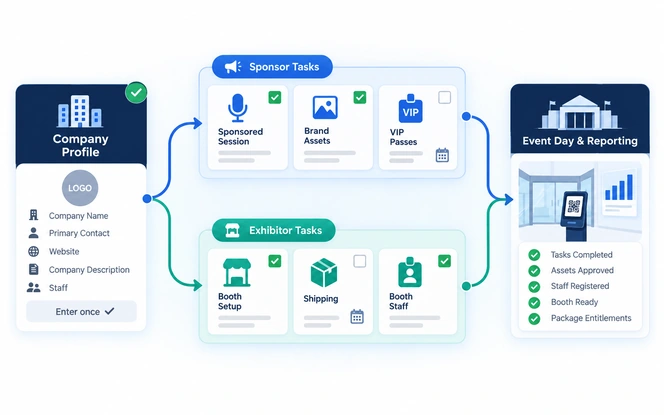
Then, keep one company profile and attach the tasks that match the package, so the team never asks the same question twice and partners see one clear list of what they still need to complete.
This also keeps every entitlement consistent across the sponsor and exhibitor sides.
- Main-stage logo placement
- A sponsored session
- An exhibition booth
- Staff passes
- VIP passes
- Lead retrieval
- Event-app visibility
- A sponsored networking activity
A sponsor without a booth should not answer shipping or booth questions, and an exhibitor without sponsor benefits should not submit sponsored-session content.
However, a company that does both should complete shared details once and then work through the sponsor and exhibitor tasks that apply to its package.
Best Practices For Sponsor And Exhibitor Registration
Make the workflow easy for partner companies and easy for your team to manage. In practice, the seven practices below cover profiles, paths, entitlements, tasks, self-service, staff records, and permissions.
For conditional fields and approval paths, see custom event registration forms and workflows.
For a product example of configurable registration forms, document collection, and review workflows, see Matrica registration platform.
Create One Company Profile
Start with information that applies to both roles:
- Company name
- Primary contact
- Website
- Company description
- Logo
- Address
- Industry
- Social links
Then ask sponsor-specific or exhibitor-specific questions only when they apply, so partners never retype information the event team already holds.
Use Role-Based Registration Paths
Ask whether the organization is participating as:
- Sponsor
- Exhibitor
- Sponsor and exhibitor
Use that answer to show the right tasks. This keeps people out of sections they do not need and gives the event team a clean record of each company's role.
Connect Packages With Entitlements
Package entitlements may include:
- Staff passes
- Booth space
- Lead-retrieval licenses
- Sponsored sessions
- Advertising placements
- Product listings
- Meeting access
- VIP benefits
Let those package rules drive the workflow, and do not make companies prove the same entitlement more than once.
Use Task-Based Onboarding
Break onboarding into manageable tasks such as:
- Complete Company Profile
- Register Team Members
- Upload Brand Assets
- Submit Booth Information
- Add Sponsored Session
- Order Venue Services
- Provide Required Documents
Give each time-sensitive task a clear deadline so nothing waits until the last week.
Provide Self-Service Access
Useful self-service options include:
- Update company profile
- Upload assets
- Add team members
- Register booth staff
- Review package benefits
- Complete outstanding tasks
- Access logistics information
- View deadlines
- Manage leads
- Access relevant documents
Keeping these actions in the portal cuts support requests and helps every record stay current.
Keep Staff Records Individual
Give every representative an individual attendee record, even when the company receives several passes.
Individual records support:
- Badges
- Check-in
- Permissions
- Meetings
- Session access
- Communication
- Lead capture
For training events, those records can also help you automate certificates for training and educational events.
Use Appropriate Permissions
Give people only the access they need. For example, a company admin may manage staff and tasks, while a booth rep may only need event access and lead tools.
In addition, for stricter identity and privacy needs, review the secure event management platform for government and education guide before you assign roles.
What Should Sponsor And Exhibitor Management Software Support?
The right platform should guide companies from package confirmation through onboarding, event-day activity, and reporting.
For broader operational workflow needs, Causeway workflow and approvals provides a product example of approval levels, reminders, escalation, and reporting across business records.
For example, use the event management platform buyer's guide to compare workflow fit, integrations, security, pricing, and vendor options before you commit to a tool, and test it against a real sponsor and exhibitor scenario.
Sponsor Management
Track sponsor packages, benefits, people, assets, tasks, and results.
- Sponsorship packages
- Sponsor tiers
- Entitlement tracking
- Company profiles
- Brand-asset uploads
- Sponsored-session management
- Advertising deliverables
- VIP or guest passes
- Sponsor staff registration
- Engagement reporting
Exhibitor Management
Track booths, staff, venue services, documents, leads, and results.
- Exhibitor packages
- Booth assignments
- Booth staff registration
- Company listings
- Product listings
- Venue-service requirements
- Exhibitor tasks
- Document uploads
- Lead retrieval and meetings
- Check-in and reporting
Shared Platform
Keep records, permissions, reminders, payments, and reports together.
- Central company record
- Package entitlement rules
- Staff allocation limits
- Automated task reminders
- Role-based user permissions
- Payment information
- Sponsor and exhibitor communication
- Shared reporting
- CRM integration
- Audit history
Choose software that matches the real workflow instead of buying the longest feature list. First, map the full path from package confirmation to event-day work and post-event reporting, and check each step against the tool before you sign.
Then, when registration must connect with CRM, finance, or marketing systems, use event management system integration to define how data moves between tools.
A Practical Sponsor And Exhibitor Registration Workflow
Consider a technology company that buys a sponsorship package with an exhibition booth.
In practice, the ordered workflow below keeps shared data in one place and adds role-specific work only when needed, so the partner completes each task once and the event team can follow progress from confirmation to results.
Confirm The Package
Record the package against one company profile. The company receives:
- Gold sponsorship
- Exhibition booth
- Six staff registrations
- Two VIP passes
- One sponsored session
- Lead retrieval
- Event-app branding
This single record becomes the source of truth for every later task, so the team does not need to reconcile separate spreadsheets or email threads.
Invite The Primary Contact
Give the company manager portal access and ask them to complete the shared company profile once.
Then, the profile feeds both sponsor and exhibitor tasks, so the contact does not repeat details, and the event team can see at a glance who owns each open task for that company.
Collect Brand Assets
Collect the approved brand details and files:
- Logo
- Description
- Website
- Social links
- Required promotional assets
Reuse the approved data across the event site, app, and partner directory so later changes are made in one place.
Complete Exhibition Tasks
Because the package includes exhibition space, collect:
- Booth information
- Product categories
- Equipment requirements
- Shipping information
- Staff details
These tasks often carry earlier deadlines than sponsor items, so show them early and send reminders before setup schedules tighten.
Add Sponsored Content
Collect the sponsored-session details:
- Session title
- Description
- Speaker information
- Presentation details
- Promotional assets
For complex programs, use multi-session event management to coordinate schedules and speakers. Set a content deadline that leaves time for review before the agenda goes live.
Register Team Members
Register booth reps, speakers, executives, and other participants, and give each person a separate attendee record.
As a result, individual records let badges, check-in, session access, and lead capture work per person, and they show how many included passes the company has left unused.
Track Open Tasks
Show missing items and upcoming deadlines in the portal, and send reminders before tasks become late.
Consequently, a clear status for each task helps the event team focus its follow-up on the few companies that are behind instead of sending every partner the same generic message.
Run The Event
Apply the correct booth, speaker, VIP, session, and lead-capture access to each person based on the package.
Because access rules come from the stored entitlements, check-in staff do not need to look up contracts, and last-minute changes take effect from a single update.
Review Results
Connect booth activity, sessions, meetings, scans, and other engagement back to the company and its package.
As a result, this lets the team show each partner what its package delivered, and it gives you a baseline to compare against when planning the next event cycle.
Common Sponsor And Exhibitor Registration Mistakes To Avoid
Most problems start when the workflow asks the wrong person for the wrong task.
In practice, the six mistakes below are the ones that most often lead to abandoned forms, missing assets, late staff lists, and repeated support emails, and each has a simple fix in how the flow is designed.
Check your current flow against each one before you launch.
Treating Sponsors And Exhibitors As The Same
Ask sponsors for sponsor deliverables and exhibitors for booth logistics. Therefore, show both sets only when the package includes both roles, so nobody answers questions that do not apply to them.
Using One Oversized Form
Do not mix staff, booth, brand, payment, session, and document questions in one long form. Instead, split them into short tasks so partners can finish each one quickly and return later for the rest.
Collecting Shared Information More Than Once
Store the company name, logo, website, description, and main contact once. Then, reuse those details across sponsor and exhibitor tasks so partners never retype what the event team already holds.
Failing To Connect Packages With Tasks
Make the package drive the task list. Therefore, do not show session, lead, or booth tasks when the company did not buy them, because irrelevant tasks create confusion and leave incomplete records behind.
Managing Everything Through Email
Use email for alerts, not as the main record. Instead, keep staff, files, booth needs, and deadlines in the platform so the whole team can see the current status without searching old message threads.
Ignoring Pass Limits And Deadlines
Show included passes, extra-pass rules, and due dates clearly. As a result, this cuts last-minute corrections and repeated support questions, and it helps partners plan their teams well before event day.
Metrics To Monitor After Registration Opens
Track a small set of numbers so you can find friction early. Use event reporting and analytics key metrics for a wider measurement framework, and review measured delivery evidence from an education event platform.
Finally, the six cards below cover completion, tasks, staff, and support, and they work best when reviewed every week.
Benchmark context: PheedLoop's 2026 Event Data Lab analyzed more than 3,600 live events per feature. Overall, median registration completion was about 85% to 94% across the compared promo-code groups, while custom-form events were about 89% to 91%.
As a result, on the same started-registration denominator, that equals about 6% to 15% abandonment. However, use these figures as directional event-registration benchmarks, not as universal sponsor or exhibitor targets. Source: PheedLoop Event Data Lab Report #03.
Registration Completion
Directional range: 85% to 94%. Therefore, track how many companies that start the flow finish it, and investigate sharp drops by package, device, or registration path.
Registration Abandonment
Directional range: 6% to 15%. Then, review where companies stop, since ticket choices, payment steps, unclear package rules, or login friction may cause the drop-off.
Task Completion
In addition, track logos, booth details, staff, sessions, documents, and ad assets against their due dates, and compare each event with the previous cycle instead of one universal target.
Staff Registration Coverage
Compare the passes a company receives with the people it actually registers. As a result, this reveals unused places and missing attendee details well before event day arrives.
Deadline Adherence
Track how many tasks arrive on time and which ones run late. For example, a rising count of late items often points to unclear instructions or weak reminders in the portal.
Support Load
Track repeated questions about packages, booths, passes, or deadlines. Similarly, a growing number of similar questions shows where instructions need to be rewritten or simplified.
Use the external ranges for context, then build your own sponsor and exhibitor baseline from each event cycle.
Then, compare every new event with the last one, and adjust reminders, package rules, and task order where completion stays low or support questions keep repeating. Finally, repeat this review after every event so the baseline stays current.
Conclusion
Sponsor and exhibitor registration solve different problems, even when one company fills both roles.
On the one hand, sponsors need a clear way to deliver brand, content, guest, and promotional benefits, while exhibitors need a clear way to manage booths, staff, logistics, meetings, and leads.
As a result, keeping those needs separate makes both roles easier to manage.
Use one company profile, let the package drive the task list, and track completion before deadlines become event-day problems.
As a result, a simple, role-aware flow saves partners time, reduces support work for your team, and gives everyone a clearer record of what has been delivered. Finally, review the flow after each event and simplify it again.
Frequently Asked Questions
What Is The Main Difference Between Sponsor And Exhibitor Registration?
Sponsor registration focuses on sponsorship benefits, branding, promotional opportunities, activations, passes, and sponsor deliverables. By contrast, exhibitor registration focuses more on booth setup, staff registration, logistics, product information, meetings, and lead generation.
Both need clear tasks, but the tasks are different.
Can A Company Be Both A Sponsor And An Exhibitor?
Yes. A company can purchase sponsorship benefits and exhibition space at the same event. For efficiency, shared company information should be collected once, while sponsor- and exhibitor-specific tasks appear according to the package.
This avoids duplicate questions and keeps one clear record for the company.
Does Every Sponsor Need An Exhibition Booth?
No. A sponsorship package may include branding, sponsored sessions, digital promotion, networking opportunities, VIP experiences, or other benefits without exhibition space.
In those cases the registration flow should hide booth, shipping, and venue-service tasks so the sponsor only completes work that applies to its package.
Does Every Exhibitor Need To Be A Sponsor?
No. An organization can purchase exhibition space without purchasing additional sponsorship benefits.
In that case, the flow should focus on booth details, staff registration, product listings, and logistics, and it should not ask the company for sponsored-session content, advertising assets, or other sponsor deliverables.
What Information Should Sponsor Registration Collect?
Sponsor registration may collect company details, sponsor contacts, logos, descriptions, staff information, sponsored-session details, advertising assets, activation requirements, and other information connected to the sponsorship package.
Collect only what the purchased benefits need, and add later tasks for items that are not ready at booking.
What Information Should Exhibitor Registration Collect?
Exhibitor registration may collect company information, booth coordinator details, staff registrations, booth requirements, products, shipping details, venue-service requirements, compliance documents, and lead-capture requirements.
Because many of these items arrive after booking, treat the flow as an ongoing checklist rather than a single form.
Should Sponsor And Exhibitor Registration Use Separate Forms?
Not always. A shared company profile combined with package-based or role-based tasks can reduce duplicate work.
However, separate workflows may still be useful when sponsorship and exhibition operations are completely independent, for example when different teams at the organizer manage each program and use different systems.
How Should Sponsor And Exhibitor Staff Be Registered?
Each representative should have an individual participant record connected to the company. As a result, the system can support badges, check-in, permissions, meetings, communication, session access, and lead capture.
Individual records also show how many of the included passes the company has actually used before event day.
What Features Matter Most In Sponsor And Exhibitor Management Software?
Important features include company profiles, package management, entitlement tracking, staff registration, role-based permissions, task deadlines, brand-asset uploads, booth management, sponsored-content management, communication tools, lead retrieval, reporting, and integrations.
Match the list to your real workflow rather than the longest feature set.
How Can Organizers Reduce Sponsor And Exhibitor Registration Work?
Collect shared company information once, show only package-relevant tasks, provide self-service tools, automate reminders, define clear deadlines, maintain individual staff records, and centralize important documents and updates.
These steps cut repeated emails and give the team one place to see what is complete and what is missing.