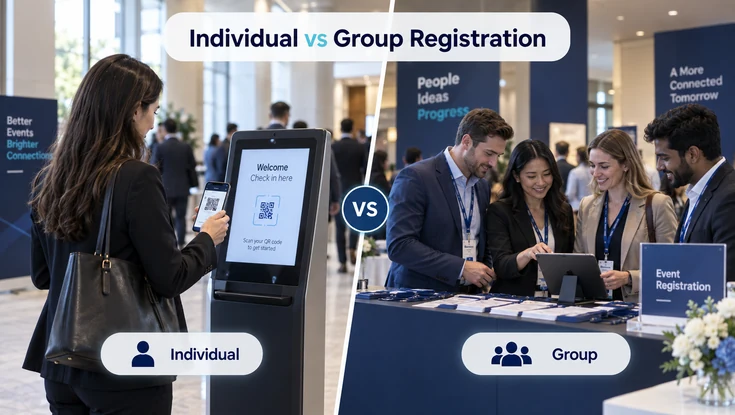
Choosing between individual and group event registration changes how attendees register, pay, share details, receive updates, and check in. It also changes how much work event teams must handle before the event.
Individual registration works well when each attendee registers, pays, and manages their own information. Group registration is designed for situations where a company, team, association, sponsor, or other organization needs to register several people under one booking or primary contact.
The right model depends on how your audience buys tickets, who controls payment, how attendee information is collected, and how much flexibility the event requires.
This guide compares individual vs group event registration, explains their key differences, highlights the benefits and limitations of each model, and shares practical best practices for creating a smoother registration experience.
Individual vs Group Event Registration At A Glance
Individual and group registration handle buyers, payments, and attendee details differently. This comparison shows organizers where each approach fits and how each workflow works.
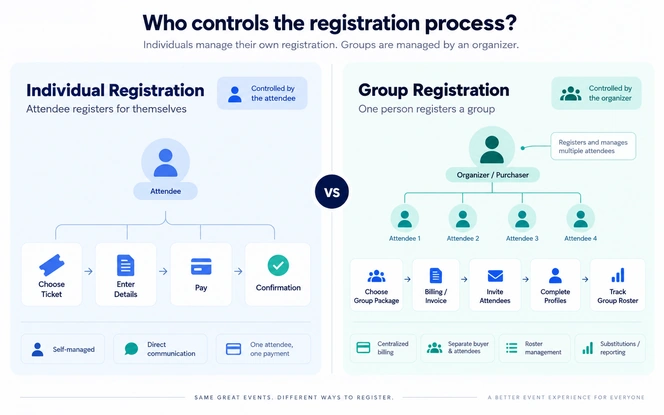
The main difference between individual and group event registration is who controls the registration process.
With individual registration, the attendee usually completes the entire process independently. With group registration, a buyer, coordinator, or group leader may manage registrations for several attendees.
Individual Registration
One attendee manages their own booking.
- Registrant
- One attendee
- Primary Contact
- Usually the attendee
- Payment
- Usually one payment per attendee
- Attendee Data
- Entered directly by the attendee
- Pricing
- Standard ticket pricing
- Communication
- Sent directly to attendee
- Changes
- Managed by attendee
- Reporting
- Mainly attendee-level
- Best Fit
- Independent attendees
Group Registration
One contact coordinates several attendees.
- Registrant
- Multiple attendees
- Primary Contact
- Group leader, buyer, or coordinator
- Payment
- One payment, invoice, or structured group payment
- Attendee Data
- Entered by the buyer or completed later by attendees
- Pricing
- May include group packages or volume pricing
- Communication
- May involve buyer and attendees
- Changes
- May be managed by an authorized group contact
- Reporting
- Group-level and attendee-level
- Best Fit
- Teams, companies, delegations, and cohorts
Neither option is automatically better. Choose the registration model that matches how attendees purchase, manage, and attend the event.
What Is Individual Event Registration?
With individual registration, each attendee controls the booking, enters their details, pays, and chooses preferences. This model works best when people register on their own and need a simple self-service path.
Individual event registration is a process in which one person registers for themselves.
The attendee typically selects a ticket, enters personal information, chooses relevant sessions or add-ons, completes payment, and receives an individual confirmation. For events with tracks or breakouts, multi-session event management should stay connected to the same attendee record.
In this model, the buyer, attendee, and primary contact are usually the same person. This makes the workflow relatively simple because there is no need to connect a separate purchaser with multiple attendee records.
For example, someone registering independently for a professional workshop may choose a ticket, enter contact details, select sessions, provide dietary or accessibility requirements, make payment, and receive confirmation without involving another person.
Individual registration commonly works well for:
- Public conferences
- Networking events
- Workshops
- Webinars
- Seminars
- Community events
- Independent professional training
- Small business events
It is particularly useful when attendees need direct control over their registration choices.
Each person can manage their own information, select relevant options, and receive event updates without relying on a group coordinator.
What Is Group Event Registration?
Group registration lets one buyer or coordinator register several people under one booking. The organization can pay centrally while each participant still keeps an individual attendee record.
Group event registration connects multiple attendees to one booking, organization, transaction, or primary contact.
A company administrator, team leader, association manager, sponsor, department coordinator, or another representative may register several people at once.
An important difference is that the person making the purchase does not always attend the event.
For example, a company administrator might purchase ten conference registrations for employees. The employees can then complete their own attendee profiles before the event.
This means effective group registration should separate the commercial booking from the individual attendee records needed for communication, preferences, sessions, and event check-in, badge printing, and attendance tracking.
Group registration is particularly useful for:
- Corporate teams
- Association members
- Training cohorts
- Exhibitor staff
- Sponsor teams
- Government delegations
- Academic groups
- School groups
- Clubs and communities
The goal of group registration is not simply to allow someone to buy several tickets.
A good group registration process makes it easier to manage the people connected to those registrations before, during, and after the event.
Key Differences Between Individual And Group Event Registration
The two models handle buyers, attendee details, payments, pricing, messages, changes, and reports in different ways. When organizers understand these differences, they can build a smoother path from registration to check-in.
Registration Ownership
With individual registration, the attendee usually controls the entire journey.
They enter their information, make selections, complete payment, and receive confirmation.
Group registration introduces another role: the group organizer or purchaser.
That person may need to:
- Purchase multiple registrations
- Invite participants
- Manage a group roster
- Track registration completion
- Access invoices
- Add attendees
- Remove attendees
- Request substitutions
This means organizers must manage an extra role that individual registration does not need.
Attendee Data Collection
Individual registration is straightforward because attendees provide their own information.
Group registration can be more complex.
A group buyer may know the names and email addresses of participants but may not know their dietary requirements, accessibility needs, job titles, travel plans, or preferred sessions.
Group registration often works better when the purchaser books the seats first and then invites attendees to add their own details later.
This reduces the amount of information the buyer must collect before making the purchase.
Payments And Invoicing
Individual registration often involves one attendee and one payment.
Group registration may require more flexible payment options.
Common approaches include:
- One centralized payment
- One invoice for the complete group
- Purchase orders
- Bank transfers
- Billing contacts
- Internal cost references
- Separate attendee payments connected to one group
Choose the payment setup that matches how organizations normally buy event registrations. A connected event registration and payment processing workflow can keep orders, transactions, refunds, and attendee records aligned. When card payments are involved, teams should also review the PCI DSS requirements that apply to their payment environment.
Pricing
Individual registration usually follows standard ticket categories such as:
- Early-bird tickets
- Standard admission
- Member pricing
- Student pricing
- VIP tickets
- Promotional codes
Group registration can introduce package pricing or quantity-based discounts.
However, a group registration workflow does not always need a discount.
Some organizations simply want a more convenient way to manage multiple attendees under one booking.
Communication
Individual registration usually involves direct communication between the organizer and attendee.
Group registration may require communication with both the purchaser and individual participants.
The purchaser may need:
- Payment confirmation
- Invoice information
- Group roster updates
- Registration completion status
Attendees may need:
- Registration confirmation
- Session information
- Event schedules
- Check-in instructions
- Badge information
Send each type of message to the right person so buyers and attendees know what they need to do.
Changes And Substitutions
Individual registration changes usually affect one person.
Group registrations are more likely to involve:
- Attendee additions
- Participant removals
- Name changes
- Registration substitutions
- Partial cancellations
- Unused registrations
Organizers should define who can make these changes and what rules apply.
Check-In And Reporting
Even when several attendees belong to one group, every participant should have their own attendee record.
Individual records support:
- QR-code scanning
- Badge printing
- Attendance tracking
- Session access
- Certificates
- Meal preferences
- Personal communication
- Post-event reporting
Keep the group connected for administration, but keep each attendee identifiable as an individual.
Benefits And Limitations Of Each Registration Model
Each registration model serves a different need and creates different trade-offs. Compare what each model does well and where it adds friction before you choose a workflow for your audience.
| Registration Model | Type | What It Means |
|---|---|---|
| Individual Registration | Benefit | Attendees choose tickets, pay, set preferences, update details, and manage their registration through one self-service journey. |
| Individual Registration | Limitation | Company teams may repeat the same work because each attendee may need to buy separately, receive a separate receipt, and manage a separate booking. |
| Group Registration | Benefit | One coordinator can book seats, handle billing, manage the roster, send invitations, and update attendees for the whole group. |
| Group Registration | Limitation | Teams must clearly define who can edit attendees, manage invoices, make substitutions, cancel seats, apply discounts, and change the roster. |
How To Choose Between Individual And Group Registration
The right model depends on who purchases the registration, how many people are involved, and who manages attendee information. Use the following decision points to match the registration journey to real attendee and organizational needs.
The right registration model depends on how people purchase and attend your event.
| Situation | Recommended Approach |
|---|---|
| Attendees purchase independently | Individual registration |
| Each attendee needs personalized choices | Individual registration |
| One company buys seats for several employees | Group registration |
| A coordinator manages a delegation | Group registration |
| One organization requires one invoice | Group registration |
| Attendees pay separately but belong to one team | Structured group registration |
| The event serves individuals and business teams | Hybrid registration |
| Attendees can bring one guest | Individual registration with guest functionality |
Before selecting a registration model, use these practical questions to match the workflow to the way your audience actually buys and attends.
Who Is Making The Purchase?
If most attendees purchase for themselves, individual registration may be enough.
If one organization purchases for several people, group registration can simplify the process.
Who Controls The Budget?
Companies often prefer centralized billing, invoices, purchase orders, or one payment record.
That makes group registration more useful.
Who Has The Attendee Information?
The buyer may not know every participant detail.
If that is the case, allow attendees to complete their own information later.
How Often Will The Group Change?
If substitutions and attendee changes are common, group self-service tools become more important.
Does The Event Serve Both Audiences?
Many events attract both independent attendees and organizational groups.
In that situation, a hybrid registration model may provide the best experience.
Why A Hybrid Registration Model Can Work Better
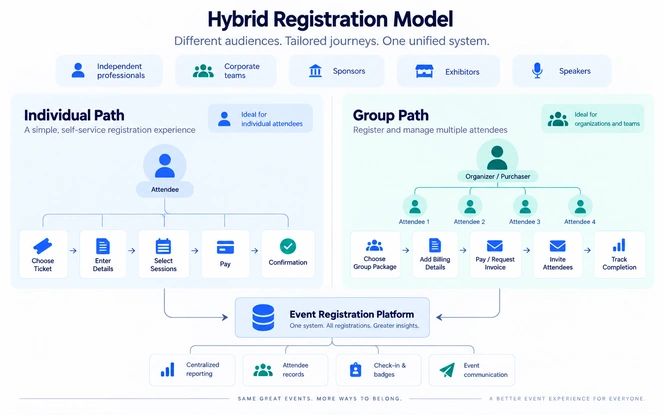
Many events attract both independent attendees and organized teams, so one registration path may not serve everyone well. A hybrid model can keep individual registration simple while giving groups the controls they need for coordinated bookings.
Many conferences, exhibitions, training programs, and business events serve more than one type of attendee.
For example, an industry conference may attract:
- Independent professionals
- Small business owners
- Corporate teams
- Sponsors
- Exhibitors
- Partners
- Speakers
Using one registration journey for every audience can make the process unnecessarily complicated.
A hybrid model allows different audiences to follow different paths.
An individual attendee journey might look like:
Choose Ticket → Enter Details → Select Sessions → Pay → Receive Confirmation
A group registration journey might look like:
Choose Group Package → Add Billing Details → Pay Or Request Invoice → Invite Attendees → Track Completion
Both paths can still feed into the same attendee-management system.
This allows organizers to maintain centralized reporting while giving each audience a more relevant registration experience.
Best Practices For Individual And Group Event Registration
A strong registration experience removes unnecessary steps while still collecting the data organizers need. Use these practices to keep individual and group registration clear, secure, flexible, and easy to manage.
| Best Practice | How To Apply It |
|---|---|
| Keep The First Step Simple | Keep the opening step short. Use custom event registration forms and workflows to ask only for registration type, ticket choice, group size, attendee category, or membership status needed to route users. |
| Separate Buyer And Attendee Information | Keep buyer and attendee data separate. Capture billing details from the purchaser while participants provide profile, badge, session, and access needs. |
| Collect Information At The Right Time | Let the buyer secure seats first when details are incomplete. Invite attendees later to add personal information through their own registration links. |
| Make Pricing Clear | Show ticket price, group eligibility, minimum size, discounts, taxes, fees, payment terms, and cancellation rules clearly before users reach checkout. |
| Provide Group Self-Service | Give group contacts self-service tools to view rosters, add attendees, resend invitations, track profiles, download invoices, and manage changes. |
| Protect Attendee Information | Limit group administrators to the attendee information their role requires. Protect sensitive responses with role-based access, not broad visibility. For higher-control environments, review secure event management platform requirements and applicable GDPR data-processing principles. |
| Test More Than The Ideal Journey | Test real edge cases before launch, including duplicate emails, failed payments, incomplete profiles, expired codes, substitutions, and mobile use. Registration forms should also be reviewed against WCAG 2 accessibility guidance. |
What Should Event Registration Software Support?
Registration software should help attendees, buyers, and event teams complete real tasks. It should make it easier to collect data, take payments, manage groups, send updates, and handle attendee changes.
Choose event registration software that helps your audience complete the tasks they actually need, instead of choosing a tool only because it lists many features.
| Capability Area | Individual Registration | Group Registration |
|---|---|---|
| Forms And Attendee Data | Custom registration forms, conditional fields, attendee profile management | Multiple attendees under one booking, separate buyer and attendee records, attendee self-completion |
| Tickets And Access | Multiple ticket types, session selection, QR codes or digital tickets, check-in integration | Group-size rules, participant additions and removals, registration substitutions |
| Payments And Billing | Payment processing, promotion codes | Consolidated payments, invoices, purchase order support |
| Communication | Confirmation emails | Group invitation links and attendee completion reminders |
| Administration And Control | Self-service attendee updates | Role-based permissions, group-level reporting, audit history |
A complete group workflow should support attendees after the purchase as well. When registration data must connect with check-in, badge printing, payments, attendee communication, session access, or event reporting, plan the event management system integration as part of the workflow from the start.
A Practical Group Registration Workflow
A practical group workflow lets one coordinator buy the registrations while each attendee completes their own details. The example below shows how a company can register a team and still keep a separate record for every employee.
Step 1: The Company Secures Registrations
The coordinator selects twelve registrations, enters the company billing details, and confirms the seats required for the full employee group.
Step 2: Payment Is Completed
The organization pays online or uses the event's invoice process to secure all twelve registrations under one booking.
Step 3: Employees Are Invited
The coordinator adds employee email addresses and sends each participant a personal registration link to complete their individual attendee details.
Step 4: Attendees Complete Their Profiles
Each employee completes their profile with badge details, session preferences, dietary requirements, accessibility needs, and other event information.
Step 5: The Coordinator Tracks Progress
The coordinator tracks completion in the group dashboard, identifies missing attendee details, and follows up with employees who still need to respond.
Step 6: Participant Changes Are Managed
If an employee cannot attend, the coordinator follows the event policy to update the roster and transfer that registration to another participant.
Step 7: Attendees Check In Individually
Each employee checks in with their own attendee record, so the event team can print the right badge, track attendance, control session access, and report accurately.
Common Event Registration Mistakes To Avoid
Registration problems often appear when teams design a weak process, hide important rules, or force every audience through the same path. Avoid these mistakes to reduce support requests, incomplete profiles, payment problems, and attendee confusion.
Using One Form For Every Audience
A speaker, exhibitor, general attendee, sponsor, and corporate group may not need the same information.
Use conditional logic or separate registration paths when requirements differ.
Asking For Too Much Information
Long forms create unnecessary work.
Ask only for the details you need to complete the registration, then collect extra information later when possible.
Treating Group Ticketing As Group Management
Buying ten tickets in one transaction does not automatically create a complete group-registration workflow.
Organizers may still need:
- Attendee invitations
- Individual profiles
- Roster management
- Substitutions
- Invoices
- Permissions
- Reporting
Sending Everything To The Group Leader
Group coordinators need administrative information.
Individual attendees still need direct confirmation, schedules, check-in instructions, and event updates.
Ignoring Attendee Changes
Group rosters can change between purchase and event day.
Define how cancellations, substitutions, additions, and unused registrations will be handled before registration opens.
Hiding Important Conditions
Group minimums, payment deadlines, cancellation policies, refund rules, and pricing conditions should be clear before checkout.
Metrics To Monitor After Registration Launch
Review registration performance after launch so you can spot friction before it affects more attendees. A clear event reporting and analytics framework helps teams track where people drop off, delay completion, or need additional support. For measured delivery evidence from an education platform, see the Education Platform case study, which reports operational outcomes from a live learning-platform implementation. For website-side measurement, Google Analytics events can be used to measure interactions such as form submissions and completed purchases.
Benchmark context: PheedLoop's 2026 Event Data Lab analyzed more than 3,600 live events per feature and defines registration completion as completed registrations divided by completed plus incomplete registrations. Its published median completion figures range from about 85% for events with promo codes to about 94% for events without them, while custom-form events were about 89% to 91%. On that same started-registration denominator, those figures correspond to roughly 6% to 15% abandonment. Use the range as directional context rather than a universal target because event type, ticket choice, payment steps, and audience intent affect completion. Source: PheedLoop Event Data Lab Report #03.
Registration Completion Rate
Track how many people start and complete registration. Sudden drop-offs can reveal confusing fields, pricing concerns, account barriers, or payment friction too.
Incomplete Attendee Profiles
Monitor how many purchased group seats still need attendee details. A rising backlog can signal unclear invitations, reminders, or profile-completion friction.
Payment Status
Review paid, pending, invoiced, failed, refunded, and outstanding registrations. Patterns can expose checkout issues, billing delays, or payment confusion quickly.
Invitation Completion
Measure how many invited group attendees finish their profiles. Low completion may indicate unclear emails, delayed follow-ups, or a difficult attendee handoff.
Registration Changes
Track substitutions, cancellations, additions, and support requests. Frequent manual changes can show where policies or better self-service tools are needed.
Check-In Rate
Compare attendee registrations with actual check-ins at attendee and organization level. Large gaps can identify no-shows, roster issues, or communication problems.
Conclusion
Choose a registration model that matches how people actually buy, manage, and attend the event. Give buyers and attendees a clear path from booking to check-in.
Choose between individual and group registration based on how attendees buy, pay, and manage their event participation.
Individual registration suits self-service attendees, while group registration supports centralized booking, billing, and roster management. Events serving both audiences can use a hybrid model.
After registration, connected event engagement tools can carry the attendee identity into apps, surveys, networking, session activity, and post-event follow-up.
Whichever model you choose, keep the process simple, collect only useful information, keep a record for each attendee, and let users make common changes easily.
Frequently Asked Questions
These frequently asked questions cover the practical decisions organizers face when planning individual and group registration. They address buying roles, attendee details, discounts, confirmations, hybrid workflows, and participant changes.
Individual event registration usually involves one attendee registering and managing their own booking. Group registration connects several attendees to one booking, buyer, organization, or group manager.
No. Buying multiple tickets may only combine the purchase. Full group registration can also include attendee invitations, individual profiles, roster management, invoicing, substitutions, permissions, and group-level reporting.
Yes. A group organizer can purchase the registrations first and then invite participants to complete their own personal information, preferences, and event requirements.
No. Group registration can make multi-attendee bookings easier even when ticket prices remain the same. Discounts should only be used when they support the event's pricing strategy.
Yes. Many events can benefit from a hybrid model that provides separate registration journeys for independent attendees and organized groups.
A group registration form should collect buyer details, billing information, group information, and any attendee data required at the time of purchase. Additional personal details can be collected from individual attendees later.
The purchaser should receive booking and payment confirmation. Individual attendees should receive relevant confirmation and event information once their attendee records are created.
Organizers should define who can make substitutions, the deadline for changes, whether any fees apply, and how attendee records will be updated. Self-service substitution tools can reduce administrative work when appropriate.