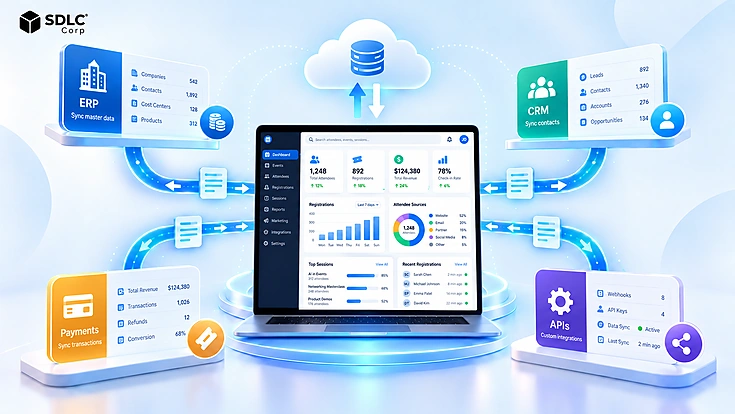
Registration is often the first operational interaction an attendee has with an event. Yet many registration experiences are still designed as forms rather than as systems. Behind one submission, an event may need to identify the registrant, verify eligibility, calculate pricing, reserve capacity, collect payment, trigger approval, and update other applications.
A reliable event registration workflow connects these decisions instead of leaving them as separate manual tasks. Well-designed custom event registration forms support that workflow by collecting only the information needed at each stage and adapting the experience to the person registering.
What Is a Custom Event Registration Form?
A custom event registration form is an interface configured around the specific information, choices, and rules of an event. Instead of collecting the same fixed fields from every person, it can adapt questions, ticket options, sessions, pricing, and required information to the registration scenario.
Standard fields often include a name, email address, company, and contact information. Custom fields may capture accessibility requirements, dietary preferences, session choices, professional credentials, travel details, speaker information, or sponsor requirements.
Customization should always have an operational purpose. Adding more questions does not automatically create a better registration experience. The form should collect information that helps identify attendees, make registration decisions, or support the event processes that follow.
What Is an Event Registration Workflow?
An event registration workflow is the sequence of rules, decisions, transactions, and system actions that moves a person from initial registration to a confirmed attendee record.
A form collects information. The workflow determines what happens to it.
A typical workflow starts when someone enters through an event page, invitation, referral link, or partner channel. The system identifies the registrant and checks eligibility. Relevant questions appear, followed by ticket, package, or session selection.
Some registrations continue directly, while others require approval. Paid registrations move through payment verification before capacity is finalized. Confirmation can then trigger tickets, emails, CRM updates, event-app access, finance records, or check-in preparation. For the onsite handoff after confirmation, see Event Check-In, Badge Printing, and Attendance Tracking .
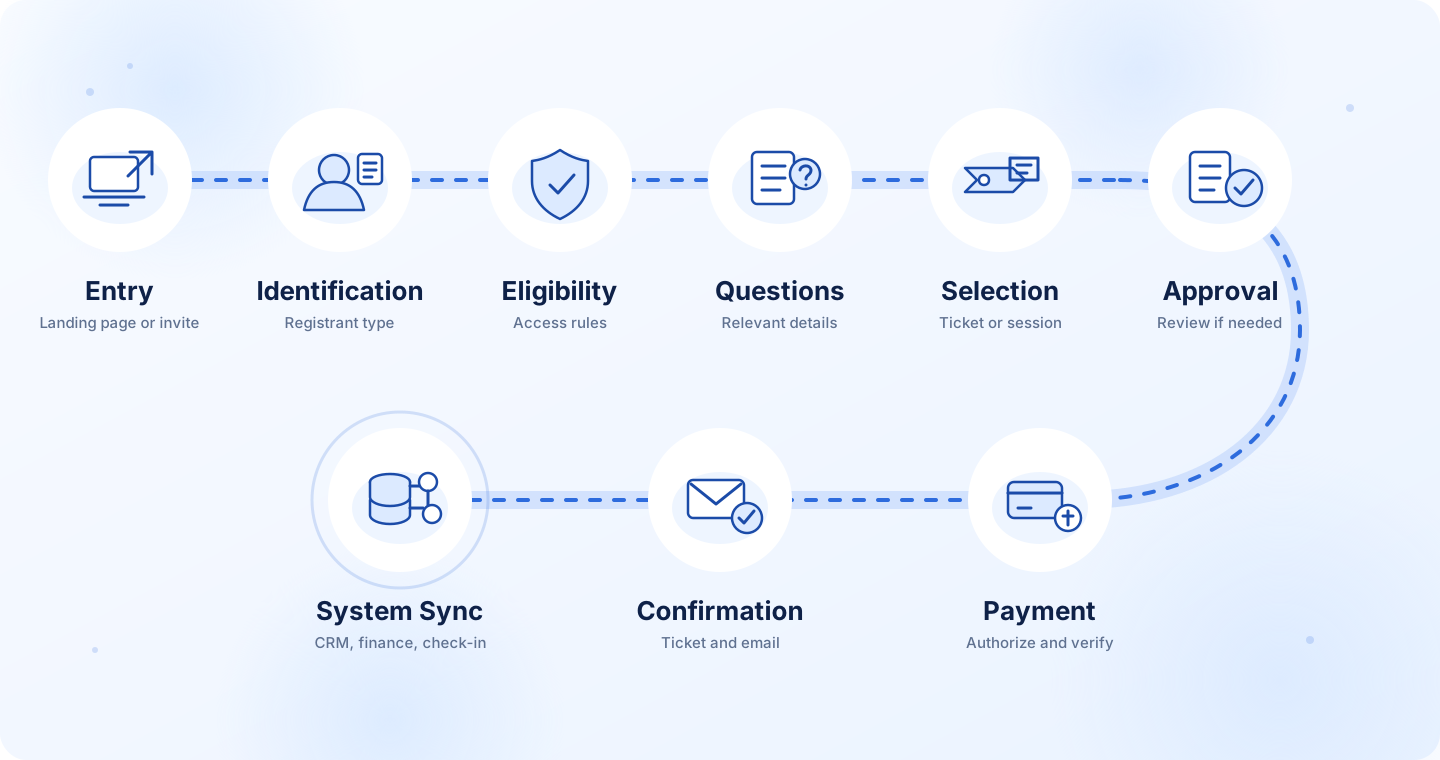
The same workflow can also trigger downstream event operations such as attendee records, confirmation messages, access permissions, finance updates, and check-in preparation.
Design Registration Paths for Different Attendee Types
Registration paths are audience-specific journeys that determine which questions, choices, approvals, and actions apply to each type of registrant.
A single path rarely works equally well for general attendees, speakers, sponsors, VIPs, media representatives, and volunteers. The goal is to keep each person's experience relevant without creating disconnected registration systems.
General Attendees
A standard attendee journey can remain relatively short:
Logistical preferences that are not essential at signup can usually be collected later.
Speakers
Speaker registration may require a biography, headshot, session information, presentation files, technical requirements, and internal approval.
A speaker path could be:
This prevents an applicant from receiving full speaker access before the necessary review is complete.
Sponsors and Exhibitors
Sponsor registration often involves both an organization and individual representatives. It may include package selection, booth requirements, staff passes, invoicing details, and internal review.
VIPs, Volunteers, and Media
VIPs may require invitation verification before accessing restricted ticket types. Volunteers can require skills, availability, and assignment approval. Media registrations may need publication details or credential verification.
| Registrant | Typical Required Data | Approval | Downstream System |
|---|---|---|---|
| Attendee | Contact, ticket, sessions | Usually no | Event platform / CRM |
| Speaker | Bio, files, session | Yes | Speaker management |
| Sponsor | Company, package, booth | Often | CRM / finance |
| VIP | Invitation details | Verification | Event platform |
| Volunteer | Skills, availability | Yes | Event operations |
The objective is not to create a separate form for every possible audience. Instead, build paths that expose the questions and decisions relevant to each registrant while keeping common attendee data consistent.
Build Registration Around Real Attendee Journeys
Design registration paths around the information, approvals, capacity rules, and downstream actions each attendee type actually needs.
Choose the Right Fields and Use Conditional Logic
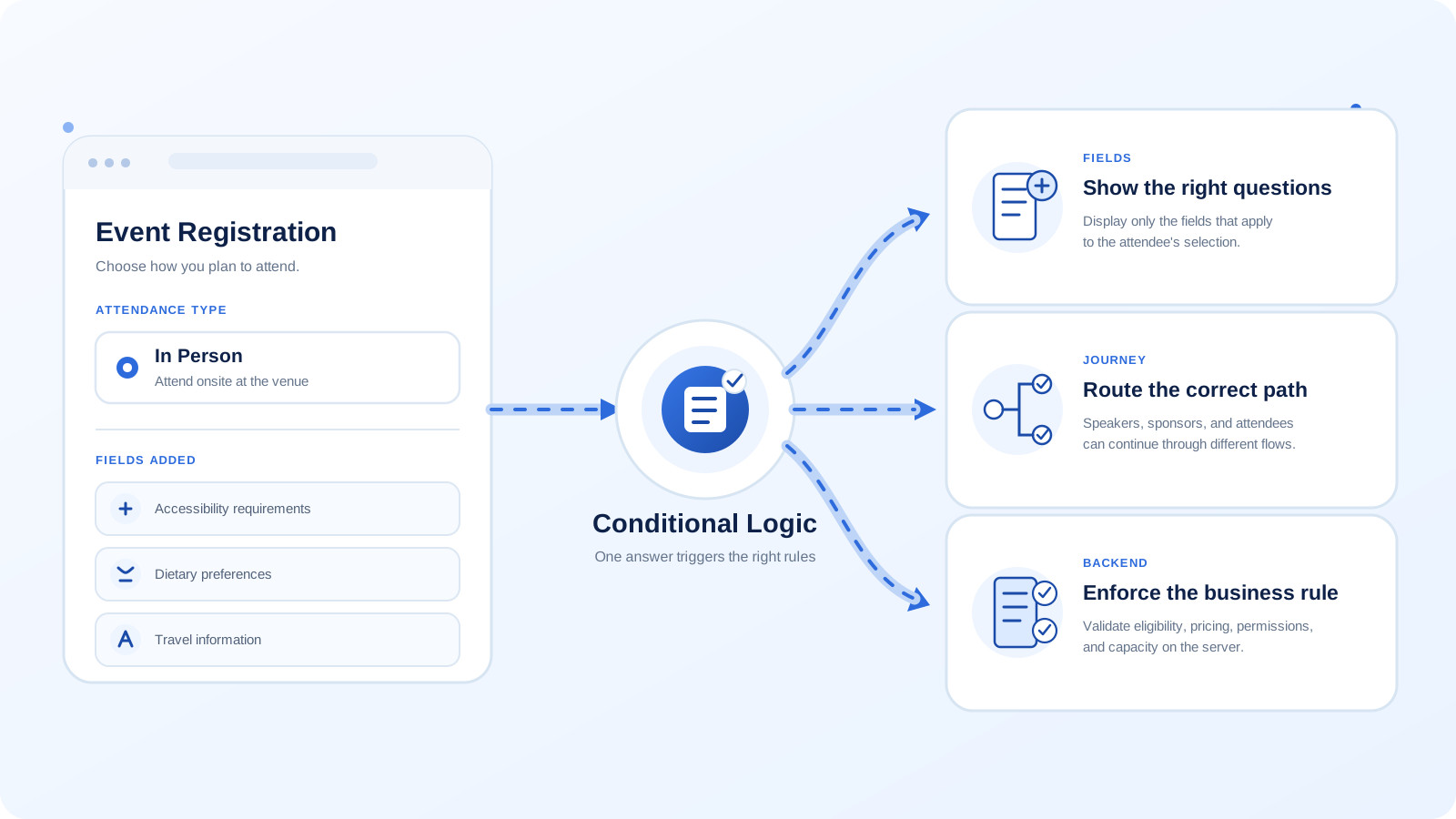
Conditional registration logic uses attendee answers and system rules to decide which fields, paths, pricing options, and operational actions should apply.
Collect Only the Information You Need
Separate information required now from information that can be collected later.
Name, email, registrant type, and ticket choice may be necessary to establish a registration. Session preferences, dietary requirements, travel information, or networking interests can often wait until confirmation.
If not, consider making the field optional or moving it to a later stage.
Ticket selection deserves particular attention because it can influence pricing, permissions, capacity, accounting, and downstream automation. Organizations building those workflows within an ERP environment can review Odoo ERP Services by an Official Odoo Partner for examples of customization and integration capabilities.
Use Field-Level Conditional Logic
Field-level logic controls which questions appear.
For example, someone selecting In Person may see dietary, accessibility, and travel questions. A virtual attendee should not have to move through fields that do not apply.
This keeps the visible form shorter while still collecting the information required for event operations.
Create Different Registration Paths
Conditional logic can also change the complete registration route.
When the registrant selects Speaker, the system might request speaker information and files before sending the application for review. Selecting Sponsor could instead open package options, company information, staff allocation, and invoicing.
The answer changes more than one field. It determines what happens next.
Validate Rules on the Server
Server-side validation independently enforces registration rules even when client-side presentation is bypassed, altered, or fails.
- Eligibility
- Required information
- Pricing
- Permissions
- Ticket availability
- Capacity
For example, hiding a discounted ticket from an ineligible visitor is not enough. If an altered request attempts to submit that ticket, the server must reject it.
The same answer can therefore affect what the attendee sees, which path they follow, and what the system does next. A dependable event registration workflow treats conditional logic as a business rule first and a user-interface behaviour second.
Build Multi-Step Registration Without Adding Friction
Multi-step registration divides a complex registration process into smaller groups of related questions without changing the underlying workflow.
Contact details might appear first, followed by ticket selection, preferences, and payment. A visible progress indicator should make the remaining effort clear.
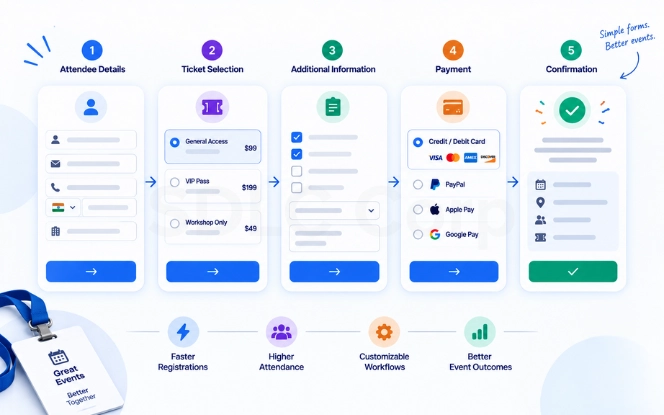
However, more steps do not automatically improve usability. Avoid separate screens for individual questions, repeated fields, or information that can already be prefilled. Inline validation should explain errors beside the field that needs attention.
Progressive collection can reduce the initial burden further. Collect name, email, and ticket first, then request sessions, travel, or logistical preferences after confirmation.
Accessibility belongs in the same design process. Registration controls need clear labels, keyboard access, understandable errors, visible focus states, and predictable behaviour when conditional content appears. The W3C WCAG Quick Reference provides implementation guidance for accessible forms and interactive controls.
Mobile layouts also need usable input sizes, clear validation, logical progress controls, and form elements that do not require horizontal scrolling.
Manage Capacity, Payments, Approvals, and Waitlists
Registration state management coordinates capacity, payments, approvals, and waitlists so that one change produces the correct next action.
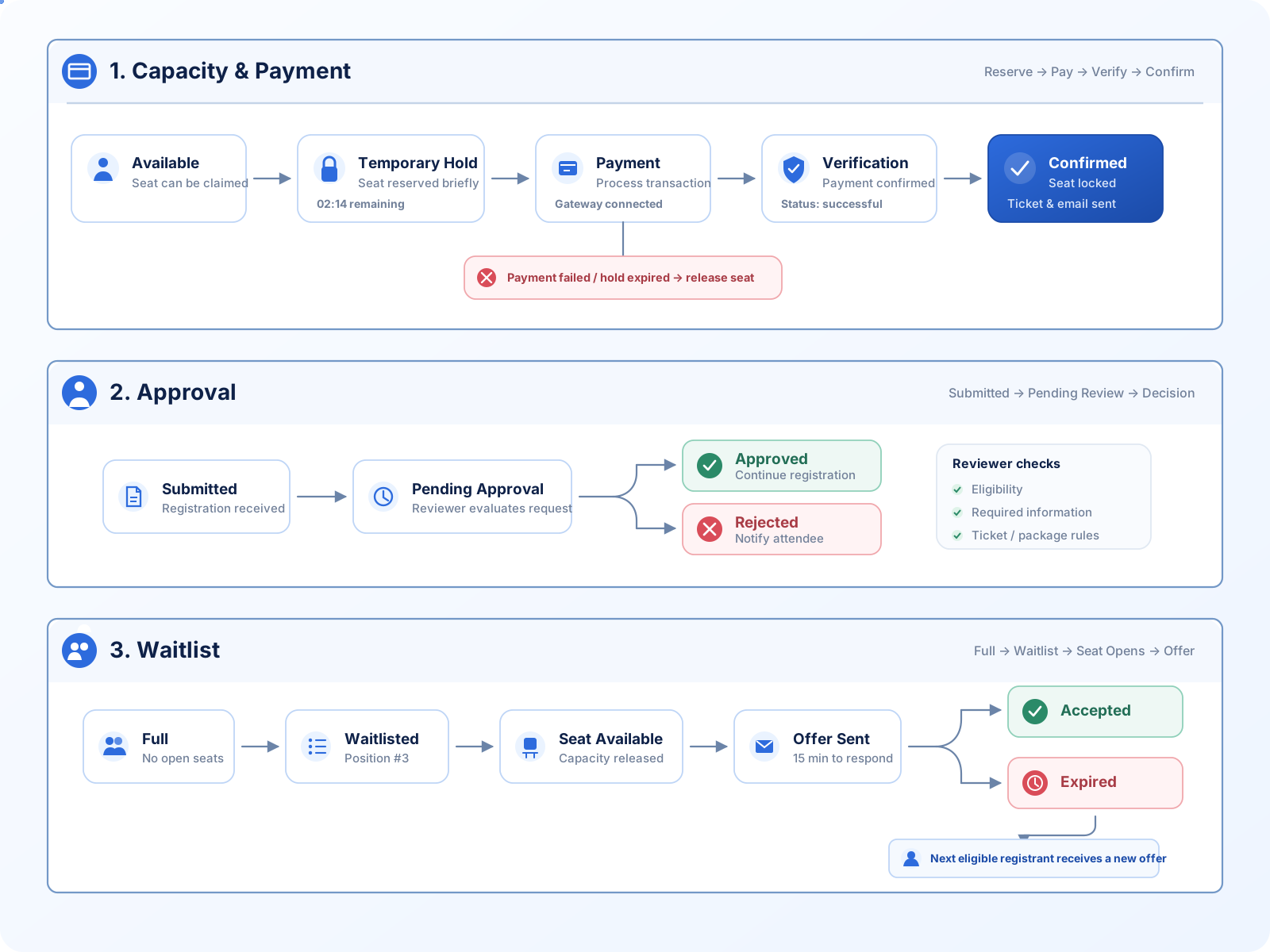
For a capacity-limited registration, the state chain may look like:
A temporary hold prevents the same place from being offered indefinitely while someone completes payment. A practical starting point is a 10-minute seat hold, with a working range of roughly 5–15 minutes depending on checkout complexity. Show the remaining time to the attendee, release the seat immediately after a definitive payment failure, and release it automatically when the hold expires.
Approval-based registrations need a different branch:
Depending on the event model, payment may occur only after approval. Other events may collect payment first and hold confirmation until the application has been reviewed. As an operating target, aim to decide routine speaker, VIP, or volunteer approvals within 1 business day; sponsor or compliance-heavy reviews can use a clearly published target of up to 2 business days.
When capacity is exhausted, eligible registrants can move into a waitlist:
Microsoft documents event and session waitlists where registrants can move from a waiting state to registration when capacity becomes available. See Microsoft Learn: Set up and manage an event waitlist .
The workflow should define how long an offered place remains valid and what happens when the person does not respond. The seat should return to the eligible queue rather than remain blocked.
These state transitions become especially important for workshops, limited-capacity sessions, premium packages, and other experiences where availability has operational or financial value. For session-level caps, waitlists, overflow, and parallel workshop rules, see How to Manage Multi-Session Events, Workshops and Breakout Sessions .
Handle Errors and Exceptions
Error and exception handling defines how an event registration system preserves a valid state when requests fail, repeat, arrive late, or conflict.
Production-oriented registration design should treat these situations as expected failure modes rather than rare theoretical edge cases.
Two People Try to Take the Last Seat
A simple availability check can fail when two registrations occur at nearly the same moment.
The system needs a controlled allocation mechanism. Depending on the architecture, this may include temporary seat holds, database transactions, or locking controls. Holds should also expire so abandoned registrations do not block capacity indefinitely.
The Same Submission Arrives Twice
Users double-click buttons. Browsers retry requests. Integrations can resend messages.
Idempotency helps the receiving system recognize that repeated requests represent the same intended operation rather than separate registrations or payments.
Stripe documents idempotency keys specifically for safely retrying requests without unintentionally performing the same operation twice. See Stripe API Reference: Idempotent requests .
Payment Succeeds but Registration Fails
Payment and registration records should not be assumed to complete at exactly the same moment.
If payment succeeds but the attendee record fails to save, the workflow needs a recoverable state. A reconciliation or retry process should identify the successful transaction and complete or flag the registration without charging the attendee again. For the wider payment lifecycle, including gateway states, refunds, settlement, and reconciliation, see Event Registration and Payment Processing Features .
Webhooks Arrive Twice or Out of Order
External systems may retry notifications or deliver related events in an unexpected sequence.
Handlers should check the current payment and registration states before applying an update. A repeated notification should not create another attendee, order, payment, or confirmation.
Duplicate Emails and Expired Waitlist Offers
The same email address does not always mean an invalid duplicate. One person may legitimately register for multiple events, sessions, or ticket types.
Duplicate policies should reflect the actual business rule instead of automatically rejecting every repeated email.
An unanswered waitlist offer should also expire cleanly so the available place can move to the next eligible registrant.
Build Registration Rules That Hold Up Under Real Event Conditions
Plan for capacity conflicts, duplicate requests, payment failures, webhook retries, and waitlist exceptions before they become event-day problems.
Structure and Connect Registration Data
A registration data model defines the separate business entities and relationships required to represent attendees, events, tickets, payments, sessions, and operational states correctly.
A simple conceptual model may include:
- Event
- Ticket Type
- Session
- Attendee
- Registration
- Order
- Payment
- Waitlist Entry
- Check-In
These records serve different purposes.
An attendee identifies a person. A registration connects that person with an event. A ticket type defines access and pricing. An order represents a commercial transaction, while a payment records what happened financially. Sessions and waitlist entries introduce their own capacity states.
Keeping these concepts separate makes workflows, reporting, and integrations easier to understand and maintain.
Connect Registration With Other Systems
Registration information often needs to reach:
- CRM
- ERP or finance
- Marketing automation
- Email systems
- Badge printing
- Event applications
- Check-in tools
- Analytics platforms
The integration map should be decided before the final form fields are locked.
Map Data Correctly Between Systems
A field can represent the same business concept while using different names and formats in different applications.
Registration form: company_name
→ CRM: Account Name
→ ERP: Customer Name
Define which system owns each important field and status. Otherwise, a CRM update can conflict with information coming from the registration platform.
Organizations connecting customer and ERP records can review Boost Your CRM Performance with Odoo ERP Integration for related integration considerations.
Consent, access permissions, and retention rules should follow the same data map. If attendee information is copied into several systems, deletion and retention processes should account for those downstream records instead of treating the original form database as the only copy.
Test the Complete Registration Workflow Before Launch
Event registration workflow testing verifies that every valid route, failure state, integration, and capacity rule produces the expected result before real attendees use the system.
Testing should cover much more than whether the Submit button works.
| Test Scenario | Expected Result |
|---|---|
| Standard attendee | Registration confirmed |
| VIP registration | Correct VIP path displayed |
| Speaker submission | Pending approval created; routine review targeted within 1 business day |
| Payment failure | Hold released immediately after failure or automatically at the 10-minute expiry |
| Duplicate submission | One registration created |
| Final available seat | No overselling |
| Full session | Waitlist offered |
| Cancellation | Capacity restored |
| CRM unavailable | Sync retried or logged |
| Mobile registration | Full workflow completes |
Test every attendee path and conditional branch. Verify approvals, payment responses, email delivery, capacity changes, and downstream integrations.
Failure conditions also need deliberate testing.
Simulate two requests attempting to claim the final seat. Test delayed payment responses. Make the CRM or email provider temporarily unavailable. Confirm that duplicate requests do not create duplicate attendees or transactions.
Load testing deserves particular attention before high-demand launches because registration traffic may arrive as a sharp spike when tickets open rather than increasing gradually.
The objective is not only to prove that pages stay online. Test whether capacity allocation, pricing, payment initiation, database writes, and downstream integrations remain correct under load.
Measure the Registration Experience
Registration experience measurement tracks where attendees progress, hesitate, fail, or abandon the workflow so teams can improve the stages causing friction.
Useful indicators include:
- Registration starts
- Completion rate
- Abandonment rate
- Drop-off by step
- Payment failure rate
- Validation errors
- Approval turnaround time
- Registration-to-attendance ratio
- Support requests
Metrics become useful when they lead to action.
High abandonment at one stage may indicate unnecessary fields. Frequent validation errors can point to unclear questions or constraints. Payment failures may reveal an integration issue, while slow approvals can expose an internal operational bottleneck.
The objective is not to chase a universal benchmark. It is to identify where the current registration journey creates avoidable friction and then improve that stage.
Custom Development vs Standard Platforms
Build-versus-buy analysis determines whether an existing event platform can support the required registration rules economically or whether custom development is justified by workflow, integration, or data requirements.
| Requirement | Standard Platform | Custom Development |
|---|---|---|
| Basic registration | Strong | Strong |
| Standard ticketing | Strong | Strong |
| Complex pricing | Eventbrite is optimized around ticket types, checkout pricing, fees, discounts, and promo codes; unusual cross-ticket or account-specific pricing can require workarounds or integration. | Highly flexible |
| Unique approvals | Cvent registration approval is path-based, and each registration type maps to one registration path; parallel approval policies may require separate paths or duplicated types. | Highly flexible |
| Deep integrations | Whova's ticket-specific question visibility and attendee segmentation are strongest when Whova Registration is used; deeper external workflows still depend on supported integrations and APIs. | Customizable |
| Data control | Vendor dependent | Greater control |
| Initial effort | Lower | Higher |
| Maintenance | Vendor managed | Internal team or partner |
A standard platform is usually the practical choice when registration paths are conventional, ticketing is straightforward, integrations are available, and platform configuration matches the event model.
WordPress can also support event registration through plugins and custom extensions when requirements fall between simple hosted software and a fully custom platform. Why WordPress Is the Go-To Platform for Event Management? covers that approach.
Organizations comparing packaged workflow products can also review Rostra alongside their registration requirements before deciding whether additional custom development is necessary.
Custom development becomes more appropriate when pricing rules are unusual, approval flows are highly specific, integrations reach multiple enterprise systems, or the organization needs stronger control over data and workflow behaviour.
For teams considering a broader event platform rather than a single registration form, How to Create an App Like Eventbrite provides additional context around building event-platform capabilities.
The objective is not to customize for its own sake. Build when business rules, integrations, or operational constraints create meaningful limitations in available products.
Choose the Right Registration Architecture
Compare platform configuration, integrations, workflow complexity, and data requirements before deciding whether custom development is necessary.
Example: Multi-Audience Conference Workflow
A multi-audience conference workflow uses a shared registration architecture while routing different attendee groups through the questions and actions relevant to them.
Consider a conference serving attendees, speakers, and sponsors.
General Attendee
Speaker
Sponsor
These are different experiences, but they should not become isolated systems.
All three paths can feed a shared registration environment that connects attendee data with the CRM, finance system, event application, communications, badge generation, and check-in.
The same attendee identity can then support multiple operational processes without forcing every system to maintain an unrelated copy of the registration journey.
That shared architecture preserves a consistent record while allowing each audience to see only the questions, pricing, approvals, and actions relevant to them.
The experience feels simpler to the attendee because the complexity stays inside the workflow instead of being exposed through one oversized registration form.
Final Thoughts
Better custom event registration forms come from designing the journey behind them. Fields, conditional rules, attendee paths, approvals, capacity, payments, integrations, and failure states should operate as one connected system.
A strong event registration workflow collects the right information at the right moment, applies business rules consistently, and moves reliable data into the systems responsible for the next action. That reduces friction for attendees while limiting manual exceptions for event teams.
Frequently Asked Questions
What is an event registration workflow?
An event registration workflow is the sequence of rules, decisions, and automated actions that moves someone from registration entry to confirmation. It can include identification, conditional questions, eligibility, ticket selection, approvals, payment, capacity allocation, communications, system integrations, and check-in preparation.
What is conditional logic in an event registration form?
Conditional logic changes fields, choices, or registration paths based on attendee information. For example, selecting “Speaker” can reveal speaker-specific questions and trigger an approval process. Important eligibility, pricing, permission, and capacity rules should also be enforced on the server.
Should different attendee types have different registration forms?
Not always. One dynamic form can support several attendee types when they share common data and reporting needs. Separate forms may work better for significantly different journeys. The right approach depends on how much information, pricing, approval logic, and system behaviour the audiences share.
What happens when an event session reaches capacity?
The system can stop direct confirmations and offer a waitlist instead. When capacity becomes available, the next eligible person may be registered automatically or receive a time-limited offer. If the offer expires, the place should move to another eligible registrant.
Can event registration forms connect with CRM systems?
Yes. Registration data can synchronize with CRM, ERP, finance, marketing, event-app, badge, and check-in systems. Reliable integration requires field mapping, ownership rules, validation, and a defined process for handling synchronization failures or conflicting updates between systems.
How do you test an event registration workflow?
Test every attendee path and expected failure state. Include conditional logic, approvals, payment failures, duplicate submissions, final-seat capacity, cancellations, waitlists, integration outages, mobile completion, and simultaneous registrations. High-demand events should also be load-tested before registration opens.