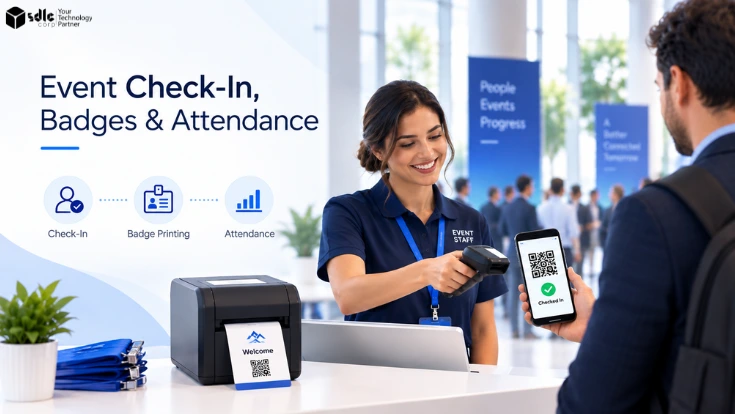
Imagine 1,200 attendees arriving within 45 minutes while staff search registration lists, find badges, correct attendee details, and answer walk-in questions at the same desk. Small delays quickly become long queues. A connected event check in and badge printing workflow removes many of those handoffs.
Check-in confirms arrival, badge printing creates an onsite identity, and attendance tracking follows that identity through sessions and controlled areas. Together, these functions help event teams manage arrivals, access, capacity, staffing, and reporting with reliable data.
How Event Check In and Badge Printing Work With Attendance Tracking
Check-in, badge printing, and attendance tracking should work as one event-day pipeline rather than three separate tools.
The process starts with the registration record. Our event registration and payment processing guide explains the upstream forms, payment status, refunds, and reconciliation that create this record. Each attendee then receives a QR code, barcode, confirmation number, or another identifier. At the venue, the check-in system reads that identifier and finds the matching registration.
After verification, the system selects the correct badge template. Visible fields may include a name, organization, ticket category, or attendee type. A QR code, barcode, RFID credential, or NFC identifier can also support later scans.
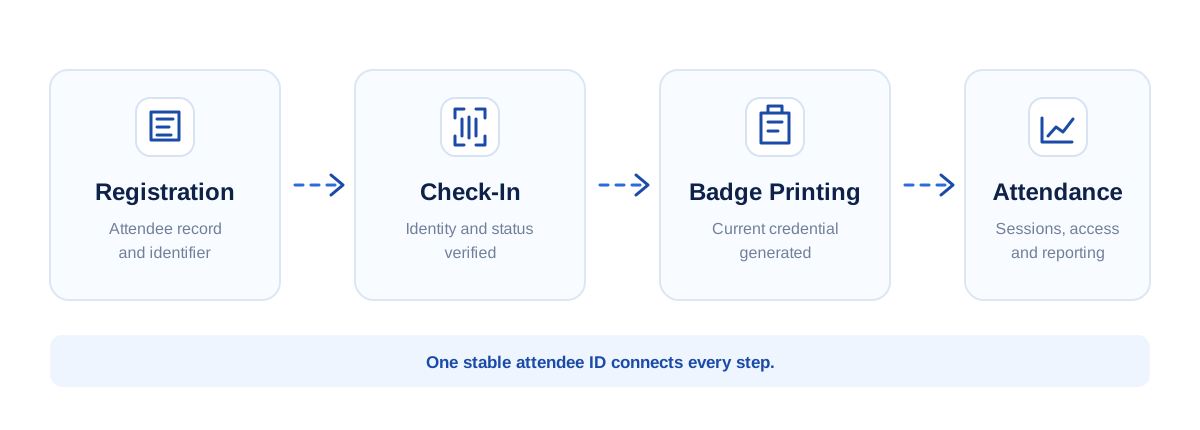
Every stage should use the same stable attendee ID. Otherwise, ticket changes, badge permissions, and session records become difficult to reconcile.
Event Check-In: Identity and Arrival Processing
The event check-in process turns an expected registration into a confirmed arrival. It must find the right attendee, validate the record, and move standard arrivals through the entrance quickly.
QR and Barcode Lookup: What Happens During Check-In
A QR scan takes only a moment, but several actions can happen behind the screen. Behind the interface, the scanner captures the identifier, finds the attendee record, checks registration status, detects an earlier check-in if one exists, and records the new arrival.
- Attendee ID
- Check-in timestamp
- Entrance or location
- Scanning device
- Check-in status
Once approved, the attendee record can move directly to badge printing.
Keeping the lookup simple matters during peak arrivals. Staff need the fields required to confirm the person, choose the right credential, and handle an exception—not the entire registration record.
GS1 barcode standards provide a useful reference for how machine-readable barcodes carry identifiers that scanning systems can resolve to structured records.
Self-Service Kiosks vs Staffed Check-In Lanes
Self-service event check-in works well for attendees whose registration details are already correct. They can scan a confirmation code, verify their identity, and continue to badge printing without waiting for staff to search manually.
However, kiosks should not replace every staffed position. Some attendees arrive without a code. Others used another email address, need a name correction, or require accessibility support. Speakers, sponsors, exhibitors, and VIPs may also follow different rules.
- Self-service kiosks for standard arrivals
- Staffed lanes for attendees who need help
- A separate desk for exceptions
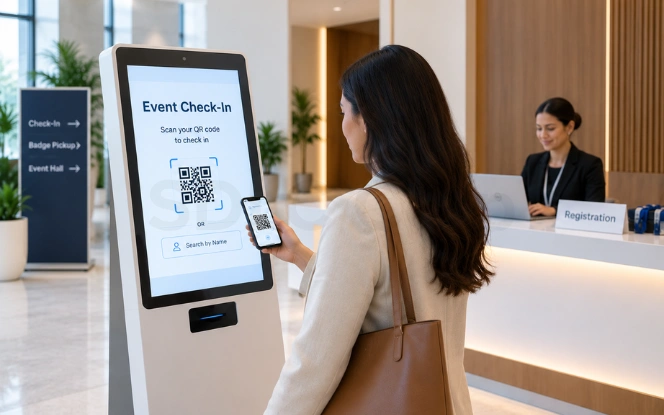
SpotMe documents attendee, host, and exception-desk check-in modes. Its exception workflow handles people who have difficulty checking in, incorrect attendee details, and unregistered walk-ins. See the SpotMe onsite check-in configuration.
Walk-Ins, Name Changes, and Registration Exceptions
Do not solve a three-minute problem in a queue built for quick transactions.
Walk-ins, duplicate registrations, missing records, substitutions, and ticket upgrades should move to a separate desk. Staff there can have broader permissions to correct information or create records without slowing standard arrivals.
On-Demand Badge Printing: Permissions on a Lanyard
A badge is more than a name card. At many events, it becomes the attendee's physical identity and access credential. That makes event check in and badge printing part of the wider event workflow rather than a separate print task.
Pre-Printed vs On-Demand Event Badges
Pre-printed badges work well when attendee information is stable. Change creates the main limitation. Late registrations need new badges, name corrections require replacements, no-shows leave unused credentials, and ticket upgrades may make an existing badge inaccurate.
On-demand badge printing creates the credential after check-in, so it can use the latest approved registration data.
Expo Pass reports that the complete scan-or-lookup through badge-handoff workflow can take about 15–30 seconds per attendee under normal conditions. Its onsite badge-printing guide also separates physical print time from the full attendee interaction.
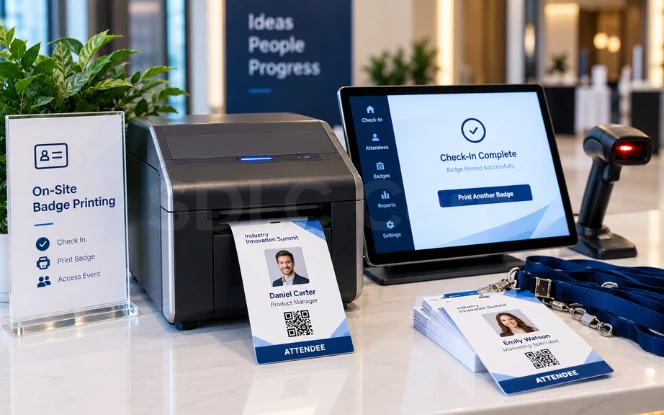
What an Event Badge Can Encode
- Attendee name and organization
- Ticket class
- Attendee type
- Speaker, sponsor, VIP, or exhibitor status
- Access permissions
- Session entitlement
- QR code or barcode
- RFID or NFC credential
That data can affect what happens after the attendee leaves registration. A VIP badge may allow access to one area while a workshop ticket may unlock a paid session.
The credential should resolve to the same attendee record used during registration and check-in. For reference, the NFC Forum overview explains how Near Field Communication supports short-range interactions used in areas such as ticketing and access control.
Reprints and Access Changes
A replacement badge is not always a cosmetic change. Correcting a name may require only a reprint, while a ticket upgrade can also change access rights or session permissions.
Where access control matters, the old credential may need to be disabled before the replacement is issued.
Event Attendance Tracking: Visibility Past the Entrance
Check-in answers one question: Who arrived? Beyond the entrance, event attendance tracking shows what attendees do next.
Event-Level Attendance Tracking
At event level, tracking compares registrations with actual arrivals. Organizers can monitor checked-in attendees, outstanding registrations, walk-ins, no-shows, arrival peaks, and people currently onsite.
Actual attendance is more useful than registration totals for many event-day decisions. Catering, transport, staffing, security, and venue teams need to know how many people are present.
Official Odoo Registration Desk documentation shows a simple version of this workflow: staff can scan a badge or select the attendee manually and then record attendance in the Events application.
Session Attendance Tracking
Session attendance tracking connects an attendee ID with a specific session and time. The resulting data can reveal sessions nearing capacity, underused rooms, popular topics, and participation in training or accredited activities.
A first-party example is Rostra, SDLC Corp's K-12 registration and event management platform. It can roll session scans into contact-hour totals and generate certificates when attendees meet administrator-defined requirements.
The result is more useful than simply knowing someone entered the building.
Access Control and Restricted Zones
The same attendee identity can also support access control. A credential may allow entry to VIP areas, speaker rooms, exhibitor zones, premium workshops, or private sessions.
Where permissions can change during the event, the system should use current attendee data rather than rely only on a badge color printed earlier.
Sizing the Event Check-In Operation
The total attendee count does not tell you how many check-in stations you need. More useful inputs are the peak arrival rate and the time required for one complete attendee interaction.
Published performance figures can look contradictory because they measure different parts of the workflow.
Benchmark Event Check-In Throughput
| Source | Figure | What It Measures |
|---|---|---|
| Expo Pass | 2–5 sec | Approximate direct thermal physical badge-print time |
| Expo Pass | 15–30 sec | Complete scan or lookup through badge handoff under normal conditions |
| VenueSight | ≈15 sec | Example physical on-demand badge-print time; about 240 badges per hour theoretically |
| VenueSight | 20–40 sec | Full self-service kiosk transaction when the workflow is operating smoothly |
| Ticket Falcon | 60 guests/hour | Planning rate per staff member for scanning, name verification, and badge or wristband handoff |
Printer speed is not attendee throughput.
Lookup, confirmation, attendee questions, badge rendering, printing, handoff, and corrections all affect the complete interaction. Capacity planning should therefore use the end-to-end attendee journey rather than the printer specification alone.
Calculate the Required Check-In Stations
The 1,600 figure is an hourly-equivalent arrival rate. It does not mean 1,600 attendees are expected. Instead, the rate describes how quickly the 1,200-person surge reaches the entrance.
Now suppose a rehearsal with the actual software, scanner, badge template, and printer shows that one complete station can process 100 attendee transactions per hour. That figure is a test assumption for this example, not an industry benchmark.
Sixteen active stations cover the calculated peak. Add flex positions for sudden surges, printer faults, accessibility needs, or staff breaks.
| Planning Input | What to Measure |
|---|---|
| Peak arrivals | Attendees expected during the busiest window |
| End-to-end time | Scan or lookup through badge handoff |
| Print time | Physical badge-production time |
| Exception rate | Attendees requiring manual help |
| Walk-in rate | Unregistered arrivals |
| Hardware buffer | Spare scanners, tablets, and printers |
| Staffing | Greeters, lane staff, and exception staff |
Test the final workflow before the event. Use the production registration system, actual badge template, planned printer, and real scanning devices.
How Event Data Moves Between Systems
A connected event workflow depends on knowing which application owns each field.
The registration platform may remain authoritative for attendee name, contact information, company, ticket type, and registration status. Onsite software reads only the fields needed for verification and badge creation.
Check-in then writes an operational event:
The badge service reads approved fields and creates the credential. Later, session tracking may record:
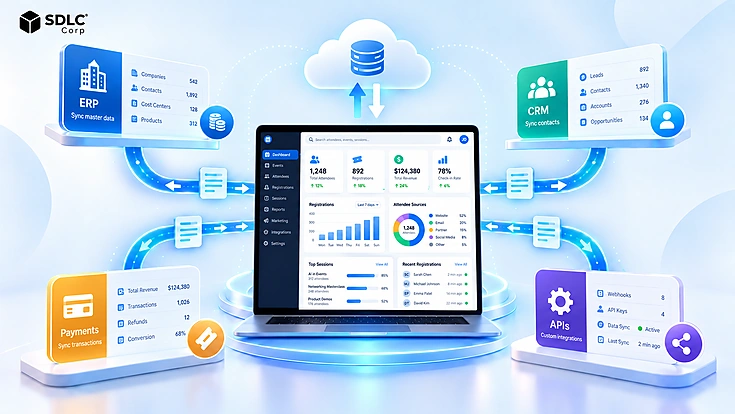
Those records can feed CRM, ERP, analytics, certificates, or reporting systems.
Organizations using Odoo can apply this model without creating another independent attendee database. Odoo can support registration, QR-based check-in, badge handling, and attendance reporting within the same event workflow.
For a wider application landscape, software integration services can connect event applications with CRM, ERP, and other business systems.
The goal is simple: every connected system should agree on who the attendee is, which fields are authoritative, and which events have already occurred.
How Offline Event Check-In Works When the Workflow Breaks
Venue connectivity should never be treated as perfect. Temporary networks, Wi-Fi dead zones, overloaded access points, and large numbers of connected devices can interrupt a cloud-only workflow.
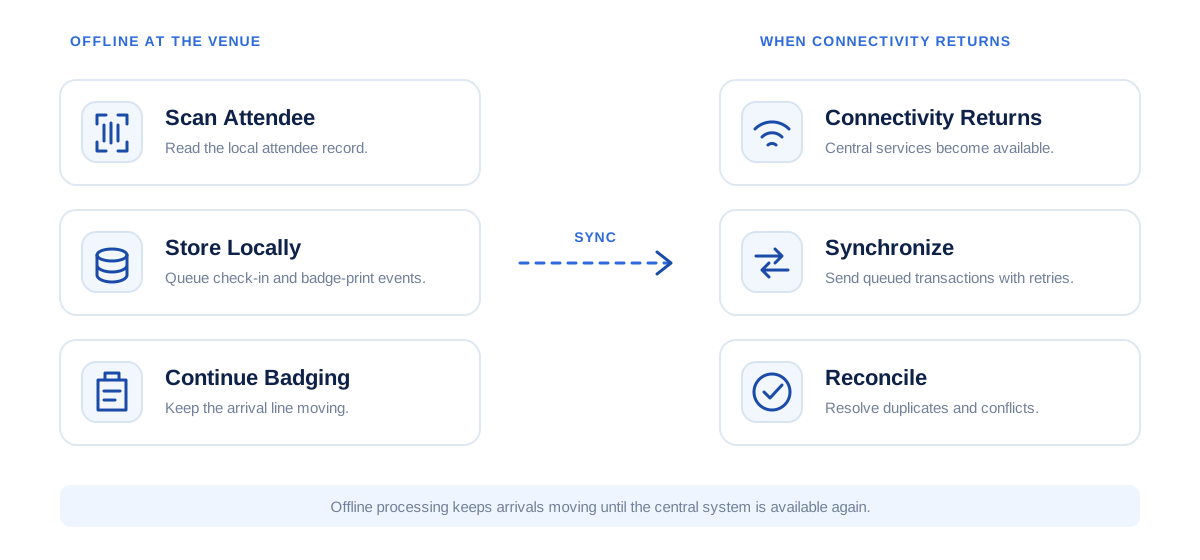
Keep Check-In Moving
An offline-capable system can keep the attendee fields required at the entrance available locally. If connectivity fails, devices can continue recording check-ins and hold those transactions until the central system becomes available again.
Rostra provides a concrete first-party example. Its onsite workflow supports camera scanning from laptops, tablets, and phones. It also supports queued badge printing designed to keep the line moving when venue connectivity becomes unreliable.
Only information needed at the door should be stored locally.
Synchronize Records Safely
Each offline transaction should include a stable attendee ID and timestamp. When connectivity returns, the central platform can decide whether the event is new, already processed, duplicated, or in conflict with another update.
Retry logic matters too. A local transaction should remain available until the server confirms that it was received.
Resolve Duplicate Scans and Hardware Failures
If two offline devices check in the same attendee, a reconciliation rule can keep the valid arrival and mark the second transaction as a duplicate.
The network is not the only risk. Printers jam, tablets lose power, scanner batteries die, and badge templates can fail. Spare hardware, tested replacement printers, approved templates, and a manual fallback process should be prepared before doors open.
Real-Time Attendance Data and the Decisions It Enables
Real-time attendance data becomes useful when the operations team can act on it.
A growing queue can trigger another check-in lane. When a session approaches capacity, the team can open an overflow room. Lower attendance may change catering, shuttle, or staffing requirements.
Checked In
Tracks how many attendee arrivals have been verified.
Badges Printed
Reveals whether credential production is keeping pace with check-in.
Currently Onsite
Supports live occupancy and operational planning.
Bottleneck Signal
If check-in rises while badge output falls behind, printing is likely the issue.
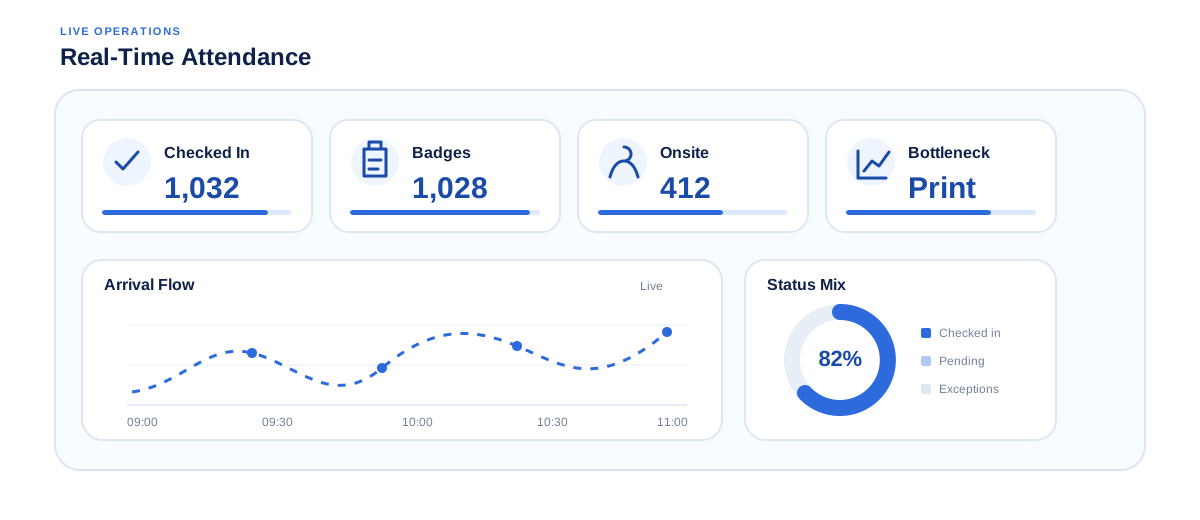
Rostra's onsite door view provides a practical example. It separates checked in, badges printed, and currently onsite into different counters. If check-in numbers rise while badge output falls behind, the print stage is the likely bottleneck.
Metrics for Measuring Event Operations
Useful metrics should point the team toward a problem.
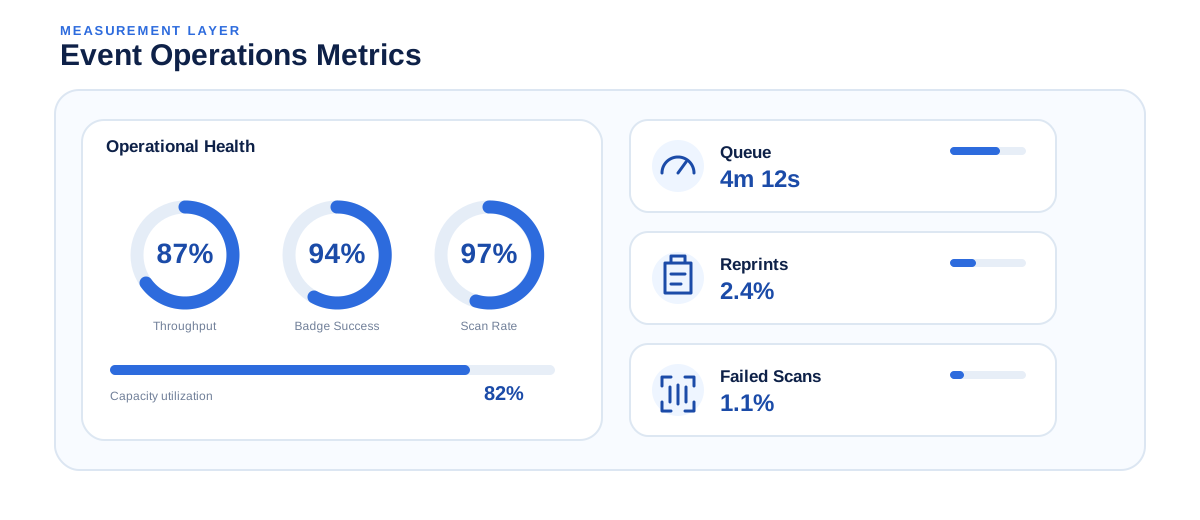
| Metric | What a Poor Result May Indicate |
|---|---|
| Average check-in time | Too many transaction steps |
| Peak throughput per lane | Insufficient station capacity |
| Queue wait time | Too few active lanes |
| Self-service share | Kiosks are unclear or poorly placed |
| Badge reprint rate | Data or printing problems |
| Failed scan rate | Code, device, or lookup problems |
| Walk-in percentage | Weak registration forecasting |
| Checked-in vs registered | Higher-than-planned no-shows |
| Session attendance | Agenda demand differs from plan |
| Room utilization | Space does not match demand |
A fast scan does not help if attendees then wait for badges. Likewise, a high reprint rate may point to inaccurate registration data rather than a printer problem.
Build, Integrate, or Buy an Event Operations System
Not every organization needs custom event software.
Buy
An off-the-shelf platform is usually suitable when registration is standard, badge rules are straightforward, and existing integrations cover the required systems.
Integrate
Integration is often better when the current registration, CRM, or ERP application works but lacks one part of the onsite workflow.
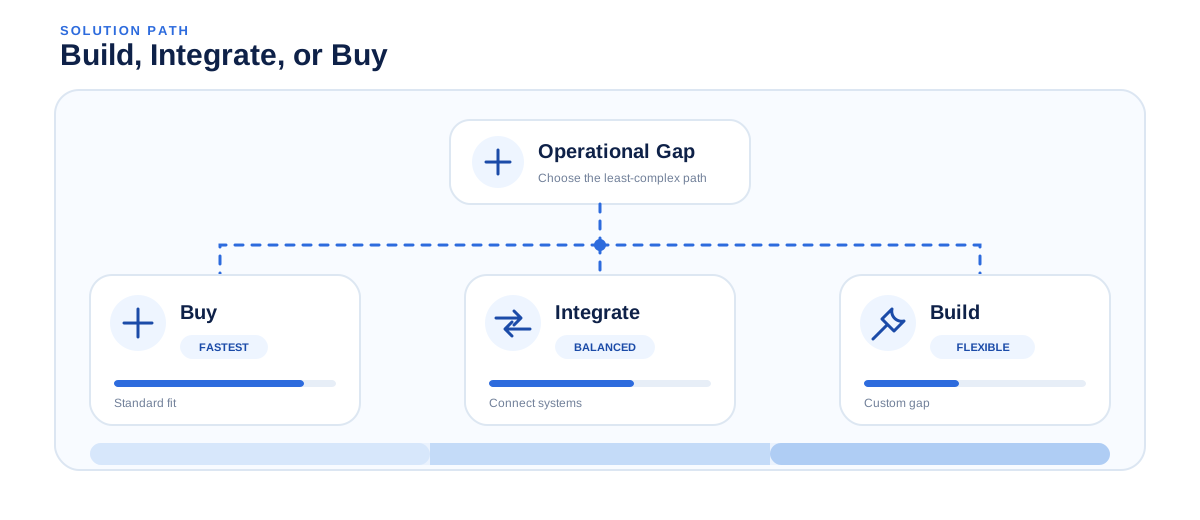
ERP consulting and system integration services can extend those systems without creating another disconnected database.
When Custom Development Makes Sense
- Several registration sources
- Proprietary hardware
- Complex access rules
- Unusual badge logic
- Strict offline behavior
- Custom attendance calculations
- Organization-specific reporting
- Deep internal integrations
Teams considering the wider event-platform model can also review SDLC Corp's guide to building an app like Eventbrite.
If configuration and integration cannot cover the missing workflow, custom software development services can address that specific operational gap.
Build or Integrate the Right Event Workflow
Review your registration, badge, attendance, hardware, and business-system requirements before committing to another platform.
Final Thoughts
Event check-in confirms arrival. Badge printing creates an onsite identity. Event attendance tracking shows what happens after entry.
When these functions share the same attendee record, teams can handle exceptions faster, identify bottlenecks, manage capacity, and produce cleaner reports.
The goal is a reliable event-day flow with fewer manual handoffs.
Frequently Asked Questions
What Is an Event Check-In System?
An event check-in system confirms attendees when they arrive. It can support QR or barcode scanning, attendee lookup, self-service kiosks, arrival timestamps, walk-ins, badge printing, and connections with registration or attendance systems.
How Does Onsite Badge Printing Work?
Onsite badge printing creates a credential after the attendee is identified. The system retrieves approved registration details, selects the correct template, adds the attendee information and scannable identifier, and sends the badge to the printer.
Should Events Use Pre-Printed or On-Demand Badges?
Pre-printed badges work well when attendee data is stable and late changes are rare. On-demand badge printing offers more flexibility for walk-ins, late registrations, name corrections, ticket changes, reprints, and access upgrades.
How Many Check-In Kiosks and Staff Does an Event Need?
Start with peak arrivals and measure the full attendee transaction using the actual scanner, software, badge template, and printer. Add spare capacity for exceptions, hardware failures, and sudden arrival surges.
Can Event Check-In Work Without Internet?
Yes. Offline event check-in can use locally available attendee records and store new transactions until connectivity returns. A reliable design also needs synchronization retries, duplicate detection, stable attendee identifiers, and clear conflict rules.
How Does Session Attendance Tracking Work?
Session attendance tracking associates an attendee identifier with a session and timestamp. QR codes, barcodes, RFID, NFC, or similar credentials can create these records for capacity planning, access control, training evidence, and participation reporting.
Can Event Check In and Badge Printing Integrate With an Existing Registration System or ERP?
Yes. Event check in and badge printing can connect with registration software, CRM platforms, ERP systems, and analytics tools through APIs, webhooks, or supported data interfaces. The key requirements are a stable attendee identifier and clear ownership of registration, access, and attendance fields.