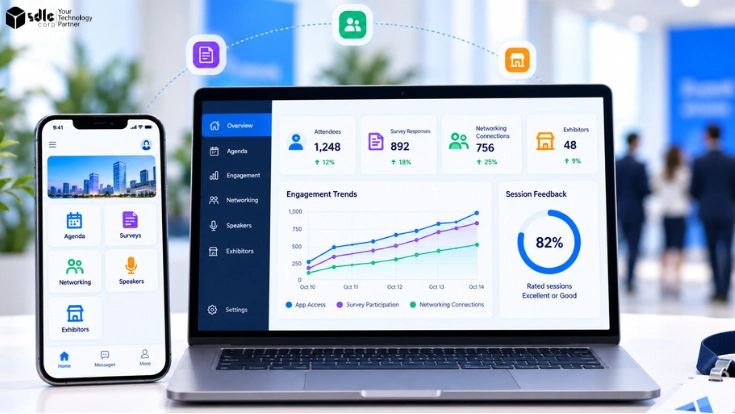
Modern events involve more than registration, check-in, and a published agenda. Attendees expect useful information on their phones, relevant people to meet, direct interaction with speakers, easy exhibitor discovery, and convenient ways to give feedback.
Event engagement tools support these interactions before, during, and after an event while creating data organizers can use to improve the experience. The strongest setup is not the one with the longest feature list. Mobile access, surveys, networking, speaker workflows, exhibitor interactions, and analytics work best as one connected experience.
How Event Engagement Tools Connect Across The Attendee Journey
Engagement begins before attendees reach the venue. Registration creates the attendee identity and core profile, while the engagement layer uses that record for agendas, recommendations, messages, sessions, meetings, and follow-up.
The SDLC Corp guide to Event Registration And Payment Processing Features covers registration, ticketing, payment, capacity, and check-in in detail, so this article treats registration only as the identity source.
Before the event, attendees build schedules, review speakers, and discover people or exhibitors. During the event, they receive updates, join sessions, vote in polls, ask questions, book meetings, and access useful content. Afterward, survey responses, meeting activity, downloads, and lead data support follow-up.
The design goal is straightforward: preserve one attendee identity across these handoffs instead of creating disconnected records for every interaction. Once that identity reaches the venue, the event check-in, badge printing, and attendance tracking workflow can continue using the same attendee record.
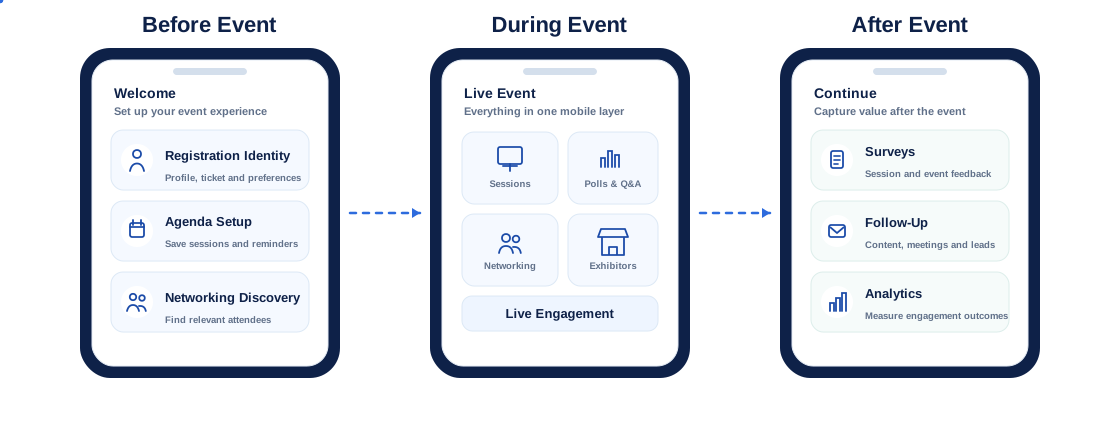
Mobile Access As The Engagement Layer
A mobile event app often becomes the front door to the event experience, but the app is not an engagement strategy by itself. Its role is to make the next useful action easy, whether that means finding a room, saving a session, responding to a poll, or opening a meeting request.
Personalized Agendas And Recommendations
Personalized agendas reduce search friction and help people move from browsing to participation. Useful mobile actions include:
- Save sessions to a personal agenda
- Filter sessions by topic or track
- View speaker and session information
- Receive relevant session recommendations
Recommendations work better when the entire program remains discoverable. An algorithm may surface relevant sessions, but attendees still benefit from exploring topics outside their predicted interests.
Notifications And Real-Time Updates
Push notifications are most useful when they support an immediate attendee action, including:
- Room or venue changes
- Session reminders
- Meeting alerts
- Important schedule updates
Promotional messages deserve stricter frequency controls because repeated alerts quickly create notification fatigue.
Separating operational notices from marketing messages also makes urgent information easier to recognize.
Maps And On-Site Navigation
Interactive maps are most useful when they connect the attendee schedule with clear venue destinations such as:
- Session rooms and stages
- Exhibitor booths and lounges
- Meeting areas and service points
- Searchable labels, accessible routes, and booth identifiers
Wayfinding also reduces staff interruptions because attendees spend less time asking where sessions, exhibitors, or meeting areas are located.
Native Apps, PWAs And Offline Access
A native app supports richer device features and persistent engagement, but it requires installation. A progressive web app, or PWA, lowers that barrier because attendees open it in a browser, although some device capabilities may be more limited.
Accessibility belongs in this delivery-model decision. The W3C mobile accessibility guidance explains that existing W3C accessibility standards, including WCAG, cover mobile web content and can also inform native and hybrid app accessibility.
Venue connectivity changes the decision. An event app offline mode stores essential information such as agendas, maps, tickets, and selected content locally when Wi-Fi becomes unreliable.
Actions that create new data, including notes or lead scans, may queue on the device and synchronize when connectivity returns. Testing that recovery path before launch is far safer than assuming venue Wi-Fi will remain stable throughout the event.
| Access Model | Best Fit | Main Limitation |
|---|---|---|
| Native app | Rich device features and repeat use | Installation required |
| PWA or web app | Fast access without an app-store download | Some device capabilities may be limited |
| Offline-capable experience | Venues with unreliable connectivity | Requires caching and synchronization logic |
Connect Your Event App With The Systems Behind It
Plan mobile access, offline behavior, notifications, attendee identity, and integration as one event engagement workflow.
Surveys, Polls And Q&A Capture Different Signals
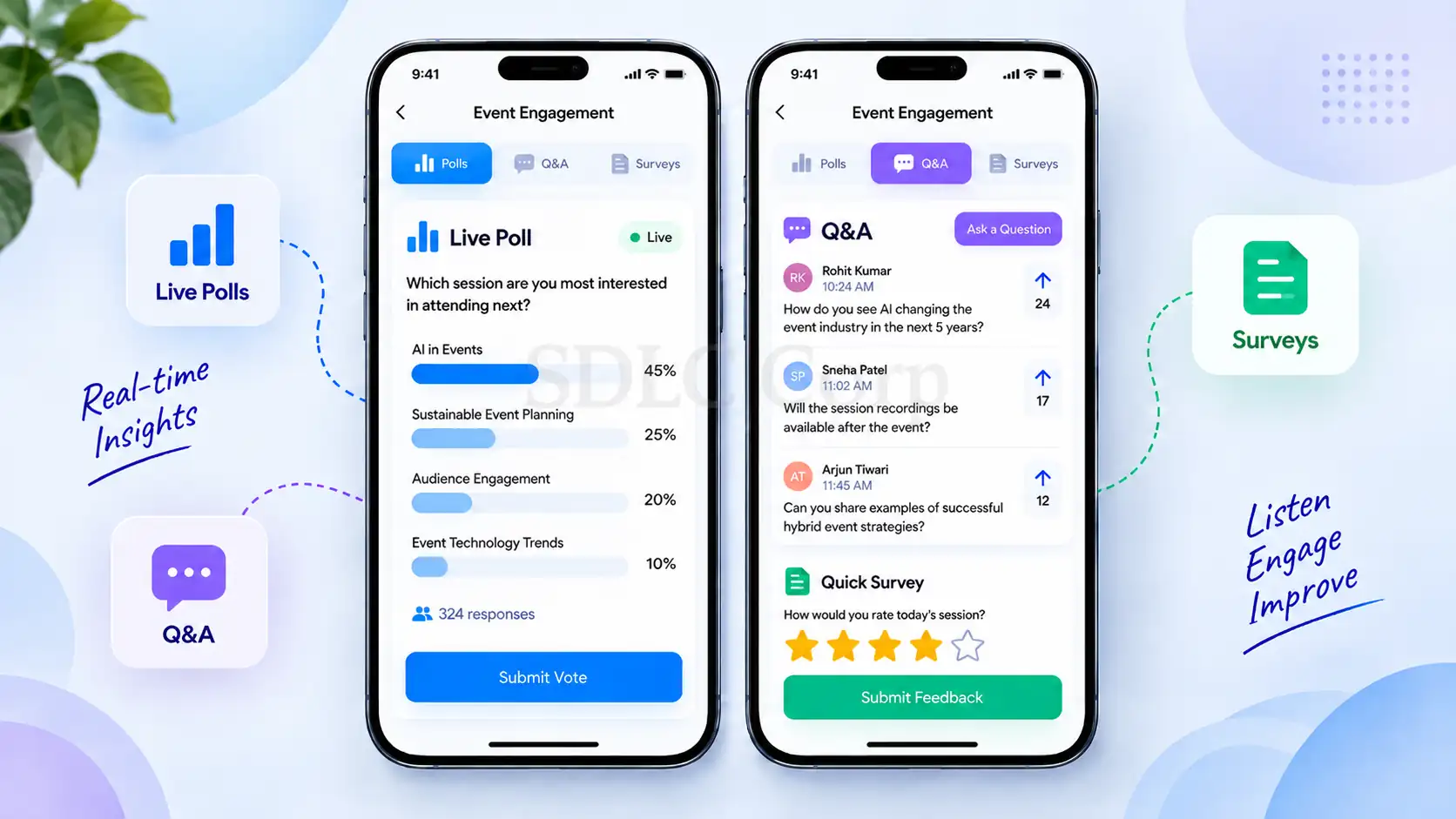
Event survey tools, live polling, and Q&A may appear in the same interface, but they solve different problems. Polls capture immediate responses, Q&A reveals what attendees want to discuss, and surveys collect structured feedback after an interaction.
Treating all three as interchangeable produces data that is harder to interpret.
Live Polling
Live polling works best when the result influences the session. A speaker can use a poll to:
- Test audience knowledge
- Compare participant priorities
- Ask the audience to choose between options
Organizers then gain a participation signal instead of relying only on attendance.
Short, relevant polls preserve session flow. Repeated questions interrupt the content and turn an engagement feature into another form.
Moderated Q&A
Q&A gives attendees a direct channel to speakers while moderation keeps the discussion useful. Depending on the event, participants can:
- Submit new questions
- Vote on existing questions
- Use anonymous submission where appropriate
Moderators can remove duplicates, group similar themes, and prioritize the questions that matter most to the room. This produces a different signal from polling because attendee questions reveal uncertainty, interest, and unmet information needs.
Session And Post-Event Surveys
Session surveys work best close to the interaction they measure. A short prompt at the end of a session can capture content relevance, speaker effectiveness, and an open-text comment without adding much friction.
A broader post-event survey can then measure the overall experience, future intent, and areas for improvement.
SurveyMonkey's 2026 survey-response benchmark guide reports 2025 platform data showing an average 38.81% response rate for post-event surveys and 28.65% for pre-event surveys. In this benchmark, response rate reflects responses relative to the survey audience; it is not the same as a survey-completion metric.
| Tool | Best Timing | Primary Signal | Example Metric |
|---|---|---|---|
| Poll | During a session | Immediate opinion or knowledge | Participation rate |
| Q&A | During a session | Questions and interests | Questions submitted or upvoted |
| Session survey | At session end | Content and speaker feedback | Session rating |
| Event survey | Event close | Overall experience | Response rate |
| Follow-up survey | After the event | Retained value and intent | Satisfaction or future intent |
The value of event feedback tools comes from context. Feedback linked to the correct session, speaker, event, or attendee record gives organizers something they can act on. Anonymous responses remain useful when the event still captures enough session or program context to interpret them.
Networking Tools That Turn Discovery Into Meetings
Networking is one of the clearest reasons attendees invest time in in-person events. Freeman's 2025 networking research found that 51% of attendees said effective networking was reason enough to return to an event. Meanwhile, Bizzabo's 2025 organizer research found that 42% of organizers reported low or very low engagement with networking features. Its in-person event strategy research also found that only 53% of attendees encountered structured networking opportunities.
That contrast explains why event networking tools require more than an attendee directory.
Attendee Profiles And Visibility Controls
Useful attendee profiles focus on fields that improve matching, such as:
- Role and company
- Interests and event goals
- Areas of expertise
- Topics the attendee wants to discuss
- Visibility and messaging preferences
Profile visibility belongs under attendee control.
Clear opt-in rules define who appears in search, who may send messages, and what information exhibitors or sponsors can access. Complete profiles improve discovery, but collecting excessive information often reduces adoption. Focusing on fields that improve matching keeps the experience lighter.
Matchmaking And Recommendations
Matchmaking can surface people with similar goals, complementary expertise, shared interests, or relevant business needs. AI-assisted recommendations speed up discovery, although attendees still benefit from understanding why a connection was suggested.
For deeper coverage of recommendation engines and intelligent matchmaking, the SDLC Corp AI For Event Management guide explains personalization and networking logic without duplicating the topic here.
Messaging And Meeting Scheduling
Discovery creates value only when attendees can act on it. A practical workflow moves from profile discovery to a connection request, message, available time slots, meeting location, reminders, and follow-up:
Meeting scheduling also works better when it accounts for session conflicts and attendee availability. After the event, organizers can measure connections made, meetings booked, meetings completed, and follow-up activity instead of treating app opens as proof of networking success.
Speaker Engagement Beyond Speaker Profiles
Dedicated speaker management platforms often handle submissions, abstracts, approvals, and administrative workflows. Speaker engagement tools serve a different purpose: they connect the speaker, session, audience, and post-session experience.
That lifecycle deserves more attention than a basic speaker biography page.
Speaker Portals And Content Collection
Before a session, a speaker portal can centralize the information organizers need, including:
- Biographies and headshots
- Presentation files and supporting resources
- Accessibility information and session details
- Deadlines and room assignments
- Rehearsal information
- Agenda changes
Keeping these updates in one place reduces email chains and gives organizers a consistent source for public speaker information. The portal also avoids unnecessary re-entry when speaker data already exists elsewhere. For events with concurrent tracks and workshops, the multi-session event management guide explains how speakers, rooms, capacity, and attendee schedules connect operationally.
Live Q&A And Polling
During the session, live Q&A and polls help speakers understand the room rather than delivering a one-way presentation. Moderated questions, upvoting, and audience polling reveal the topics generating the most interest.
Moderation rules belong in the event plan before the session starts. The team can define who approves questions, whether anonymous submissions are available, and how unanswered questions are handled after the session.
Speaker And Session Feedback
Speaker feedback becomes useful when it is linked to the correct session and interpreted with context. Ratings show whether attendees found the content relevant or the presentation clear, while open-text comments reveal what worked and what could change.
A single average rating gives only part of the picture. Attendance, question volume, poll participation, content downloads, and survey response create a fuller set of speaker engagement metrics.
This is also where event engagement tools become more useful than isolated speaker-management features: the same session record can connect audience participation, feedback, content consumption, and follow-up.
Post-Session Content And Follow-Up
Engagement does not have to stop when the room clears. Organizers may publish slides, recordings, summaries, answers to unanswered questions, or related resources.
Attendees who saved or attended the session can receive relevant follow-up without automatically entering unrelated campaigns.
That structure turns speaker content into part of the wider event experience instead of an isolated agenda item.
Exhibitor Engagement From Discovery To CRM
Exhibitor engagement tools help attendees find relevant companies and help exhibitors turn meaningful conversations into usable follow-up. The workflow begins before the booth scan and continues after the event.
Exhibitor Discovery And Meetings
An exhibitor profile should give attendees enough context to decide whether a booth or meeting is relevant. Useful profile fields include:
- Company information and categories
- Products and downloadable resources
- Booth location
- Available representatives
- Options to save the exhibitor or request a meeting
Early discovery gives exhibitors a chance to engage based on relevance rather than depending entirely on foot traffic.
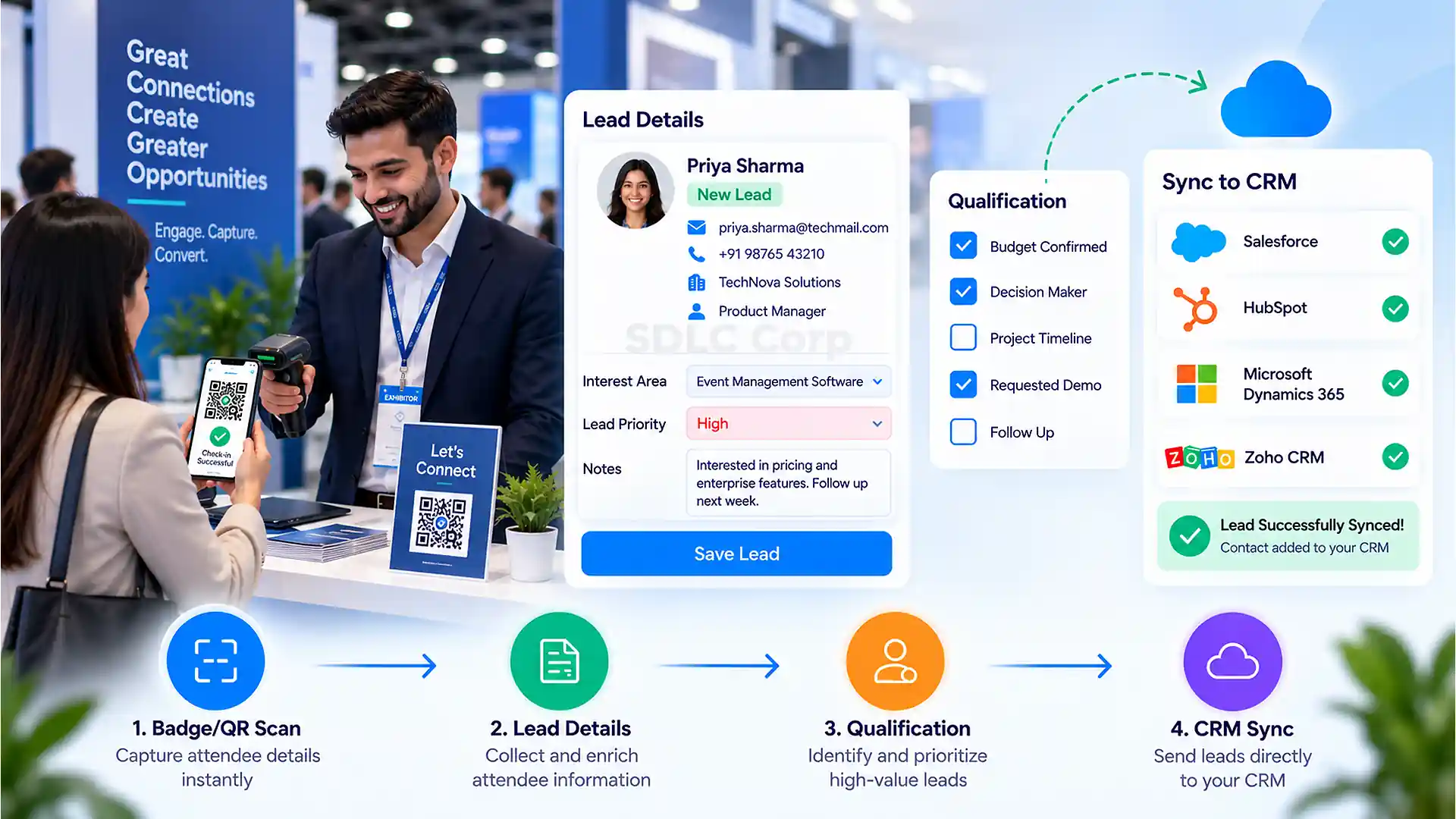
Badge And QR Lead Capture
At the booth, exhibitor lead capture may use a badge, QR code, or event credential to retrieve attendee information the organizer is permitted to share.
The representative can add notes, select interests, answer qualification questions, and assign a follow-up priority.
A badge scan is not automatically a qualified lead. Someone who stopped for a giveaway and someone who requested a product discussion belong in different CRM stages.
Offline Capture And Lead Qualification
Trade-show floors often have congested or inconsistent connectivity. Offline capture stores scans and notes on the device and synchronizes them later.
The workflow also has to account for duplicate scans, failed synchronization, and conflicts when several booth representatives update the same lead.
Standard qualification fields create more consistent downstream data. Without them, each representative records different details and the sales team receives leads that are difficult to compare.
CRM Sync And Follow-Up
The final step moves qualified lead information into the CRM with the correct owner, source, campaign, consent status, and qualification fields.
From there, exhibitors can measure profile views, meetings, scans, qualified leads, follow-up completion, and pipeline influence. That creates a more useful exhibitor ROI story than reporting only the number of badges scanned.
Turn Exhibitor Interactions Into Usable CRM Follow-Up
Connect badge scans, qualification fields, attendee consent, lead ownership, and CRM synchronization in one workflow.
How Event Engagement Data Should Connect
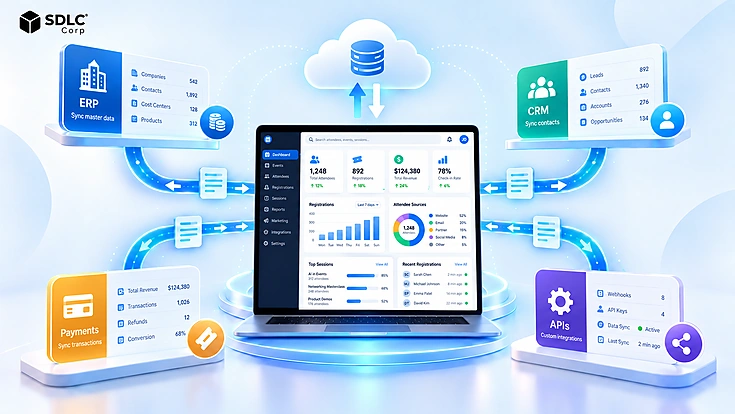
The strongest event engagement tools still underperform when every module creates a separate copy of the attendee. A connected architecture starts with one identity and carries that identity through mobile activity, sessions, networking, surveys, speaker interactions, and exhibitor workflows.
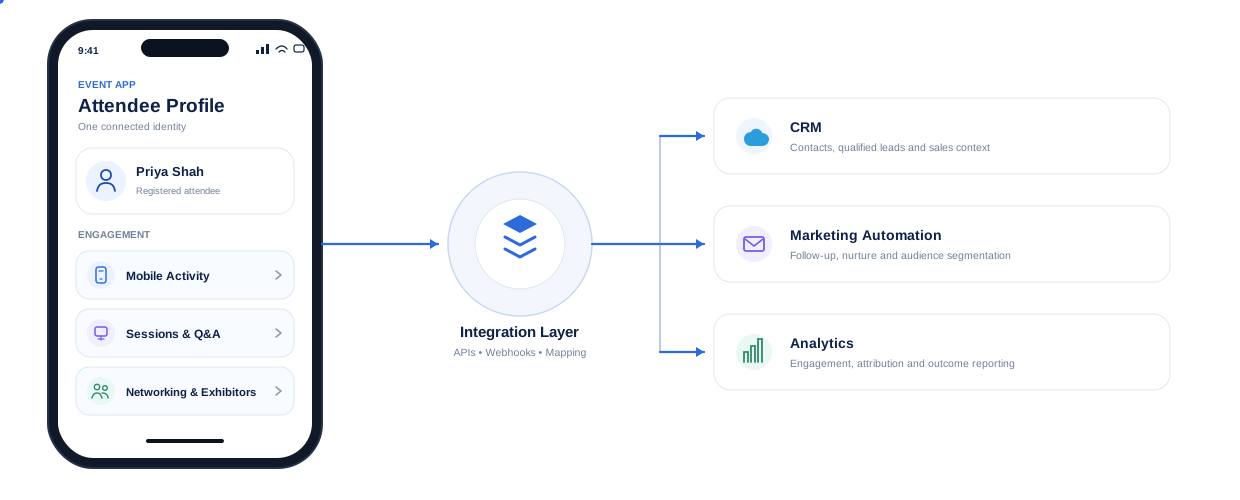
Event app CRM integration involves more than sending a contact record. Teams need explicit rules for:
- Which system owns the attendee record
- How fields map between applications
- When webhooks or synchronization jobs fire
- What happens after a failed request
- How duplicate records are detected and resolved
Consent also travels with the record so downstream systems understand the applicable communication and data-sharing rules.
A useful SDLC Corp integration example comes from its Salesforce and ActiveCampaign work for BPMInstitute.org. Salesforce remained the source of truth, while webhook-triggered updates passed through field mapping, validation, record matching, and upsert logic before downstream automation ran.
That project was not an event-platform implementation, so it should not be presented as one. The transferable lesson is architectural: identity, system ownership, validation, and duplicate handling are easier to resolve before downstream activity begins creating or updating records.
Event engagement data integration becomes especially important when several tools are involved. If the networking platform, survey system, lead-capture application, and CRM all use different identifiers, reconstructing one attendee journey becomes difficult.
Clear system-of-record ownership and synchronization rules reduce that fragmentation.
Buy, Integrate Or Build Event Engagement Tools
Not every organization benefits from custom event software. Standard platforms are often the fastest option when required workflows already match established features.
Integration adds value when event data has to connect with CRM, marketing, analytics, membership, or internal systems. Custom development fits cases where the experience, workflow, or ownership requirements are genuinely differentiated.
| Requirement | Buy Platform | Integrate Existing Tools | Custom Build |
|---|---|---|---|
| Standard agenda and mobile access | Strong | Strong | Usually unnecessary |
| Polls and Q&A | Strong | Strong | Usually unnecessary |
| Standard networking | Strong | Strong | Possible |
| Custom matchmaking logic | Vendor dependent | Strong | Highest control |
| CRM workflow | Connector dependent | Strong | Strong |
| Specialized exhibitor process | Limited to platform model | Strong | Highest control |
| Custom analytics | Moderate | Strong | Strong |
| Fast launch | Fastest | Moderate | Slowest |
A build vs buy event app decision starts with workflow fit, integration constraints, data ownership, expected scale, and long-term operating cost.
Custom event app development makes sense when it solves a genuine control or workflow problem rather than recreating standard features an established platform already delivers well.
If the next step is comparing packaged options, use the SDLC Corp Event Registration And Management Software Buyer’s Guide to evaluate platform fit, integrations, ownership, and operating requirements. Teams that want to review a first-party event platform can also explore Rostra for registration, program, onsite, finance, reporting, and engagement capabilities.
How To Measure Event Engagement
Event engagement metrics have to reflect the action each tool is designed to create. A single blended score can hide whether attendees were genuinely active or simply opened the app.
| Engagement Area | Attendee Action | Data Captured | Useful KPI |
|---|---|---|---|
| Mobile access | Opens, saves, navigates | App activity | Active usage |
| Polling | Votes | Responses | Participation rate |
| Q&A | Submits or upvotes | Questions | Interaction rate |
| Surveys | Rates or comments | Feedback | Response rate |
| Networking | Connects | Connection activity | Connections made |
| Meetings | Books and attends | Meeting activity | Completed meetings |
| Speakers | Asks, votes, downloads | Session activity | Session engagement |
| Exhibitors | Visits, meets, scans | Lead activity | Qualified leads |
Event engagement analytics become more useful when quantitative and qualitative evidence are read together. Networking counts reveal activity, while feedback shows whether those connections were useful.
Exhibitor scans show contact volume. Qualification and CRM follow-up reveal whether that activity produced business value.
The objective is not to maximize every number. Select metrics that match the event's purpose and the behavior each feature is intended to support.
Common Event Engagement Problems
Even well-designed event engagement software can fail when operational details are ignored. Common issues include:
- Low app adoption because login or onboarding is difficult
- Poor venue Wi-Fi with no useful offline experience
- Notification fatigue caused by excessive alerts
- Incomplete attendee profiles that weaken recommendations
- Irrelevant matches that reduce trust in networking
- Low survey response because every session asks too many questions
- Unmoderated Q&A that becomes repetitive or difficult to manage
- Disconnected exhibitor lead data and inconsistent qualification fields
- Duplicate attendee records across event and CRM systems
- Accessibility barriers in navigation, content, or interaction controls
- Unclear consent rules when attendee data is shared
Realistic pre-event testing works best with attendee, speaker, exhibitor, and staff scenarios. That exposes identity, connectivity, permission, and synchronization failures before they reach the event floor.
Final Thoughts
Effective event engagement tools create a connected path from mobile access to sessions, networking, speaker interaction, exhibitor engagement, feedback, and follow-up.
The right platform is not simply the one with the longest feature list. Organizations gain more value by evaluating participation friction, venue reliability, the data each interaction creates, and how that data reaches the systems that act on it.
When those pieces connect, engagement becomes measurable and useful instead of another collection of disconnected event features.
Plan The Engagement Experience And The Integration Together
Connect mobile access, networking, speakers, exhibitors, feedback, and event data without creating disconnected attendee records.
Frequently Asked Questions
What Are Event Engagement Tools?
Event engagement tools are digital features and platforms that help attendees interact with event content, people, speakers, exhibitors, and organizers. They include capabilities such as mobile access, live polls, Q&A, surveys, networking, meeting scheduling, speaker interaction, exhibitor lead capture, and engagement analytics.
What Should A Mobile Event App Include?
A mobile event app typically includes agendas, sessions, speaker and exhibitor information, maps, notifications, networking, meetings, and feedback features. Offline access, accessibility, synchronization, and connections with registration and CRM data also affect how reliably the app performs at a live venue.
What Is The Difference Between Event Polls, Q&A And Surveys?
Polls collect immediate structured responses during a session. Q&A captures attendee questions and discussion topics, while surveys collect broader feedback after a session or event. Using each tool for its intended signal makes the resulting data easier to interpret.
How Do Event Networking Tools Work?
Event networking tools use attendee profiles, recommendations, messaging, and meeting scheduling to help people identify relevant contacts and connect with them. Strong implementations also include privacy controls and measure whether introductions progress into meetings or follow-up.
How Do You Measure Speaker And Exhibitor Engagement?
Speaker engagement can be measured through attendance, Q&A participation, poll responses, ratings, feedback, and content downloads. Exhibitor engagement may include profile views, meetings, scans, qualified leads, follow-up activity, and CRM outcomes. The most useful metric depends on the intended result.
Should You Buy, Integrate Or Build Event Engagement Software?
Buy event engagement software when standard features cover the required experience. Integration works when event tools must share data with CRM, marketing, analytics, or internal systems. Custom development fits cases where unique workflows, ownership requirements, or control justify a tailored solution.