Choosing event management software is not about finding the platform with the most features. The right choice depends on your event model, attendee journey, integrations, budget, and operational needs. A tool that works well for a small workshop may not support a large conference or a recurring enterprise event program.
Instead, start with clear requirements and test each shortlisted platform against real workflows. Then compare total cost, implementation effort, support, security, and measurable value. This guide explains how to choose event management software without turning the process into an oversized feature checklist.
Key Takeaways
The sections below work through a full evaluation, but the short version is this. Requirements come before vendor names, evidence comes before feature lists, and total cost comes before headline pricing.
- Start with event requirements, not vendor names. Define your event type, scale, registration flow, payment needs, integrations, and onsite operations first, because those decisions shape every comparison that follows.
- Separate must-have features from optional ones. A platform should pass every critical requirement before you begin comparing the additional capabilities that vendors like to demonstrate.
- Test real workflows during vendor demos. Check mobile registration, refunds, waitlists, check-in, integrations, and data export instead of relying on prepared product tours that only show ideal conditions.
- Compare total cost, not only subscription pricing. Include transaction fees, implementation, integrations, hardware, training, and support, since these often cost more than the licence itself.
- Evaluate security, data ownership, and exit terms. Confirm how attendee data is protected, exported, retained, and handled under GDPR and CCPA. Agree those terms before you sign rather than after.
- Use the same scorecard for every vendor. Compare evidence across event fit, user experience, integrations, operations, analytics, security, cost, and support so that no platform is judged on a different basis.
Choose the platform that proves the best fit. The best event management platform meets your non-negotiable requirements and works reliably in real event conditions. It is not the one with the longest feature list.
Start With Your Event Requirements
Before comparing event registration software, define what your events actually require. Start with event type, expected attendance, frequency, registration complexity, payment needs, sessions, and onsite operations. Record each one so the whole team evaluates against the same list. A simple requirements table keeps that evaluation focused.
| Requirement | Example | Why It Matters |
|---|---|---|
| Event type | Conference | Sets the platform category |
| Expected attendees | 2,000 | Sets the scale to support |
| Payments | Required | Adds refunds and PCI scope |
| Session booking | Required | Needs capacity and waitlists |
| CRM integration | Required | A hard pass or fail check |
| QR check-in | Required | Drives event-day speed |
| Badge printing | Preferred | Often a paid add-on |
| Mobile app | Optional | Format-specific, not decisive |
Next, map the attendee journey, because the sequence itself shows where a platform has to hold up. A typical flow may look like this.
This exercise often reveals requirements that basic feature lists miss. For example, a platform may support registration but fail when attendees need to change tickets, join waitlists, or move between sessions. Also consider future scale, since growth can mean more attendees, but it can equally mean more events, organizers, locations, integrations, and business units.
Choose The Right Type Of Event Platform
Different event platforms solve different problems, so identify the platform category before you compare vendors. Four categories cover most buying situations.
- Registration And Ticketing PlatformsThese suit simpler events that mainly need forms, tickets, payments, confirmations, and basic attendee records. They are usually the fastest to set up.
- All-In-One Event Management PlatformsThese add capabilities such as attendee management, session scheduling, communication, check-in, and reporting. That suits organizations running the full event lifecycle in one system.
- Conference And Trade Show PlatformsThese usually need deeper onsite functionality. Common requirements include multi-track agendas, exhibitors, badges, lead capture, session capacity, and high-volume check-in.
- Enterprise Event PlatformsThese support larger event portfolios across teams or business units. Buyers may need role-based access, APIs, SSO, CRM integration, centralized reporting, and audit controls.
For organizations whose workflows cannot fit packaged tools, custom or enterprise platforms may be another option. SDLC Corp's enterprise software development services focus on business workflows, integrations, roles, and long-term system ownership. Education and public sector teams running district-wide event programs can also review Rostra, a K-12 registration and event management platform. It covers registration, approvals, badges, attendance, and finance posting in one system.
The decision should start with platform fit, not brand popularity.
Not Sure Which Platform Category Fits Your Events?
Talk to SDLC Corp about mapping your event workflows, integrations, and ownership requirements before you shortlist vendors.
Talk To Our TeamSeparate Must-Haves From Nice-To-Haves
A long event management software features list can make every capability look equally important. In practice, buyers should separate non-negotiable requirements from useful extras, and four priority levels are usually enough to do that.
| Priority | Meaning | Example |
|---|---|---|
| Must Have | Platform cannot be selected without it | CRM integration |
| Should Have | Important, but alternatives may exist | Badge printing |
| Could Have | Useful if cost and effort are reasonable | Mobile app |
| Not Needed | Adds little value to your events | Gamification |
For example, CRM integration and mobile registration may be mandatory, while gamification or advanced networking may only matter for certain event formats. Keep those hard requirements separate from your weighted scorecard. If Salesforce synchronization is essential, a vendor that cannot support it should fail that requirement even when it performs well elsewhere.
This approach makes your event software evaluation checklist more useful, and it also prevents teams from paying for features they may never use.
Evaluate The Event Management Features That Matter Most
Features still matter, but focus on the capabilities that affect registration, attendee experience, event-day operations, and reporting. Those matter more than the ones that look impressive in a demo.
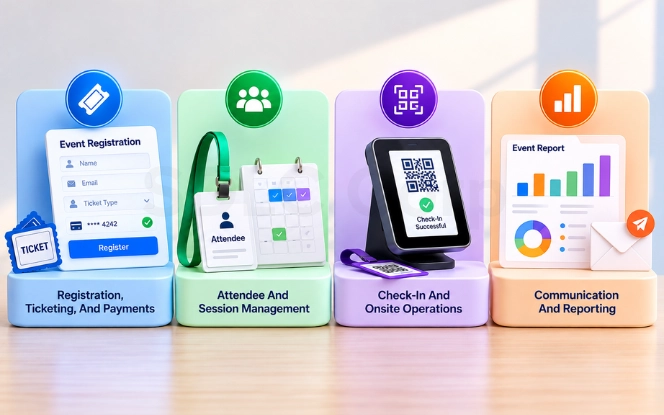
Registration, Ticketing, And Payments
Strong event registration software should support the registration paths your events need. Check custom fields, conditional questions, ticket types, promo codes, group registration, waitlists, refunds, taxes, and mobile usability. Our guide to custom event registration forms and workflows covers how those conditional paths are usually built. Test the complete journey on a phone, including payment and error recovery. If users struggle to register, the rest of the platform cannot fix that experience.
For organizations reviewing the attendee interface, UI/UX design services can provide additional context around mobile usability, accessible forms, and conversion-focused workflows.
Attendee And Session Management
The platform should maintain a clear attendee record across registration and attendance. Test ticket changes, cancellations, session choices, capacity rules, and waitlists. For conferences, try filling a session to capacity, then check what happens to the next registrant and whether notifications update correctly.
Check-In And Onsite Operations
Event-day workflows deserve more attention than a product screenshot. Evaluate QR scanning, walk-ins, badge printing, duplicate scans, multiple entrances, and attendance tracking. If the platform offers offline check-in, confirm how records synchronize after connectivity returns, and test what happens when two devices update the same attendee.
Communication And Reporting
Communication should follow the attendee journey, from confirmation through to post-event follow-up. Check whether messages can be segmented by attendee type, registration status, or session. Reporting should answer practical questions about registrations, attendance, revenue, session demand, and lead activity. Confirm that teams can export usable data instead of relying only on dashboard views.
Check Integrations, Security, And Data Ownership
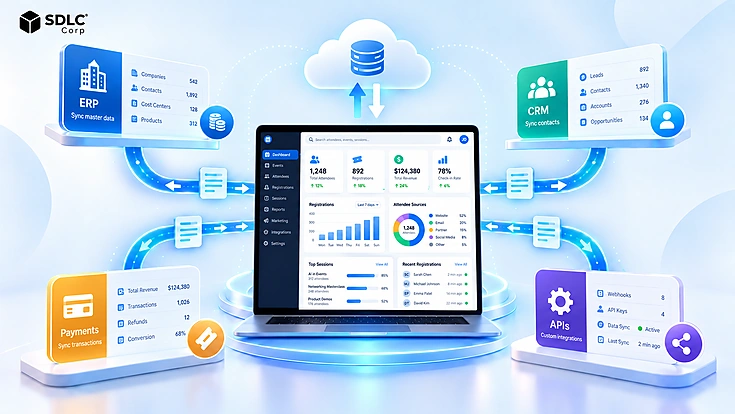
An event management platform rarely operates alone. It often connects with CRM, marketing automation, payments, analytics, and finance systems. Do not accept "Yes, we integrate with Salesforce" as enough evidence. Ask which fields synchronize, which system owns the master record, how often data syncs, and how duplicates are handled. Then review API authentication, webhooks, error logs, and retry behavior when integrations fail.
A typical connection map may look like this.
For complex system connections, SDLC Corp's custom software development services include API-based integration and governed data synchronization.
Security checks should cover roles, permissions, SSO, audit logs, and payment handling. If card payments are involved, clarify which party stores, processes, and transmits payment data, since that decision changes your own compliance scope. PCI SSC currently lists PCI DSS v4.0.1 in its official standards library.
Privacy and accessibility matter as well, so buyers should review retention, deletion, subprocessors, and data export requirements. For applicable organizations, California's current CCPA regulations took effect on January 1, 2026. For events with attendees in the EU or UK, GDPR applies in parallel with CCPA. Check lawful basis for attendee data, transfer terms for non-EU hosting, and the vendor's subprocessor list before signing. Separately, W3C recommends using WCAG 2.2 for current web accessibility work.
Compare Pricing, Total Cost, And ROI
Event management software pricing can be difficult to compare because vendors use different commercial models. Some charge annual subscriptions, while others add per-event, per-registration, payment, or module fees. Instead of comparing headline prices, calculate the total cost of ownership.
- License$2 to $12 per attendee
- Transaction fees1% to 3%
- Payment fees2.5% to 3.5% plus a fixed amount
- Implementation$2k to $25k
- Integrations$1k to $15k each
- HardwareScanners and badge printers
- TrainingPriced per team
- SupportPremium tiers cost extra
- Total cost of ownershipSum of all rows above
Treat those bands as a starting point rather than a quote. Per-attendee licence pricing usually falls as volume rises, and transaction and payment fees stack on top of each other. Implementation sits at the higher end when CRM sync, finance posting, and badge printing are all in scope.
Ask vendors which capabilities require paid add-ons, because badge printing, API access, advanced analytics, or premium support may not be included in the base package. Teams weighing automation against headcount can also review how AI for event management changes the operating cost side of this comparison. Next, compare that cost with business value. Useful measures include staff hours saved, fewer manual data transfers, better registration completion, improved attendance tracking, lead value, and tools replaced. If a build is also under consideration, see our breakdown of the cost to develop a ticket selling app. It gives a useful reference point for that comparison.
Keep the ROI calculation practical. The goal is not to create a perfect financial model, it is to compare shortlisted platforms on the same basis.
Need Help Comparing Total Cost Of Ownership?
Get an objective view of licensing, integration effort, and implementation cost before your team signs a multi-year contract.
Request A ConsultationTest Every Platform With Real-World Scenarios
A prepared demo usually shows a platform under ideal conditions. A better evaluation runs the same real workflows through every shortlisted vendor. These five tests cover the areas that carry the most risk on event day.
- Mobile registration. Complete registration, payment, validation, and confirmation from a phone, since most attendees will register this way.
- Ticket change and refund. Buy a ticket, change it, and process a refund, then check whether the attendee and payment records remain accurate afterwards.
- Capacity and waitlist. Fill a session and test capacity enforcement, waitlist placement, and the notifications that attendees receive when a place opens.
- Peak or offline check-in. Test check-in under busy conditions or limited connectivity, then confirm how records synchronize once the connection returns.
- Data export. Export attendee records, registration responses, session choices, attendance, and reports, and check that the output is usable outside the platform.
Also test failures, not only successful paths. For example, disconnect an integration or enter duplicate attendee data and see how the system responds. For API-level checks, the OWASP API Security Top 10 is a practical reference for the authentication, authorization, and error-handling risks worth testing. If a vendor cannot demonstrate a critical workflow, record that as evidence instead of accepting a future-feature promise.
For more formal performance, API, mobile, and security validation, SDLC Corp's software testing and QA services cover these testing areas.
Score And Compare Your Shortlisted Vendors
An event management software comparison works best when every platform receives the same evaluation. A simple 100-point scorecard keeps that decision objective.
| Evaluation Area | Weight | Evidence To Record |
|---|---|---|
| Event and workflow fit | 20 | Requirements table results |
| Registration and attendee UX | 15 | Mobile registration test |
| Integrations and data | 15 | Field-level sync demo |
| Onsite operations | 10 | Peak or offline check-in test |
| Reporting and analytics | 10 | Data export sample |
| Security and privacy | 10 | Roles, SSO, and audit logs |
| Pricing and ROI | 10 | Total cost of ownership |
| Implementation and support | 10 | Setup plan and SLA terms |
| Total | 100 | Same basis for every vendor |
Score each category from 1 to 5, then convert that score into its weighted value. More importantly, record the evidence beside every score. Each rating should trace back to something the vendor actually demonstrated.
Keep mandatory requirements outside the weighted calculation. A platform should not win because of a high total score if it fails a critical security, integration, or operational requirement.
Evaluate Implementation, Support, And Exit Risk
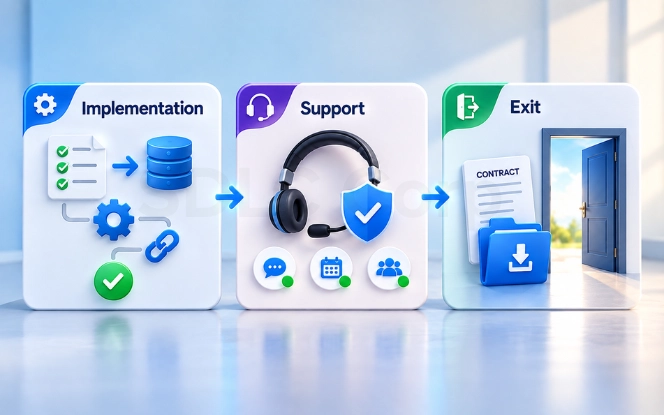
A good product can still become a poor investment if implementation is slow or responsibilities are unclear. Before signing, ask for a realistic setup plan covering migration, configuration, integrations, testing, training, and go-live support. Then agree who is accountable for each of the following areas.
- OwnershipClarify who owns each area internally, since event operations may own registration while IT manages integrations and finance reviews payment workflows.
- SupportConfirm support hours, response targets, escalation paths, weekend coverage, and any premium support charges, because support matters most during the event itself.
- Contract And ExitCheck renewal periods, cancellation notice, price-change clauses, data retention, export formats, and migration fees before the contract is signed.
Ask for customer references from organizations with a similar event model, attendee volume, and technology stack. Those conversations usually reveal more than a reference list chosen by the vendor.
A simple rule works well here: understand both how you will implement the platform and how you can leave it.
Use A Final Selection Checklist Before You Buy
By this stage, your team should have evidence rather than vendor claims. Before signing a contract, confirm the following points and treat any unanswered item as an open risk.
- The platform fits our event type and expected scale.
- Every must-have requirement passed.
- We tested registration on mobile.
- Payment, refund, and capacity workflows worked correctly.
- Required integrations were demonstrated.
- Onsite check-in was tested under realistic conditions.
- Security, privacy, and accessibility requirements were reviewed.
- We understand the full pricing model and total operating cost.
- Expected business value is clear.
- Implementation and support responsibilities are documented.
- Data export and contract-exit terms are acceptable.
The best event management platform is not automatically the one with the most capabilities. Choose the platform that fits your real workflows, passes your non-negotiable requirements, and provides enough value to justify its cost. If packaged platforms cannot support your workflows, integrations, or ownership requirements, a custom solution may be worth evaluating. SDLC Corp's custom software development services are designed around business-specific workflows, roles, data, and integration needs. For a view of what building your own tool involves, read our guide to developing an app like Eventbrite. It outlines the scope and feature decisions to expect.
Ready To Build An Event Platform Around Your Own Workflows?
If no packaged tool passes your must-have list, SDLC Corp can scope a custom solution. We build event registration and management systems around your own workflows.
Get In TouchConclusion
Learning how to choose event management software is less about collecting features and more about proving fit. Define your requirements first, then test the workflows that carry the most risk. Compare vendors using the same cost and scoring model, so every platform is judged on identical evidence.
That approach keeps the decision clear: requirements first, evidence second, purchase last.
Quick FAQs
What Features Should Event Registration Software Have?
Event registration software should cover the workflows your event requires. Common needs include customizable forms, ticketing, payments, attendee records, communication, reporting, and integrations. Larger events may also need session management, badge printing, check-in, and mobile tools.
How Much Does Event Management Software Cost?
Pricing varies by vendor, event volume, registrations, modules, and support. Compare total cost rather than the subscription alone. Include implementation, transaction fees, payment processing, integrations, hardware, training, and support.
What Is The Difference Between Event Registration And Event Management Software?
Registration software mainly manages registration, ticketing, payments, and attendee information. Event management software usually covers a wider lifecycle, including communication, sessions, check-in, integrations, analytics, and multi-event operations.
What Should I Ask During An Event Platform Demo?
Ask the vendor to demonstrate your real workflows. Test mobile registration, payments, refunds, waitlists, check-in, CRM synchronization, reporting, and data export. In addition, test at least one failure scenario so you can see how the platform handles exceptions.
How Long Does It Take To Implement Event Management Software?
A simple registration setup can go live in a few weeks. A platform with CRM integration, finance posting, approval routing, and badge printing usually takes longer. The timeline depends on data migration, the number of integrations, and how many teams need training before the first live event.
Can We Migrate Attendee Data From Our Existing System?
Most platforms support imports of attendee records, past registrations, and contact history, but the detail varies. Ask which fields transfer, which are dropped, and how duplicates are merged. Also confirm whether historical attendance and payment records come across or stay in the old system as an archive.
Do We Need Separate Software For Virtual And Hybrid Events?
Not usually. Many platforms handle in-person, virtual, and hybrid formats from one attendee record, though the depth of virtual features differs. Check streaming or conferencing integration, session access control for remote attendees, and whether attendance tracking and reporting combine both audiences in a single view.
How Do GDPR And CCPA Affect Event Registration Data?
Both laws apply to attendee data collected through registration. GDPR covers attendees in the EU and UK, while CCPA covers applicable California residents. Ask the vendor about lawful basis, consent capture, retention periods, deletion requests, hosting location, and the subprocessor list. Confirm those terms before the first event goes live.