Odoo 18 & 19 Ready Community & Enterprise 80+ UI Options

Modern Premium Backend Theme for Odoo ERP

Upgrade the default Odoo backend theme into a faster, cleaner, and more productive ERP workspace. Improve usability, speed up navigation, simplify daily operations, and help teams work more efficiently with customizable layouts, dark mode, responsive dashboards, keyboard shortcuts, and advanced UI controls.

  • Improve ERP Usability with Faster Navigation & Smarter Layouts
  • Customize Colors, Fonts, Layouts & Theme Settings
  • Increase Team Productivity with a Cleaner ERP Workspace
Clutch
5/5 ★★★★★
F GoodFirms
4.9/5.0 ★★★★★
AppFutura
4.9/5.0 ★★★★★
Premium Odoo Backend Theme dashboard with theme settings
Theme Control Layouts, colors, fonts, shortcuts, and dark mode in one place.
1 downloads
Active Installations
v18.0 to v19.0
Supported Versions
$9.81
Module Pricing
LGPL-3
License Type
Theme Control Panel

Shape the Odoo Backend Around Your Team

Create a cleaner, faster, and easier-to-use Odoo workspace for every department. Reduce unnecessary clicks, improve navigation, increase daily productivity, and give teams a more organized backend experience with flexible UI customization and workspace controls.

Dark Mode Interface
Compact Sidebar Navigation
Keyboard Shortcut Access
Custom Fonts & Layout Settings
80+

Customization Options

Control sidebar styles, dashboard layouts, menu behavior, colors, fonts, workspace settings, and backend UI elements to match different team workflows and improve usability.

12

Color Palettes

Apply ready-made light and dark color schemes to create a cleaner, more consistent, and visually comfortable ERP workspace for daily operations.

13

Google Fonts

Improve backend readability with modern font styles that make dashboards, forms, and data-heavy screens easier to scan and use.

3

Layout Modes

Switch between compact, standard, and expanded layout styles to improve navigation, screen usage, and workspace comfort for different teams and devices.

12+

Keyboard Shortcuts

Reduce repeated clicks and speed up common backend actions with keyboard shortcuts designed for faster daily ERP operations.

Upgrade the Default Odoo Backend

Customize Your Odoo Backend with Powerful UI Controls

Manage layouts, colors, fonts, navigation styles, shortcuts, and backend views from one advanced Odoo theme. Improve usability, simplify daily workflows, reduce extra clicks, and create a cleaner ERP experience for every team.

Book Theme Consultation

Dark Mode

With Dark Mode, teams can create a cleaner and more comfortable workspace that reduces screen strain during long ERP operations.

Layout Switcher

Along with visual comfort, the Layout Switcher helps users move between compact, standard, and flexible layouts for better navigation.

Theme Personalization

In addition, Theme Personalization allows businesses to customize colors, fonts, menus, and backend styles based on their brand identity.

Quick Access Controls

More importantly, Quick Access Controls help users complete repeated actions faster with shortcuts and simplified navigation.

PRODUCT UI SHOWCASE

Explore the Premium Odoo Backend Theme Experience

See how the Premium Odoo Backend Theme improves daily ERP work with modern dashboards, theme settings, quick search, dark mode, app drawer views, keyboard shortcuts, and a polished login screen.

Get Odoo Theme Support
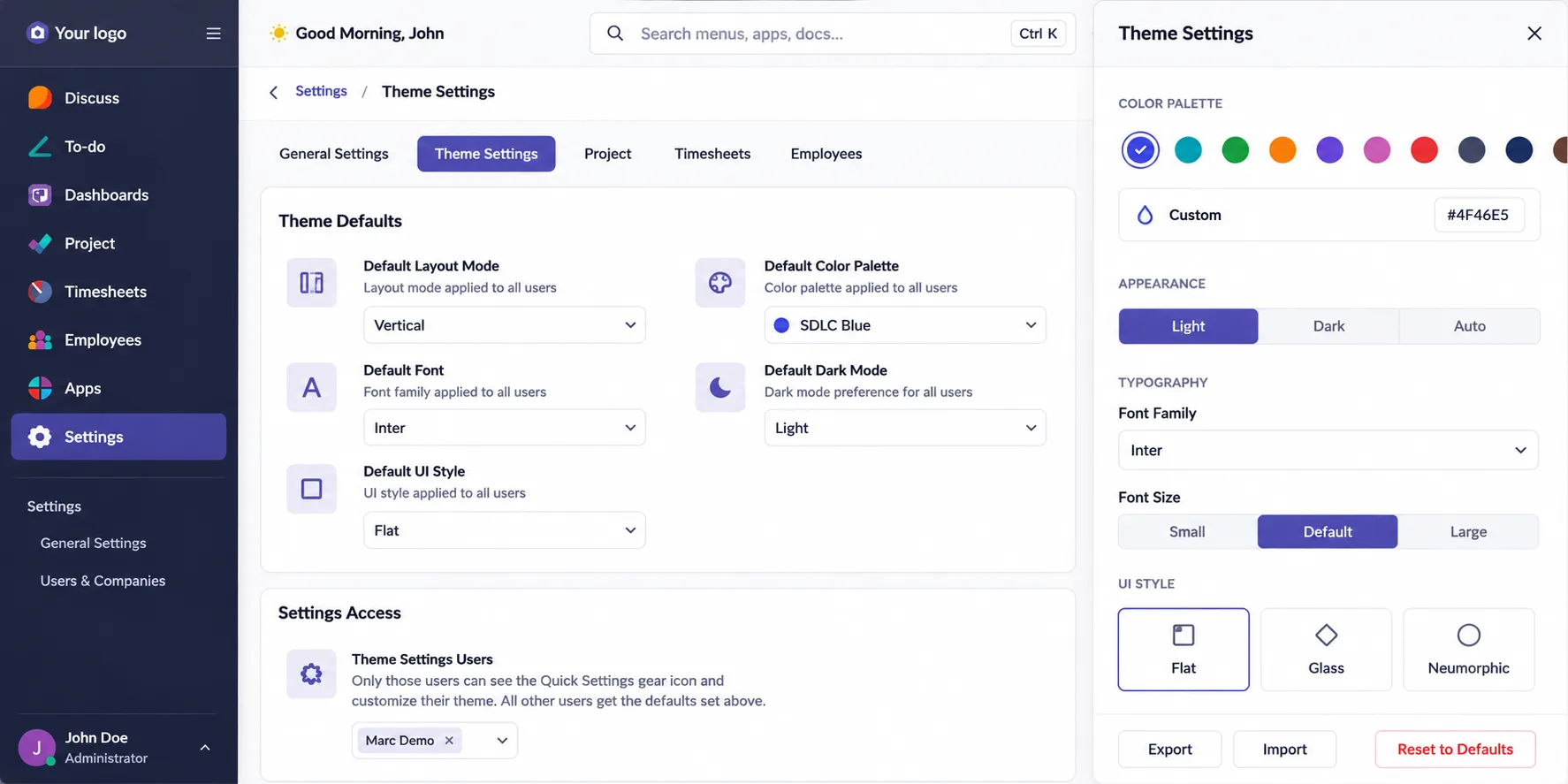
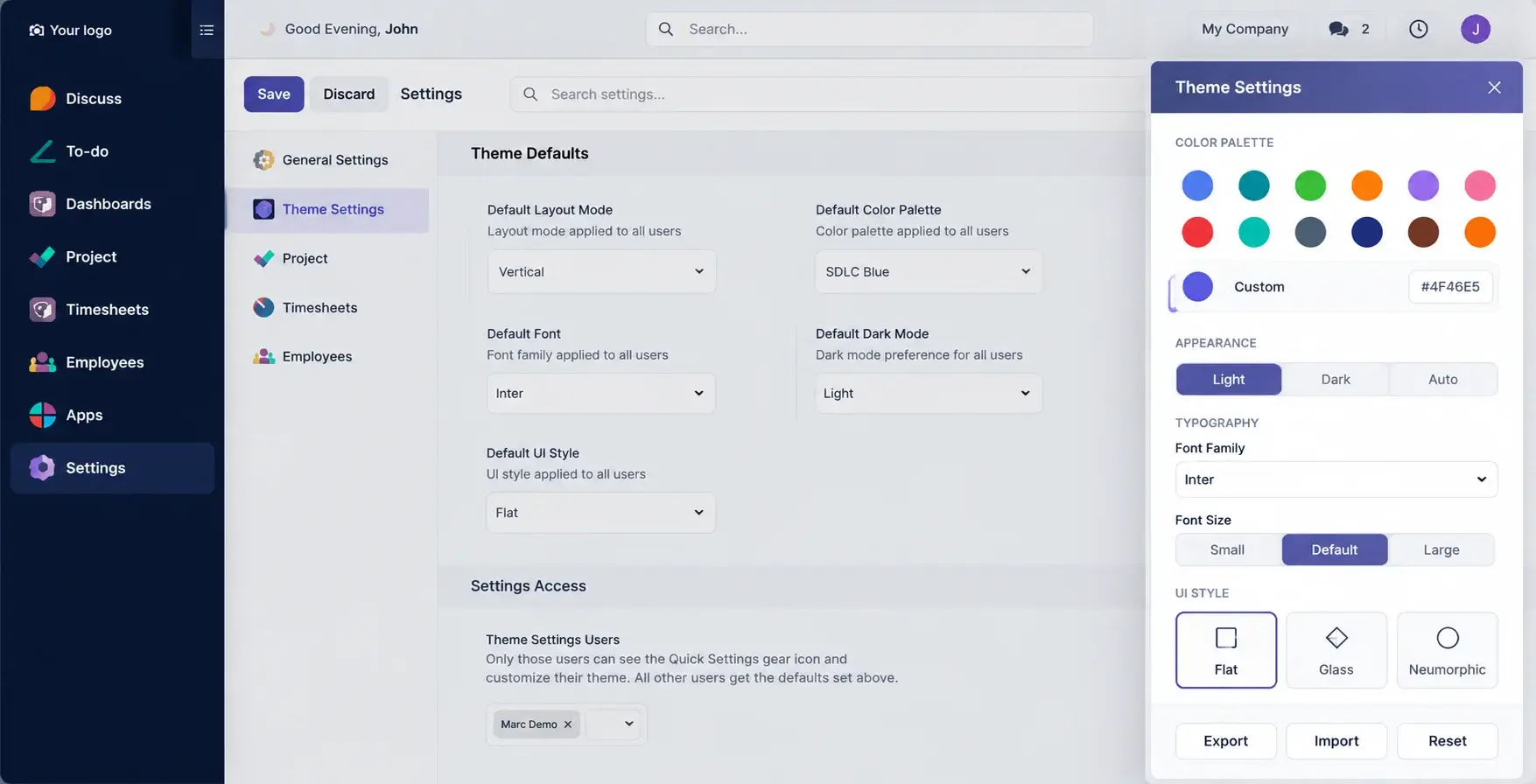
Theme defaults settings in Premium Odoo Backend Theme

Theme Defaults Settings

Set global backend theme preferences for layout, colors, fonts, and dark mode control.

  • Set default layout mode for all users
  • Choose the main color palette
  • Apply font and UI style preferences
  • Control dark mode from theme settings
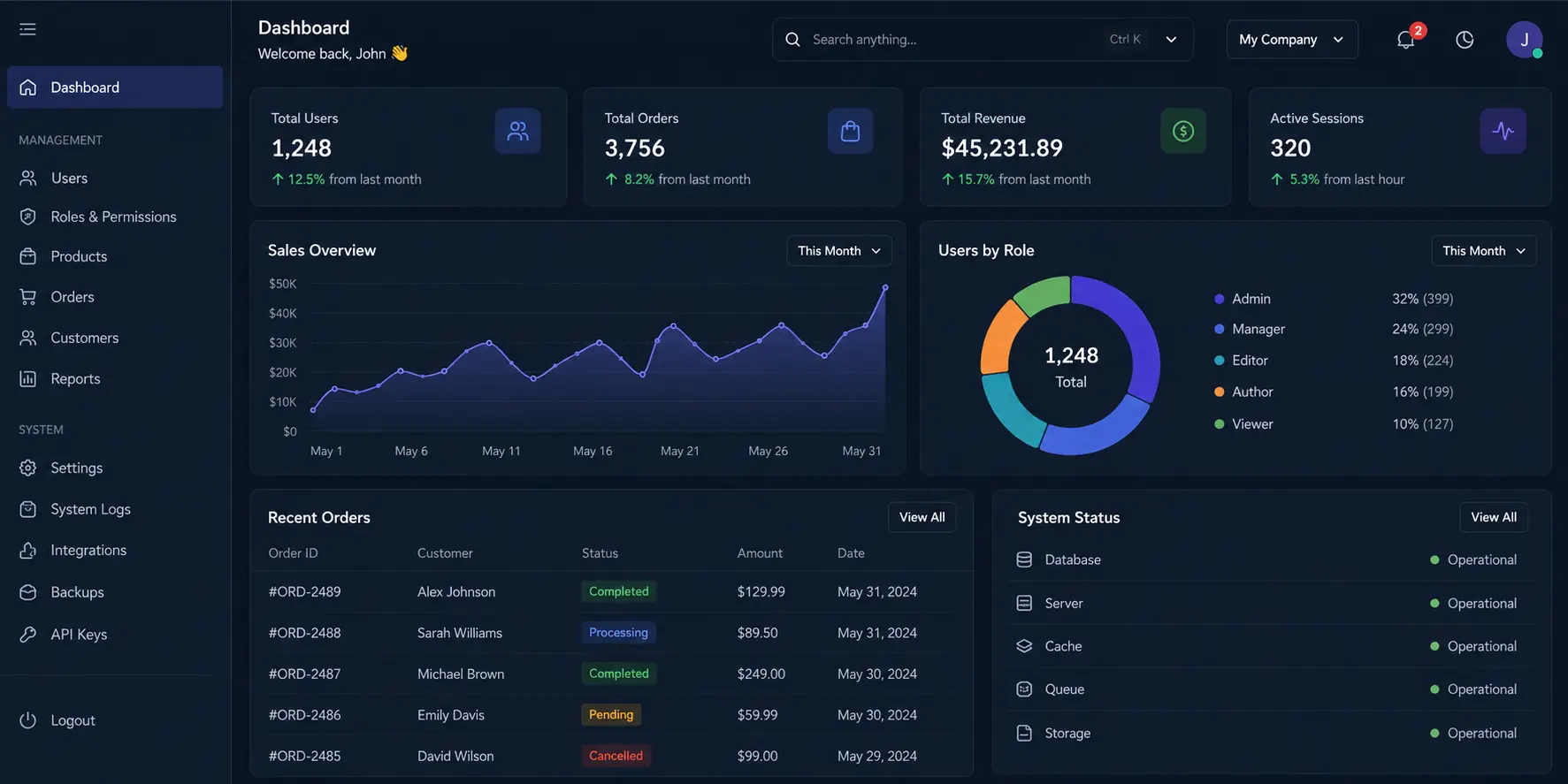
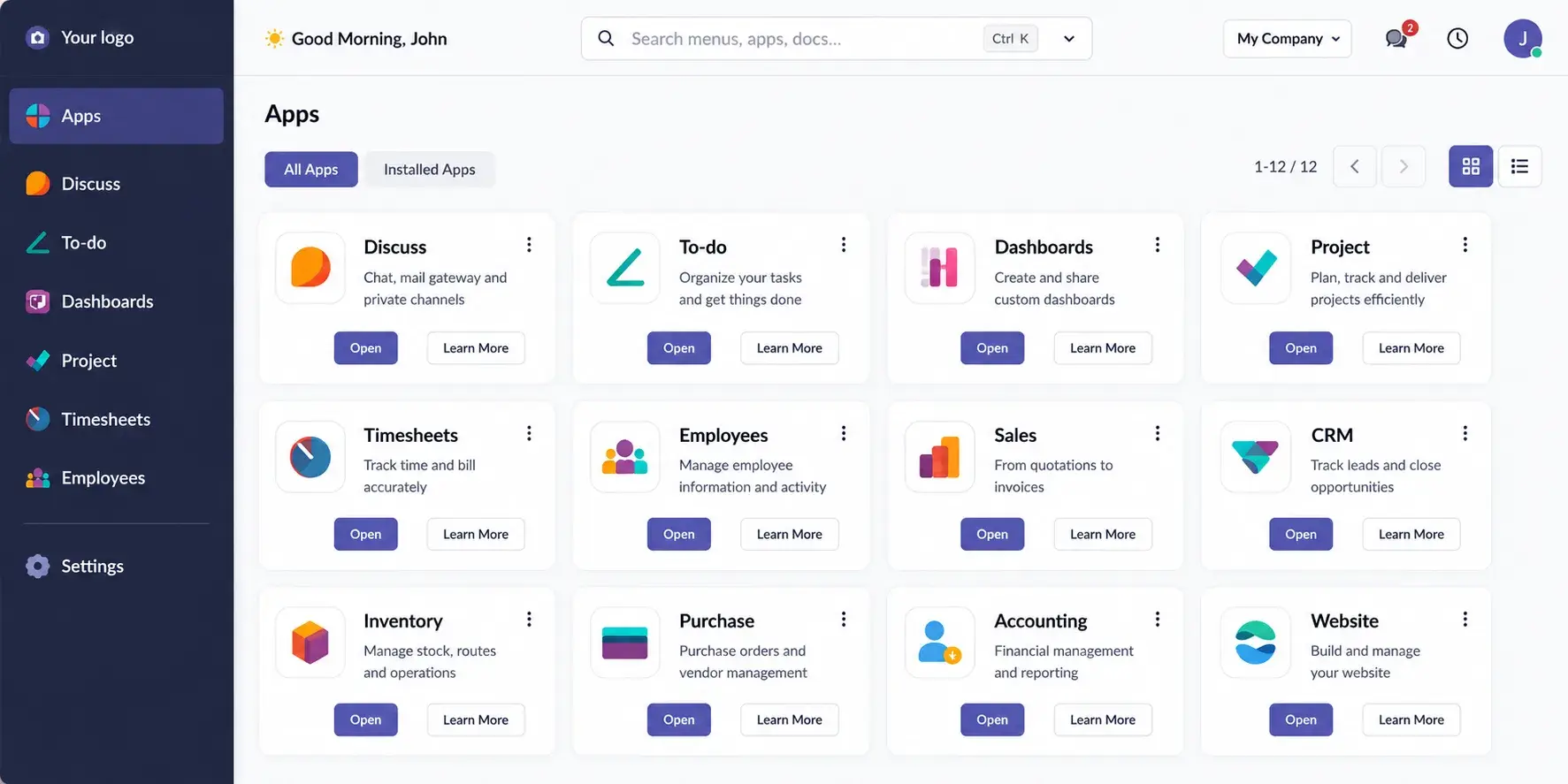
Modern app dashboard in Premium Odoo Backend Theme

Modern App Dashboard

Access Odoo apps faster with a cleaner dashboard layout, improved search, organized categories, and smoother backend navigation for better daily ERP productivity.

  • Browse Odoo apps in a cleaner card layout
  • Use improved search and category navigation
  • Switch between grid and list views
  • Access modules with a more organized interface
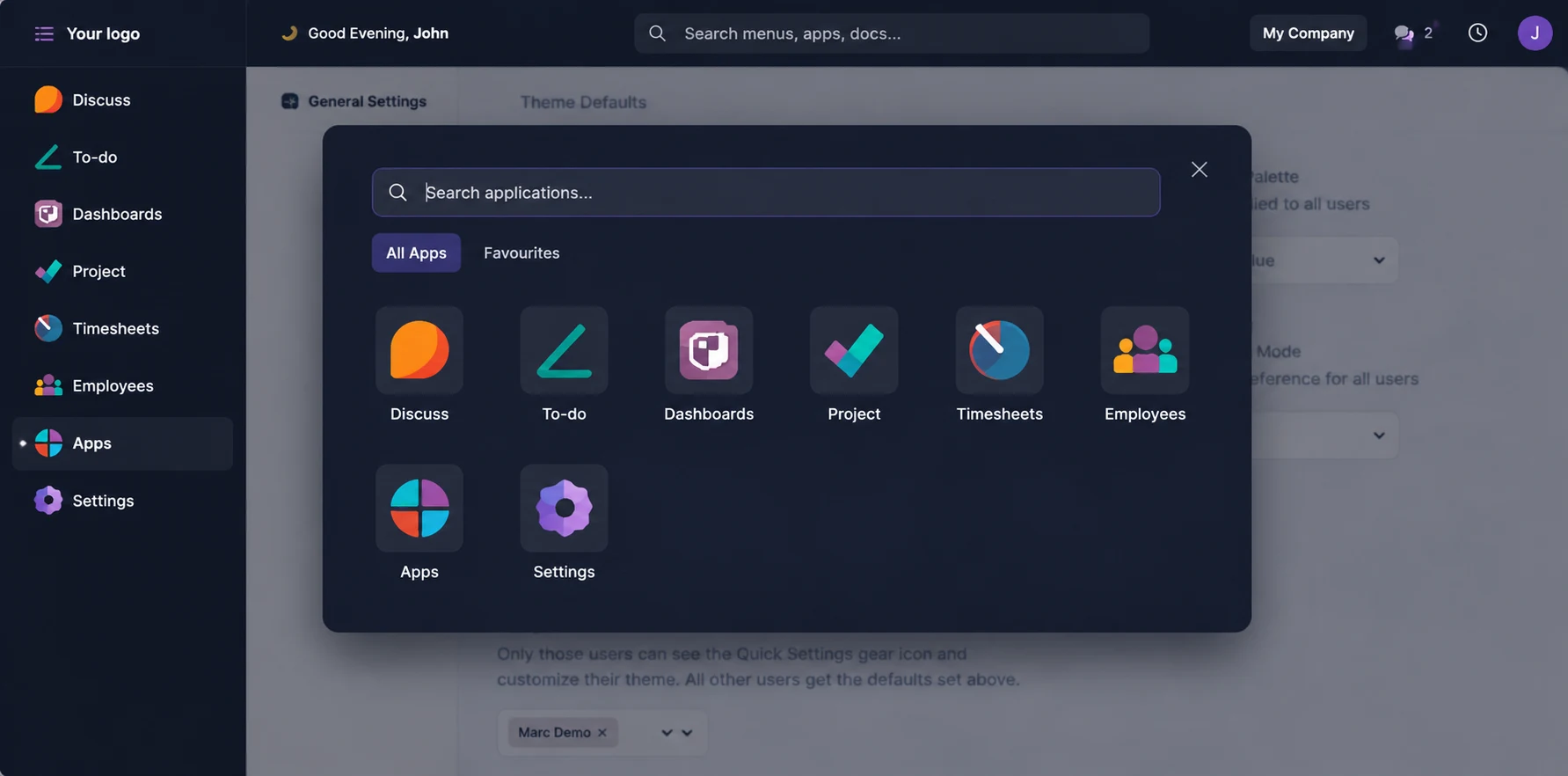
Dark app drawer in Premium Odoo Backend Theme

Dark App Drawer

Find and open Odoo modules faster with a focused dark app drawer designed for smoother backend navigation, fewer clicks, and reduced visual clutter.

  • Open apps from a focused quick drawer
  • Discover modules faster with cleaner app navigation
  • Reduce clicks while switching between backend modules
  • Improve focus with a dark interface and less screen clutter
Theme settings panel in Premium Odoo Backend Theme

Theme Settings Panel

Customize the Odoo backend interface without code by adjusting colors, typography, appearance modes, and UI styles from one easy theme control panel.

  • Change color palettes quickly for better brand consiste
  • Switch between light, dark, or auto mode for better visual comfort
  • Adjust typography and font size to improve backend readability
  • Personalize the Odoo backend with flat, glass, or neumorphic UI styles
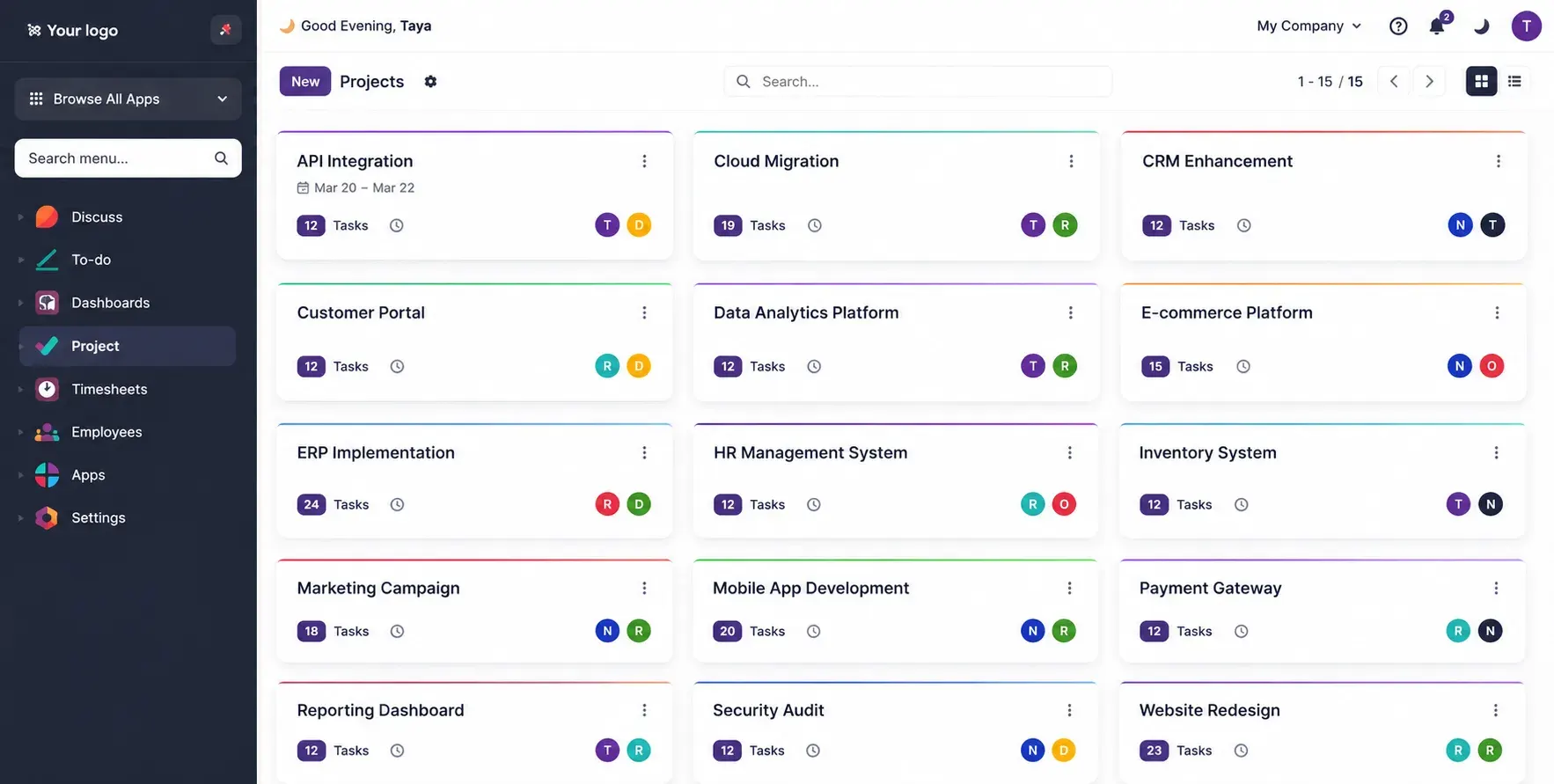
Project dashboard view in Premium Odoo Backend Theme

Project Dashboard View

Manage Odoo projects in a cleaner dashboard view with better task visibility, clear project ownership, and smoother team workflow management.

  • View Odoo project cards in a clean and organized workspace
  • Track tasks, project owners, and progress faster
  • Improve task visibility with color-coded project sections
  • Support smoother team coordination with simple project navigation
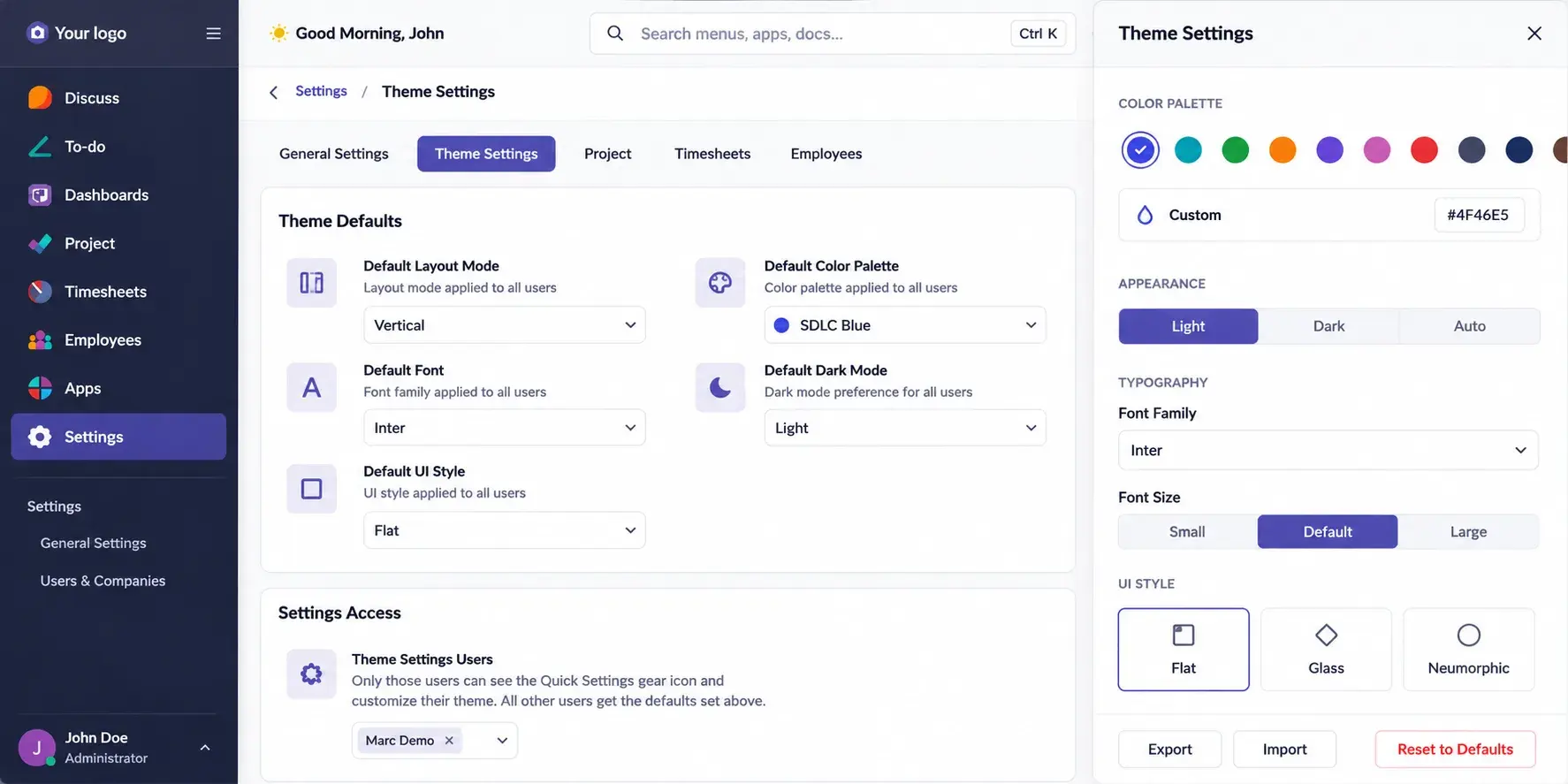
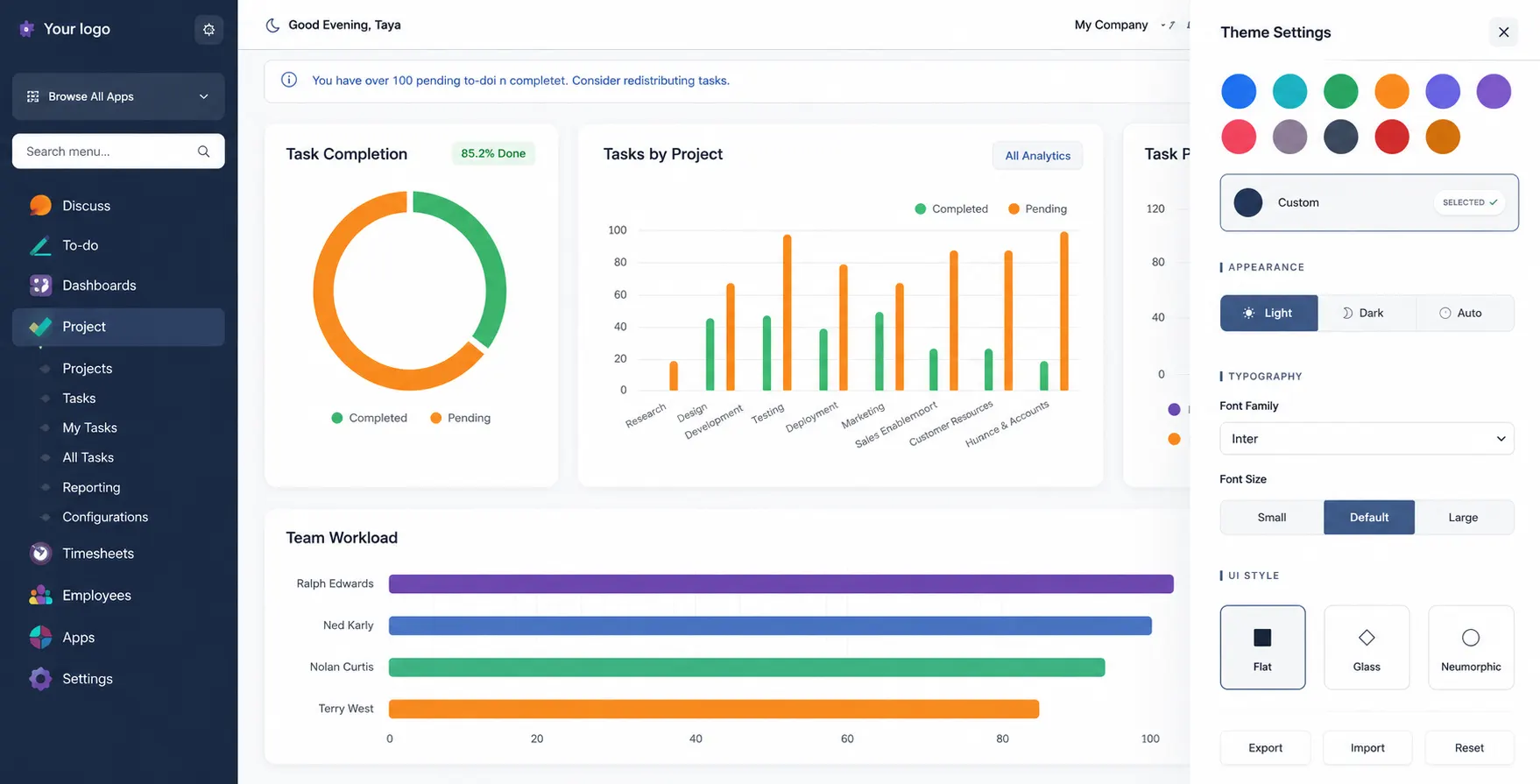
Analytics dashboard with theme controls in Premium Odoo Backend Theme

Analytics Dashboard with Theme Controls

Improve Odoo analytics dashboard readability with better spacing, side controls, cleaner reporting layouts, and faster data review for daily ERP decisions.

  • Review Odoo dashboards with better spacing and clearer visual structure
  • View charts and reports in a cleaner, easier-to-read layout
  • Customize analytics theme settings from the side control panel
  • Review reporting data faster with improved dashboard readability
Typography and UI settings in Premium Odoo Backend Theme

Typography and UI Settings

Customize fonts, font sizes, headings, and line spacing across Odoo backend screens to improve readability, user comfort, and daily ERP usability.

  • Select backend font styles for a cleaner Odoo interface
  • Adjust font size for better readability and accessibility
  • Improve scanning with clear headings and balanced line height
  • Preview typography changes before saving for smoother customization
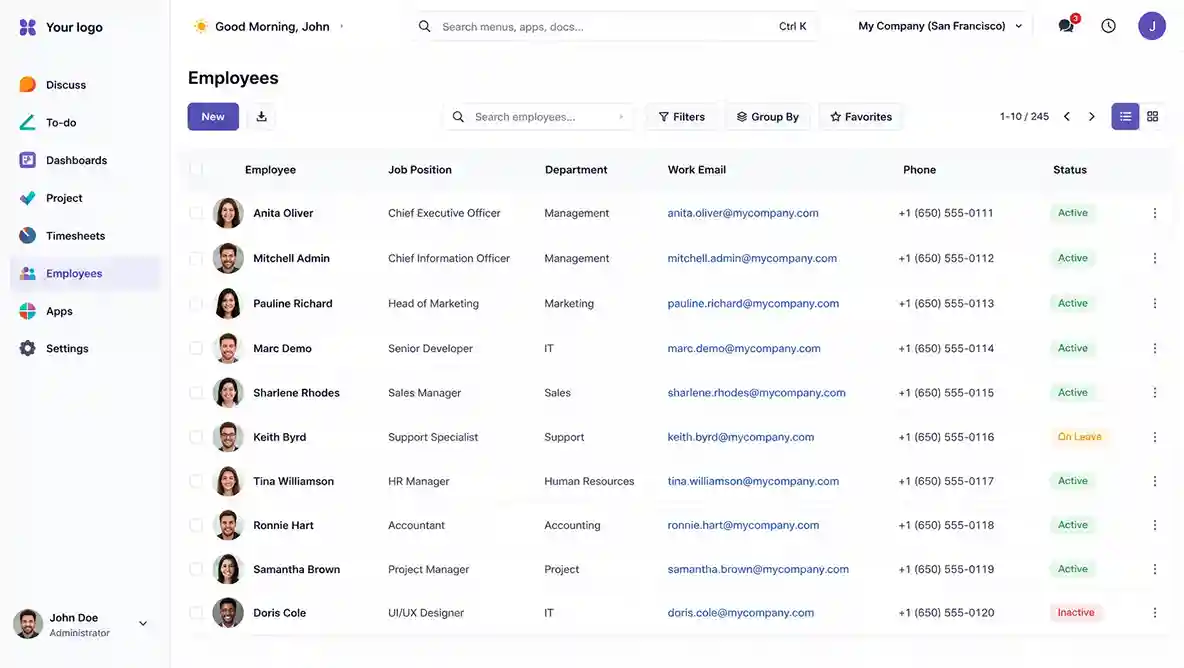
Employee list view in Premium Odoo Backend Theme

Employee List View

Manage Odoo employee records faster with clean tables, search, filters, grouped views, and easier HR record management for daily backend work. This helps HR teams access and manage employee information with better clarity.

  • To begin with, manage Odoo employee records in a clean table layout.
  • Next, find employee details faster with search, filters, and grouped views.
  • At the same time, improve HR visibility across employee records and departments.
  • Overall, make backend record management easier for better HR productivity.
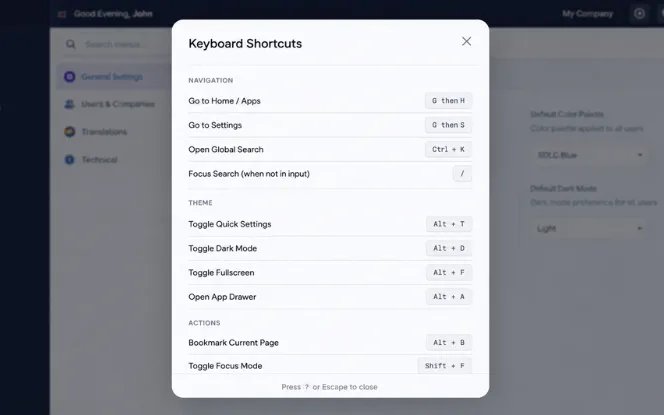
Keyboard shortcuts modal in Premium Odoo Backend Theme

Keyboard Shortcuts Modal

Complete common Odoo backend actions faster with simple keyboard shortcuts that reduce clicks, speed up navigation, and improve daily ERP productivity. This makes it easier for users to manage backend tasks with less effort and better control.

  • To start, open global search faster for quick backend access.
  • Similarly, toggle dark mode instantly with keyboard shortcuts.
  • In the same way, access quick settings without repeated navigation.
  • Ultimately, reduce clicks and complete daily ERP tasks more efficiently.
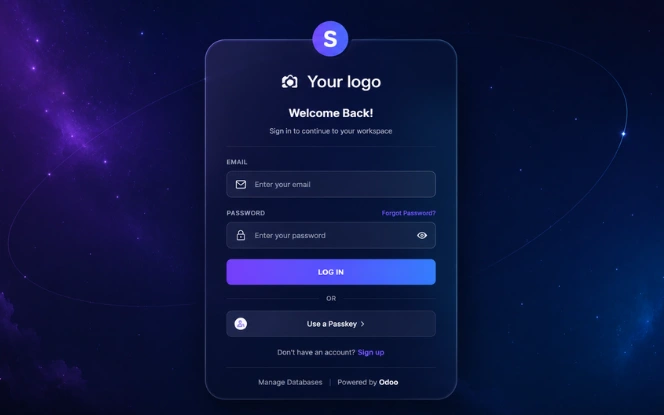
Premium login screen in Premium Odoo Backend Theme

Premium Login Screen

Create a professional Odoo login screen that reflects your brand identity, improves user confidence, and delivers a modern backend access experience. As a result, users get a cleaner and more trusted first interaction with your backend.

  • In addition, add a polished Odoo login experience for backend users.
  • Along with this, use a modern dark glass-style layout for a premium look.
  • BMoreover, improve brand presentation before users access the backend.
  • As a result, build user confidence with a clean and professional login screen.
Compatibility

Compatible with All Major Odoo Versions

Built for strong Odoo backend theme compatibility across Odoo 16, 17, 18, and 19. The theme supports Community and Enterprise editions, helping businesses adopt it easily, reduce upgrade risk, and maintain a smoother backend experience as their ERP environment grows.

Odoo 16 — Community & Enterprise
Odoo 17 — Community & Enterprise
Odoo 18 — Community & Enterprise
Multi-Company Support
Multi-Currency Support
Odoo VersionCommunity EditionEnterprise EditionMulti-CompanyMulti-Currency
Odoo 16SupportedSupportedYesYes
Odoo 17SupportedSupportedYesYes
Odoo 18SupportedSupportedYesYes
Odoo 19SupportedSupportedYesYes
Theme Features

Help Teams Work Faster Inside Odoo

Support daily Odoo users with cleaner navigation, faster module access, better visibility, and a workspace they can personalize for their role. The theme helps reduce training time, improve user comfort, and speed up ERP adoption across teams.

Get a Free Consultation

Cleaner Workspace

Better spacing, cleaner layouts, and structured screens make the Odoo backend easier to read and use every day.

Faster Module Access

Users can move between Odoo modules like Sales, Inventory, HR, Accounting, and Projects faster with improved menus and navigation.

Better User Comfort

Dark mode, readable typography, and clean layouts help users work comfortably during long ERP sessions.

Easy Personalization

Teams can adjust colors, fonts, layouts, and appearance settings based on their role, brand, and working style.

Faster Adoption

A cleaner Odoo backend helps new users understand workflows faster, reducing training time and onboarding effort.

Responsive Backend

Users can work smoothly across desktop, tablet, and mobile screens with improved backend layout behavior.

Simple Setup

Easy Theme Setup with Simple Backend Configuration

Set up the Premium Odoo Backend Theme quickly with a simple configuration process built for Odoo users. Teams can install the theme, customize layouts, adjust colors and fonts, and apply a modern backend experience without disrupting daily ERP operations.

Talk to Odoo Theme Expert

Install the Theme Module

First, add the Premium Backend Theme directly into your Odoo environment with a quick and simple installation process.

Configure Backend Preferences

Next, set layouts, colors, fonts, menus, and dashboard preferences from one easy admin control panel.

Enable UI Customization

Then, activate dark mode, responsive layouts, navigation controls, and visual customization features for better usability.

Start Using the New Backend Experience

Finally, help teams move smoothly into a cleaner, faster, and more modern Odoo backend workspace.

Why Upgrade Your Backend

Benefits of a Premium Odoo Backend Theme

Improve how your teams use Odoo every day with a cleaner backend interface, better navigation, personalized layouts, and improved usability for faster workflows, smoother ERP adoption, and an easier backend transition.

Reduce Manual Work

Reduce repeated clicks and manual navigation with a cleaner Odoo backend interface that helps users complete daily actions faster.

Improve Usability

Make Odoo screens easier to read, scan, and use with better spacing, cleaner layouts, and improved backend structure.

Support Personalization

Allow teams to customize colors, layouts, fonts, and appearance settings based on their role, comfort, and working style.

Faster User Adoption

Help new users understand the Odoo backend faster with simple navigation, cleaner screens, reduced training effort, and a smoother transition to the new backend experience.

Better Visibility

Improve workflow visibility with organized menus, readable dashboards, and clearer access to important backend actions.

Scale With Control

Support growing teams with a consistent, user-friendly backend interface that keeps ERP navigation simple, manageable, and easier to transition across teams.

Support

Lifetime Support for Your Premium Odoo Backend Theme

Get ongoing support for your Premium Odoo Backend Theme, including setup guidance, version compatibility help, bug-fix assistance, and technical support to keep your Odoo backend stable, updated, and running smoothly. As a result, your team can manage daily operations with more confidence.

Discuss Odoo Theme

Free Bug Fixes

With ongoing support, receive bug-fix assistance for theme-related issues to help maintain a stable and reliable Odoo backend experience.

Version Compatibility Updates

In addition, get support for major Odoo version changes, backend theme compatibility, and updates needed for smoother upgrades.

Technical Support Access

Along with this, connect with Odoo theme experts through email, phone, or WhatsApp for faster issue resolution and clear technical guidance.

Installation & Setup Help

Moreover, get assistance with theme installation, configuration, setup issues, and initial backend customization.

FAQs

Frequently Asked Questions

Common questions about the Premium Backend Theme features, customization, compatibility, responsive design, and backend user experience improvements.

Yes. The Premium Backend Theme is compatible with both Odoo Community and Odoo Enterprise editions. Businesses can use the theme to improve backend appearance, navigation, workspace management, and user experience without affecting core ERP functionality or existing module operations.

Yes. Users can customize the backend interface directly from the admin settings panel without writing code. Teams can adjust themes, sidebar styles, colors, menu layouts, dark mode preferences, fonts, dashboard appearance, and workspace settings based on their operational needs.

No. The theme is designed for backend UI and usability improvements only. It does not change accounting logic, inventory workflows, sales processes, CRM operations, or other standard ERP business functions already configured inside Odoo.

Yes. The Premium Backend Theme includes a built-in dark mode option along with multiple modern UI layouts and color schemes. Users can switch between interface styles to create a cleaner and more comfortable working environment for daily backend operations.

Yes. The backend interface is fully responsive and optimized for desktop, tablet, and mobile devices. Users can access dashboards, menus, forms, kanban boards, and operational modules with improved readability and smoother navigation across different screen sizes.

Yes. Businesses can personalize the backend experience for different departments and operational teams. Admins can configure workspace layouts, menu visibility, theme preferences, and dashboard structures to match team-specific workflows and productivity requirements.

Let’s Customize Your Odoo Backend Experience

Share your Odoo theme requirements, backend customization needs, layout preferences, and workspace goals with our team.

What happens next?