
Odoo Premium Backend Theme for a Cleaner ERP Workspace
Simplify daily work in the Odoo backend with a cleaner, faster, and more modern ERP interface. With Odoo Premium Backend Theme, users can access apps faster, use better layouts, and personalize their workspace. It improves usability, reduces screen clutter, and makes daily ERP navigation smoother.
 Product Hunt Listed
 Trusted Software Partner
 Multiple Products Listed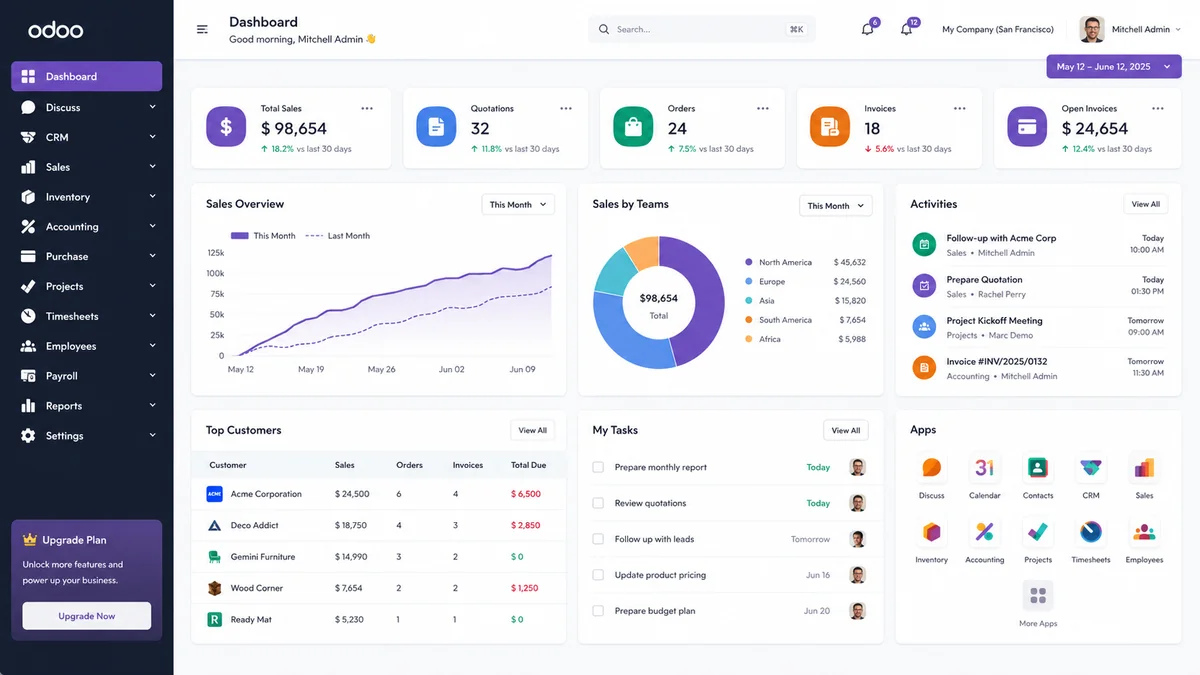
QUICK SNAPSHOT
Project Snapshot for Odoo Premium Backend
A quick view of the client needs, product features, main goals, and final outcome after using the Odoo Premium Backend Theme.
Client Type
Internal business teams used Odoo for daily ERP tasks and backend operations.
Platform
The project was built around the Odoo backend workspace.
Product Used
Premium Backend Theme was used to improve the daily Odoo interface.
Main Challenge
The existing Odoo backend had a basic UI, repeated navigation steps, low visual comfort, and limited personalization options.
Core Features Used
Dark mode, layout modes, theme settings, app drawer, keyboard shortcuts, custom fonts, and color palettes.
Business Goal
Improve backend usability, reduce repeated clicks, and make daily ERP work faster, cleaner, and easier for users.
Final Outcome
Navigation was reduced from 7 steps to single-click app drawer access, saving users around 6 minutes per day and improving daily ERP productivity.
BACKEND NEED
Client Needs for a Better Odoo Backend
As daily Odoo usage grew, the team needed cleaner screens, quicker module access, and flexible layout control for different users.
The client managed project work, employee records, reporting, sales activity, and backend operations inside Odoo. After more modules were added, the standard backend layout became less efficient for daily users.
A cleaner backend experience was needed to improve usability without changing existing Odoo workflows. The goal was to reduce repeated navigation, improve screen clarity, and help users complete daily ERP tasks with less effort.
Faster Access to Odoo Apps
Users needed quicker access to modules, menus, and records so they could move through backend tasks faster and reduce unnecessary clicks.
Better Workspace Control
Flexible layouts, cleaner screens, and simple personalization helped users work more comfortably across different Odoo tasks.
Problem
Challenges Before Using Odoo Premium Backend Theme
The standard Odoo backend created extra clicks, slower navigation, and limited workspace control for daily users.
Basic Backend Layout Slowed Daily Operations
Daily Odoo work became slower because the team needed better navigation, clearer layouts, and more flexible workspace settings.
Low Visual Comfort
Long working hours became difficult because the backend screens had limited visual comfort. A cleaner layout and dark mode were needed to improve daily usability.
Repeated Navigation Took More Time
Users had to move through multiple menus to access apps, dashboards, forms, and records. This increased clicks and slowed backend efficiency.
Limited Workspace Personalization
Different users had different working styles, but the standard layout offered limited control. The team needed flexible settings for a more comfortable ERP workspace.
Backend Did Not Feel Brand-Friendly
The default backend looked basic and less polished for internal ERP users. A more modern interface was needed to improve the backend experience.
Weak Responsive Experience
Smaller screens needed better spacing, readability, and navigation. A responsive layout helped users manage daily tasks more easily.
Overall, the client needed a cleaner Odoo backend with faster navigation, better screen comfort, and simple personalization. For deeper backend improvements, Odoo development services can support custom ERP enhancements.
Solution
How the Odoo Premium Backend Theme Improved Daily Work
The team used the Odoo Premium Backend Theme to improve the daily backend experience without changing existing ERP workflows.
Cleaner Backend Interface
A modern and organized backend made ERP screens easier to view, navigate, and use.
Faster Layout Control
Moreover, quick layout changes helped users reduce screen switching and work more comfortably.
Dark Mode Support
In addition, dark mode made long backend sessions easier for users.
Custom Colors and Fonts
Also, brand-aligned styling improved readability and gave the workspace a cleaner look.
Modern App Dashboard
Because of faster app access, users reduced repeated navigation during daily ERP tasks.
Keyboard Shortcuts
Finally, shortcuts helped users open apps, switch layouts, and complete common actions faster.
Overall, the theme improved usability, reduced repeated clicks, and saved time during daily ERP work. For deeper UI changes, Odoo Customization Services can support advanced backend improvements.
Setup Process
Steps to Set Up the Odoo Premium Backend Theme
The theme was installed, activated, configured, and personalized step by step to create a cleaner and more usable Odoo backend workspace.
Install the Theme Module
First, the module was installed to enable connected WhatsApp messaging inside Odoo.
Activate the Theme
Next, messaging was activated so users could send updates faster from Odoo records.
Configure Admin Defaults
Then, admin settings were adjusted to manage users, access, and message control.
Customize Layout and Colors
After that, templates were added to keep customer replies clear and consistent.
Enable User Personalization
Moreover, follow-up tracking helped the team monitor pending replies and customer updates.
Start Daily Backend Work
Finally, the team used the setup to send messages faster and manage communication with less manual effort.
This setup helped the team create a cleaner Odoo backend with faster navigation and better usability. For setup support, Odoo implementation services can help with installation, configuration, and testing.
Features
Key Features That Improved the Odoo Premium Backend
The Premium Backend Theme improved daily Odoo work with cleaner screens, faster navigation, dark mode, flexible layouts, and better workspace control.
Theme Defaults Settings
Admins could set default layouts, colors, fonts, and dark mode settings for users. This helped keep the backend experience consistent across the team.
Modern App Dashboard
The modern dashboard made Odoo apps easier to find and open. Users could browse modules faster with clean cards, improved search, and organized categories.
Dark App Drawer
The dark app drawer reduced screen clutter and made app navigation smoother. It also gave the backend a more focused and premium look.
Flexible Theme Controls
Users could adjust colors, fonts, layouts, and UI styles without code. This made backend personalization simple for both admins and users.
Typography and UI Controls
Modern fonts, spacing, and size controls improved readability. Users could scan forms, lists, dashboards, and reports more comfortably.
Quick Keyboard Actions
Keyboard shortcuts helped users complete common actions faster. They could open search, switch layouts, toggle dark mode, and access settings with fewer clicks.
Together, these features helped the team create a cleaner Odoo backend experience with faster navigation, better readability, simple personalization, and improved daily ERP usability.
CORE TECHNOLOGY
Technology Stack Behind Odoo Premium Backend Theme
These technologies help create a cleaner Odoo backend interface with faster navigation, flexible layouts, dark mode, and a smoother daily ERP experience.
JavaScript and XML
App drawers, menus, shortcuts, and screen actions became easier to use through JavaScript and XML improvements.
Python and Odoo Framework
Theme settings, layout control, and user preferences were managed with Python and the Odoo framework.
PostgreSQL
Saved preferences, user settings, and theme-related records were stored in PostgreSQL for stable backend use.
SCSS and CSS
Spacing, colors, fonts, dark mode, and responsive layouts were improved with SCSS and CSS for better readability.
QWeb and Backend Views
QWeb and Odoo backend views improved menus, forms, lists, and dashboard layouts for a cleaner user experience.
Theme Settings and Shortcuts
Personalization options and shortcuts helped users access apps faster and complete daily ERP tasks with less effort.
This technology stack created a cleaner Odoo backend workspace with faster navigation, better readability, flexible layout control, and smoother daily ERP use.
OUTCOME
Results After Using Odoo Premium Backend Theme
The new backend experience reduced repeated clicks, improved screen comfort, and made daily Odoo work easier.
Cleaner Odoo Backend Experience
App access became faster, as users could locate modules in 2 clicks instead of 4. This reduced daily navigation time by 40% and helped users complete backend tasks with less effort.
Faster Navigation
Improved search, app drawer access, and keyboard shortcuts helped users move between Odoo screens faster. This reduced repeated clicks during daily work.
Better Readability
Modern fonts, spacing, layout controls, and dark mode made the backend easier to read. As a result, users could work more comfortably on data-heavy screens.
Easier User Adoption
The cleaner interface helped new users understand the backend faster. Simple navigation and clear layouts reduced confusion during onboarding.
More Workspace Control
Users could choose layouts, fonts, colors, and dark mode based on their working style. This made the backend feel more flexible for different teams.
Stronger Brand Presentation
The premium login screen and polished UI gave the Odoo backend a more professional look. This improved the user’s first impression of the system.
Overall, the Odoo Premium Backend Theme helped the team improve backend usability, reduce repeated navigation, support better readability, and create a more flexible ERP workspace.
Need a Cleaner and Faster Odoo Backend Workspace?
Need help with setup or backend improvements? Get support from an experienced hire Odoo developer to customize your workspace. Our team helps with theme setup, layout changes, and smoother daily Odoo use.
- Get Started
Let’s Connect Your Odoo Backend Workspace
Get expert Odoo backend customization support to create a cleaner and faster ERP workspace.We help with layouts, dark mode, app drawer setup, shortcuts, and theme personalization.
What happens after you submit?
- Odoo backend usability review
- Theme setup and customization guidance
- Layout, dark mode, and shortcut configuration support
- Secure Integration
- Odoo-Ready
- Global Clients


