


Integration Engineering Enterprise Ready

AI Integration & Implementation
Services

Connect AI with the systems where your business already works.

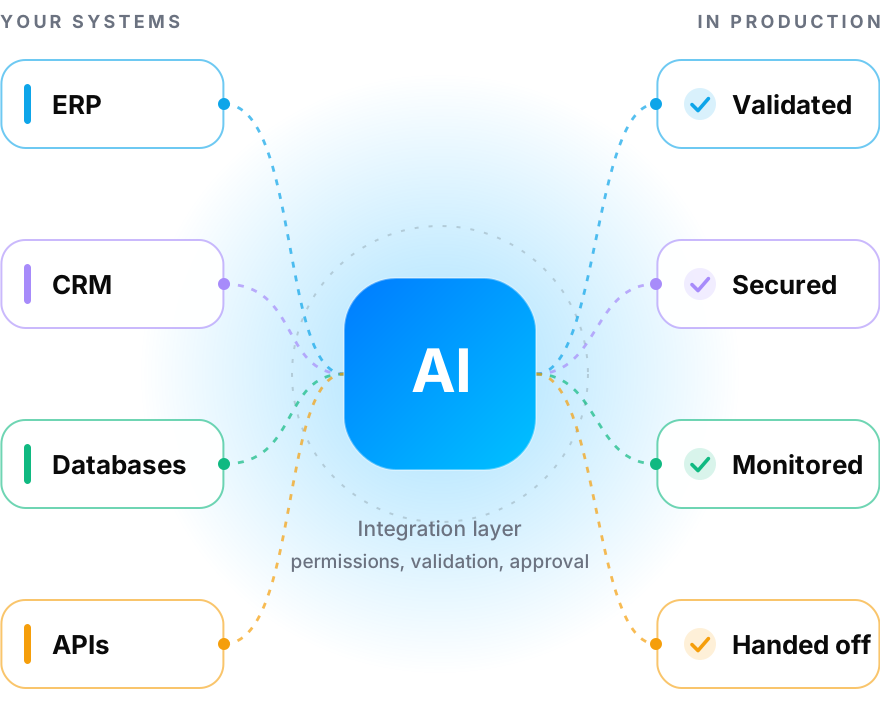
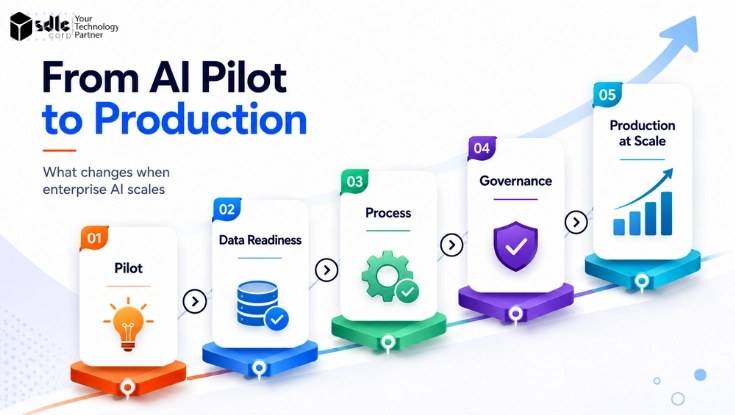
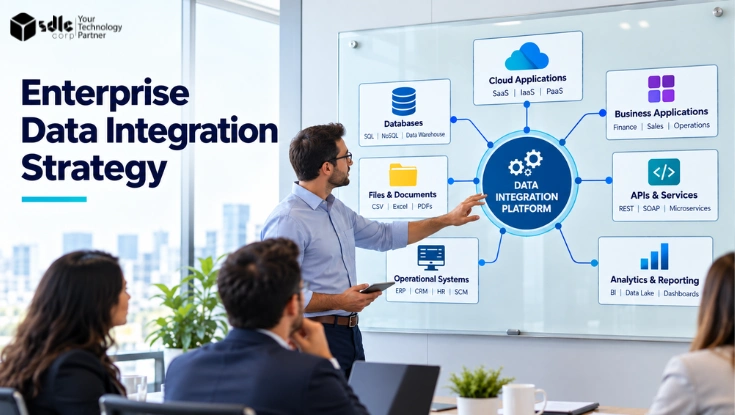
Our AI integration and implementation services help organizations move AI from isolated prototypes into production by connecting models, applications and automation with ERP, CRM, databases, APIs, document systems and enterprise workflows - including integration architecture, data flow, permissions, validation, deployment, monitoring and operational handoff.

Proven Enterprise AI Delivery

50+Enterprise Clients
400+AI Specialists
98%On Time Delivery
10+ Yearsof Experience

Trusted by Fortune Global 500 leaders, governments & top universities across 30+ countries

Powered by leading cloud & AI platforms

AWS
Google Cloud
Microsoft Azure
NVIDIA
OpenAI
Anthropic
Gemini
Grok
Perplexity
Google AI
AWS
Google Cloud
Microsoft Azure
NVIDIA
OpenAI
Anthropic
Gemini
Grok
Perplexity
Google AI

Recognized by leading industry reviewers

Awards & industry recognition

Top AI Development Company by Selected FirmsTop IT Consulting, SI & Managed Services Company by ITRateTop Web Development Company by Selected FirmsTop Service Provider 2025 by RightFirmsTop App Development Company by AppDevelopmentCompaniesTop Software Development Company by Selected FirmsBest Support Company 2025 by SoftwareSuggestTop AI App Developers by C2C Reviews
Recognition

Recognized for
AI Delivery

Recognized across leading industry and B2B review platforms for AI engineering and enterprise technology delivery.

Top AI Solutions Provider for Enterprises — 2025 Read the announcement

Top AI Development Company by Selected FirmsTop AI Development Company by Selected Firms
Top AI App Developers by C2C ReviewsTop AI App Developers by C2C Reviews
Top IT Consulting, SI & Managed Services Company by ITRateTop IT Consulting, SI & Managed Services Company by ITRate
Top Software Development Company by Selected FirmsTop Software Development Company by Selected Firms

Reviewed on Clutch, GoodFirms, Selected Firms and DesignRush.

Integration

AI Integration
Services

Connect AI capabilities to real applications, data and workflows without rebuilding your entire technology environment.

Enterprise

Enterprise AI Integration

Integrate AI applications into existing enterprise systems while preserving business rules, permissions and existing systems of record.

Services

AI API Integration

Connect managed AI models, custom AI services and internal applications through secure APIs and application services.

Operations

ERP AI Integration

Add AI capabilities around operational workflows while keeping ERP platforms responsible for authoritative business transactions.

Customers

CRM AI Integration

Connect AI with customer, lead, opportunity and service workflows inside CRM platforms.

Legacy

Legacy System Integration

Add AI capabilities around existing applications that cannot be replaced but still contain important business processes or data.

Process

AI Workflow Integration

Insert AI into existing workflows where it can classify, extract, summarize, predict or assist with defined process steps.

Need a new AI application built from the ground up? Explore AI Development Services.

Implementation

AI Implementation
Services

Move an approved AI capability from prototype into day-to-day operation.

Deploy

Production Deployment

Deploy AI applications into the required cloud, private, hybrid or supported on-premise environment.

Models

Model Integration

Connect selected commercial or open models to the application layer without turning model selection into a separate development project.

Data

Data Integration

Provide AI applications with the structured information they require through controlled services and existing data platforms.

Apps

Application Integration

Embed AI into web applications, enterprise software, portals and internal tools.

Process

Workflow Implementation

Connect AI outputs with downstream business processes, approvals and existing automation.

Handover

Production Handoff

Deliver configuration, documentation, monitoring and operational ownership to the team responsible for the production system.

Implementation ends when someone other than us can run it on a Monday morning.

Capabilities

AI Systems
We Integrate

The implementation approach depends on what type of AI capability needs to reach production.

Language

LLM Applications

Connect language models with business applications, interfaces and operational workflows. For deeper model engineering, see LLM Development Services.

Retrieval

RAG Applications

Integrate retrieval systems with document repositories, permissions, applications and enterprise knowledge sources. For retrieval engineering, see RAG Development Services.

Acting

AI Agents

Connect agents to approved APIs, tools and enterprise workflows with controlled action boundaries. For agent engineering, see Agentic AI Development Services.

Predictive

Machine Learning Models

Deploy predictive, classification, recommendation and forecasting models into operational applications. For modelling, see Machine Learning Development.

Documents

Document AI

Connect extraction and document-intelligence systems with ERP, finance, logistics and review workflows.

Generative

Generative AI

Embed text, image, video and multimodal generation capabilities into products and business systems. For generation engineering, see Generative AI Development Services.

Each of these reaches production differently, which is why the integration design starts from the capability rather than from a template.

Architecture

AI Integration
Architecture

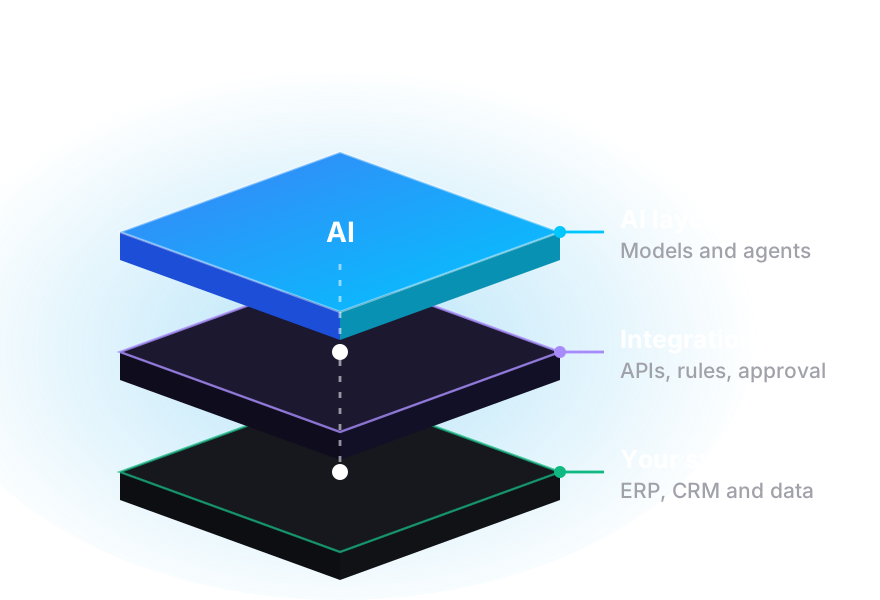
Production AI should sit inside a controlled enterprise architecture, not beside it.

Stage 01

Business System

The workflow begins inside the application where employees or customers already work.

Stage 02

Integration Layer

APIs, application services, connectors or event handlers move approved information between systems.

Stage 03

AI Service

The relevant AI model or application performs its defined task.

Stage 04

Validation

Check that the AI response has the expected structure and meets application rules.

Stage 05

Business Rules

Apply deterministic rules before anything changes downstream.

Stage 06

Human Approval

Pause important actions where authorization or judgment is required.

Stage 07

System of Record

Write approved results back to the authoritative enterprise application.

Stage 08

Monitoring

Record operational activity, errors and important workflow outcomes.

Stages 04 to 06 are the ones most prototypes skip, and they are the reason those prototypes never get approved for production.

Value

Where AI Integration
Creates Value

The value is rarely in the model. It is in removing the manual step between the model and the system that runs the business.

Handoffs

Eliminate Copy and Paste

Move information between AI and enterprise applications automatically instead of relying on people to transfer results manually.

Inputs

Use Current Business Data

Connect AI to approved operational information rather than isolated files or manual exports.

Continuity

Keep Existing Systems

Add intelligence around the systems already running the business.

Speed

Improve Workflow Speed

Use AI at the exact step where interpretation, extraction or prediction currently slows the process.

Control

Maintain Human Control

Insert validation and approval before important AI outputs change authoritative business records.

Operations

Create Production Visibility

Track requests, failures, latency and workflow outcomes once AI is operating inside production processes.

Every one of these is measured against the workflow, not against the model.

Systems

Connect AI With
Enterprise Systems

Built to work with the platforms businesses already use.

ERP

ERP Platforms

Odoo, SAP, Oracle, Microsoft Dynamics, NetSuite and custom ERP systems - for document processing, operational queries, order workflows, inventory information, accounting support and transaction preparation.

CRM

CRM Platforms

Salesforce, HubSpot, Zoho, Microsoft Dynamics CRM and custom CRM platforms - for enquiry classification, lead scoring, customer summaries, follow-up preparation, service routing and record enrichment.

Service

Service Platforms

ServiceNow, ticketing platforms, customer-support systems and internal service portals.

Data

Databases

PostgreSQL, SQL Server, MySQL, MongoDB, Snowflake, Databricks and other enterprise data platforms, reached through controlled application services.

Content

Document Platforms

Approved document stores, enterprise file systems, knowledge platforms, SharePoint and content repositories.

APIs

Business APIs

REST, GraphQL, webhooks and event-driven integrations connecting AI with existing applications.

Where a platform has a native extension framework, we use it rather than bolting an external service onto the side of it.

Authority

Keep Systems of Record
in Control

AI should not silently become the authoritative source for important enterprise data.

ERP

ERP Remains the ERP

AI can prepare, classify or validate information before approved data reaches the ERP.

CRM

CRM Remains the CRM

AI can interpret interactions and prepare updates while the CRM remains the authoritative customer record.

Data

Data Platforms Remain Authoritative

AI applications should access approved data through controlled interfaces rather than creating disconnected copies unnecessarily.

People

Human Authority Remains Defined

Important decisions and transactions should follow existing approval requirements.

This architecture reduces the risk of implementing AI as an isolated parallel system that quietly diverges from the business.

Patterns

AI Integration
Patterns

Different systems require different integration approaches.

Direct

API Integration

Use supported APIs when enterprise applications already expose the required functionality.

Reactive

Event-Driven Integration

Trigger AI workflows from events such as a new document, new enquiry, ticket created, order update or status change.

Callback

Webhook Integration

Use application events to initiate AI processing or downstream actions.

Coordinated

Middleware Integration

Use a service layer when several systems need coordinated access to AI capabilities.

Native

Native Platform Integration

Integrate through the native extension mechanisms offered by ERP, CRM and service platforms.

Scheduled

Batch Integration

Process scheduled groups of documents or records where real-time execution is unnecessary.

The pattern is chosen by what the receiving system actually supports, not by preference.

Oversight

Human-in-the-Loop
Implementation

Not every AI result should move directly into another system.

Threshold

Confidence-Based Review

Route low-confidence outputs to a reviewer.

Authorize

Approval Workflows

Require approval before important records are created or modified.

Verify

Validation Queues

Let users verify extracted or generated information before it reaches the system of record.

Unusual

Exception Handling

Send unusual or unsupported scenarios to the appropriate team.

Learn

Correction Capture

Record human corrections where they are useful for improving future performance.

Scope

Proportionate Review

Review sits where the consequence justifies it, so throughput is not spent on outputs nobody needed to check.

Review capacity is usually the real constraint on how much of a workflow can be automated.

Security

Secure Enterprise
AI Integration

AI integration expands the number of systems and data flows involved in an application, so security has to cover the entire integration path.

Identity

Authentication

Use approved identities for users, services and system-to-system connections.

Permissions

Authorization

Apply application and business permissions before AI accesses information.

Endpoints

API Security

Protect service endpoints, tokens and integration credentials.

Credentials

Secrets Management

Keep credentials outside prompts, application logs and exposed client code.

Transit

Data Encryption

Protect business information in transit and at rest where required.

Evidence

Audit Logging

Record relevant requests, system changes and approvals.

Boundary

Network Controls

Deploy integration services within appropriate enterprise network boundaries.

Failure

Safe Failure Modes

Decide in advance what happens when a provider, API or downstream system is unavailable, rather than discovering it in production.

Credentials leaking into prompts or logs is the single most common finding when we audit an existing AI integration.

Security, Privacy and Responsible AI

Company AssuranceSOC 2 Certified · ISO 27001 Certified · ISO 9001 Certified
Privacy and Industry RequirementsGDPR · HIPAA · PCI DSS, where applicable
AI Governance FrameworksNIST AI RMF

Applicability depends on geography, industry, the data processed, the deployment model, the use case and your own legal and regulatory obligations.

Governance

AI Implementation
Governance

Governance should remain part of implementation rather than becoming a separate documentation exercise.

Models

Model Approval

Use approved models and providers.

Data

Data Approval

Confirm which data sources the application may access.

Change

Change Management

Review material changes before production rollout.

Oversight

Human Oversight

Define when a person must review AI output.

Ownership

Operational Ownership

Assign responsibility for monitoring and production support.

Response

Incident Handling

Define what happens when AI or an integration behaves unexpectedly.

For organization-wide governance design, see our AI Governance Consulting Services.

Industries

AI Integration
by Industry

The integration pattern is shaped by which systems already hold the work.

Logistics

Logistics

Connect AI document processing, operational systems, shipment workflows and enterprise data.

Industry

Manufacturing

Integrate AI with machine information, sales workflows, maintenance processes and operational reporting.

Finance

Financial Services

Connect AI applications with controlled data, review workflows and enterprise systems. Payment workflows can be designed around applicable PCI DSS requirements.

Health

Healthcare

Integrate approved AI capabilities into administrative and operational systems while maintaining defined access controls. HIPAA-aligned controls can be applied where US healthcare data is involved.

Retail

Retail and E-commerce

Connect AI with product data, inventory, CRM, customer service and commerce workflows.

Enterprise

Enterprise Operations

Integrate AI across finance, HR, sales, support, service management and internal applications.

Three of the four implementations below are logistics, manufacturing and service operations, for exactly this reason.

Stack

AI Integration
Technology Stack

Chosen for what the receiving systems support, not for what is newest.

Enterprise Applications

Where the business already works

OdooSalesforceSAPOracleMicrosoft DynamicsServiceNow
AI Models

Selected per workload, not per vendor

OpenAIClaudeGeminiLlamaMistral
Integration

How systems actually talk

REST APIsGraphQLWebhooksMCP-Compatible InterfacesEvent-Driven Services
Automation

The deterministic half of the workflow

n8nWorkflow ServicesPython AutomationNative Platform Workflows
Data

Where approved information lives

PostgreSQLMongoDBSnowflakeDatabricksSQL Serverpgvector
Engineering and Infrastructure

What it runs on

PythonNode.jsMicroservicesAWSAzureGoogle CloudDockerKubernetes
Portfolio

AI Integration
in Production

Real implementations where AI was connected to existing applications and business workflows.

4 entries · scroll to reveal
01 / 04 Case Study
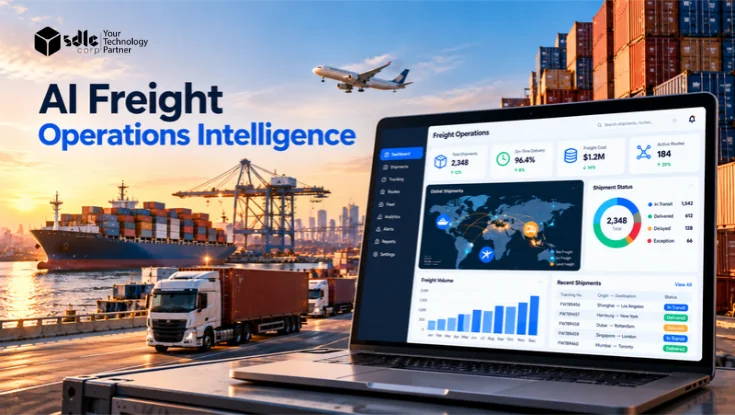
ERP and AI Modernization SDLC Corp

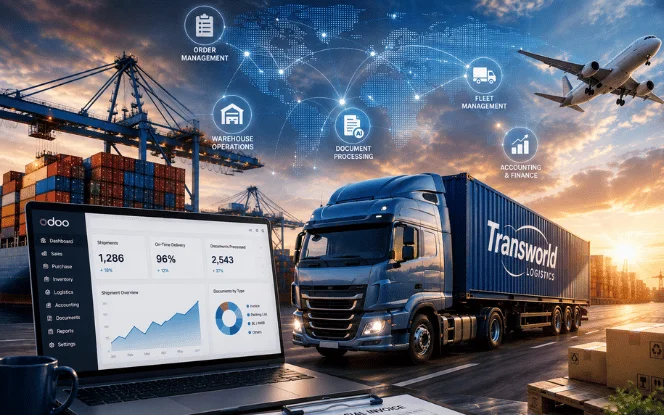
Transworld Logistics

A logistics operation needed AI-assisted document processing connected to the ERP responsible for fleet, warehouse, accounting and shipment workflows. The enterprise workflow was established first, then an AI extraction and validation layer was placed in front of the ERP.

Invoices and bills of lading enter the AI layer, required fields are extracted, values are validated against operational records, and only approved information moves downstream. Pattern: shipment documents to AI extraction to validation to human review to ERP workflow.

Best proof foran AI layer in front of the ERP, not instead of it

  • Odoo-based ERP
  • Document extraction
  • Invoice processing
  • Bills of lading
  • Operational validation
  • Human review
  • ERP integration
  • Shared operational records
View full case study
Transworld Logistics ERP and AI modernization, with AI document extraction validated before entering the Odoo ERP

Featured image from the Transworld Logistics case study.

2,000+Documents Handled Per Day
48hr → 4hrDocument Turnaround
−98%Processing Error Rate
100%Validated Before ERP Entry
02 / 04 Case Study
AI Inside ERP SDLC Corp

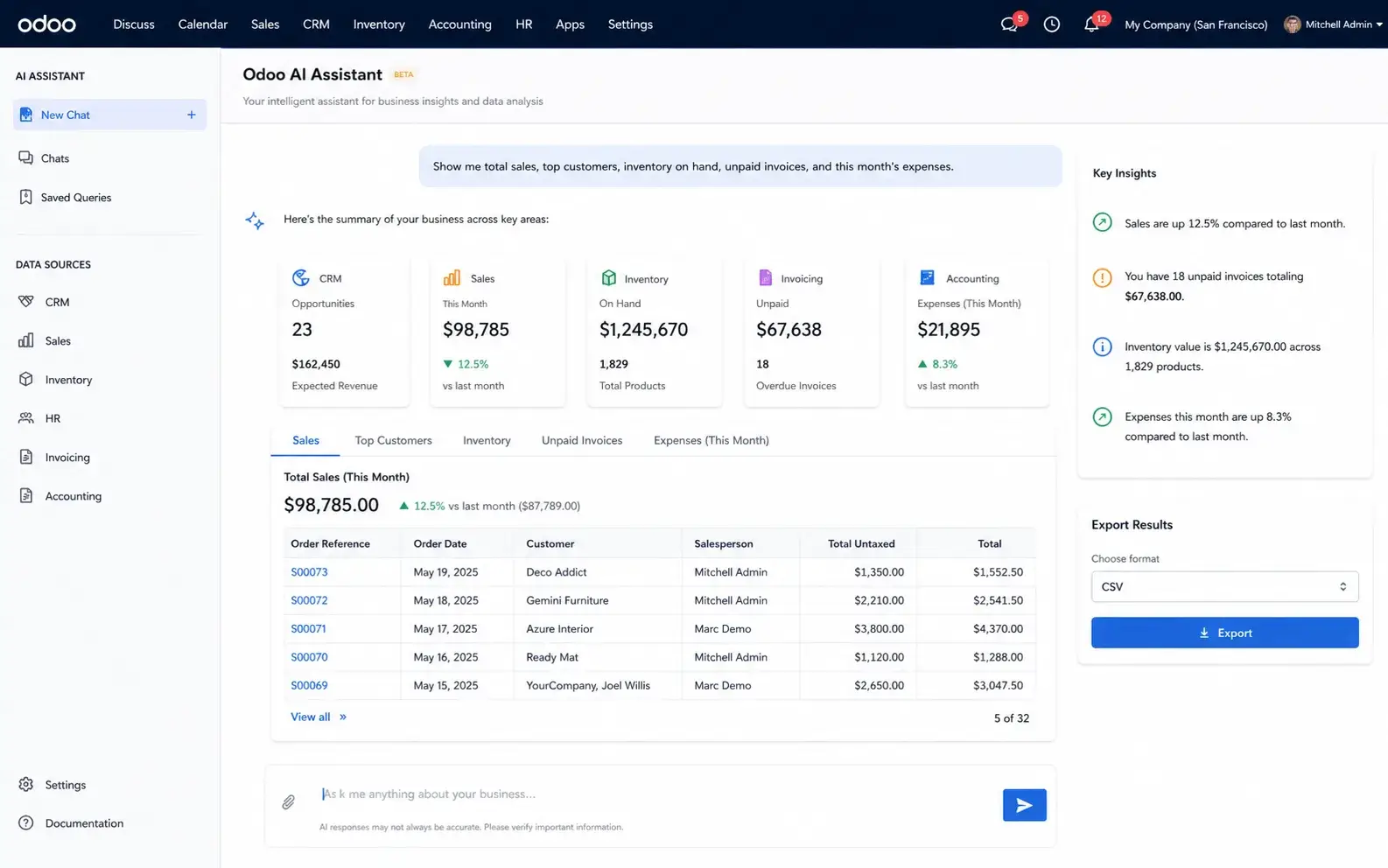
Odoo AI Assistant

A multi-department business needed employees to retrieve current ERP information without manual report requests or technical queries, so the assistant was implemented directly around the existing Odoo environment.

It uses Odoo's native ORM and role permissions, so users ask questions in plain English while existing ERP access controls stay in place. Pattern: user question to assistant to Odoo ORM to permission check to current records to structured response.

Best proof forAI inside the ERP's own permission model, not beside it

  • Native Odoo ORM
  • Role-based permissions
  • Natural-language queries
  • Current ERP records
  • Structured responses
  • Export options
  • CRM, sales, inventory
  • HR and accounting
View full case study
Odoo AI Assistant dashboard for plain-English ERP data access across CRM, sales, inventory, HR and accounting

Featured image from the Odoo AI Assistant case study.

18+Connected Odoo Modules
4x FasterPlain English Queries
65%Reduction in Manual Report Requests
Odoo 18 & 19Supported Versions
03 / 04 Case Study
Connected AI Workflow Automation SDLC Corp

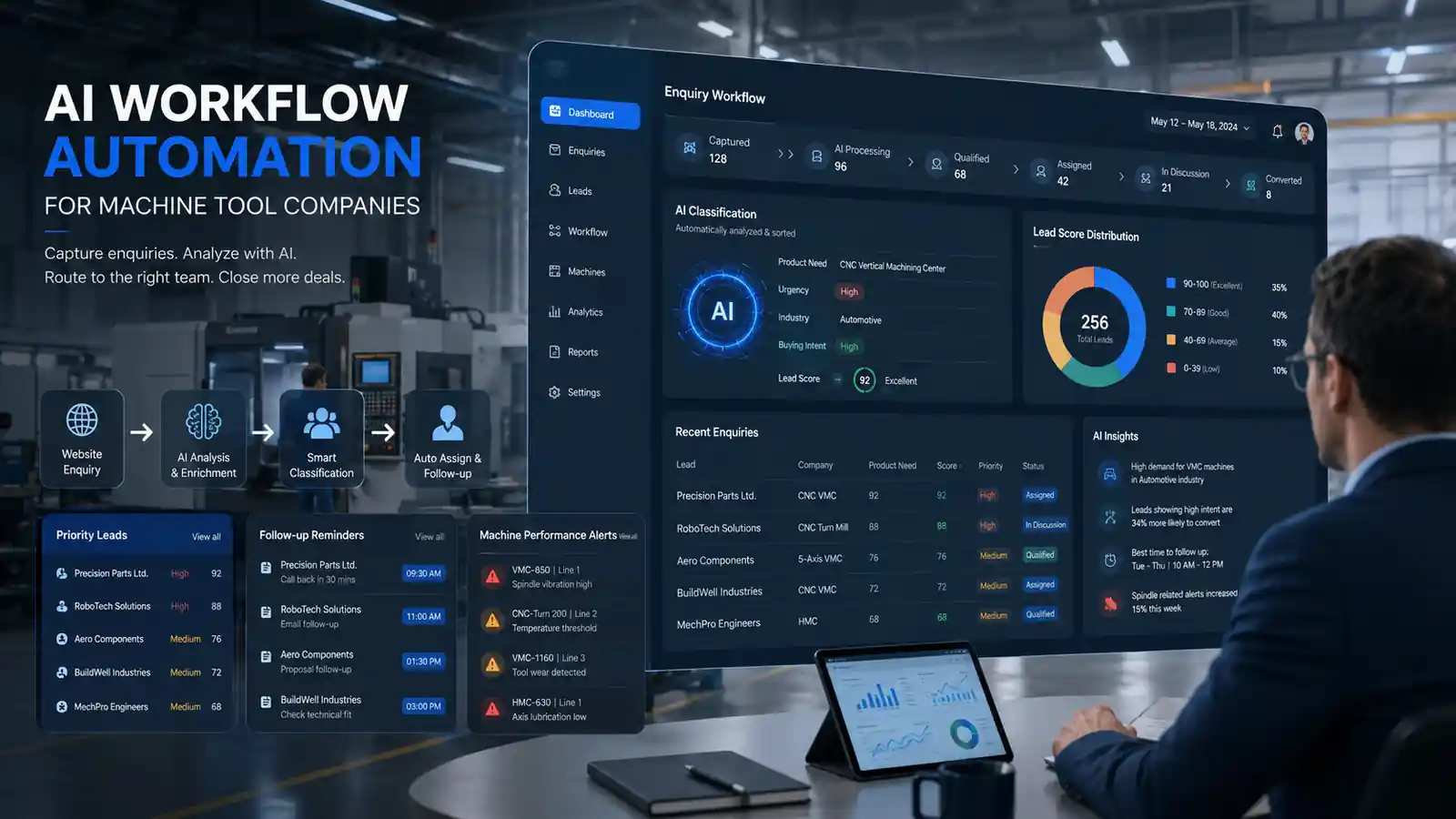
QuantusTechnik

QuantusTechnik needed AI operating across website enquiries, sales workflows, machine information and management reporting rather than functioning as a separate chatbot or analytics tool.

The implementation connected GPT-4o, Python, LangChain, PostgreSQL, pgvector and n8n with daily business workflows. Pattern: forms, CRM and machine data to PostgreSQL to Python rules to AI processing to n8n to team actions and reports.

Best proof forone integration chain across enquiries, machines and reporting

  • GPT-4o
  • Python
  • LangChain
  • PostgreSQL
  • pgvector
  • n8n
  • Workflow routing
  • Automated alerts
View full case study
QuantusTechnik AI workflow automation connecting sales enquiries, machine data and manager reporting

Featured image from the QuantusTechnik case study.

ScoredWebsite Enquiries
AutomatedManager Reporting
60% → 95%Follow-Up Visibility
3x FasterCampaign Segmentation
04 / 04 Case Study
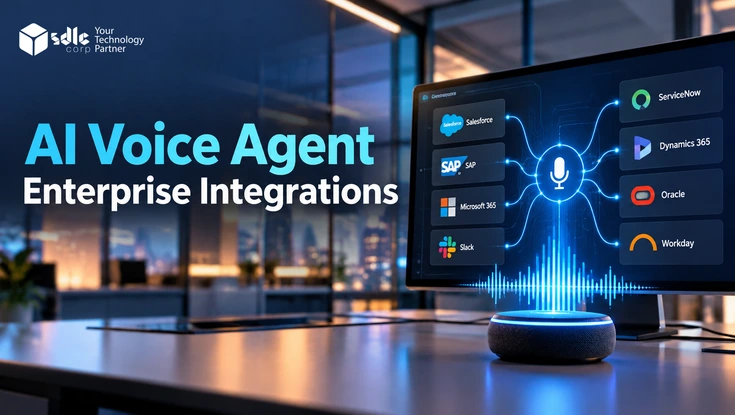
AI Voice Integration SDLC Corp

Pulastya

A service business needed AI call handling without changing the phone number or removing existing routing responsibilities, so Pulastya was connected to the client's existing Twilio numbers and business workflows.

It classifies intent, answers supported requests from approved business information, and transfers unsupported calls to the relevant team with transcript and summary context. Pattern: existing phone number to Pulastya to intent classification to knowledge and routing logic to the human team.

Best proof forAI added around existing communication infrastructure, not replacing it

  • Existing Twilio numbers
  • Natural conversation
  • Intent classification
  • Approved knowledge
  • Deterministic routing
  • Transcript transfer
  • AI-generated summary
  • Human handoff
View full case study
Pulastya AI dashboard showing call intake, detected intent and intelligent call routing to the right queue

Featured image from the Pulastya case study.

ExistingTwilio Numbers Kept
ApprovedDocuments Only
Every TransferCarries Context
IntentClassified Per Call

Each panel names the integration pattern actually used, and every figure is the one published on that case study.

Client Stories

What Clients Say
About SDLC Corp

Founders, CEOs, and operating leaders share what it's like to build with SDLC Corp.

Client story

Eric Leist

CEO, Edgerton Strategies

Client story

Doug Schmidt

CEO, Roofaid USA

Client story

Reyzal Razmi

All Star Influencers

What clients say
01 / 05
They approached our Salesforce discovery with real technical depth, uncovered structural gaps others missed, and delivered a solution that worked exactly as promised.
SDLC CORP built a mobile application that met our strategic requirements with strong technical execution. The solution performs reliably and has become an important operational asset.
They saw inefficiencies in our Salesforce workflow and redesigned our entire quote-to-cash system. We now operate faster, cleaner, and with better accuracy.
From planning to post-launch, SDLC Corp guided us every step of the way. Their support makes them more than a vendor. They're a trusted partner.
The SDLC Corp team scaled our platform with impressive technical expertise, ensuring it's secure, robust, and ready for future growth.
What clients say
01 / 05
The SDLC Corp team scaled our platform with impressive technical expertise, ensuring it's secure, robust, and ready for future growth.
From planning to post-launch, SDLC Corp guided us every step of the way. Their support makes them more than a vendor. They're a trusted partner.
They saw inefficiencies in our Salesforce workflow and redesigned our entire quote-to-cash system. We now operate faster, cleaner, and with better accuracy.
SDLC CORP built a mobile application that met our strategic requirements with strong technical execution. The solution performs reliably and has become an important operational asset.
They approached our Salesforce discovery with real technical depth, uncovered structural gaps others missed, and delivered a solution that worked exactly as promised.
By the Numbers

Enterprise Engineering
at Scale.

The systems AI has to integrate with are the systems we already build and operate.

Drag to spin
3,400+
Projects Delivered
across 12 industries
400+
AI Specialists
Top 1% global talent
10+ Years
of Experience
in AI and software
1,200+
Global Engineers
across 6 continents
30+
Countries Served
global regulatory regimes
50+
Enterprise Clients
Fortune 500 to challengers
Process

Our AI
Implementation Process

Six stages, ending with someone on your side owning it.

01

Assess

Understand the target AI capability, existing applications, system ownership, data flows, APIs, security requirements, users and production constraints.

02

Design

Define the integration architecture, data flow, validation, permissions, workflow rules and operational boundaries.

03

Connect

Build APIs, connectors, application services and the required enterprise integrations.

04

Validate

Test AI outputs, data mapping, permissions, workflow behaviour, failure scenarios, human approvals and system changes.

05

Deploy

Release into the required environment using controlled rollout and production configuration.

06

Operate

Establish monitoring, documentation, ownership and improvement workflows.

Rollout

Production
Rollout Strategy

AI implementations do not need to move from prototype to full enterprise rollout in one step.

Stage 01

Controlled Pilot

Launch with a defined group of users or workflow volume.

Stage 02

Parallel Operation

Run the AI process alongside the existing workflow where appropriate.

Stage 03

Human Validation

Review production outputs before increasing automation.

Stage 04

Gradual Expansion

Increase users, systems or transaction volume after quality is demonstrated.

Stage 05

Operational Handoff

Transfer ownership with documentation, dashboards and escalation procedures.

Parallel operation is the cheapest way to find out whether the AI result would actually have been accepted.

Operations

Monitor AI
in Production

Integration success is not finished at deployment.

Uptime

Availability

Monitor whether AI and integration services are operational.

Speed

Latency

Track how long end-to-end workflow execution takes.

Errors

Failure Rate

Measure model, API and downstream integration failures.

People

Human Escalations

Track cases requiring review.

Outcome

Workflow Completion

Measure whether AI-enabled processes reach the intended business outcome.

Spend

Cost

Monitor model and infrastructure usage around completed workflows.

Drift

Changes

Track important modifications to providers, models and enterprise interfaces.

Records

Downstream Integrity

Confirm that what the workflow wrote into the system of record is what the business expected to see there.

Workflow completion is the metric that matters; model accuracy on its own does not tell you whether the business process finished.

Remediation

Improve Existing
AI Implementations

Already have AI in production but struggling with reliability or integration issues? We review the complete implementation.

Common Problems

Signs an AI implementation is not actually integrated

AI operates outside the core workflow
Manual copy and paste remains
Duplicated business data
Fragile APIs
Missing retries
Failed downstream writes
Unclear system ownership
AI bypasses permissions
No validation layer
No human approval
Poor exception handling
No production monitoring
Model changes break workflows
Latency is too high
Costs are difficult to attribute
No clear support ownership

We evaluate the complete operating workflow rather than treating every problem as a model issue.

If the use case itself is still undefined, start with AI consulting services instead.

Why SDLC Corp

Why Choose SDLC Corp
for AI Integration

Integration work is judged by whether the business process finished, not by whether the model responded.

Both Sides

AI and Enterprise Systems

Our teams work across AI engineering and the ERP, CRM, data and business platforms AI needs to connect with.

Architecture

Integration-First Architecture

Design AI around the existing operating environment rather than forcing businesses to rebuild everything around the model.

Authority

Systems of Record Stay in Control

Maintain clear ownership of business information and transactions.

Oversight

Human Validation Where Needed

Keep approval and exception handling inside important workflows.

Production

Production Engineering

Design for security, integration failures, monitoring and operational handoff from the start.

50+Enterprise Clients
400+AI Specialists
98%On Time Delivery
Scope

AI Implementation
vs AI Development

Build the capability, or connect it. Most programmes need both, in that order.

AI Development

Choose AI development when the primary requirement is to build a new AI capability or application.

Custom AI applicationsPredictive modelsAI productsIntelligent featuresComputer visionCustom automation
AI Integration and Implementation

Choose this service when the primary requirement is to connect an AI capability to existing systems and make it work in production.

API integrationERP integrationCRM integrationDeploymentWorkflow integrationValidationEnterprise rolloutProduction monitoring

Question

What Should It Do?

Development answers the capability.

Question

How Does It Connect?

Implementation answers the environment.

Output

A Working Capability

A model or application that performs the task.

Output

A Running Workflow

A business process that completes end to end.

Together

Often the Same Programme

A project can involve both; they are separate disciplines, not competing ones.

Explore AI Development Services when the capability itself still has to be built.

Scope

AI Implementation
vs AI Consulting

One decides what is worth doing. The other makes it run.

AI Consulting

Answers what should we build, where should AI be used, what is the roadmap, and which use cases have value.

What should we build?Where should AI be used?What is the roadmap?Which use cases have value?
AI Implementation

Answers how it connects, how data moves, which system stays authoritative, what happens when AI fails, where human review occurs, and how it is deployed and operated.

How does it connect?How does data move?Which system is authoritative?What happens when AI fails?Where does human review occur?How do we deploy it?How do we operate it?

Stage

Before the Decision

Consulting reduces uncertainty about what to fund.

Stage

After the Decision

Implementation delivers it into the environment.

Risk

Choosing the Wrong Problem

The failure consulting prevents.

Risk

A Prototype That Never Ships

The failure implementation prevents.

Signal

Which One You Need

If the objective is already clear, you need implementation.

Explore AI Consulting Services when the use case still has to be chosen.

Scope

AI Integration
vs Workflow Automation

The strongest enterprise workflows usually combine both.

Workflow Automation

Use deterministic automation where the process follows known rules.

Move filesUpdate fieldsTrigger notificationsFixed approvalsSystem synchronization
AI Integration

Use AI inside the workflow where a step requires judgment rather than a rule.

InterpretationExtractionPredictionClassificationNatural-language understandingGenerative output

Rule

Known and Fixed

Deterministic software handles it, faster and cheaper.

Judgment

Uncertain or Language-Heavy

AI handles the step a rule cannot express.

Design

Split the Workflow

AI for the uncertain step, deterministic software for the rest.

Cost

Do Not Pay for Certainty

Sending a rule-shaped step to a model costs money and adds variance.

Both

Usually Combined

Most production workflows we build use both in the same chain.

Explore Workflow Automation Services for the deterministic half.

Get Started

Implement AI
Where Work Happens

Move AI out of isolated prototypes and into the systems your employees and customers already use.

From ERP and CRM integration to document workflows, APIs, enterprise applications and production rollout, our AI implementation team can connect your approved AI capability with the rest of your technology environment.

Contact Us

Share a few details about your project, and we’ll get back to you soon.

Let's Talk About Your Project

FAQ

AI Integration
FAQs

Straight answers on integration, deployment, systems of record, failure behaviour and where this sits next to our development and consulting services.

AI integration services connect artificial intelligence capabilities with existing software, data and business workflows.

This can include ERP, CRM, APIs, databases, document platforms, service systems and custom enterprise applications.

AI implementation services take an approved AI capability from prototype or design into a working production environment.

Implementation can include integration, configuration, validation, deployment, monitoring and operational handoff.

AI development focuses on building the AI capability or application.

AI integration focuses on connecting that capability with the existing technology environment. A project can involve both - see AI Development Services.

Yes. AI applications can connect with ERP systems through APIs, native platform frameworks and controlled integration services.

The ERP should normally remain the authoritative system for important business transactions.

Yes. AI can support workflows such as enquiry classification, summarization, lead analysis, service routing and CRM record preparation.

The CRM remains the authoritative customer record; AI prepares the update rather than replacing the system.

Yes, when the existing system exposes a workable integration path.

Approaches may include APIs, middleware, database services, file-based interfaces or controlled automation depending on the legacy environment.

Yes. Commercial and open models can be integrated through an application service layer that manages prompts, authentication, validation, business rules and downstream workflows.

For deeper language-model engineering, use our LLM Development Services.

Yes. Our published Odoo AI Assistant implementation uses native Odoo ORM access and role-based permissions to provide plain-English access to current ERP records.

It connects 18+ Odoo modules and reports 4x faster plain-English queries and a 65% reduction in manual report requests.

Yes. AI services can interact with approved Salesforce objects and workflows through supported Salesforce APIs and platform capabilities.

Yes. The integration approach depends on the specific platform, modules, available APIs and business workflow.

Production integrations can use validation, deterministic business rules, confidence thresholds, permission checks, human approval and transaction controls before an AI result changes an authoritative system.

In the Transworld Logistics implementation, for example, extracted values are validated against operational records and only approved information moves downstream into the ERP.

Not always. In many enterprise environments it is better to expose controlled application services or APIs rather than allowing the AI application unrestricted database access.

That keeps existing permissions in force and keeps the data platform authoritative.

Yes. A single workflow can connect AI with several approved systems such as CRM, ERP, databases, document services and workflow platforms.

The QuantusTechnik implementation connects forms, CRM records and machine data through PostgreSQL, Python rules, AI processing and n8n routing.

Yes. Human review can be inserted where AI confidence is insufficient or where the business action requires authorization.

Deployment depends on the system. It may involve cloud services, private infrastructure, containers, enterprise application modules, APIs or a hybrid architecture.

The production rollout should also include monitoring, permissions, error handling and operational ownership.

Suitable AI applications and models can be deployed in private cloud, customer-managed infrastructure or supported on-premise environments where project requirements call for it.

The integration should define failure behaviour before production. This can include retries, provider fallback, manual processing, queueing, escalation or safe workflow termination depending on the business process.

Deciding this after go-live is how a model outage becomes a business outage.

Monitoring can cover service availability, latency, API failures, output quality, human escalations, workflow completion, model usage, cost and downstream integration errors.

Workflow completion is the one that tells you whether the business process actually finished.

Yes. We can review integration architecture, APIs, workflows, permissions, validation, deployment, monitoring and operational ownership to identify why an existing AI implementation is unreliable or difficult to scale.

Most of what we find is integration and ownership, not model quality.

Choose AI consulting when the problem or use case still needs to be defined.

Choose AI implementation when the objective is sufficiently clear and the priority is connecting, deploying and operationalizing the AI capability - see AI Consulting Services.