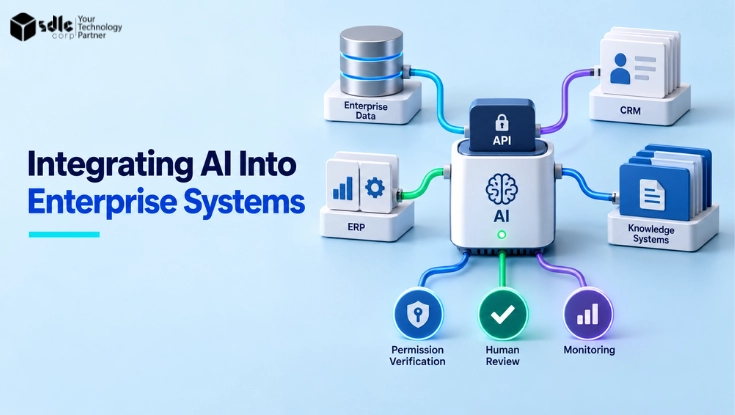
Enterprise AI integration connects models to enterprise applications, data, identity, and controlled workflows so AI outputs become actionable recommendations or prepared transactions rather than isolated demos.
Connecting a model or an API is only the starting point.
Real value appears when AI is wired into the systems where work already happens, ERP, CRM, document stores and data platforms, while permissions, validation and ownership are preserved so AI never makes unvetted changes in critical systems.
This guide covers readiness, integration patterns, reference architecture, legacy systems, identity, human review, testing, rollout and measurement.
To integrate AI into enterprise systems, define the workflow and the AI’s role, confirm data and API readiness, choose an integration pattern (API, embedded, event-driven or agent-based), retrieve data through permission-aware services, route high-impact actions through human approval, and expand autonomy only after testing and monitoring prove it is safe.
- An integration-pattern shortlist tailored for enterprise workflows.
- Rollback rules and safety checks to prevent and recover from unintended changes.
- Production safeguards and testing guidance for governed deployments.
How to Integrate AI Into Enterprise Systems in 7 Steps
- Identify the workflow and business outcomePick one bounded process and the measurable result you want to improve.
- Assess data and system readinessConfirm the data is accurate, governed and reachable through supportable interfaces.
- Define the AI role and autonomy levelDecide whether AI informs, recommends, drafts, prepares or executes.
- Choose the integration patternMatch API, embedded, event-driven or agent-based delivery to the workflow.
- Build secure retrieval and tool accessEnforce permissions in retrieval and keep write actions behind narrow adapters.
- Test permissions, failures and transaction safetyValidate negative paths, concurrency and rollback before go-live.
- Pilot, monitor and scale graduallyExpand only when acceptance, correction rates and controls hold steady.
A practical integration plan ties a single integration architecture to policy and testing: a bounded AI gateway for routing and policy, retrieval services that respect permissions and context, orchestration for approvals, and tool adapters that enforce allowed actions.
Teams needing custom AI development and system integration services can apply this pattern to connect governed model workflows to ERP, CRM, document, and service systems while keeping high-impact execution behind human validation.
Vendor note, Azure AI Search (example): Azure AI Search's native query-time ACL/RBAC enforcement is documented as a preview capability.
If you evaluate it, explicitly validate the API version and the approach used to index and synchronize permission metadata with your source systems.
Confirm metadata freshness, known limitations, failure behavior, and overall production suitability before depending on the feature.
- Do not rely on preview capabilities as your sole access-control mechanism: use them alongside established identity and authorization controls.
- Plan and test fallbacks for metadata synchronization and service failures (for example, degraded results or temporary authorization gaps).
- Validate preview features in staging, and add monitoring and alerts to detect integration or behavior changes before promoting to production.
Before You Integrate AI: Assess Enterprise Readiness
Most failed enterprise AI integrations are not model failures. They are readiness failures: an unclear workflow, data nobody trusts, systems with no supportable interface, or no answer to what happens when the AI is wrong.
Four checks decide whether an integration is worth starting.
Business readiness. Name the single workflow you are improving and the outcome that proves it worked, such as invoice cycle time, first-response time on service tickets or quote accuracy.
If the outcome cannot be measured today, you have no baseline to compare against later.
Data readiness. The context the model receives has to be accurate, current, reachable and governed. Working through how to assess data readiness for AI gives you the dimensions to score before any integration work starts.
Check who owns each source, how fresh it is, whether duplicates and conflicting master records exist, and whether access rules are recorded in a form a retrieval service can enforce.
Integration readiness. Inventory the interfaces you actually have: documented APIs, event streams, middleware, database access and webhooks. Note which systems allow writes, which are read-only in practice, and where a change would need vendor support or a custom adapter.
Any gap you find here becomes custom API development and integration work in the plan rather than a surprise during build.
Risk readiness. Decide in advance what a wrong recommendation or a wrong transaction costs, who reviews it, how it is detected and how it is reversed.
Financial postings, customer commitments and regulated records need a documented rollback path before the first line of integration code is written.
Mapping those risks to an established structure such as the NIST AI Risk Management Framework keeps the assessment consistent across workflows.
- One named workflow, one owner and one measurable baseline outcome.
- Source data owners, freshness expectations and access rules documented.
- A supportable interface for every system in scope, including write paths.
- An agreed error, escalation and rollback procedure for wrong outputs.
These four checks pair directly with the autonomy ladder in the next section. Risk readiness sets the ceiling on how much autonomy the AI can be given, and data readiness sets how far up that ladder retrieval can be trusted.
Define the Role of AI in the Workflow

Start by categorizing what the AI will do inside the workflow: inform, recommend, draft, prepare or execute. Informational roles return read-only context such as summaries or findings. Recommendation roles propose actions with confidence metadata. Drafting produces human-reviewable content.
Preparation assembles transactions and data but stops short of commit. Execution performs a system change and therefore demands the highest controls. Map these roles to business outcomes and error impact before any technical work.
For example, a CRM integration that informs can surface previous customer contacts and sentiment for a rep without changing records. A recommendation system might suggest the next contact strategy with a confidence score and rationale.
A preparation flow could populate an order in an ERP draft but require finance approval to submit. Each role changes the scope of permissions, audit and rollback requirements and therefore alters the implementation plan.
Decision criteria should include transaction financial impact, regulatory exposure, data sensitivity, required latency and user experience. Lower-risk roles tolerate looser coupling and more model flexibility. Higher-risk roles require stricter identity propagation, input validation, idempotent operations and explicit human approval gates.
Document the role decision and the triggers that move an interaction from one role to another, such as confidence thresholds or manual escalation rules.
| AI role | What it does | Autonomy | Control required |
|---|---|---|---|
| Inform | Returns read-only context, summaries or findings | Lowest | Read permissions and source attribution |
| Recommend | Proposes an action with rationale and confidence | Low | Confidence metadata and routing rules |
| Draft | Produces human-reviewable content or records | Medium | Review interface and edit history |
| Prepare | Assembles a transaction but stops before commit | High | Draft states, idempotency keys, approval gate |
| Execute | Commits a change in the system of record | Highest | Identity propagation, pre-commit validation, rollback |
Autonomy and control move together: as you go down the list, the AI does more and the surrounding controls have to do more as well.
Read this ladder against the readiness checks above, since the risk answer for a workflow usually caps which row is realistic in the first release.
Choose the AI role first; technical design follows the required level of control and audit.
For a wider view of where these roles already show up in day-to-day operations, see how artificial intelligence is transforming ERP software.
Common Enterprise AI Integration Patterns

API-based integration exposes model capabilities through a backend API that applications call. Use this pattern when you need centralized policy enforcement, model switching and server-side retrieval of enterprise context.
Embedded integration injects AI features directly into ERP or CRM screens for lower-friction user experience, often through client-side components or SDKs. Embedded experiences must still call a controlled backend to enforce permissions and logging.
Event-driven integration triggers AI work from events such as document upload, invoice arrival or ticket creation. Use event handlers and queues for asynchronous enrichment, classification and transaction preparation.
Assistant and agent-based integration provides a conversational or command layer that accesses multiple systems and orchestrates actions through tool calling.
Agents can chain steps, but every tool they call must be a governed tool with its own permission scope, so identity propagation and clear limits on what may be prepared versus executed matter more here than in any other pattern.
Select a pattern based on latency, failure tolerance, user workflow and integration surface. API-based patterns centralize control and simplify monitoring but can add latency. Embedded patterns reduce context switching but increase client-side complexity.
Event-driven patterns decouple user flow from background processing but require robust retry and idempotency controls. Assistant and agent patterns improve productivity but widen the scope of data access and require stricter governance over the tools they are allowed to call.
Pattern comparison: key decision criteria
| Pattern | Latency | Failure tolerance | Permission surface | Monitoring complexity |
|---|---|---|---|---|
| API-basedCentral policy, model switching, server-side context retrieval | Medium, backend calls can add latencyTypical 300 ms to 1.5 s per call | Medium, single backend point simplifies handling but is a dependency | Server-side permissions and centralized policy enforcement | Lower, centralized logging and monitoring |
| EmbeddedFrontline UX in ERP/CRM via client components or SDKs | Low, reduces context switching for usersTypical 200 ms to 800 ms perceived | Depends on client stability; requires client-side controls | Wider client surface; must call backend for enforcement and logging | Higher, adds client-side monitoring and coordination |
| Event-drivenAsync enrichment, classification, document or invoice processing | Asynchronous, decouples user flow from background processingSeconds to minutes, queue dependent | High when designed with retries and idempotency | Backend processors handle permissions; user-facing surface is small | Moderate, needs queue, retry and visibility tooling |
| Assistant and agent-basedConversational orchestration and cross-system commands with strict governance | Variable, often real-time for conversational workflows1 s to 5 s per turn, longer for multi-step runs | Lower tolerance for unintended actions; requires strict limits and allowlists | Broad, accesses multiple systems; needs tight identity propagation | High, audit trails, command logging and governance required |
Hybrid architectures are common in practice: an embedded experience for the user, a governed backend API for policy, event processing for background work, and centralised audit controls across all of it.
For a closer look at how agents plan, call tools and hand work back to a person, see agentic AI fundamentals.
A Reference Enterprise AI Integration Architecture

Use a layered architecture that separates user experience, orchestration, model access, enterprise data retrieval and monitoring. The front layer hosts embedded UI components or application integrations. An orchestration layer implements workflow steps, approvals and retry semantics.
A model gateway centralizes policy, model routing and request sanitization. Retrieval services access enterprise data with permission checks. Monitoring and audit capture full request and response context for compliance and debugging.
Managed products describe a comparable set of responsibilities, and Microsoft’s generative AI gateway capabilities documentation is a useful reference for what this layer normally handles.
In practice, an ERP invoice automation use case would have a front-end capture interface and an orchestration service that validates supplier and PO data.
Behind those sit a retrieval service that fetches supplier credit status and invoice history, a model gateway that classifies line items and proposes GL codes, and a tool adapter that submits the prepared invoice to the ERP only after approval.
Each layer enforces its own contracts and least privilege access.
Design clear boundaries: which component may read sensitive fields, which may produce proposals and which may commit changes. Define API contracts and failure semantics between layers.
Where possible use signed, time-limited tokens between layers to limit lateral movement and include structured tracing IDs to correlate user action, model response and any downstream tool calls for audit and root cause analysis.
Agent-based workflows use the same boundaries: the same retrieval, permission, tool-adapter, approval and audit layers apply whether a person or an agent triggers the step.
Before production rollout, align approvals, risk tiers and monitoring with your wider responsible AI development practices.
Integrating AI With Legacy Enterprise Systems
Most enterprises do not run on modern, API-first platforms. They run on an older ERP release, a custom application written a decade ago, or a system whose only interface is a nightly file drop. One principle keeps these integrations safe:
Do not connect the AI model directly to the legacy system of record. Put an integration layer in between, so the model never holds credentials to the system that owns your data.
That layer can be an API wrapper over existing transactions, middleware or an iPaaS platform, or a message and event queue that turns legacy activity into consumable events.
Where no interface exists at all, screen-level automation is sometimes the only bridge, which is the territory covered in RPA and process improvement: automating workflow processes.
What matters is that it owns the credentials, normalises the data, and gives you one place to apply validation and logging.
Sequence the work in phases. Start read-only: let AI summarise, classify or retrieve from legacy data with no ability to change anything, which is enough to prove accuracy and value at very low risk.
Then add controlled write-back for one narrow transaction type, behind schema validation, business-rule checks and human approval. Only after that pattern runs cleanly should a second transaction type be added.
A worked example: an older ERP with no usable invoice API.
- A middleware service exposes supplier, PO and invoice reads.
- AI classifies line items and proposes GL codes.
- Validation re-checks supplier status and PO tolerance.
- Finance approves or amends the proposal.
- The write-back adapter posts the invoice through the one supported transaction path with an idempotency key.
If any step fails, the invoice stays in draft and nothing reaches the ledger. The shape is the same as any AI intelligent document processing build, with the AI confined to classification and proposal.
Where the deeper question is whether to encapsulate, refactor or replatform the system itself, that is a modernisation decision rather than an integration one.
Identity, Permissions and Data Access

Preserve the principal: AI actions should execute with the identity and permissions of the initiating user or an auditable service account. Do not allow model components to bypass source-system access control.
For embedded experiences, propagate user tokens to the backend and use short-lived service tokens for cross-service calls. For async event processing, include a credible authorization context that reflects the originating user or a defined escalation identity.
Retrieval layers, whether purpose-built or based on standard RAG architecture patterns, must enforce source-system ACLs and mask or redact sensitive fields before they are used as model context.
Use field-level permissions so the model never receives data that a user cannot see. When enrichment requires cross-system joins, perform joins within the retrieval layer under controlled credentials and only return the aggregated, permission-filtered context to the model gateway.
Audit logging must capture who initiated the request, which identity the model acted for, what data was accessed, which model produced the output and which downstream calls were proposed or executed.
Log enough context to reconstruct decisions for compliance reviews while avoiding retention of raw sensitive data where policy forbids it. Define retention and access policies for logs separately from general application logs.
- Propagate user identity for interactive calls; use auditable service identities for automated tasks.
- Enforce field-level permissions in retrieval services before supplying model context.
- Use short-lived tokens and signed requests between layers to reduce replay risk.
- Retain audit trails with request IDs, identity, model version and action outcomes for investigations.
Treat identity propagation and field-level permissions as foundational controls, not optional extras.
For permission-aware retrieval and document-level access patterns, see Microsoft's guidance on document-level access in Azure AI Search and its retrieval-augmented generation overview.
Human Review and Transaction Controls
Design human-in-the-loop workflows for any high-impact action. The review interface should present the proposed change, confidence indicators, rationale snippets and linked source evidence.
For ERP updates show the original and proposed values, affected ledger or master data implications, and a clear approve, amend or reject action.
Ensure the reviewer can see the minimum context required to make a decision without exposing downstream sensitive details unnecessarily.
Implement transaction controls such as idempotency keys, pre-commit validation, schema validation and staged commits. A model-prepared transaction should be serialized as a draft with a unique idempotency key so retries do not cause duplicates.
Pre-commit validation should re-check business rules and reference data at approval time because source systems may have changed between preparation and approval.
Define escalation and rollback procedures. For rejected or corrected proposals record the reason and route that information back to model retraining pipelines or rule engines.
For automated execution gates, require multi-party approvals for thresholds that impact finance, compliance or customer experience. Make rollback easy by storing reversible audit records or using compensating transactions when the underlying system does not support native undo.
- Provenance on every proposal. Link each suggestion to the source documents and retrieval results it came from.
- Draft states with idempotency keys. Prepared transactions stay reversible and retries never create duplicates.
- Re-validation at approval time. Business rules and reference data are checked again at commit, not only at preparation.
Testing Enterprise AI Integrations Before Production
Test beyond model quality: validate end-to-end authentication, permission enforcement, retrieval correctness, tool adapter behavior and audit capture. Create a test matrix that includes functional tests, security tests, load tests and error-path tests.
Include negative tests such as denied permissions, missing reference data, malformed records and slow or failed downstream systems to confirm the integration fails safely without producing unwanted side effects.
The OWASP Top 10 for LLM Applications is a practical checklist for the security cases, particularly prompt injection, excessive agency and insecure output handling.
Run realistic scenarios with synthetic and masked production-like data. For ERP and CRM integrations include cases with duplicate masters, conflicting records, and partial updates.
Simulate concurrency issues such as two users approving related changes simultaneously and confirm idempotency and conflict resolution behave as designed. Use shadow mode to compare AI recommendations against human decisions without executing changes to validate accuracy and process fit.
Measure operational resilience: test retry logic, queue overflow behavior, backpressure and end-to-end latency under load. Verify that audit logs remain complete during failure modes and that monitoring alerts fire for missing or incomplete traces.
Include chaos or fault-injection testing for critical paths so teams learn recovery procedures and time-to-recovery targets before production incidents occur.
- Create a test matrix covering auth, permissions, retrieval, model, tool adapters and audits.
- Use masked production-like datasets to validate edge cases such as duplicates and conflicting records.
- Run shadow-mode comparisons and record discrepancies to prioritize fixes before enabling execution.
- Include fault-injection tests for downstream failures, latency spikes and queue saturation.
- Automate regression tests keyed to model and adapter version changes to prevent integration regressions.
Test the whole pipeline and failure modes, not only the model outputs, to avoid production surprises.
Roll Out in Controlled Stages
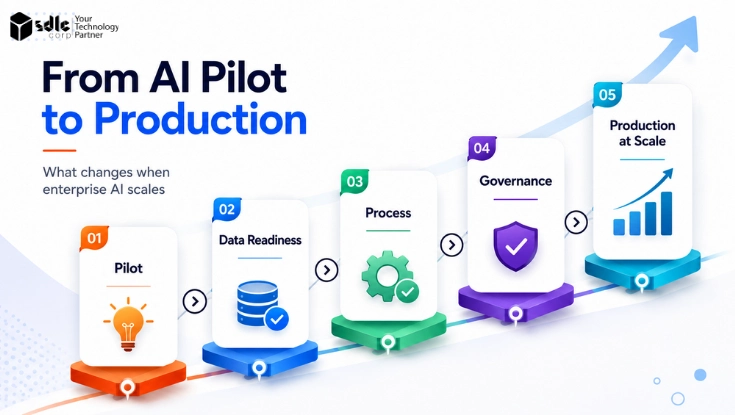
Follow a staged rollout: pilot, controlled expansion and scale. The pilot should run with a small cross-functional user group, a tightly scoped set of tasks and conservative approval rules.
Use the pilot to validate end-to-end controls, monitor user behavior and collect qualitative feedback. Run the AI in shadow mode for some workflows to capture recommendations and compare them to historical decisions without affecting live records.
During controlled expansion widen task scope, add user groups and potentially relax some manual approvals for low-risk actions. Introduce incremental autonomy by raising confidence thresholds for automatic acceptance in narrow, well-understood cases only after monitoring demonstrates low correction rates.
Maintain the ability to immediately revert to manual-only paths and keep rollback and incident playbooks accessible to operators and business stakeholders.
At scale, invest in continuous monitoring, cost controls and ownership. Assign product and data owners for each integrated workflow and define budgets for model usage and tool calls.
Automate onboarding checks and standardize adapter templates so new integrations reuse proven patterns. Continue to harvest review feedback to tune models and rules, and ensure governance reviews remain scheduled to reassess risk as throughput and impact grow.
- PilotA small cross-functional group, a narrow task set, strict approval rules and close monitoring. A common starting shape is 5 to 15 users on one workflow for four to six weeks.
- Controlled expansionMore users and tasks, with limited autonomy released only when the promotion gates are met. Most teams open 10 to 25 percent of eligible transaction volume at this stage.
- ScaleCost and usage controls, named workflow owners, reusable adapter templates and scheduled governance reviews. Move past 25 percent of volume only after two consecutive review cycles hold the same gates.
Keep a rollback playbook and a fast revert path available at every stage. Expansion is a threshold decision, not a calendar decision: the next section defines the measures those thresholds are based on.
User Adoption and Change Management
An integration that works technically can still fail in practice. Train users on what the AI is doing and, just as importantly, where its limits are, so nobody treats a proposal as a verified answer.
Name a workflow owner in the business, not only in IT, who is accountable for the process the AI now touches. Larger programmes usually run this alongside wider digital transformation consulting services.
Make override easy and visible. If a reviewer can reject or amend a proposal in one step and give a short reason, you get both a better decision and the feedback signal you need.
Collect that feedback on a regular cadence, and be explicit about the process changes the integration introduces, including which manual steps disappear and which approvals stay. Adoption improves when people can see what changed and why.
Where the process is being redesigned rather than assisted, that is closer to a workflow automation services project than an AI integration.
Measure Integration Success
Define operational and adoption KPIs aligned to the chosen AI role and business goals. Track workflow completion time, recommendation acceptance rate, correction rate after review, frequency of escalations, failed tool calls and end-to-end latency.
For ERP and financial workflows include reconciliation metrics such as post-approval error rates, duplicate transactions and correction costs. Combine technical telemetry with business outcome measurements to assess true value.
Also measure user behavior to detect workarounds that indicate poor workflow fit. Monitor whether users bypass the integrated experience, return to manual copy-paste, or routinely override AI proposals.
High override rates or frequent manual corrections suggest model or UX issues rather than infrastructure problems. Use surveys and qualitative interviews to capture operational friction that metrics alone do not show.
Set alert thresholds and reporting cadence tied to business SLAs. Automate dashboards that surface drift in model performance and integration errors. Feed failure and correction data back into model retraining pipelines and rule updates.
Define success criteria for each rollout stage in advance and require objective evidence of stability before expanding autonomy or user coverage.
| KPI type | What to track | Starting target | What it tells you |
|---|---|---|---|
| Operational | Latency, failed tool calls, workflow completion time | Failed tool calls under 1 percent; p95 latency inside the workflow SLA | Whether the integration is technically healthy |
| Quality | Acceptance rate, correction rate, escalation frequency | Acceptance at or above 85 percent; correction under 10 percent; escalation under 5 percent | Whether the outputs are good enough to act on |
| Business | Cost per transaction, throughput, SLA compliance | Cost per transaction below the manual baseline | Whether the workflow is actually better off |
| Adoption | Bypass rate, override frequency, user satisfaction | Bypass under 10 percent; override under 15 percent | Whether the workflow fit is right for real users |
Feed corrections and rejections back into model and rule updates, and require objective stability across all four rows before increasing autonomy or user coverage.
Conclusion
Enterprise AI integration is not simply a model-selection problem. It is a workflow, data, identity and control problem. Sequencing it is a scoping exercise before it is a build, which is where an AI consulting company usually starts.
The organisations that get value from it are rarely the ones with the best model.
They are the ones that picked a workflow worth improving, built retrieval that respects existing permissions, kept high-impact writes behind validation and approval, and could tell within weeks whether the thing was working.
The sequence matters more than the technology choice. Start with one bounded workflow, prove value under human review, validate permissions and failure behaviour, and increase autonomy only when operational evidence supports it.
Frequently Asked Questions
Enterprise AI integration connects AI capabilities with applications, data stores, identity systems and workflow controls so model outputs become actionable in business processes.
It includes retrieval that respects permissions, orchestration for approvals, adapters to back-end systems and audit trails that record proposals and actions.
Identify one workflow and its business outcome, confirm data and interface readiness, define the AI role and autonomy level, choose an integration pattern, build permission-aware retrieval and narrow tool adapters.
Then test permissions and failure paths, pilot, and scale gradually based on measured results.
Yes, but not directly. Put an integration layer between the AI and the legacy system of record, using API wrappers, middleware or event queues.
Start with read-only retrieval to prove accuracy, then add controlled write-back for one transaction type behind validation and human approval.
An AI gateway is a control layer that routes requests to models, enforces policies, sanitises inputs, logs requests and applies model selection rules. It centralises access control and monitoring so individual applications do not need to implement model governance themselves.
Preserve source-system permissions by enforcing field-level access in retrieval services and propagating user identity for interactive calls. For automated tasks use auditable service identities with narrowly scoped privileges and short-lived tokens between components.
AI can update records, but high-impact updates should require validation, permissions, audit logging and human approval. Use staged commits, idempotency keys and multi-party approvals for financial, regulatory or customer-facing changes to prevent unvetted writes.
Test the full pipeline, not only model output: authentication, permission enforcement, retrieval correctness, tool adapter behaviour and audit capture. Include negative tests, concurrency cases, shadow-mode comparison and fault injection for downstream failures before enabling any execution.
Roll out in stages: pilot with a small user group and narrow tasks, expand under controlled conditions using shadow mode and monitored thresholds, then scale when acceptance, low correction rates and operational controls are proven.