Odoo AI Assistant for Smarter Odoo ERP Data Access
To improve operational visibility inside Odoo ERP, the company implemented Odoo AI Assistant for sales, HR, inventory, CRM, and accounting workflows. The solution helped teams access business records faster, reduce reporting workload, and review answers directly inside Odoo using plain-English queries.
Product Hunt Listed
Trusted Software Partner
Multiple Products Listed
CRM, Sales, Inventory, HR, Accounting, Calendar, Products, Invoices, and more.
Finance teams can ask report questions in plain English and get answers without SQL knowledge or technical support.
Teams get instant answers from current Odoo ERP records with export options.
Users only view approved Odoo data based on their access permissions.
Project Snapshot for Odoo AI Assistant
A quick look at the company profile, Odoo AI Assistant scope, and daily operations covered in this implementation project.
ERP Platform
Odoo (18 & 19)
Supported versions for Odoo AI Assistant deployment with full module integration.
Solution Used
Odoo AI Assistant
Natural language query module for ERP data access without SQL knowledge.
Main Goal
Plain English Queries
Enable teams to access ERP records using conversational questions.
Data Coverage
18+ Odoo Areas
CRM, Sales, Inventory, HR, Accounting, Calendar, Products, Invoices, and more.
Access Method
Odoo ORM
Native ORM-based query flow for structured data retrieval.
Security Model
Role-Based Control
Users only access approved data areas based on Odoo role permissions.
AI Powered Operations Management Inside Odoo ERP
A multi-department company used Odoo ERP to manage sales, inventory, finance, and HR operations from one system. Sales teams tracked orders and leads, inventory teams monitored stock availability, finance teams reviewed invoices, and HR teams managed employee records.
However, managers still relied on manual reports, exports, and technical support to answer routine business questions. This slowed daily data checks and created extra work across departments.
Odoo Usage
Multi-Departmental Operations
Main Challenge
Report Dependency
Why a Multi-Department Odoo Team Needed an AI Assistant
As Odoo data increased across sales, inventory, finance, and HR, managers needed faster access to reports and answers. Manual exports, developer support, and repeated report requests slowed daily decisions.
These challenges made Odoo data harder to access and increased reporting work. The company needed a faster way to ask questions and view reliable answers from Odoo records.
Slow Report Access
Teams waited for prepared reports before checking sales, stock, invoices, or employee records. This slowed daily decision-making.
Technical Dependency
Non-technical users could not write SQL or build custom reports. They depended on developers for routine data checks.
Scattered Data Across Modules
Information lived across CRM, Sales, Inventory, Accounting, and HR with no easy way to ask questions across areas.
Repeated Manual Exports
Managers exported records repeatedly for daily reviews. This increased manual effort, errors, and inconsistent reporting.
Limited Visibility
Without quick data access, decision-making became slower and less informed. Teams couldn't act quickly on business changes.
Improve ERP Data Access With Odoo AI Assistant
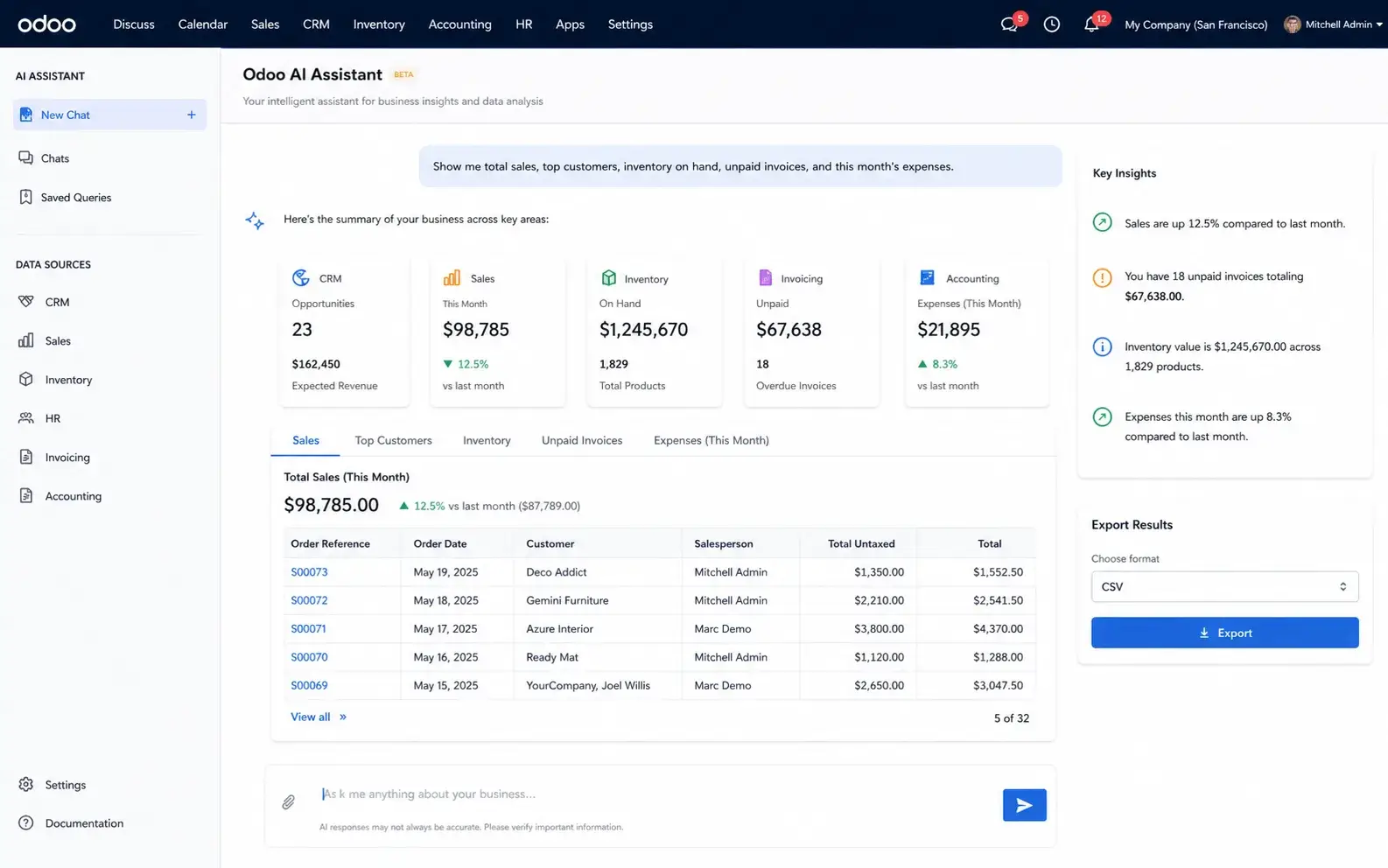
To resolve data access barriers, we implemented the Odoo AI Assistant inside the client's Odoo environment. This helped teams access approved module data through simple questions instead of reports, exports, or technical support.
Natural Language Interface
Users type business questions in plain English inside Odoo. The assistant understands intent and queries the correct data areas automatically.
Multi-Module Data Access
Access CRM, Sales, Inventory, HR, Accounting, Calendar, and other modules from one assistant interface without switching screens.
Role-Based Security
Each user only sees results from approved data areas. Permissions are controlled by existing Odoo role settings.
Export Options
Query results can be exported as CSV, JSON, or text for sharing, analysis, and integration with other tools.
Real-Time Results
Instant answers from current ERP records. No waiting for reports or technical support to retrieve information.
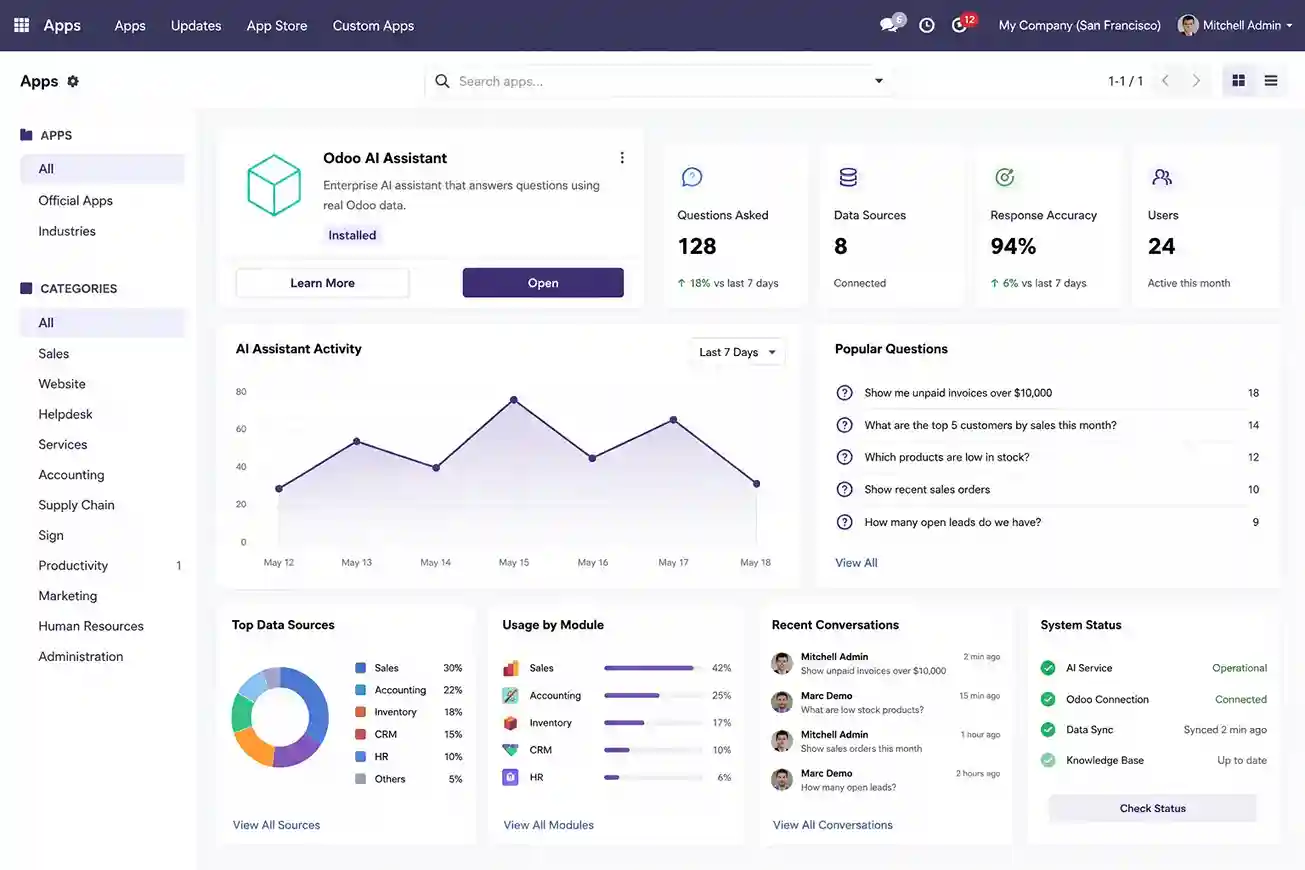
Operational Dashboard
View query history, usage logs, analytics, and assistant activity from one centralized admin panel.
Operations became more organized, data stayed accessible across teams, and everyone gained faster access to approved Odoo information without technical bottlenecks.
Process Followed for Odoo AI Assistant Deployment
A structured deployment process helped configure the Odoo AI Assistant with clean data mapping, secure access control, query testing, and user-ready rollout.
Requirement Gathering
Multi-department reporting needs, data areas, user groups, and query patterns were documented before setup.
Module Configuration
The Odoo AI Assistant was installed and configured with required modules, settings, and data mappings.
Intent Mapping Setup
Business queries and question patterns were mapped to selected Odoo data areas for accurate responses.
Access Control Setup
Role-based permissions were configured so users could only access approved modules and records.
Testing & Validation
The assistant was tested with sample queries, edge cases, and user scenarios to check answer accuracy.
User Training & Deployment
Teams were trained on daily use, and the assistant was deployed for live Odoo operations.
Features Built for Real Odoo Workflows With Odoo AI Assistant
The Odoo AI Assistant was configured to support daily operations across CRM, Sales, Inventory, HR, Accounting, and more.
CRM Record Queries
Access customer records, opportunities, follow-ups, and contact details through plain English questions.Sales Order Search
Query recent orders, order status, customer purchases, and sales pipeline data instantly.Inventory Tracking
Check stock levels, warehouse locations, product availability, and reorder status.HR Information Access
Review employee records, departments, positions, attendance, and team details.Financial Data Query
Access invoices, payments, accounting records, and financial reports.Multi-Export Options
Export results as CSV, JSON, or text for sharing and further analysis.
Technology Stack Behind the Odoo AI Assistant
Built using Odoo backend logic, AI query mapping, database tracking, scheduled jobs, and secure access control.
Frontend
Odoo Interface
Native Odoo chat interface for asking questions and viewing answers.
Odoo AI Assistant Core
Connects user questions with Odoo records, access rules, query logic, and response output from one controlled workflow.
Backend
Python ORM
Handles business logic, data retrieval, role checks, and custom module workflows.
AI/NLP
AI Engine
Understands query intent and maps plain-English questions to correct Odoo data areas.
Database
PostgreSQL
Stores ERP records, query logs, products, customers, orders, and operational data.
Operational Improvements After Odoo AI Assistant Implementation
The Odoo AI Assistant reduced reporting effort, improved operational visibility, and helped teams act faster on current Odoo records.
4x Faster Access to Odoo Records
Teams retrieved CRM, sales, inventory, HR, and accounting records in seconds instead of depending on manual exports and report requests.
65% Reduction in Manual Report Requests
Managers reduced repeated exports and routine report preparation by accessing approved Odoo data directly through plain-English queries.
18+ Odoo Data Areas Connected
Teams accessed invoices, opportunities, inventory records, employee data, customer details, and operational updates from one assistant interface.
Reduced Dependency on Technical Teams
Non-technical users retrieved operational insights without SQL queries, custom reports, or developer assistance for daily checks.
The implementation improved operational data access, reduced manual reporting work, and helped managers retrieve approved Odoo insights faster across departments.
Ready for Smart Odoo Data Access?
SDLC Corp helps you implement Odoo AI Assistant so your team can query CRM, sales, inventory, HR, and accounting records in plain English from one reliable ERP workspace.
- Get Started
Let’s Connect AI With Your Odoo ERP
Get expert guidance on setting up Odoo AI Assistant to query CRM, sales, inventory, HR, accounting, invoices, and other approved Odoo records in plain English.
What happens after you submit?
- Query Odoo records without SQL
- Access approved module data
- Reduce repeated report requests
- Secure Integration
- Odoo-Ready
- Global Clients