
AI Call Intake and Intelligent Routing with Pulastya
SDLC Corp replaced manual phone triage with a Pulastya AI voice agent. It understands callers in natural speech, classifies each call by intent, and answers from the client’s approved knowledge base. Calls it should not handle go to the right department with the transcript and summary attached.
- Keeps your existing Twilio number
- Answers only from approved documents
- Every transfer carries context
Pulastya AI at a Glance
The product, focus, and scope behind this AI call intake and routing deployment, built on the client’s existing phone numbers and approved knowledge base.
- Client
- Service-Based Business
- Existing Twilio numbers, no number change
- Industry
- Customer Service & Call-Heavy Operations
- Replacing manual phone triage and menu routing
- Engagement
- AI Call Intake, Classification & Routing
- Six-stage rollout, from setup to live tuning
- Platform
- Pulastya AI
- Voice agent answering from approved documents
A service-based business was losing staff time to manual phone triage and menu-driven routing. SDLC Corp deployed Pulastya AI on the client’s existing Twilio numbers to classify every call by intent, answer documented questions from approved documents only, and route the rest to the owning team with context. The rollout ran in six stages, from workspace setup to live tuning.
- Telephony: existing Twilio numbers, no number change
- Answer source: client-approved documents only
- Routing: deterministic intent-to-queue mapping
- Handoff: transcript and AI summary attached
- Not used for: emergency, diagnosis, financial or legal advice
The Challenge
Where Manual Call Triage Slowed Everything Down
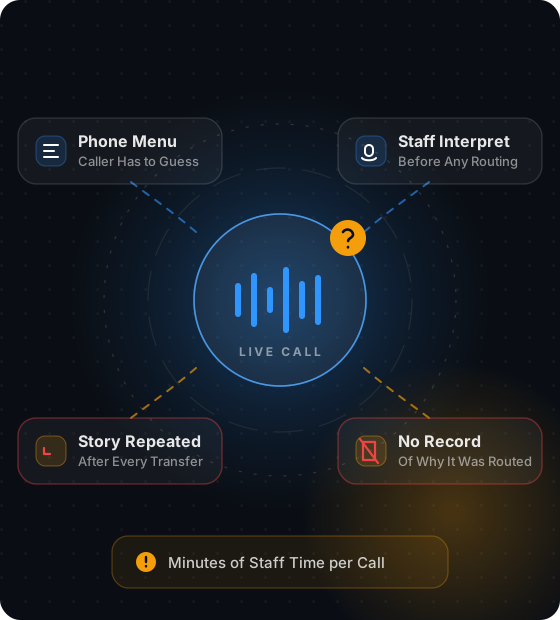
Before this deployment, four conditions shaped how the client's team handled inbound calls. Each one is a constraint the build had to remove, and together they set its scope.
Callers Needed Interpreting First
People do not describe their problem in system terms. Staff had to listen, interpret, and only then decide where the call belonged.
Menus Pushed Work to Callers
Callers had to self-classify against a fixed list, guess the closest match, and often land in the wrong queue, repeating the whole story after a transfer.
Documented Answers Ate Staff Time
A large share of calls had answers already written down in service documents, policy files and FAQs, yet those calls still occupied a person for several minutes each.
Transfers Arrived Without Context
When a call reached the right team, the receiving agent started from nothing, and the caller repeated their name, reference and issue all over again.
Five Requirements Set Before the Build Began
Before any configuration started, five requirements defined how Pulastya AI should understand callers, use approved knowledge, capture requests, and route every call with context.
Understand Naturally
Understand the caller in natural conversation, without menu prompts or keyword commands.
Classify Every Call
Classify each call into a defined intent before deciding what happens next.
Answer From Approved Knowledge
Answer documented questions from the client’s approved knowledge base, not general model knowledge.
Capture Structured Requests
Capture structured service request details when the caller needs something logged.
Route With Context
Transfer any call the AI should not handle to the correct department, with context already prepared.
Planning the Same Shift?
Moving from manual call triage to AI-driven intake? These requirements shaped everything that followed. Talk to our AI voice team.
The Pulastya AI Solution
One Intake Layer, Three Connected Parts
Pulastya AI sits in front of the client’s existing phone numbers and handles every inbound call in three steps. It understands the caller, answers from approved knowledge, and routes the call to the right team with full context, so no one has to repeat themselves.
Conversation & Intent Classification
Callers speak naturally on existing numbers, and the Pulastya AI platform classifies every call by intent.
- Barge-in and natural turn-taking
- Intents mapped to real call types
- No menus or keyword prompts
Approved-Knowledge Answers
Answers come only from client-approved documents. Without enough grounding, the agent says so or captures the request.
- Approved documents only
- Structured request capture
- No answer without grounding
Routing & Contextual Handoff
Each intent goes to the queue that owns it, and every transfer carries the transcript and an AI summary.
- Same intent, same route
- Escalation with admin takeover
- Full context for the receiving agent
From Inbound Call To Resolved Outcome
Five steps, running the same way for every call. Knowledge retrieval sits inside the workflow at step three, which is what stops the agent from answering beyond what it actually knows.
- 01
Inbound Call Received
A caller reaches the business through its existing phone number.
Step 1 - 02
Conversation Understood & Intent Classified
The agent identifies what the caller wants from natural speech.
Step 2 - 03
Knowledge Retrieval Or Request Capture
The agent answers from approved documents or collects structured request details.
Step 3 - 04
Routing Decision Applied
The call is directed to the department or queue that owns that intent.
Step 4 - 05
Resolved By AI Or Transferred With Context
The call closes, or a human agent continues with the full call history in view.
Step 5
Grounding stays inside the workflow. Nothing is answered until it is checked against the client’s documents, and nothing is transferred without context.
Implementation Approach
From Setup to Live Call Handling
The setup prepared Pulastya AI to answer routine calls, use approved business information, capture caller details, and route the rest with full context.
- Step 01
Workspace And Number Setup
A Pulastya AI workspace was created and connected to the client's existing Twilio phone numbers, so no number changes were required.
- Step 02
Knowledge Base Preparation
Approved documents were uploaded and indexed. Content that was out of date or contradictory was resolved before indexing.
- Step 03
Intent And Routing Design
Call types were defined from the client's real call mix, then mapped to departments and queues.
- Step 04
Browser Test Calls
The team spoke to the agent from the browser before any live traffic, checking classification accuracy and answer grounding.
- Step 05
Live Call Handling
The number was pointed at Pulastya AI and the agent began taking real inbound calls.
- Step 06
Review And Tuning
Transcripts and summaries were reviewed to find intents that needed sharper definition or documents that needed updating.
Technology Stack
Technology Powering AI Call Handling
Voice, conversation, platform and data layers used to build the call intake and routing capability described in this case study.
Primary references: Twilio Programmable Voice, OpenAI Realtime API, ElevenLabs, pgvector.
 Twilio Twilio Polly
  ElevenLabs OpenAI TTS OpenAI Realtime API Twilio Twilio Polly ElevenLabs OpenAI TTS OpenAI Realtime API Twilio Twilio Polly ElevenLabs OpenAI TTS OpenAI Realtime API Twilio Twilio Polly ElevenLabs OpenAI TTS OpenAI Realtime API
  React 18
  Node.js
  Socket.IO JWT HTTPS Express.js React 18 Node.js Socket.IO JWT HTTPS Express.js React 18 Node.js Socket.IO JWT HTTPS Express.js React 18 Node.js Socket.IO JWT HTTPS Express.js
 PostgreSQL pgvector pgcrypto PostgreSQL JSONB PostgreSQL pgvector pgcrypto PostgreSQL JSONB PostgreSQL pgvector pgcrypto PostgreSQL JSONB PostgreSQL pgvector pgcrypto PostgreSQL JSONB
Want to see how this stack would handle your call flow?
Discuss Your Call Flow Architecture →Architecture Decisions
Why This Stack Was Chosen
The architecture separates telephony, live conversation, application logic, retrieval, storage, and security so each layer has a clear responsibility in the call path.
| Component | Role | Why Chosen |
|---|---|---|
| Twilio Programmable Voice | Telephony and call connection | Connects Pulastya AI to the client’s existing phone numbers so inbound calls can enter the AI workflow without changing the caller-facing number. |
| OpenAI Realtime API | Live conversation and intent understanding | Supports low-latency conversational turns so the agent can understand natural caller language and decide what should happen next during the call. |
| ElevenLabs + OpenAI TTS | Voice generation | Turns generated responses into spoken output, giving the voice layer flexible synthesis options for natural call interactions. |
| Node.js + Express.js | Backend orchestration and APIs | Provides the event-driven application layer that coordinates telephony events, AI requests, routing logic, and internal API endpoints. |
| Socket.IO | Real-time application events | Keeps browser and server state synchronized during testing, monitoring, and live call activity where updates need to appear immediately. |
| React 18 | Browser interface | Supports the component-based interface used for workspace configuration, test calls, operational views, and other interactive workflows. |
| PostgreSQL + JSONB | Structured and semi-structured data storage | Stores call records, configuration, routing data, and flexible metadata in one durable relational data layer. |
| pgvector | Semantic retrieval | Stores and searches embeddings so Pulastya AI can retrieve relevant approved knowledge by meaning rather than relying only on exact keyword matches. |
| pgcrypto + JWT + HTTPS | Data and session security | Protects sensitive fields, authenticated application sessions, and data moving between browser, application, and integration endpoints. |
Outcomes
What Changed in Day-to-Day Call Handling
No measured figures are published for this deployment yet. The changes below describe how call handling now works by design, as confirmed during review and tuning.
Triage Moved off the Front Desk
What a call is and where it belongs is decided during the conversation, not by a person listening and then transferring.
Callers Stopped Navigating Menus
Intent is identified from natural speech, removing the guesswork that sends callers into the wrong queue.
Documented Questions Resolve in the Call
Calls with an answer already in the knowledge base close without occupying a staff member.
Transfers Arrive Prepared
Agents pick up with the full conversation record, so the call continues instead of restarting.
Every Call Leaves a Structured Record
Intent, routing, transcript, summary and recording are captured per call, supporting QA review and audit trails.
See Pulastya AI Handle Your Call Types
Bring your real call mix and your existing documents. We will show how intent classification and routing would work against them, and where the AI would hand off to your team.
Common Questions
AI Call Intake and Routing FAQs
The questions teams ask most often when evaluating AI call intake and routing.
An IVR asks the caller to classify themselves against a fixed list. Pulastya AI classifies the call from what the caller actually says, so there is no menu to navigate and no wrong button to press.
It says it does not have the information and offers a transfer. The call moves to a person who can already see what was said and why. It does not guess.
Yes. Pulastya AI connects through Twilio, so an existing Twilio number can be pointed at the platform without changing what customers dial.
Answers come from the documents you upload and approve. Updating pricing, policies or service details means updating those documents and reindexing the knowledge base from the dashboard.
Intents are mapped to departments and queues during setup, based on your real call types. The mapping is deterministic, so the same intent always routes the same way.
It is built for administrative and informational call handling. It should not be used for diagnosis, emergency support, financial advice, legal advice or sensitive account verification.
Yes. Configured escalation policies decide whether the AI continues, escalates or transfers the call, and an admin can take over a live call directly when needed.
Each call keeps its intent, routing decision, transcript, AI summary, outcome and recording. Teams use this record for QA review, audit trails and tuning.
- Contact Us
Let’s Talk About Your Project
What happens next?
- We review your requirements
- Strategy call with experts
- Clear roadmap & estimate
- NDA Protected
- Enterprise Grade Delivery
- Global Clients