
AI Voice Agent Integration with CRM ERP and ITSM

With AI voice agent integration, Pulastya AI connects to CRM, ERP, and ServiceNow through custom REST API connectors built by SDLC Corp. As a result, one voice agent can verify a caller, fetch live order data, and open a prioritized IT ticket while the call is still in progress.

  • Live CRM and ERP data for order calls
  • ServiceNow tickets for unresolved IT issues
  • One agent for customer and employee calls
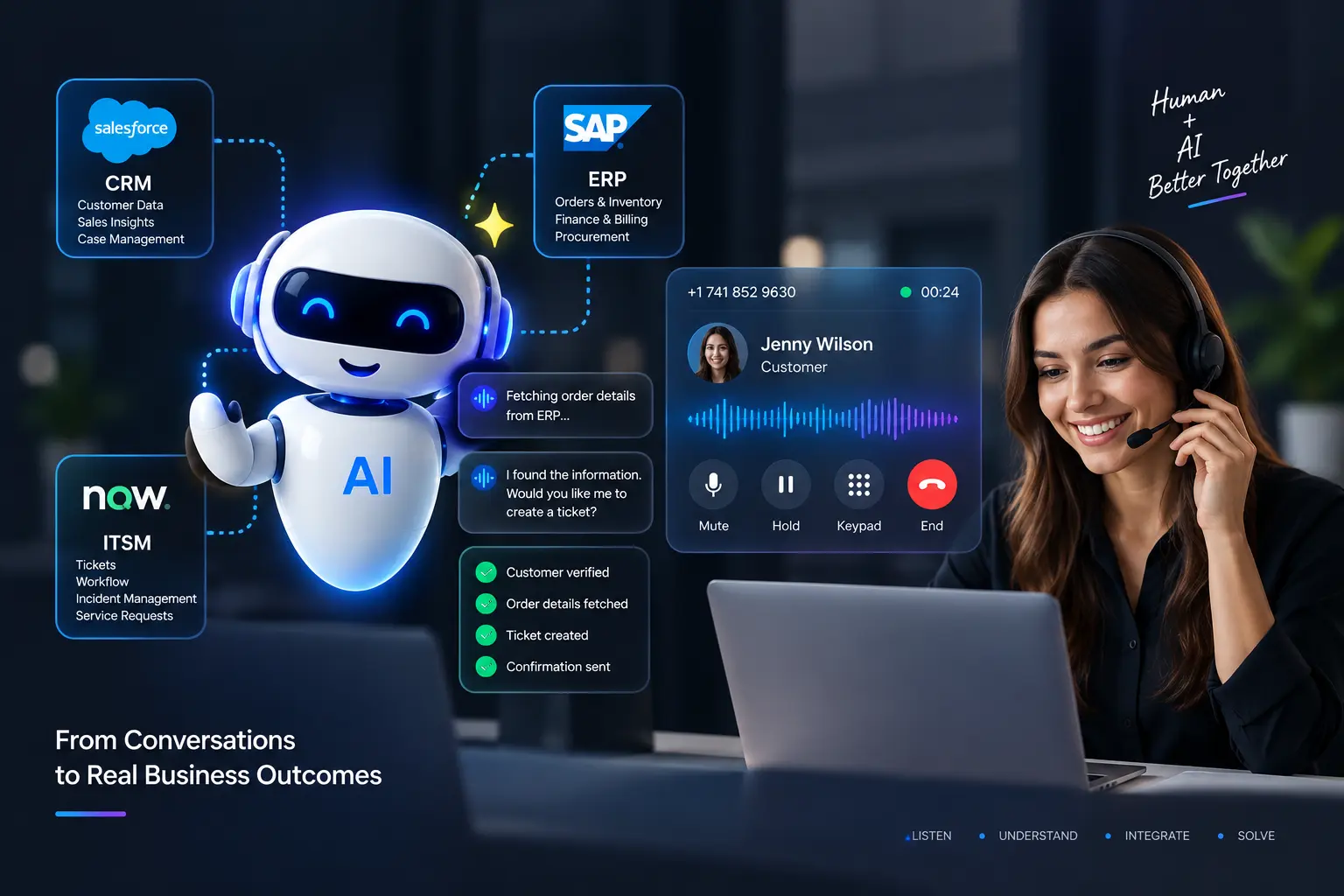
Pulastya AI voice agent detecting an order status request and querying ERP

Inbound call“Where is my order?”

  • Intent detected: Order status
  • Caller verified before data is shared
  • Data source: ERP / Order Management
  • Live data rather than stored documents
Engagement Overview

AI Voice Agent Integration Scope and Connected Systems

The platform, connected systems, and service scope behind this integration project.

Project snapshot of the bespoke Pulastya AI integration
AreaScopeDetails
Systems Connected3Business SystemsCRM, ERP / Order Management, ServiceNow (IT service management, ITSM).
Service Scope2Service WorkflowsCustomer service and employee IT support.
Integration Method2Data PathsREST APIs with authentication for live data, while approved knowledge covers guidance.
Platform1Voice AgentPulastya AI handles both customer and employee calls.
Integration TypeBespokeIntegration BuildConnectors built by SDLC Corp for this engagement, not standard Pulastya AI features.
EngagementAI Voice Agent Integration & Workflow Automation

Case type: Bespoke integration (client details not published)

Shashank Jaiswal, Project Lead at SDLC Corp
Project LeadShashank Jaiswal

AI Voice Integration Lead, SDLC Corp

The Challenge

Why a Knowledge-Only AI Voice Agent Falls Short on Service Calls

Some calls cannot be answered from documents, because the answer sits in a business system or the call has to end with an action.

As a result, four gaps defined what the voice agent had to handle.

  • Live Answers Sit in Business Systems

    An order’s status keeps changing until delivery, so no document can say where an order is right now. Instead, that answer lives in the ERP / Order Management system.

  • Account Data Needs a Verified Caller

    Before discussing an order, the agent has to confirm who is calling. It does this by matching the caller’s details to a customer record in the CRM before anything is shared.

  • Some Calls Must End in an Action

    An employee with a VPN problem may need more than advice. If troubleshooting does not fix it, the issue has to become a ticket that someone owns.

  • Customers and Employees Need Different Systems

    Customer calls focus on orders, whereas employee calls focus on IT issues. Therefore, one voice agent has to reach the right system for each.

Project Objectives

Five Requirements for AI Voice Agent Integration

To close these gaps, Pulastya AI therefore had to identify intent, protect account data, use live systems, and complete service workflows.

01 / 05

Identify Intent First

Recognize what the caller needs, such as an order status check or an IT support request, before choosing a system.

Verify Before Sharing

Match the caller’s details in the CRM before any order information is read or shared.

Retrieve Live Data

Fetch current order data from the ERP through authenticated REST APIs, but only after the CRM confirms the caller.

Execute Service Workflows

Create a ServiceNow ticket and assign a priority when an issue is not resolved during the call.

Keep Knowledge and Data Separate

Answer guidance questions from approved knowledge using retrieval-augmented generation (RAG), whereas transactional questions come from live systems.

The Pulastya AI Solution

One AI Voice Agent Connected to Three Business Systems

The same AI voice agent for customer support also handles employee IT support. It picks the right source for each part of the call: approved knowledge covers guidance, whereas live systems cover data and actions.
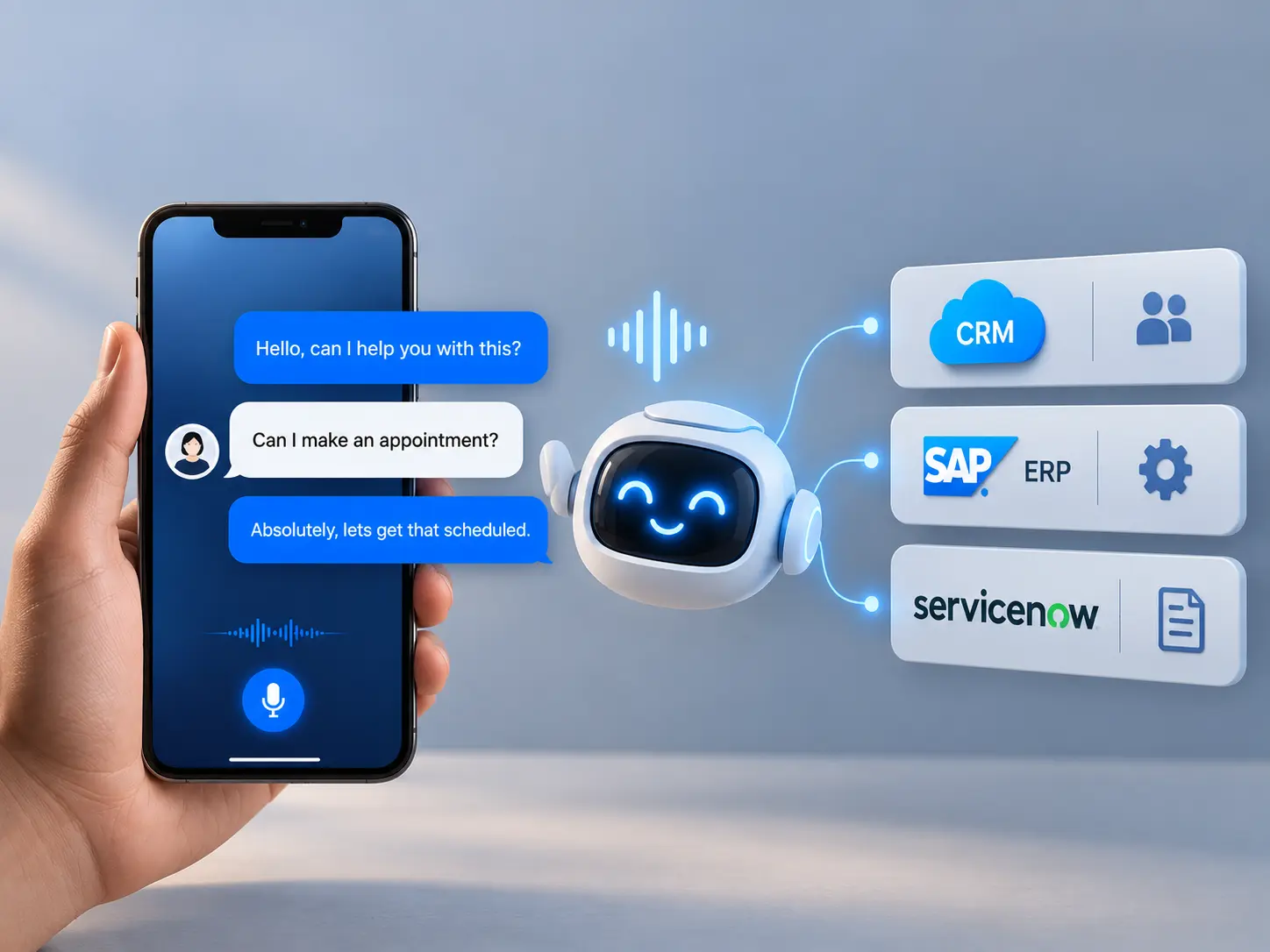
AI voice agent connected to CRM, ERP, and ServiceNow for real-time business data and customer support.

Intent Detection & Caller Verification

Every call starts by identifying intent, and order data stays locked until the caller is matched in the CRM.

  • Intent identified from the caller’s own words
  • Caller details matched in the CRM first
  • No account data read until the match succeeds

CRM Integration and Live Order Data from ERP

The agent confirms the caller in the CRM, then requests current order data from the ERP / Order Management system while the call is live.

  • Authenticated REST API requests
  • Real-time order data from ERP / Order Management
  • Answer given from the live system response

Knowledge Search, Troubleshooting & ServiceNow Ticketing

If documented troubleshooting does not fix the issue, the ServiceNow integration creates a prioritized ticket for the right IT team.

  • Troubleshooting guidance from approved knowledge
  • Ticket created only when the issue is unresolved
  • Priority assigned before routing
  • Ticket then routed to an IT engineer or support queue

Related: the Pulastya AI voice agent case study on call intake and routing.

How the Workflows Run

AI Voice Agent Call Flows for Order Status and IT Support

Each call type follows a fixed sequence: the order inquiry ends with live data, whereas the IT request ends with a resolved issue or a ticket. In both, the caller can also reach a person at any step.

Workflow A

Order Status Inquiry

Caller says: “Where is my order?”

  1. Step 01Caller

    Caller Asks About an Order

    The caller asks about an order in their own words, so there is no menu to navigate.

  2. Step 02Pulastya AI

    Intent Identified: Order Status

    Pulastya AI recognizes an order status request before choosing a system.

  3. Step 03CRM

    Caller Details Matched in CRM

    The agent then matches the caller’s details against the customer record in the CRM.

  4. Step 04Decision

    Identity Confirmed

    Account data is unlocked only when the match succeeds.

    If the details do not match, no order data is shared and the caller is offered a human agent.

  5. Step 05ERP

    Order Requested from ERP

    With the caller confirmed, the agent then requests the order through an authenticated API.

  6. Step 06ERP

    Real-Time Order Data Returned

    The ERP returns the order’s current status while the caller is still on the line.

  7. Step 07Pulastya AI

    Pulastya AI Answers the Caller

    The caller hears the current status, rather than an answer from a stored document.

Human handoff: whenever a caller asks for a person, the call is transferred to a human agent.

OutcomeLive answer from real-time order data
Workflow B

IT Support Request

Caller says: “My VPN isn’t working.”

  1. Step 01Caller

    Employee Reports a VPN Issue

    The employee calls and describes the problem in their own words.

  2. Step 02Approved Knowledge

    Knowledge Search

    Pulastya AI searches approved IT knowledge for documented fixes.

  3. Step 03Approved Knowledge

    Troubleshooting Guidance

    The agent walks the employee through each documented step until the issue is fixed or the steps run out.

  4. Step 04Decision

    Issue Remains Unresolved

    The documented steps do not fix the problem, so the call cannot end here.

    If troubleshooting works, the call ends with the issue resolved.

  5. Step 05ServiceNow

    ServiceNow Ticket Created

    The agent then creates a ServiceNow ticket that describes the issue.

  6. Step 06ServiceNow

    Priority Assigned

    The ticket is assigned a priority before it is routed.

  7. Step 07IT Support

    Routed to IT Engineer or Support Queue

    The ticket finally reaches the IT engineer or support queue that will resolve it.

Human handoff: whenever a caller asks for a person, the call is transferred to a human agent.

OutcomePrioritized ticket in the right support queue

Knowledge guides the conversation, while connected systems supply the facts and complete the actions.

Agentic Workflow in Practice

A Bounded Agentic Service Workflow Across CRM, ERP and ServiceNow

This implementation demonstrates an action-taking AI workflow within defined business boundaries. The agent interprets the caller's need, selects an approved source or system, performs the permitted action, validates the result against business rules and hands control to a person when the workflow requires it.

Caller intent CRM identity check Approved source/tool selection ERP/API lookup or knowledge retrieval Conditional ServiceNow action Priority + routing Human handoff when required

Operating boundary: the agent does not have unrestricted system access. It uses authenticated connectors, approved knowledge and defined workflow rules, with human escalation available throughout the call.

Architecture Decisions

RAG vs API: How the AI Voice Agent Picks Its Data Source

Pulastya AI uses approved knowledge for guidance and connected systems for current records and service actions. The source depends on what the caller needs.

RAG and API paths compared across five points
5 Points ComparedRAG (Approved Knowledge)APIs (Live Transactional Data)
What It HandlesApproved guidance, such as VPN troubleshooting stepsCurrent records and actions, such as order status and ticket creation
How Content Is ReachedKnowledge search over approved contentAuthenticated requests to CRM, ERP, or ServiceNow during the call
How Current It IsAs current as the last approved updateReflects the connected system’s response at the time of the request
Can It Take Action?No. Retrieved guidance informs the answer.An authorized API operation can create a ServiceNow ticket.
Access ControlLimited to approved contentSystem access requires authentication; customer data also requires a caller check

Why the Separation Matters

Order status comes from the connected system during the call. Approved knowledge supplies troubleshooting steps; it does not stand in for a live order record.

Learn more about our RAG development services.

Caller Checks and System Access

For order inquiries, the workflow checks the caller against CRM before requesting order status from ERP. These are lookup paths. Creating a ServiceNow ticket is a separate write action.

Caller checks and access for the CRM and ERP lookup paths
4 StepsCRM Access PathERP / Order Management Access Path
Caller CheckThe workflow checks the caller’s details against a CRM record.The order lookup follows a successful caller check.
System RequestAn authenticated API request checks the customer record.An authenticated API request retrieves order information.
Access NeededThe caller check needs access to the relevant customer details.The order lookup needs access to the relevant order details.
Response UsedThe check determines whether the order lookup can proceed.The returned status informs the answer given during the call.
Workflow Outcomes

What the Integrated Workflows Deliver

The two call flows produce different outputs: an order inquiry returns live status from the ERP, while an unresolved IT request creates a prioritized ServiceNow ticket. Our AI development services team can plan a similar integration for your systems.

Order Inquiries Use Live Status Data

After caller verification, the agent requests the current order status from the ERP / Order Management system and uses that response to answer the caller.

Unresolved Issues Become Tickets

When documented troubleshooting does not resolve an IT issue, the agent creates a ServiceNow ticket for the support team to follow up.

Tickets Receive a Priority Before Routing

The workflow assigns a priority to each new ticket before routing it to an IT engineer or support queue.

Client Feedback From Other Projects

What Clients Say About Building With SDLC Corp

Prabhat Mishra reviewed a separate digital platform project. The video stories also come from other SDLC Corp projects; none review the voice agent integration described on this page.

Other project

Eric Leist

CEO, Edgerton Strategies

Other project

Doug Schmidt

CEO, RoofAid USA

Other project

Reyzal Razmi

All Star Influencers

Written Client Review · Separate Project
★★★★★
“What stood out most was their ability to understand the problem before writing code.”

The review covers a digital platform built for an AI services company. The reviewer praised SDLC Corp’s understanding of the problem before development. This feedback does not assess the voice agent integration on this page.

Quality 5.0 Schedule 4.5 Cost 4.5 Willing to Refer 4.5
More Client Stories
Common Questions

Frequently Asked Questions About AI Voice Agent Integration

Questions teams ask when evaluating a voice agent that connects to CRM, ERP, and ITSM.

Is Pulastya AI Just a Conversational Chatbot?

No, it does more than hold a conversation. In this integration, Pulastya AI also verifies callers, retrieves live data from CRM and ERP through REST APIs, and creates ServiceNow tickets. In other words, the conversation is only one part of the call.

How Is Customer Data Protected During an AI Voice Agent Call?

The CRM is used only to match the caller’s details, and no order data is read until that match succeeds. In addition, every request uses authenticated, read-only access over HTTPS, and only the fields the answer needs reach the call.

Does It Replace the IT Support Team?

No, it supports the team rather than replacing it. The agent handles documented troubleshooting and then passes unresolved issues to IT engineers through ServiceNow. However, people still resolve the tickets.

Are These CRM, ERP, and ServiceNow Connections Standard Pulastya AI Features?

No, they were custom-built by SDLC Corp for this engagement. Out of the box, Pulastya AI answers calls from an approved knowledge base and escalates to people when needed. In contrast, live CRM or ERP lookups and ServiceNow ticketing are scoped and built per project.

How Long Does an AI Voice Agent Integration Take?

It depends on the systems involved. For example, a CRM or ERP with a documented REST API is faster to connect than a legacy system. The timeline is therefore set after a short discovery phase. For budget planning, see our guide to AI voice agent pricing.

Which CRM, ERP, and ITSM Systems Can an AI Voice Agent Connect To?

Generally, any system that offers an authenticated API can be connected. In this engagement, for example, the connectors covered a CRM, an ERP / Order Management system, and ServiceNow.

What Happens If a Connected System Is Down During an AI Voice Agent Call?

The agent does not guess. Instead, it tells the caller the information is unavailable right now and offers a transfer to a person.

Start with One Call Type

Map Your Service Calls
to the Right Systems

Bring one real service request, such as an order inquiry or an IT issue, and the systems it depends on. Then we will show where Pulastya AI would use approved knowledge, call an API, or create a ticket. This mapping is part of our AI integration and implementation services.

  • Use Your Real Service Requests
  • CRM, ERP, and ITSM Workflows
  • Knowledge and API Paths Mapped

Pulastya AI

  1. 01Verify Caller
  2. 02Fetch Live Data
  3. 03Create Ticket

Plan Your AI Voice Agent Integration with Our Experts

Share your CRM, ERP, or ITSM setup, and our team will guide you on scope, architecture, timelines, and delivery so you can move forward with confidence.

What happens next?