
Transworld Logistics Modernized Logistics
Operations With ERP and AI
How SDLC Corp helped Transworld Logistics connect core workflows through an AI-powered logistics ERP and automate shipment-document processing.
- 48hr → 4hr Document turnaround
- 2,000+ Documents handled per day
- −98% Processing error rate
- 100% Validated before ERP entry
Project Snapshot
The client, industry, platform, and scope behind this ERP and AI modernization engagement.
Transworld Logistics
Logistics & freight operations
ERP & logistics workflow modernization
Odoo-based ERP
Fleet, warehouse, accounting & operations
Shipment-document extraction & validation
Transworld Logistics Client Overview
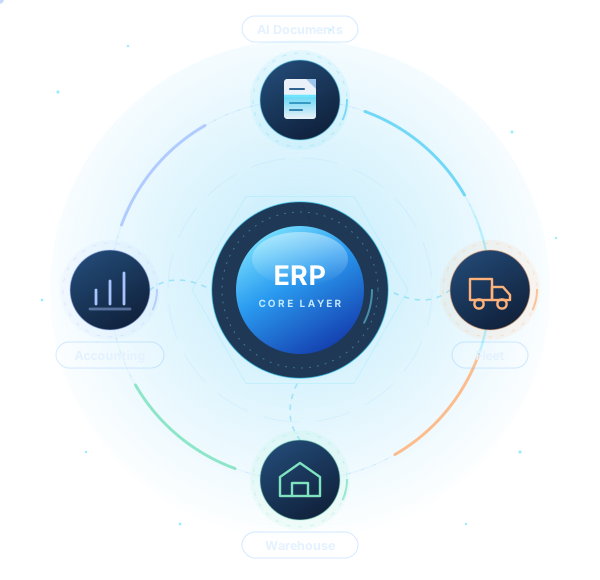
SDLC Corp delivered an Odoo-based ERP implementation connecting Transworld Logistics’ fleet, warehouse, accounting and order operations with intelligent document processing.
AI-powered document processing
AI extracts key shipment data such as carrier, consignee, line items, totals, and dates. It validates each value against ERP records before sending approved data into Odoo workflows.
What changed in day-to-day operations
Document turnaround dropped from about two days to a few hours. Fleet, warehouse, accounting, and order teams now work from the same ERP records instead of separate spreadsheets and inboxes.
Transformation in one sentence
SDLC Corp combined Odoo ERP modernization with AI document processing to connect logistics workflows and reduce manual shipment data handling.
The challenge
Where Shipment Information Slowed Down
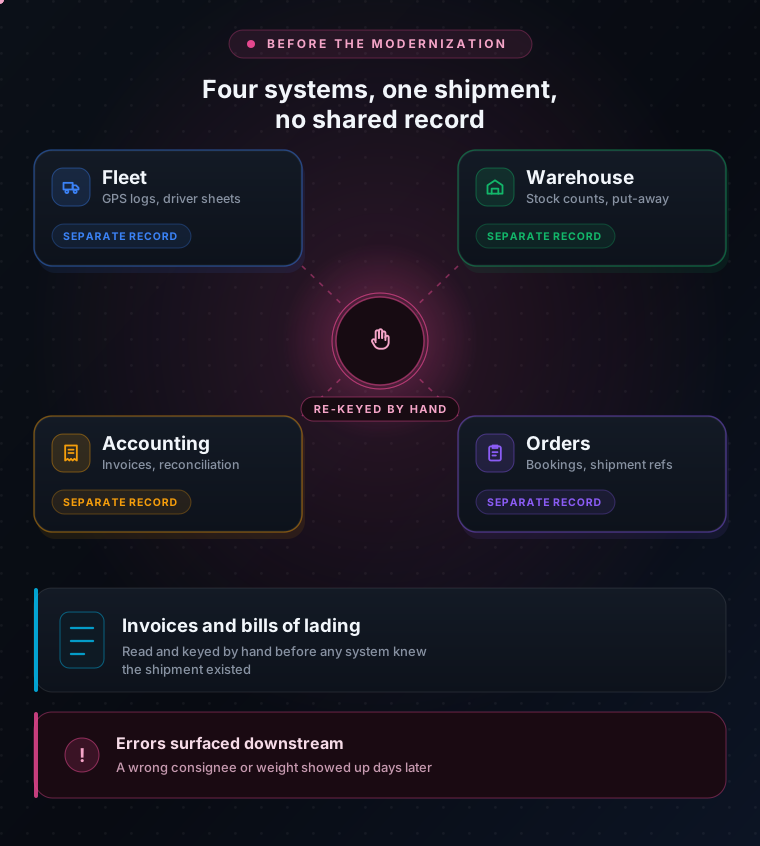
Before the engagement, five conditions shaped the working day at Transworld Logistics. Each one is a constraint the modernization had to remove, and together they set the scope of the work.
Each function ran its own system
Fleet, warehouse and accounting each kept their own records, so the same shipment existed in several places at once and none of them was authoritative.
Handoffs were manual
Moving an order from warehouse to accounting meant someone re-entering it, so operations staff spent a large share of the day moving data around instead of moving freight.
Every document was read by a person
Invoices and bills of lading arrived as PDFs and scans in dozens of carrier formats. Each one had to be opened, read and keyed before the ERP knew the shipment existed.
Mistakes were found downstream
A mistyped weight or a wrong consignee typically surfaced at invoicing or reconciliation, days later, when correcting it meant unpicking work that had already happened.
Nothing to automate against
With no shared operational record, any automation would have had to be built per system and maintained per system, which is why the ERP work had to come before the AI work.
The SDLC Corp solution
A Logistics ERP Implementation in Three Connected Pieces
One Odoo ERP, custom freight workflows, and AI document processing in a connected logistics system.
Unified Odoo-based ERP foundation
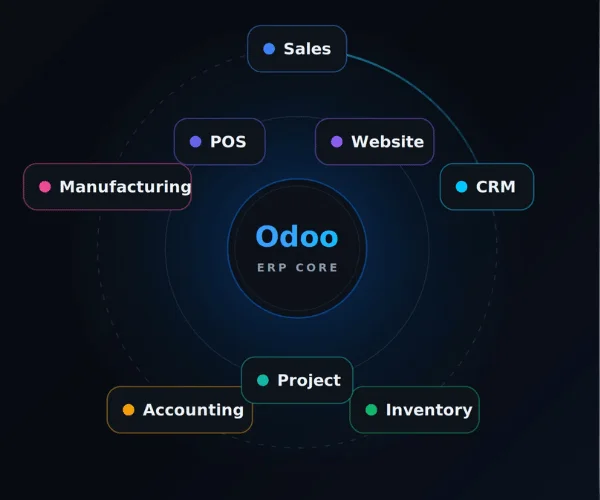
SDLC Corp unified fleet, warehouse, accounting, and orders in one Odoo ERP, creating a shared operational record across logistics teams.
- Fleet, warehouse, accounting, and orders in one ERP
- Connected shipment and document records
- Shared operational data across teams
Custom freight and logistics workflows
SDLC Corp extended Odoo with freight-specific workflows for fleet activity, shipment coordination, warehouse operations, and accounting touchpoints.
- Fleet and freight workflows
- Warehouse and inventory operations
- Order and shipment coordination
AI-powered shipment-document processing
AI extracts key data from shipment documents and validates it against ERP records before information enters downstream workflows.
- Invoices, bills of lading, and shipment records
- Validation before ERP entry
- Less manual reading and data entry
Transformation goals
Five Goals Set Before Delivery Began
Digitizing individual tasks would have left the handoffs untouched. SDLC Corp scoped the engagement around the operating workflow instead: establish the ERP foundation first, shape it around how the teams already work, and add AI only at the point where it removes a measurable delay.
Unify core workflows
Bring freight and logistics workflows into a common ERP environment.
Connect the domains
Link fleet, warehouse, accounting, order, document, and operational activities.
Automate extraction
Extract and validate shipment-document data where that is practical.
Deliver validated data
Make validated information available to the workflow that needs it.
Stay extensible
Establish a foundation for future digital and AI-enabled logistics capabilities.
Planning the same shift from task-level tooling to a connected operating workflow?
Talk to our ERP & AI teamSolution architecture
Document Intelligence in Front of ERP Operations
At a high level, the modernization connects document intelligence with ERP-driven operations. The document layer does not replace the system of record. It prepares validated information for use inside the logistics workflow.
Shipment Documents
Invoices, shipment records and other operational documents
AI Document Processing
Extract the required fields, then validate them
Odoo ERP Foundation
The common workflow and business-process layer
Connected Operations
Fleet · Warehouse · Orders · Accounting · Documents
Operational Actions & Reporting
Teams work from validated, connected information
How the Document Workflow Works
From Shipment Document to Validated ERP Data
Five steps, running the same way for every document. Validation sits inside the workflow at step three, which is what stops automation from becoming an unchecked source of operational data.
| Step | Stage | What Happens |
|---|---|---|
| Step 1 | Shipment document received | A logistics document enters the operational workflow. |
| Step 2 | AI extracts relevant information | Required fields are identified from the document. |
| Step 3 | Information is validated | Extracted values are checked before downstream use. |
| Step 4 | Validated data enters ERP workflow | Approved information is made available to the relevant Odoo process. |
| Step 5 | Operations continue from a common system | Teams handle follow-up, records, and coordination in one place. |
Validation stays inside the workflow. Nothing reaches an Odoo process until the extracted values have been checked.
Modernization Perspective
Where AI Adds Value in the Logistics Stack
AI works best when it supports an established operational system, rather than operating as a separate tool.
Operational Workflow
Freight, warehouse, shipment, and accounting processes define where decisions happen.
Odoo ERP Foundation
Odoo becomes the shared operational record connecting logistics data and workflows.
AI Document Layer
AI extracts and validates shipment information before it enters the ERP workflow.
Architecture aligned with the NIST AI Risk Management Framework and Odoo inventory and operations modules .
What Comes Next
What This Foundation Can Support Next
Once core logistics workflows, documents, and operational data are connected, additional AI capabilities can be evaluated from a much stronger starting point.
Shipment-Exception Prediction
Proactive operational alerts when a shipment is likely to deviate from plan.
AI-Assisted Communication
Support for customer and operations communication around shipment activity.
Wider Document Intelligence
Extraction and validation extended across additional logistics document types.
Predictive Inventory Planning
Forward-looking inventory and warehouse planning built on connected data.
Operational Copilots
Assistive tools for shipment handling and exception management.
Advanced Analytics
Reporting across fleet, warehouse, orders, and financial operations.
Illustrative, not delivered scope. These are examples of opportunities a modern logistics foundation can enable. They are not presented here as claims about the completed Transworld Logistics scope.
Delivery Approach
Applications, Data, Workflows, and AI as One Operating System
SDLC Corp treats applications, data, workflows, and AI as connected parts of one operating system, not as independent technology projects.
- Step 01
Understand the Workflow
Map the operational workflow and the points where data, documents, and users interact.
- Step 02
Establish the Platform
Establish or modernize the transactional platform that owns the workflow.
- Step 03
Configure Around the Business
Configure and extend the platform around real business processes, not generic templates.
- Step 04
Integrate AI Where It Pays
Add AI where it can remove repetitive processing or improve decision support.
- Step 05
Keep Validation Inside
Keep validation and operational accountability inside the workflow itself.
- Step 06
Build for What Comes Next
Create an architecture that supports future automation without fragmenting the landscape again.
Outcomes
What the Modernization Enabled
Three figures below, then what changed structurally behind them.
Connected Logistics Workflows
Fleet, warehouse, accounting and order activity run through one Odoo ERP foundation, so a shipment has a single record that every team reads from and writes to.
Less Repetitive Document Handling
Extraction and validation removed the read-and-key step from roughly 2,000 documents a day. Staff review exceptions instead of transcribing every invoice and bill of lading.
More Consistent Information Flow
Turnaround fell from about two days to about four hours, because a document reaches the workflow that needs it without waiting in an inbox for someone to open it.
A Stronger Automation Foundation
With one operational record in place, the next automation extends the layer that already exists. Each addition costs less than the one before it, not more.
Better Readiness for Analytics and AI
Shipment, fleet and financial data now land in one environment with a consistent shape, which is the precondition for any reporting or predictive work that follows.
Conclusion
Modernization Without Losing Control of the Workflow
SDLC Corp combined an Odoo-based ERP foundation with custom logistics workflows and AI document processing. Together these changed how operational information moves through the business.
Enterprise Data & AI Modernization Services
The capability behind this engagement
Enterprise Data & AI Modernization ServicesOdoo Development & ERP Implementation
Build the platform that owns your workflow
Odoo Development & ERP ImplementationAI Intelligent Document Processing
How extraction and validation works
AI Intelligent Document ProcessingERP Products & Odoo Modules
Ready-built modules for a running start
ERP Products & Odoo ModulesData & Analytics Services
Enterprise data integration and reporting
Data & Analytics ServicesEnterprise AI Modernization Roadmap
How data modernization enables enterprise AI
Enterprise AI Modernization RoadmapLegacy Application Modernization
How to modernize legacy applications for AI
Legacy Application ModernizationModernize the Systems Behind Your Logistics Operations
If your operation runs on paperwork that people have to read first, the sequence above is the one we would start from. Send your document volumes and we will scope it against them.
Common Questions
ERP and AI Document Processing in Logistics
The questions logistics and operations teams ask most often when they evaluate this kind of modernization.
The document layer sits in front of the ERP, not inside it. A shipment document enters the workflow, the AI layer identifies and extracts the required fields, those values are validated, and only approved data is passed into the relevant Odoo process. Odoo remains the system of record; the AI layer only prepares information for it.
Yes. Standard Odoo covers inventory, accounting, orders and operations, and those modules can be extended with custom logistics workflows so that fleet activity, warehouse movements, order and shipment coordination, and the accounting touchpoints tied to them run in one environment instead of in separate tools. See how those extensions are built in Odoo customization.
Validation is a required step inside the workflow. Extracted values are checked before any downstream use, so nothing reaches an Odoo process automatically. This keeps automation from becoming an uncontrolled source of operational data.
In this engagement the scope covered invoices and bills of lading, the documents that carry the data operational and financial workflows depend on. The same extraction and validation pattern can be extended to additional logistics document types once the foundation is in place.
An implementation deploys software to handle tasks. Modernization changes how the operating workflow runs: the platform is configured around real business processes, the domains are connected to each other, and AI is introduced only where it removes a specific information-processing bottleneck.
No. AI is most useful when it is connected to the systems where operational decisions are already made. In this pattern the ERP organizes the workflow and remains the system of record, while the AI layer reduces friction at the single point where unstructured information enters that workflow.
Freight work rarely fits a standard ERP module, so the deciding factor is usually how cheap it is to extend the platform, not how much it covers out of the box. Odoo is open source and modular, which makes custom fleet and shipment workflows a normal piece of development instead of a licensing negotiation, and it keeps the total cost closer to a mid-market budget. The trade-off is real: the tier-one suites bring deeper multi-entity finance, established freight partner ecosystems and larger support networks. For an operator whose differentiator is its own process, extensibility usually wins; for one that needs heavy statutory consolidation across many entities, it may not. Our Odoo consulting team runs that comparison against your actual process before any build starts.
It is caught at the validation step rather than in the ERP. Each extracted field carries a confidence score and is checked against the records it will touch, so a carrier name that matches nothing, a total that does not reconcile with the line items, or a low-confidence date is routed to an operations reviewer instead of being written. The reviewer sees the document and the proposed values side by side and either corrects or approves. The design assumption is that extraction will sometimes be wrong; what matters is that a wrong value cannot reach a downstream process unreviewed.
The ERP foundation goes in first and the document layer follows, because extraction needs somewhere validated to write to. Scoping starts by mapping the operational workflow and counting the document volume and formats actually in circulation, which is what determines both the extraction effort and the size of the review queue. Timelines depend on how many domains are in the first phase and how clean the existing data is. A scoping pass against your own volumes is the usual first step.
- Contact Us
Send your requirements
What happens next?
- We review your requirements
- Strategy call with experts
- Clear roadmap & estimate
- NDA Protected
- Enterprise Grade Delivery
- Global Clients